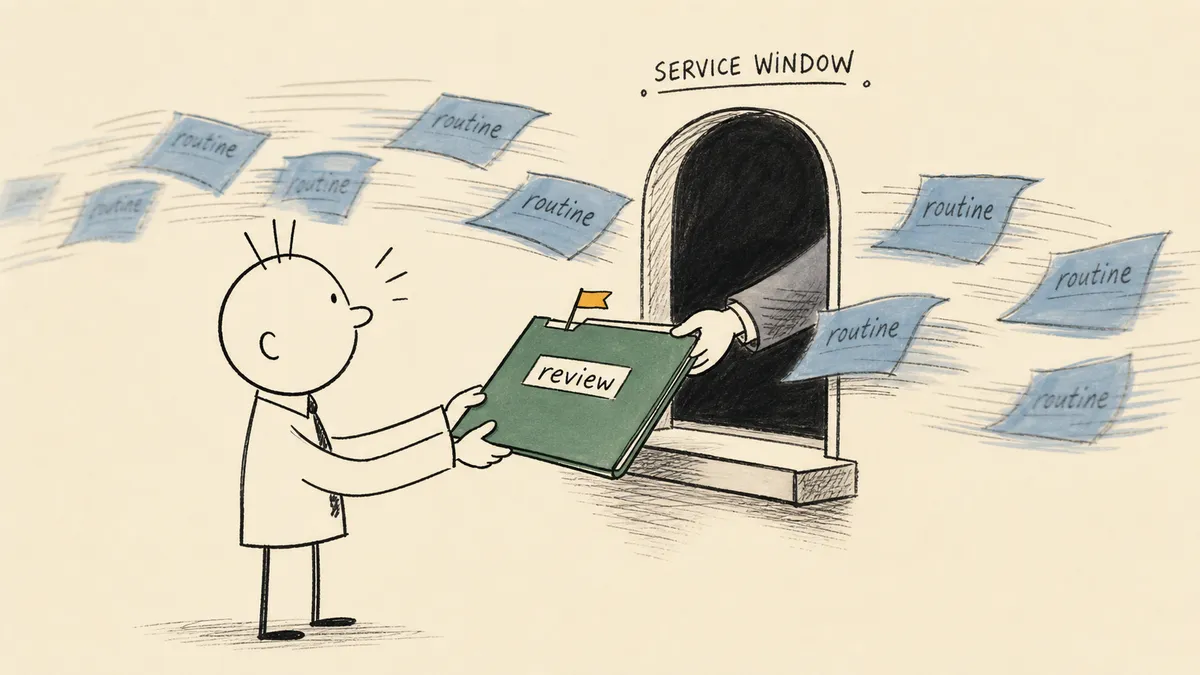
A human in the loop review is worth nothing if the person doing the reviewing cannot see, in the moment they are asked, the one thing that made the case worth asking about. That is the whole game, and most writing on this topic skips it to talk about the approve button. The approve button is the cheap part. The expensive part, the part that decides whether the review is real or theater, is the context that arrives with the request.
This is the read for the CFO, VP of Finance, or controller who has been handed black-box automation before and wants the opposite: judgment kept exactly where it belongs, without putting senior finance time back on every transaction. It defines what a review step actually is, names the three pieces a good one needs, and walks the finance cases (AP, duplicate payments, invoice exceptions) where the call gets made every week. For the related question of whether a person should review before the action or monitor after it, the in-the-loop versus on-the-loop distinction covers that dial. This article is about the review moment itself.
What a human in the loop review actually is
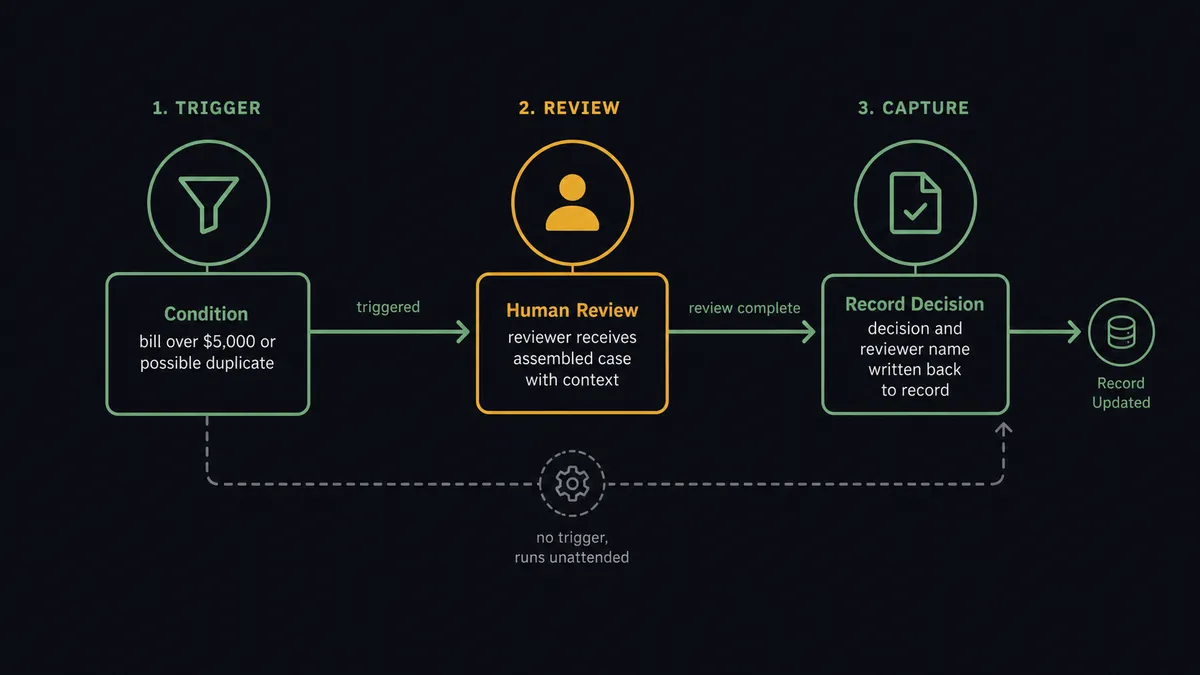
Strip the jargon and a human-in-the-loop review step is three things in sequence. A workflow reaches a point it was told not to pass alone. It hands one specific decision to one named person, with the case assembled for them. It captures their answer and resumes. That is the pattern in compact form: pause autonomously, assemble the relevant context and the decision choices available, route to a human via their preferred channel, resume the moment the human responds.
That is the definition. Note what is not in it.
- It is not a generic approval queue that every transaction files into. A queue that holds everything is a queue nobody reads.
- It is not a rubber-stamp signoff, where the reviewer’s job is to acknowledge rather than judge.
- It is not a manual fallback for when the system breaks. The review is part of the design, not the failure case.
A review step has a precise shape: a trigger condition that defines when to pause, the context delivered to the reviewer at that pause, and a captured decision tied back to the record. Miss any one of the three and you have something that looks like oversight and functions like ceremony.
 This is the difference between automation that holds up beyond the demo and automation that only handled the happy path. A review step is one of the things that makes the difference.
It also sits in a specific place between two extremes. Full automation with no human is one end. An AI agent acting on its own judgment is the other. The review step is the deliberate seam where the system says it has reached the edge of what it should decide alone and asks. The routing logic that decides whether to pause is a different kind of decision from the action that runs afterward, which is the same line that separates AI automation from AI agents. Routing decides whether to ask. The action either runs or waits on the answer.
Why finance leaders care about this specific pattern
Finance work is full of decisions that resist full automation by a hair. A rule engine cannot make the call. An AI cannot make it with enough confidence to bet money on. A person can, in seconds, but only if a person is not asked to make every call. Across conversations with finance leaders, the recurring pattern is the same: senior finance time gets spent on processing that needs just enough judgment to prevent full automation, and that is the exact gap a review step is designed to fill.
A CFO running AP at a growing company put the floor of that zone in one sentence: “if someone’s out, I might even enter a bill into the system.” The judgment to enter the bill is too thin to fully delegate to a tool, but the keystrokes are real work, and they land on the most expensive person in the room. That is precisely the gap a review step closes. The system does the data movement and the pre-checks. The person makes the small judgment the data movement cannot make on its own. The bill posts without the CFO doing the typing.
The concern here is not “replace people.” It is “stop spending senior finance time on processing that still needs a sanity check.” Without a review step, finance teams get pushed to one of two bad outcomes. They approve everything blindly because reviewing it all is impossible, or they refuse to automate at all because they do not trust an unattended system with money. Both are failures. The review step is the design that lets the routine majority run while the cases that need a human get one.
There is a third reason finance leaders care, and it shows up later than the others, at close and in diligence. A captured human decision, with the reviewer’s name and the reason attached to the record, is defensible. “The system did it” is not an answer when a controller or an auditor asks who approved a specific payment six months after the fact. A review step that captures identity produces an answer that is a name attached to a record. That is the same property that makes a purchase order approval workflow survive an audit, applied to AP and reconciliation.
The part most posts on this topic will not say
Here is the claim most human-in-the-loop writing tiptoes around: the review is not the safety feature. The context attached to the review is the safety feature. The pause itself is trivial. Any tool can stop and wait for a click. What separates a real control from a liability is whether the person who clicks can actually see the case.
A review with no context is a rubber stamp with a timestamp. It is worse than no review at all, because it manufactures audit evidence that does not reflect any actual judgment. The same CFO above named the failure mode from the other side of the desk: “a lot of the sales guys, it’s just paperwork. They just want to get it off their desk.” A loop that always asks but never gets a real answer is theater. It produces a log entry that says “approved by Jane” when Jane never had a chance to judge anything.
So the design question is not “where do we add an approval step.” It is “what does the reviewer need to see to make this a real decision in twenty seconds, and how does it get in front of them without making them go hunt for it.” Everything good about a review step follows from answering that question well. Everything bad about approval queues follows from never asking it.
What a well-designed review pause looks like
Four properties separate a review step that adds value from one that adds latency.
The trigger is specific, not vague. “Pause for review when something looks off” is not a trigger; it is a wish. A real trigger is a condition the system can evaluate: the bill exceeds a dollar threshold, the vendor name does not match prior history, a duplicate invoice number appears within thirty days, the extraction confidence falls below a bar. The narrower the condition, the more the pause means when it fires.
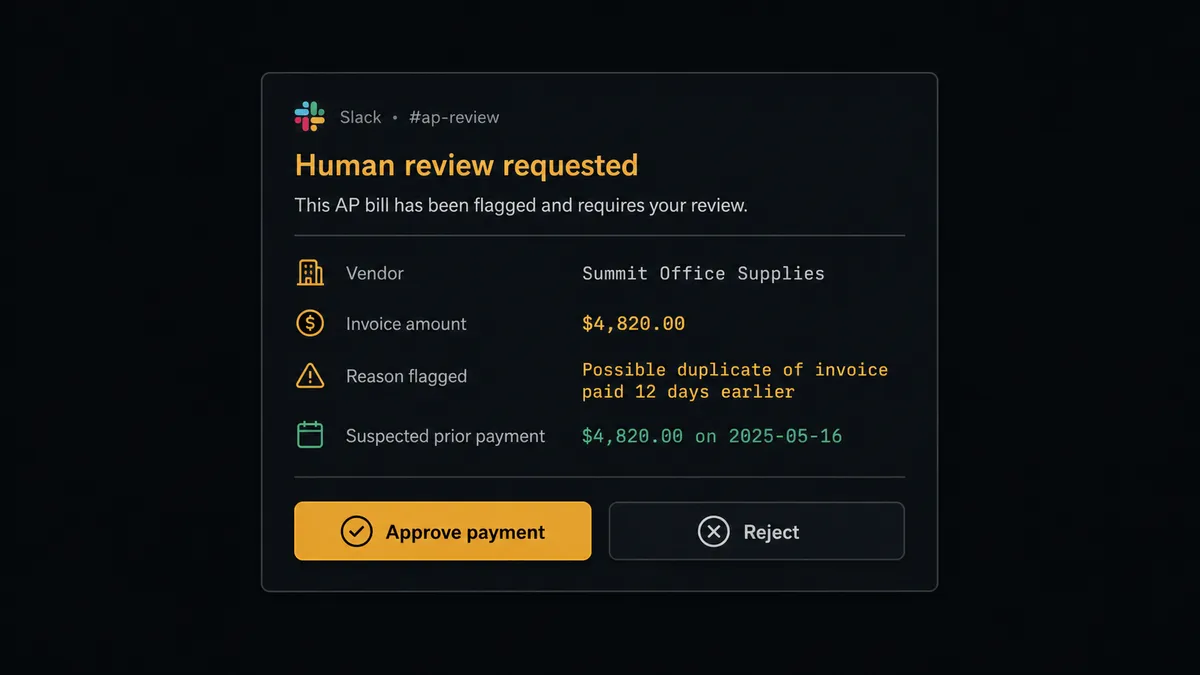
The context travels with the request. This is the property that decides everything. The reviewer should not receive a notification that says “a bill needs approval” and then go open the ERP, find the vendor, pull the payment history, and locate the original document. All of that should arrive attached: the specific anomaly that was flagged, the vendor’s prior payments, the original invoice, and the exact action that will run on approval. The duplicate payment case makes this concrete. The same CFO said it plainly: “I feel that it would be very easy to double pay on something like that if both we and the distributor made a payment.” A review step that catches that has to show the reviewer the suspected prior payment next to the new one. The pause without the comparison is useless.
The reviewer is reached where they already work. A separate approval portal that nobody logs into is a backlog with a login screen. The review request should land in the channel the person already lives in, Slack or email, with the decision available right there. The point of meeting people where they are is not convenience. It is that a review which requires a context switch gets deferred, and a deferred review is the backlog you were trying to avoid.
The decision is captured back to the record. The answer and the reason cannot live in a chat thread that scrolls away. They have to be written back to the system of record, attached to the bill, the invoice, or the transaction, so that the next person who looks at that record sees who decided and why. A decision that is not captured did not happen, as far as the audit trail is concerned.
Worked examples in finance workflows
The pattern is easier to see in the specific. Each of these is a defined trigger, context delivered at the pause, and a captured decision.
- Near-duplicate AP detection. An invoice arrives that resembles one already paid. The flow flags it, surfaces the candidate match beside the new bill to a reviewer, and posts only after explicit confirmation. The human-in-the-loop step on near-duplicate detection in Acumatica is this pattern inside an ERP.
- Bills above a threshold. A bill crosses the amount that warrants a person. The flow pauses the bill for a named approver in Slack before payment runs, with the bill context attached so the approver has something to approve against rather than a number in a vacuum.
- Parsing exceptions on extracted invoices. Document extraction is reliable until it is not. When a parse fails or an amount looks anomalous, the flow routes the exception to a human reviewer with the original document attached and captures the reviewer’s identity with the decision.
- Email-to-payment that escalates only on a mismatch. An invoice comes in by email, gets parsed, and runs against the purchase order or prior invoices. When the totals line up it flows through. When they do not, the exception surfaces with the vendor history attached and waits for a person.
In every one of these, the reviewer’s experience is the same: a specific case, the reason it stopped, the evidence to judge it, and a decision that gets recorded. That consistency is the product. The captured reasoning across these flows is also what builds the audit trail that reviewers reach exceptions with full ERP context and that holds up at close.
How this differs from the approval workflow you already have
Most finance teams already have approval routing. So the fair question is what a review step adds that a traditional approval chain does not. Three things.
| Traditional approval routing | Human in the loop review | |
|---|---|---|
| What triggers it | Every transaction of a type | Only the conditions the system cannot safely decide alone |
| What the reviewer sees | The request, often without context | The flagged case, the anomaly, the history, the source document |
| Where the answer lives | Email or chat, loosely tied to the record | Captured back to the system of record with identity |
| What it optimizes | Coverage (everything gets a signoff) | Judgment (the few cases that need it get a real one) |
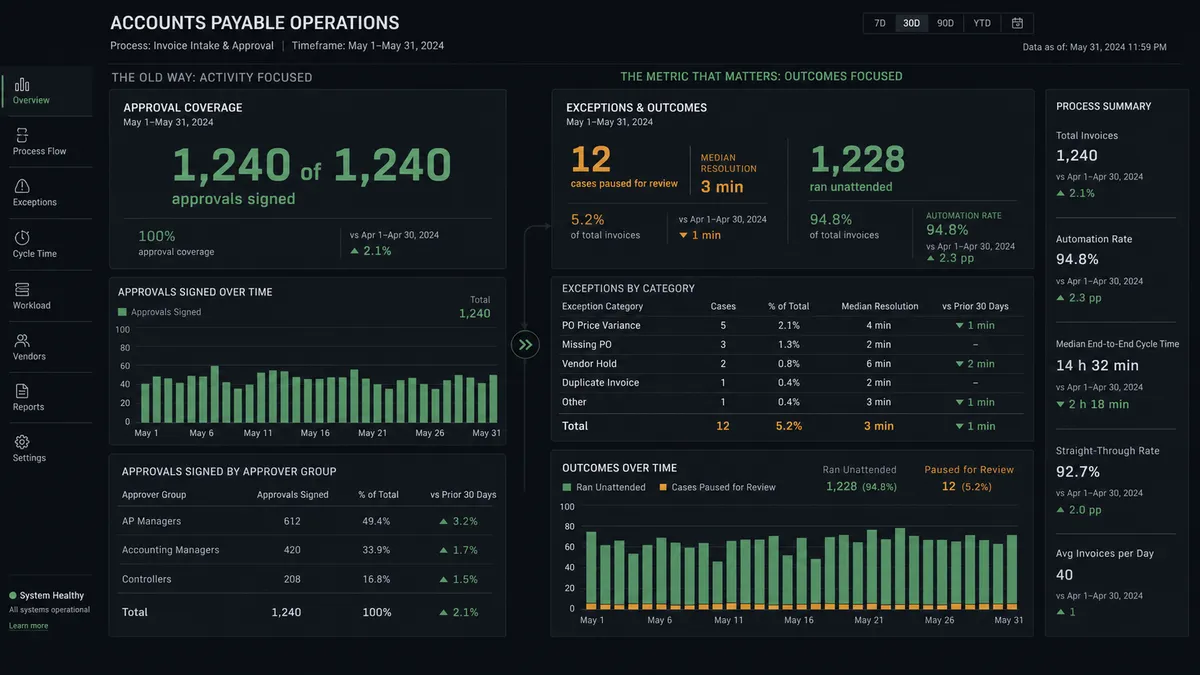
The deeper difference is what you are measuring. A traditional approval workflow is measured by coverage: did everything get signed off. A review step is measured by exception resolution: how fast did the cases that genuinely needed a human get resolved, and did the routine majority flow without a human touching it. Counting approval-button clicks tells you how much ceremony you generated. Counting exception-resolution time tells you whether the control is working. Those are different numbers, and the second one is the one that matters.
A review step does not replace your ERP’s approval module. The cases that belong inside the ERP can stay there. It adds the layer for the cases the ERP’s native rules were never built to catch: the automation exception that arrives from outside the system, the anomaly that needs context from a different system to evaluate, the decision that needs a person pulled in mid-flow without leaving the channel they work in.
Where the orchestration layer comes in
Look closely at the property that decides whether a review is real: the context has to be assembled at the moment of the pause, from wherever it lives. The flagged bill is in the AP system. The vendor’s payment history is in the ERP. The original document came in by email or a parser. The suspected duplicate is a different record entirely. The reviewer needs all of it in one place, in Slack, in the few seconds they have.
No single system of record owns that assembly. QuickBooks knows its own bills. Acumatica’s approval module knows the bills inside Acumatica. The parser knows the document. None of them reaches across the others to gather the case and put it in front of a person. That gather, between the systems, at the moment a decision is needed, is a job that lives above all of them.
That is the work an orchestration layer exists to do. This is the category we are defining: Orchestration as a Service, a platform category that coordinates, governs, and supervises multi-agent environments while keeping humans in control of the decisions that require judgment. An orchestration layer is a system that sits above the systems of record, listens for what they emit, assembles the context that no single system had on its own, pulls a named person in when the case earns a pause, runs unattended when it does not, and writes the decision back so the trail stays in one place. The review step is the human moment inside that layer. FlowRunner is built for that layer. The pause-and-ask is not a feature bolted onto an automation tool. It is the point where the orchestration layer hands a complete case to a human and waits for the answer, because that is the moment the system was designed to recognize and respect.
How to decide where a review step belongs
You do not add review steps everywhere. You add them where the cost of a wrong unattended action is higher than the cost of a person’s twenty seconds. A short way to find those places:
- Start with the exceptions you already catch by hand. Duplicate payments, billback errors, bills that fall through the cracks, vendor mismatches. Those are the cases where you already know a human adds value, because you are already the human. Those become your first triggers.
- Name the condition that separates routine from judgment. For each process, what is the line? The dollar threshold, the new-vendor flag, the confidence score from the extraction step, the duplicate-window rule. If you cannot name the condition, you cannot build the trigger, and you will end up reviewing everything.
- Choose the reviewer by role, not by name. Route to “the AP manager,” not to a specific person, so the workflow survives turnover and vacations. The judgment lives in the role.
- Decide what happens when no one answers. A review step that stalls forever is a new way for things to fall through the cracks. Set the rule up front: does the case wait, escalate to a second reviewer after an interval, or hold in a defined state. The default behavior on silence is part of the design, not an afterthought.
Then revisit it. The right set of triggers moves as the log accumulates. A condition you reviewed nervously for three months because you were not sure the system was catching the right things can relax once the record shows it is. A condition you let run unattended can earn a review step if the after-the-fact log keeps surfacing expensive mistakes. The triggers are not set once.
The finance leaders who get the most from a review step are not the ones who add the most approvals. They are the ones who add the fewest, each one earning its pause, each one arriving with the case already assembled, so the person being asked is making a real decision in the few seconds they have rather than acknowledging a request they had no way to judge. Design the review backward from those seconds. The reviewer’s attention is the scarcest thing in the workflow. Spend it only on the cases that deserve it, and when you spend it, give the reviewer everything they need to make it count.
Frequently asked questions
What makes a human in the loop review good instead of a rubber stamp?
The context arrives with the request. A good review surfaces the specific anomaly, the prior history, and the original document at the moment of the decision, so the reviewer is judging the case rather than acknowledging it. A review with no context is a rubber stamp with a timestamp.
What context should a reviewer see at the pause?
The specific reason the case was flagged, the source document, the relevant history the system already has, and the action that will run on approval. The reviewer should be able to decide without leaving the message to go hunt in three other systems.
Should every transaction get a human in the loop review?
No. Reviewing everything is how you train people to stop reading. A good design pauses only on the conditions the system cannot safely decide alone and lets the routine majority run, with the full record written to the log for after-the-fact review.