FlowRunner vs Power Automate
FlowRunner vs Power Automate: for cloud AI-agent automation FlowRunner does more, without the premium-connector paywall or Microsoft lock-in. Where each wins, and how to choose.
TL;DR
- Start with the cloud automation both run: connectors, triggers, actions, approvals. FlowRunner runs all of it, and it runs the layer above, coordinating AI agents and keeping a human in control of the decisions that need judgment, without a per-connector paywall or a Microsoft-estate dependency. FlowRunner is Orchestration as a Service. Two things Power Automate does that FlowRunner does not: desktop RPA, screen-level automation of legacy Windows apps, and the very broadest inherited compliance (FedRAMP, government clouds).
- This page is about AI-agent automation with human oversight in a Microsoft-independent stack. For that specific work the fit is not 50/50: FlowRunner is built for it, and Power Automate is being stretched to reach it. We will still show you exactly where Power Automate is the better call, because sometimes it is.
- FlowRunner is stronger where this reader lives: per-execution billing that does not multiply with steps or retries, no premium-connector paywall, multi-channel agent-invoked human-in-the-loop that waits up to a year, and BYOK across dozens of AI providers with no markup on inference.
- Power Automate is stronger on inherited Microsoft compliance breadth, desktop RPA, native Microsoft 365 and Dynamics depth, enterprise ubiquity, and its Copilot toolchain.
Who this comparison is for
You are a builder who has Power Automate available, probably because it came bundled with Microsoft 365, and you are deciding whether to keep building agent automation on it or move that work somewhere designed for it. The agents you are building need to do more than fire a linear flow and finish. They need to call out to non-Microsoft systems. They need to wait on a person who might not answer today. They may run against a limit you did not know existed until a run failed at scale.
The overlap is large: the cloud, connector-based automation Power Automate runs, FlowRunner runs too, and it adds the agentic layer, agents that pause for a human and long-running orchestration, without the premium-connector paywall or the Microsoft-estate lock-in. Two things Power Automate does that FlowRunner does not: desktop RPA that drives legacy Windows apps by their screen, and the very broadest inherited compliance (FedRAMP, government clouds). This page is about where those facts leave you: the agent that has to reach outside Microsoft, hold a run open until a human weighs in, and do it without a per-user premium license gating the connectors that matter.
What FlowRunner is good at
FlowRunner is built around one commitment: agents that know when to stop and ask a human for help. Everything else in the platform exists to make that commitment reliable at production scale, and to do it without tying your automation to a single vendor’s ecosystem.
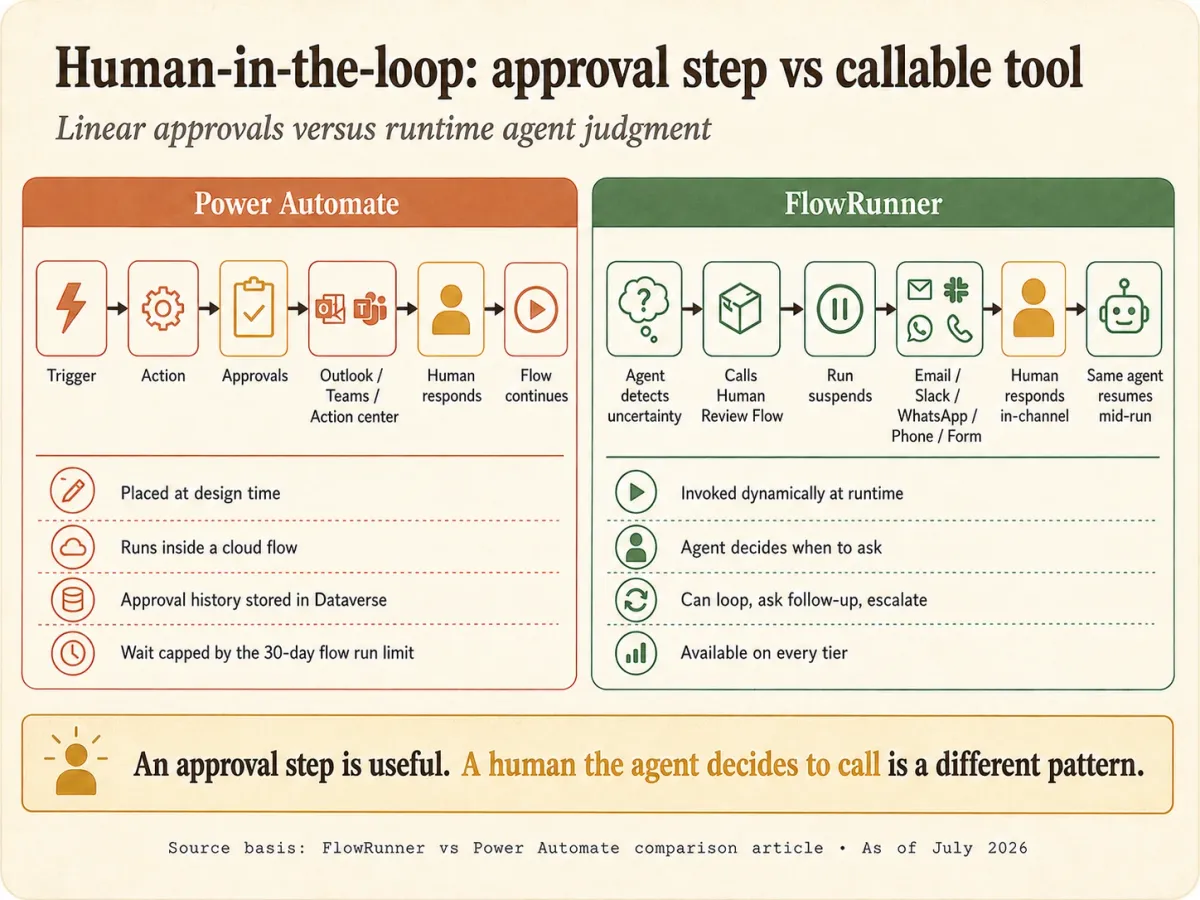
The mechanism is the part that linear, estate-bound tools do not have. In FlowRunner, an AI agent invokes one of your own Flows as a callable tool. When the agent calls that flow-tool, it suspends while the flow runs, and the flow can hold on an external callback until a human replies through email, Slack, WhatsApp, phone, or a Form, then resume mid-run. This is human-in-the-loop as an execution pattern: the agent pauses on its own judgment, assembles the context and the choices available, routes to a human on their preferred channel, and resumes the moment they answer. Some teams call it a digital andon cord, after the Toyota factory pull cord any worker can pull to stop the line when something needs a human eye.
FlowRunner is strong on:
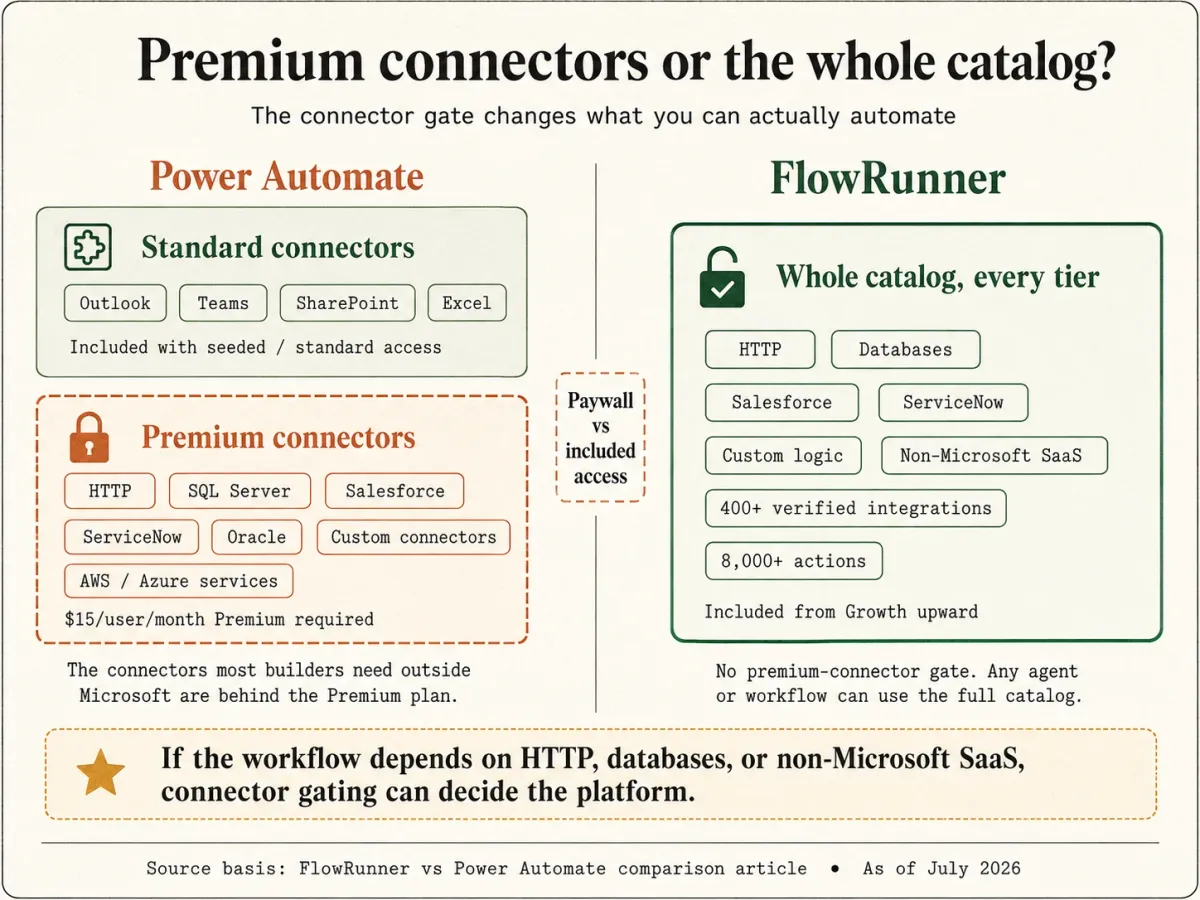
- No premium-connector paywall. FlowRunner’s whole catalog is available at every tier. The connectors you need most (HTTP, databases, Salesforce, ServiceNow, and every non-Microsoft SaaS) are not gated behind a per-user upgrade. Connectors are reusable bridges between FlowRunner and third-party services that any agent or workflow can compose into a capability, and none of them cost extra to reach.
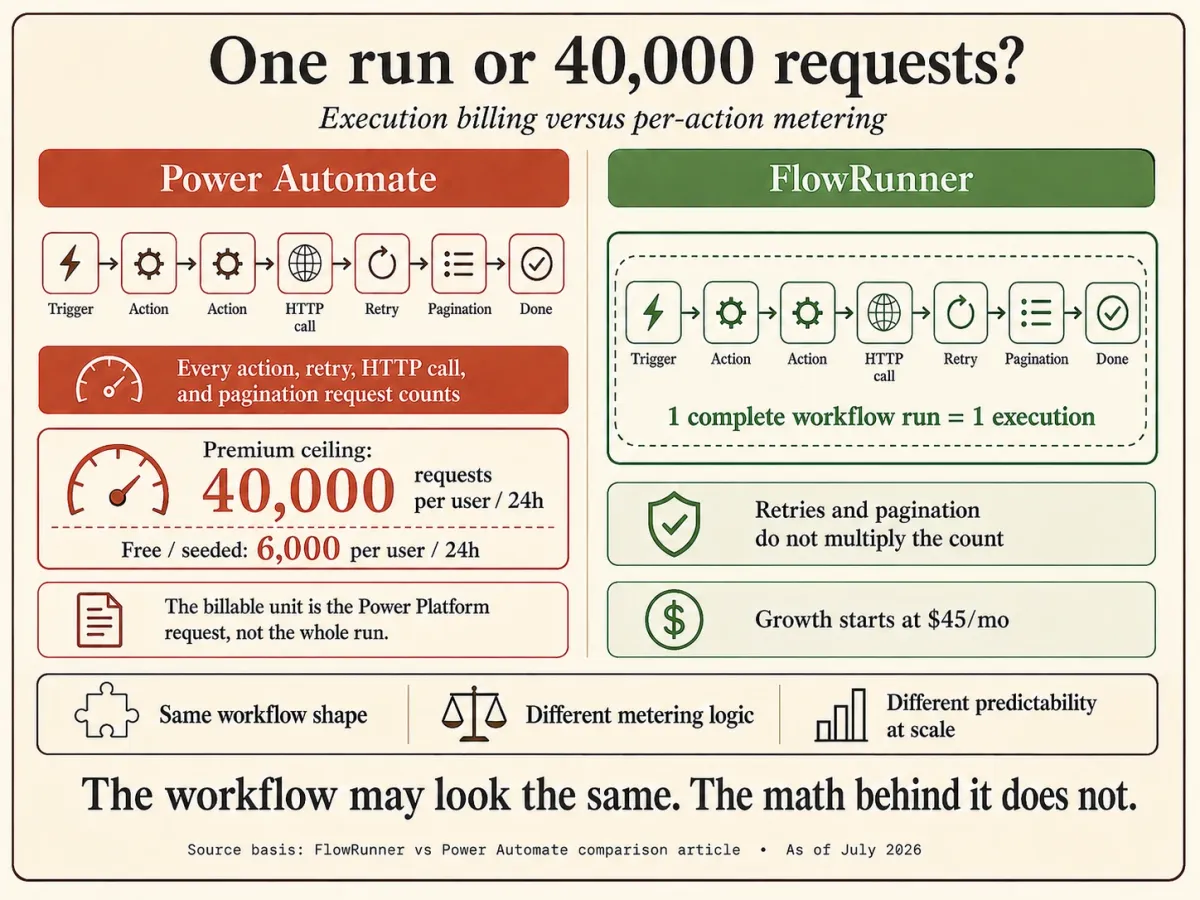
- Run-based billing. One complete workflow run, start to finish, is one execution. A 10-step run is one execution, not ten, and retries and pagination do not multiply the count. That removes the per-request math that Power Platform request metering forces on builders.
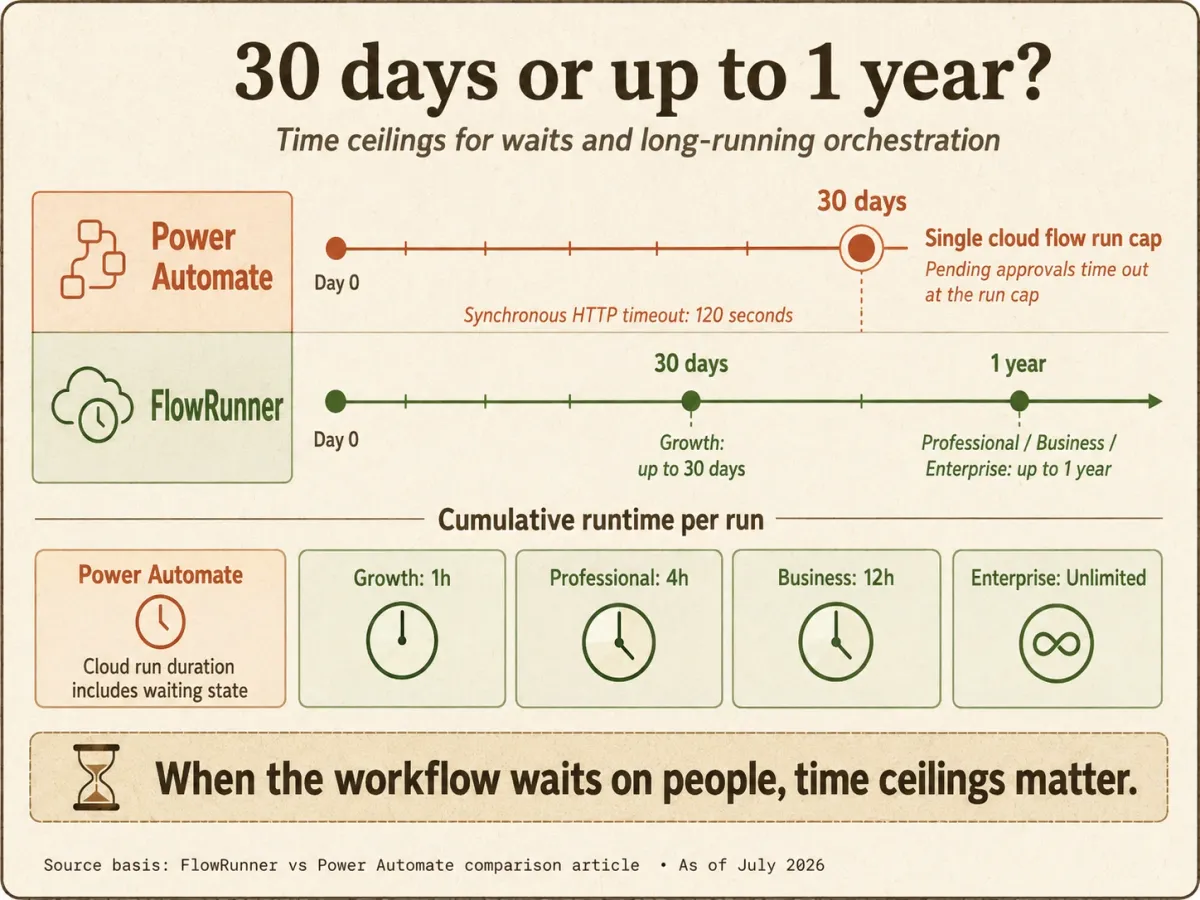
- Long waits and long runtimes. A run can suspend for up to 30 days on Growth and up to a year on Professional, Business, and Enterprise. Cumulative runtime runs to 1 hour on Growth, 4 hours on Professional, 12 hours on Business, and unlimited on Enterprise. A pending human decision does not expire at 30 days.
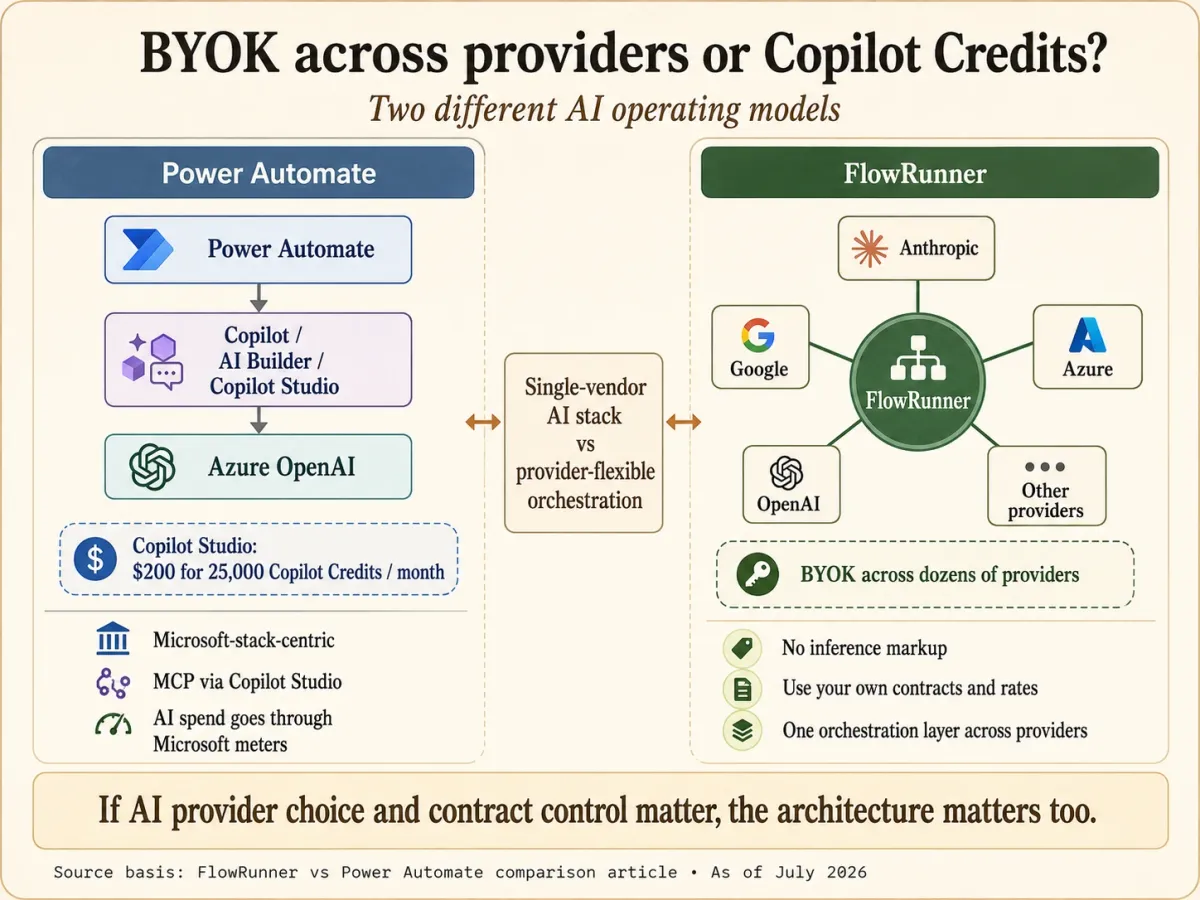
- BYOK across dozens of providers with no markup. BYOK is a model where the customer supplies their own AI provider API credentials, pays providers directly for usage, and FlowRunner orchestrates calls across providers without taking a markup on inference. You are not confined to Azure OpenAI, and you are not buying AI capacity through a Copilot Credits meter. For a buyer who already has an Anthropic, Google, or Azure agreement, that means your own rates, your own data-processing terms, and a provider your security team already approved.
- Compliance at mid-tier prices. Audit trails and RBAC start at the Professional tier ($299/month). HIPAA support with a BAA is available. SSO/SAML and 90-day audit retention arrive at Business ($999/month), without a premium-connector gate and without standardizing on the Microsoft estate.
- A verified, agent-ready catalog. 2,100+ integrations and 56,000+ callable actions (as of September 2026, and growing), roughly 26 actions per integration, each carrying the structured metadata an LLM needs to call it as a tool, all built and verified against each vendor’s official API reference. Agents built in the Agent Factory compose those connectors, other agents, and existing flows without writing code.
That pause-for-a-human moment is the load-bearing part of FlowRunner’s architecture. It is why agentic work that needs human judgment is native here rather than assembled from workarounds, and it reaches the systems and the people your agents need without a premium license or a Microsoft standardization.
What Power Automate is good at
Power Automate is Microsoft’s automation platform. Inside the Microsoft estate it runs deep: a certified connector library, desktop RPA that FlowRunner does not have, and compliance inherited from the Microsoft cloud including government clouds.
Power Automate is strong on:
- Inherited Microsoft compliance breadth. A HIPAA Business Associate Agreement is available by default through the Microsoft Online Services DPA, with no special negotiation, and Power Automate cloud is in scope. Beyond that, Microsoft carries SOC 2, ISO 27001, HITRUST, and FedRAMP attestations including the government clouds (GCC, GCC High, DoD). Microsoft Purview provides audit with 90-day retention, and Entra ID provides SSO. This is a compliance surface no independent competitor, FlowRunner included, matches on breadth.
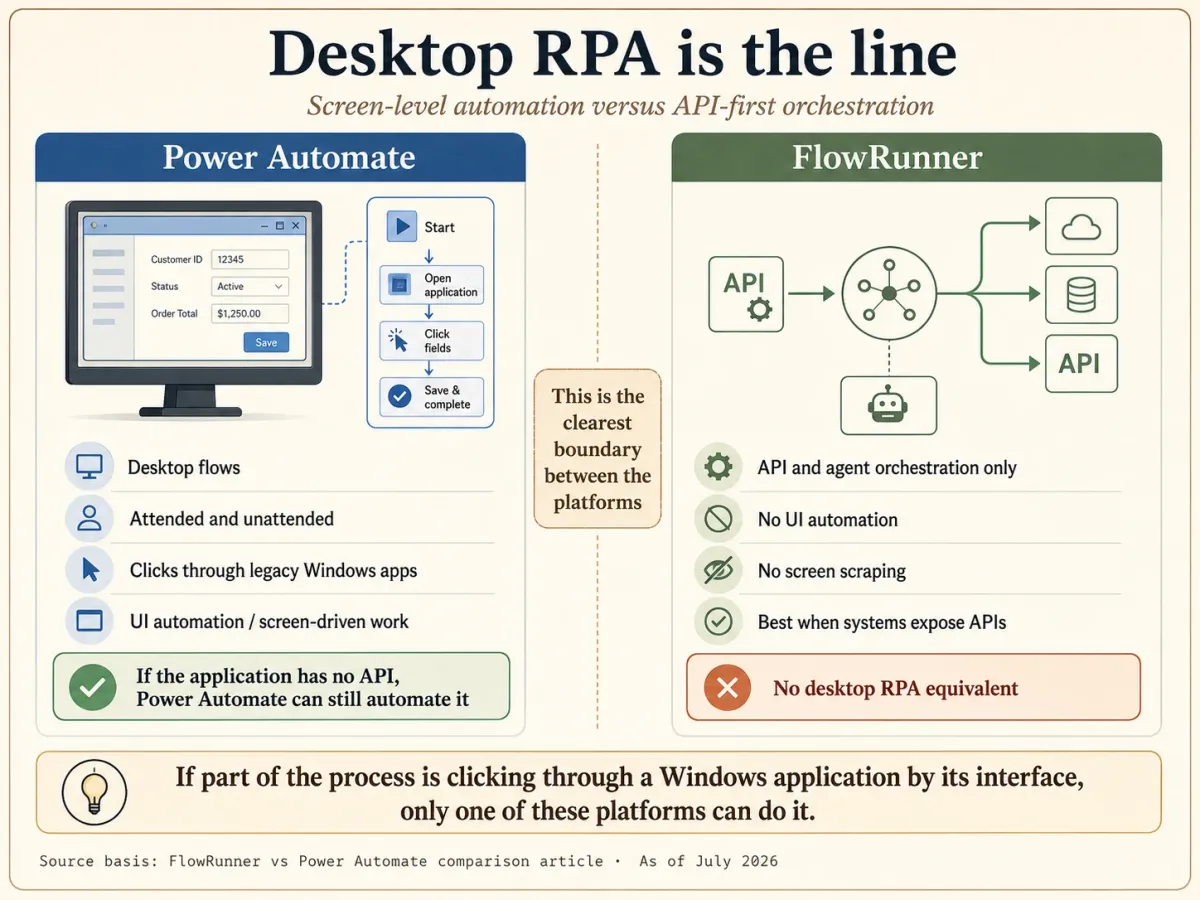
- Genuine desktop RPA. Power Automate desktop flows provide attended and unattended robotic process automation that drives legacy and modern desktop and web applications by their actual user interface. If you need to automate an old Windows application that has no API, Power Automate can click through its screens. FlowRunner does not do this at all.
- Native Microsoft 365, Dynamics, and Azure depth. Inside SharePoint, Outlook, Teams, Excel, Dataverse, and Dynamics, Power Automate’s integrations are built by the same company that builds the apps.
- Enterprise ubiquity and zero net-new procurement. Power Automate is seeded into most Microsoft 365 subscriptions. For a Microsoft-standardized organization, adopting it means no new vendor, no new security review, and no new line item.
- AI Builder’s prebuilt models. Both platforms have AI agents, natural-language flow builders, and MCP, so those are not the difference. Where Power Automate’s AI goes further for a Microsoft shop is AI Builder: prebuilt, no-code models for document, receipt, and invoice extraction, prediction, and classification, wired into the Microsoft stack. FlowRunner orchestrates any model you bring through BYOK, but does not ship prebuilt ML models like these.
- Process mining. Power Automate Process Mining analyzes how work actually flows through your systems to find automation candidates, a capability aimed at large process-heavy organizations.
Power Automate is built for automation inside the Microsoft estate.
Where FlowRunner is stronger
For the agentic, human-oversight, Microsoft-independent work this page is about, these are the differences that decide the platform:
- No premium-connector paywall. This is the sharpest practical gap. Power Automate’s free and Microsoft 365-seeded entitlement includes standard connectors only. The genuinely useful ones (HTTP, SQL Server, Salesforce, Oracle, ServiceNow, AWS and Azure services, and every custom connector) are premium connectors that require the Premium plan at $15/user/month. Because it is per user, the cost climbs with every person who runs a flow touching those systems. FlowRunner’s entire catalog is available on every plan, including Free. The connector you need is never a line-item upgrade.
- Per-execution billing instead of per-request metering. Power Automate meters Power Platform requests, and Microsoft’s own documentation is explicit that every action counts, from initializing a variable to a compose step, and that retries and pagination requests count too. A Premium user gets 40,000 requests per user per 24 hours; the free and Office 365-seeded ceiling is 6,000 per user per day. A busy multi-step flow burns through that faster than teams expect. FlowRunner bills one execution per whole run regardless of step count, so the cost is predictable and the metering does not shape how you design.
- Human-in-the-loop across every channel, waiting up to a year. Power Automate Approvals routes to Outlook actionable email, a Teams adaptive card, or the action center, it depends on Dataverse, and a pending approval dies at the 30-day flow run cap. FlowRunner’s human-in-the-loop reaches people through email, Slack, WhatsApp, phone, or a Form, the agent invokes it as a callable tool rather than a linear approval step, and the wait can last up to a year. For any workflow where the human might take days or weeks, that difference decides the platform.
- The 30-day run ceiling does not exist. A Power Automate cloud flow run maxes out at 30 days, pending approvals included, and synchronous HTTP requests time out at 120 seconds. FlowRunner suspends a run for up to a year and runs up to 12 hours or unlimited depending on tier, and a flow can begin with any block, not only a trigger. Long-running orchestration is native, not a workaround built from child flows.
- BYOK across dozens of AI providers, no markup. Power Automate’s AI is Microsoft-stack-centric, powered by Azure OpenAI, with agents and MCP living in Copilot Studio behind a Copilot Credits meter. FlowRunner lets you bring your own keys across dozens of providers, pay them directly at your negotiated rates under your own DPA, and orchestrate across them without an inference markup. For a buyer with an existing Anthropic, Google, or Azure agreement, that is their processor, their contract, their rate.
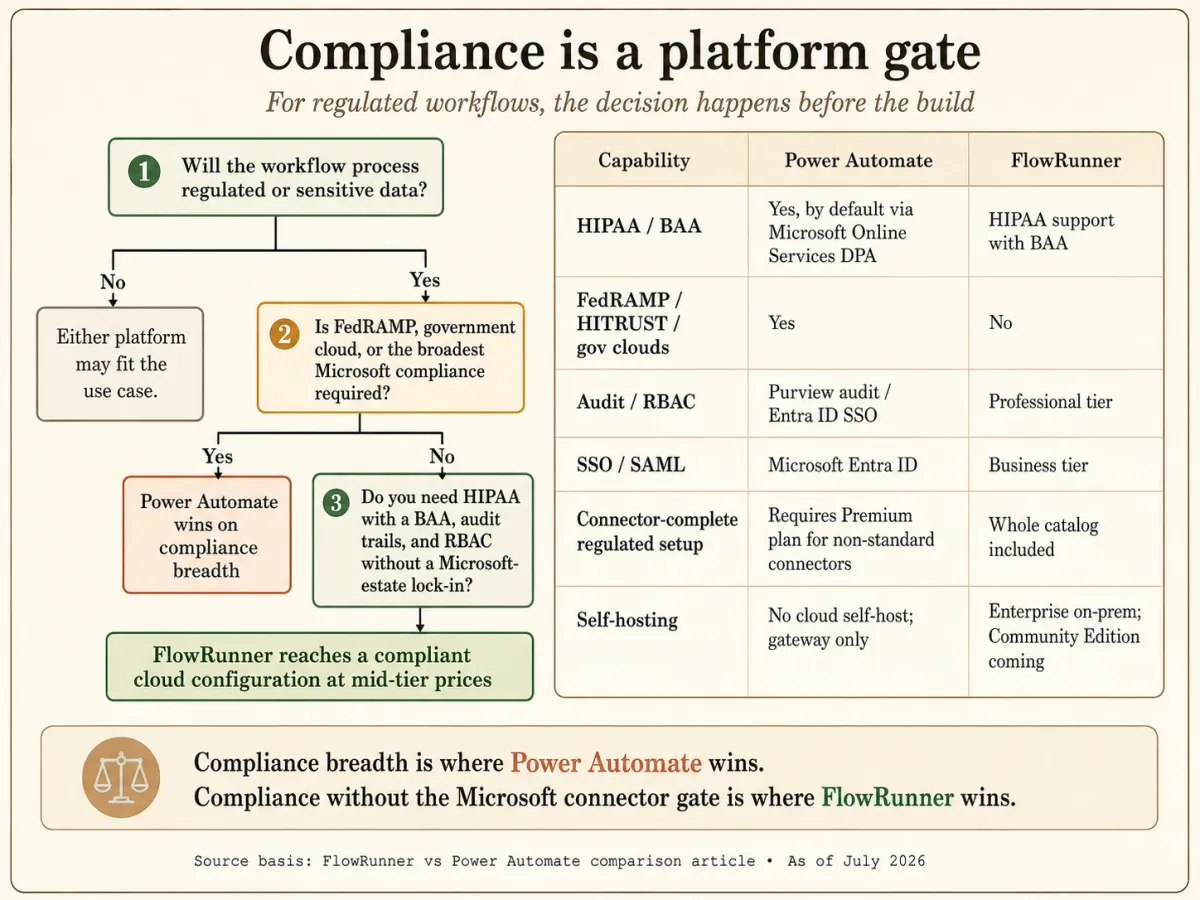
- Compliance without the Microsoft lock-in or the connector gate. FlowRunner ships HIPAA support with a BAA, plus audit trails and RBAC, starting at Professional ($299/month), with SSO/SAML at Business ($999/month). Power Automate has wider compliance breadth, but reaching a compliant, connector-complete configuration on Power Automate means the Premium plan and standardizing on the Microsoft estate. FlowRunner reaches a compliant configuration at mid-tier prices without either.
Where Power Automate is stronger
This is the section most comparison pages skip. Power Automate wins on real, decisive dimensions, and if these are your priorities, Power Automate is the right call.
- Compliance breadth you cannot get independently. Power Automate inherits Microsoft’s full estate: HIPAA BAA by default, SOC 2, ISO 27001, HITRUST, and FedRAMP including government clouds, plus Purview audit and Entra ID SSO. FlowRunner offers HIPAA support with a BAA and mid-tier audit and RBAC, but it does not carry FedRAMP or HITRUST, and it cannot serve GCC High or DoD environments. For a federal agency, a defense contractor, or an organization that has standardized on Purview for audit, Power Automate wins outright. We will not pretend that gap is small.
- Real desktop RPA. This is the clearest line. Power Automate desktop flows automate legacy applications by driving their user interface, attended or unattended. FlowRunner does not do UI automation or screen scraping at all. If part of your process is clicking through a Windows application that has no API, only one of these two platforms can do it, and it is not FlowRunner.
- Native Microsoft depth. For automation that lives inside SharePoint, Outlook, Teams, Excel, Dataverse, and Dynamics, Power Automate’s first-party integrations go deeper than any third party, FlowRunner included, can match. Same-vendor integration is a genuine advantage.
- Zero net-new procurement. Power Automate is already in most Microsoft 365 subscriptions. For a Microsoft-standardized organization, that means no new vendor to onboard, no new security review, and no new contract. FlowRunner is a net-new purchase and a net-new security review.
- Process mining and a compounding Microsoft AI investment. Power Automate Process Mining analyzes how work flows through your systems to surface automation candidates, which FlowRunner does not offer, and AI Builder’s prebuilt models plus a broad Copilot investment compound inside the Microsoft estate. If your organization is standardizing on Copilot, Power Automate is where that investment pays off.
If any of those outweigh the differences above, Power Automate is your platform, and choosing it is defensible.
Starting free: FlowRunner Free against Power Automate’s seeded entitlement
“Free Power Automate alternative” is a connector question before it is a price question. Power Automate’s free and Microsoft 365-seeded entitlement includes standard connectors only, at a ceiling of 6,000 requests per user per day, and every action, retry, and pagination call counts as a request. The connectors most automation needs outside the Microsoft estate, HTTP, SQL Server, Salesforce, ServiceNow, and every custom connector, are premium and require the Premium plan at $15 per user per month.
FlowRunner Free is a permanent plan with the whole catalog on it: every integration, AI agents on your own provider keys, human-in-the-loop across email, Slack, WhatsApp, phone, and Form, unlimited users, unlimited workflows, one concurrent run, and 24 hours of log history. The meter is 100 executions a month, where one execution is one whole flow run regardless of step count. The first paid rung is $5 a month (Starter, 300 executions), not $15 per user, and every new account starts with 14 days of Professional, the tier with audit trails and RBAC.
For a Microsoft 365 organization whose automation stays inside SharePoint, Outlook, Teams, and Excel on standard connectors, the seeded entitlement is already paid for and needs no new vendor. The moment a flow needs a premium connector, or a person outside Teams and Outlook, FlowRunner’s Free plan reaches it and the seeded entitlement does not.
Feature comparison
| Dimension | FlowRunner | Microsoft Power Automate |
|---|---|---|
| Primary buyer | Builder plus operations team | Microsoft-standardized enterprise |
| Billing unit | Execution (one whole run) | Power Platform request (per action, retry, pagination) |
| Metering ceiling | Per-tier execution count, no per-action metering | 40,000 requests/user/24h Premium; 6,000 free/seeded |
| Entry price for full connectors | Free $0, whole catalog included; paid plans from $5/mo Starter | $15/user/mo Premium (as of Jul 2026) |
| Connector gating | No gating; all connectors every tier | Standard free; premium + custom behind Premium |
| Unlimited users | Yes, every plan including Free | No (per-user and per-bot licensing) |
| Max single-run duration | 1h Growth, 4h Pro, 12h Business, unlimited Enterprise | 30 days incl. pending approvals |
| Max human wait | 30 days Growth, up to 1 year other tiers | 30 days (approval dies at run cap) |
| Human-in-the-loop | Agent-invoked callable tool, every tier | Approvals (Outlook / Teams / action center; Dataverse-bound) |
| HITL channels | Email, Slack, WhatsApp, phone, Form | Outlook email, Teams, action center |
| AI agents | Native (Agent Factory), BYOK across providers | Copilot + AI Builder + Copilot Studio (Azure OpenAI) |
| AI provider model | BYOK, dozens of providers, no inference markup | Microsoft-stack-centric; Copilot Credits meter |
| MCP | Consumes external MCP servers; exposes catalog as MCP server (in final QA, shipping soon) | Via Copilot Studio (generative orchestration) |
| Desktop RPA / UI automation | No (API and agent orchestration only) | Yes, attended and unattended |
| Connector library | 2,100+ integrations, 56,000+ actions | 1,000+ certified (Microsoft cites up to 1,400) |
| HIPAA / BAA | HIPAA support with BAA | Yes, by default via Microsoft Online Services DPA |
| FedRAMP / HITRUST / gov clouds | No | Yes (GCC, GCC High, DoD) |
| Audit / SSO | Audit + RBAC at Professional ($299); SSO/SAML at Business ($999) | Purview audit (90-day); Entra ID SSO |
| Self-hosting | Enterprise on-prem; Community Edition coming | No (on-prem gateway is a data bridge only) |
Decision framework
Pick FlowRunner if:
- The connectors you actually need are the ones Power Automate paywalls (HTTP, SQL, Salesforce, ServiceNow, non-Microsoft SaaS), and you do not want a per-user Premium license to reach them.
- Your agents need to stop and pull in a human mid-run through Slack, WhatsApp, phone, or a Form, and the human might take days or weeks to answer.
- You want per-execution billing you can predict, instead of counting every action, retry, and pagination call against a 40,000-request daily ceiling.
- You want BYOK across dozens of AI providers at your own rates and under your own DPA, not Azure OpenAI through a Copilot Credits meter.
- You need HIPAA with a BAA, audit trails, and RBAC at mid-tier prices without standardizing your whole automation stack on Microsoft.
Pick Power Automate if:
- Your automation lives inside Microsoft 365, Dynamics, and Azure, and you want first-party depth from the vendor that builds those apps.
- You need desktop RPA to drive a legacy Windows or web application by its user interface, attended or unattended. FlowRunner cannot do this.
- You operate in a FedRAMP, HITRUST, or government-cloud environment (GCC, GCC High, DoD) where Microsoft’s inherited compliance is a hard requirement.
- Power Automate is already seeded into your Microsoft 365 subscription and avoiding a net-new vendor and security review is the deciding factor.
- Your organization is investing in Copilot broadly and you want automation that compounds with that stack, including Process Mining.
If the answer is honestly mixed, run one real workflow on both before committing. The right platform is the one that fits the shape of your work and your stack, not the one that came bundled.
Migration considerations
For builders already on Power Automate and weighing a switch, the practical questions:
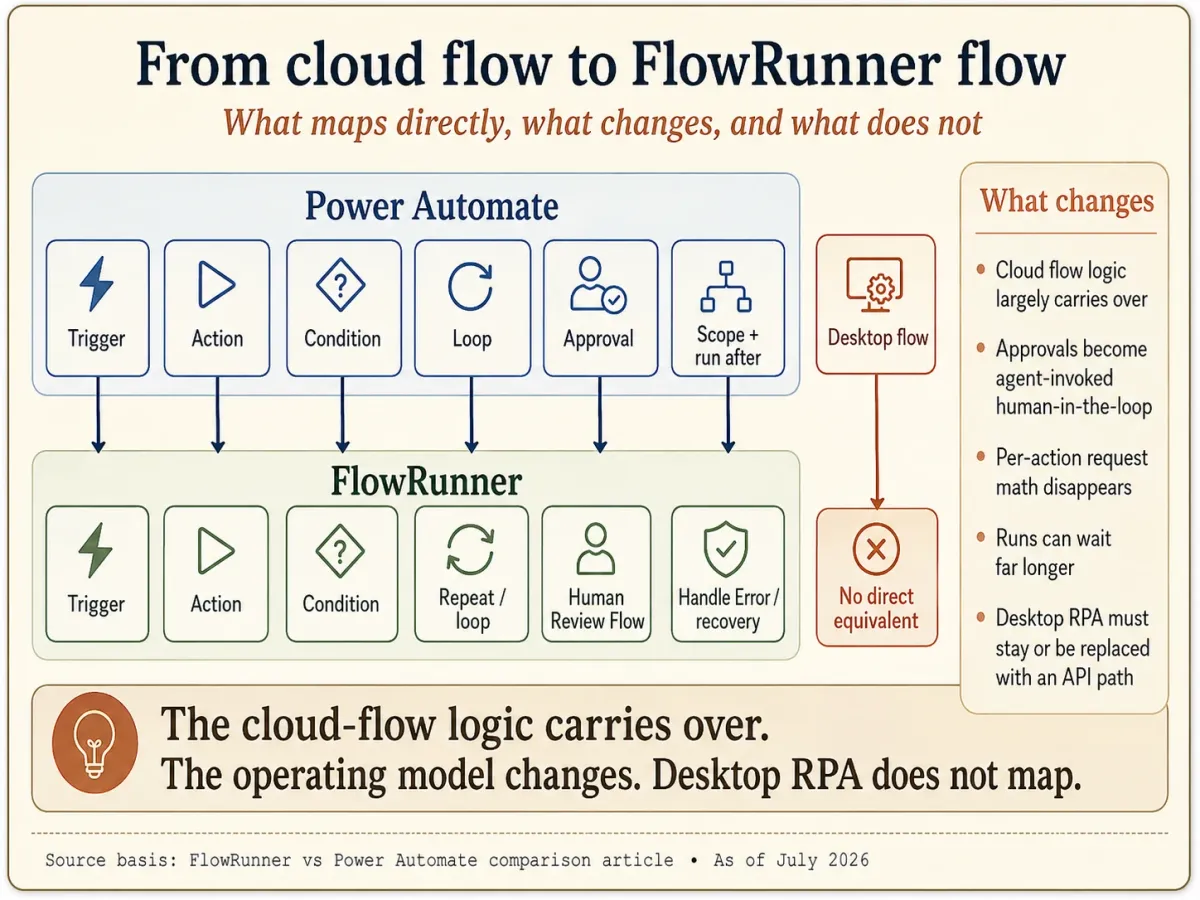
- What maps mechanically? Cloud flow logic carries over. Triggers, actions, conditions, and loops map directly. Power Automate’s try/catch pattern (Scopes plus “Configure run after”) re-expresses as FlowRunner’s Condition, Repeat, and Handle Error blocks. Approvals become FlowRunner’s agent-invoked human-in-the-loop across more channels, and without the 30-day death.
- What does not map, honestly? Desktop RPA. FlowRunner does not do UI automation or screen scraping, so any Power Automate desktop flow that drives a legacy Windows application by its interface has no FlowRunner equivalent. If that RPA is load-bearing for your process, keep it on Power Automate or replace it with an API path where one exists.
- What gets better in the process? Any flow that fought the 40,000-request daily ceiling stops counting individual actions. Any human-in-the-loop step that risked timing out at 30 days can now wait up to a year. Any connector you were paying $15/user/month to reach is included.
- Who runs the migration? The Midnight Flow consulting team runs cloud migrations as part of FlowRunner Enterprise onboarding. Other tiers self-migrate with the platform’s import tools.
- How long does it take? A typical mid-market cloud deployment migrates over 4 to 8 weeks with consulting support, longer if a meaningful share of the estate depends on desktop RPA that has to be re-architected around APIs.
If you would like a free migration consultation, reach out via the Contact page and we will scope the engagement, including the desktop-RPA question, before any commitment.
Frequently asked questions
Is FlowRunner a good Power Automate alternative?
It depends on whether your automation lives inside Microsoft. If your work is Microsoft 365, Dynamics, and Azure end to end, and you need desktop RPA to drive legacy Windows apps, Power Automate fits that case: it is seeded into your existing subscriptions and inherits Microsoft's compliance estate. FlowRunner is the better alternative when your automation is Microsoft-independent, the useful connectors you need (HTTP, SQL, Salesforce, ServiceNow, non-Microsoft SaaS) are what Power Automate paywalls behind its Premium plan, you want per-execution billing instead of per-request metering, and you are building AI agents that pause for a human across email, Slack, WhatsApp, phone, or a Form rather than only Outlook and Teams.
How much do Power Automate premium connectors cost?
Power Automate's free and Microsoft 365-seeded entitlement includes standard connectors only. The genuinely useful connectors (HTTP, SQL Server, Salesforce, Oracle, ServiceNow, AWS and Azure services, and all custom connectors) are premium connectors that require the Power Automate Premium plan at $15/user/month (as of July 2026). That is per user, so the cost scales with how many people run flows that touch those connectors. FlowRunner does not gate its connectors by tier. The whole catalog of 2,100+ integrations is available on every plan, including the Free plan at $0 and Starter at $5/month.
Does Power Automate have human in the loop?
Yes. Power Automate has Approvals with five approval types, and a flow can pause on a 'Start and wait for an approval' action. Two constraints matter for agent work. First, approvals route to Outlook actionable email, a Teams adaptive card, or the action center, so there is no native Slack, WhatsApp, phone, or web-form channel, and the feature depends on Dataverse. Second, a pending approval dies at the 30-day flow run cap. FlowRunner's human-in-the-loop is architecturally different: the AI agent invokes a Flow as a callable tool and suspends until a human replies through email, Slack, WhatsApp, phone, or a Form, and the wait can last up to a year, on every tier.
What is Power Automate's flow run time limit?
A single Power Automate cloud flow run has a maximum duration of 30 days, and Microsoft's own documentation states this includes flows with pending steps like approvals, which then time out after 30 days. Synchronous HTTP requests time out at 120 seconds, and the minimum scheduled recurrence is 60 seconds. The 30-day ceiling is the practical reason a long-running human-in-the-loop flow can fail: if the approver takes longer than 30 days, the run and the pending approval both expire. FlowRunner suspends a run for up to a year on Professional, Business, and Enterprise, and up to 30 days on Growth.
Does Power Automate have AI agents?
Yes. Power Automate has Copilot (powered by Azure OpenAI) for building and describing flows, AI Builder for prebuilt models, and full agents through Copilot Studio, which also carries its Model Context Protocol support. The difference is model breadth and cost. Power Automate's AI is Microsoft-stack-centric, and agents plus MCP live in Copilot Studio at $200 for 25,000 Copilot Credits per month. FlowRunner uses BYOK: you supply your own keys across dozens of AI providers, pay providers directly at your negotiated rates, and FlowRunner takes no markup on inference. Note that Power Automate's bundled 5,000 AI Builder credits per month are being removed in November 2026, so new customers buy Copilot Credits.
Is Power Automate HIPAA compliant?
Yes. This is a real Power Automate strength. A HIPAA Business Associate Agreement is available by default through the Microsoft Online Services DPA with no special negotiation, Power Automate cloud is in scope, and Microsoft also holds SOC 2, ISO 27001, HITRUST, and FedRAMP attestations including government clouds. That inherited compliance breadth is wider than FlowRunner's. FlowRunner offers HIPAA support with a BAA and ships audit trails and RBAC starting at the Professional tier ($299/month) without the Microsoft lock-in and without gating the useful connectors behind a premium plan. The honest framing is not 'more compliant.' It is a compliant configuration at mid-tier prices without tying your automation to the Microsoft estate.
Can I migrate from Power Automate to FlowRunner?
Yes, with one honest exception. Cloud flow logic maps over: triggers, actions, conditions, loops, and the try/catch pattern (Power Automate's Scopes plus 'Configure run after') re-express as FlowRunner's Condition, Repeat, and Handle Error blocks. Approvals become FlowRunner's agent-invoked human-in-the-loop across more channels. The exception is desktop RPA. FlowRunner does not do UI automation or screen scraping, so Power Automate desktop flows that drive legacy Windows applications do not have a FlowRunner equivalent and stay where they are. The Midnight Flow consulting team runs cloud migrations as part of Enterprise onboarding; other tiers self-migrate.
Is there a free alternative to Power Automate without the premium connector paywall?
Yes. FlowRunner's Free plan carries the entire integration catalog, including the HTTP, SQL, Salesforce, ServiceNow, and custom connectors that Power Automate gates behind its $15 per user per month Premium plan, along with AI agents on your own keys, human-in-the-loop, and unlimited users. The meter is 100 executions a month, one per whole flow run. Power Automate's free and Microsoft 365-seeded entitlement is limited to standard connectors and 6,000 requests per user per day, where every action, retry, and pagination call is a request. Paid FlowRunner plans start at $5 a month, not per user.
I like that aspect of the human in the loop when it's needed. That's ultimately what we need to get to.
Ready to automate this?
Start building your first workflow on the Free plan. No card required. Or have our team build it for you.