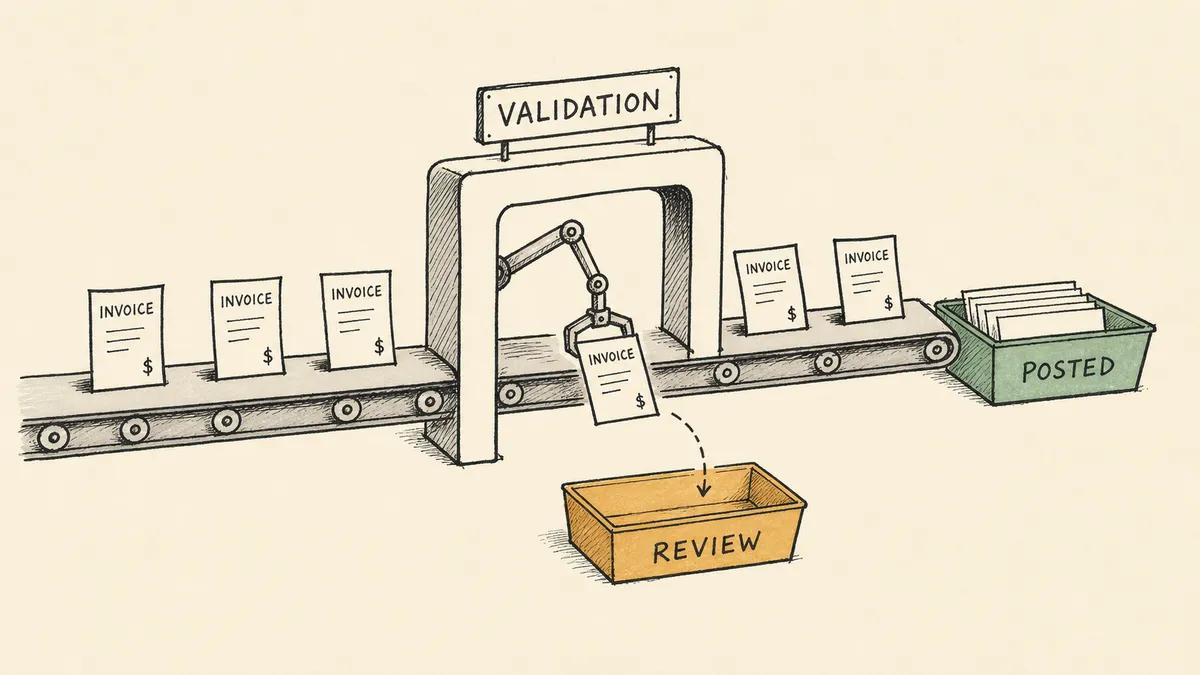
The word “automate” in “automate invoice processing” hides a switch, and most vendors sell you the wrong side of it. The side they demo is capture: an invoice arrives, the software reads it, and the fields land in your system without anyone typing. That part is solved, commoditized, and roughly the same across every tool that sells it. The side that decides whether your books stay clean is validation, and it is the side the demo skips. This article is about that switch, and about why the number a vendor leads with (extraction accuracy) is the least decision-relevant number in the entire evaluation.
If you are weighing whether to automate invoice processing, this is the distinction to hold onto: getting the data off the page is not the hard problem. Knowing whether the invoice is real, unique, and owed is the hard problem. This piece sits one level below the broader accounts payable automation question; it is specifically about the path an invoice takes from arrival to a posted bill, and where that path quietly breaks.
The three layers, and the one that matters
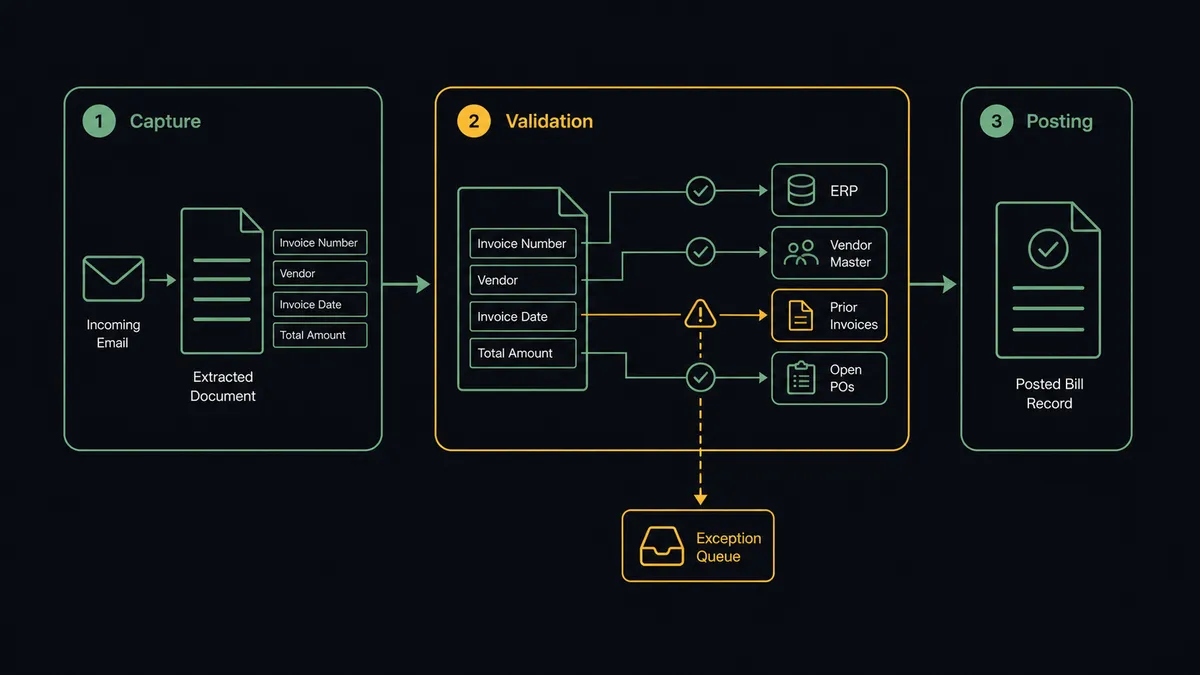
Automated invoice processing is three layers stacked, not one feature. Naming them separately is the first useful thing to do, because vendor pitches blur them constantly.
| Layer | What it does | Maturity | Where the risk lives |
|---|---|---|---|
| Capture | Pull the invoice out of email, PDF, or a vendor portal and extract structured fields (vendor, invoice number, date, line items, totals) | Commoditized. Many tools do this well. | Low. A wrong field is visible and correctable. |
| Validation | Check the extracted data against the ERP, the vendor master, prior invoices, and open POs before the bill is posted | Uneven. This is where implementations fall short. | High. A missed duplicate or billback error is money out the door. |
| Posting | Create the bill in the ERP with the right coding and route it for approval | Straightforward once validation passes | Low, conditional on validation being right first. |
Read the maturity column top to bottom. Capture is a solved category problem. Posting is mechanical once the data is trusted. The entire difficulty, and the entire reason to care which tool you pick, lives in the middle row. A finance team that buys on capture accuracy and inherits a weak validation layer has automated the easy 80% and left the part that protects cash to chance.
Here is what most posts on this topic will not say plainly: extraction accuracy is the wrong headline number. A tool can read an invoice with perfect fidelity and still wave through a bill that should never have been paid. The invoice is captured correctly and is a duplicate. The line items are extracted correctly and exceed what the contract allows. The total is read correctly and there is no purchase order behind it. None of those are capture failures. Every one of them is a validation failure, and validation is the layer the marketing number does not measure.
Why validation is hard, and why it is not a parsing problem
Capture happens inside one document. You hand the parser an invoice and it hands you fields. Everything it needs is on the page.
Validation is the opposite. To answer “should this bill be paid,” the system has to look away from the document and reach into other systems. Is this invoice number already in the ledger against this vendor? That answer lives in the ERP. Is the claimed rate within the contract? That lives in the vendor agreement. Does a purchase order exist, and do the line items match it? That lives in the procurement record. Is this vendor even in the master file yet? Another lookup, another system.
That reach is the whole reason validation is hard, and it is also the reason a better parser does not fix it. You can improve extraction accuracy from 96% to 99% and not move the duplicate-payment risk at all, because the duplicate check was never about reading the page better. It was about cross-referencing the page against four other systems at the moment of capture. Validation is a coordination problem dressed up as a document problem.
This is the seam where a parsing tool, an ERP module, and an approval app each own a fragment and none owns the whole. The parser knows the fields. The ERP knows the ledger. The contract repository knows the terms. The approval tool knows who signs. The invoice has to be checked against all of them before it posts, and nothing in that list was built to coordinate the other three.
A validation layer that spans systems is an orchestration problem, and an orchestration layer is the category that owns it. We call this category Orchestration as a Service: a platform category that coordinates, governs, and supervises multi-agent environments while keeping humans in control of the decisions that require judgment. That layer sits above the systems of record. It listens when a new invoice arrives. It gathers the ledger history, the contract terms, and the PO the parser never had. It pulls a human in only when the cross-check cannot resolve on its own, in the human-in-the-loop pattern that pauses, assembles context, routes the decision, and resumes. FlowRunner is built for that layer. It does not replace your parser or your ERP. It is the thing that makes their separate facts agree before a bill becomes a payment.
The exception path is the actual product
Once you accept that validation is the point, the design question stops being “how accurate is capture” and becomes “what happens when validation says no.” That path, the exception path, is the actual product you are buying. Everything that clears automatically is invisible by design. The bills that pause are where the finance team’s day happens.
The validated finance buyers we talk to frame their own work this way without prompting. One described his AP day plainly: when someone is out, he might enter a bill into the system himself. That is the tell. When a senior finance person is the backup data-entry clerk, the routine work still carries just enough judgment per invoice to block fully unattended automation, and the automation that exists is doing capture and nothing past it. The judgment did not disappear. It got pushed onto whoever was available.
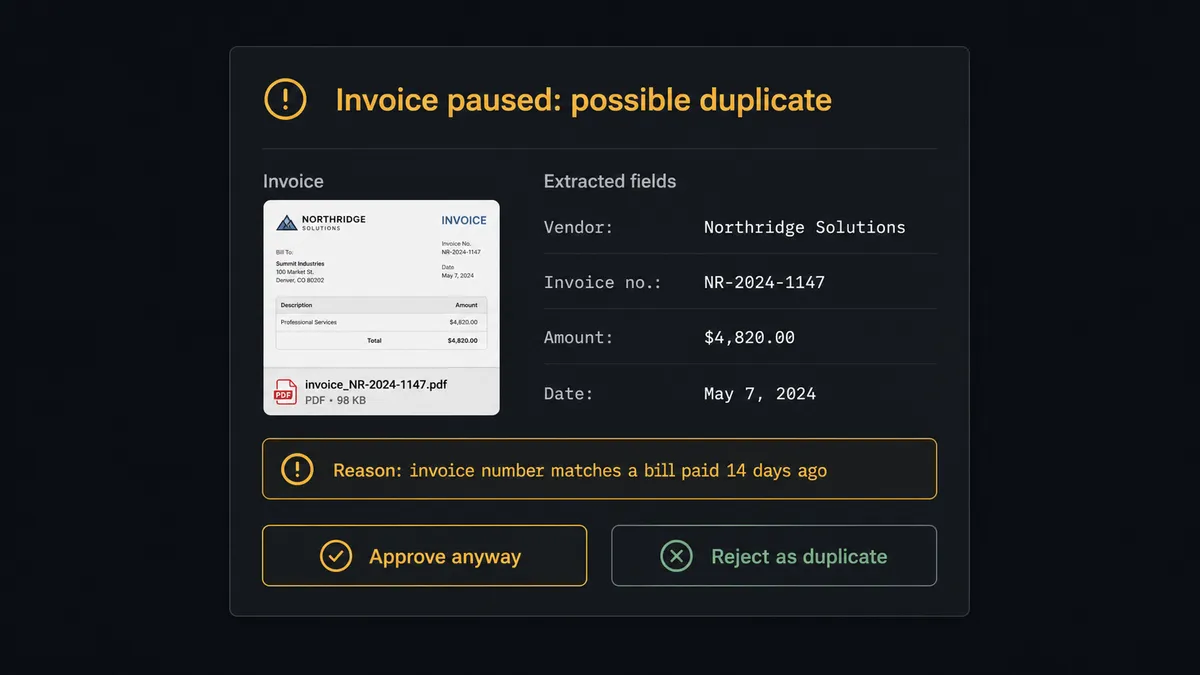
A workable exception path has a specific shape, and it is not “email it back to AP.” When an invoice cannot be auto-resolved, the system routes it to a channel (Slack or Teams) with three things attached: the original document, the extracted fields, and the reason the system paused. The reviewer responds in the thread. The response is logged as part of the audit trail. The email-to-payment workflow we publish for QuickBooks shows that shape end to end, with the same pattern published for vendor invoices into NetSuite and parsed documents into Acumatica. The mechanics are nearly identical across ERPs; only the field mapping changes.
The difference between that and a forwarded email is the difference between a control and a hope. A forwarded email loses the context, loses the audit trail, and lands in an inbox that already has 200 other things in it. A routed exception with full context attached is a decision a human can make in seconds, with a record of what they decided and why.
The exceptions worth designing for
Not every automation exception is equal. The four that move cash, and therefore the four a validation layer has to handle before anything else, are concrete:
- Duplicate invoices. Match on vendor identity, amount, invoice number, and date before the bill reaches an approver. The risk finance leaders name here is specific: when both the company and a distributor can initiate payment against the same item, double-paying is easy and the check belongs at capture, not at month-end reconciliation when the cash is already gone.
- Billback and contract mismatches. Distributor billbacks are a running back-and-forth between what the vendor charged and what the contract allows. Compare the claimed amount against the terms before payment goes out, not after the AR team raises a credit memo three months later.
- Missing or mismatched POs. Three-way match against invoice, purchase order, and receipt is standard AP control practice. When the records exist, the bill clears against them. When they do not, it pauses for a human to find the missing record or override with a logged reason. The automation question is whether your tool enforces that check before approval or pretends the bill cleared.
- Unknown vendors and out-of-tolerance amounts. Vendor not in the master file. Total off the PO by more than a set tolerance. The flag fires, the bill pauses, the reviewer gets the full picture.
Evaluating automated invoice processing software
If you are shopping for the “best automated invoice processing software,” the honest framing is that the category sells four different shapes of tool, and they are strong in different layers. Sort them by where they live, not by their feature lists.
- Document parsing tools (Parseur, Rossum, Docparser) are strong on capture and stop there by design. They get clean fields out of messy documents. What happens to those fields next is your problem to solve, which makes them an excellent capture layer and not an invoice-processing solution on their own.
- Native ERP modules handle capture and basic validation inside the system of record. NetSuite, for example, documents Bill Capture as part of its accounts payable features; Acumatica and Sage Intacct ship comparable AP-automation capabilities (check current vendor documentation for module names, which change between releases). These are credible for capture and in-ERP validation. They tend to be rigid about routing exceptions outside the ERP, which is exactly where many exceptions need to go (to a sales rep for a billback, to a buyer for a PO, to an account manager for a contract term).
- Standalone AP platforms (BILL, Tipalti, Ramp) bundle payment execution with processing and are the right answer when AP is the whole job. Their validation logic lives inside their product, which is a strength when the data you need is inside their product and a constraint when your check depends on data outside it (a contract in your document store, a PO in your ERP, a vendor risk flag in your CRM).
- Orchestration approaches connect these pieces rather than replacing them. The capture tool, the ERP, the contract repository, and the approval channel all participate in one workflow where the validation logic is explicit and exceptions route with full context. This is the shape that fits when validation depends on data the AP product cannot see.
There is no universally best tool, and any listicle that crowns one is selling placement. The best tool is the one whose strongest layer matches your weakest one. A team with clean POs and a tight vendor master needs capture and not much else. A team drowning in billbacks and missing POs needs validation that reaches across systems, and capture is the part they should worry about least.
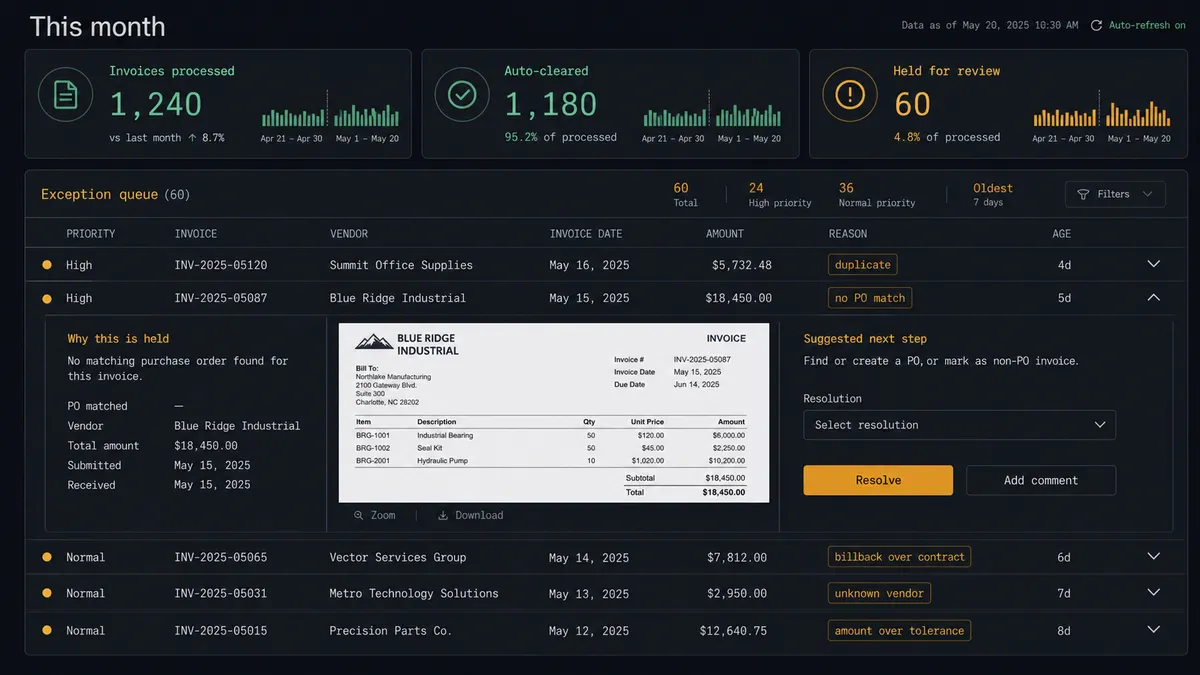
The number on that dashboard worth watching is not “auto-cleared.” It is “held for review,” and specifically how fast those held items resolve. A high auto-clear rate with a stagnant review queue is not a win; it is a backlog wearing a green metric.
Where to start, by document source and ERP
The starting point is not a tool. It is a single invoice flow chosen for volume and predictability. Pick the vendor invoice stream with the highest monthly count and the most consistent format, automate that, and let the harder document types wait.
The pattern holds regardless of the pieces. Document parsing into a structured ERP record is a viable first step, demonstrated by FlowRunner-orchestrated workflows pulling email invoices through a parser into QuickBooks, NetSuite, or Acumatica. The Acumatica capability catalog shows invoice handling as one part of a broader footprint inside one ERP. Treat each of these as a pattern to adapt, not a finished product to copy: the capture tool can change, the ERP can change, the channel can change. The capture-validate-route-post structure is what stays fixed.
What this is not, and the brief is explicit on it, is a case for removing finance review. Automating invoice processing does not eliminate AP staff or finance judgment; it relocates them onto the exceptions, which is where they were always most valuable. The ninety-something percent of bills that flow clean become invisible. The handful that need a human get a human, fast, with the full picture attached.
Deciding whether it is worth it
The ROI conversation for invoice automation is quieter and more honest than the vendor slides suggest. For a lean mid-market finance team, automation rarely strips out significant headcount cost. What it changes is what senior finance time is spent on, and it removes the failure mode where an exception sits in someone’s inbox for days because no one owned it.
Better questions than “how much will this save”:
- How many invoices per month, and what is the realistic projection over the next eighteen months? Flat volume means the ROI is mostly exception detection. Growing volume means it is absorbing growth without adding a clerk.
- How often does AP currently catch a duplicate before it pays? If the answer is “at reconciliation, if at all,” the validation layer is what you are actually buying.
- What is the cycle time from invoice received to bill posted, and how much of it is waiting on a human who was never told it was their turn?
- How much senior finance time goes to bill entry when someone is out? That number is the cost of capture-only automation, and it is usually larger than it looks.
The broader framework for that decision, applied to any process and not just invoices, is laid out in how to know what’s worth automating.
So the number to evaluate a vendor on is not extraction accuracy. It is the catch rate on the exceptions that move cash, and the cycle time on resolving them once caught. A tool that reads invoices flawlessly and lets a duplicate through has automated the part that was never going to hurt you. Buy the layer that protects the money, not the layer that reads the page.
Frequently asked questions
What does it mean to automate invoice processing?
It means moving an invoice from arrival to a posted bill across three layers: capture (extract the fields), validation (check the data against your ERP, vendor master, prior invoices, and POs), and posting (write the bill with coding and approval). Capture is the commoditized part. Validation is where automation either protects cash or quietly stops being a control.
Is OCR enough to automate invoice processing?
No. OCR and parsing get structured data out of the document, which is the solved part of the problem. Extraction can be perfectly accurate while the invoice is still a duplicate, a billback that exceeds contract terms, or missing a matching purchase order. Those are validation failures, not capture failures, and they are where the money is lost.
What is the hardest part of invoice automation to get right?
The exception path. Deciding what happens when an invoice cannot be auto-resolved, routing it to the right person with the original document and the reason it paused attached, and logging the response as part of the audit trail. A system without a designed exception queue turns into another inbox.