How to Connect Xero with CloudTalk (With or Without an AI Agent)
Connect Xero receivables to CloudTalk calls and SMS, optionally as an AI agent that runs payment reminders automatically and pauses for a human before a collections message reaches a sensitive account.
How do you connect Xero to CloudTalk?
You connect Xero to CloudTalk by having a scheduled sweep of Xero’s Get Aged Receivables drive CloudTalk’s communication actions: each morning the workflow assembles every overdue invoice with Get Invoice and Get Contact, files the payer with Add Contact, and sends a reminder with Send SMS carrying the invoice reference and amount due, until Xero’s On New Payment Received trigger ends that payer’s sequence. FlowRunner is a visual AI-agent orchestration platform where automations run autonomously and pause for human judgment on the steps that carry real consequence. Run as an agent, the same connection reads each account before it writes to it, and pauses for the AR owner before any reminder reaches a customer whose relationship is worth more than the invoice.
The problem it solves
Receivables chasing is the job everyone defers. The aged receivables report gets pulled weekly, someone scans it between meetings, and the follow-ups happen in bursts: a batch of copy-pasted emails one afternoon, a few awkward calls the next week. In between, invoices age quietly. Cash flow tightens not because customers refuse to pay but because nobody asked at the right moment, on a channel they actually read. Email reminders land in the same folder as newsletters; the invoice stays unpaid another week.
The reason teams hesitate to automate this is the right reason: a dunning message is a relationship event. The same text that nudges a chronically late small account is a mistake when it lands on your largest customer three days after their AP contact went on leave, or on an account with an open credit note that makes the “amount due” wrong. One tone-deaf automated reminder to the wrong account costs more than a quarter of late payments. So the choice looks binary: automate and risk the relationship, or stay manual and stay slow.
How it works: the connection
The connection reads Xero and communicates through CloudTalk. Here is the plain version, grounded in the real connector actions.
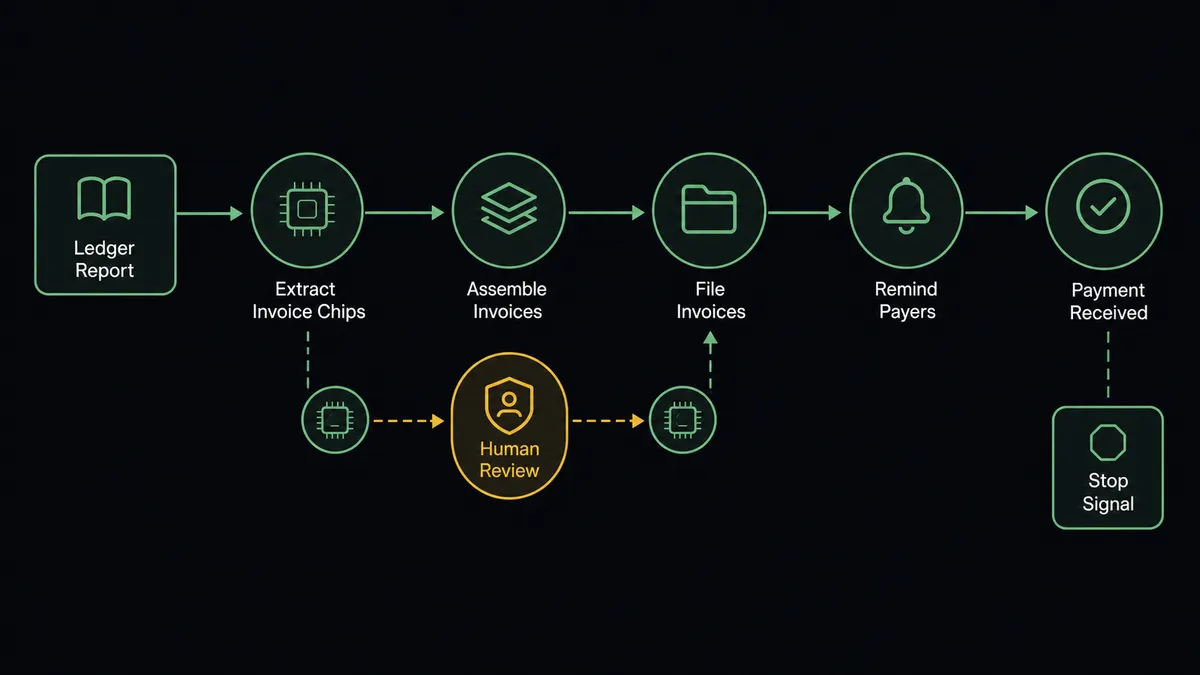
- Trigger: On a schedule each morning, the workflow calls Get Aged Receivables to pull the overdue ledger.
- Read: For each overdue invoice, it calls Get Invoice for the reference, amount due, and due date, and Get Contact for the payer’s details.
- File: It calls Add Contact in CloudTalk so every payer exists in the calling system with current details.
- Remind: It calls Send SMS with a short, courteous reminder carrying the invoice reference and amount, a channel that gets read the day it arrives.
- Escalate by age: Invoices that stay unpaid move from text to voice: Make Call (Click to Call) connects a team member live instead of sending a fourth message.
- Stop on payment: Xero fires On New Payment Received the moment money lands, and the payer’s sequence ends immediately, no reminder after the check clears.
- Record: List Calls flows outcomes back so the account’s contact history is complete.
That is the “just connect them” answer. The aged receivables report stops being a weekly reading assignment and becomes a daily, self-working queue, and no customer ever gets chased for an invoice they already paid.
Can an AI agent run it? (and why a human stays in the loop)
Yes, and the agent is what resolves the automate-or-protect dilemma. It holds the real actions as tools: Get Aged Receivables, Get Invoice, Get Contact, Find Payments, Get Credit Note, Add Contact, Send SMS, Make Call (Click to Call), List Calls. Before it contacts anyone, it reads the account the way a careful AR clerk would. It checks Find Payments for a payment already in flight. It checks for an open credit note that changes the true balance. It reads the payment pattern: a customer who has paid on day forty for three years is not late, they are on their own schedule, and a day-thirty-five reminder just annoys them.
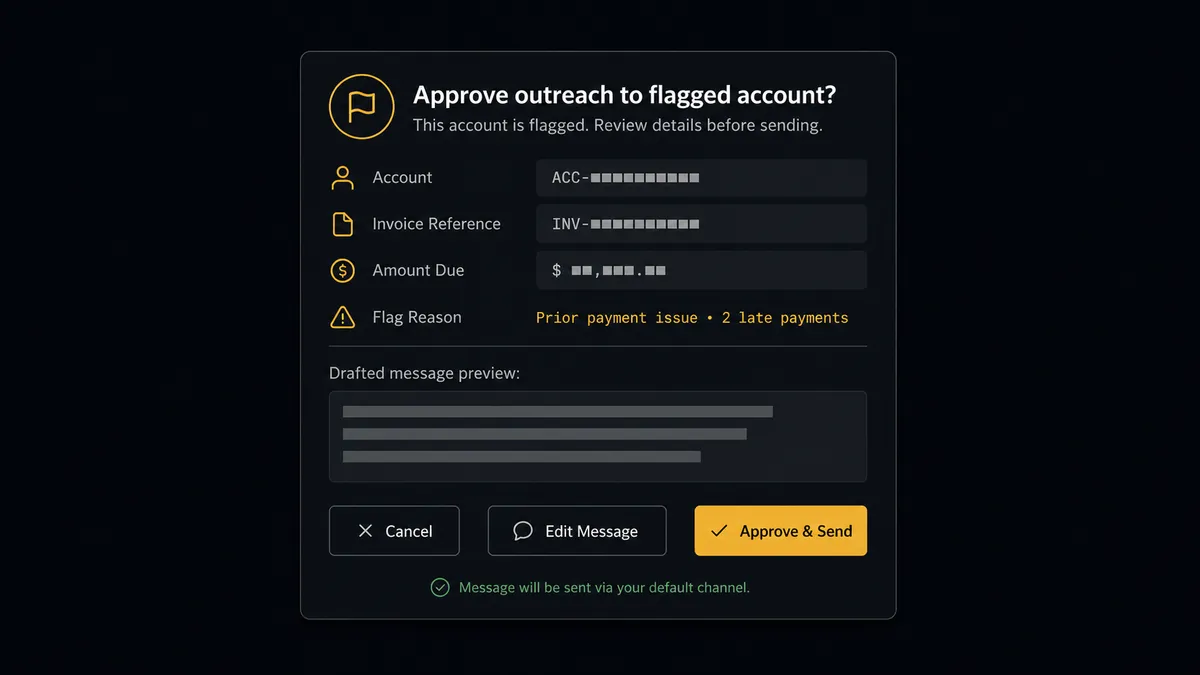
The consequential step is the message that reaches a sensitive account. When the agent flags an account, because the balance is large, the relationship is strategic, or the history is unusual, it does not send. It invokes a human-in-loop flow it holds as a callable tool, and the workflow pauses and posts to the AR owner: “Reminder ready for [account], invoice [reference], amount due [total]. This account is flagged: largest open balance in the ledger, credit note open. Draft attached. Approve, edit, or take the call yourself?” The owner decides with one click, and only then does Send SMS run or Make Call (Click to Call) connect. The approver, the approved text, and the timestamp land in the audit trail, so the answer to “who sent that?” is never a shrug.
This is the digital andon cord, FlowRunner’s core thesis: like Toyota’s andon cord, the workflow stops the line the moment the next message carries relationship risk. Routine reminders flow every morning; the sensitive ones wait for the person who owns the account.
FlowRunner vs Zapier
Zapier has earned its place as the default first tool: a giant connector library, a template gallery that covers most simple pairs, and a fast path from idea to a running Zap. If the requirement is “when an invoice is created in Xero, log it to a sheet,” Zapier is a perfectly good answer.
Receivables chasing is a different kind of workflow: a daily queue with per-account judgment, escalation by age, a hard stop on payment, and a human gate on the accounts that matter. That is a system with state and discretion, not a trigger and an action.
| What matters for this pair | FlowRunner | Zapier |
|---|---|---|
| Human-in-the-loop before a flagged account is contacted | Native. The agent invokes an approval flow as a callable tool and waits for the AR owner | Available via approval steps wired into the Zap, not the agent’s own judgment about the account |
| Who runs the flow | An AI agent reads balance, history, and credit notes, then picks actions as tools | A predefined step sequence you configure per Zap |
| Users included | Unlimited users on every tier | Priced by task volume; seat limits vary by plan |
| Bring your own AI keys | Yes, BYOK | AI features center on Zapier’s own AI offering |
| Self-hosted option | Yes, cloud-hosted or self-hosted | Cloud only |
| Pricing model | Transparent workflow-based tiers | Per-task pricing; a daily sweep across a full ledger consumes tasks quickly |
If you need a light notification between Xero and one other tool, Zapier is genuinely the quicker path. If you need receivables worked daily with judgment, and the AR owner’s hand on every sensitive send, this pairing on FlowRunner is.
Before and after
| Category | Before | After |
|---|---|---|
| The overdue queue | An aged receivables report read weekly, worked in bursts | Get Aged Receivables feeds a daily queue the agent works every morning |
| Reminder channel | Emails that age in an unread folder | Send SMS reminders that get read the day they land |
| Paid invoices | Customers occasionally chased after paying | On New Payment Received ends the sequence the moment money lands |
| Sensitive accounts | Same template to everyone, and the team holds its breath | Flagged accounts wait for the AR owner’s approval before any contact |
| Escalation | Whoever remembers makes the call | Aging invoices move from text to a live Make Call (Click to Call) connection on a defined path |
What you can build
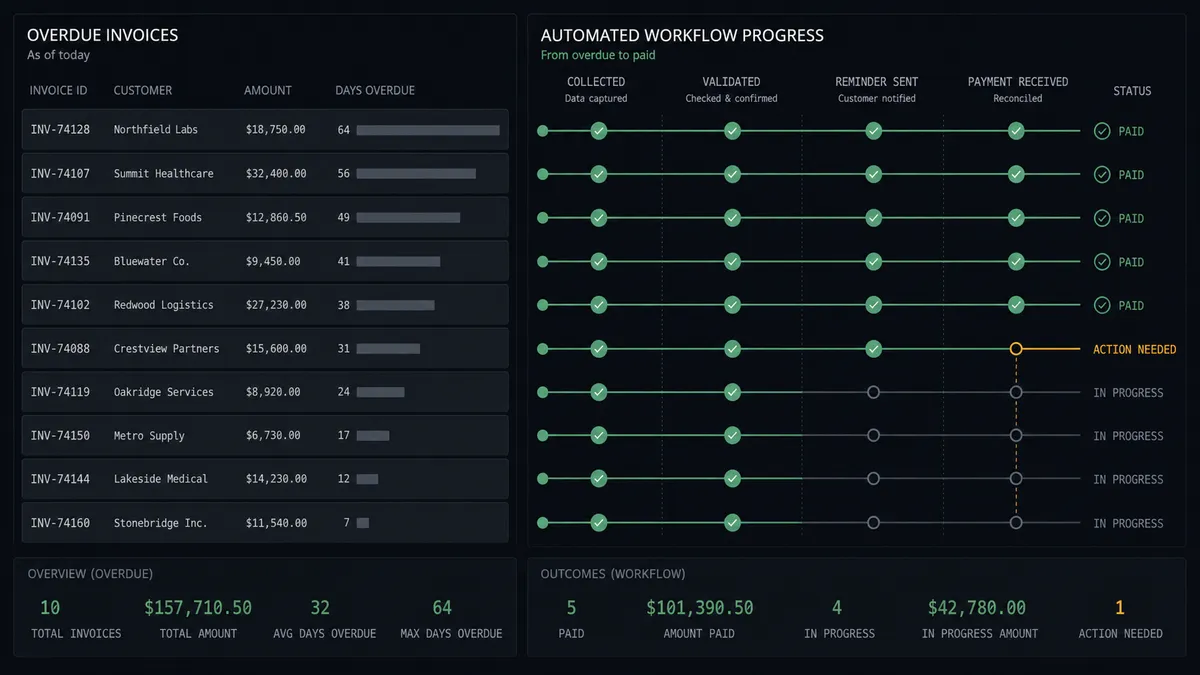
Morning receivables sweep. On a schedule, Get Aged Receivables pulls the overdue ledger, the agent assembles each invoice with Get Invoice and Get Contact, and routine payers get a courteous Send SMS reminder before the coffee is cold.
Flagged-account gate. High balances, strategic customers, and accounts with open credit notes route through the human-in-loop step, where the AR owner approves, edits, or takes the contact personally before anything sends.
Text-to-voice escalation ladder. Invoices that survive early reminders graduate to Make Call (Click to Call), connecting a team member live, with List Calls writing the outcome back into the account’s history.
Payment cutoff. On New Payment Received fires and the agent immediately ends that payer’s sequence, so the thank-you never arrives wrapped in a dunning notice.
Weekly cash-position digest. The agent pairs Get Aged Receivables with Get Statistics from CloudTalk and posts a short summary: what is outstanding, what was contacted, what moved, so leadership sees receivables momentum without opening Xero.
Common questions
Is it free to connect Xero and CloudTalk on FlowRunner? You can build and run the connection on FlowRunner’s free plan, which includes 100 executions a month and every integration with no credit card required, and new accounts also get 14 days of Professional. Both connectors are available on every FlowRunner tier, and every tier includes unlimited users and unlimited workflows.
Can I self-host the Xero to CloudTalk workflow? Yes. FlowRunner offers a cloud-hosted option and a self-hosted option, so the connection can run inside your own environment.
Does the AI agent need my own OpenAI or Claude key? FlowRunner uses a bring-your-own-keys model, so you connect the AI provider key you already have. You are not locked to one model.
What keeps an automated reminder from landing on our most important customer? The agent flags sensitive accounts before anything sends: high balances, long relationships, open credit notes, or unusual payment patterns. For a flagged account it stops, posts the drafted message and the account history to the AR owner, and waits. Send SMS only runs after sign-off.
Which Xero events feed the CloudTalk workflow? The daily sweep runs from Get Aged Receivables on a schedule, and Xero’s On New Payment Received trigger ends a payer’s reminder sequence the moment money lands. On Invoice Updated keeps the queue current when terms or amounts change.
Does CloudTalk have triggers of its own? No. CloudTalk has fifteen actions and no triggers, so the flow starts from the schedule or a Xero event. Call outcomes still flow back through List Calls so the reminder history stays complete.
Getting started
Start on the free plan: 100 executions a month, every integration included, no credit card required, plus 14 days of Professional for new accounts. Both connectors are available on every tier, and every tier includes unlimited users and unlimited workflows.
Explore the integration details:
- Xero integration (8 triggers and 38 actions covering invoices, contacts, payments, and reports)
- CloudTalk integration (15 actions covering calls, SMS, contacts, and statistics)
Start building free at flowrunner.ai or book a demo to see a live Xero to CloudTalk workflow, flagged-account gate and all.
Frequently asked questions
Is it free to connect Xero and CloudTalk on FlowRunner?
You can build and run the connection on FlowRunner's free plan, which includes 100 executions a month and every integration with no credit card required, and new accounts also get 14 days of Professional. Both connectors are available on every FlowRunner tier, and every tier includes unlimited users and unlimited workflows.
Can I self-host the Xero to CloudTalk workflow?
Yes. FlowRunner offers a cloud-hosted option and a self-hosted option, so the connection can run inside your own environment.
Does the AI agent need my own OpenAI or Claude key?
FlowRunner uses a bring-your-own-keys model, so you connect the AI provider key you already have. You are not locked to one model.
What keeps an automated reminder from landing on our most important customer?
The agent flags sensitive accounts before anything sends: high balances, long relationships, open credit notes, or unusual payment patterns. For a flagged account it stops, posts the drafted message and the account history to the AR owner, and waits. Send SMS only runs after sign-off.
Which Xero events feed the CloudTalk workflow?
The daily sweep runs from Get Aged Receivables on a schedule, and Xero's On New Payment Received trigger ends a payer's reminder sequence the moment money lands. On Invoice Updated keeps the queue current when terms or amounts change.
Does CloudTalk have triggers of its own?
No. CloudTalk has fifteen actions and no triggers, so the flow starts from the schedule or a Xero event. Call outcomes still flow back through List Calls so the reminder history stays complete.