How to Connect Airtable with CloudTalk (With or Without an AI Agent)
Connect Airtable records to CloudTalk calls and SMS, optionally as an AI agent that works the outreach queue automatically and pauses for a human before a message goes out to an entire segment.
How do you connect Airtable to CloudTalk?
You connect Airtable to CloudTalk by having Airtable’s On New Record trigger drive CloudTalk’s communication actions: a row lands in your outreach table, the workflow pulls its fields with Find Record, files the person with Add Contact, sends the message with Send SMS, and writes the contacted status back with Update Record so the base always shows who was reached and when. FlowRunner is a visual AI-agent orchestration platform where automations run autonomously and pause for human judgment on the steps that carry real consequence. Run as an agent, the same connection works each row with judgment: it dedupes, picks the channel, and stops the line for a named approver before any message goes out to an entire segment at once.
The problem it solves
Airtable is where operations teams keep the truth: the waitlist, the renewal list, the event roster, the customers affected by this week’s issue. CloudTalk is where the team actually reaches people. Between the two sits a person with the base open on one screen and the dialer on the other, copying numbers, sending the same text again and again, and then updating a status column by hand so the next shift knows who was already reached. Rows get skipped, rows get double-contacted, and the base drifts out of date the moment anyone falls behind.
The catastrophic version of this problem is not the missed row. It is the filter mistake. Someone means to text the customers whose appointments moved and instead selects the whole table. Or the segment was built on a stale status field and half the recipients already resolved their issue yesterday. One wrong bulk send teaches a team to fear its own automation, which is why so many outreach tables end up worked entirely by hand, slowly, forever.
How it works: the connection
The connection listens to Airtable and communicates through CloudTalk. Here is the plain version, grounded in the real connector actions.
- Trigger: Airtable fires On New Record when a row lands in the outreach table, or On New or Updated Record when a status change should start the sequence.
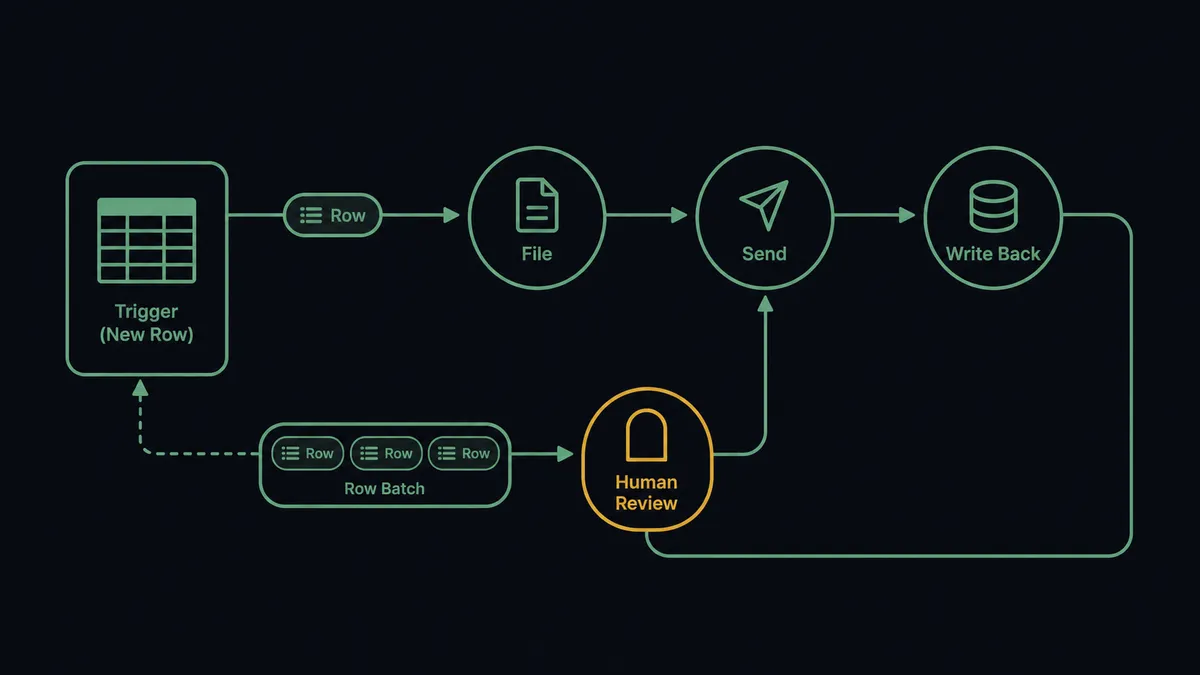
- Read: The workflow calls Find Record to pull the row’s name, phone, message context, and campaign field.
- File: It calls Add Contact in CloudTalk, or Edit Contact if the person already exists, so the dialer side always has a clean record.
- Send: It calls Send SMS with the message built from the row’s fields.
- Write back: It calls Update Record to stamp the row with contacted status and time, so the base is the live source of truth.
- Close the loop: On a schedule, it calls List Calls and writes call outcomes into the base with Update Record, so a row shows not just “contacted” but what happened.
That is the “just connect them” answer. Rows become contacts, contacts become messages, and outcomes flow back into the table without anyone retyping a thing. Get Statistics gives you the aggregate view on the same schedule.
Can an AI agent run it? (and why a human stays in the loop)
Yes, and the agent is the difference between a mail merge and a colleague. It holds the real actions as tools: Find Record, Find Many Records, Update Record, Add Contact, List Contacts, List Calls, Send SMS, Make Call (Click to Call). Working a row, it checks List Contacts and List Calls first: this person was called an hour ago by a live agent, so the text would be redundant; that one has two rows in the table under slightly different spellings, so it contacts once and flags the duplicate. It reads the row’s context and picks the channel, a text for a reschedule notice, a queued call through Make Call (Click to Call) for the customer whose row says the issue is sensitive.
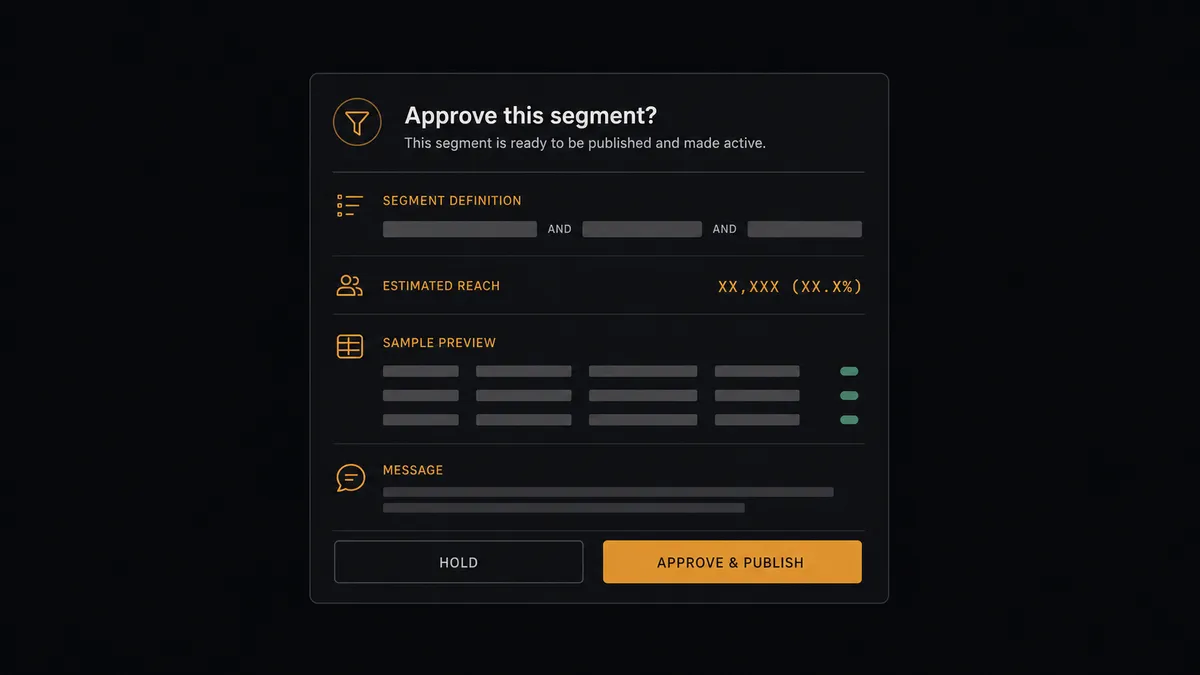
The consequential step is the batch. When the agent finds many rows sharing one campaign value, that is no longer one message, it is a broadcast wearing the same clothes. So it stops. It invokes a human-in-loop flow it holds as a callable tool, and the workflow pauses and posts to the operations channel: “Batch send ready for campaign [name]. Segment definition attached, sample records attached, message text attached. Approve the send, edit the message, or hold?” A named approver reviews exactly what will go out and to whom. Only after sign-off does Send SMS run across the batch, and the approver, the approved text, and the segment definition all land in the audit trail. If the segment looks wrong, the send never happens, and the near-miss is visible instead of silent.
This is the digital andon cord, FlowRunner’s core thesis: like Toyota’s andon cord, the workflow stops the line the moment the next step is bigger than one person’s inbox. Single-row outreach flows all day; the broadcast waits for a human who has seen the list.
FlowRunner vs Zapier
Zapier’s strengths here are real. Its connector library is enormous, its template gallery almost certainly contains an Airtable-to-SMS starting point, and a simple “new record sends a text” Zap goes live quickly. For a low-volume, single-purpose notification, that is a fine tool doing what it was built for.
The gap opens where the outreach table becomes an operational system: dedupe against call history, per-row channel choices, write-backs that keep the base authoritative, and above all, a hard stop before any batch send. Those are judgment steps, and judgment is the part a fixed step sequence does not carry.
| What matters for this pair | FlowRunner | Zapier |
|---|---|---|
| Human-in-the-loop before a segment-wide Send SMS | Native. The agent invokes an approval flow as a callable tool and waits for a named approver | Available via approval steps you add per Zap, not an agent’s own judgment about batch size |
| Who runs the flow | An AI agent reads the row, dedupes, picks channel and actions as tools | A predefined step sequence you configure per Zap |
| Users included | Unlimited users on every tier | Priced by task volume; seat limits vary by plan |
| Bring your own AI keys | Yes, BYOK | AI features center on Zapier’s own AI offering |
| Self-hosted option | Yes, cloud-hosted or self-hosted | Cloud only |
| Pricing model | Transparent workflow-based tiers | Per-task pricing; every row contacted and written back consumes tasks |
If you need one table to fire one notification, Zapier is genuinely the faster path. If the table is your outreach operation, with dedupe, write-backs, and a human gate on every broadcast, this pairing on FlowRunner is.
Before and after
| Category | Before | After |
|---|---|---|
| Working the queue | A person copies numbers from the base into the dialer row by row | On New Record starts the contact sequence the moment a row lands |
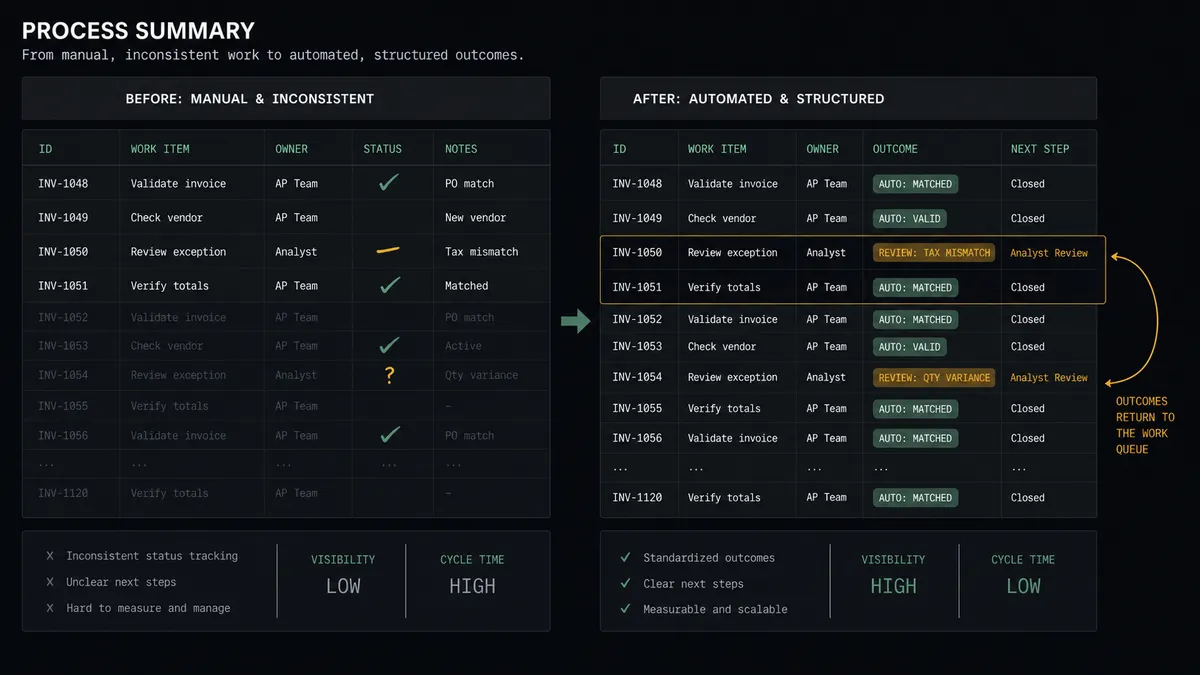
| Status tracking | A status column updated by hand, drifting out of date by afternoon | Update Record stamps every row with contacted status and outcome automatically |
| Duplicate contact | The same customer texted twice by two shifts | The agent checks List Contacts and List Calls before anything sends |
| Batch sends | One bad filter texts the whole table | Every batch waits at the approval gate with segment and message visible |
| Reporting | Someone assembles call counts from screenshots | Get Statistics and List Calls flow into the base on a schedule |
What you can build
Outreach queue on autopilot. On New Record fires, the agent files the person with Add Contact, sends the row’s message with Send SMS, and stamps the row with Update Record, so the base is always the live state of the queue.
Campaign sends with a named approver. The agent gathers rows sharing a campaign value with Find Many Records, drafts the message once, and holds the whole batch at the human-in-loop step until an approver releases Send SMS across it.
Call-first escalations. Rows marked sensitive route to Make Call (Click to Call) instead of a text, connecting a live team member, with the row updated to show who took the call and when.
Outcome write-back loop. On a schedule the agent pulls List Calls, matches calls to rows, and writes dispositions back with Update Record, turning the base into a self-updating record of every conversation.
Missed-connection sweeper. Each morning the agent finds rows still uncontacted past their target date with Find Many Records, works the backlog, and posts a short digest built from Get Statistics so the team sees what moved.
Getting started
Start on the free plan: 100 executions a month, every integration included, no credit card required, plus 14 days of Professional for new accounts. Both connectors are available on every tier, and every tier includes unlimited users and unlimited workflows.
Explore the integration details:
- Airtable integration (2 triggers and 17 actions covering records, tables, bases, and comments)
- CloudTalk integration (15 actions covering calls, SMS, contacts, and statistics)
Start building free at flowrunner.ai or book a demo to see a live Airtable to CloudTalk workflow, batch approval gate and all.
Frequently asked questions
Is it free to connect Airtable and CloudTalk on FlowRunner?
You can build and run the connection on FlowRunner's free plan, which includes 100 executions a month and every integration with no credit card required, and new accounts also get 14 days of Professional. Both connectors are available on every FlowRunner tier, and every tier includes unlimited users and unlimited workflows.
Can I self-host the Airtable to CloudTalk workflow?
Yes. FlowRunner offers a cloud-hosted option and a self-hosted option, so the connection can run inside your own environment.
Does the AI agent need my own OpenAI or Claude key?
FlowRunner uses a bring-your-own-keys model, so you connect the AI provider key you already have. You are not locked to one model.
What stops the agent from texting the wrong segment?
Batch sends never run unattended. When the agent detects that many records share one campaign or status value, it stops, posts the segment definition, the record sample, and the exact message text to a named approver, and waits. Send SMS only runs across the batch after sign-off.
Which Airtable events can start the CloudTalk workflow?
Airtable offers two triggers: On New Record and On New or Updated Record. On New Record starts outreach for fresh rows, while On New or Updated Record lets a status change, such as a row moving to a Contact stage, start the sequence.
Does CloudTalk have triggers of its own?
No. CloudTalk has fifteen actions and no triggers, so the flow always starts from an Airtable event or a schedule. Call outcomes still flow back on a schedule through List Calls, written into the base with Update Record.