How to Connect DocuSign with CloudTalk (With or Without an AI Agent)
Connect DocuSign envelopes to CloudTalk calls and SMS, optionally as an AI agent that chases stalled signatures automatically and pauses for a human before it contacts a signer who declined.
How do you connect DocuSign to CloudTalk?
You connect DocuSign to CloudTalk by having DocuSign’s envelope triggers drive CloudTalk’s communication actions: On Envelope Sent fires, the workflow files each signer with Add Contact using the details from Get Envelope Recipients, watches Get Envelope Status, and when an envelope stalls it calls Resend Envelope and follows with Send SMS so the reminder lands where people actually look. FlowRunner is a visual AI-agent orchestration platform where automations run autonomously and pause for human judgment on the steps that carry real consequence. Run as an agent, the same connection handles the envelope that comes back declined: it drafts the outreach and queues the call, but a human approves before Send SMS or Make Call (Click to Call) puts anything in front of that signer.
The problem it solves
Every operations team has a document graveyard: agreements that went out for signature and simply stopped. The signer opened it on a phone, meant to come back, and never did. Today the chase is manual. Someone keeps a mental list, or a spreadsheet, of outstanding envelopes and works through it between other jobs: re-sending, emailing “just following up,” eventually asking a colleague to call. Onboarding stalls, renewals slip past their dates, and deals sit in limbo not because anyone said no, but because nobody said anything.
The genuinely hard case is the envelope that comes back declined. A decline is rarely just paperwork; it means something in the deal is off: a term, a price, a name spelled wrong, a decision-maker change. The wrong response is an automated reminder hammering someone who already said no. The right response is a person, informed and prepared, reaching out at the right moment. Most automation treats both cases identically, which is exactly why teams turn signature chasing off after the first customer complaint.
How it works: the connection
The connection listens to DocuSign and communicates through CloudTalk. Here is the plain version, grounded in the real connector actions.
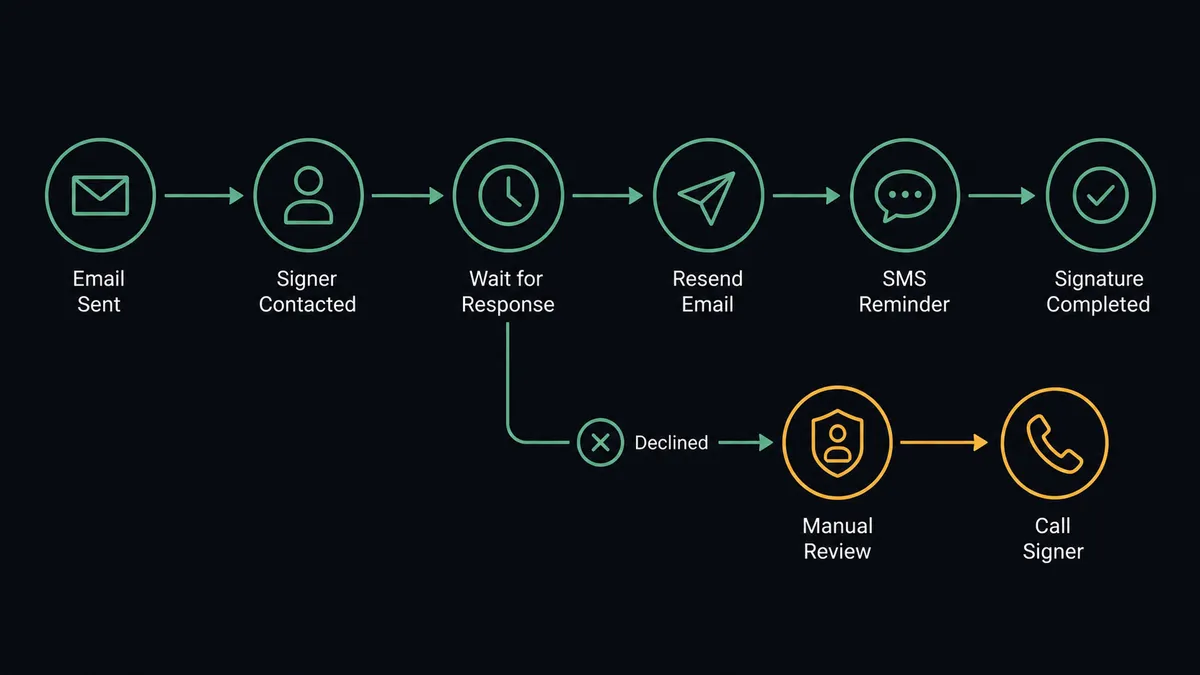
- Trigger: DocuSign fires On Envelope Sent the moment the agreement goes out.
- Read: The workflow calls Get Envelope Recipients to pull each signer’s name and contact details.
- File: It calls Add Contact in CloudTalk so every signer exists in the calling system, or Edit Contact if they already do.
- Watch: It checks Get Envelope Status on a schedule to find envelopes stalled past your reminder window.
- Re-send: It calls Resend Envelope so the agreement returns to the top of the signer’s inbox.
- Nudge: It calls Send SMS with a short, polite reminder carrying the envelope subject, since a text gets seen where a third email does not.
- Stop cleanly: When On Envelope Completed fires, the sequence ends and no further messages go out.
That is the “just connect them” answer. Envelopes stop dying of silence, reminders land on a channel people read, and the sequence shuts itself off the moment the signature arrives. On Envelope Voided ends the sequence the same way when a deal is withdrawn.
Can an AI agent run it? (and why a human stays in the loop)
Yes, and the agent is what makes the chase feel human instead of relentless. It holds the real actions as tools: Get Envelope Status, Get Envelope Recipients, Resend Envelope, Add Contact, Send SMS, Make Call (Click to Call), List Calls, Void Envelope. Before sending anything, it checks context a fixed sequence never sees. It reads List Calls to learn the signer already spoke with your team this morning, so a reminder now would land badly. It notices one envelope has three signers and only the last one is missing, so the nudge goes to that person alone. It paces reminders against the envelope’s actual urgency rather than a fixed drumbeat.
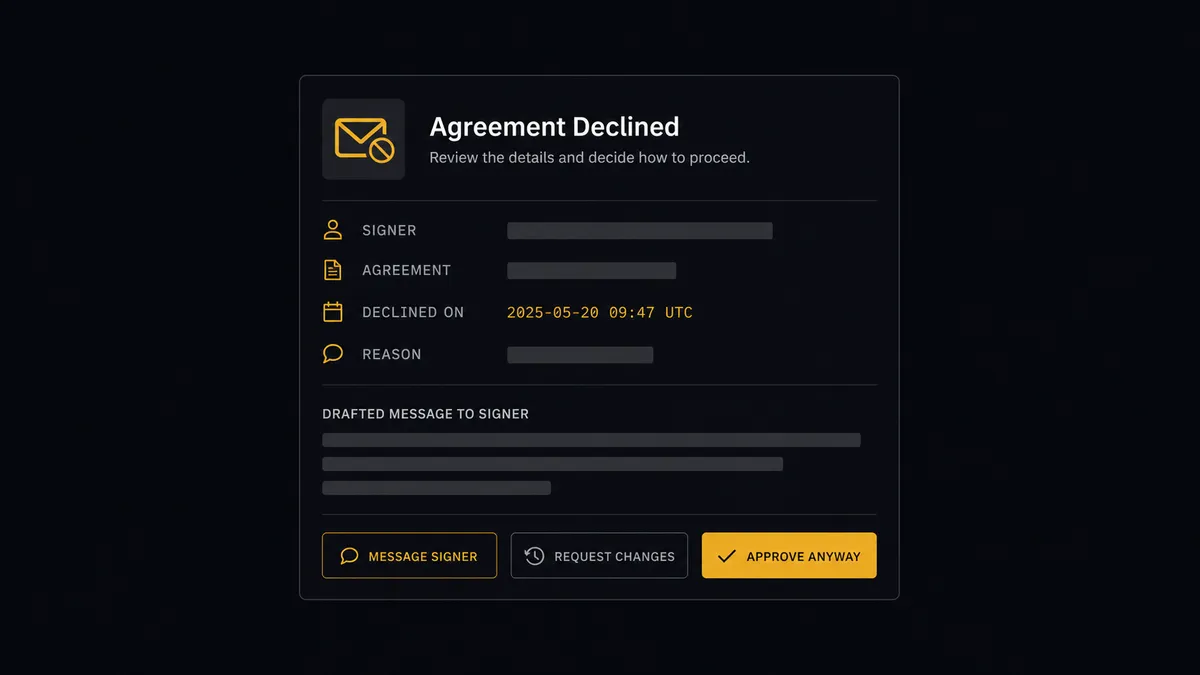
The consequential step is contact after a decline. When On Envelope Declined fires, the agent gathers what a person needs: the envelope subject, who declined, the decline context from Get Envelope Status, and the history from List Calls. Then it invokes a human-in-loop flow it holds as a callable tool. The workflow pauses and posts to the deal owner: “Envelope [subject] declined by [signer]. Drafted SMS attached; call queued for you via Make Call (Click to Call) when you approve. Send the message, take the call, or hold?” The owner edits or approves with one click. Only then does Send SMS go out or the call connect, and the approver, the approved text, and the timestamp all land in the audit trail. The same gate guards Void Envelope, because withdrawing an agreement is a statement someone should own.
This is the digital andon cord, FlowRunner’s core thesis: like Toyota’s andon cord, the workflow stops the line the moment it hits uncertainty. Routine nudges flow on their own; the conversation that decides the deal waits for the person who should have it.
FlowRunner vs Zapier
Zapier is the first tool most teams try for this, and its core strength is real: an enormous connector library, a deep template gallery, and years of polish on getting a simple trigger-action pair running quickly. If the whole requirement is “when an envelope completes, log it somewhere,” Zapier handles that with minimal fuss.
Signature chasing is not that shape. It is a stateful sequence with a judgment call in the middle: watch, remind, stop on completion, and hand the declined case to a human with context. That last part is where the architectures diverge.
| What matters for this pair | FlowRunner | Zapier |
|---|---|---|
| Human-in-the-loop before contacting a declined signer | Native. The agent invokes an approval flow as a callable tool and waits for the deal owner | Available via added approval steps you wire into the Zap, not an agent’s own decision |
| Who runs the flow | An AI agent reads status and call history, reasons, picks actions as tools | A predefined step sequence you configure per Zap |
| Users included | Unlimited users on every tier | Priced by task volume; seat limits vary by plan |
| Bring your own AI keys | Yes, BYOK | AI features center on Zapier’s own AI offering |
| Self-hosted option | Yes, cloud-hosted or self-hosted | Cloud only |
| Pricing model | Transparent workflow-based tiers | Per-task pricing that grows with every reminder sent |
If you need a simple envelope-to-spreadsheet log, Zapier is genuinely the quicker path. If you need stalled agreements chased with judgment and declined ones handled by a prepared human, this pairing on FlowRunner is.
Before and after
| Category | Before | After |
|---|---|---|
| Stalled envelopes | Tracked in someone’s head or a spreadsheet, chased between other jobs | The agent watches Get Envelope Status and nudges by SMS on its own |
| Reminder channel | A third email into an ignored inbox | Send SMS puts the reminder where people actually look |
| Declined envelopes | Either hammered by automated reminders or silently dropped | Routed to the deal owner with a drafted message and a queued call |
| Signer contact records | Phone numbers scattered across the CRM and old threads | Add Contact files every signer in CloudTalk at send time |
| Accountability | Nobody can say who contacted a signer, or when | Every contact after a decline carries an approver, the approved text, and a timestamp |
What you can build
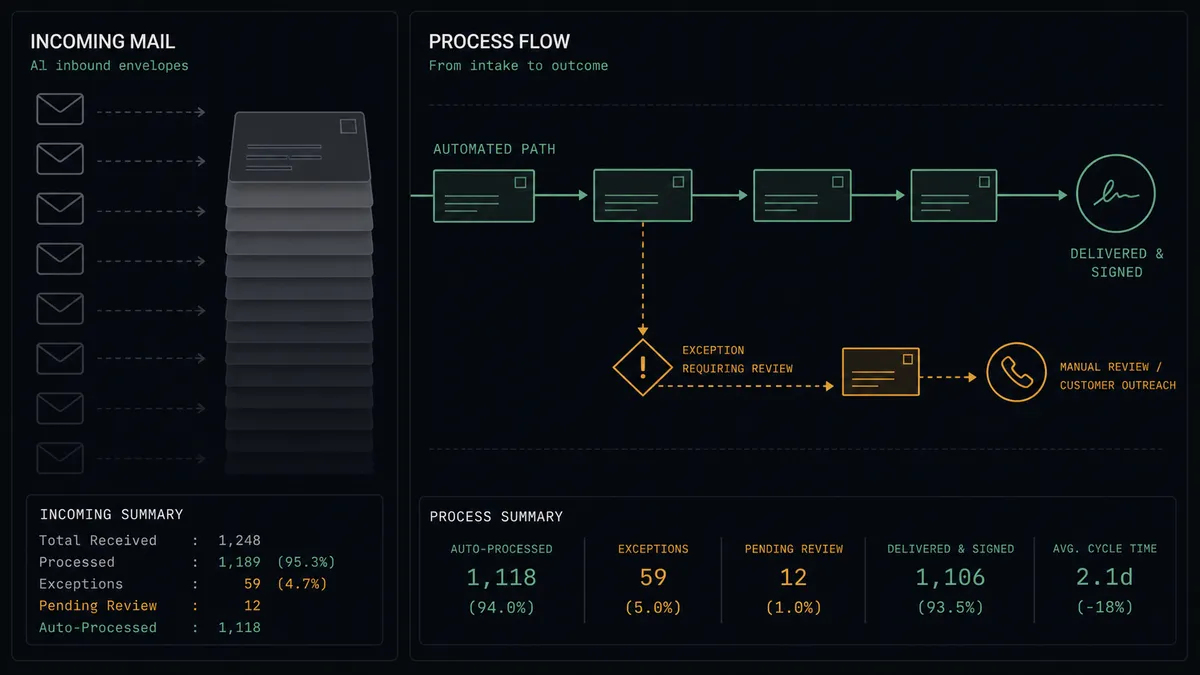
Signature chase sequence. On Envelope Sent fires, Get Envelope Recipients and Add Contact file the signers, and the agent watches Get Envelope Status, resending with Resend Envelope and nudging with Send SMS until On Envelope Completed shuts the sequence off.
Declined-deal handoff. On Envelope Declined fires, the agent packages the decline context and call history, holds at the human-in-loop step, and on approval fires Send SMS and queues Make Call (Click to Call) so the deal owner connects live.
Renewal countdown. For agreements tied to renewal dates, a scheduled flow finds unsigned envelopes as the date approaches and escalates the pacing, with the final pre-deadline call always routed through the approval gate.
Multi-signer targeting. For envelopes with several signers, the agent reads Get Envelope Recipients against Get Envelope Status and nudges only the signers still outstanding, so the person who signed on day one never gets a reminder.
Signing-operations pulse. On a schedule, the agent pulls Get Statistics from CloudTalk and List Envelopes from DocuSign and posts a short digest: envelopes out, envelopes stalled, contacts made, so the team sees the pipeline without opening either system.
Getting started
Start on the free plan: 100 executions a month, every integration included, no credit card required, plus 14 days of Professional for new accounts. Both connectors are available on every tier, and every tier includes unlimited users and unlimited workflows.
Explore the integration details:
- DocuSign integration (4 triggers and 9 actions covering envelopes, documents, and recipients)
- CloudTalk integration (15 actions covering calls, SMS, contacts, and statistics)
Start building free at flowrunner.ai or book a demo to see a live DocuSign to CloudTalk workflow, declined-envelope gate and all.
Frequently asked questions
Is it free to connect DocuSign and CloudTalk on FlowRunner?
You can build and run the connection on FlowRunner's free plan, which includes 100 executions a month and every integration with no credit card required, and new accounts also get 14 days of Professional. Both connectors are available on every FlowRunner tier, and every tier includes unlimited users and unlimited workflows.
Can I self-host the DocuSign to CloudTalk workflow?
Yes. FlowRunner offers a cloud-hosted option and a self-hosted option, so the connection can run inside your own environment.
Does the AI agent need my own OpenAI or Claude key?
FlowRunner uses a bring-your-own-keys model, so you connect the AI provider key you already have. You are not locked to one model.
What happens when a signer declines the envelope?
The agent stops and invokes a human-in-loop step. It posts the envelope subject, the signer, the decline context from Get Envelope Status, and a drafted SMS plus a proposed call assignment, then waits for the deal owner to approve, edit, or cancel before Send SMS or Make Call (Click to Call) runs.
Which DocuSign events can start the CloudTalk workflow?
DocuSign offers four triggers: On Envelope Sent, On Envelope Completed, On Envelope Declined, and On Envelope Voided. On Envelope Sent starts the chase sequence, On Envelope Completed ends it, and On Envelope Declined routes to the human gate.
Does CloudTalk have triggers of its own?
No. CloudTalk has fifteen actions and no triggers, so the flow always starts from a DocuSign event or a schedule. The workflow still reads CloudTalk with List Calls and Get Statistics to see whether a signer was already reached before it sends anything else.