How to Connect Xero with CloudConvert (With or Without an AI Agent)
Connect Xero invoices and credit notes to CloudConvert document processing, optionally as an AI agent that assembles billing packets automatically and pauses for a human before an invoice is emailed to the customer.
How do you connect Xero to CloudConvert?
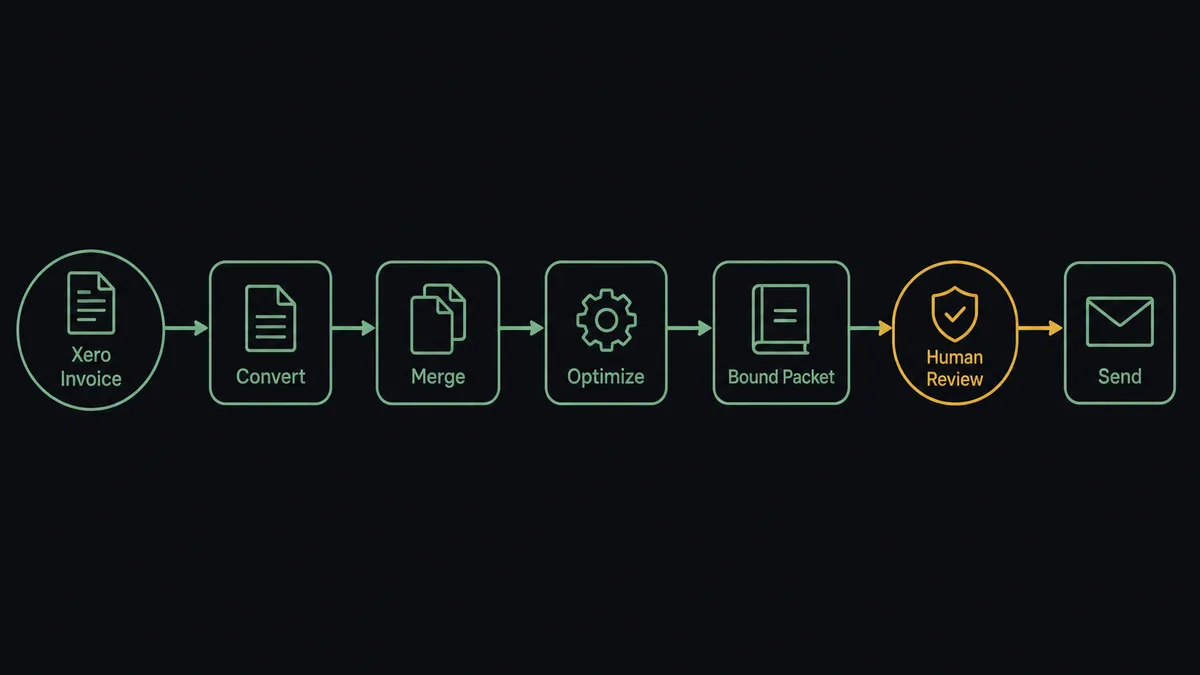
You connect Xero to CloudConvert by having Xero’s On Invoice Created trigger drive CloudConvert’s document actions: the workflow calls Get Invoice to pull the lines, contact, and attachments, runs Convert File on each document, binds everything into a single packet with Merge Files to PDF, and compresses it with Optimize File so a raised invoice becomes a clean, deliverable billing packet. FlowRunner is a visual AI-agent orchestration platform where automations run autonomously and pause for human judgment on the steps that carry real consequence. Run as an agent, the same connection reads each invoice before packaging it and pauses for a named approver before Email Invoice puts the packet in front of a customer.
The problem it solves
Right now the billing packet is an assembly job someone does by hand. An invoice gets raised in Xero. For any client that expects backup, someone exports the invoice, hunts down the timesheets, receipts, or delivery confirmations that justify it, converts whatever arrived as spreadsheets or images into PDF, stitches the pile together in a desktop tool, and emails the result. For a services firm billing dozens of clients at month end, that is a full day of someone’s time spent on file conversion and attachment archaeology, and the invoices go out days after the work was done.
The edges are worse than the routine. A packet goes out missing the backup a client’s AP department requires, and the invoice bounces into a dispute that stalls payment for weeks. An invoice with a wrong amount gets emailed before anyone looks at it, and now the correction requires a credit note and an awkward call. A merged file lands at a size the client’s mail server rejects. Each of these turns a billing task into a collections problem, and none of them leave a record of who checked what before send.
How it works: the connection
The connection listens to Xero and writes through CloudConvert. Here is the plain version, grounded in the real connector actions.
- Trigger: Xero fires On Invoice Created the moment an invoice is raised.
- Read: The workflow calls Get Invoice to pull the invoice lines, contact, due date, and attachments, and Get Contact for the delivery details.
- Convert: It calls Convert File on the invoice and on each supporting document, turning spreadsheets, images, and mixed formats into uniform PDFs.
- Merge: It calls Merge Files to PDF to bind the invoice and its backup into one ordered packet.
- Compress: It calls Optimize File so the packet clears email size limits without losing legibility.
- Verify: It calls Get Job to confirm the conversion chain finished cleanly before anything moves.
- Send: It calls Email Invoice in Xero to deliver the invoice to the contact, packet attached to the record.
That is the “just connect them” answer. Raised invoices become complete, consistent billing packets without anyone converting a file by hand. The same chain runs for credits: On Credit Note Created fires, Get Credit Note pulls the details, and the packet assembles itself the same way.
Can an AI agent run it? (and why a human stays in the loop)
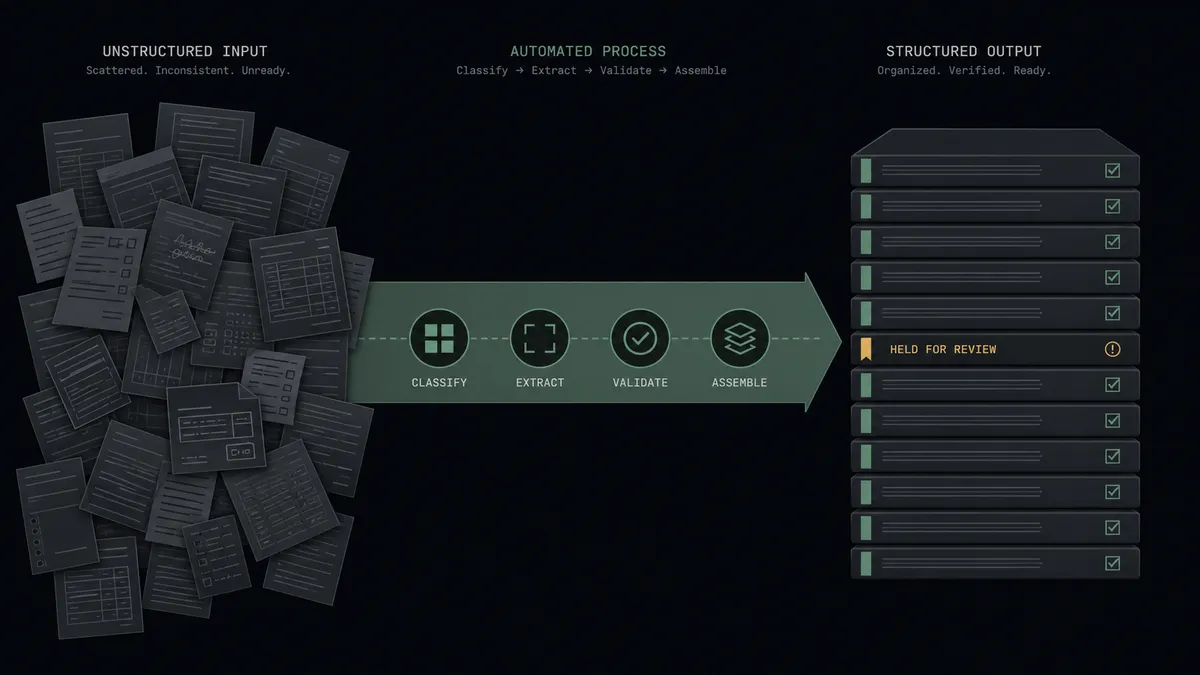
Yes, and this is where the connection earns its keep at month end. A fixed pipeline converts and merges every invoice identically. An agent holds the actions as tools, Get Invoice, Find Invoices, Convert File, Merge Files to PDF, Optimize File, Email Invoice, and reasons about each packet before it builds it. It knows this client requires timesheet backup and that one does not. It notices the invoice total is far outside the contact’s usual range and checks the billing history with Find Invoices before packaging anything. It catches the attachment that failed to convert and retries the job instead of shipping a packet with a missing exhibit.
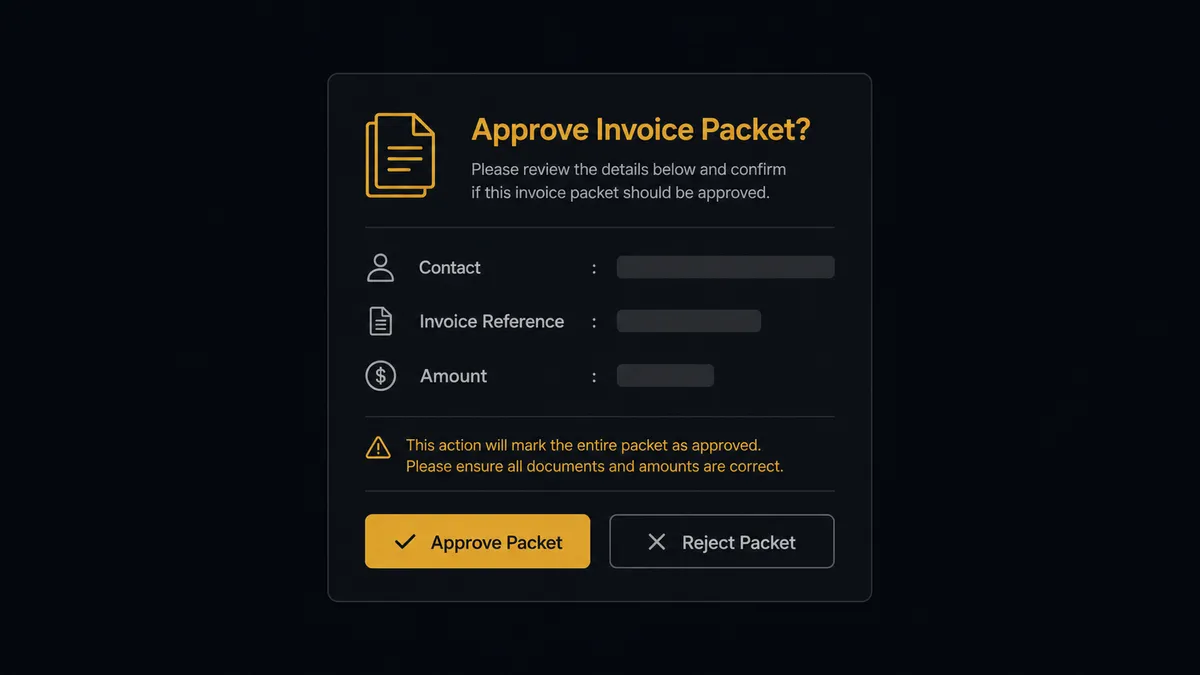
The consequential step is the send. Email Invoice puts a number in front of a customer, and a wrong number costs more than the minutes it saves. So before the send, the agent invokes a human-in-loop flow it holds as a callable tool. The workflow pauses and posts to the finance channel: “Billing packet ready for [contact], invoice [number], amount [total], due [date]. Total is well above this contact’s usual range. Packet attached. Approve to send?” The approver reviews the packet exactly as the client will receive it and decides with one click. Only then does Email Invoice run, and the approver’s name and timestamp land in the audit trail beside the invoice.
The agent escalates on context, not on a fixed rule. A routine monthly retainer packet for a long-standing client goes out on its own. A first invoice to a new contact, a total that breaks pattern, or a packet missing expected backup stops the line. Prospects call this the digital andon cord: like Toyota’s andon cord, the workflow halts the moment it hits uncertainty, and a person pulls it back into motion.
FlowRunner vs n8n
For a team with developers on hand, n8n is a credible way to wire Xero to CloudConvert. Its integration library is large, its community has published thousands of workflow templates, and its fair-code model means you can self-host it and inspect every node. If your engineers want to own the workflow logic, n8n gives them the surface to do it.
The difference is who can run the system and what happens at the consequential step. n8n workflows are built and maintained by people comfortable with expressions, JSON, and debugging node output. FlowRunner is built so the operations team that owns billing can see, adjust, and approve the flow themselves, with the human gate as a native part of how agents work rather than something engineered around the edges.
| What matters for this pair | FlowRunner | n8n |
|---|---|---|
| Human-in-the-loop before Email Invoice | Native. The agent invokes an approval flow as a callable tool and waits for a named approver | Possible with wait nodes and custom approval wiring you design yourself |
| Who runs the flow | An AI agent reads the invoice, reasons, picks actions as tools | A node graph a developer builds and maintains |
| Users included | Unlimited users on every tier | Varies by plan; cloud tiers are execution-priced |
| Bring your own AI keys | Yes, BYOK | Yes, via its AI nodes |
| Self-hosted option | Yes, cloud-hosted or self-hosted | Yes, fair-code self-hosting is a core strength |
| Pricing model | Transparent workflow-based tiers | Execution-based cloud pricing; self-host costs live in your infrastructure and upkeep |
If you have engineering capacity to spare and want a workflow tool your developers fully control, n8n is a genuine fit. If billing packets need to be owned by the finance and operations people who answer for them, with approvals and audit built in, this pairing on FlowRunner is.
Before and after
| Category | Before | After |
|---|---|---|
| Packet assembly | Someone exports, converts, and stitches each invoice packet in a desktop tool | Convert File and Merge Files to PDF build the packet the moment On Invoice Created fires |
| Supporting documents | Backup gets hunted down from email threads and shared drives at month end | Attachments ride along from Get Invoice and land in the packet in order |
| Errors reaching clients | Wrong totals and missing exhibits are discovered by the client’s AP team | The agent checks totals against history and holds anomalies for a named approver |
| Send discipline | Whoever assembled the packet sends it, with no record of review | Email Invoice runs only after approval, with approver and timestamp in the audit trail |
| Month-end crunch | Billing packets consume days of manual conversion work | The routine packets flow on their own; people touch only the exceptions |
What you can build
Invoice to approved billing packet. On Invoice Created fires, the agent pulls the record with Get Invoice, converts and merges the backup with Convert File and Merge Files to PDF, holds the packet at the approval gate, and sends it with Email Invoice once a person signs off.
Credit note packets with the same discipline. On Credit Note Created fires, Get Credit Note pulls the details, and the agent assembles the credit packet and routes it through the same named-approver gate before it reaches the customer.
Month-end archive builder. On a schedule, the agent calls Find Invoices for the period, converts each to PDF, and calls Create Archive to produce one dated bundle per month, ready for auditors without anyone assembling it.
Receivables evidence packs. Working from Get Aged Receivables, the agent builds a merged packet per overdue account, invoice plus history, so whoever makes the collections call has the full picture in one file.
Payment-triggered receipts. On New Payment Received fires, the agent pulls the payment with Get Payment, generates a receipt packet with Convert File, and attaches it to the record so the paper trail closes itself.
Getting started
Start on the free plan: 100 executions a month, every integration included, no credit card required, plus 14 days of Professional for new accounts. Both connectors are available on every tier, and every tier includes unlimited users and unlimited workflows.
Explore the integration details:
- Xero integration (8 triggers and 38 actions covering invoices, credit notes, contacts, payments, and reports)
- CloudConvert integration (15 actions covering conversion, merging, optimization, and archives)
Start building free at flowrunner.ai or book a demo to see a live Xero to CloudConvert workflow, pre-send approval gate and all.
Frequently asked questions
Is it free to connect Xero and CloudConvert on FlowRunner?
You can build and run the connection on FlowRunner's free plan, which includes 100 executions a month and every integration with no credit card required, and new accounts also get 14 days of Professional. Both connectors are available on every FlowRunner tier, and every tier includes unlimited users and unlimited workflows.
Can I self-host the Xero to CloudConvert workflow?
Yes. FlowRunner offers a cloud-hosted option and a self-hosted option, so the connection can run inside your own environment.
Does the AI agent need my own OpenAI or Claude key?
FlowRunner uses a bring-your-own-keys model, so you connect the AI provider key you already have. You are not locked to one model.
What happens when the agent finds an invoice that does not look right?
The agent stops and invokes a human-in-loop step. It posts the invoice number, contact, amount, and what looks off, such as a total that breaks from the contact's billing history, then waits for an approve or reject decision before Email Invoice runs.
Which Xero events can start the CloudConvert workflow?
Xero offers eight triggers, including On Invoice Created, On Invoice Updated, On Credit Note Created, and On New Payment Received. On Invoice Created is the natural start for billing packets, and On Credit Note Created runs the same assembly for credits.
Does CloudConvert have triggers of its own?
No. CloudConvert is a processing toolbox of fifteen actions with no triggers, so the flow always starts from a Xero event or a schedule. Get Job and Get Task let the workflow confirm each conversion finished before moving on.