How to Connect ShipBob with CloudConvert (With or Without an AI Agent)
Connect ShipBob shipments to CloudConvert document processing, optionally as an AI agent that builds carrier claim packets automatically and pauses for a human before an order is canceled or a return is created.
How do you connect ShipBob to CloudConvert?
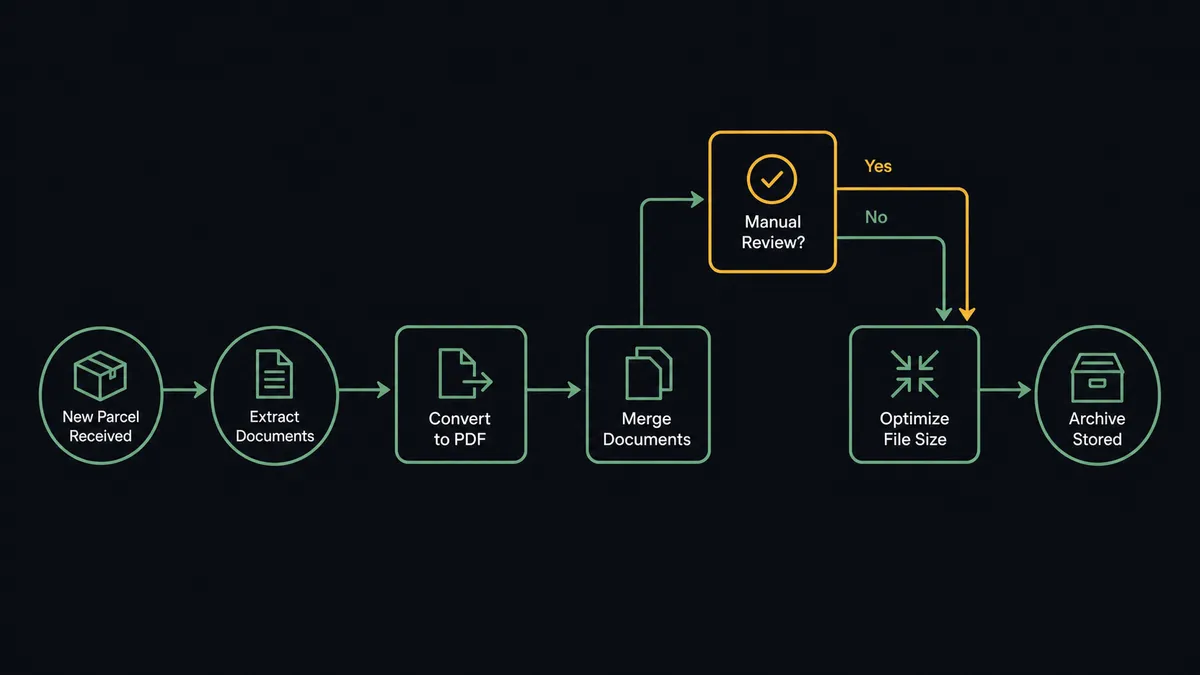
You connect ShipBob to CloudConvert by having ShipBob’s shipment triggers drive CloudConvert’s document actions: On Order Shipped fires, the workflow calls Get Order and Get Shipment for the items, carrier, and tracking, then Convert File and Merge Files to PDF turn the packing slip, label, and confirmation into one clean shipment packet, compressed with Optimize File and filed with Create Archive. FlowRunner is a visual AI-agent orchestration platform where automations run autonomously and pause for human judgment on the steps that carry real consequence. Run as an agent, the same connection handles the shipments that go wrong: it assembles the exception evidence packet, weighs the options, and pauses for a named approver before Cancel Order or Create Return changes what the customer receives.
The problem it solves
Fulfillment produces paper the way a warehouse produces cardboard. Every shipment generates a packing slip, a label, a confirmation, and for anything crossing a border, customs documents in whatever format the broker sent them. Today someone on the operations team collects those files per shipment, converts the odd formats, and files them where finance and support can find them later. Mostly they do not, because the routine shipments outnumber the hours, so the paper trail exists in fragments across email and the ShipBob dashboard.
Then a shipment goes sideways, and the fragments become the problem. A carrier reports damage, or a package stalls in an exception state, and now someone has to reconstruct the evidence: the shipment details, the photos, the slip, the timeline. Carrier claims have filing windows, and a claim that misses its window is money gone. Meanwhile the customer is waiting, and the reship-or-refund call gets made in a chat thread by whoever is online, with no consistent record of the cost weighed or the decision made. The routine paperwork was tedious; the exception paperwork is expensive.
How it works: the connection
The connection listens to ShipBob and writes through CloudConvert. Here is the plain version, grounded in the real connector actions.
- Trigger: ShipBob fires On Order Shipped the moment a shipment leaves the fulfillment center.
- Read: The workflow calls Get Order and Get Shipment to pull items, carrier, tracking, and destination.
- Convert: It calls Convert File on the packing slip, label, and any broker documents, turning mixed formats into uniform PDFs.
- Merge: It calls Merge Files to PDF to bind them into one shipment packet named by order and tracking number.
- Compress: It calls Optimize File so the packet stays lean enough to attach anywhere.
- Verify: It calls Get Job to confirm every conversion finished before the packet is filed.
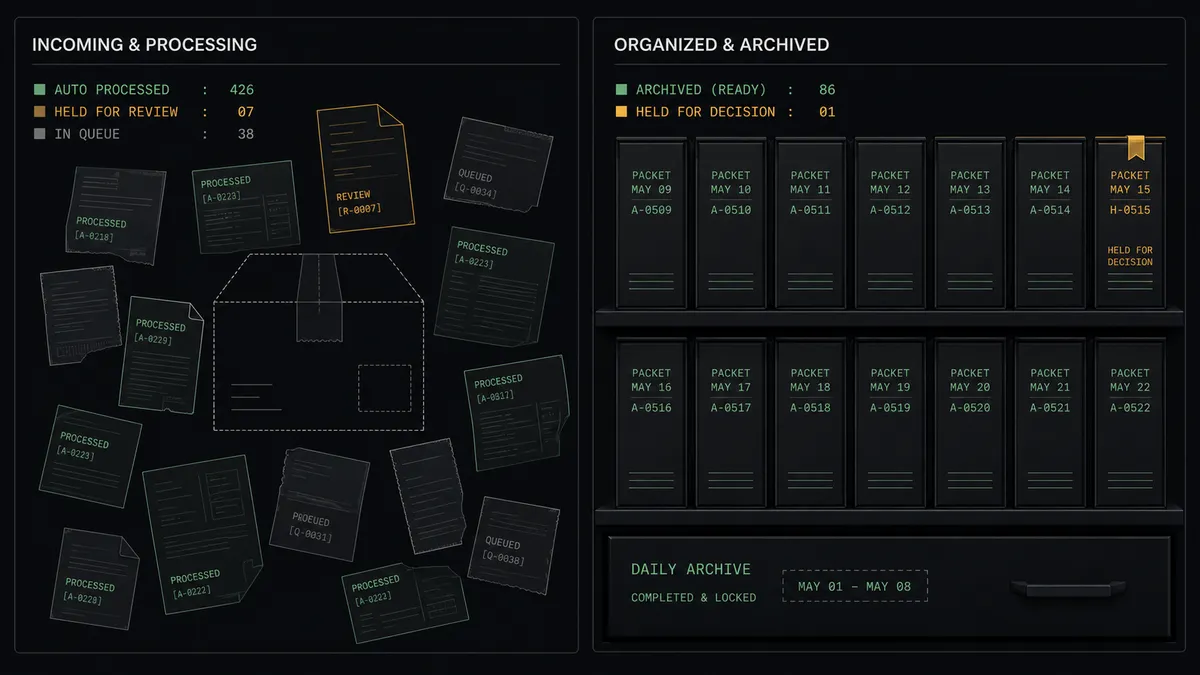
- Archive: On a nightly schedule, Create Archive bundles the day’s packets into one dated file for finance and support.
That is the “just connect them” answer. Every shipment leaves behind a complete, findable document packet, and the nightly archive means month-end and audit requests stop being scavenger hunts. On Shipment Delivered closes the loop by stamping the packet’s record with the delivery confirmation.
Can an AI agent run it? (and why a human stays in the loop)
Yes, and the exception path is where the agent earns its place. A fixed pipeline files paperwork; it cannot decide what to do when On Shipment Exception fires. The agent holds the real actions as tools, Get Shipment, Get Order, Estimate Fulfillment Cost, Cancel Order, Create Return, plus the CloudConvert chain, and works the problem the way your best operations person would. It classifies the exception from the shipment data: a carrier delay that will resolve itself, an address failure that needs the customer, or damage that needs a claim. It builds the evidence packet on the spot with Convert File and Merge Files to PDF while the details are fresh. It calls Estimate Fulfillment Cost to price the reship before anyone asks.
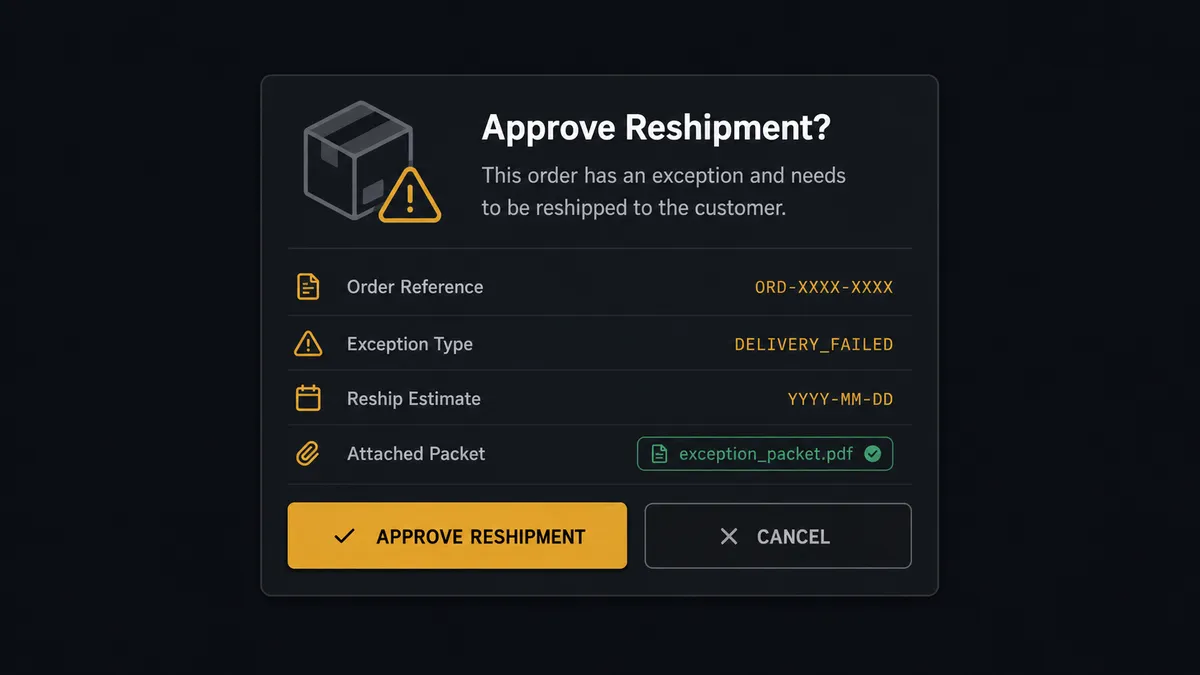
The consequential step is changing what the customer receives. Cancel Order kills a fulfillment in motion; Create Return sets reverse logistics moving; both are the kind of action you do not want fired by a script guessing. So the agent invokes a human-in-loop flow it holds as a callable tool. The workflow pauses and posts to the operations channel: “Shipment exception on order [number]: carrier reports damage. Reship estimate from Estimate Fulfillment Cost attached, evidence packet attached. Recommend reship and file a claim. Approve, or choose refund?” A person decides with one click, the agent executes exactly that decision, and the approver’s name and timestamp are recorded with the packet.
This is the digital andon cord, FlowRunner’s core thesis: like Toyota’s andon cord, the workflow stops the line the moment it hits uncertainty. The paperwork for hundreds of clean shipments flows with no human touch, and the line halts precisely at the handful of shipments where a wrong call costs real money and a customer relationship.
FlowRunner vs Celigo
If your operation runs on a major ERP, Celigo deserves its reputation. Its prebuilt integration apps, especially around NetSuite, encode years of real B2B data-sync practice, and as an iPaaS it moves records between enterprise systems with genuine depth. For keeping an ERP and a fulfillment platform in field-level sync, Celigo is a serious tool built for exactly that.
The difference is the shape of the problem. Syncing records is not the same as working an exception. Celigo keeps data consistent between systems; it is not built around an agent that reads a damaged-shipment report, prices the reship, assembles the claim packet, and asks a named person before acting.
| What matters for this pair | FlowRunner | Celigo |
|---|---|---|
| Human-in-the-loop before Cancel Order or Create Return | Native. The agent invokes an approval flow as a callable tool and waits for a decision | Error and exception queues exist for data flows; approval of business actions is not the core model |
| Who runs the flow | An AI agent reads the exception, reasons, picks actions as tools | Integration flows configured by an integration team |
| Users included | Unlimited users on every tier | Licensed per the platform agreement |
| Bring your own AI keys | Yes, BYOK | AI capabilities are part of the platform’s own stack |
| Self-hosted option | Yes, cloud-hosted or self-hosted | Cloud iPaaS |
| Pricing model | Transparent workflow-based tiers starting at $45/mo | Enterprise iPaaS contracts sized for enterprise budgets |
If your core need is deep, prebuilt ERP synchronization at enterprise scale, Celigo is genuinely the better fit. If the need is a fulfillment operation where documents file themselves and a person signs off before an order is canceled or a return is created, this pairing on FlowRunner is.
Before and after
| Category | Before | After |
|---|---|---|
| Shipment paperwork | Slips, labels, and broker files scattered across inboxes and the dashboard | Every shipment gets one merged, named packet the moment On Order Shipped fires |
| Carrier claims | Evidence reconstructed days later, sometimes after the filing window | The packet is assembled at exception time, while the claim window is open |
| Reship decisions | Made ad hoc in chat, cost unexamined, record nowhere | The agent prices the reship with Estimate Fulfillment Cost and a named approver decides |
| Archive and audit | Month-end document requests trigger a scavenger hunt | Create Archive files a dated bundle nightly, ready to hand over |
| Exception visibility | Problem shipments surface when a customer complains | On Shipment Exception and On Shipment On Hold put them in front of the team immediately |
What you can build
Shipment packet on every send. On Order Shipped fires, Get Order and Get Shipment pull the details, and the Convert File and Merge Files to PDF chain produces one named packet per shipment, compressed with Optimize File and filed automatically.
Exception claim builder with a decision gate. On Shipment Exception fires, the agent classifies the failure, assembles the evidence packet, prices the reship with Estimate Fulfillment Cost, and holds at the human-in-loop step until an approver picks reship, refund, or wait, before Cancel Order or Create Return runs.
Return paperwork loop. On Return Completed fires, the agent pulls the return details, merges the condition notes and original shipment packet into one return file, and archives it so disputes months later have a single source of truth.
Hold-queue digest. On Shipment On Hold events accumulate during the day; on a schedule the agent merges the held shipments into one review packet and posts it to the operations channel so holds get cleared in one sitting.
Receiving-order records. When inbound inventory moves, the agent pulls Get WROs and Get WRO Boxes, converts the receiving documents to PDF, and archives a per-order receiving packet so inventory disputes trace back to paper.
Getting started
Start on the free plan: 100 executions a month, every integration included, no credit card required, plus 14 days of Professional for new accounts. Both connectors are available on every tier, and every tier includes unlimited users and unlimited workflows.
Explore the integration details:
- ShipBob integration (5 triggers and 20 actions covering orders, shipments, returns, and inventory)
- CloudConvert integration (15 actions covering conversion, merging, optimization, and archives)
Start building free at flowrunner.ai or book a demo to see a live ShipBob to CloudConvert workflow, exception decision gate and all.
Frequently asked questions
Is it free to connect ShipBob and CloudConvert on FlowRunner?
You can build and run the connection on FlowRunner's free plan, which includes 100 executions a month and every integration with no credit card required, and new accounts also get 14 days of Professional. Both connectors are available on every FlowRunner tier, and every tier includes unlimited users and unlimited workflows.
Can I self-host the ShipBob to CloudConvert workflow?
Yes. FlowRunner offers a cloud-hosted option and a self-hosted option, so the connection can run inside your own environment.
Does the AI agent need my own OpenAI or Claude key?
FlowRunner uses a bring-your-own-keys model, so you connect the AI provider key you already have. You are not locked to one model.
What happens when the agent cannot tell whether an exception needs a reship or a refund?
The agent stops and invokes a human-in-loop step. It posts the order, the exception details from Get Shipment, the reship cost from Estimate Fulfillment Cost, and the assembled evidence packet, then waits for a decision before Cancel Order or Create Return runs.
Which ShipBob events can start the CloudConvert workflow?
ShipBob offers five triggers: On Order Shipped, On Shipment Delivered, On Shipment Exception, On Shipment On Hold, and On Return Completed. On Order Shipped drives routine document packets, and On Shipment Exception drives the claims path.
Does CloudConvert have triggers of its own?
No. CloudConvert has fifteen actions and no triggers, so the flow always starts from a ShipBob event or a schedule. The workflow uses Get Job to confirm each conversion finished before filing the packet.