How to Connect NetSuite with CloudConvert (With or Without an AI Agent)
Connect NetSuite to CloudConvert so invoice and sales order documents are standardized, merged into audit packets, and archived automatically, with an AI agent that flags duplicate invoices and pauses for the controller before Delete Invoice touches the ERP.
How do you connect NetSuite to CloudConvert?
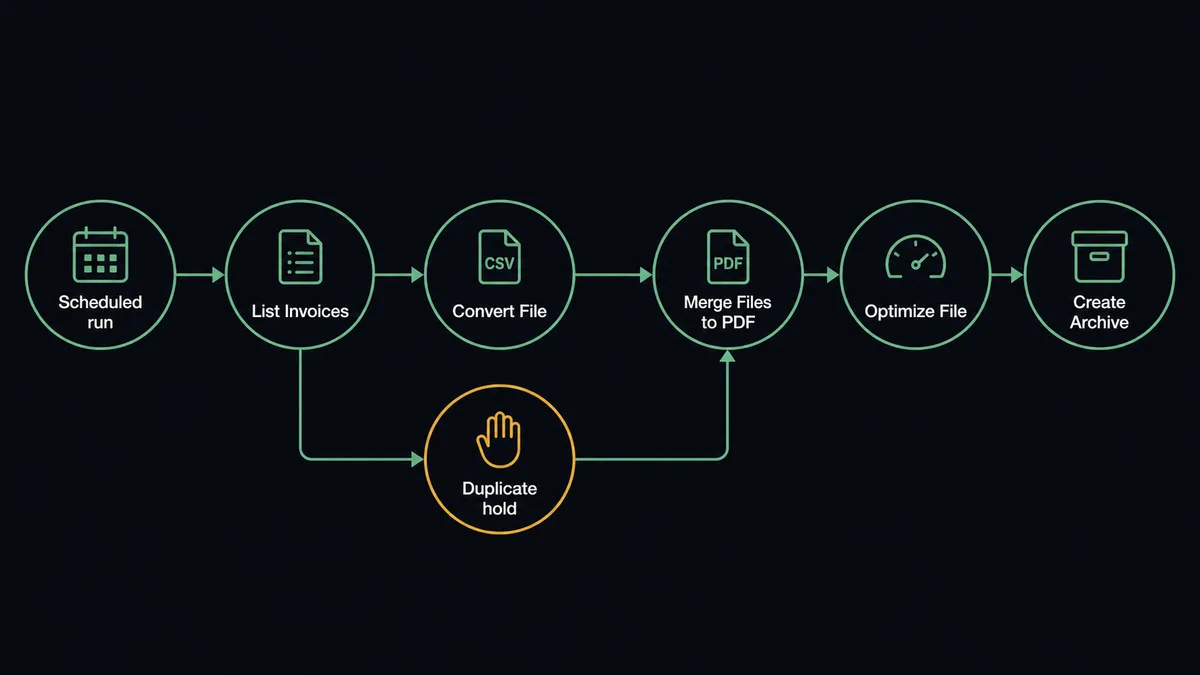
You connect NetSuite to CloudConvert by having a scheduled workflow pull invoice records with List Invoices and Get Invoice, push each document through Convert File to standardize the format, then assemble the set with Merge Files to PDF and compress it with Optimize File, so a month of ERP paperwork becomes one clean, ordered packet without anyone touching a file. FlowRunner is a visual AI-agent orchestration platform where automations run autonomously and pause for human judgment on the steps that carry real consequence. When the connection runs as an AI agent, the agent reviews the invoice set while it assembles the packet, catches duplicates and numbering gaps, and stops for the controller before Delete Invoice removes anything from NetSuite.
The problem it solves
Every close, someone on the finance team becomes a document clerk. Auditors, lenders, and tax preparers want the period’s invoices as one packet, in order, in one format. What actually exists is a NetSuite saved search and a folder of attachments in whatever format each one arrived: PDFs from one system, spreadsheet exports from another, the occasional image of a signed document. So a person downloads them one at a time, converts the strays, renames everything to sort correctly, merges the set, and emails a file that is too large to send. It is a full day of work that produces nothing the business did not already have, just in a shape someone else demanded.
The edges are what make it risky rather than merely tedious. A duplicate invoice sits in the set because it was entered twice in different subsidiaries, and now the packet overstates the period until someone notices. A numbering gap goes unexplained. The person assembling the packet is also the only person who knows where last quarter’s version lives. When the auditor asks for the same thing next quarter, the whole day happens again, slightly differently, with no record of what was excluded or why.
How it works: the connection
The connection reads from NetSuite and processes through CloudConvert. Here is the plain version, grounded in the real connector actions.
- Trigger: On the first morning of each month, the workflow pulls the prior period’s records.
- Read: It calls List Invoices for the period, Get Invoice for full detail on each, and Run SuiteQL Query for anything the standard filters miss, such as invoices edited after the period closed.
- Standardize: It sends each attached document through Convert File so every spreadsheet, image, and word processor file becomes a PDF.
- Assemble: It calls Merge Files to PDF to build one packet in invoice-number order.
- Compress: It calls Optimize File so the packet is small enough to share without splitting.
- Archive: It calls Create Archive to bundle the packet with the source files, and Extract Metadata to record what each file was before conversion.
That is the “just connect them” answer. The close packet builds itself, in order, in one format, with a manifest of what went in. The same steps run daily for continuous archiving, or on demand when a lender asks for a specific quarter.
Can an AI agent run it? (and why a human stays in the loop)
Yes, and the agent turns a document chore into a review. A deterministic pipeline converts and merges whatever it is given. An AI agent reads the invoice set while it works. List Invoices, Get Invoice, Run SuiteQL Query, Convert File, Merge Files to PDF, Optimize File, Create Archive, Delete Invoice: those are its tools, and along the way it notices what a tired human misses at 6 PM on close day. Two invoices to the same customer, same amount, three days apart, one with no payment applied. A gap in the numbering sequence. A document whose extracted metadata says it was modified after the period closed.
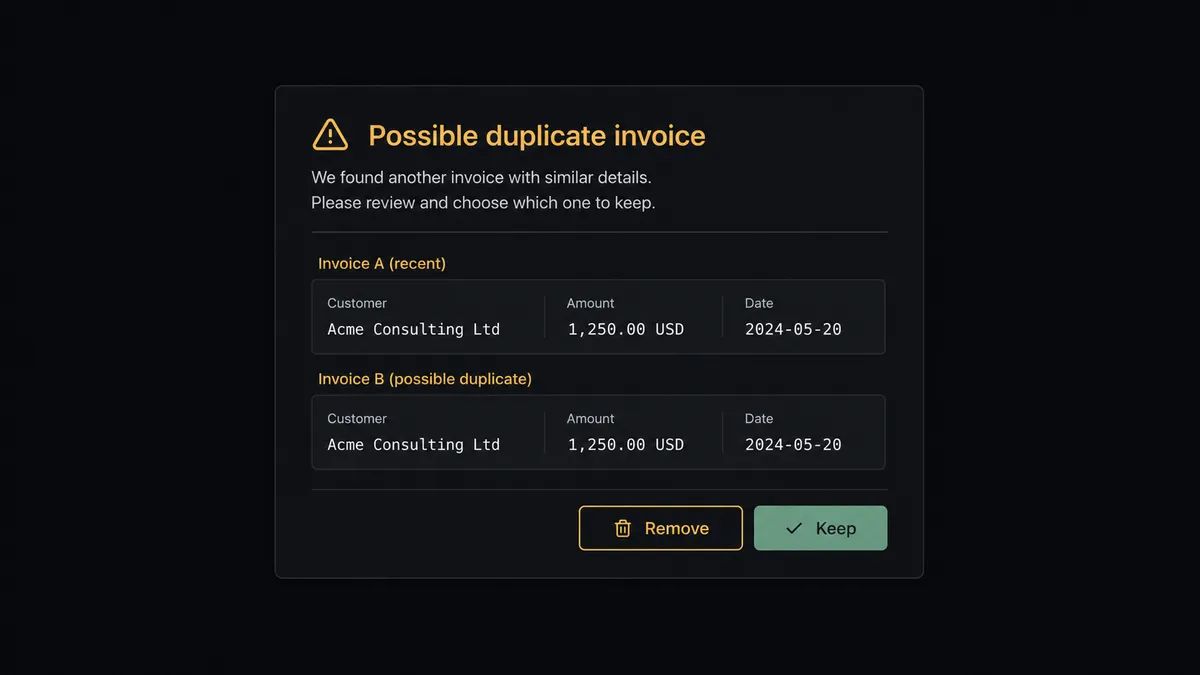
The consequential step is Delete Invoice. Removing an invoice from the ERP changes the books, and no automation should do that on its own reasoning. So when the agent concludes two records are duplicates, it does not act. It invokes a human-in-loop flow it holds as a callable tool, and the workflow pauses. The controller gets one message with both records side by side: “Possible duplicate in the March packet: invoice [number] and invoice [number], same customer, same amount, entered three days apart. Approve to remove the second from NetSuite, or keep both.” Only after approval does Delete Invoice run, and the packet is rebuilt without the removed record. The decision, the controller’s name, and the timestamp land in the audit trail next to the packet itself.
Everything else runs without interruption, because converting a file and merging a packet are reversible acts. The line only stops where the ERP is about to change. Prospects call this the digital andon cord: like Toyota’s quality control pull cord, the workflow stops the line the moment it hits uncertainty, and the controller pulls it back into motion.
FlowRunner vs Celigo
If you run NetSuite, you already know Celigo. The company grew up in the NetSuite ecosystem, its integration platform has prebuilt NetSuite integration apps that encode years of ERP field-mapping experience, and for standardized connections like NetSuite to a storefront or a 3PL, those templates save real implementation time. That pedigree is earned.
The difference is what kind of work the platform does. Celigo moves data between systems along mappings you configure. This workflow needs something else: judgment about the documents while they move, and a controller’s sign-off before the ERP changes. Here is the honest side-by-side.
| What matters for this pair | FlowRunner | Celigo |
|---|---|---|
| Human-in-the-loop on Delete Invoice | Native. The agent invokes an approval flow as a callable tool and pauses before the ERP changes | Error and exception queues for failed records, not agent-initiated approval on a pending action |
| Who runs the flow | An AI agent reads the invoice set, reasons, picks actions as tools | Configured data flows and mappings run as designed |
| Users included | Unlimited users on every tier | Seat and endpoint licensing on enterprise iPaaS terms |
| Bring your own AI keys | Yes, BYOK | AI features run inside Celigo’s platform offering |
| Self-hosted option | Yes, cloud-hosted or self-hosted | Cloud iPaaS |
| Pricing model | Transparent workflow-based tiers starting at $45/mo | Custom enterprise pricing by endpoints and volume |
If you need a battle-tested, template-driven sync between NetSuite and a handful of standard SaaS endpoints, Celigo is a credible enterprise answer. If you want the document work reasoned over, and a human gate on the one step that changes the books, that is where FlowRunner is the better fit.
Before and after
| Category | Before | After |
|---|---|---|
| Packet assembly | A finance person downloads, converts, renames, and merges files for a full day each close | The packet assembles itself on the first morning of the month |
| Format consistency | Spreadsheets, images, and PDFs mixed together in the deliverable | Convert File normalizes everything to PDF before the merge |
| Duplicate invoices | Found by the auditor, if at all | Flagged by the agent during assembly and resolved by the controller before the packet ships |
| Traceability | Whoever built the packet remembers what was excluded | Extract Metadata and the audit trail record every file, every exclusion, every approval |
| Repeat requests | Each lender or auditor request restarts the manual day | Any period rebuilds on demand from the same workflow |
What you can build
Month-end close packet. List Invoices pulls the period, Convert File standardizes every document, Merge Files to PDF assembles the set in order, Optimize File compresses it, and Create Archive stores the bundle with its manifest.
Duplicate sweep with controller approval. The agent cross-checks the period’s invoices with Run SuiteQL Query, flags suspected duplicates, and holds Delete Invoice for the controller’s side-by-side decision.
Sales order document room. List Sales Orders and Get Sales Order feed each order’s documents through Convert File into a per-customer archive, so fulfillment disputes are answered from one packet instead of a mailbox search.
Audit thumbnail index. Create Thumbnail generates a preview for every archived document and the agent assembles a visual index page, so the auditor finds the right invoice without opening a hundred files.
Vendor record snapshots. On a schedule, the agent pulls vendor data with List Vendors and Get Vendor, captures each vendor’s current terms into a document, and archives the set with Create Archive for the procurement review.
Getting started
Start on the free plan: 100 executions a month, every integration included, no credit card required, plus 14 days of Professional for new accounts. Both connectors are available on every tier, and every tier includes unlimited users and unlimited workflows, so finance, operations, and the controller all work from the same flows.
Explore the integration details:
- NetSuite integration (27 actions covering customers, vendors, invoices, sales orders, payments, and SuiteQL)
- CloudConvert integration (15 actions covering conversion, merging, optimization, and archives)
Start building free at flowrunner.ai or book a demo to see a live NetSuite to CloudConvert workflow, controller approval on Delete Invoice and all.
Frequently asked questions
Is it free to connect NetSuite and CloudConvert on FlowRunner?
You can build and run the connection on FlowRunner's free plan, which includes 100 executions a month and every integration with no credit card required, and new accounts also get 14 days of Professional. Both connectors are available on every FlowRunner tier, and every tier includes unlimited users and unlimited workflows.
Can I self-host the NetSuite to CloudConvert workflow?
Yes. FlowRunner offers a cloud-hosted option and a self-hosted option, so the connection can run inside your own environment.
Does the AI agent need my own OpenAI or Claude key?
FlowRunner uses a bring-your-own-keys model, so you connect the AI provider key you already have. You are not locked to one model.
What happens when the agent suspects a duplicate invoice?
Nothing is deleted. The agent puts both invoice records side by side, including customer, amount, date, and document links, and sends them to the controller. Delete Invoice runs only after the controller confirms which record goes, and the decision is recorded with their name and a timestamp.
Which NetSuite and CloudConvert actions does this workflow use?
Neither connector publishes event triggers in the FlowRunner catalog, so the workflow runs on a schedule. It reads with List Invoices, Get Invoice, and Run SuiteQL Query in NetSuite, then processes documents with Convert File, Merge Files to PDF, Optimize File, and Create Archive in CloudConvert.
Can the workflow handle file formats other than PDF?
Yes. CloudConvert's Convert File action converts between more than 200 formats, so spreadsheets, images, and word processor files attached to NetSuite records all normalize to PDF before Merge Files to PDF assembles the packet.