How to Connect Xero with Base64.ai (With or Without an AI Agent)
Connect Base64.ai document extraction to Xero so scanned supplier invoices become payable bills automatically, with an AI agent that pauses for a human before any payment leaves the account.
How do you connect Xero to Base64.ai?
You connect Xero to Base64.ai by running a scheduled workflow that calls Base64.ai’s Scan Document on each new supplier invoice, then drives Xero actions with the results: Find Contacts matches the supplier, Create Contact adds a new one, and Create Invoice posts the bill as a payable. Base64.ai exposes actions rather than triggers, so the schedule is the honest starting point, and Xero’s own On New Payment Received trigger closes the loop when a bill gets paid. FlowRunner is a visual AI-agent orchestration platform where automations run autonomously and pause for human judgment on the steps that carry real consequence. When the connection runs as an AI agent, the agent judges every extraction before posting, and it stops for a named human before Create Payment moves a single dollar.
The problem it solves
Accounts payable still runs on retyping. Supplier invoices arrive as PDFs and photographed paper, and someone in finance opens each one, reads the supplier name, keys the invoice number, date, and line amounts into Xero, and files the original somewhere they hope to find again. It is slow, it invites transposition errors, and it means the payables picture is only as current as the typing backlog. Month-end becomes an archaeology project.
The edges are expensive. A duplicate invoice arrives with a new file name and gets paid twice. A supplier changes bank details on a PDF that nobody scrutinizes. An invoice from an unfamiliar sender gets posted because it looked routine at a glance. Manual AP fails quietly, and the failures are exactly the ones that cost real money, because a busy person checking forty documents gives each one four seconds of skepticism.
How it works: the connection
The connection scans with Base64.ai and writes to Xero. Here is the plain version, grounded in the real connector actions.
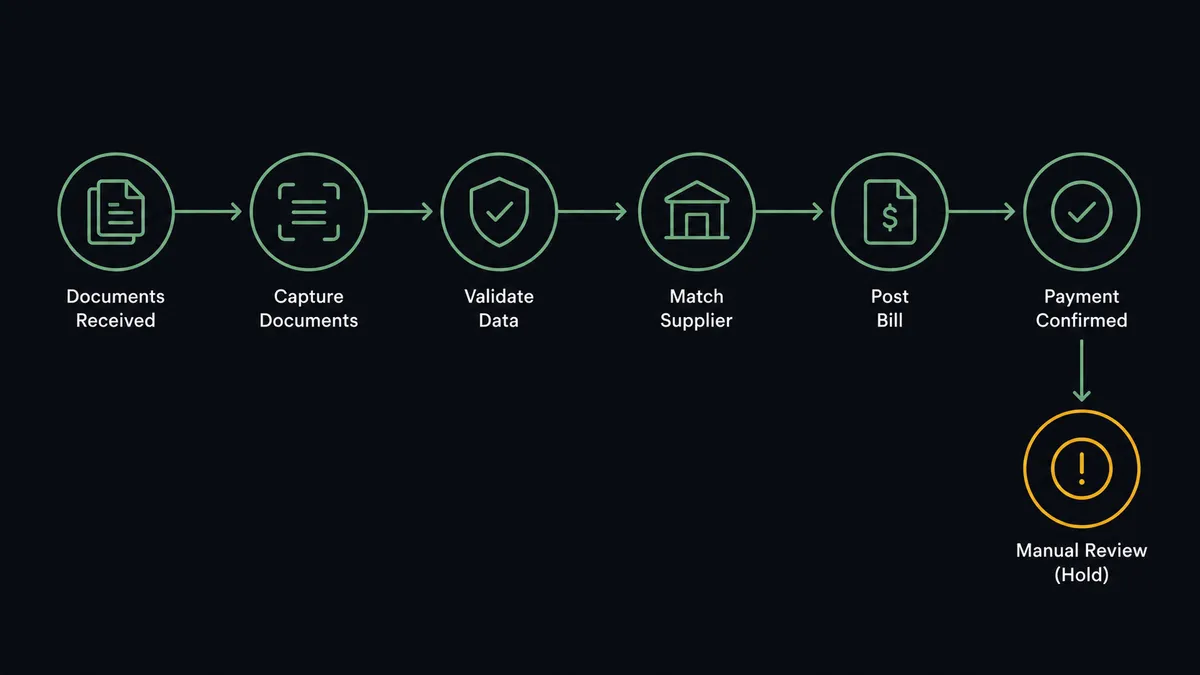
- Trigger: On a schedule, the workflow picks up new supplier documents from your intake location.
- Scan: It calls Scan Document on each file, or Start Async Scan for a batch, collecting results with Get Async Scan Result. Each document comes back as labeled fields with confidence scores.
- Validate: It checks the essentials: supplier identified, amounts consistent, invoice number not already posted.
- Match: It calls Find Contacts in Xero to locate the supplier, or Create Contact for a genuinely new one.
- Post: It calls Create Invoice to record the bill as a payable against the matched supplier, with the extracted line items, dates, and tax.
- Confirm: When the bill is later paid, Xero’s On New Payment Received trigger fires and the workflow marks the source document closed out.
That is the “just connect them” answer. Paper in, payables out, and the typing queue disappears. Get Aged Payables makes the same pipeline reportable: a scheduled digest of what is due, built from bills that entered the system minutes after they arrived.
Can an AI agent run it? (and why a human stays in the loop)
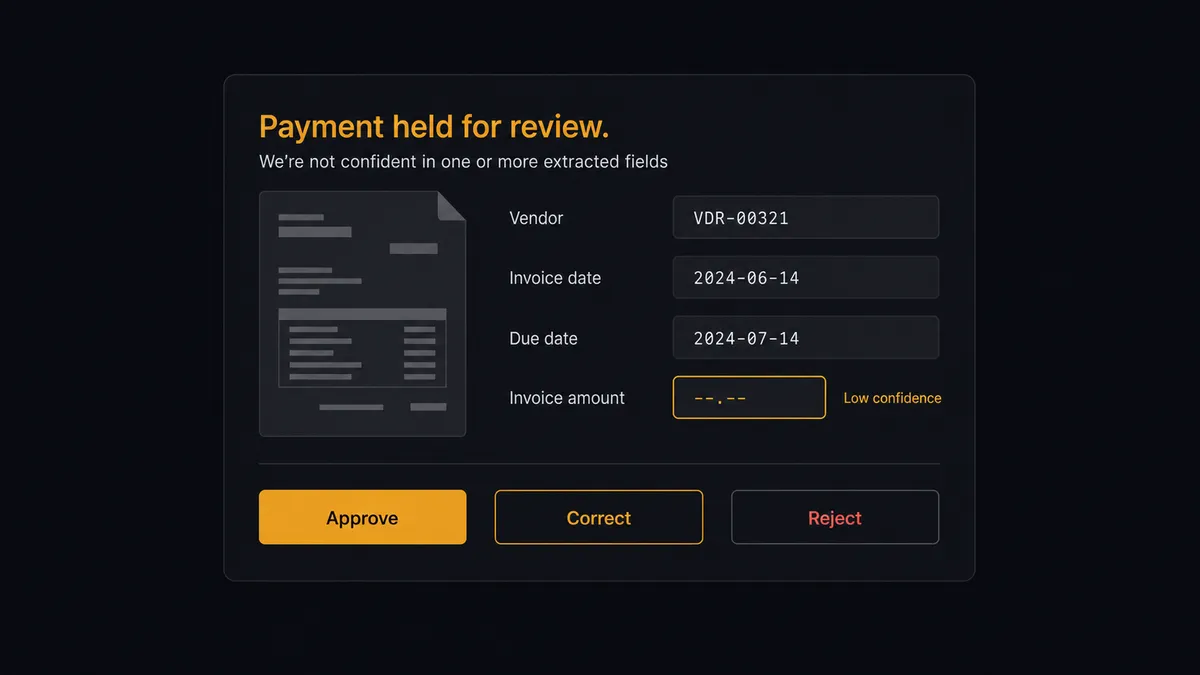
Yes, and the confidence scores are what make agent judgment more than a slogan. Base64.ai does not just return fields; it returns how sure it is about each one. An AI agent holds Scan Document, Get Async Scan Result, Detect Signatures, Find Contacts, Create Contact, Create Invoice, and Create Payment as tools, and it reads those signals the way a careful AP clerk reads a suspicious invoice: high-confidence extraction from a known supplier with a plausible amount posts straight through; anything else earns scrutiny before it touches the ledger.
The consequential step is Create Payment, because that is when money leaves. Before the agent settles any bill it doubts, it invokes a human-in-loop flow it holds as a callable tool. The workflow pauses and posts to the finance channel: “Bill from [supplier] extracted with low confidence on the amount field. Invoice number is one digit off from a bill posted earlier this month. Source document attached. Approve payment, correct the fields, or reject as duplicate?” A named approver decides. Only then does Create Payment run, and the decision, the approver, and the timestamp land in the audit trail next to the source document.
The gate is contextual, not blanket. A routine utility bill from a supplier you have paid for years does not need a committee. A first invoice from a new supplier, a changed remittance detail, a near-duplicate number: those stop the line every time. Prospects call this the digital andon cord, and AP is where the metaphor is most literal. Like Toyota’s cord, the workflow halts the moment something looks off, and a person clears it before a dollar moves.
FlowRunner vs n8n
n8n is a credible way to build this pipeline, and its strengths are real: a free self-hosted community edition, a large node library, and full flexibility to write code nodes wherever the built-ins run out. A developer who wants to own every line of an AP pipeline can build one in n8n, and many have.
The difference is who can build it and what happens at the moment money moves. FlowRunner is built around native human-in-the-loop and AI-agent orchestration, where the pause before payment is a first-class tool the agent invokes, not a wait node you wire and maintain.
| What matters for this pair | FlowRunner | n8n |
|---|---|---|
| Human-in-the-loop before Create Payment | Native. The agent invokes an approval flow as a callable tool, with the document and its reasoning attached | Wait and approval patterns you assemble and maintain yourself |
| Who runs the flow | An AI agent reads confidence scores, reasons, picks actions as tools | Node graphs and expressions you build; agent nodes exist but flows are developer-built |
| Users included | Unlimited users on every tier | Varies by plan; full RBAC and SSO sit in the Enterprise tier |
| Bring your own AI keys | Yes, BYOK | Yes, n8n also supports your own keys; parity here |
| Self-hosted option | Yes, cloud-hosted or self-hosted | Yes, self-hosting is a core n8n strength |
| Pricing model | Transparent workflow-based tiers | Execution-based cloud pricing; self-hosting shifts cost to infrastructure and upkeep |
If your team has engineers who enjoy owning automation infrastructure, n8n is a genuine option. If the people who run AP are finance people, and the requirement is an auditable pause before every uncertain payment, this pairing gets there without anyone writing an expression.
Before and after
Here is what changes operationally when the connection is live.
| Category | Before | After |
|---|---|---|
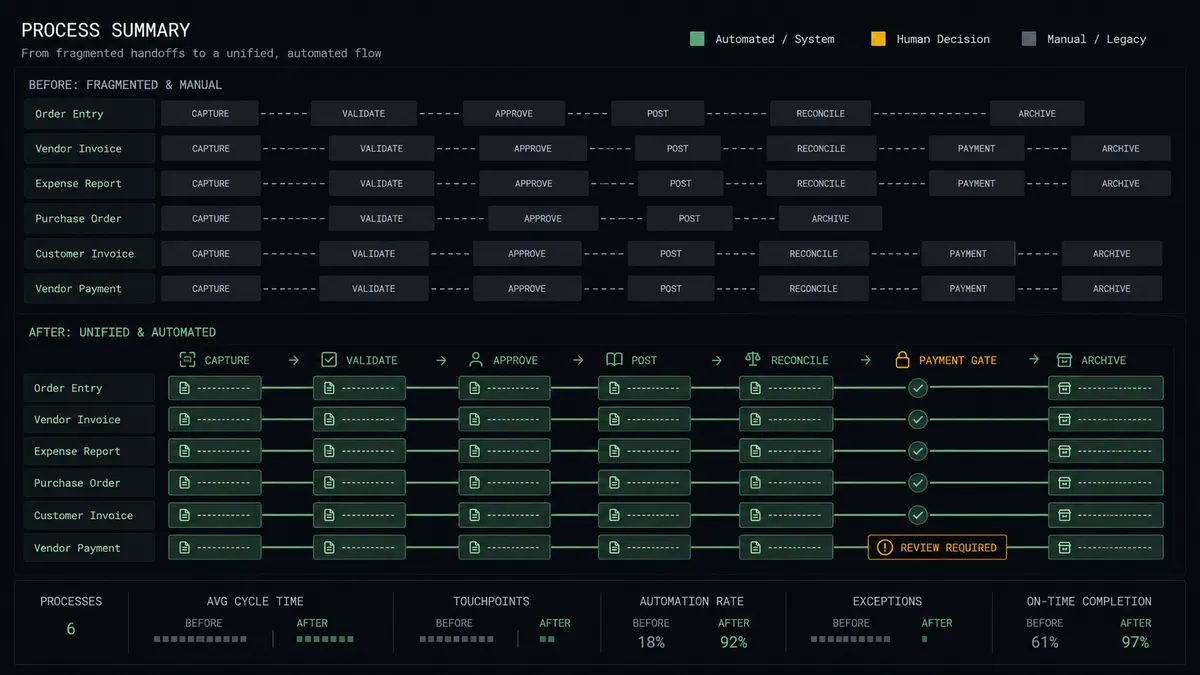
| Invoice entry | Finance retypes each PDF into Xero by hand | Scan Document feeds Create Invoice without a keyboard involved |
| Payables freshness | The payables picture trails the intake pile by days | Bills post minutes after documents arrive, on every schedule run |
| Duplicate payments | Near-duplicate invoice numbers slip through visual checks | The agent cross-checks every extraction against posted bills before Create Invoice |
| New supplier risk | Unfamiliar invoices get four seconds of human skepticism | First-time suppliers always route to a named approver before payment |
| Audit trail | The source PDF and the ledger entry live in different worlds | Every bill carries its document, extraction result, and approver in one trail |
What you can build
Intake to payable, no typing. The scheduled run scans new documents with Scan Document, matches suppliers via Find Contacts, and posts bills with Create Invoice, so the payables ledger stays current with the mail.
Payment run with a conscience. Before each payment cycle, the agent assembles due bills, clears the routine ones, and routes new suppliers, changed details, and low-confidence extractions through the approval gate before any Create Payment runs.
Duplicate catcher. Every extraction is checked against existing bills by invoice number, supplier, and amount, and near-matches are held for a person instead of posted, closing the classic double-payment hole.
Signed-delivery verification. For invoices that reference signed delivery paperwork, the agent runs Detect Signatures on the attached document and flags unsigned or mismatched paperwork before the bill posts.
Payables digest. On a weekly schedule, the agent pulls Get Aged Payables from Xero and posts a summary of what is due and what is held at the gate, so finance sees the whole pipeline including its exceptions.
Common questions
Is it free to connect Xero and Base64.ai on FlowRunner? You can build and run the connection on FlowRunner’s free plan, which includes 100 executions a month and every integration with no credit card required, and new accounts also get 14 days of Professional. Both connectors are available on every FlowRunner tier, and every tier includes unlimited users and unlimited workflows.
Can I self-host the Xero to Base64.ai workflow? Yes. FlowRunner offers a cloud-hosted option and a self-hosted option, so the connection can run inside your own environment.
Does the AI agent need my own OpenAI or Claude key? FlowRunner uses a bring-your-own-keys model, so you connect the AI provider key you already have. You are not locked to one model.
What happens when the extraction confidence is low or the supplier is new? The agent holds the bill. It posts the extracted fields, the confidence signals, and the source document to your finance channel, and a named approver corrects or confirms before Create Invoice posts the bill. Payments on uncertain bills never run without that sign-off.
How does the workflow start if Base64.ai has no triggers? On a schedule. Base64.ai exposes actions, not triggers, so the workflow runs on a timer: it picks up new supplier documents from your intake location, calls Scan Document or Start Async Scan on each, and collects results with Get Async Scan Result before posting to Xero.
Which Xero actions does the connection use? The core path uses Find Contacts, Create Contact, Create Invoice, and Create Payment, with Get Aged Payables available for the payables digest. Create Payment is the consequential one, so it sits behind the human-in-loop step.
Getting started
Start on the free plan: 100 executions a month, every integration included, no credit card required, plus 14 days of Professional for new accounts. Both connectors are available on every tier, and every tier includes unlimited users and unlimited workflows, so the whole finance team can watch the same AP pipeline and share the same approval queue from day one.
Explore the integration details:
- Xero integration (8 triggers and 38 actions across invoices, payments, and reports)
- Base64.ai integration (11 actions for document extraction and verification)
Start building free at flowrunner.ai or book a demo to see a live Xero to Base64.ai workflow, payment gate and all.
Frequently asked questions
Is it free to connect Xero and Base64.ai on FlowRunner?
You can build and run the connection on FlowRunner's free plan, which includes 100 executions a month and every integration with no credit card required, and new accounts also get 14 days of Professional. Both connectors are available on every FlowRunner tier, and every tier includes unlimited users and unlimited workflows.
Can I self-host the Xero to Base64.ai workflow?
Yes. FlowRunner offers a cloud-hosted option and a self-hosted option, so the connection can run inside your own environment.
Does the AI agent need my own OpenAI or Claude key?
FlowRunner uses a bring-your-own-keys model, so you connect the AI provider key you already have. You are not locked to one model.
What happens when the extraction confidence is low or the supplier is new?
The agent holds the bill. It posts the extracted fields, the confidence signals, and the source document to your finance channel, and a named approver corrects or confirms before Create Invoice posts the bill. Payments on uncertain bills never run without that sign-off.
How does the workflow start if Base64.ai has no triggers?
On a schedule. Base64.ai exposes actions, not triggers, so the workflow runs on a timer: it picks up new supplier documents from your intake location, calls Scan Document or Start Async Scan on each, and collects results with Get Async Scan Result before posting to Xero.
Which Xero actions does the connection use?
The core path uses Find Contacts, Create Contact, Create Invoice, and Create Payment, with Get Aged Payables available for the payables digest. Create Payment is the consequential one, so it sits behind the human-in-loop step.