How to Connect Typeform with Clio Manage (With or Without an AI Agent)
Connect Typeform intake questionnaires to Clio Manage so completed forms become contacts and matters, with an AI agent that reads the free-text answers, screens for conflicts, and pauses for the supervising attorney before Create Matter runs.
How do you connect Typeform to Clio Manage?
You connect Typeform to Clio Manage by having a scheduled workflow pull new intake submissions with Get Form Responses, match or create the client in Clio Manage with Get Contact and Create Contact, and open the file with Create Matter, so a completed questionnaire becomes a numbered matter without anyone re-typing the answers. FlowRunner is a visual AI-agent orchestration platform where automations run autonomously and pause for human judgment on the steps that carry real consequence. When the connection runs as an AI agent, the agent actually reads what the prospective client wrote, screens the parties for conflicts against your existing Clio Manage records, and stops for the supervising attorney before any matter is opened.
The problem it solves
The intake questionnaire on your website is a Typeform because Typeform makes it easy for a nervous prospective client to finish: one question at a time, plain language, works on a phone. But the answers land in Typeform’s results view, and the practice runs on Clio Manage. So a paralegal exports responses, reads each one, figures out from a paragraph of free text what kind of matter this is and who the other side is, searches Clio Manage for the names, creates the contact, opens the matter, and types a matter description that is really a summary of what the client wrote. Every submission costs the same fifteen minutes of transcription whether the firm takes the case or not.
The edges are worse. Free-text answers do not map to fields: the opposing party is buried mid-paragraph, the legal issue is described in the client’s words, not a practice area name. A rushed reading misses that the “other driver” in an injury intake is an existing client. Submissions pile up over a weekend, and the fastest firms in your market are calling those prospects back while yours are still in the export queue. And a form tool is now quietly holding sensitive legal intake details indefinitely, because nobody’s job is to go back and clean it out.
How it works: the connection
The connection reads from Typeform and writes to Clio Manage. Here is the plain version, grounded in the real connector actions.
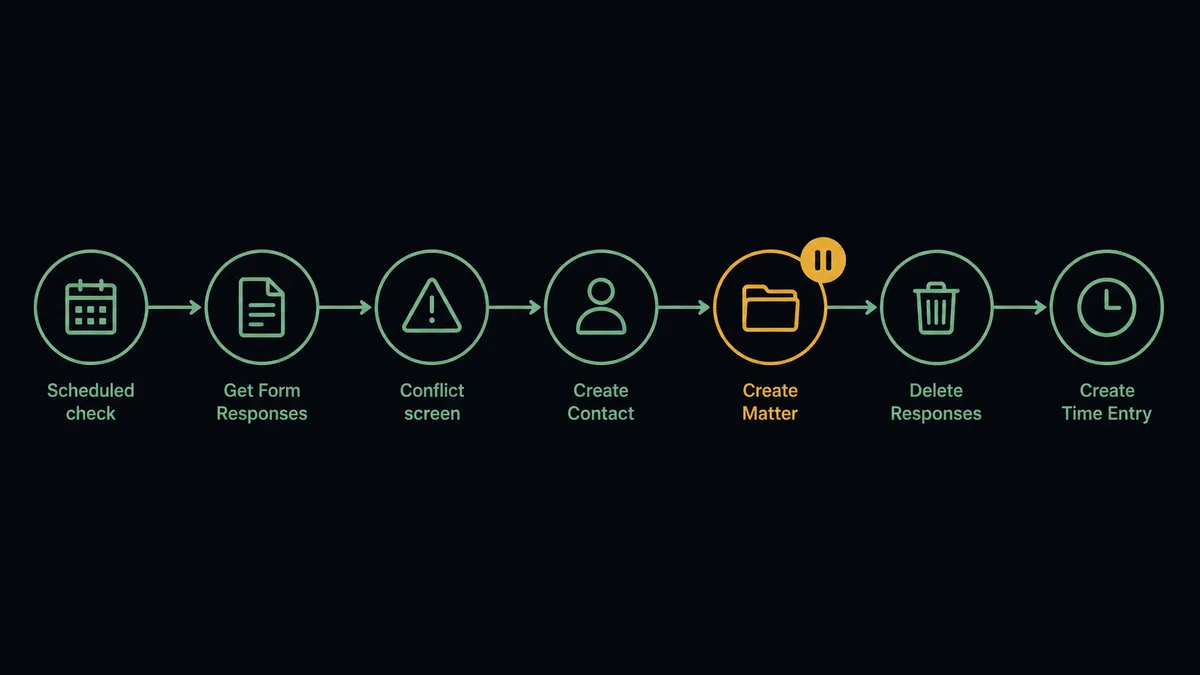
- Trigger: On a schedule, morning and midday, the workflow checks the intake form for new submissions.
- Read: It calls Get Form Responses to pull each new submission with every answer, including the free-text description of the legal issue.
- Screen: It calls List Contacts and List Matters in Clio Manage to check whether the prospective client or any named opposing party already appears in the firm’s records.
- Match the client: It calls Get Contact to confirm an existing record, or Create Contact to add the new client with name, email, and phone from the form.
- Open the file: It calls Create Matter with the practice area, matter description, and responsible attorney.
- Clean up: Once the Clio Manage records are confirmed, it calls Delete Responses in Typeform so the intake details stop living in the form tool.
- Capture the time: It calls Create Time Entry to log the intake review against the new matter.
That is the “just connect them” answer. Submissions become matters, the paralegal stops transcribing, and the form tool stops accumulating sensitive data.
Can an AI agent run it? (and why a human stays in the loop)
Yes, and for this pair the agent earns its keep before it ever touches Clio Manage. A plain field-mapping sync cannot handle a Typeform intake, because the most important answers are prose. The agent reads the submission the way the paralegal does: it identifies the opposing party inside a paragraph, classifies the legal issue into one of your practice areas, and notices when an answer contradicts itself. Get Form Responses, List Contacts, List Matters, Get Contact, Create Contact, Create Matter, Delete Responses, Create Time Entry: those are its tools, and it chooses per submission.
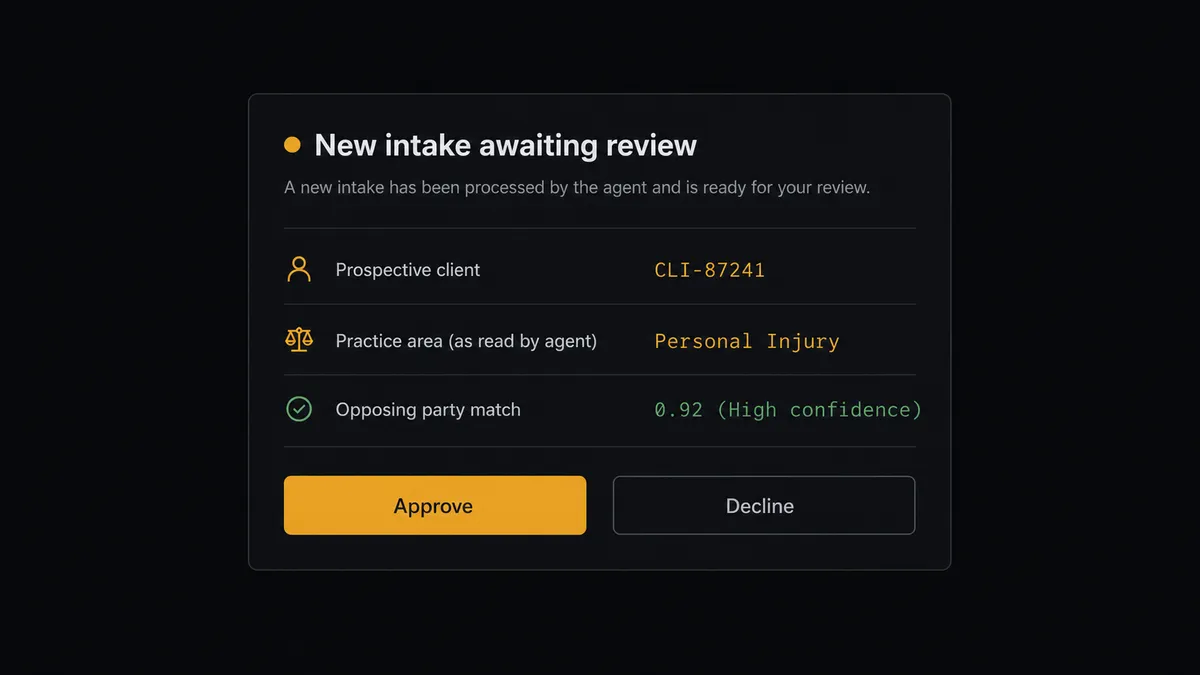
The consequential step is Create Matter. Opening a matter is an engagement decision with conflict-clearance obligations attached, so the agent never takes it alone. When it finds any overlap between the parties in the form and the firm’s existing contacts or matters, or when it cannot classify the issue with confidence, it invokes a human-in-loop flow it holds as a callable tool. The workflow pauses and the supervising attorney receives one complete message: “New intake from [name], read as [practice area]. Opposing party [name] matches an existing record, attached. Approve to open the matter, or decline with a note.” Only after approval does Create Matter run. There is a second irreversible step here too: Delete Responses permanently removes the submission from Typeform, so the agent runs it only after the Clio Manage records are verified, never before.
The approval is not a formality bolted onto the end. It is the point. The attorney sees the raw answers, the agent’s reading, and the conflict hits in one place, decides in one click, and that decision is recorded with their name and a timestamp. Prospects call this the digital andon cord: like Toyota’s quality control pull cord, the workflow stops the line the moment it hits uncertainty, and the attorney pulls it back into motion.
FlowRunner vs n8n
A technical evaluator will find n8n early in this search, and fairly. n8n offers a very large node library, a free self-hosted core under its fair-code license, and a deep community template gallery. A developer can wire Typeform to an HTTP call against Clio’s API and have something working in an afternoon, with full control over every line.
The catch is who has to live with it. Intake belongs to operations and paralegals, and a workflow that interprets prose, screens conflicts, and routes an attorney approval is not an afternoon node graph. Here is the honest side-by-side.
| What matters for this pair | FlowRunner | n8n |
|---|---|---|
| Human-in-the-loop on Create Matter | Native. The agent invokes an approval flow as a callable tool and pauses before the matter opens | Possible with wait and form nodes you assemble and maintain yourself |
| Who runs the flow | An AI agent reads the free-text answers, reasons, picks actions as tools | Node graph you design step by step; agent nodes exist but you wire the logic |
| Users included | Unlimited users on every tier | Cloud plans priced with limits; unlimited users requires self-hosting |
| Bring your own AI keys | Yes, BYOK | Yes, n8n also supports your own model keys |
| Self-hosted option | Yes, cloud-hosted or self-hosted | Yes, fair-code self-hosted core |
| Pricing model | Transparent workflow-based tiers with audit trails and RBAC at the Professional tier | Execution-based cloud pricing; full compliance features sit in the custom-priced Enterprise tier |
If your firm has an engineer who wants to own and maintain the stack, n8n is a strong tool in their hands. If the requirement is that operations staff run intake and no matter ever opens without a recorded attorney decision, FlowRunner is the better fit.
Before and after
| Category | Before | After |
|---|---|---|
| Submission handling | A paralegal exports Typeform results and transcribes each one into Clio Manage | Submissions flow to Clio Manage on the scheduled run with no transcription |
| Reading the answers | Whoever processes the form interprets the prose under time pressure | The agent classifies the issue and extracts parties, and an attorney reviews its reading |
| Conflict screening | Depends on remembering to search every name in the answers | Every party in every submission is screened against existing contacts and matters |
| Response time | Weekend and evening submissions wait for the next export | Each scheduled run processes everything received since the last one |
| Data left in the form tool | Old intake responses accumulate in Typeform indefinitely | Delete Responses purges each submission once the matter data is confirmed in Clio Manage |
What you can build
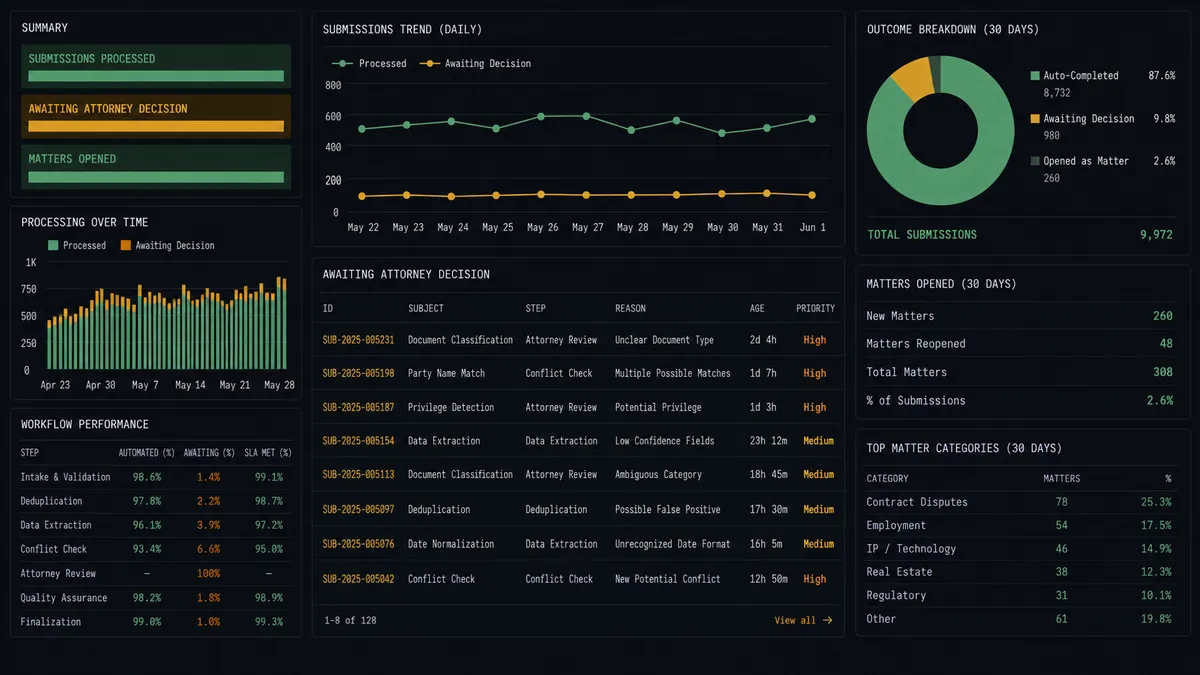
Questionnaire to open matter, screened. The scheduled run pulls submissions with Get Form Responses, the agent screens every named party with List Contacts and List Matters, creates the client with Create Contact, and holds Create Matter for attorney approval.
Intake data hygiene. After the matter is confirmed, the agent calls Delete Responses so sensitive intake details do not accumulate in Typeform, and logs the purge in the audit trail.
Declined-intake follow-up list. When the attorney declines an intake, the agent still calls Create Contact so the firm keeps a clean record of the inquiry, tagged for a referral letter, without opening a matter.
Form performance review. On a monthly schedule, the agent calls Get Form Insights and Get Form to see where prospective clients drop off, then posts a summary so operations can decide which questions to cut.
Multilingual intake. With Auto-Translate Form, the agent maintains translated versions of the intake questionnaire, and processes submissions from any language version through the same conflict screen and attorney approval.
Getting started
Start on the free plan: 100 executions a month, every integration included, no credit card required, plus 14 days of Professional for new accounts. Both connectors are available on every tier, and every tier includes unlimited users and unlimited workflows, so intake staff and attorneys share the same workspace from day one.
Explore the integration details:
- Typeform integration (36 actions covering forms, responses, themes, and workspaces)
- Clio Manage integration (9 actions covering matters, contacts, activities, tasks, and time entries)
Start building free at flowrunner.ai or book a demo to see a live Typeform to Clio Manage workflow, attorney approval on Create Matter and all.
Frequently asked questions
Is it free to connect Typeform and Clio Manage on FlowRunner?
You can build and run the connection on FlowRunner's free plan, which includes 100 executions a month and every integration with no credit card required, and new accounts also get 14 days of Professional. Both connectors are available on every FlowRunner tier, and every tier includes unlimited users and unlimited workflows.
Can I self-host the Typeform to Clio Manage workflow?
Yes. FlowRunner offers a cloud-hosted option and a self-hosted option, so the connection can run inside your own environment.
Does the AI agent need my own OpenAI or Claude key?
FlowRunner uses a bring-your-own-keys model, so you connect the AI provider key you already have. You are not locked to one model.
What happens when a form answer is ambiguous or a conflict appears?
The agent stops before anything is created in Clio Manage. It packages the full form response, its own reading of the ambiguous answer, and any matching contacts or matters it found, then sends that to the supervising attorney. Create Matter runs only after an approve decision.
Which Typeform and Clio Manage actions does this workflow use?
Neither connector publishes event triggers in the FlowRunner catalog, so the workflow runs on a schedule. It pulls new submissions with Get Form Responses in Typeform, screens with List Contacts and List Matters in Clio Manage, then creates records with Create Contact and Create Matter.
Does the workflow remove intake data from Typeform after it transfers?
It can. Once the contact and matter are confirmed in Clio Manage, the agent calls Delete Responses in Typeform to purge the submission, so sensitive intake details do not sit in a form tool longer than they need to. Deletion is permanent, so the agent only runs it after the Clio Manage records are verified.