How to Connect Notion with Clio Manage (With or Without an AI Agent)
Connect a Notion intake database to Clio Manage so approved intakes become contacts and matters automatically, with an AI agent that runs the conflict screen and pauses for the supervising attorney before Create Matter opens a billable file.
How do you connect Notion to Clio Manage?
You connect Notion to Clio Manage by having a scheduled workflow read your Notion intake database with Find Database Item, match or create the client in Clio Manage with Get Contact and Create Contact, and open the file with Create Matter, so an intake record marked ready in Notion becomes a numbered matter in your practice management system without anyone re-keying it. FlowRunner is a visual AI-agent orchestration platform where automations run autonomously and pause for human judgment on the steps that carry real consequence. When the same connection runs as an AI agent, the agent reads each intake, screens the parties for conflicts against your existing Clio Manage records, and stops for the supervising attorney before any matter is opened.
The problem it solves
In most small and mid-sized firms, intake lives in Notion because that is where the operations team can actually build: a database with client name, matter type, referral source, adverse parties, and a status column. Clio Manage is the system of record for matters, contacts, and billing. The bridge between the two is a person. Someone watches the intake board, waits for the status to flip to ready, then opens Clio Manage, searches for the contact, creates it if it is missing, opens the matter, sets the practice area and responsible attorney, and finally goes back to Notion to paste in the matter number. Every step is copy-paste, and every intake waits in the queue until that person gets to it.
The edges are where it hurts. A contact gets created twice because the intake spelled the name differently than the Clio Manage record. A matter opens for a party the firm already represents on the other side, and nobody catches it until an attorney recognizes the name weeks in. An intake sits at ready over a holiday and the prospective client signs with another firm. The consultation never gets billed because the time entry was an afterthought. It is what happens when a manual bridge carries work that deserves a screen, a decision, and a record.
How it works: the connection
The connection reads from Notion and writes to Clio Manage. Here is the plain version, grounded in the real connector actions.
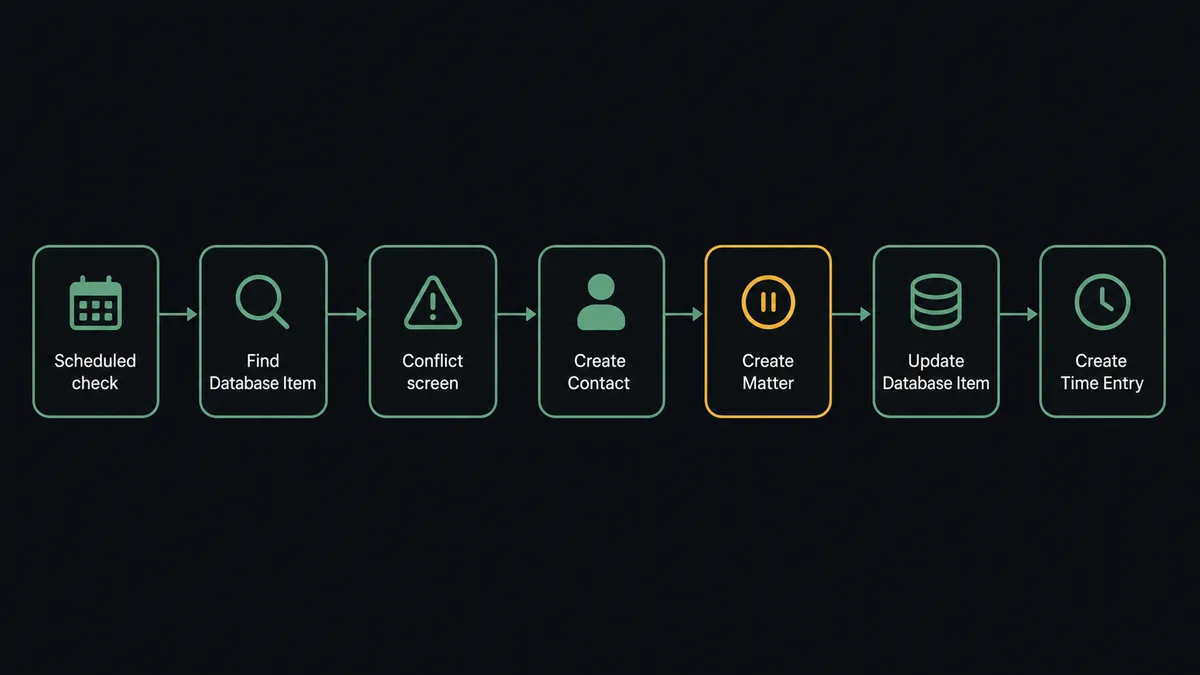
- Trigger: Every morning at 7 AM, the workflow checks the Notion intake database for records whose status is set to ready to open.
- Read: It calls Find Database Item to pull each qualifying record: client name, email, matter type, adverse parties, and referral source.
- Screen: It calls List Contacts and List Matters in Clio Manage to check whether the client or any adverse party already appears in the firm’s records.
- Match the client: It calls Get Contact to confirm an existing client record, or Create Contact to add the new client with the details from the intake.
- Open the file: It calls Create Matter with the matter description, practice area, and responsible attorney mapped from the Notion record.
- Close the loop: It calls Update Database Item in Notion to write the matter number back to the intake record and flip the status to open.
- Capture the time: It calls Create Time Entry in Clio Manage to log the intake consultation against the new matter.
That is the “just connect them” answer. Intake records become matters, the matter number lands back on the board where the team already looks, and the intake consult gets billed instead of forgotten.
Can an AI agent run it? (and why a human stays in the loop)
Yes, and this is where the connection stops being a sync and starts being a junior intake coordinator with perfect discipline. Instead of a fixed script that copies fields in the same order every time, an AI agent reads the intake record in front of it and reasons about it. Find Database Item, List Contacts, List Matters, Get Contact, Create Contact, Create Matter, Create Time Entry, Update Database Item: these are the agent’s toolbox, and it picks the calls each intake actually needs. A returning client with a clean screen gets matched, not duplicated. A misspelled name gets recognized as the same person, not created as a second contact.
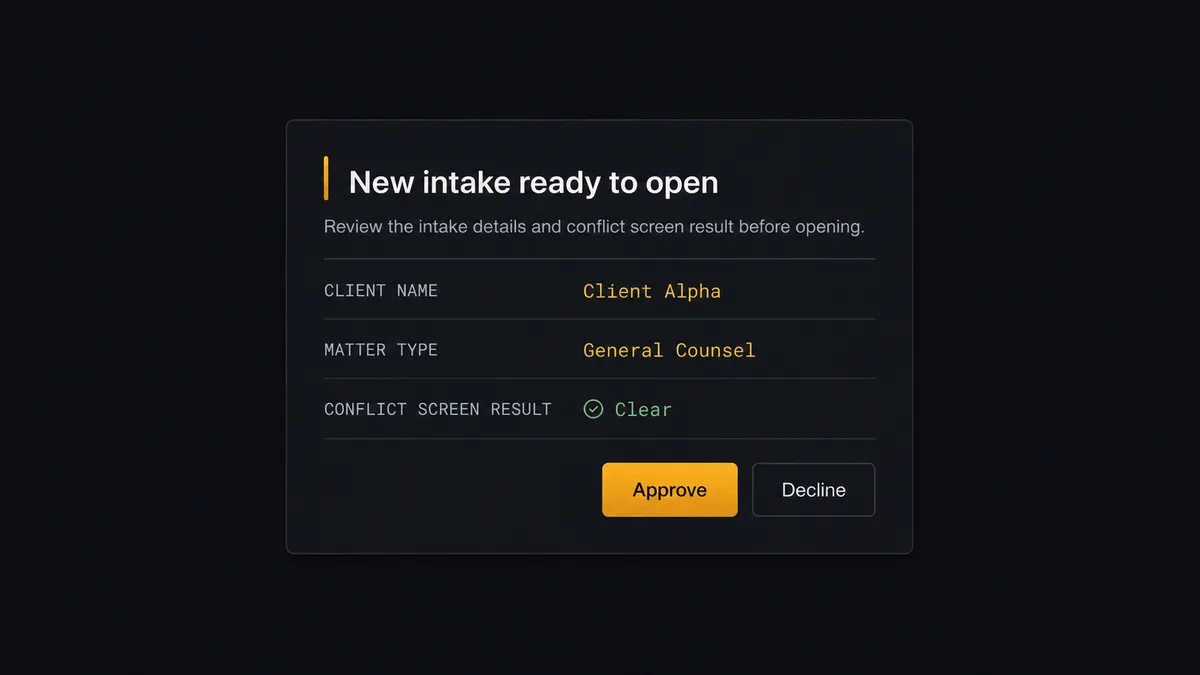
The consequential step is Create Matter. Opening a matter is an engagement decision with professional responsibility attached: it says the firm has cleared conflicts and accepted the representation. So the agent never fires Create Matter on its own judgment. When the conflict screen returns any overlap, or when the intake is unusual in a way the agent cannot resolve, it invokes a human-in-loop flow it holds as a callable tool. The workflow pauses and the supervising attorney gets the full picture in one message: “New intake ready to open: [client name], [matter type]. Conflict screen found [n] existing records with matching party names, attached below. Approve to open the matter, or decline with a note.” One click clears it or stops it. Only after approval does Create Matter run, and the approving attorney’s name, the screen result, and the timestamp all land in the audit trail.
That is the difference between a threshold rule and judgment. A keyword filter cannot tell “Smith Industries, the client we billed last year” from “Smith Industries, the adverse party in an active matter.” The agent reads both records, sees the difference, and escalates the one that matters. Prospects call this the digital andon cord: like Toyota’s quality control pull cord, the workflow stops the line the moment it hits uncertainty, and the attorney pulls it back into motion.
FlowRunner vs n8n
Technical teams evaluating this connection will find n8n first, and it earns the attention. n8n has a very large node library, a free self-hosted core under its fair-code license, and a developer community that has published thousands of workflow templates. For an engineering team that wants full control of the code path and is comfortable maintaining its own instance, n8n is a genuinely capable choice.
The gap shows up when the people who own intake are not developers. Legal operations teams live in Notion precisely because they do not write JavaScript, and a conflict screen with an attorney sign-off is not a happy-path automation. Here is the honest side-by-side.
| What matters for this pair | FlowRunner | n8n |
|---|---|---|
| Human-in-the-loop on Create Matter | Native. The agent invokes an approval flow as a callable tool and pauses before the matter opens | Possible with wait and form nodes you assemble and maintain yourself |
| Who runs the flow | An AI agent reads, reasons, picks actions as tools | Node graph you design step by step; agent nodes exist but you wire the logic |
| Users included | Unlimited users on every tier | Cloud plans priced with limits; unlimited users requires self-hosting |
| Bring your own AI keys | Yes, BYOK | Yes, n8n also supports your own model keys |
| Self-hosted option | Yes, cloud-hosted or self-hosted | Yes, fair-code self-hosted core |
| Pricing model | Transparent workflow-based tiers with audit trails and RBAC at the Professional tier | Execution-based cloud pricing; full compliance features sit in the custom-priced Enterprise tier |
If your firm has an engineer who wants to own the automation stack, n8n will serve them well. If the people running intake are operations staff and the requirement is a matter that never opens without an attorney’s recorded sign-off, that is where FlowRunner is the better fit.
Before and after
| Category | Before | After |
|---|---|---|
| Intake handoff | Someone watches the Notion board and re-keys each ready record into Clio Manage by hand | Ready records flow to Clio Manage on the morning run with no re-keying |
| Conflict screening | Depends on whoever opens the matter remembering to search names first | Every intake is screened against existing contacts and matters before the matter can open |
| Duplicate contacts | Misspelled names quietly create second contact records | The agent matches variants to existing records and only creates genuinely new contacts |
| Matter numbers in Notion | Pasted back manually, often days later or never | Update Database Item writes the matter number back the moment the matter opens |
| Intake billing | Consultation time is logged from memory, if at all | Create Time Entry logs the intake consult against the new matter automatically |
What you can build
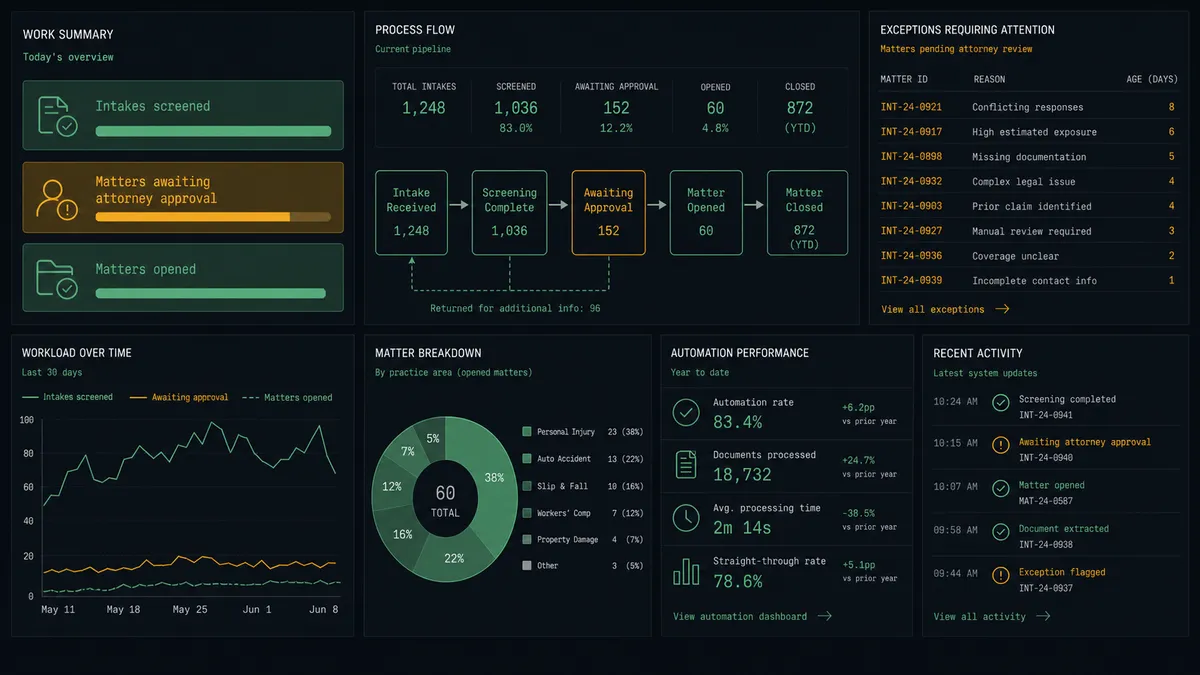
Intake to open matter, screened. The morning run pulls ready records with Find Database Item, the agent screens parties with List Contacts and List Matters, creates the client with Create Contact, and holds Create Matter for attorney approval. Approved intakes become numbered matters with the number written back by Update Database Item.
Matter status board that updates itself. On a schedule, the agent calls List Matters and List Activities in Clio Manage, then calls Update Database Item so each matter’s row in Notion reflects current status and recent activity. The partners’ dashboard stays honest without anyone maintaining it.
Task digest for the operations lead. The agent calls List Tasks in Clio Manage each morning, groups open tasks by responsible attorney, and writes the digest to a Notion page with Create Page and Add Content To Page, so the day starts with one page instead of nine tabs.
Billable time capture from intake notes. When a matter opens, the agent reads the consultation notes on the Notion intake record, drafts a time entry description, and calls Create Time Entry in Clio Manage so the intake consult is billed with a defensible narrative.
Client record enrichment. When the agent matches an intake to an existing client with Get Contact, it calls Create Comment on the Notion record with the client’s matter history from List Matters, so the intake team sees the relationship before calling back.
Getting started
Start on the free plan: 100 executions a month, every integration included, no credit card required, plus 14 days of Professional for new accounts. Both connectors are available on every tier, and every tier includes unlimited users and unlimited workflows, so the intake team, the operations lead, and the supervising attorney all work in the same workspace from day one.
Explore the integration details:
- Notion integration (23 actions covering pages, databases, blocks, and comments)
- Clio Manage integration (9 actions covering matters, contacts, activities, tasks, and time entries)
Start building free at flowrunner.ai or book a demo to see a live Notion to Clio Manage workflow, attorney approval on Create Matter and all.
Frequently asked questions
Is it free to connect Notion and Clio Manage on FlowRunner?
You can build and run the connection on FlowRunner's free plan, which includes 100 executions a month and every integration with no credit card required, and new accounts also get 14 days of Professional. Both connectors are available on every FlowRunner tier, and every tier includes unlimited users and unlimited workflows.
Can I self-host the Notion to Clio Manage workflow?
Yes. FlowRunner offers a cloud-hosted option and a self-hosted option, so the connection can run inside your own environment.
Does the AI agent need my own OpenAI or Claude key?
FlowRunner uses a bring-your-own-keys model, so you connect the AI provider key you already have. You are not locked to one model.
What happens when the agent finds a possible conflict of interest?
The agent does not open the matter. It packages the intake summary, the matching contact or matter records it found in Clio Manage, and the adverse party names, then sends the whole picture to the supervising attorney for a clear-or-decline decision. Create Matter only runs after that sign-off.
Which Notion and Clio Manage actions does this workflow use?
Neither connector publishes event triggers in the FlowRunner catalog, so the workflow runs on a schedule. It reads intake records with Find Database Item in Notion, screens with List Contacts and List Matters in Clio Manage, creates records with Create Contact and Create Matter, and writes the matter number back with Update Database Item.
Can the workflow log intake time back to Clio Manage?
Yes. After the matter opens, the agent calls Create Time Entry in Clio Manage to log the intake consultation against the new matter, so billable time from the intake process is captured instead of forgotten.