How to Connect Typeform with Accelo (With or Without an AI Agent)
Turn Typeform intake submissions into Accelo contacts, tasks, and client records, run by an AI agent that matches each response to existing accounts and pauses for a human before a new company record enters the PSA.
How do you connect Typeform to Accelo?
You connect Typeform to Accelo by running a scheduled workflow that pulls new submissions with Get Form Responses, maps the answers using the field definitions from Get Form, checks for existing records with List Companies and List Contacts, and files the request with Create Task and Log Activity, creating contacts with Create Contact where the account already exists. FlowRunner is a visual AI-agent orchestration platform where automations run autonomously and pause for human judgment on the steps that carry real consequence. The same connection can run as an AI agent that processes every submission on its own and pauses for a named human before Create Company adds a new client record to the PSA.
The problem it solves
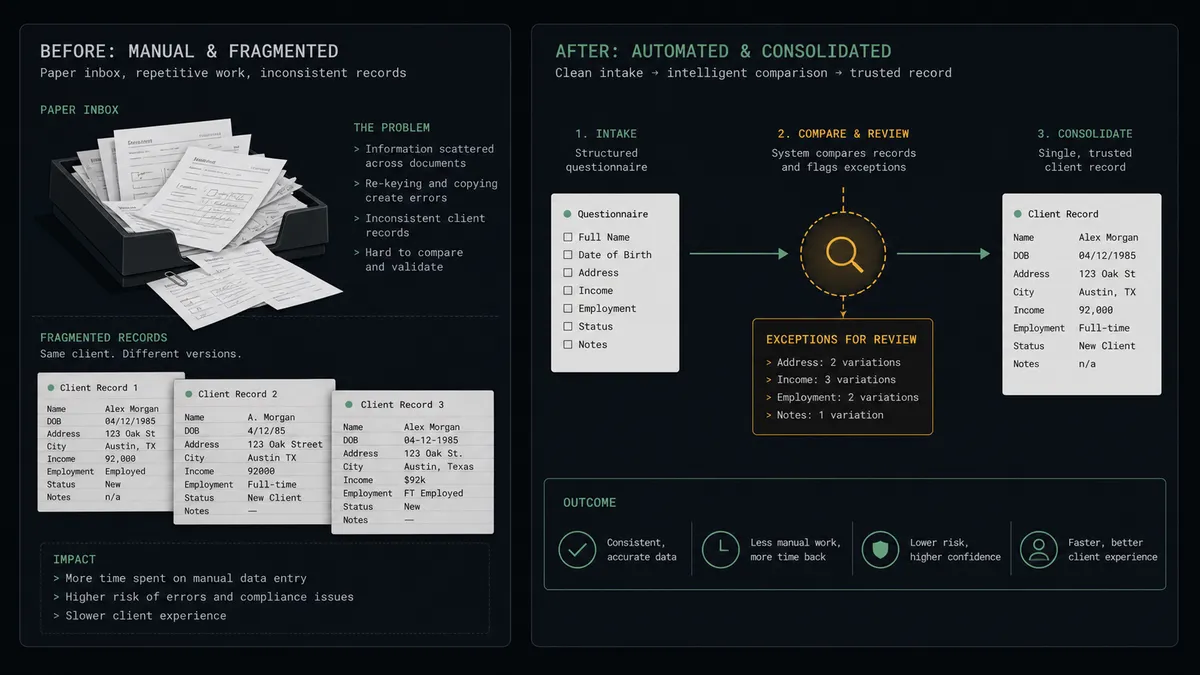
Right now the intake form and the PSA are connected by copy-paste. A prospect or client fills in the Typeform: who they are, what they need, when they need it. The submission lands in an inbox or a spreadsheet, and someone on the operations team re-keys it into Accelo, deciding on the fly whether “Acme Corp,” “ACME Corporation,” and “acme.com” are one client or three. Intake happens in batches when someone has time, which means a request submitted Friday afternoon starts existing in your delivery system sometime Tuesday.
The damage compounds quietly. Duplicate company records split one client’s history across three shells, so nobody sees the full relationship and month-end billing reconciles against the wrong entity. A submission that never gets keyed in becomes work someone eventually does off the books, or a prospect who never hears back. The PSA’s client list is the backbone of billing and reporting, and every careless record weakens everything built on top of it.
How it works: the connection
The connection reads Typeform on a schedule and writes to Accelo. Here is the plain version, grounded in the real connector actions.
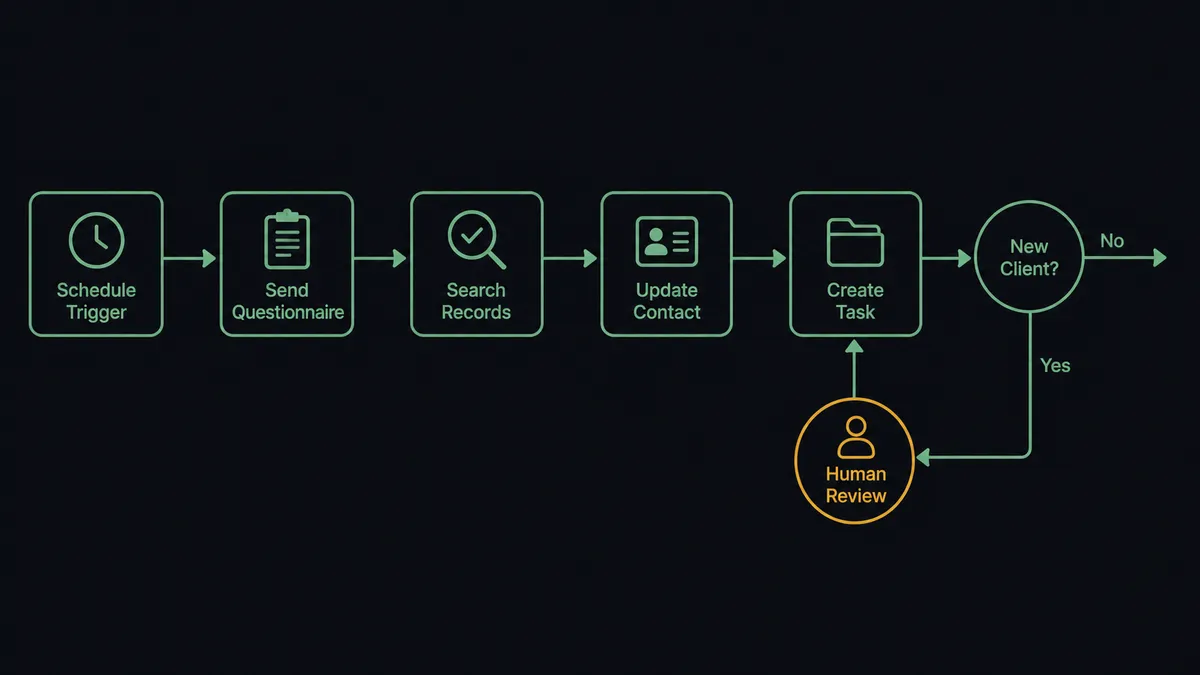
- Trigger: On a schedule, the workflow calls Get Form Responses on the intake form and picks up submissions it has not yet processed.
- Read: It calls Get Form once for the field definitions, so each answer maps to a named field instead of a positional guess.
- Search first: For each response, it calls List Companies with the stated organization and List Contacts with the requester’s name and email.
- Attach to the account: Where the company exists, Create Contact adds the requester if they are new, linked to the right organization.
- File the request: It calls Create Task against the account with the request title, description, and any stated deadline, and Log Activity records the submission itself against the company.
- Handle new clients: Where no match exists, the response is routed for approval, and confirmed new clients get Create Company followed by Create Contact.
That is the “just connect them” answer. Submissions become searchable, assignable work in the PSA within minutes, attached to the right client, with the original response preserved on the record. Get Form Insights adds a periodic read on how the form itself performs.
Can an AI agent run it? (and why a human stays in the loop)
Yes, and entity matching is the part that genuinely needs reasoning. A rules-based sync sees “ACME Corporation” and “Acme Corp” as different strings; an AI agent holding Get Form Responses, List Companies, List Contacts, Create Company, Create Contact, Create Task, and Log Activity as tools reads them the way a person does. Same website domain, same city, overlapping contact names: this is one client. Different domain, different address, similar name: probably two. The agent works through each submission, attaches the confident matches, and files the requests without ceremony.
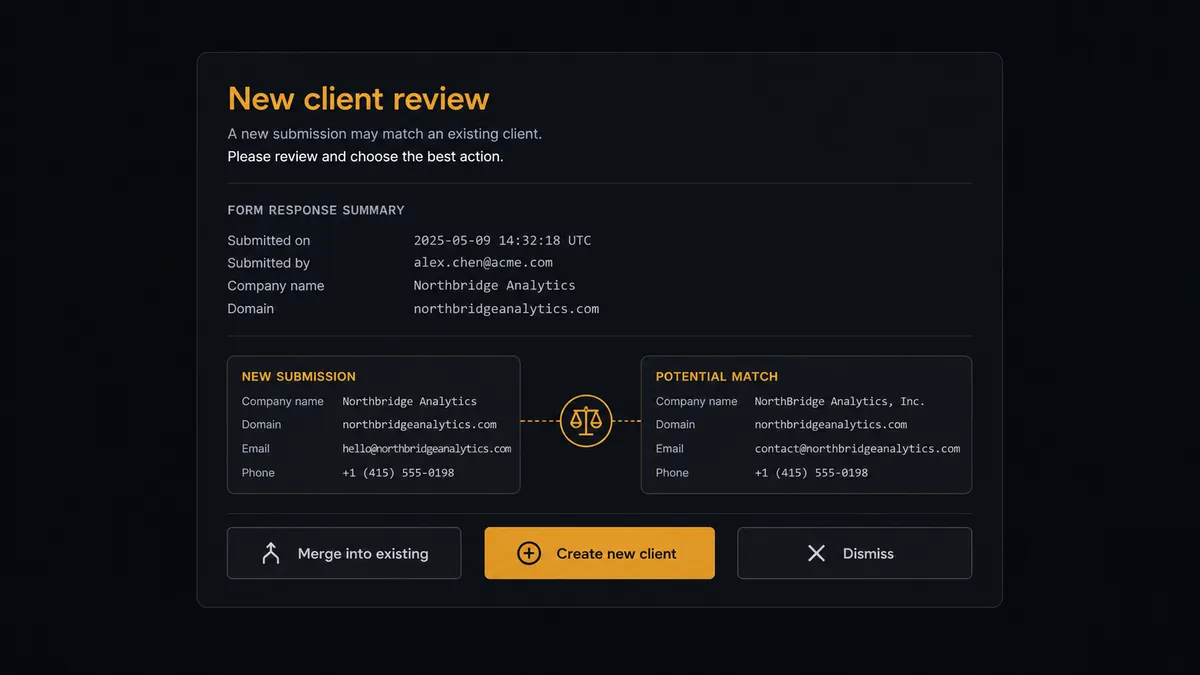
The consequential step is Create Company. In a PSA, a company record is not a row in a mailing list; it is the anchor that jobs, tasks, activities, and ultimately invoices hang from. Create the wrong one and the client’s history forks. So when the agent finds a near-match it cannot resolve, or a submission that appears to be a genuinely new client, it stops. It invokes a human-in-loop flow it holds as a callable tool and posts to your channel: “Intake submission from a company not confidently matched. Closest existing records shown with their websites and standings. Merge into an existing account, create a new client record, or dismiss?” A named approver decides. Only then does Create Company run, followed by Create Contact and the intake task. The response, the near-matches considered, the decision, and the approver all land in the audit trail.
Prospects call this the digital andon cord: like Toyota’s production line pull cord, the workflow stops the line the moment it hits uncertainty. Routine submissions flow through in minutes. The record that would have forked a client’s billing history waits for a person.
FlowRunner vs n8n
A developer evaluating this pairing will find n8n a credible option. Its Typeform node handles response retrieval, its HTTP request node reaches Accelo’s API, and its code steps can implement fuzzy matching however sophisticated the team wants to make it. The fair-code self-hosted model keeps intake data on your own infrastructure, and the community has published plenty of form-processing patterns to borrow from.
The difference is what happens to the ambiguous cases and who resolves them. In n8n, fuzzy matching is a script with a threshold; everything above it merges silently and everything below it errors or creates. FlowRunner routes exactly those cases to a person, natively, with the evidence attached.
| What matters for this pair | FlowRunner | n8n |
|---|---|---|
| Human-in-the-loop before Create Company enters the PSA | Native. The agent invokes an approval flow as a callable tool and waits | Buildable with wait nodes and custom branching; you assemble and maintain it |
| Who runs the flow | An AI agent reads each response, reasons about matches, and picks actions as tools | Node sequence with matching logic you write and tune in code |
| Users included | Unlimited users on every tier | Cloud plans carry per-tier limits; self-hosting shifts cost to your infrastructure |
| Bring your own AI keys | Yes, BYOK | Yes, BYOK supported |
| Self-hosted option | Yes, cloud-hosted or self-hosted | Yes, fair-code self-hosted |
| Pricing model | Transparent workflow-based tiers | Execution-based cloud pricing that takes effort to predict |
If your team wants to own matching logic as code and tune thresholds themselves, n8n supports that path. If you want intake running itself with the duplicate question answered by a person every time it matters, this pairing is the better fit.
Before and after
| Category | Before | After |
|---|---|---|
| Intake speed | Submissions wait in an inbox for someone’s batch-processing hour | Responses become filed tasks in Accelo within minutes of the scheduled run |
| Duplicate records | Spelling variants quietly become separate client shells | Near-matches route to a named approver before Create Company runs |
| Request tracking | Some submissions never leave the spreadsheet | Every response produces a Create Task entry or an explicit human decision |
| Client history | Form answers vanish once the task is typed up | Log Activity preserves the original submission on the company record |
| Accountability | Nobody can say who decided a company was new | Each new record carries the approver, the near-matches considered, and the timestamp |
What you can build
Client intake pipeline. Get Form Responses feeds each submission through matching, Create Contact and Create Task attach the request to the right account, and only approver-confirmed clients get Create Company. Intake stops being a Tuesday batch job.
Project request triage. For existing clients, the agent reads the request description, picks the engagement with List Jobs, and files the task where the account team will actually see it, with the deadline mapped from the form answer.
Duplicate-proof onboarding. The comparison step becomes your dedupe layer: every would-be company record is checked against List Companies with the evidence shown to a person, so the client list stays clean enough to bill from.
Support-to-record trail. Feedback and issue forms file through Log Activity against the company, building a searchable history of what clients asked for, alongside the tasks that answered them.
Intake health report. On a weekly schedule, Get Form Insights pulls the form’s completion analytics while the workflow summarizes how many submissions matched, how many needed review, and how many became new clients, posted to the operations channel.
Common questions
Is it free to connect Typeform and Accelo on FlowRunner? You can build and run the connection on FlowRunner’s free plan, which includes 100 executions a month and every integration with no credit card required, and new accounts also get 14 days of Professional. Both connectors are available on every FlowRunner tier, and every tier includes unlimited users and unlimited workflows.
Can I self-host the Typeform to Accelo workflow? Yes. FlowRunner offers a cloud-hosted option and a self-hosted option, so the connection can run inside your own environment.
Does the AI agent need my own OpenAI or Claude key? FlowRunner uses a bring-your-own-keys model, so you connect the AI provider key you already have. You are not locked to one model.
What happens when a submission looks like a duplicate of an existing client? The agent does not create anything. It packages the form response next to the near-matching companies from List Companies, with the differences highlighted, then invokes a human-in-loop step and waits for a person to merge into the existing account or confirm a genuinely new client before Create Company runs.
Which Typeform and Accelo actions does this workflow use? On the Typeform side, Get Form Responses pulls new submissions and Get Form supplies the field definitions so answers map cleanly. On the Accelo side, List Companies and List Contacts check for existing records, Create Company and Create Contact add confirmed new ones, Create Task files the intake request, and Log Activity records the submission.
Can the workflow report on how the intake form itself is performing? Yes. On a schedule, Get Form Insights pulls the form’s analytics so operations can see completion behavior and drop-off, and the agent posts a summary alongside the intake pipeline report, all without anyone logging into Typeform.
Getting started
Start on the free plan: 100 executions a month, every integration included, no credit card required, plus 14 days of Professional for new accounts. Both connectors are available on every tier, and every tier includes unlimited users and unlimited workflows.
Explore the integration details:
- Typeform integration (36 actions covering forms, responses, themes, and insights)
- Accelo integration (10 actions covering companies, contacts, jobs, tasks, and activities)
Start building free at flowrunner.ai or book a demo to see a live Typeform to Accelo workflow, new-client approval and all.
Frequently asked questions
Is it free to connect Typeform and Accelo on FlowRunner?
You can build and run the connection on FlowRunner's free plan, which includes 100 executions a month and every integration with no credit card required, and new accounts also get 14 days of Professional. Both connectors are available on every FlowRunner tier, and every tier includes unlimited users and unlimited workflows.
Can I self-host the Typeform to Accelo workflow?
Yes. FlowRunner offers a cloud-hosted option and a self-hosted option, so the connection can run inside your own environment.
Does the AI agent need my own OpenAI or Claude key?
FlowRunner uses a bring-your-own-keys model, so you connect the AI provider key you already have. You are not locked to one model.
What happens when a submission looks like a duplicate of an existing client?
The agent does not create anything. It packages the form response next to the near-matching companies from List Companies, with the differences highlighted, then invokes a human-in-loop step and waits for a person to merge into the existing account or confirm a genuinely new client before Create Company runs.
Which Typeform and Accelo actions does this workflow use?
On the Typeform side, Get Form Responses pulls new submissions and Get Form supplies the field definitions so answers map cleanly. On the Accelo side, List Companies and List Contacts check for existing records, Create Company and Create Contact add confirmed new ones, Create Task files the intake request, and Log Activity records the submission.
Can the workflow report on how the intake form itself is performing?
Yes. On a schedule, Get Form Insights pulls the form's analytics so operations can see completion behavior and drop-off, and the agent posts a summary alongside the intake pipeline report, all without anyone logging into Typeform.