How to Connect Outlook with Accelo (With or Without an AI Agent)
Turn client emails in Outlook into tracked Accelo tasks and logged activities, run by an AI agent that files each request against the right job and pauses for a human before any reply that commits your team reaches the client.
How do you connect Outlook to Accelo?
You connect Outlook to Accelo by running a scheduled workflow that pulls new messages from the client inbox with Get Emails, matches each sender to a company and engagement with List Contacts, List Companies, and List Jobs, files the request with Create Task and Log Activity, and acknowledges the client with Reply to Email. FlowRunner is a visual AI-agent orchestration platform where automations run autonomously and pause for human judgment on the steps that carry real consequence. The same connection can run as an AI agent that classifies and files every request on its own, and pauses for a named human before any reply that commits scope, dates, or budget leaves the building.
The problem it solves
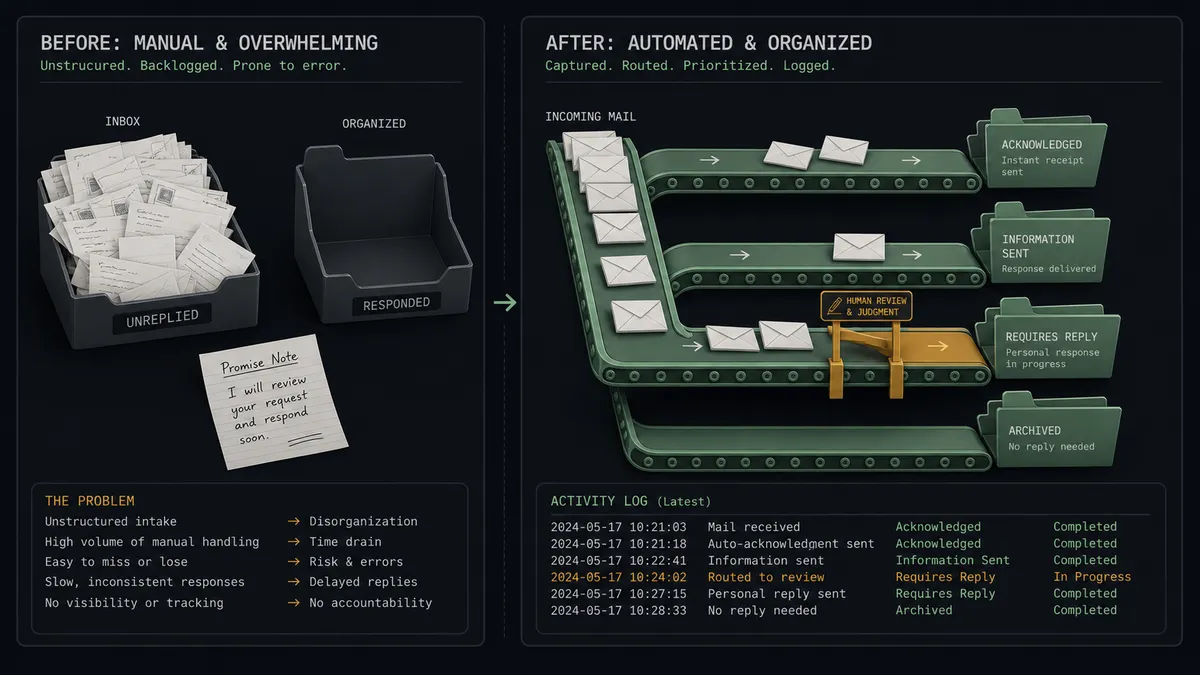
Right now the client inbox is where work goes to hide. Requests arrive in Outlook all day: a change here, a question there, an urgent favor addressed to whoever answered last time. Someone on the delivery team is supposed to read each one, decide which client and engagement it belongs to, create the task in Accelo, and reply so the client knows they were heard. In practice that happens in bursts between meetings, which means requests sit unacknowledged for hours and get filed from memory, if they get filed at all.
The edges are the expensive part. A request never makes it out of the inbox, so the work is done off the books or not done at all, and the client’s next email opens with “following up again.” A reply dashed off at speed says “sure, we can do that by Friday,” and now there is a scope commitment in writing that nobody costed. A message from a new contact at an existing client gets missed because the sender was not recognized. Email is where commitments get made, and unmanaged email is where they get made accidentally.
How it works: the connection
The connection reads Outlook on a schedule and writes to Accelo. Here is the plain version, grounded in the real connector actions.
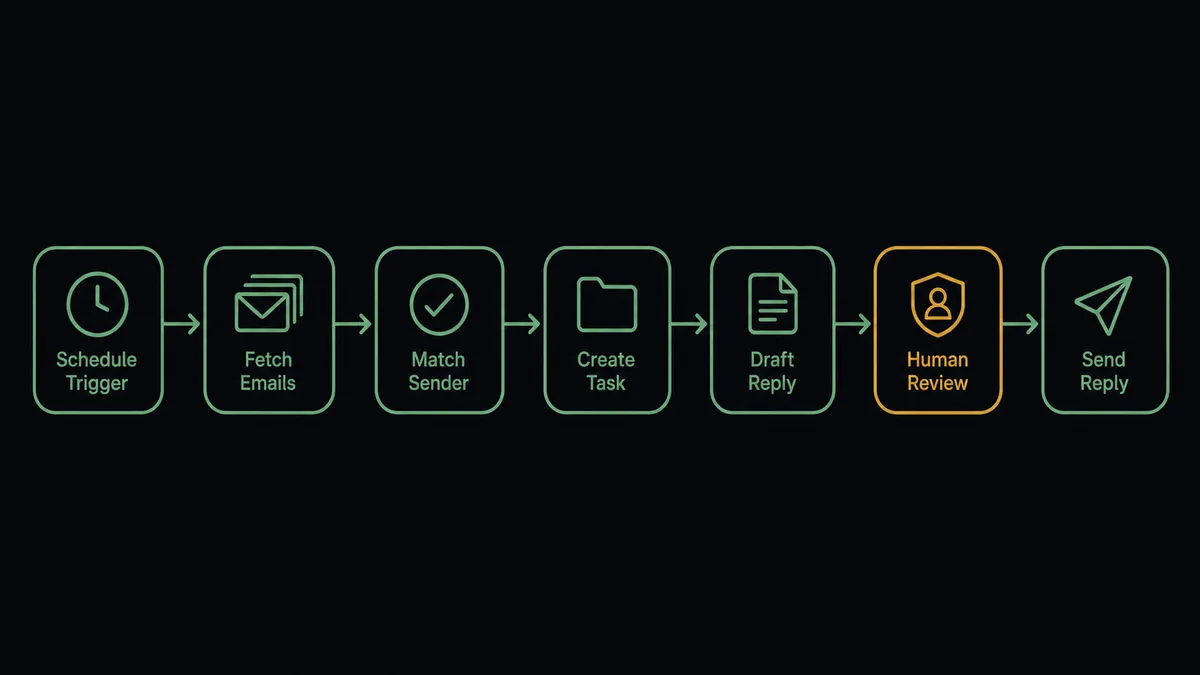
- Trigger: On a short-interval schedule, the workflow calls Get Emails on the client-facing folder, located with Get Email Folders, and picks up messages it has not yet processed.
- Read: For each new message, it calls Get Email to pull the full body, sender, and thread context.
- Match the sender: It calls List Contacts and List Companies in Accelo to identify who is writing and which client they belong to.
- Pick the engagement: It calls List Jobs for that company and selects the engagement the request belongs to.
- File the work: It calls Create Task against the matched job with a title, description, manager, and any stated deadline, and Log Activity to record the email itself against the record.
- Acknowledge: It calls Create Draft Email with a short acknowledgment carrying the task reference, then Reply to Email sends it into the same thread.
That is the “just connect them” answer. Every client email becomes a tracked task on the right engagement within minutes, the message itself is filed where the account team can find it, and the client hears back before they wonder whether anyone read it.
Can an AI agent run it? (and why a human stays in the loop)
Yes, and triage is where the agent does its best work. It holds the Outlook and Accelo actions as tools: Get Emails, Get Email, Create Draft Email, Reply to Email on one side; List Companies, List Contacts, List Jobs, Create Task, Log Activity on the other. It reads each message the way your delivery lead would. Is this a new request, a nudge on an existing task, or an FYI? Which engagement does it belong to, given what the sender’s company has open? Is the stated deadline realistic against the job’s dates? Routine requests get filed, tasked, and acknowledged without anyone touching them.
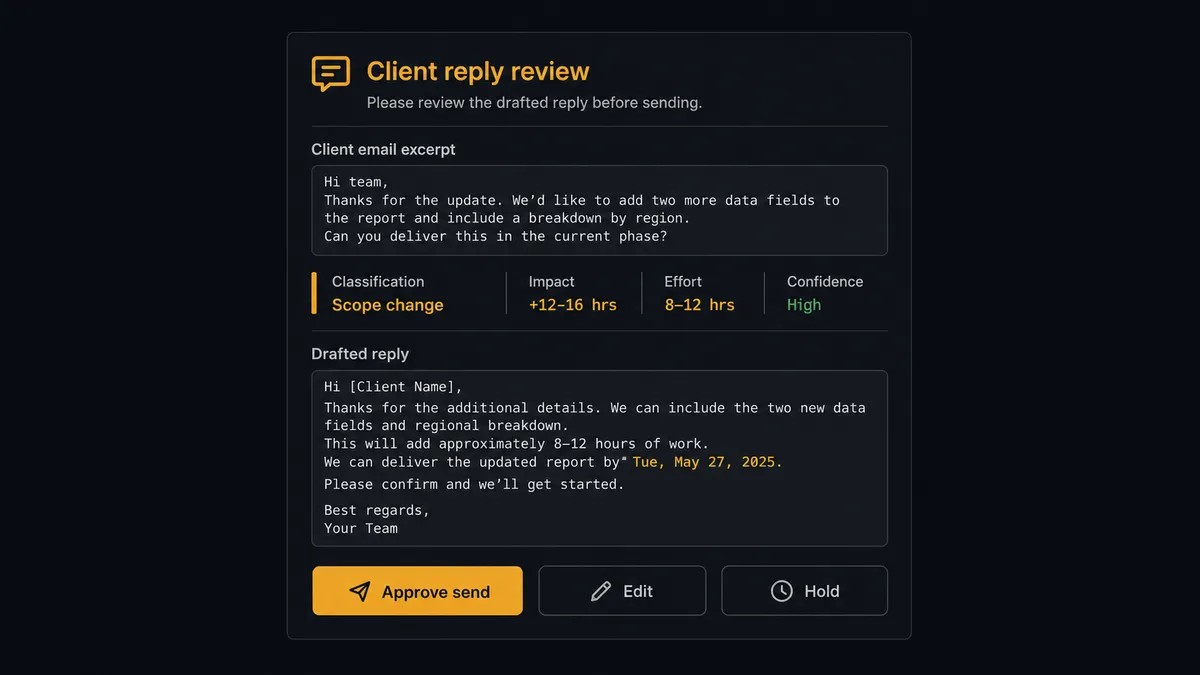
The consequential step is the reply, because an email from your domain is your firm speaking. An acknowledgment that says “received, filed, here is the reference” is safe to automate. A reply that says yes to a date, a scope, or a number is a commitment, and the agent is built to know the difference. When the drafted reply crosses that line, or when the request itself asks for something outside the engagement’s scope, the agent stops. It invokes a human-in-loop flow it holds as a callable tool and posts to your channel: “Client request classified as a scope change. Task created and filed against the matched job. Drafted reply attached; it confirms a delivery date. Approve, edit, or hold?” A named approver owns the yes. Only then does Reply to Email send, and Log Activity files what was promised. The decision, the approver, and the timestamp land in the audit trail.
Prospects call this the digital andon cord: like Toyota’s production line pull cord, the workflow stops the line the moment it hits uncertainty. The inbox stays empty and acknowledged. The commitments still come from people.
FlowRunner vs n8n
An engineering-minded team will weigh n8n for this pairing, and fairly. n8n’s Microsoft Outlook node covers mail operations well, its HTTP request node reaches Accelo’s API, and its code steps can express whatever classification rules a developer cares to write. Self-hosted under the fair-code license, it keeps client email processing entirely on your own infrastructure, which some firms value highly.
The difference is where the judgment lives and who maintains it. In n8n, email classification is logic an engineer encoded last quarter; in FlowRunner, an AI agent reads each message in context, and the reply gate is a native platform feature rather than a wait-node pattern you assemble.
| What matters for this pair | FlowRunner | n8n |
|---|---|---|
| Human-in-the-loop before Reply to Email reaches a client | Native. The agent invokes an approval flow as a callable tool and waits | Buildable with wait nodes and custom branching; you assemble and maintain it |
| Who runs the flow | An AI agent classifies, matches, and picks actions as tools | Node sequence with rules you write and update in code |
| Users included | Unlimited users on every tier | Cloud plans carry per-tier limits; self-hosting shifts cost to your infrastructure |
| Bring your own AI keys | Yes, BYOK | Yes, BYOK supported |
| Self-hosted option | Yes, cloud-hosted or self-hosted | Yes, fair-code self-hosted |
| Pricing model | Transparent workflow-based tiers | Execution-based cloud pricing that takes effort to predict |
If your firm has engineers who want to own inbox-processing code, n8n gives them a solid workbench. If you want operations to run client-email triage themselves, with classification that adapts and a human owning every commitment, this pairing is the better fit.
Before and after
| Category | Before | After |
|---|---|---|
| Request capture | Emails get filed into Accelo from memory, in bursts, or never | Every new message is classified and filed via Create Task on schedule |
| Acknowledgment | Clients wait hours to learn whether anyone read their email | An acknowledgment with the task reference goes back within minutes |
| Commitments | Quick replies make scope and date promises nobody costed | Commitment-shaped replies wait for a named approver before sending |
| Engagement history | The real story of an engagement lives in individual mailboxes | Log Activity files each message and reply against the client record |
| Unknown senders | New contacts at existing clients slip through unrecognized | Unmatched senders route to a person to match or create before filing |
What you can build
Shared inbox triage desk. Get Emails sweeps the client folder, the agent classifies and matches each message, Create Task files the work, Log Activity records the email, and Reply to Email acknowledges with the reference. The inbox becomes a queue with an owner.
Commitment guardrail. Every drafted reply is screened for dates, prices, and scope language. Anything that binds the firm routes through the approval tool, so the client still gets a fast answer and the account lead still owns the yes.
New contact onboarding. When a message arrives from an unknown address at a known client domain, the approver confirms it, and the agent runs Create Contact so the relationship record grows instead of fragmenting.
Meeting follow-through. After a client call invite lands, Get Calendar Events confirms the meeting happened, and the agent files the recap thread with Log Activity and creates follow-up tasks with Create Task against the engagement.
Aging request watchdog. On a daily schedule, List Tasks pulls open request tasks, and the agent flags the ones past their due date to the account lead, with the original email context attached, before the client sends the follow-up nobody wants to receive.
Getting started
Start on the free plan: 100 executions a month, every integration included, no credit card required, plus 14 days of Professional for new accounts. Both connectors are available on every tier, and every tier includes unlimited users and unlimited workflows.
Explore the integration details:
- Outlook integration (21 actions covering email, calendar, and contacts)
- Accelo integration (10 actions covering companies, contacts, jobs, tasks, and activities)
Start building free at flowrunner.ai or book a demo to see a live Outlook to Accelo workflow, reply approval and all.
Frequently asked questions
Is it free to connect Outlook and Accelo on FlowRunner?
You can build and run the connection on FlowRunner's free plan, which includes 100 executions a month and every integration with no credit card required, and new accounts also get 14 days of Professional. Both connectors are available on every FlowRunner tier, and every tier includes unlimited users and unlimited workflows.
Can I self-host the Outlook to Accelo workflow?
Yes. FlowRunner offers a cloud-hosted option and a self-hosted option, so the connection can run inside your own environment.
Does the AI agent need my own OpenAI or Claude key?
FlowRunner uses a bring-your-own-keys model, so you connect the AI provider key you already have. You are not locked to one model.
What happens when an email comes from a sender Accelo does not recognize?
The agent files nothing and replies to no one. It packages the message, the closest company and contact candidates from List Companies and List Contacts, and its classification of the request, then invokes a human-in-loop step and waits for a person to match, create, or dismiss before Create Task or any reply runs.
Which Outlook and Accelo actions does this workflow use?
On the Outlook side, Get Emails and Get Email pull new messages, Create Draft Email stages the acknowledgment, and Reply to Email sends it after approval. On the Accelo side, List Companies, List Contacts, and List Jobs match the sender to an engagement, Create Task files the request, and Log Activity records the email against the record.
Does this work on a shared inbox rather than a personal mailbox?
Yes, and that is the recommended setup. Connect the shared client-facing mailbox, use Get Email Folders to point the workflow at the right folder, and every request that lands there gets classified, filed, and acknowledged through one consistent process.