How to Connect Google Forms with Accelo (With or Without an AI Agent)
Connect Google Forms client requests to Accelo so every submission lands on the right client and job, with an AI agent that files routine requests automatically and pauses for a human before out-of-scope work becomes a scheduled task.
How do you connect Google Forms to Accelo?
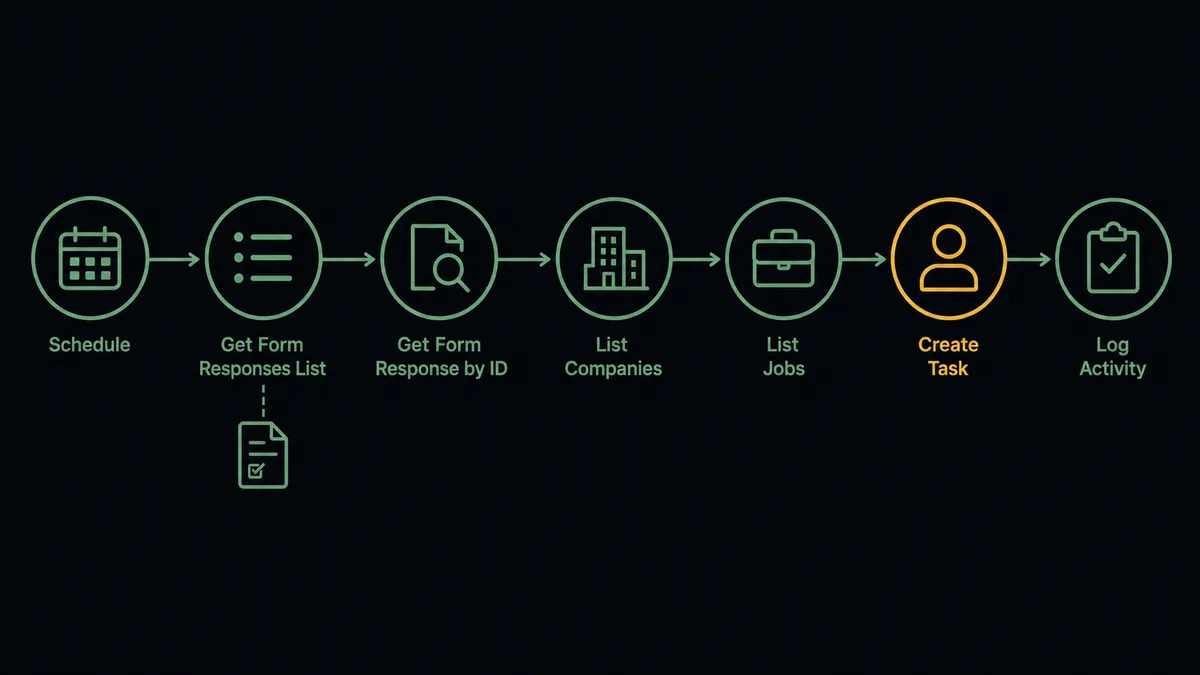
You connect Google Forms to Accelo by having a scheduled workflow read new responses with Get Form Responses List and Get Form Response by ID, then drive Accelo actions: List Companies and Get Company identify the client, List Jobs finds the active engagement, Create Task files the work, and Log Activity records the request on the client record. FlowRunner is a visual AI-agent orchestration platform where automations run autonomously and pause for human judgment on the steps that carry real consequence. The same connection can run as an AI agent that files routine requests on its own and pauses for a named human before Create Task turns an out-of-scope request into scheduled work.
The problem it solves
Right now your client request form feeds a spreadsheet, and the spreadsheet feeds nobody. Clients submit change requests, support asks, and new work through Google Forms because it is easy to share, and then someone on the ops team periodically opens the responses sheet, figures out which client each row belongs to, opens Accelo, finds the right job, and creates the task by hand. Between form and PSA sits a person, a delay, and a judgment call made differently every time.
The expensive edge case is scope. A request form does not know what the engagement covers, so “small tweak” requests that are actually new projects flow in alongside legitimate in-scope work. When those become tasks without review, your delivery team quietly does unbilled work and your account managers find out at the retro. The other edge is attribution: a response with a vague company name gets filed against the wrong client, and the request either vanishes or appears on someone else’s job. A form is a side door into the delivery schedule, and today nobody is checking what walks through it.
How it works: the connection
The connection polls Google Forms and writes to Accelo. Here is the plain version, grounded in the real connector actions.
- Trigger: On a schedule, the workflow calls Get Form Responses List and picks out responses that arrived since the last run.
- Read: It calls Get Form Response by ID for the full answer set, and Get Form Details to map answers to their question labels.
- Identify the client: It calls List Companies in Accelo to match the requester’s company, then Get Company to confirm the record.
- Find the engagement: It calls List Jobs to locate the client’s active job and Get Job to load its details.
- File the work: It calls Create Task on the job, with the request description, requester, and urgency mapped into the task.
- Record the request: It calls Log Activity on the client record, so the request exists in the client’s history even before the work starts.
- Handle new clients: When no company matches, it calls Create Company and Create Contact so intake from a new client stands up a record instead of dying in the sheet.
That is the “just connect them” answer. Requests stop pooling in a spreadsheet, land on the right client and job, and carry their context with them.
Can an AI agent run it? (and why a human stays in the loop)
Yes, and the agent is what makes the form safe to leave open. A fixed mapping files whatever arrives. An AI agent reads the request the way an account coordinator would, holding the Accelo actions as tools: List Companies, Get Company, List Jobs, Get Job, Create Task, Log Activity, Create Company, Create Contact. It resolves “the folks at Meridian” to the right client record, reads the engagement details from Get Job, and files a routine in-scope request without bothering anyone.
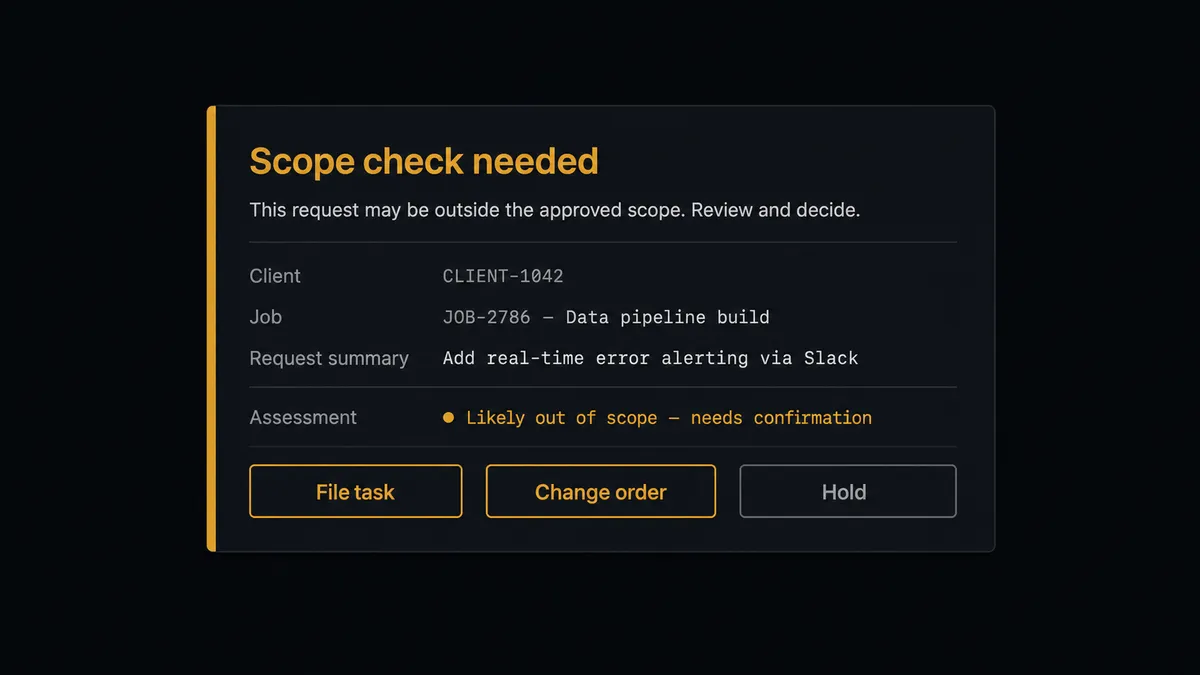
The consequential step is Create Task, because in a services firm a task on a job is a commitment of billable hours. When the request reads like new scope, an expanded deliverable, or anything the engagement does not obviously cover, the agent does not file it quietly. It invokes a human-in-loop flow it holds as a callable tool. The workflow pauses and posts to the account channel: “Request from [client] on [job name]: [summary]. This looks outside the current scope. File as task, flag as change order, or hold for a conversation?” The account manager answers with one click. Only then does Create Task run, or not, and either way Log Activity records what was decided and by whom, with the approver and timestamp in the audit trail.
Prospects call this pattern a digital andon cord: like Toyota’s quality control pull cord, the workflow stops the line the moment something unusual comes down it, and a person decides what happens next. The form stays effortless for clients. The schedule stays honest for you.
FlowRunner vs n8n
Teams with developers on hand look at n8n for this connection, and with reason. Its node library is broad, its community shares plenty of forms-and-PSA patterns, and its fair-code self-hosting model is genuinely strong when you want the runtime on your own infrastructure. For engineers who want to own the graph, n8n offers real depth.
But this workflow’s hard part is not moving data between two APIs. It is the scope judgment in the middle, and who gets to make it. Here is the honest side-by-side.
| What matters for this pair | FlowRunner | n8n |
|---|---|---|
| Human-in-the-loop on out-of-scope Create Task | Native. The agent invokes an approval flow as a callable tool, multi-channel, decision recorded | Buildable with wait and approval wiring you assemble and maintain yourself |
| Who runs the flow | An AI agent reads the request, reasons, and picks actions as tools | A node graph you design; AI agent nodes exist but the builder is developer-oriented |
| Users included | Unlimited users on every tier | Plan-dependent; full RBAC and SSO sit in higher tiers |
| Bring your own AI keys | Yes, BYOK | Yes, n8n also supports your own model keys |
| Self-hosted option | Yes, cloud-hosted or self-hosted | Yes, self-hosting is a core strength |
| Pricing model | Transparent workflow-based tiers; compliance features from the $299/mo Professional tier | Execution-based cloud tiers; full cloud compliance suite is custom-priced Enterprise |
If your engineering team wants to build and maintain the intake pipeline themselves, n8n is a legitimate choice. If operations owns client intake and the requirement is a scope gate the account managers actually use, with an audit trail, working on day one, that is where FlowRunner is the better fit.
Before and after
| Category | Before | After |
|---|---|---|
| Where requests live | In a responses spreadsheet nobody owns | On the client’s Accelo record via Log Activity, the moment they are picked up |
| Client matching | A person deciphers which client each row belongs to | The agent resolves the requester against List Companies and confirms with Get Company |
| Task creation | Requests are retyped into Accelo when someone gets to the sheet | Create Task files in-scope work automatically with context attached |
| Scope control | Out-of-scope requests become unbilled work discovered at the retro | Anything outside the engagement pauses for the account manager before it becomes a task |
| New-client intake | Unknown senders sit in the sheet until someone investigates | Create Company and Create Contact stand up the record for a person to confirm |
What you can build
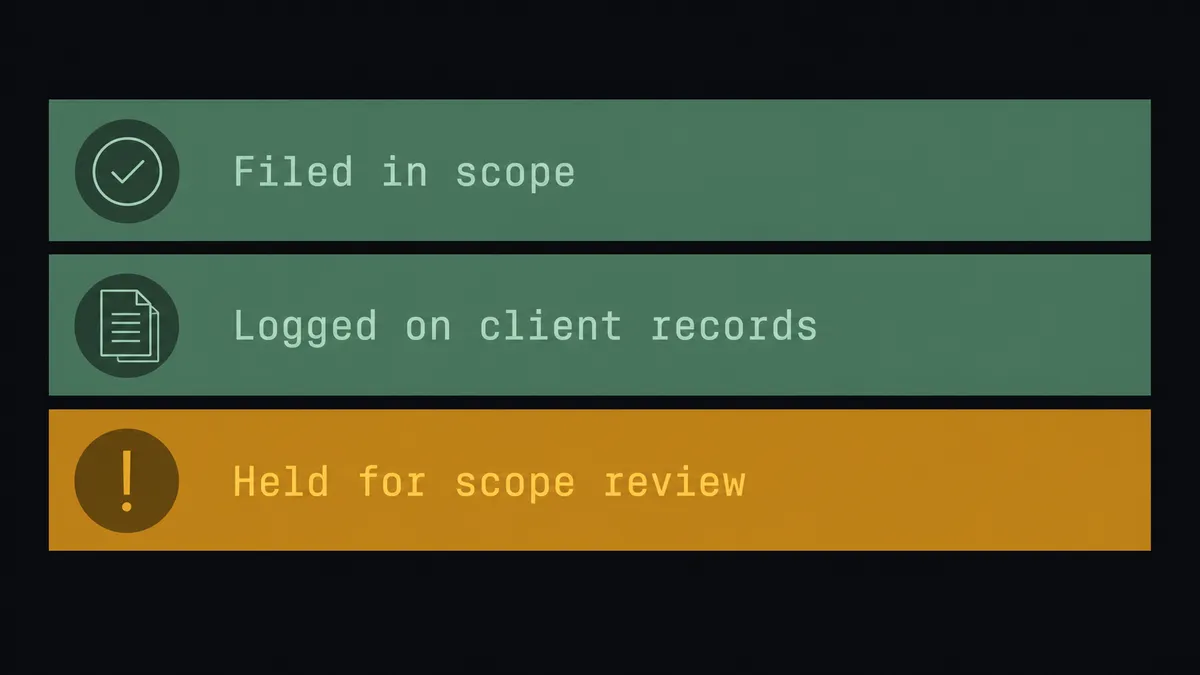
Client request desk. The scheduled run picks up each response, the agent matches the client with List Companies, finds the engagement with List Jobs, and files the work with Create Task, context and urgency included.
Scope gate for account managers. Requests the engagement does not obviously cover pause before Create Task, with the job details from Get Job and the agent’s assessment attached, so change orders start as decisions instead of surprises.
New-client intake funnel. A response from an unknown company triggers Create Company and Create Contact, and the agent posts the fresh record for confirmation before the first request is filed against it.
Request history on the record. Every submission lands in Log Activity on the client, so when a renewal conversation starts, the account manager reads the full request history in Accelo instead of scrolling a spreadsheet.
Daily intake digest. After each day’s runs, the agent summarizes what was filed, what paused for scope, and what came from new clients, and posts the digest to your ops channel so nobody has to ask what came through the form.
Getting started
Start on the free plan: 100 executions a month, every integration included, no credit card required, plus 14 days of Professional for new accounts. Both connectors are available on every tier, and every tier includes unlimited users and unlimited workflows, so account managers and the delivery team share one workspace from day one.
Explore the integration details:
- Google Forms integration (9 actions covering forms, responses, and form structure)
- Accelo integration (10 actions covering companies, contacts, jobs, tasks, and activity logging)
Start building free at flowrunner.ai or book a demo to see a live Google Forms to Accelo workflow, scope-check approval and all.
Frequently asked questions
Is it free to connect Google Forms and Accelo on FlowRunner?
You can build and run the connection on FlowRunner's free plan, which includes 100 executions a month and every integration with no credit card required, and new accounts also get 14 days of Professional. Both connectors are available on every FlowRunner tier, and every tier includes unlimited users and unlimited workflows.
Can I self-host the Google Forms to Accelo workflow?
Yes. FlowRunner offers a cloud-hosted option and a self-hosted option, so the connection can run inside your own environment.
Does the AI agent need my own OpenAI or Claude key?
FlowRunner uses a bring-your-own-keys model, so you connect the AI provider key you already have. You are not locked to one model, and you control which provider runs the agent.
What happens when a request does not fit the client's current engagement?
It does not become work silently. The agent records the request with Log Activity, then pauses before Create Task and posts the request, the client's active job, and its scope assessment to your team's channel. The account manager decides whether it is in scope, a change order, or a conversation, and that decision is recorded.
Neither Google Forms nor Accelo has a trigger in FlowRunner. How does the workflow start?
On a schedule. The workflow calls Get Form Responses List, compares the results against the responses it has already processed, and handles anything new. Requests are picked up within the polling interval you choose.
Can the workflow handle new clients as well as existing ones?
Yes. When a response comes from a company the agent cannot find with List Companies, it treats the submission as new-client intake: Create Company and Create Contact stand up the record, and the first request is filed against it once a person confirms the details.