How to Connect HubSpot with Accelo (With or Without an AI Agent)
Connect HubSpot closed-won deals to Accelo so every new client gets a company record, contacts, and a kickoff checklist, with an AI agent that runs the handoff automatically and pauses for a human before creating a client record that looks like a duplicate.
How do you connect HubSpot to Accelo?
You connect HubSpot to Accelo by having a scheduled workflow watch HubSpot with Get All Deals for deals moved to closed won, then drive Accelo actions: List Companies checks for an existing client, Create Company and Create Contact stand up the record, Create Task builds the kickoff checklist, and Log Activity writes the handoff note, so a won deal becomes a delivery-ready client without anyone retyping it. FlowRunner is a visual AI-agent orchestration platform where automations run autonomously and pause for human judgment on the steps that carry real consequence. The same connection can run as an AI agent that executes the handoff on its own and pauses for a named human before Create Company runs against anything that looks like an existing client.
The problem it solves
Right now the sales-to-delivery handoff is a forwarded email. A deal closes in HubSpot, sales celebrates, and someone in operations receives “new client, can you set them up” with a link to the deal. That person opens Accelo, creates the company, retypes the contacts, builds the kickoff tasks from a checklist that lives in their head, and hopes the deal notes covered everything the client was promised. Every won deal repeats this, and every handoff is only as good as the busiest week allows.
The failure that hurts most is the quiet one: duplicates. “Acme Corp” in HubSpot already exists in Accelo as “Acme Corporation” from an engagement two years ago. A rushed handoff creates a second company, and from that day the client’s jobs, tasks, logged activity, and billing history are split across two records. Nobody notices until an account review comes up short or an invoice goes to the wrong entity. In a PSA, the client record is the foundation everything else attaches to, which makes creating it carelessly the most expensive thirty seconds in the whole process.
How it works: the connection
The connection polls HubSpot and writes to Accelo. Here is the plain version, grounded in the real connector actions.
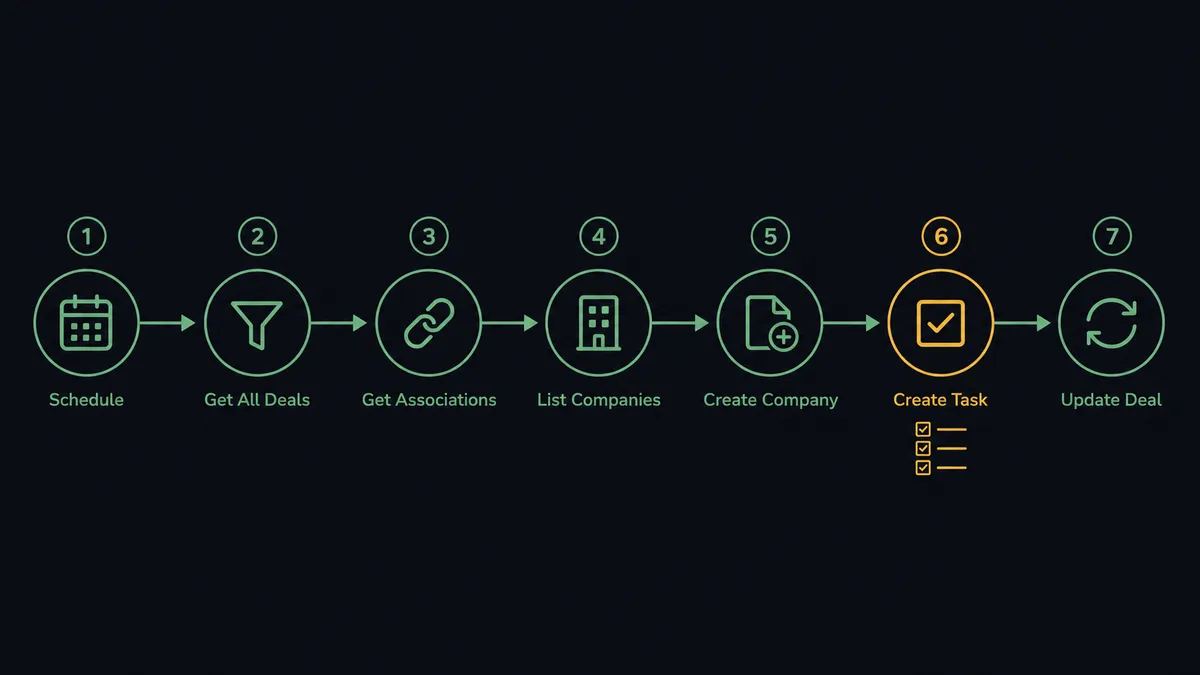
- Trigger: On a schedule, the workflow calls Get All Deals and picks out deals that moved to closed won since the last run.
- Read: It calls Get Deal By ID for the full deal, then Get Associations to find the linked company and contacts.
- Assemble: It calls Get Company By ID and Get Contacts At Company to gather the client’s people and details from HubSpot.
- Check Accelo: It calls List Companies to search for an existing client record by name and domain.
- Create the client: If no match exists, it calls Create Company, then Create Contact for each associated person.
- Stand up the work: It calls Create Task to build the kickoff checklist and Log Activity to record the handoff, deal context included, on the client record.
- Close the loop: Back in HubSpot, it calls Update Deal to mark the handoff complete, so sales can see delivery has the ball.
That is the “just connect them” answer. Won deals become working client records, the kickoff checklist is never skipped, and both systems agree about where the handoff stands.
Can an AI agent run it? (and why a human stays in the loop)
Yes, and the agent earns its place at the matching step. A deterministic sync compares strings; “Acme Corp” and “Acme Corporation” fail the comparison and a duplicate is born. An AI agent reads the List Companies results the way a person would, weighing name, domain, and the contacts already attached. It holds the Accelo actions as tools: Get Company, Create Company, Create Contact, Create Task, Log Activity, plus the HubSpot side with Get Deal By ID, Get Associations, and Update Deal. Clean cases run end to end without anyone touching them.
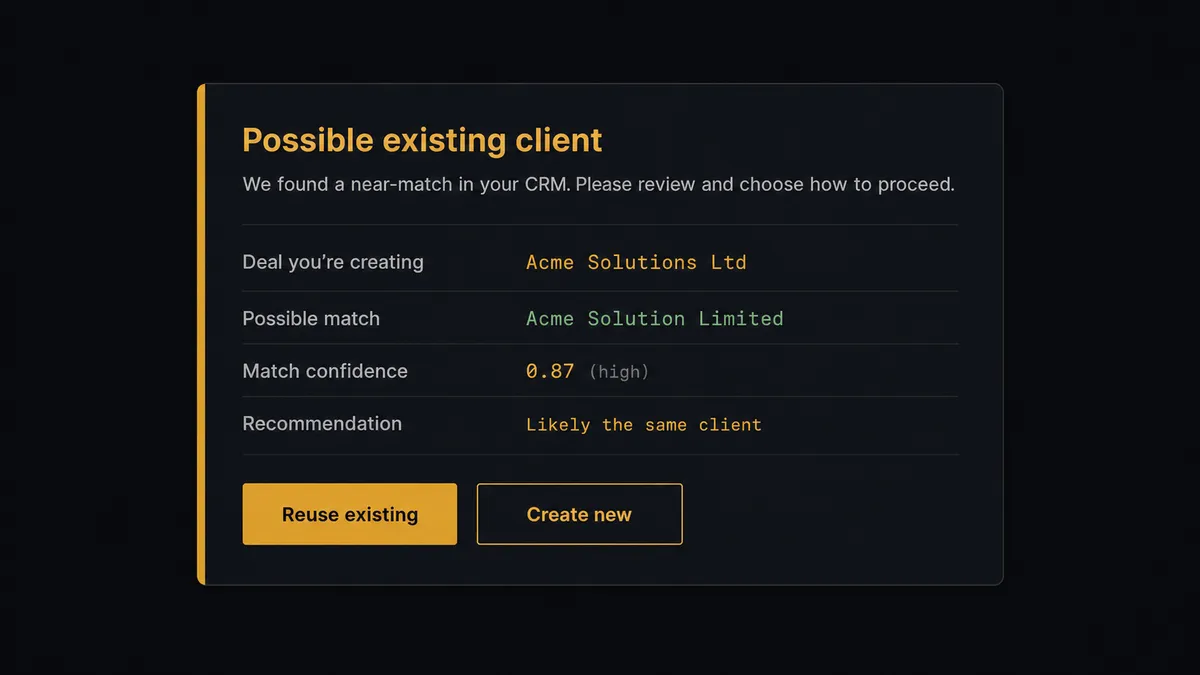
The consequential step is Create Company. In a PSA the company record is where every job, task, activity, and invoice attaches, so creating a duplicate quietly corrupts the client’s history and billing from that point forward. When the match evidence is anything less than certain, the agent does not pick a side. It invokes a human-in-loop flow it holds as a callable tool. The workflow pauses and posts to the ops channel: “Closed-won deal [deal name] resembles existing Accelo client [company name], which has prior jobs attached. Recommend reusing the existing record. Create new instead?” A named person makes the call. Only then does the agent proceed, either attaching contacts and tasks to the existing client or running Create Company fresh, and the decision lands in the audit trail with the approver and timestamp.
Prospects call this a digital andon cord: like Toyota’s quality control pull cord, the workflow stops the line the moment it hits ambiguity, and your team pulls it back into motion with one click. The handoff stays fast for the clean majority, and the ambiguous minority gets exactly one human decision instead of a cleanup project six months later.
FlowRunner vs n8n
Technical teams evaluating this connection look at n8n, and there is plenty to respect. Its node library is deep, its community templates cover a wide range of CRM patterns, and its fair-code self-hosting model is genuinely good for teams that want the runtime on their own metal. If you have engineers who enjoy owning a node graph, n8n gives them real power.
The question is who runs the sales-to-delivery handoff at your company. In most services firms it is operations, not engineering, and the approval step is the part that has to work every time. Here is the honest side-by-side.
| What matters for this pair | FlowRunner | n8n |
|---|---|---|
| Human-in-the-loop on Create Company | Native. The agent invokes an approval flow as a callable tool, multi-channel, with the decision recorded | Buildable with wait and approval wiring you assemble and maintain yourself |
| Who runs the flow | An AI agent reads the deal, reasons, and picks actions as tools | A node graph you design; AI agent nodes exist but the builder is developer-oriented |
| Users included | Unlimited users on every tier | Plan-dependent; full RBAC and SSO sit in higher tiers |
| Bring your own AI keys | Yes, BYOK | Yes, n8n also supports your own model keys |
| Self-hosted option | Yes, cloud-hosted or self-hosted | Yes, self-hosting is a core strength |
| Pricing model | Transparent workflow-based tiers; compliance features from the $299/mo Professional tier | Execution-based cloud tiers; full cloud compliance suite is custom-priced Enterprise |
If your engineers want full control of every node and you are comfortable building the approval and audit layer yourselves, n8n is a strong choice. If the ops team owns onboarding and needs the duplicate-check approval, audit trail, and access controls working on day one without an engineering project, that is where FlowRunner is the better fit.
Before and after
| Category | Before | After |
|---|---|---|
| Handoff speed | Won deals wait for someone in ops to notice the forwarded email | The scheduled run picks up every closed-won deal and starts the handoff |
| Client records | Companies and contacts retyped by hand, formatted differently each time | Create Company and Create Contact build the record from HubSpot data every time |
| Duplicates | Near-match names quietly become second client records that split billing history | List Companies runs before every create, and uncertain matches go to a named approver |
| Kickoff consistency | The checklist lives in one person’s head and shrinks under deadline pressure | Create Task builds the same kickoff checklist for every client, deal context attached |
| Cross-system truth | Sales asks “did delivery pick this up yet” in a channel | Update Deal marks the handoff in HubSpot, and Log Activity records it in Accelo |
What you can build
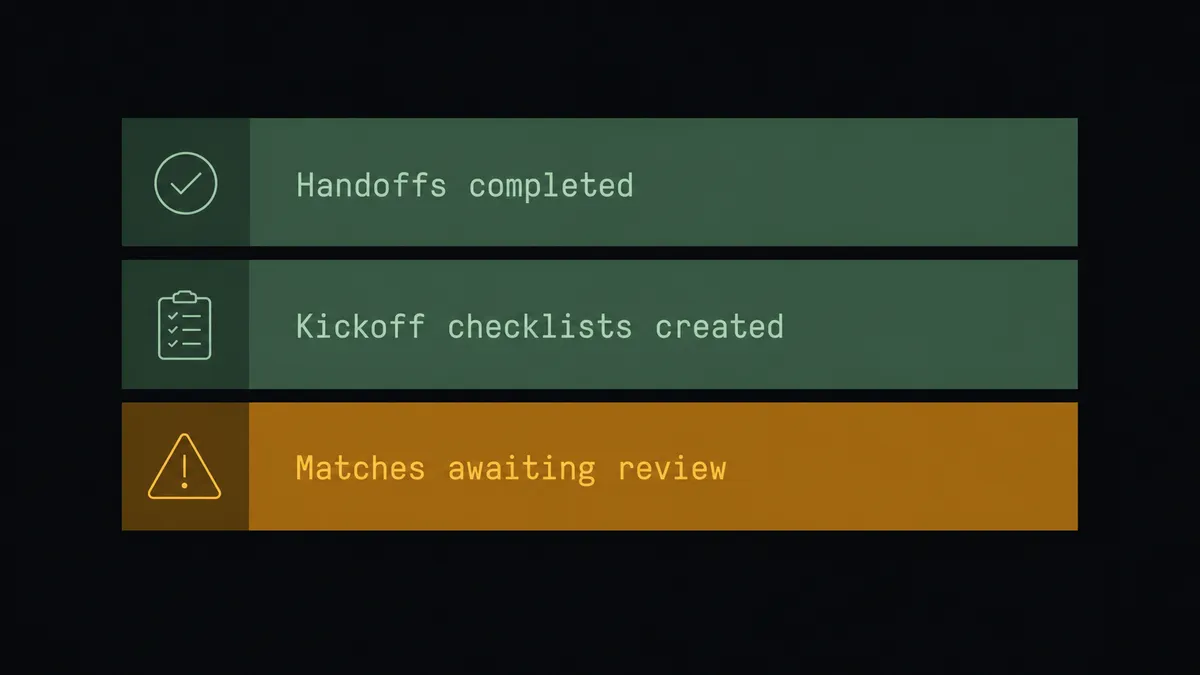
Closed-won to kickoff, end to end. The scheduled run finds a won deal, the agent assembles the client from Get Deal By ID and Get Associations, stands up Accelo with Create Company and Create Contact, and builds the checklist with Create Task.
Duplicate-proof client creation. Every create is preceded by List Companies. Certain matches reuse the record, certain misses create fresh, and everything in between pauses for a human with both records side by side.
Handoff notes that survive. The agent writes the deal context, promises, and amount into Log Activity on the client record, so the delivery team reads what sales actually sold instead of reconstructing it from memory.
Existing-client expansion. When a won deal belongs to a current client, the agent skips creation, checks open work with List Jobs and Get Job, and adds the new engagement’s tasks alongside what is already running.
Two-way status sync. After Accelo is set up, the agent calls Update Deal in HubSpot with the handoff status, so account managers see delivery progress without asking, and no deal sits in a stage that stopped being true.
Getting started
Start on the free plan: 100 executions a month, every integration included, no credit card required, plus 14 days of Professional for new accounts. Both connectors are available on every tier, and every tier includes unlimited users and unlimited workflows, so sales ops and the delivery team share one workspace from day one.
Explore the integration details:
- HubSpot integration (21 actions covering contacts, companies, deals, and associations)
- Accelo integration (10 actions covering companies, contacts, jobs, tasks, and activity logging)
Start building free at flowrunner.ai or book a demo to see a live HubSpot to Accelo workflow, duplicate-check approval and all.
Frequently asked questions
Is it free to connect HubSpot and Accelo on FlowRunner?
You can build and run the connection on FlowRunner's free plan, which includes 100 executions a month and every integration with no credit card required, and new accounts also get 14 days of Professional. Both connectors are available on every FlowRunner tier, and every tier includes unlimited users and unlimited workflows.
Can I self-host the HubSpot to Accelo workflow?
Yes. FlowRunner offers a cloud-hosted option and a self-hosted option, so the connection can run inside your own environment.
Does the AI agent need my own OpenAI or Claude key?
FlowRunner uses a bring-your-own-keys model, so you connect the AI provider key you already have. You are not locked to one model, and you control which provider runs the agent.
What happens when a won deal looks like it matches an existing Accelo client?
The agent does not guess. It pauses before Create Company, posts the HubSpot deal and the near-match Accelo record side by side to your team's channel with its recommendation, and waits. A named person decides whether to reuse the existing client or create a new one, and that decision is recorded in the audit trail.
Neither HubSpot nor Accelo has a trigger in FlowRunner. How does the workflow start?
On a schedule. The workflow polls HubSpot with Get All Deals, compares deal stages against its last run, and processes any deal that has moved to closed won since. In practice the handoff starts within the polling interval you choose.
What gets created in Accelo when a deal closes?
The company record with Create Company, the client's people with Create Contact, a kickoff checklist with Create Task, and a handoff note with Log Activity, so delivery starts from a complete client record instead of a forwarded email.