How to Connect ShipBob with CloudTalk (With or Without an AI Agent)
Connect ShipBob shipment events to CloudTalk SMS and calls, optionally as an AI agent that tells customers about delivery problems before they notice and pauses for a human before an order is canceled.
How do you connect ShipBob to CloudTalk?
You connect ShipBob to CloudTalk by having ShipBob’s shipment triggers drive CloudTalk’s communication actions: On Shipment Exception fires, the workflow pulls the tracking history and customer details with Get Shipment and Get Order, files the customer with Add Contact, and sends a proactive delay notice with Send SMS before the customer has refreshed the tracking page twice. FlowRunner is a visual AI-agent orchestration platform where automations run autonomously and pause for human judgment on the steps that carry real consequence. Run as an agent, the same connection separates the delay that fixes itself from the order that cannot be delivered, and pauses for a named approver before Cancel Order ends anything.
The problem it solves
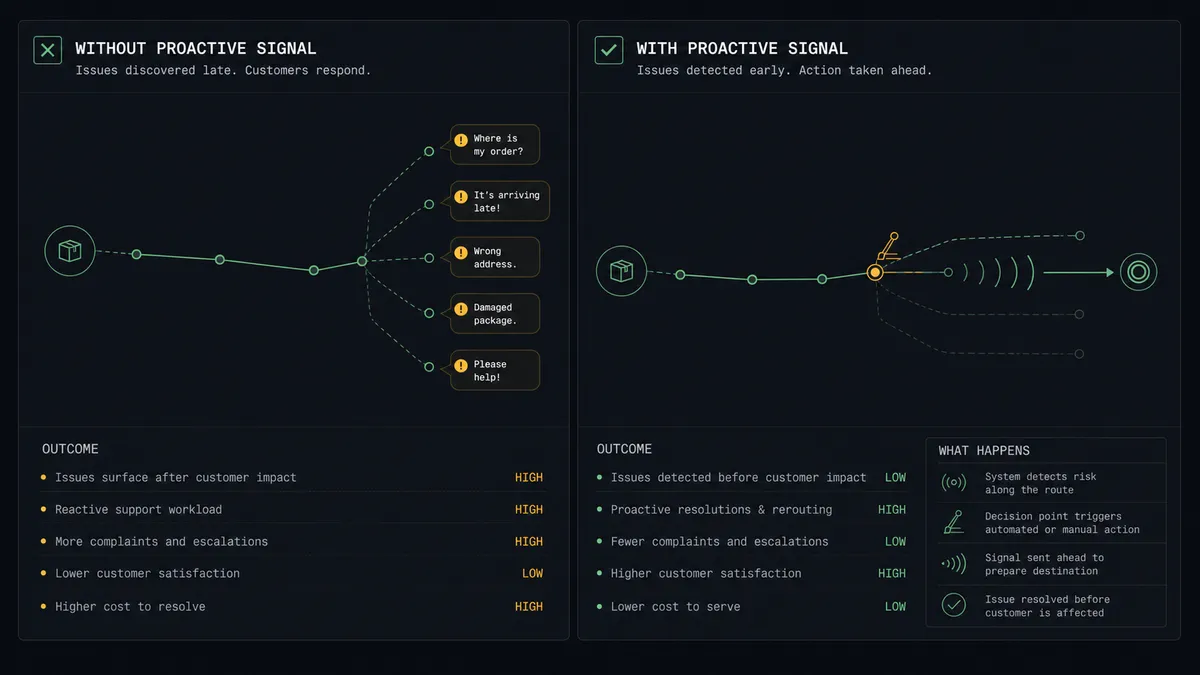
Every fulfillment operation has the same silent queue: packages in trouble that nobody has told the customer about. The carrier scans an exception, the dashboard notes it, and the clock starts. Right now, the customer finds out one of two ways: they watch the tracking page stall and start writing an angry email, or a support ticket lands three days later asking where the order is. Either way, your team learns about the problem from the customer, which is backwards, and the support conversation starts from apology instead of information.
The harder edge is the shipment that is not just late but stuck: a bad address, a package the carrier stopped scanning, a hold at the warehouse. Someone has to decide: wait it out, reship at cost, or cancel and refund. Today that decision happens whenever someone works the exception queue, which at busy times is nobody. Orders sit in limbo for a week, and when the cancellation finally happens, no record shows who decided, what the reship would have cost, or whether the customer was ever offered the choice.
How it works: the connection
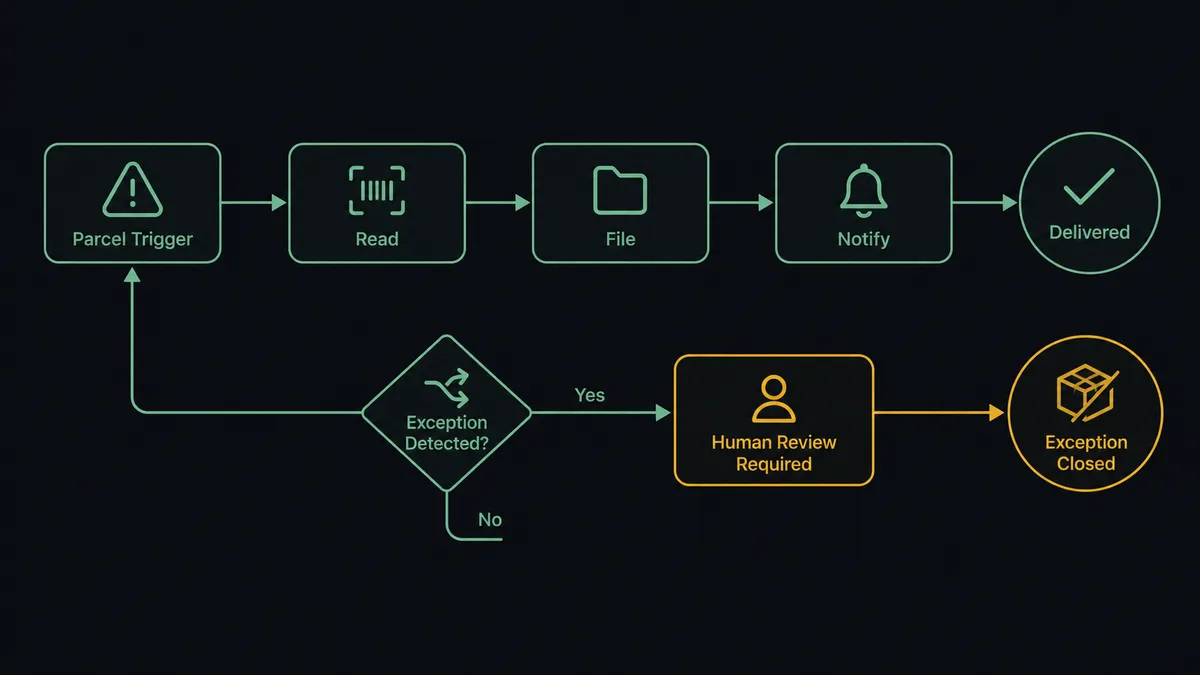
The connection listens to ShipBob and communicates through CloudTalk. Here is the plain version, grounded in the real connector actions.
- Trigger: ShipBob fires On Shipment Exception the moment a carrier reports a problem, and On Shipment On Hold when a shipment is paused at the warehouse.
- Read: The workflow calls Get Shipment for the tracking history and status, and Get Order for the items and the customer’s contact details.
- File: It calls Add Contact in CloudTalk so the customer exists in the calling system with the order attached to their record.
- Notify: It calls Send SMS with a plain-language notice: what happened, the carrier’s updated estimate, and where to reply with questions.
- Track the aftermath: It watches subsequent shipment status, and when movement resumes, a short update goes out the same way.
- Close the loop: When On Shipment Delivered fires, a delivery confirmation completes the thread, so the customer’s last message from you is good news.
- Record: List Calls and Get Statistics keep the contact history complete for support.
That is the “just connect them” answer. Customers hear about delays from you first, on a channel they read within minutes, and the support queue stops filling with “where is my order” tickets that the tracking page already answered.
Can an AI agent run it? (and why a human stays in the loop)
Yes, and the agent is what keeps proactive from becoming noisy. It holds the real actions as tools: Get Shipment, Get Order, Estimate Fulfillment Cost, Cancel Order, Create Order, Add Contact, Send SMS, Make Call (Click to Call), List Calls. Reading an exception, it does what your best support lead does: distinguishes the exception that resolves itself from the one that will not. A weather delay with a new carrier estimate gets a calm notice and no further action. A package that has not scanned in days against its route history is treated as likely lost. An address failure gets a text asking the customer to confirm details before anything reships. It also checks List Calls first, so a customer already talking to your team does not get a parallel automated text.
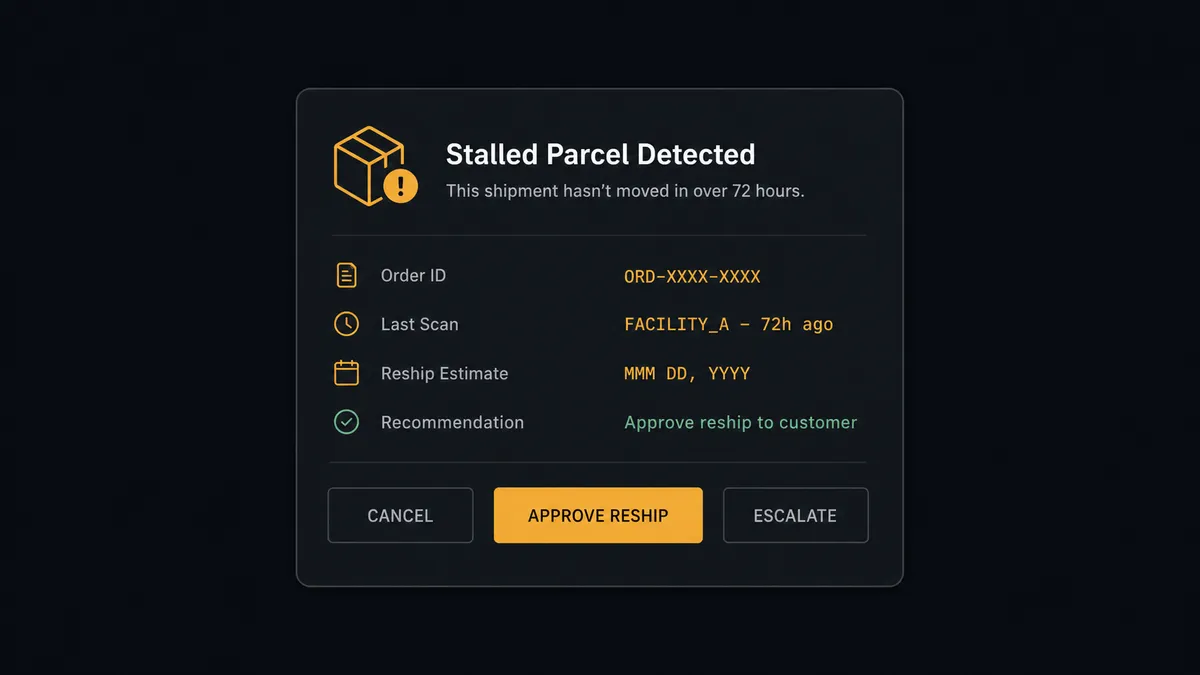
The consequential step is ending the order. Cancel Order is final: it unwinds the sale, triggers the refund conversation, and closes the customer’s window to just wait. So the agent never fires it alone. When it concludes an order cannot be fulfilled as placed, it prices the alternative with Estimate Fulfillment Cost and invokes a human-in-loop flow it holds as a callable tool. The workflow pauses and posts to the operations channel: “Order [number] stalled: no carrier scan since [date], customer notified and asking for options. Reship estimate attached. Recommend reship. Approve reship, approve cancel, or hold?” A named approver decides with one click, the agent executes exactly that, confirms the outcome to the customer with Send SMS, and the approver, estimate, and timestamp land in the audit trail.
This is the digital andon cord, FlowRunner’s core thesis: like Toyota’s andon cord, the workflow stops the line the moment the next step is irreversible. Delay notices flow at machine speed; the decision to end an order waits for a person with the numbers in front of them.
FlowRunner vs Celigo
Celigo’s reputation in operations is earned. As an iPaaS, it moves data between enterprise systems with real depth, and its prebuilt integration apps, particularly around NetSuite and the commerce stack, encode years of field-level sync experience. If the requirement is keeping an ERP, a storefront, and a 3PL in consistent data agreement at scale, Celigo is a serious answer to exactly that question.
Customer communication during a fulfillment failure is a different question. It needs an actor, not a sync: something that reads tracking history, drafts a message a human would send, knows which exceptions resolve themselves, and stops for approval before an order dies. That is orchestration with judgment, and it is the part data integration platforms are not shaped for.
| What matters for this pair | FlowRunner | Celigo |
|---|---|---|
| Human-in-the-loop before Cancel Order | Native. The agent invokes an approval flow as a callable tool and waits for a named approver | Exception queues exist for data errors; approving business actions is not the core model |
| Who runs the flow | An AI agent reads tracking, reasons, picks ShipBob and CloudTalk actions as tools | Integration flows configured and maintained by an integration team |
| Users included | Unlimited users on every tier | Licensed per the platform agreement |
| Bring your own AI keys | Yes, BYOK | AI capabilities are part of the platform’s own stack |
| Self-hosted option | Yes, cloud-hosted or self-hosted | Cloud iPaaS |
| Pricing model | Transparent workflow-based tiers starting at $45/mo | Enterprise iPaaS contracts sized for enterprise budgets |
If your bottleneck is data consistency across an ERP-centered stack, Celigo is genuinely the better fit. If your bottleneck is customers finding out about delivery problems before you tell them, and orders dying without a named decision, this pairing on FlowRunner is.
Before and after
| Category | Before | After |
|---|---|---|
| Delay discovery | The customer notices the stalled tracking page first | On Shipment Exception triggers a proactive SMS before the customer checks twice |
| Support queue | Filled with “where is my order” tickets | Those tickets never open; the answer arrived by text |
| Stuck shipments | Sit in the exception queue until someone works it | Classified by the agent immediately, with lost-package candidates escalated |
| Cancel decisions | Made ad hoc, cost unexamined, recorded nowhere | A named approver decides with the Estimate Fulfillment Cost number in view |
| The last word | An apology after the complaint | A delivery confirmation when On Shipment Delivered fires |
What you can build
Proactive delay notices. On Shipment Exception fires, Get Shipment and Get Order pull the context, Add Contact files the customer, and Send SMS delivers the what-happened-and-when notice before the customer notices the stall.
Stalled-order decision gate. When tracking goes quiet past the route’s normal rhythm, the agent prices the reship with Estimate Fulfillment Cost and holds at the human-in-loop step until an approver picks reship, cancel, or wait, before Cancel Order or Create Order runs.
Address-fix loop. For address failures, the agent texts the customer to confirm corrected details, holds the shipment path until the reply arrives, and routes the corrected order onward, no support ticket required.
High-value voice lane. Orders above your care threshold skip the text and route to Make Call (Click to Call), connecting a team member live, with the conversation logged through List Calls next to the order.
Hold-queue morning digest. On Shipment On Hold events collect overnight; each morning the agent posts a digest with each held order’s age and status, so holds get cleared in one pass instead of aging invisibly.
Getting started
Start on the free plan: 100 executions a month, every integration included, no credit card required, plus 14 days of Professional for new accounts. Both connectors are available on every tier, and every tier includes unlimited users and unlimited workflows.
Explore the integration details:
- ShipBob integration (5 triggers and 20 actions covering orders, shipments, returns, and inventory)
- CloudTalk integration (15 actions covering calls, SMS, contacts, and statistics)
Start building free at flowrunner.ai or book a demo to see a live ShipBob to CloudTalk workflow, cancel-order gate and all.
Frequently asked questions
Is it free to connect ShipBob and CloudTalk on FlowRunner?
You can build and run the connection on FlowRunner's free plan, which includes 100 executions a month and every integration with no credit card required, and new accounts also get 14 days of Professional. Both connectors are available on every FlowRunner tier, and every tier includes unlimited users and unlimited workflows.
Can I self-host the ShipBob to CloudTalk workflow?
Yes. FlowRunner offers a cloud-hosted option and a self-hosted option, so the connection can run inside your own environment.
Does the AI agent need my own OpenAI or Claude key?
FlowRunner uses a bring-your-own-keys model, so you connect the AI provider key you already have. You are not locked to one model.
What happens when a shipment cannot be delivered as placed?
The agent stops and invokes a human-in-loop step. It posts the order, the tracking history from Get Shipment, the reship cost from Estimate Fulfillment Cost, and its recommendation, then waits for an approve or reject decision before Cancel Order runs or a replacement goes out.
Which ShipBob events can start the CloudTalk workflow?
ShipBob offers five triggers: On Order Shipped, On Shipment Delivered, On Shipment Exception, On Shipment On Hold, and On Return Completed. On Shipment Exception and On Shipment On Hold drive the proactive-notice path, and On Shipment Delivered closes the loop.
Does every delay notice need approval before it sends?
No. Routine carrier-delay notices send on their own, which is the point of being proactive. The gate sits on consequence: any path that ends in Cancel Order, and any message that makes a commitment beyond the carrier's own updated estimate, waits for a named approver.