How to Connect Salesforce Pro with AWeber (With or Without an AI Agent)
Sync Salesforce campaign members into the matching AWeber lists with consent checked on every contact, and an agent that pauses for a marketer before Create Broadcast reaches a list.
How do you connect Salesforce Pro to AWeber?
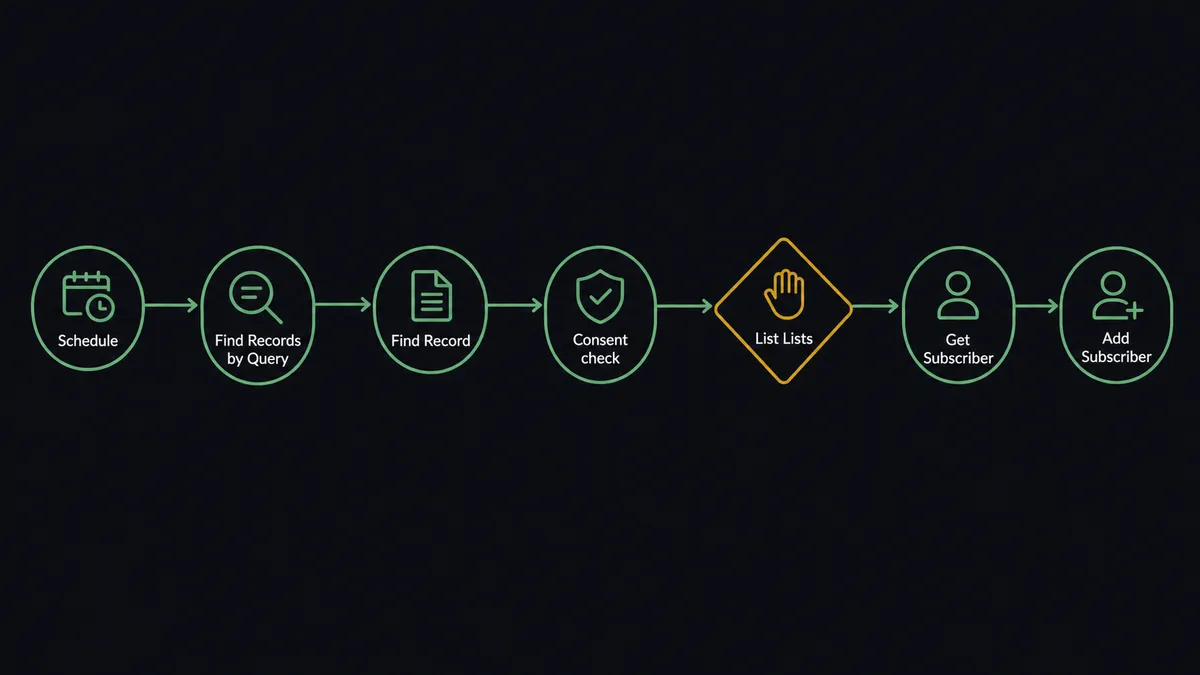
You connect Salesforce Pro to AWeber with a scheduled FlowRunner workflow: Find Records by Query pulls the members added to a campaign that day, Find Record fetches each contact’s email and opt-out status, List Lists selects the AWeber list mapped to that campaign, and Add Subscriber enrolls the contact after Get Subscriber confirms they are not already on it. Neither connector exposes a trigger, so a nightly query is the honest starting point. FlowRunner is a visual AI-agent orchestration platform where automations run autonomously and pause for human judgment on the steps that carry real consequence. Run as an agent, the connection also enforces consent on every enrollment and holds every Create Broadcast behind a marketer’s approval.
The problem it solves
Today the handoff between Salesforce campaigns and AWeber is a person with two browser tabs. Marketing builds a campaign in Salesforce, sales adds members all week, and at some point somebody exports the member list, scrubs it against the last unsubscribe report, and imports it into AWeber. The scrub is the step everyone dreads and everyone rushes. Contacts who opted out three weeks ago slip through because the export predates the unsubscribe. Contacts added Thursday miss the send entirely because the import happened Wednesday.
The edges carry legal weight, not just annoyance. Emailing a contact whose record says opted out is a compliance event in most jurisdictions, and “the export was stale” is not a defense anyone enjoys giving. Meanwhile the same contact exists in two campaigns, lands on two lists, and gets the same offer twice with different subject lines. The problem is not moving email addresses between systems. It is moving them with their consent state intact, every time, without a human doing the scrubbing at 6 PM on a Thursday.
How it works: the connection
Here is the deterministic version, grounded in the real connector actions.
- Trigger: Nightly at 9 PM, the workflow calls Find Records by Query in Salesforce for campaign members added or changed that day.
- Read: For each member, it calls Find Record to fetch email, first name, and the opt-out field.
- Filter: Contacts whose record shows opted out are dropped and logged; they never leave Salesforce.
- Select: It calls List Lists in AWeber and picks the list mapped to the campaign.
- Check: It calls Get Subscriber to confirm the contact is not already enrolled.
- Enroll: It calls Add Subscriber with email, name, and campaign tags.
- Stamp: It calls Update Contact in Salesforce to record the sync date and list name.
That is the plain answer. Campaign membership flows to the email platform every night with consent checked at the record level, and the export-scrub-import ritual retires. The sync stamp in the final step also gives sales something they never had: a rep looking at a Salesforce contact can see which AWeber list the person is on and when they joined it, so “did marketing already email them?” stops being a Slack question and becomes a field on the record.
Can an AI agent run it? (and why a human stays in the loop)
Yes, and the agent earns its place at the two points where the deterministic version still leaks: unclear consent and the send itself. The agent holds the actions as tools: Find Records by Query, Find Record, Update Contact, and Add Contact to Campaign on the Salesforce side; List Lists, Get List, Get Subscriber, Add Subscriber, List Broadcasts, and Create Broadcast on the AWeber side. A hard filter can only handle opt-out fields that are cleanly true or false. Real orgs have records where the field is empty, where a contact re-subscribed after opting out, or where two records for the same person disagree. The agent reads the record history, and when consent is genuinely ambiguous, it does not enroll and does not silently drop. It escalates.
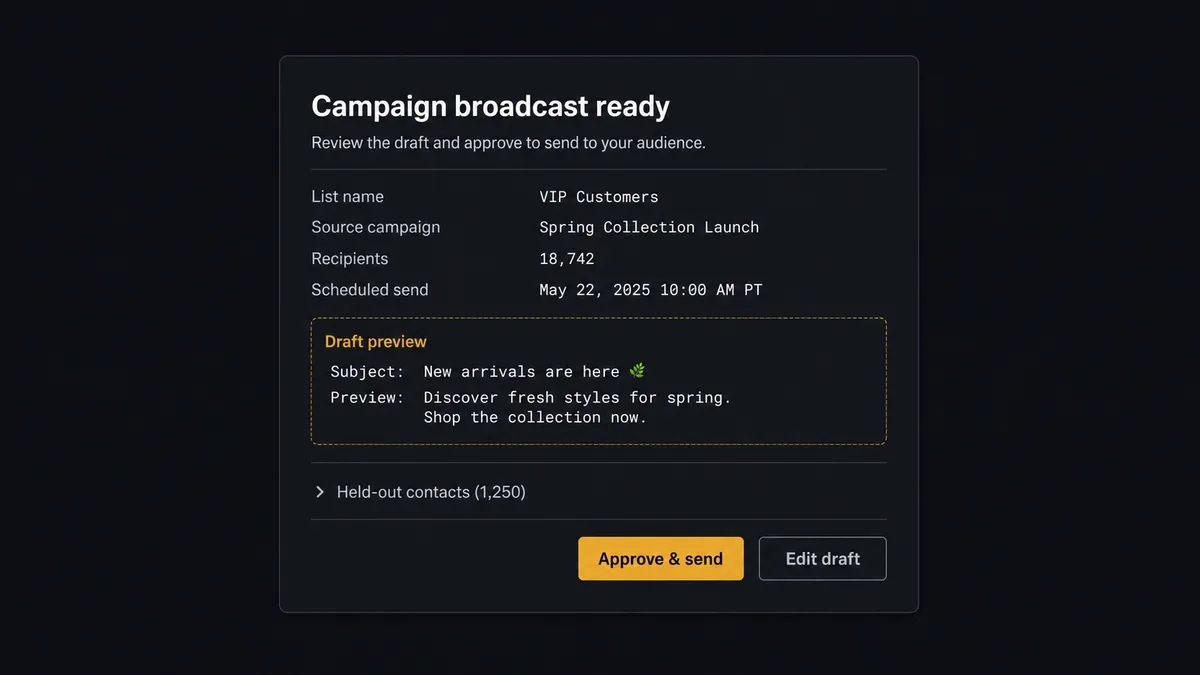
The consequential step is Create Broadcast, the action that reaches every subscriber on a list at once. The agent drafts the campaign message and assembles the audience, then invokes a human-review flow it holds as a callable tool. The workflow pauses and the marketer sees: “Broadcast drafted for [list] from campaign [name]. Audience: subscribers tagged with this campaign. Held out: [contacts with unclear consent], listed below. Approve to queue?” One decision covers both the send and the exceptions. Only after approval does Create Broadcast run, and the audit trail keeps the approver’s name, the timestamp, and the held-out list.
This is the digital andon cord applied to email compliance: the moment the workflow meets a record it cannot be sure about, or a send it cannot take back, it stops the line and hands the decision to the person accountable for it.
FlowRunner vs Zapier
Zapier is a reasonable first answer for Salesforce to AWeber, and its strengths are real: mature apps for both platforms, a large template gallery, and a setup flow a marketer can finish without help. For pushing new leads from one Salesforce view onto one AWeber list, it works and it works quickly.
The gap is consent logic and send governance, which is where this pair actually bites.
| What matters for this pair | FlowRunner | Zapier |
|---|---|---|
| Human-in-the-loop on Create Broadcast | Native. The agent invokes an approval flow as a callable tool and pauses before any send | Available by inserting approval steps, not a native agent decision |
| Who runs the flow | An AI agent checks consent per record, reasons about exceptions, and picks actions as tools | A predefined step sequence with filters you maintain by hand |
| Users included | Unlimited users on every tier | Priced by task volume; seats vary by plan |
| Bring your own AI keys | Yes, BYOK | AI features tied to Zapier’s own AI offering |
| Self-hosted option | Yes, cloud-hosted or self-hosted | Cloud only |
| Pricing model | Transparent workflow-based tiers | Per-task pricing that grows with every campaign member synced |
If your campaigns are small and your consent data is spotless, Zapier will carry you. If opt-out status is messy and a wrong send has compliance weight, the agent with a consent check and a send gate is the better fit. The test is whether your team could show an auditor, for any given send, who approved it and which contacts were held out and why. With this workflow, that answer is a query, not an archaeology project.
Before and after
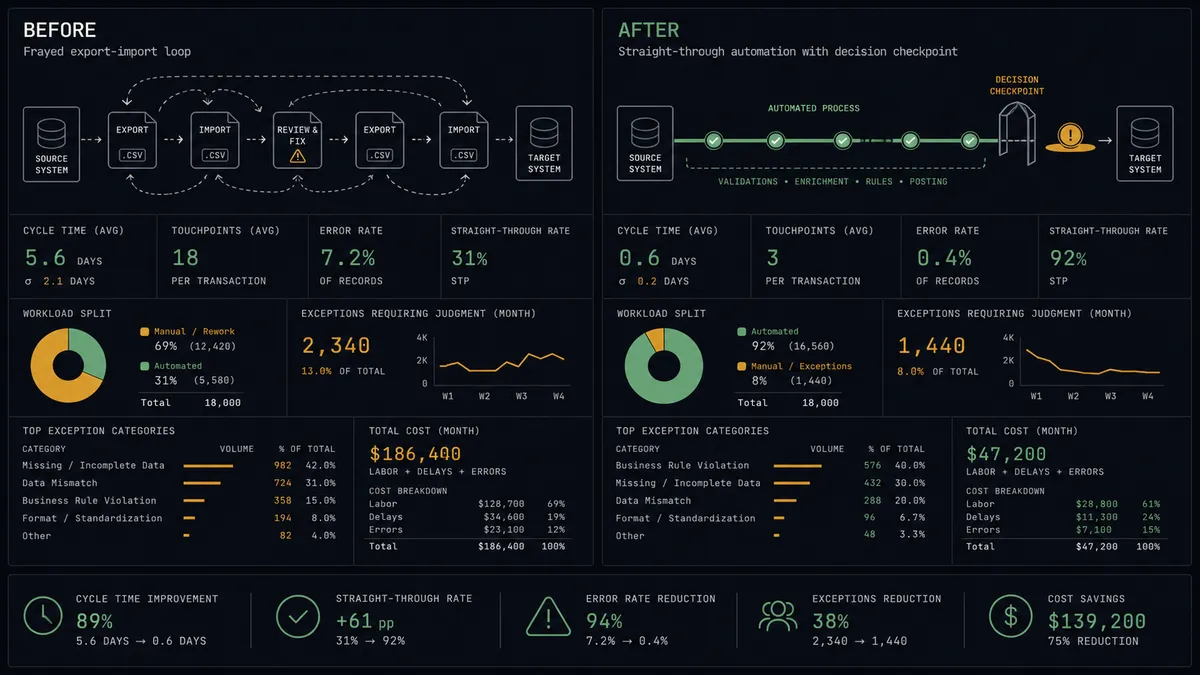
| Category | Before | After |
|---|---|---|
| Campaign sync | Export, scrub, import, repeat, with days of lag | Members reach the mapped AWeber list nightly via the scheduled query |
| Consent handling | Stale exports let opted-out contacts slip onto lists | Opt-out status is read per record, and unclear cases go to a person |
| Send control | Anyone with list access can broadcast to a campaign audience | Create Broadcast runs only after a named marketer approves draft and audience |
| Duplicate enrollment | The same contact joins multiple lists from overlapping campaigns | Get Subscriber checks membership before every Add Subscriber |
| Compliance record | Reconstructing who was emailed and why takes an afternoon | Sync stamps in Salesforce plus an audit trail of approvals and held-out contacts |
What you can build
Nightly campaign sync. Find Records by Query pulls the day’s campaign members, consent is checked per record, and Add Subscriber enrolls the clean ones on the mapped list. Campaign audiences in AWeber stay a day fresh at most.
Consent exception queue. Records with empty or contradictory opt-out fields collect in a review message instead of a list. A person resolves each one, and the agent updates Salesforce with Update Contact so the ambiguity never recurs.
Gated campaign sends. The agent drafts the campaign broadcast, assembles the audience, and pauses. Marketing approves, Create Broadcast queues, and the send is on the record with a name attached.
Cross-campaign dedupe. When overlapping campaigns would put one contact on two lists with the same offer, the agent detects the collision via Get Subscriber and asks which list wins, so nobody gets the same promotion twice in one week.
Re-engagement pipeline. Contacts whose deals went quiet get pulled by a dormancy query, enrolled on a win-back list with distinct tags, and the agent proposes the re-engagement broadcast for approval once the segment is worth a send.
Getting started
Start on the free plan: 100 executions a month, every integration included, no credit card required, plus 14 days of Professional for new accounts. Both connectors are available on every tier, and every tier includes unlimited users and unlimited workflows.
Explore the integration details:
- Salesforce Pro integration (26 actions covering leads, contacts, campaigns, notes, files, and SOQL queries)
- AWeber integration (9 actions covering lists, subscribers, and broadcasts)
Start building free at flowrunner.ai or book a demo to see a live Salesforce Pro to AWeber workflow, consent gate and all.
Frequently asked questions
Is it free to connect Salesforce Pro and AWeber on FlowRunner?
You can build and run the connection on FlowRunner's free plan, which includes 100 executions a month and every integration with no credit card required, and new accounts also get 14 days of Professional. Both connectors are available on every FlowRunner tier, and every tier includes unlimited users and unlimited workflows.
Can I self-host the Salesforce Pro to AWeber workflow?
Yes. FlowRunner offers a cloud-hosted option and a self-hosted option, so the connection can run inside your own environment.
Does the AI agent need my own OpenAI or Claude key?
FlowRunner uses a bring-your-own-keys model, so you connect the AI provider key you already have. You are not locked to one model.
What happens when a contact's consent status is unclear?
The agent holds the contact out of the list and asks. A record with a missing or contradictory opt-out field gets posted to your team's channel with the campaign context, and a person decides whether Add Subscriber runs. Nobody joins a list on a guess.
Which triggers and actions does this pair use?
Neither connector exposes a trigger, so the workflow runs on a schedule. It calls Find Records by Query and Find Record in Salesforce, and List Lists, Get Subscriber, Add Subscriber, and Create Broadcast in AWeber.
Can a campaign email go to the list without approval?
No. The agent drafts the broadcast and names its audience, but Create Broadcast runs only after a marketer approves. The approval, the approver's name, and the timestamp land in the audit trail.