Connect Marketo to Salesforce Pro: Sync Leads, Gate Conversions
Connect Marketo and Salesforce Pro so new leads sync into the CRM automatically, with an AI agent that pauses for a sales manager before an irreversible lead conversion.
How do you connect Marketo to Salesforce Pro?
Marketo’s On New Lead trigger fires when a lead is created from a form fill, ad, or import, and that trigger runs Salesforce Pro’s Find Record and Create Lead actions to check for a duplicate and bring the lead into the CRM with its source and score attached. FlowRunner is a visual AI-agent orchestration platform where automations run autonomously and pause for human judgment on the steps that carry real consequence. The same connection can run as a fixed sync that always creates the record the same way, or as an AI agent that scores the lead, decides whether it’s ready to move further, and pauses for a sales manager before it calls the one Salesforce action that can’t be undone.
The problem it solves
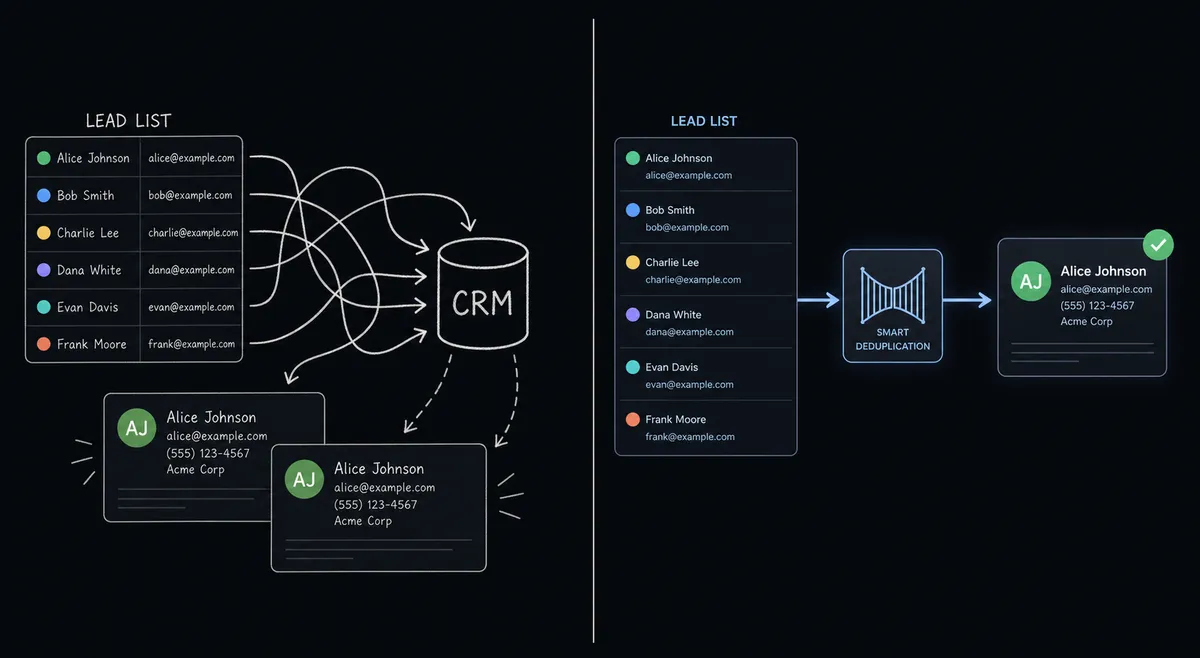
A marketing ops coordinator watches Marketo fill up with leads all day: form fills, ad clicks, list imports. Getting a lead from Marketo into Salesforce, where the SDRs and reps actually work it, still depends on someone noticing it, checking whether it’s already in the CRM, and typing it in by hand. When two people work the same source list, or an import runs twice, the same lead lands in Salesforce as two records with two histories, and nobody can say which one is current. Meanwhile a genuinely hot lead can sit in Marketo for a day before anyone routes it, which defeats the purpose of scoring it in the first place.
The conversion step makes this worse, not better. Converting a lead to a contact and opportunity in Salesforce is a one-way door: once it happens, the lead record is gone and the territory assignment is set. Different reps convert at different points because there’s no consistent rule, which means some conversions happen too early on unqualified leads and some qualified leads sit unconverted because nobody got to them. The sales manager finds out about a bad conversion after it’s already caused a territory dispute, not before.
How it works: the connection
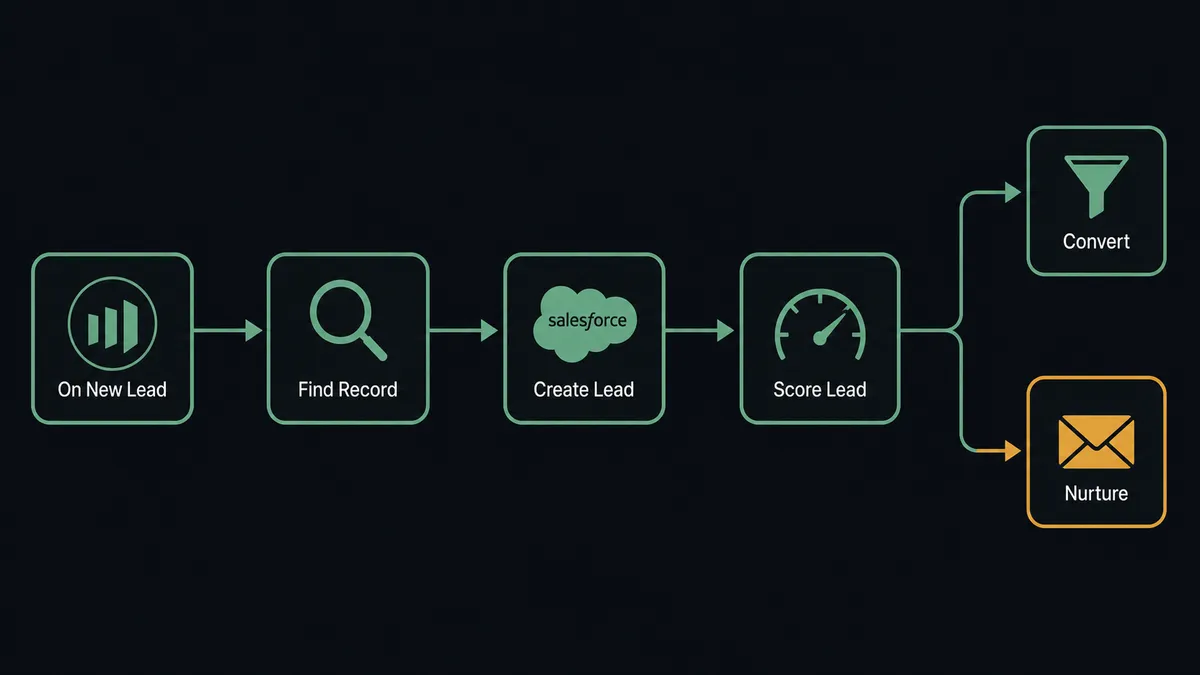
The flow starts on Marketo’s On New Lead trigger, which fires the moment a lead record is created, regardless of source. The agent calls Find Record in Salesforce Pro first, checking whether that lead already exists in the CRM by email or a matched field, so the same person never becomes two records. If there’s no match, the agent calls Create Lead, passing across the lead’s source, company, and the Marketo score already sitting on the record, so the Salesforce lead arrives with context instead of just a name and email.
From there the agent evaluates the lead against firmographic ICP criteria and its Marketo score together. Leads that clear the bar move toward conversion; leads that don’t get routed into a Marketo nurture track with Add Leads to List and Request Campaign, so a cold lead isn’t pushed into a rep’s queue before it’s ready. For a lead whose scoring field changes later, the On Lead Field Change trigger fires and the agent can call Update Lead in Salesforce Pro to keep the CRM record current without waiting for the next full sync.
Can an AI agent run it? (and why a human stays in the loop)
A fixed sync would call Find Record, Create Lead, and Convert Lead to Contact in the same order for every lead, with no distinction between a Fortune 500 buyer and a form-fill from someone kicking tires. FlowRunner’s agent reads the lead’s score, company, and activity, reasons about whether it’s actually ready, and calls those same Marketo and Salesforce Pro actions as tools it chooses to use. This is not a sync tool. The agent knows when to stop and ask.
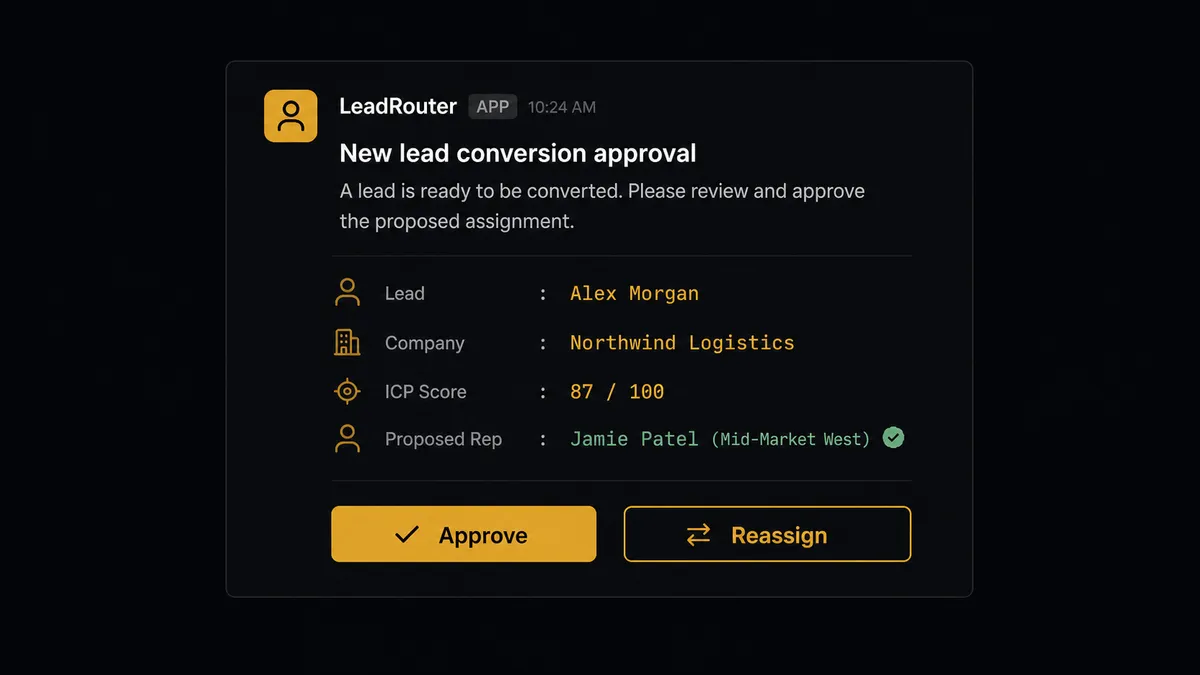
The moment that matters is Convert Lead to Contact. Conversion in Salesforce is irreversible: it creates or merges the contact, account, and opportunity, and there’s no undo. Before the agent calls it, the agent pauses and routes the decision to the sales manager on Slack: “Lead Dana Ruiz at Meridian Logistics scored 87 on ICP fit and lead score. Ready to convert and assign to the Central territory rep. Approve or reassign?” The manager approves in one click, and the agent converts the lead, assigns the rep, and posts the full context to that rep in Slack in the same run. The manager holds, or reassigns the territory, and the agent waits. The decision, the approver, and the timestamp are all captured in the audit trail. Prospects call this a digital andon cord: the line keeps moving on its own until something needs a person’s judgment, and then it stops until they weigh in.
The same discipline runs on the Marketo side. When a smart campaign is about to send to a large audience rather than a small, targeted list, the agent treats that send the same way: it pauses, shows marketing ops the campaign and the audience size, and waits for a Slack approval before it calls Request Campaign. Small, targeted sends and routine lead syncs move through on their own. Mass sends and irreversible conversions get a person’s sign-off first.
FlowRunner vs Zapier
Zapier connects Marketo and Salesforce natively, and for a marketing ops team that just wants new leads landing in the CRM, it’s genuinely fast to set up. Where the two diverge is what happens on the step that can’t be undone, and what the connection costs as lead volume and rep headcount grow.
| Capability | Zapier | FlowRunner |
|---|---|---|
| Human-in-loop before conversion | A manual review step or delay app you build and wire yourself | Native: the agent invokes a human-in-loop flow as a callable tool before Convert Lead to Contact runs |
| Reasoning over each lead | Filter steps apply the same fixed rule to every lead | The agent scores the lead and decides whether it’s conversion-ready, nurture-only, or needs a person |
| Users included | Paid seats on the tiers with this much automation depth | Unlimited users on every tier |
| Pricing model | Per-task pricing that gets harder to predict as lead volume climbs | Transparent workflow-based tiers with clear execution limits |
| Self-hosting | Not available | Self-hosted Community Edition free, self-hosted Enterprise for full compliance |
Before and after
| Category | Before | After |
|---|---|---|
| Lead sync | Lead data from Marketo is reconciled into Salesforce by hand | Find Record and Create Lead sync each lead the moment it appears |
| Lead qualification | SDRs review each lead and research the company individually | ICP and score criteria are applied to every lead automatically |
| Lead conversion | Different reps convert leads at different points, with no consistent rule | Every conversion requires explicit manager approval, with the decision logged |
| List membership | Marketo list adds and removes happen on a schedule someone runs | The agent adds leads to nurture lists as scoring decides |
| Campaign attribution | Revenue ops runs SOQL queries against spreadsheets to build attribution reports | A weekly SOQL query posts campaign ROI straight to the revenue ops channel |
What you can build
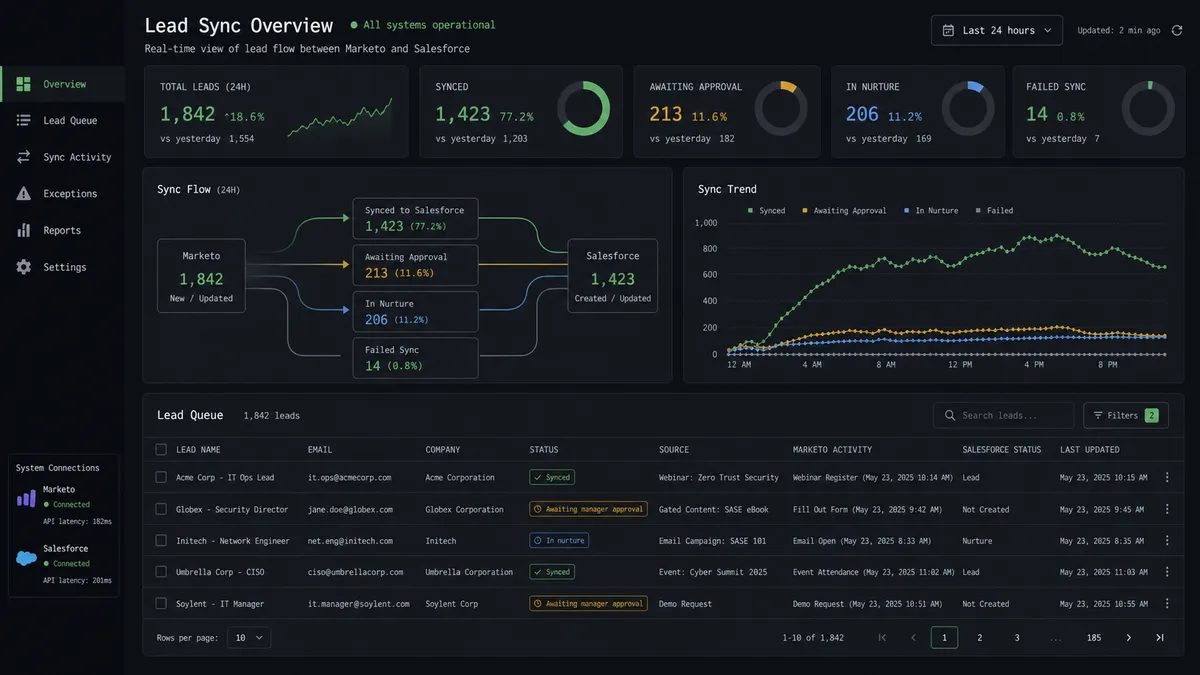
Real-time lead sync with duplicate protection. The agent calls Find Record on every new Marketo lead before Create Lead runs, so the same contact never becomes two Salesforce records from a repeated import or a second form fill.
Score-gated conversion with manager sign-off. Leads that clear the ICP and lead-score threshold pause for the sales manager in Slack before Convert Lead to Contact runs, so no territory gets a conversion nobody approved.
Automatic nurture for leads that aren’t ready. Leads below the threshold are added to a Marketo list with Add Leads to List and enrolled in a nurture track with Request Campaign, so a cold lead never reaches a rep’s queue before it’s warm.
Score changes reflected in Salesforce without a full resync. The On Lead Field Change trigger fires when a lead’s score updates, and the agent calls Update Lead in Salesforce Pro to keep the CRM record current the moment the score moves.
Weekly campaign attribution posted automatically. The agent runs Custom SOQL Query against closed opportunities, matches them to the Marketo campaigns that touched them, and posts the attribution report to the revenue ops Slack channel every week.
Common questions
Is it free to connect Marketo and Salesforce Pro on FlowRunner? FlowRunner has a free plan with 100 executions a month, every integration included, and no credit card required, and new accounts get 14 days of Professional on top. Beyond the free plan, Growth starts at $45/mo for 12,000 executions.
Can I self-host the Marketo and Salesforce Pro connection? Yes. The Community Edition is free for a single self-hosted instance, and the self-hosted Enterprise tier adds multi-instance clustering and the full compliance suite for teams that need lead and CRM data to stay on their own infrastructure.
Does the agent need my own OpenAI key? FlowRunner uses a bring-your-own-key model, so you connect the AI provider you already use and the agent runs on your key rather than a shared pool.
What happens when the agent isn’t sure whether to convert a lead? The agent never calls Convert Lead to Contact on its own. It packages the lead’s score, company, and proposed rep assignment and routes the decision to the sales manager through Slack, and nothing converts until a person approves it.
Does this replace Marketo’s native Salesforce sync? No. FlowRunner is the layer that decides when a lead is ready to move and who has to approve it; it calls the same Marketo and Salesforce Pro actions a native sync would, but adds the reasoning and the approval step around them.
Getting started
FlowRunner has a free plan with 100 executions a month, every integration included, and no credit card required, and new accounts get 14 days of Professional on top. Start at flowrunner.ai to build the flow yourself, or book time at calendly.com/flowrunner/intro to walk through the conversion threshold and territory rules with the team.
Frequently asked questions
Is it free to connect Marketo and Salesforce Pro on FlowRunner?
FlowRunner has a free plan with 100 executions a month, every integration included, and no credit card required, and new accounts get 14 days of Professional on top. Beyond the free plan, Growth starts at $45/mo for 12,000 executions.
Can I self-host the Marketo and Salesforce Pro connection?
Yes. The Community Edition is free for a single self-hosted instance, and the self-hosted Enterprise tier adds multi-instance clustering and the full compliance suite for teams that need lead and CRM data to stay on their own infrastructure.
Does the agent need my own OpenAI key?
FlowRunner uses a bring-your-own-key model, so you connect the AI provider you already use and the agent runs on your key rather than a shared pool.
What happens when the agent isn't sure whether to convert a lead?
The agent never calls Convert Lead to Contact on its own. It packages the lead's score, company, and proposed rep assignment and routes the decision to the sales manager through Slack, and nothing converts until a person approves it.
Does this replace Marketo's native Salesforce sync?
No. FlowRunner is the layer that decides when a lead is ready to move and who has to approve it; it calls the same Marketo and Salesforce Pro actions a native sync would, but adds the reasoning and the approval step around them.