How to Connect Typeform with AWeber (With or Without an AI Agent)
Pull new Typeform submissions into AWeber automatically, optionally as an AI agent that adds clean signups on its own and pauses for a human when consent is unclear before anyone lands on the list.
How do you connect Typeform to AWeber?
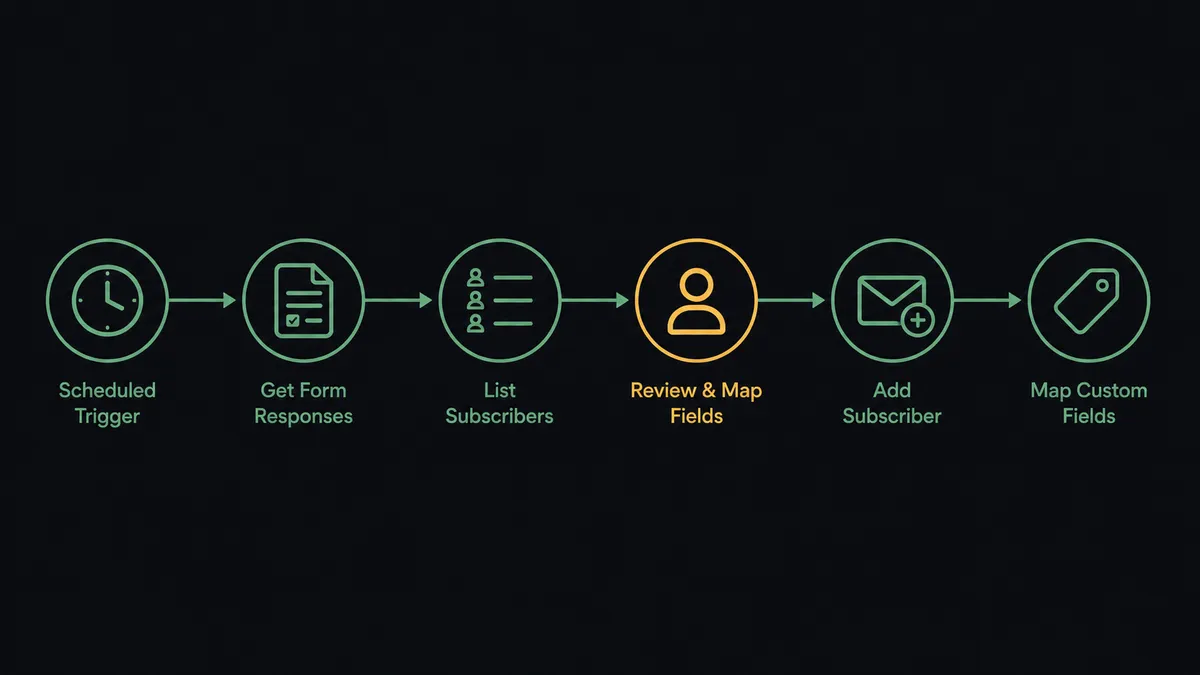
You connect Typeform to AWeber by running a scheduled workflow that calls Get Form Responses to pull new submissions, then calls Add Subscriber to place each respondent on the right AWeber list with their display name, tags, and custom field values mapped from the form answers. Typeform has no trigger in FlowRunner, so the schedule is the starting gun: every run picks up what arrived since the last check. FlowRunner is a visual AI-agent orchestration platform where automations run autonomously and pause for human judgment on the steps that carry real consequence. When the same connection runs as an AI agent, the agent reads each response, adds clean signups on its own, and stops for a named human before Add Subscriber runs on anyone whose consent answer is unclear.
The problem it solves
Without this connection, the bridge between your form and your list is an export file. Someone on the marketing or ops team logs into Typeform, downloads the latest responses, cleans the columns in a spreadsheet, and imports the file into AWeber. They do it when they remember, which means the lead who filled out your form on Friday afternoon gets the welcome sequence the following Wednesday. By then the interest that drove the signup has cooled, and the first email lands as a surprise instead of a confirmation.
The edges are worse than the lag. A respondent who typed their email with a typo bounces on the first send and drags down deliverability. Someone who filled out the form twice gets imported twice. And the quiet compliance problem: a form respondent who answered your consent question with something other than a clean yes gets swept into the import anyway, because a CSV column does not distinguish “yes, send me the newsletter” from “maybe later.” One spam complaint from a person who never opted in costs more sender reputation than a hundred clean signups build.
How it works: the connection
The connection reads from Typeform on a schedule and writes to AWeber. Here is the plain version, grounded in the real connector actions.
- Trigger: On a schedule, the workflow calls Get Form Responses to pull every submission received since the last run.
- Read: It calls Get Form once to pull the form definition, so each answer maps to a named field instead of a question ID.
- Resolve the list: It calls List Accounts and List Lists to resolve the AWeber account and target list, then Get List to confirm the list configuration.
- Check for duplicates: It calls List Subscribers filtered to the target list to see whether the respondent already has a record.
- Add the subscriber: For new, clean signups it calls Add Subscriber with the email, display name, tags, and custom field values mapped from the answers.
- Verify: It calls Get Subscriber to confirm the record landed with the right status and tags.
That is the “just connect them” answer. Every form submission becomes a tagged, segmented subscriber within minutes of arriving, and nobody touches a CSV. The tags carry the form answers forward, so the respondent who said they run a team of fifty gets different follow-up than the solo founder.
Can an AI agent run it? (and why a human stays in the loop)
Yes, and this is where the connection stops being a pipe and starts being a doorman. Instead of a fixed mapping that treats every submission identically, an AI agent reads each response and picks the AWeber actions it needs as tools: List Subscribers to check for an existing record, Add Subscriber to create one, Get Subscriber to verify, Create Broadcast to stage a follow-up draft. The agent decides what each response deserves based on what the respondent actually wrote.
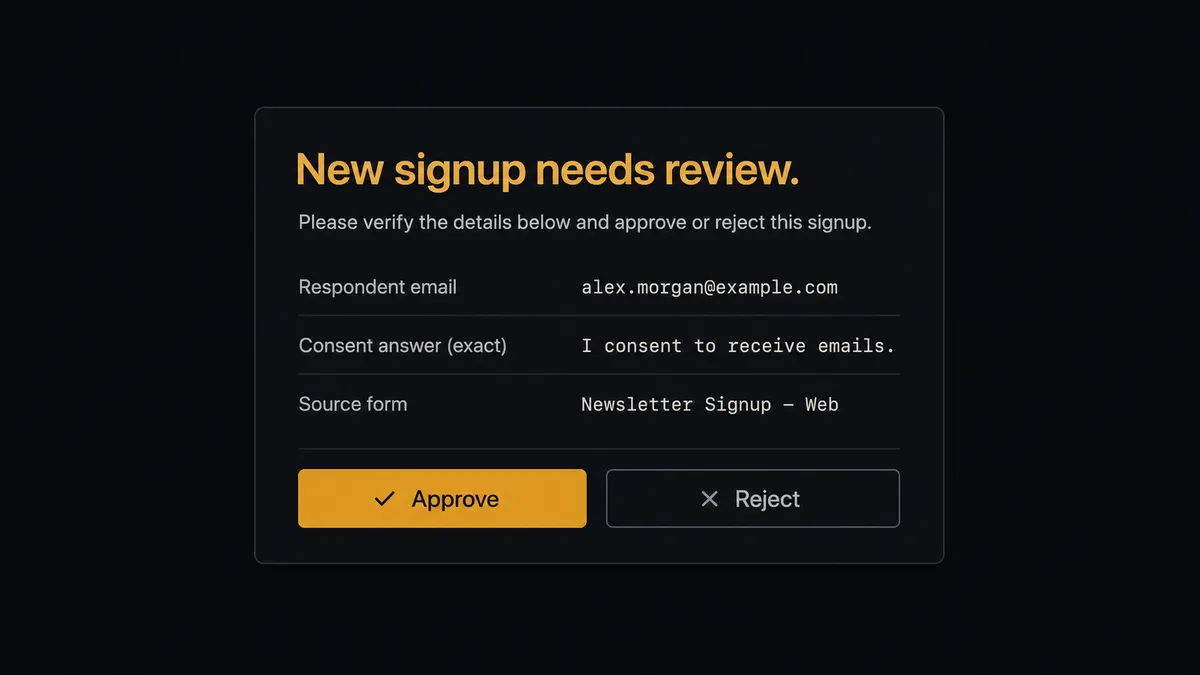
The consequential step is putting a person on a list that emails them. When the consent answer is a clean yes and the email validates, the agent adds the subscriber on its own. When the answer is ambiguous, when the free-text field says “just looking for pricing,” or when the same domain has submitted several times in one afternoon, the agent does not guess. It invokes a human-in-loop flow it holds as a callable tool. The workflow pauses and posts to your team’s channel: “New Typeform response from [email]. Consent answer: [exact text]. Recommend holding. Add to the list?” A person clicks approve or reject. Only on approval does the agent call Add Subscriber, and the decision, the approver’s name, and the timestamp all land in the audit trail.
That judgment call is the difference between a sync and an agent. A keyword rule cannot tell “yes, but only product updates” from “no thanks.” The agent can, and when it cannot tell, it stops. Prospects call this the digital andon cord: like Toyota’s quality control pull cord, the workflow stops the line the moment it hits uncertainty, and your team pulls it back into motion with one click.
FlowRunner vs Zapier
Most teams connecting Typeform to AWeber look at Zapier first, and with reason. Zapier’s connector library is enormous, its template gallery almost certainly has a prebuilt Typeform to AWeber Zap, and for a straight submission-to-subscriber push it is quick to stand up. That speed is real.
The difference shows up at the step that carries consequence: who gets emailed. FlowRunner is built around native human-in-the-loop and AI-agent orchestration, where the agent decides when a signup needs a person, rather than a fixed step sequence that treats every row the same.
| What matters for this pair | FlowRunner | Zapier |
|---|---|---|
| Human-in-the-loop on ambiguous consent | Native. The agent invokes an approval flow as a callable tool and pauses before Add Subscriber | Available via added approval steps you place in advance, not an agent decision |
| Who runs the flow | An AI agent reads each response, reasons, and picks actions as tools | Predefined step sequence you configure per Zap |
| Users included | Unlimited users on every tier | Priced by task volume; seats vary by plan |
| Bring your own AI keys | Yes, BYOK. Connect the AI provider key you already have | AI features tied to Zapier’s own AI offering |
| Self-hosted option | Yes, cloud-hosted or self-hosted | Cloud only |
| Pricing model | Transparent workflow-based tiers | Per-task pricing that grows with your form volume |
If all you need is every submission on the list, Zapier does it well. If you want a doorman who checks consent before anyone gets emailed, with a full audit trail of who approved the edge cases, that is where FlowRunner is the better fit.
Before and after
| Category | Before | After |
|---|---|---|
| Signup lag | Responses wait in Typeform until someone runs the weekly export and import | New subscribers land on the AWeber list within minutes of submitting |
| List hygiene | Typos, duplicates, and test submissions ride along in the CSV import | The agent validates emails and checks List Subscribers before adding anyone |
| Consent handling | The consent column gets skimmed, or skipped, during the import | Ambiguous consent answers pause for a named approver before Add Subscriber runs |
| Segmentation | Everyone lands on one list; tagging happens later, by hand, if ever | Tags and custom fields map from the form answers at the moment of signup |
| Accountability | Nobody can say who added a contested address or why | Every escalated signup carries the approver, the decision, and a timestamp |
What you can build
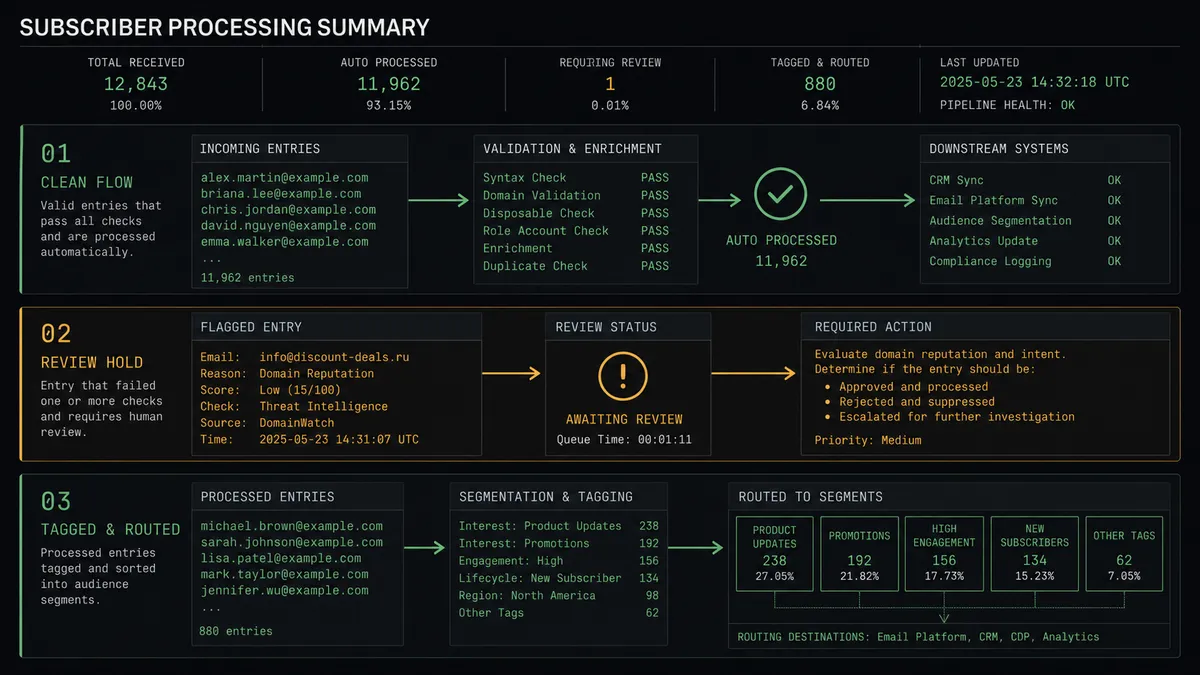
Form signup to tagged subscriber, hands off. The schedule fires, Get Form Responses pulls the new submissions, and the agent maps each clean opt-in through Add Subscriber with tags and custom fields drawn from the answers. Your welcome sequence starts while the signup is still warm.
Consent gate for gray-area responses. The agent reads the actual consent answer, adds the clear yeses, rejects the clear nos, and routes everything in between through the human-in-loop tool. A person decides the gray areas, and the audit trail remembers.
Segmented onboarding from one form. One Typeform feeds several AWeber lists. The agent reads the role and interest answers, resolves the right list with List Lists, and calls Add Subscriber with tags that put the agency owner and the in-house marketer into different sequences.
Broadcast draft from this week’s responses. On a weekly schedule the agent calls Get Form Responses, summarizes what new signups said they want, and calls Create Broadcast to stage a draft email built around those answers. List Broadcasts shows the draft waiting; a person reviews and sends it from AWeber.
Duplicate and typo quarantine. Before any add, the agent checks List Subscribers for the address and inspects the email for malformed domains. Suspect entries queue for one human decision instead of bouncing on the next send.
Getting started
Start on the free plan: 100 executions a month, every integration included, no credit card required, plus 14 days of Professional for new accounts. Both connectors are available on every tier, and every tier includes unlimited users and unlimited workflows.
Explore the integration details:
- Typeform integration (36 actions covering forms, responses, themes, and insights)
- AWeber integration (9 actions covering lists, subscribers, and broadcasts)
Start building free at flowrunner.ai or book a demo to see a live Typeform to AWeber workflow, consent gate and all.
Frequently asked questions
Is it free to connect Typeform and AWeber on FlowRunner?
You can build and run the connection on FlowRunner's free plan, which includes 100 executions a month and every integration with no credit card required, and new accounts also get 14 days of Professional. Both connectors are available on every FlowRunner tier, and every tier includes unlimited users and unlimited workflows.
Can I self-host the Typeform to AWeber workflow?
Yes. FlowRunner offers a cloud-hosted option and a self-hosted option, so the connection can run inside your own environment.
Does the AI agent need my own OpenAI or Claude key?
FlowRunner uses a bring-your-own-keys model, so you connect the AI provider key you already have. You are not locked to one model.
What happens when the agent is unsure whether someone opted in?
The agent stops before Add Subscriber runs and invokes a human-in-loop step. It posts the respondent's email, the exact consent answer they gave, and the form they came from to the channel your team already uses, then waits for an approve or reject decision. Nobody lands on the list without either a clear opt-in or a named human sign-off.
Typeform has no trigger in FlowRunner, so what starts the workflow?
The workflow runs on a schedule. Every run calls Get Form Responses to pull submissions received since the last check, so signups flow to AWeber in near real time without a webhook. Get Form pulls the form definition once so answers map to named fields.
Can the workflow also send AWeber emails, not just add subscribers?
It can prepare them. Create Broadcast creates an email draft on an AWeber list with your subject and body, and List Broadcasts shows drafts, scheduled, and sent messages. AWeber keeps scheduling and sending as separate operations, so a person always presses send on the broadcast itself.