How to Connect QuickBooks Online with CloudConvert (With or Without an AI Agent)
Turn QuickBooks Online invoices into merged, optimized close packets with CloudConvert, run by an AI agent that reconciles the documents and pauses for a human before the packet is finalized and intermediate files are purged.
How do you connect QuickBooks Online to CloudConvert?
You connect QuickBooks Online to CloudConvert by running a scheduled workflow that scopes the period with List Invoices, pulls each document with Get Invoice PDF, binds them into one packet with Merge Files to PDF, compresses the result with Optimize File, and bundles the deliverable with Create Archive. FlowRunner is a visual AI-agent orchestration platform where automations run autonomously and pause for human judgment on the steps that carry real consequence. The same connection can run as an AI agent that reconciles the documents against the ledger as it goes and pauses for a named approver before the packet is finalized, so voids and gaps get a ruling instead of a pass.
The problem it solves
Right now assembling a document packet from the books is a person’s afternoon. An auditor, a lender, or a due diligence request asks for the period’s invoices as one clean file. Someone opens QuickBooks Online, downloads each invoice PDF one at a time, drags them into a desktop merger in the right order, checks the page count looks plausible, compresses the file so email accepts it, and uploads it. Then the request comes back: the lender wants it as a single archive with a cover sheet, or the auditor wants the prior quarter too, and the routine starts over.
The edges are where it goes wrong. An invoice was voided halfway through the month and nobody decided whether it belongs in the packet. Two invoices were revised after the download and the packet no longer matches the ledger. One PDF silently failed to download and the packet is a document short, which nobody discovers until the auditor counts. A missing or mismatched document in an audit packet is not a formatting problem, it is a credibility problem.
How it works: the connection
The connection reads QuickBooks Online on a schedule and processes the documents through CloudConvert. Here is the plain version, grounded in the real connector actions.
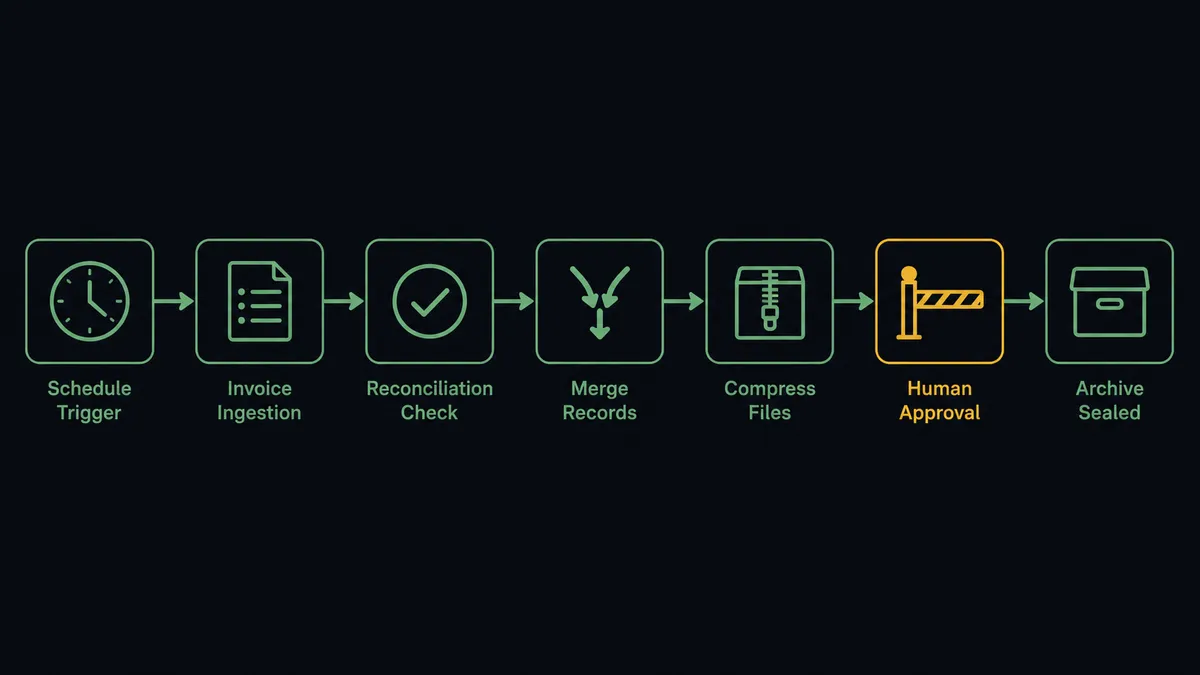
- Trigger: On a month-end schedule, the workflow calls List Invoices filtered to the closed period.
- Read: For each invoice, it calls Get Invoice PDF to pull the document exactly as QuickBooks Online renders it.
- Reconcile: It compares the pulled files against the invoice list: every invoice accounted for, voids identified, totals consistent.
- Bind: It calls Merge Files to PDF to combine the documents into a single packet in invoice-number order.
- Compress: It calls Optimize File with the archiving profile so the packet stays small without changing format.
- Bundle: It calls Create Archive to produce the ZIP that goes to the auditor or lender, saved to durable file storage.
- Clean up: It calls Delete Job to purge the intermediate conversion files from CloudConvert ahead of the automatic 24-hour deletion.
That is the “just connect them” answer. A period’s invoices become one ordered, compressed, delivery-ready file without a single manual download. The same chain handles vendor bills via List Bills and estimates via Get Estimate PDF when the request covers more than sales.
Can an AI agent run it? (and why a human stays in the loop)
Yes, and the agent’s value is precisely at the reconciliation. A plain pipeline merges whatever files it receives; an AI agent holds List Invoices, Get Invoice PDF, Merge Files to PDF, Optimize File, Create Archive, and Delete Job as tools and reasons about what it is binding. It notices that the invoice list has entries the pull did not return. It notices a voided invoice sitting in the middle of the sequence. It notices that an invoice was updated after the packet run started. Each of those is a judgment call about what the packet should contain, and judgment calls about audit deliverables belong to a person.
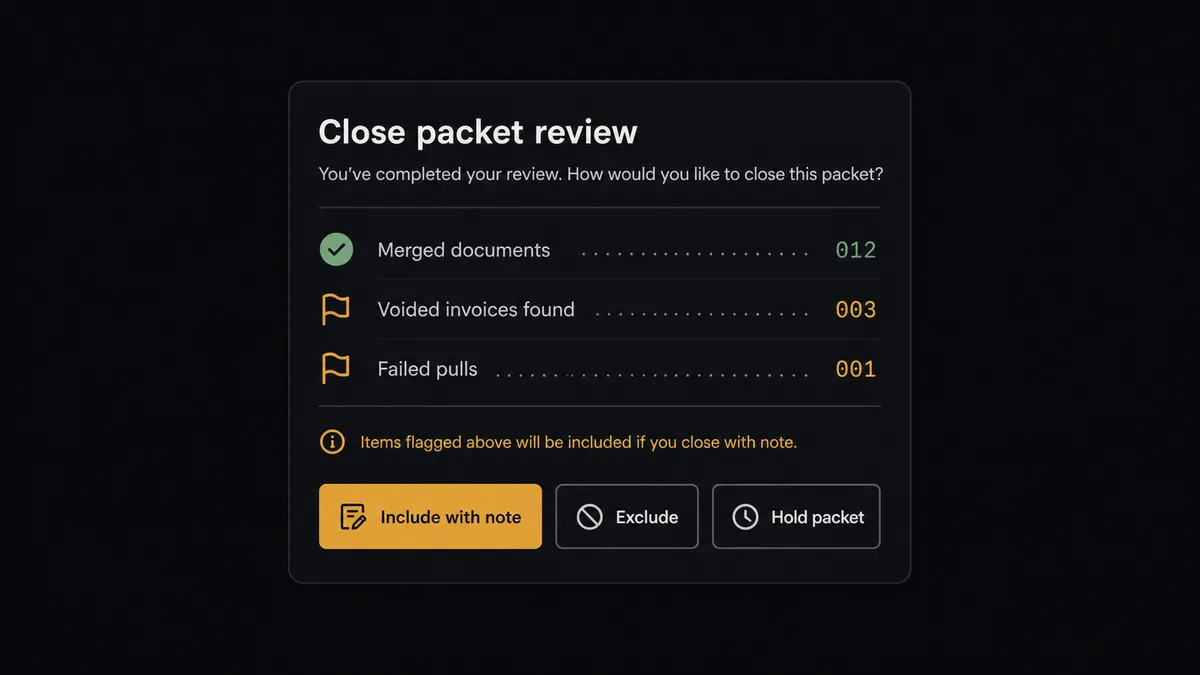
The consequential step is finalizing the packet. Once Create Archive produces the deliverable and it leaves for the auditor, an omission or a stale document is out of your hands. So when the reconciliation is anything other than clean, the agent stops and invokes a human-in-loop flow it holds as a callable tool. It posts to the finance channel: “Close packet for the period is merged and optimized. Reconciliation: voided invoices found in the period and one document failed to pull, list attached. Include the voids with a note, exclude them, or hold the packet?” A named approver rules on each exception, and only then does the agent run Create Archive, followed by Delete Job to purge the intermediate files early. The reconciliation result, the ruling, the approver, and the timestamp all land in the audit trail, which is a sentence auditors enjoy reading.
Prospects call this the digital andon cord: like Toyota’s production line pull cord, the workflow stops the line the moment it hits uncertainty. Clean months run end to end untouched. The month with a void in the middle is the month a human decides what the packet says.
FlowRunner vs n8n
A technical team sizing up this pairing looks at n8n with cause. n8n’s HTTP request node and code steps can drive both the QuickBooks Online API and CloudConvert’s job graph directly, its self-hosted fair-code model appeals to teams that want the pipeline on their own metal, and its community has published a deep pool of file-processing examples. For an engineer who wants raw control over a conversion job graph, n8n offers it.
The difference is who owns the workflow and what happens when the reconciliation is not clean. FlowRunner makes the exception gate a native platform feature the agent invokes as a tool, not a wait-node pattern someone has to build and maintain.
| What matters for this pair | FlowRunner | n8n |
|---|---|---|
| Human-in-the-loop before Create Archive finalizes the packet | Native. The agent invokes an approval flow as a callable tool and waits for a ruling | Buildable with wait nodes and custom branching; you assemble and maintain it |
| Who runs the flow | An AI agent reconciles the documents, reasons, and picks actions as tools | Node sequence you wire yourself; agent nodes exist but as add-ons |
| Users included | Unlimited users on every tier | Cloud plans carry per-tier limits; self-hosting shifts cost to your infrastructure |
| Bring your own AI keys | Yes, BYOK | Yes, BYOK supported |
| Self-hosted option | Yes, cloud-hosted or self-hosted | Yes, fair-code self-hosted |
| Pricing model | Transparent workflow-based tiers | Execution-based cloud pricing that takes effort to predict |
If your engineers want to script CloudConvert job graphs by hand and own the result, n8n serves that well. If you want finance and operations to run the close packet themselves, with reconciliation and a built-in approval gate, this pairing is the better fit.
Before and after
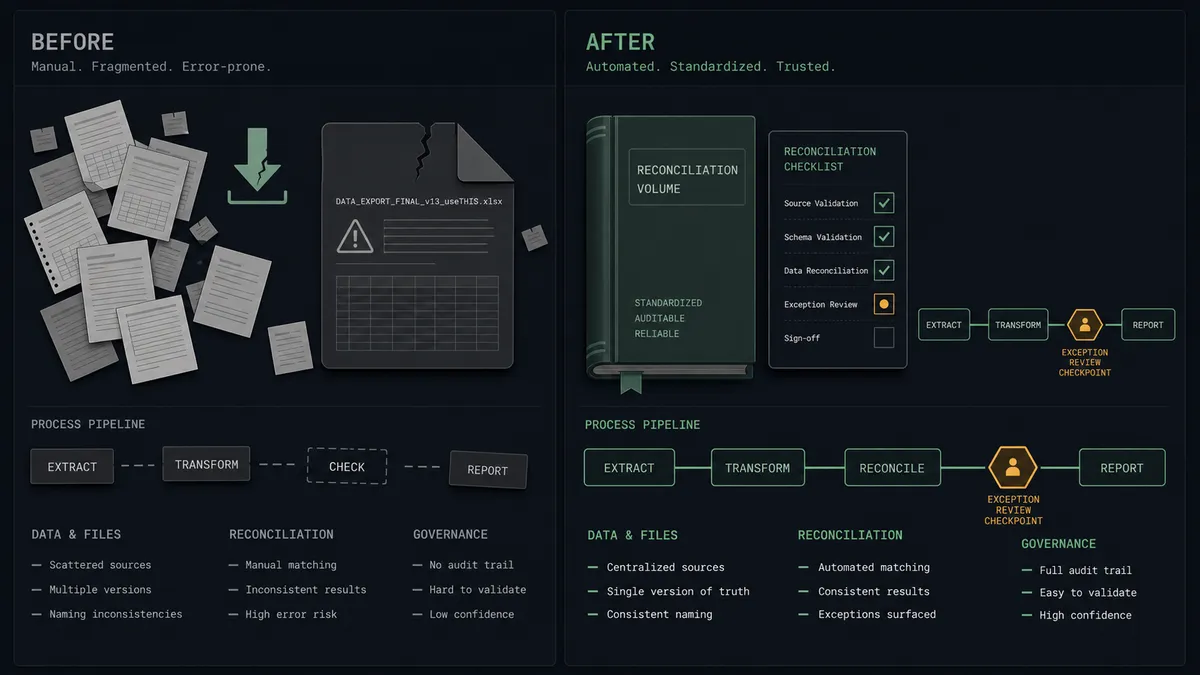
| Category | Before | After |
|---|---|---|
| Packet assembly | Someone downloads each invoice PDF and merges them by hand | Get Invoice PDF and Merge Files to PDF produce the ordered packet on schedule |
| Completeness | A silently failed download surfaces when the auditor counts documents | The agent reconciles pulled files against List Invoices before anything is bound |
| Void handling | Voided invoices ride into the packet or vanish without a decision | Every void gets an explicit include-or-exclude ruling from a named approver |
| File hygiene | Oversized attachments bounce and intermediate copies linger on desktops | Optimize File keeps the packet lean and Delete Job purges intermediates early |
| Audit posture | Nobody can say who assembled the packet or what was checked | The audit trail records the reconciliation, the ruling, the approver, and the timestamp |
What you can build
Month-end close packet. List Invoices scopes the period, Get Invoice PDF pulls each document, Merge Files to PDF binds them in order, Optimize File compresses the result, and a named approver clears Create Archive after the agent’s reconciliation.
Lender or diligence responses. When a request arrives for a specific date range, the agent runs the same chain against that range, adds a generated cover page to the merge, and holds the packet at the gate until the CFO confirms scope.
Vendor bill archive. List Bills and Get Bill drive a quarterly packet of payables documentation, merged and archived with the same reconciliation discipline, so the payables record is one file instead of a folder of screenshots.
Estimate book for sales reviews. Get Estimate PDF pulls the quarter’s estimates, Merge Files to PDF binds them, and Create Thumbnail generates a preview image for the summary page the review starts from.
Sensitive-file hygiene sweep. After any packet run, the agent calls List Jobs, verifies each finished job’s outputs are safely in FlowRunner file storage, and calls Delete Job on the rest, keeping financial documents off third-party storage longer than necessary.
Getting started
Start on the free plan: 100 executions a month, every integration included, no credit card required, plus 14 days of Professional for new accounts. Both connectors are available on every tier, and every tier includes unlimited users and unlimited workflows.
Explore the integration details:
- QuickBooks Online integration (56 actions covering customers, invoices, bills, payments, and P&L reports)
- CloudConvert integration (15 actions covering conversion, merging, optimization, and archives)
Start building free at flowrunner.ai or book a demo to see a live QuickBooks Online to CloudConvert workflow, packet approval and all.
Frequently asked questions
Is it free to connect QuickBooks Online and CloudConvert on FlowRunner?
You can build and run the connection on FlowRunner's free plan, which includes 100 executions a month and every integration with no credit card required, and new accounts also get 14 days of Professional. Both connectors are available on every FlowRunner tier, and every tier includes unlimited users and unlimited workflows.
Can I self-host the QuickBooks Online to CloudConvert workflow?
Yes. FlowRunner offers a cloud-hosted option and a self-hosted option, so the connection can run inside your own environment.
Does the AI agent need my own OpenAI or Claude key?
FlowRunner uses a bring-your-own-keys model, so you connect the AI provider key you already have. You are not locked to one model.
What happens when an invoice in the period is voided or a PDF fails to pull?
The agent does not finalize the packet. It packages the reconciliation: which invoices merged cleanly, which are voided, and which failed to pull, then invokes a human-in-loop step and waits for a named approver to rule on each exception before Create Archive runs.
Which QuickBooks Online and CloudConvert actions does this workflow use?
On the QuickBooks Online side, List Invoices scopes the period and Get Invoice PDF pulls each document. On the CloudConvert side, Merge Files to PDF binds the packet, Optimize File compresses it with the archiving profile, Create Archive bundles the deliverable, and Delete Job purges intermediate files early.
Does CloudConvert keep copies of my financial documents?
CloudConvert deletes jobs and their stored data automatically 24 hours after they end, and the workflow calls Delete Job to remove sensitive intermediate files earlier than that. The finished packet itself is saved to FlowRunner file storage, so your deliverable does not depend on CloudConvert's temporary URLs.