Send PandaDoc Drafts to Slack for Approval Before Signing
Connect PandaDoc and Slack so every contract draft is generated, posted for approval, and sent for signature automatically, optionally run by an AI agent that pauses for a human before the document reaches the client.
How do you connect PandaDoc to Slack?
Connect PandaDoc’s Create Document from Template and Send Document actions to a Slack trigger like On Mention or On Block Action, so a request in a channel generates the contract and a click on a Slack button approves it before it sends. FlowRunner is a visual AI-agent orchestration platform where automations run autonomously and pause for human judgment on the steps that carry real consequence. The same connection can run as a scripted flow, or as an AI agent that reads the deal record, assembles the document, and invokes a human-in-loop step in Slack before the one action that reaches the customer.
What’s the manual process without this connection?
Right now, a rep closes a deal and either builds the contract by hand in PandaDoc or asks someone else to. Deal terms get retyped from the CRM into the document, and a copy-paste error in the pricing table ships straight to the client because nobody caught it before send. Once the document is out, someone in the deal channel asks “did they sign yet,” and a teammate opens PandaDoc to check, several times a day, because there’s no other way to know.
The signed copy usually lands wherever it happened to be downloaded: a rep’s inbox, a shared drive nobody indexed, a desktop folder. During renewal season, finding the executed version of a specific contract turns into archaeology. None of this is a skill problem. It’s a spreadsheet-and-email problem dressed up as a document workflow, and it falls through the cracks the same way every manual handoff does.
How it works: the connection
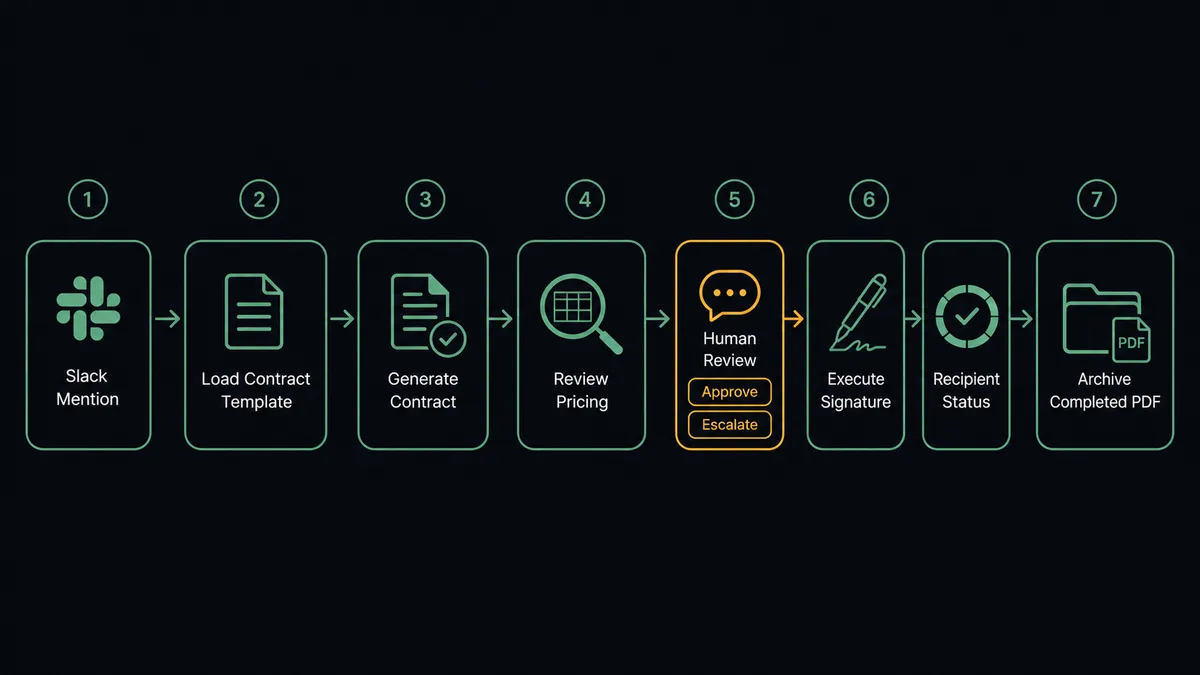
The flow starts where the request comes from. A Slack On Mention or On Channel Message trigger in the deal channel kicks off document generation, since PandaDoc itself has no triggers of its own; it only exposes actions.
From there, Get Template Details pulls the contract template’s roles, tokens, and pricing table structure. Create Document from Template assembles the contract, assigning the client to the signer role and pre-filling every token from the deal record, so nothing gets retyped. Download Document PDF renders the exact file a client would receive, which becomes the review artifact.
That draft PDF, along with a summary of what was filled in, gets posted back to the same Slack channel using Send Message to Channel, formatted with Approve and Escalate buttons through Block Kit. When someone clicks a button, Slack’s On Block Action trigger fires and resumes the flow with their decision. On approval, Send Document routes the contract for signature, either through PandaDoc’s own email or silently through a Create Document Link if your team delivers it personally. Get Document Details then confirms each recipient’s completion status as signatures come in, and the same channel gets the completion notice once every signer is done.
Can an AI agent run it? (and why a human stays in the loop)
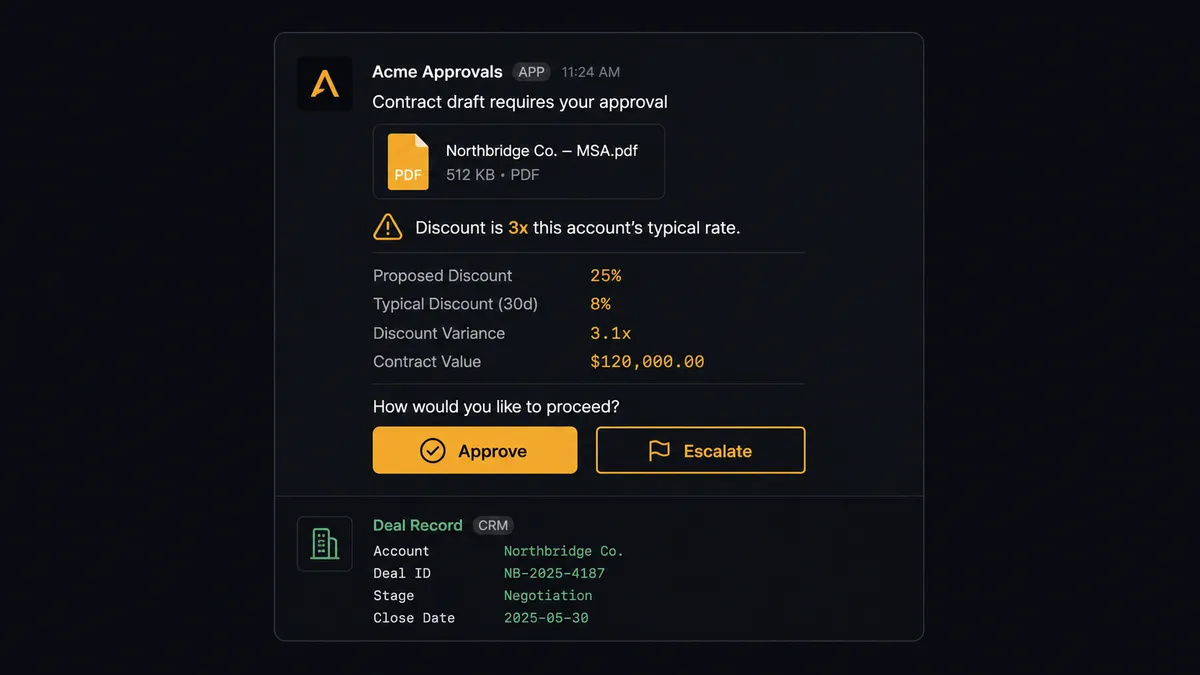
A script can chain these actions in a fixed order every time. An AI agent does something different: it reads the deal record and the draft it just generated, reasons about whether the pricing table and terms match what was actually agreed, and decides for itself whether this contract needs a closer look before it goes any further. A renewal at the same price as last year might sail through with a lighter check. A contract with a discount three times deeper than this account’s history warrants a harder look, and the agent treats it that way without anyone hardcoding a threshold.
When the agent decides a document needs a person’s eyes, it doesn’t just fire an email and move on. It packages the draft PDF, the deal record, and the specific thing that caught its attention (a pricing mismatch, an unusual term, a discount outside the normal range) and posts all of it to the deal’s Slack channel with Approve and Escalate buttons. The account owner sees exactly what the agent saw and why it paused, decides from their phone if needed, and the agent resumes with that decision, the decider’s identity, and the timestamp captured in the audit trail.
This is not a sync tool quietly moving data between two apps. It’s an agent that assembles a contract at machine speed and then stops at the one step it should never decide alone: what actually reaches the customer. That’s the digital andon cord in practice, pulled automatically the moment the agent hits something worth a second opinion.
FlowRunner vs Zapier for PandaDoc and Slack
Zapier connects PandaDoc and Slack well for simple, single-direction notifications: a Zap that posts to a channel when a document is signed takes minutes to set up, and its library of pre-built triggers for both apps is mature. For teams that just want a status ping, that’s a reasonable fit.
Where it runs out of road is the approval step itself. Getting a real Approve/Escalate decision back into the workflow, with context and an audit trail, means bolting on a separate approval app or building a webhook workaround. FlowRunner treats that as a native step.
| Capability | Zapier | FlowRunner |
|---|---|---|
| Human-in-the-loop on the send step | Requires a separate approval app or webhook workaround | Native: the agent invokes a human-in-loop flow as a tool and pauses before Send Document fires |
| Approval channel | No built-in interactive buttons for this flow | Native Slack Approve/Escalate buttons via On Block Action |
| Pricing model | Per-task pricing that scales with document and message volume | Workflow-based tiers with a fixed execution ceiling |
| Users included | Paid seats on most plans | Unlimited users and workflows on every tier |
| AI provider | Built-in AI credits billed by Zapier | BYOK: connect the AI provider account you already use |
| Self-hosting | Not available | Enterprise self-hosted option |
Before and after
| Metric | Before | After |
|---|---|---|
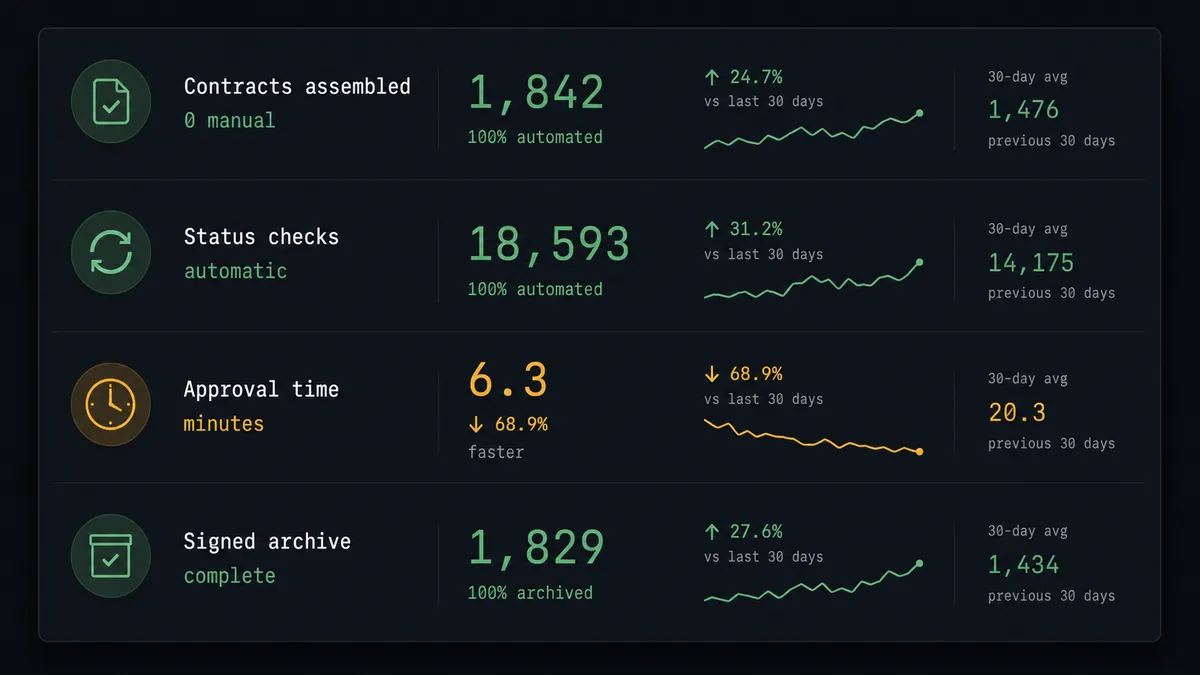
| Contract assembly | Deal data retyped from the CRM into a document, pricing errors ship to the customer | Contracts build themselves from CRM data through templates, tokens, and pricing tables |
| Status checking | Someone asks “did they sign yet” in a channel, then goes and looks, several times a day | Webhook subscriptions announce sent, viewed, and completed the moment they happen |
| Signed document location | The executed copy lives in one rep’s inbox; finding it at renewal is archaeology | Completed PDFs download automatically and land back in the channel, filed and searchable |
| Approval turnaround | A meeting or email chain before a contract can go out | Approve or Escalate from a phone in the same Slack thread the request started in |
| Decision record | No structured record of who approved what or when | Every approval captured with approver identity and timestamp in the audit trail |
What you can build
Closed-won to signed contract in one thread. A mention in the deal channel triggers Create Document from Template, the draft posts for Approve/Escalate, and Send Document fires the moment someone approves, all without leaving Slack.
Silent delivery through your own channel. Send Document with Silent mode enabled skips PandaDoc’s default email, and Create Document Link mints a per-recipient signing link that posts straight to the deal channel for the account team to deliver personally.
Renewal digest with signed archive. A webhook subscription fires on document completion, Get Document Details reads the filled-in fields, Download Document PDF archives the executed copy, and a completion summary posts to #operations so leadership sees renewal activity without pulling a report.
Exception routing for non-standard terms. When the agent flags a discount or term outside the normal range, it escalates to a finance director in a private Slack channel instead of the account owner, matching the review to who actually owns that risk.
Common questions
Is it free to connect PandaDoc and Slack on FlowRunner? Yes. FlowRunner has a free plan with 100 executions a month, every integration included, and no credit card required, and new accounts get 14 days of Professional on top.
Can I self-host this PandaDoc and Slack workflow? Yes, FlowRunner offers a self-hosted Enterprise option for teams that need document and approval data to stay on their own infrastructure, alongside the standard cloud-hosted tiers.
Does the agent need my own OpenAI key? FlowRunner uses a bring-your-own-key model, so you connect the AI provider account you already use rather than paying FlowRunner a markup on model calls.
What happens when the agent isn’t sure about a contract? It stops. The agent posts the draft PDF, the deal record, and what looks off to the Slack channel with Approve and Escalate buttons, and waits for a person to decide before Send Document ever fires.
Do I need to build the Slack approval message myself? No. FlowRunner’s human-in-loop step handles posting the draft and buttons to Slack and resuming the workflow on the response, so you configure it once inside the flow builder instead of writing Block Kit code.
Can the same flow notify a channel when a contract is signed, not just before it’s sent? Yes. A webhook subscription on the document’s completion event lets the agent post the signed confirmation and archive the PDF back to the same Slack channel automatically.
Getting started
Start on the free plan: 100 executions a month, every integration included, no credit card required, plus 14 days of Professional for new accounts. Connect PandaDoc and Slack, pick your trigger, and add the human-in-loop step before you turn on Send Document.
Build it yourself at flowrunner.ai, or book a walkthrough and we’ll set up the first flow with you.
Frequently asked questions
Is it free to connect PandaDoc and Slack on FlowRunner?
Yes. FlowRunner has a free plan with 100 executions a month, every integration included, and no credit card required, and new accounts get 14 days of Professional on top.
Can I self-host this PandaDoc and Slack workflow?
Yes, FlowRunner offers a self-hosted Enterprise option for teams that need document and approval data to stay on their own infrastructure, alongside the standard cloud-hosted tiers.
Does the agent need my own OpenAI key?
FlowRunner uses a bring-your-own-key model, so you connect the AI provider account you already use rather than paying FlowRunner a markup on model calls.
What happens when the agent isn't sure about a contract?
It stops. The agent posts the draft PDF, the deal record, and what looks off to the Slack channel with Approve and Escalate buttons, and waits for a person to decide before Send Document ever fires.
Do I need to build the Slack approval message myself?
No. FlowRunner's human-in-loop step handles posting the draft and buttons to Slack and resuming the workflow on the response, so you configure it once inside the flow builder instead of writing Block Kit code.
Can the same flow notify a channel when a contract is signed, not just before it's sent?
Yes. A webhook subscription on the document's completion event lets the agent post the signed confirmation and archive the PDF back to the same Slack channel automatically.