How to Connect Slack with Adobe Acrobat Sign (With or Without an AI Agent)
Send contracts for e-signature straight from Slack and track them to completion, with an AI agent that pauses for a named human before Send Agreement puts a legal document in front of a counterparty.
How do you connect Slack to Adobe Acrobat Sign?
You connect Slack to Adobe Acrobat Sign by having Slack’s On File Shared trigger drive Adobe Acrobat Sign actions: when the final contract PDF lands in the deal channel, the workflow stages it with Upload Transient Document, assembles it with Create Draft Agreement, sends it with Send Agreement, and then tracks it with Get Agreement and Get Agreement Events until the signed copy comes back through Download Agreement PDF. FlowRunner is a visual AI-agent orchestration platform where automations run autonomously and pause for human judgment on the steps that carry real consequence. The same connection can run as an AI agent that reads the thread, prepares the agreement itself, and pauses for a named person before Send Agreement puts a legal document in front of a counterparty.
The problem it solves
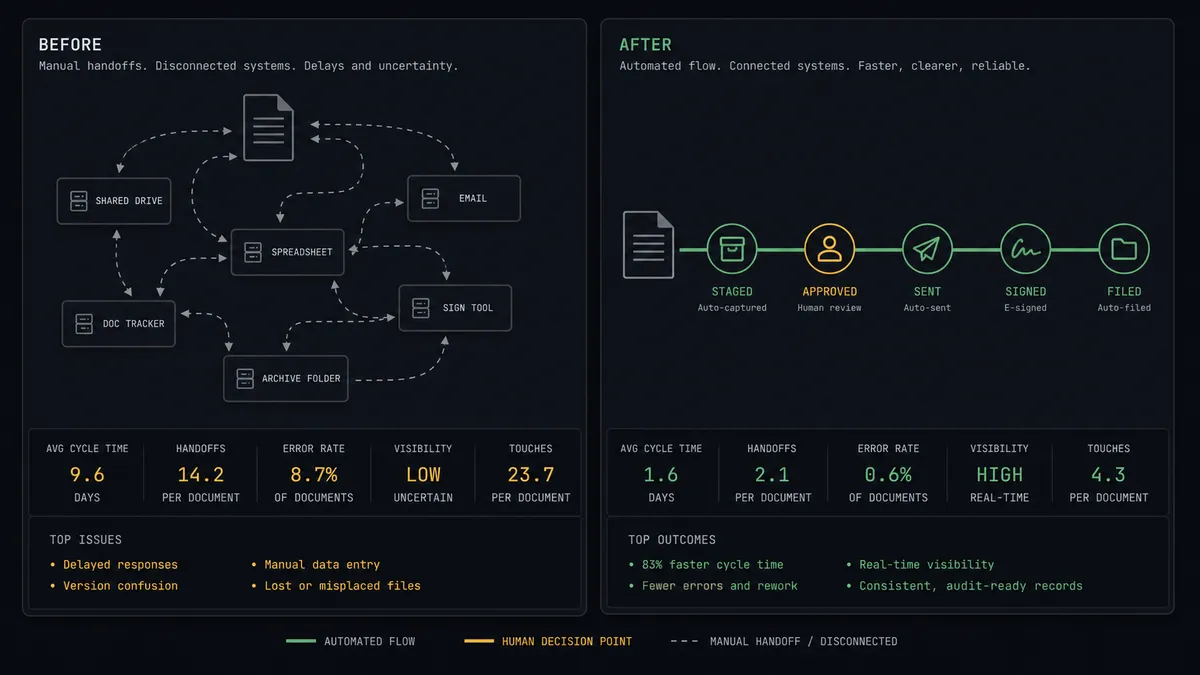
Today the deal closes in Slack and then leaves Slack to die in a browser tab. The final PDF gets posted in the channel with “ready to send.” Someone downloads it, opens Adobe Acrobat Sign, re-uploads the file, retypes the recipient emails from the thread, sets the signing order, writes a cover message, and hits send. Then the channel goes quiet. “Did the MSA go out?” “Who has it now?” “Can someone nudge their legal?” Each answer requires someone to leave the conversation, log into the signing tool, and report back. The deal channel, which knows everything else about the deal, knows nothing about the one document that makes it real.
The edges are where deals slip. A stale draft gets sent because two versions of the PDF were in the channel. A recipient email gets fat-fingered during the retype and the agreement sits unopened for a week. Nobody owns the reminder cadence, so the counterparty’s signer forgets and the close date moves a quarter. And when the signed copy finally arrives, it lives in one person’s inbox instead of being filed with the audit trail where finance and legal can find it.
How it works: the connection
The connection listens to Slack and drives Adobe Acrobat Sign. Here is the plain version, grounded in the real connector actions.
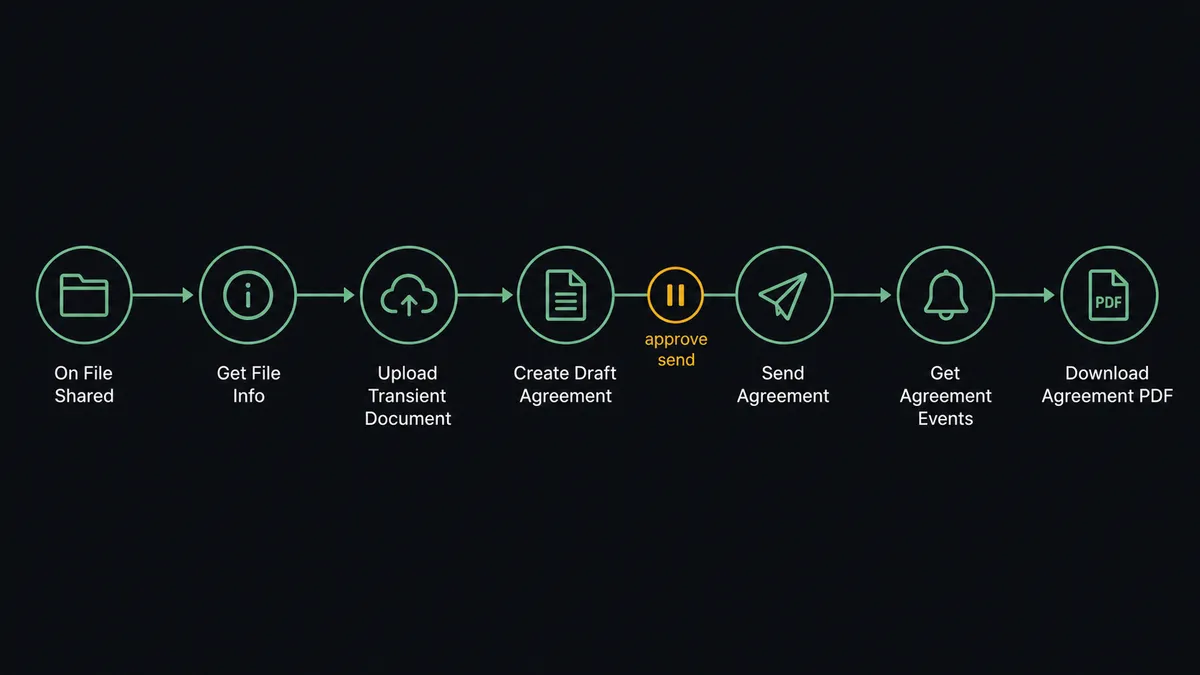
- Trigger: Slack fires On File Shared when the contract PDF is posted in the deal channel.
- Read: The workflow calls Get File Info to confirm the file and pull it for upload.
- Stage: It calls Upload Transient Document in Adobe Acrobat Sign, which readies the file for an agreement.
- Assemble: It calls Create Draft Agreement with the participants, signing order, and cover message drawn from the thread.
- Send: It calls Send Agreement, and the counterparty gets the signature request.
- Track: It polls Get Agreement and Get Agreement Events, posting each status change to the channel with Send Message To Channel, and calls Send Reminder when a signer goes quiet.
- File: When the agreement completes, it calls Download Agreement PDF and Download Audit Trail so the signed record and its evidence are filed automatically.
That is the “just connect them” answer. The deal channel becomes the signature console: drop the file, the agreement goes out, and every status change comes back to the thread where the deal actually lives.
Can an AI agent run it? (and why a human stays in the loop)
Yes, and the agent earns its keep in the messy middle a fixed integration cannot handle. It reads the thread, works out which of the three PDFs posted this week is the final version, extracts the recipient names and emails, infers the signing order from “their CFO signs after ours,” and holds the Adobe Acrobat Sign actions as tools: Upload Transient Document, Create Draft Agreement, Send Agreement, Send Reminder, Get Agreement Events, Cancel Agreement. It also knows what it should not do alone.
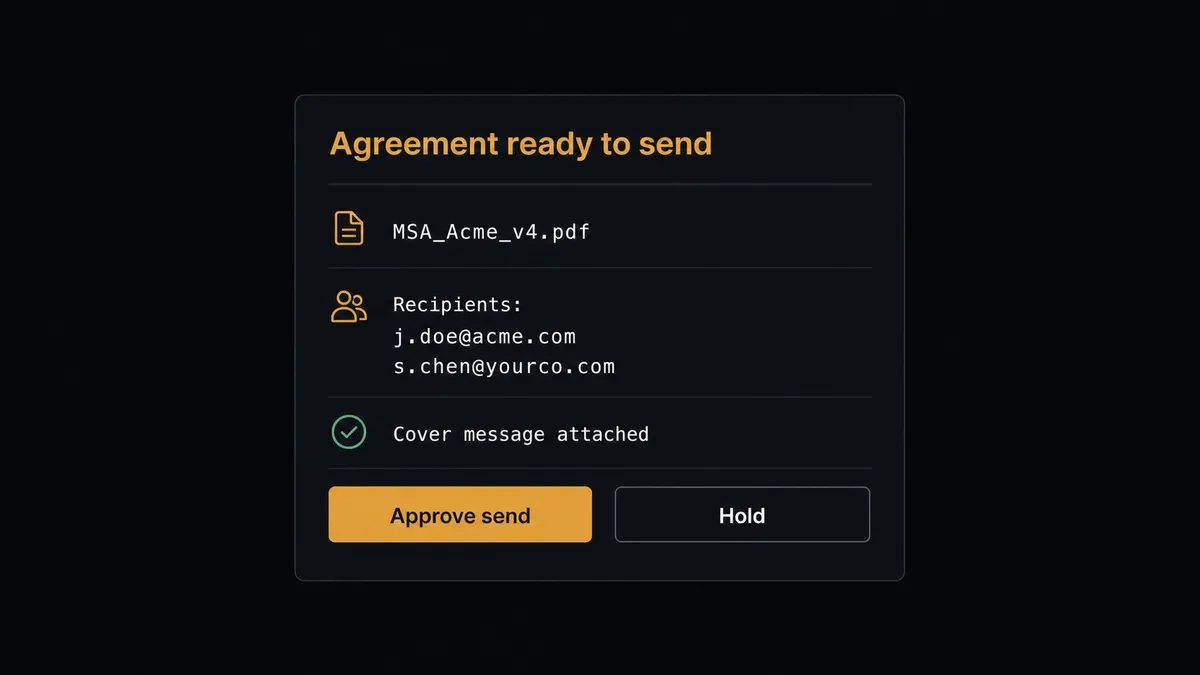
The consequential step is the send. Send Agreement is not a notification; it puts a legal document with your company’s name on it in front of a counterparty, and a wrong file or a wrong signer is not recalled with an apology. So the agent stages everything and stops. The channel gets a message: “Agreement ready: MSA_Acme_v4.pdf. Recipients: [email protected] signs first, then [email protected]. Cover message attached. Approve to send?” A named approver clicks once. Only then does Send Agreement run, and the approver, the timestamp, and the agreement’s own event log from Get Agreement Events all land in the audit trail. The same gate guards Cancel Agreement, because killing a live signature request mid-deal deserves a human decision too.
After the send, the agent runs the follow-through nobody owns today: it watches Get Agreement Events, nudges stalled signers with Send Reminder on a cadence you set, and answers “where is the MSA?” in the channel from live data instead of guesswork. Prospects call this pattern a digital andon cord. Like Toyota’s production line pull cord, the workflow stops the line at the moment of consequence, a person pulls it back into motion, and everything before and after the pause runs on its own.
FlowRunner vs n8n
For a developer team, n8n is a credible way to wire this pair. It has a large node library, a very active community with thousands of shared workflow templates, and a fair-code Community Edition you can self-host for free. An engineer comfortable with the Adobe Acrobat Sign API’s transient-document flow and webhook handling can build a working bridge.
The difference is what it takes to put a trustworthy gate in front of a legal send, and who can maintain the thing afterward. Here is the honest side-by-side.
| What matters for this pair | FlowRunner | n8n |
|---|---|---|
| Human-in-the-loop on Send Agreement | Native. The agent drafts, pauses, and waits for a named approver before the document leaves | Wait and approval steps can be wired as nodes; the gate is plumbing you build and test yourself |
| Who runs the flow | An AI agent reads the thread, picks the file, extracts recipients, chooses actions as tools | A node graph you design per case; AI is available as nodes inside it |
| Users included | Unlimited users on every tier | Varies by plan; self-hosting shifts cost into infrastructure and upkeep |
| Bring your own AI keys | Yes, BYOK | Yes, model credentials are yours |
| Self-hosted option | Yes, cloud-hosted or self-hosted | Yes, fair-code Community Edition or paid plans |
| Pricing model | Transparent workflow-based tiers with clear execution limits | Execution-based pricing where predicting what counts takes reading |
If your engineers want full node-level control and are happy to own the API plumbing, n8n can do this job. If the people running deals are sales and operations leads who need the send gated by a named approver without anyone maintaining webhook code, this pairing on FlowRunner is the better fit.
Before and after
| Category | Before | After |
|---|---|---|
| Starting the signature | Download from Slack, re-upload to the signing tool, retype recipients from the thread | Drop the PDF in the channel and the agreement is staged with Upload Transient Document and Create Draft Agreement |
| The send decision | Whoever had the tab open hit send, sometimes on the wrong version | Send Agreement runs only after a named approver confirms the file and signer list |
| Status visibility | ”Did it go out?” answered by logging in and reporting back | Get Agreement Events posts each milestone to the deal channel as it happens |
| Chasing signers | Reminders sent when someone remembers, close dates slip | Send Reminder fires on a set cadence the moment a signer goes quiet |
| Filing the signed copy | Signed PDF lands in one inbox, audit trail never pulled | Download Agreement PDF and Download Audit Trail file both automatically on completion |
What you can build
Channel-to-signature pipeline. On File Shared fires, the agent stages the PDF with Upload Transient Document, assembles Create Draft Agreement from the thread, and holds at the approval gate until a person confirms Send Agreement. The whole close happens without leaving the channel.
Reminder cadence that runs itself. The agent polls Get Agreement for anything out for signature, and when a signer has gone quiet past your threshold, it calls Send Reminder and notes it in the channel, so nobody plays bad cop manually.
Signature status on demand. Someone mentions the workflow with “where is the Acme MSA?” On Mention fires, the agent calls List Agreements and Get Agreement Members, and answers in-thread with who has the document and since when.
Completed-deal filing. On completion the agent calls Get Form Data to pull any fields the signer filled, Download Agreement PDF for the executed copy, and Download Audit Trail for the evidence, then posts the package summary to the channel.
Template-driven sends. For standard NDAs the agent pulls the approved template with List Library Documents and Get Library Document, fills the counterparty from the thread, and still holds at the same Send Agreement gate, so standard paper moves fast without becoming unsupervised.
Getting started
Start on the free plan: 100 executions a month, every integration included, no credit card required, plus 14 days of Professional for new accounts. Both connectors are available on every tier, and every tier includes unlimited users and unlimited workflows.
Explore the integration details:
- Slack integration (8 triggers and 16 actions covering messages, channels, members, and files)
- Adobe Acrobat Sign integration (21 actions covering agreements, reminders, form data, and audit trails)
Start building free at flowrunner.ai or book a demo to see a live Slack to Adobe Acrobat Sign workflow, send approval and all.
Frequently asked questions
Is it free to connect Slack and Adobe Acrobat Sign on FlowRunner?
You can build and run the connection on FlowRunner's free plan, which includes 100 executions a month and every integration with no credit card required, and new accounts also get 14 days of Professional. Both connectors are available on every FlowRunner tier, and every tier includes unlimited users and unlimited workflows.
Can I self-host the Slack to Adobe Acrobat Sign workflow?
Yes. FlowRunner offers a cloud-hosted option and a self-hosted option, so the connection can run inside your own environment.
Does the AI agent need my own OpenAI or Claude key?
FlowRunner uses a bring-your-own-keys model, so you connect the AI provider key you already have. You are not locked to one model.
What stops the agent from sending a contract to the wrong person?
The send is gated. The agent prepares everything with Upload Transient Document and Create Draft Agreement, then pauses and posts the document name, recipient emails, and signing order to the channel. Send Agreement only runs after a named person approves, and that approval is captured in the audit trail.
Which Slack trigger starts the signature workflow?
On File Shared is the natural start: drop the final contract PDF in the deal channel and the workflow picks it up with Get File Info. Teams also use On Mention to ask for a status check or a reminder on an agreement already out for signature.
How do we know when the counterparty signs?
The agent polls Get Agreement and Get Agreement Events for status changes, posts each milestone to the channel, and when the agreement completes it calls Download Agreement PDF and Download Audit Trail so the signed record is filed without anyone chasing it.