How to Connect Outlook with Aha! (With or Without an AI Agent)
Turn product feedback arriving in Outlook into Aha! ideas automatically, with an AI agent that files requests on its own and pauses for a product lead before an exec email reshapes an existing roadmap feature.
How do you connect Outlook to Aha!?
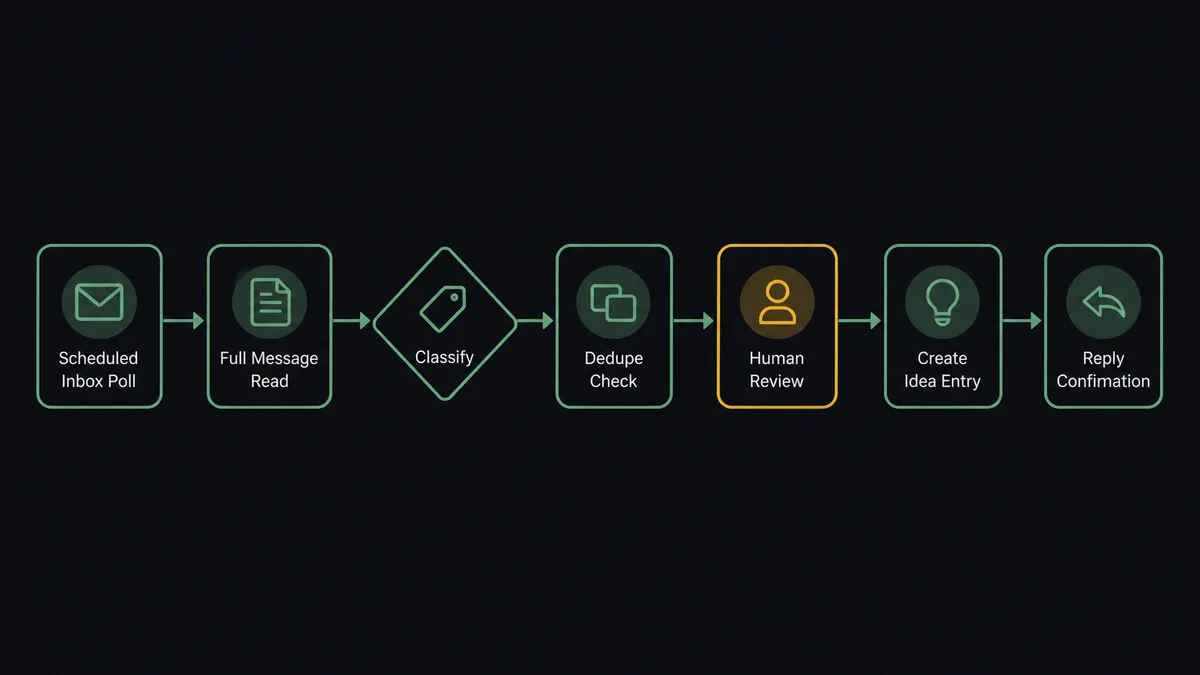
You connect Outlook to Aha! by polling the product feedback inbox with Get Emails on a schedule and filing each new request into Aha!: the workflow reads the message with Get Email, resolves the destination with List Products, checks List Ideas for duplicates, writes the request with Create Idea, and confirms receipt with Reply to Email. FlowRunner is a visual AI-agent orchestration platform where automations run autonomously and pause for human judgment on the steps that carry real consequence. Run the same connection as an AI agent and it files every request on its own merit regardless of who sent it, and pauses for a product lead before Update Feature lets any single email reshape work already committed on the roadmap.
The problem it solves
Product feedback that arrives by email is the least governed input a roadmap has. Customers write to their account manager, execs forward “thoughts” from a board dinner, sales sends “quick asks” after a lost deal. Each lands in an inbox, and each depends on a human to notice it, judge it, and move it into Aha! where prioritization actually happens. Most of it never makes the trip. The product manager who owns the feedback alias does a guilt-driven sweep every few weeks, files what still looks relevant, and silently drops the rest. Requesters, hearing nothing, escalate by re-sending to more people.
The sharper problem is that email carries rank. A request from a large account or a senior title reads as a directive, and under deadline pressure someone edits the committed feature directly: new scope folded in, a release target nudged, all without a decision anyone can point to later. The roadmap becomes an archaeology of forceful emails. Meanwhile the quiet pattern, the same gap reported politely by six mid-size accounts, never accumulates anywhere because each email was handled, or lost, in isolation.
How it works: the connection
The connection reads Outlook and writes Aha!. Here is the plain version, grounded in the real connector actions.
- Trigger: On a schedule, the workflow calls Get Emails on the feedback inbox and picks up new messages.
- Read: Get Email pulls the full message: sender, subject, body, and thread context.
- Resolve the product: List Products maps the request to the right Aha! product line.
- Dedupe: List Ideas checks whether the request already exists before anything is created.
- Write the idea: Create Idea files the request with the sender’s account attached as the source.
- Confirm: Reply to Email sends the requester the idea reference, so the ask stops circulating.
- File the thread: Forward Email routes the original message to the account owner when the sender is a customer, so relationship context is not lost.
That is the “just connect them” answer. Every emailed request gets captured, deduplicated, and acknowledged, and the feedback alias stops being a place where asks go to disappear.
Can an AI agent run it? (and why a human stays in the loop)
Yes, and the agent’s first job is to be rank-blind where a human cannot be. It holds the actions as tools: Get Emails, Get Email, List Products, List Ideas, Create Idea, Get Feature, Update Feature, Reply to Email, Forward Email. For each message it reasons about what is actually being asked. A feature request becomes a deduplicated Create Idea whether it came from an intern or the CEO’s forward. A repeat of an existing request gets noted against the existing idea instead of duplicating it. A support issue wearing a feature-request costume gets forwarded to the right queue instead of polluting the idea pool.
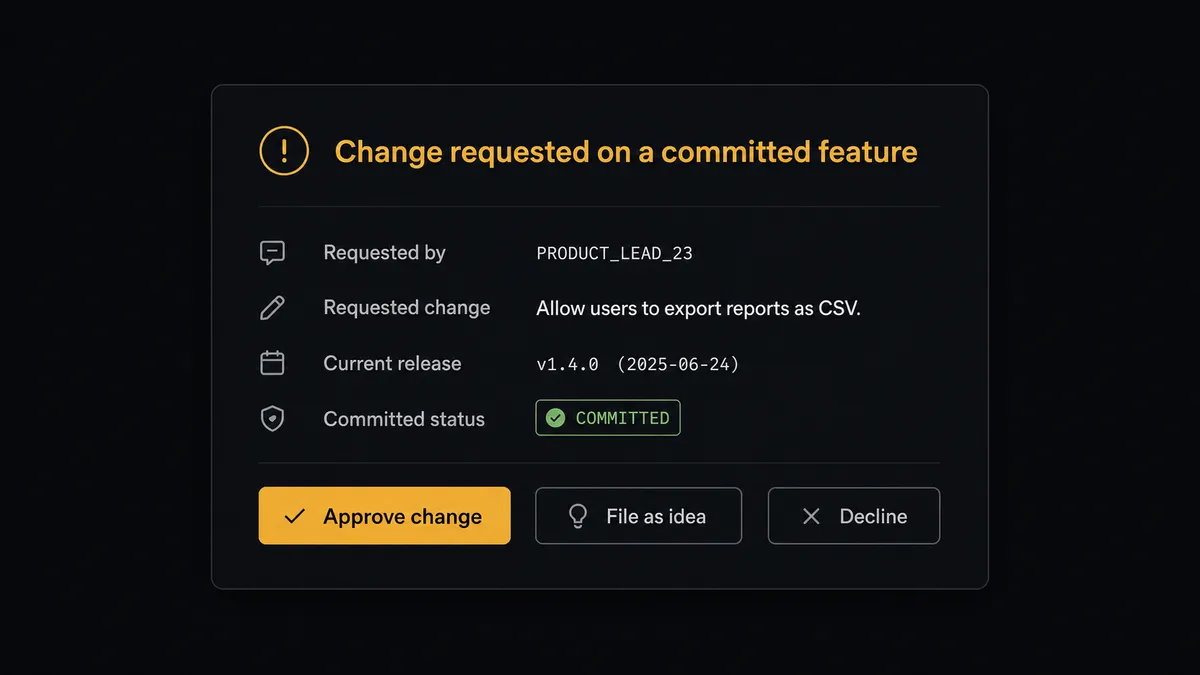
The consequential step is Update Feature. A feature in Aha! is committed work: engineering has scoped it, a release carries it, and customers have been told versions of it. When an email asks to change that, the stakes are no longer filing accuracy; they are roadmap integrity. So the agent does not edit. It pulls the feature’s current state with Get Feature, then invokes a human-in-loop flow it holds as a callable tool. The workflow pauses and posts to the product lead: “[Sender] is asking to change [feature]: [summary of change]. Current release: [release]. This feature is committed. Approve the change, file as a separate idea, or decline?” The email’s seniority is presented as context, never as authority. Only after a named approver decides does the agent call Update Feature, or file the ask as its own idea with Create Idea.
That is the discipline email-driven roadmaps lack. Prospects call it the digital andon cord: like Toyota’s production line pull cord, the workflow stops the line the moment an input would alter committed work, and the person accountable for the roadmap restarts it deliberately.
FlowRunner vs n8n
A technical product operations team can build this pair in n8n. Its node coverage is broad, its fair-code self-hosting model is genuinely good, and its community templates include plenty of inbox-parsing patterns a developer can adapt. If someone on your team wants to own the classification logic in a node graph, n8n is a workable path.
The difference is judgment and governance. Classifying “is this email a new request, a duplicate, or a demand to change committed work” is reasoning, not routing, and the pause before Update Feature is the whole point of the workflow. FlowRunner makes both native. Here is the honest side-by-side.
| What matters for this pair | FlowRunner | n8n |
|---|---|---|
| Human-in-the-loop on Update Feature | Native. The agent invokes an approval flow as a callable tool before committed work changes | Buildable with wait nodes and webhooks; you assemble and maintain the approval logic yourself |
| Who runs the flow | An AI agent reads each email, reasons, and picks actions as tools | A node graph you design and debug, with AI available as LangChain nodes |
| Users included | Unlimited users on every tier | Cloud plans meter executions and gate collaboration features by tier |
| Bring your own AI keys | Yes, BYOK | Yes, via your own credentials in AI nodes |
| Self-hosted option | Yes, cloud-hosted or self-hosted | Yes, fair-code self-hosting is a core n8n strength |
| Pricing model | Transparent workflow-based tiers with clear execution limits | Execution-based cloud pricing; self-hosting shifts cost to your own infrastructure and upkeep |
If your team has engineers eager to own a custom email classifier and the approval plumbing around it, n8n is a credible choice. If you want emailed feedback captured without a human sweep and committed features protected from drive-by edits, this pairing on FlowRunner is the better fit.
Before and after
| Category | Before | After |
|---|---|---|
| Email capture | The feedback alias gets swept every few weeks; most requests never reach Aha! | Every request is filed as a deduplicated idea within minutes of arriving |
| Sender influence | Forceful emails from senior titles get edited straight into committed features | Update Feature runs only after a named product lead approves, whoever the sender is |
| Duplicates | The same ask exists in four inboxes and twice in Aha! | List Ideas is checked by meaning before anything is created |
| Requester experience | Silence, followed by escalation to more recipients | Reply to Email returns the idea reference and review status in the original thread |
| Decision record | Roadmap changes trace back to a forwarded email someone half-remembers | Every feature change carries approver, timestamp, and the originating email |
What you can build
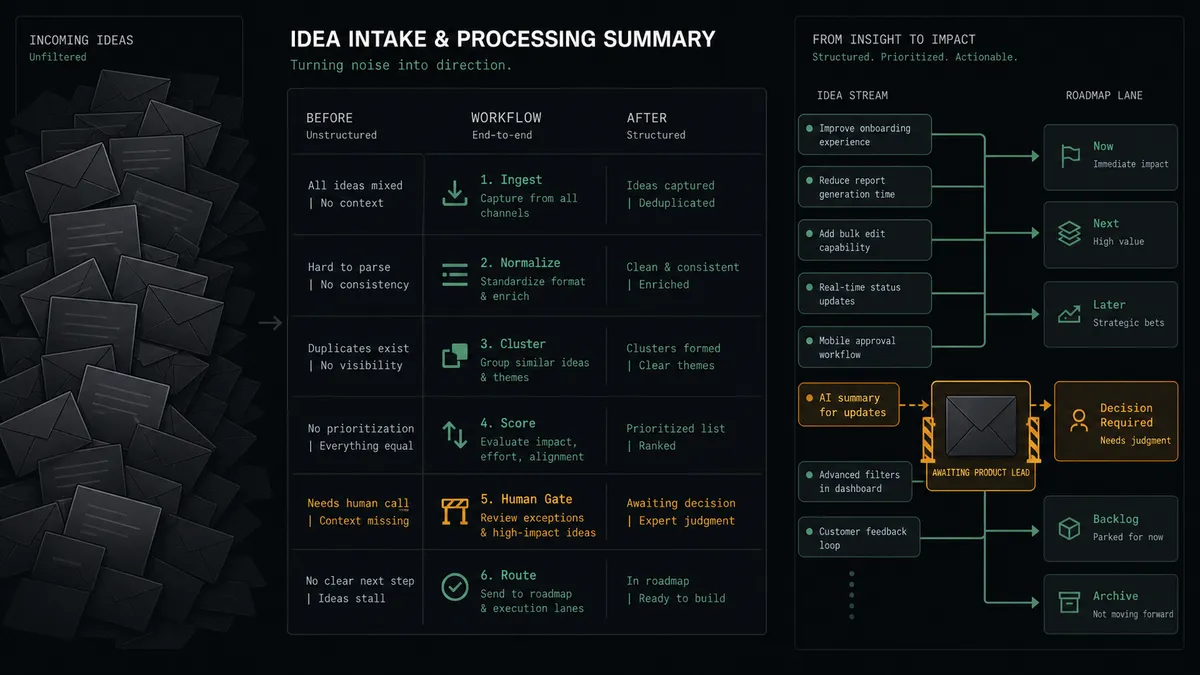
Email to deduplicated idea, hands off. The schedule fires Get Emails, the agent reads each message, resolves the product with List Products, checks List Ideas, files new requests with Create Idea, and confirms with Reply to Email. The guilt-driven sweep is gone.
Committed-feature gate. An exec forward asks to fold new scope into a committed feature. The agent pulls Get Feature, packages sender, change, and release context, invokes the human-in-loop tool, and only calls Update Feature after the product lead approves.
Account-context routing. When feedback comes from a customer, the agent forwards the original thread to the account owner with Forward Email and attaches the account to the idea source, so the roadmap signal and the relationship signal both land.
Release-news replies. When a feature ships, the agent reads List Releases, finds the ideas linked to it, and uses Send Email to tell each original requester their ask is live, turning the feedback loop into a retention touch.
Idea digest for product reviews. On a weekly schedule, the agent summarizes new entries from List Ideas by product and account spread, and sends the digest with Send Email to the product team before their prioritization meeting.
Getting started
Start on the free plan: 100 executions a month, every integration included, no credit card required, plus 14 days of Professional for new accounts. Both connectors are available on every tier, and every tier includes unlimited users and unlimited workflows.
Explore the integration details:
- Outlook integration (21 actions covering email, calendar events, and contacts)
- Aha! integration (10 actions covering products, ideas, features, releases, and initiatives)
Start building free at flowrunner.ai or book a demo to see a live Outlook to Aha! workflow, committed-feature gate and all.
Frequently asked questions
Is it free to connect Outlook and Aha! on FlowRunner?
You can build and run the connection on FlowRunner's free plan, which includes 100 executions a month and every integration with no credit card required, and new accounts also get 14 days of Professional. Both connectors are available on every FlowRunner tier, and every tier includes unlimited users and unlimited workflows.
Can I self-host the Outlook to Aha! workflow?
Yes. FlowRunner offers a cloud-hosted option and a self-hosted option, so the connection can run inside your own environment.
Does the AI agent need my own OpenAI or Claude key?
FlowRunner uses a bring-your-own-keys model, so you connect the AI provider key you already have. You are not locked to one model.
What happens when an email demands a change to something already on the roadmap?
The agent stops. It pulls the feature's current state with Get Feature, packages the sender, the requested change, and the feature's release assignment, and posts it to the product lead. Update Feature only runs after a named person approves, no matter whose signature is on the email.
Which actions move email feedback into Aha!?
The workflow polls the inbox with Get Emails on a schedule, reads each message with Get Email, resolves the product with List Products, dedupes with List Ideas, and files new requests with Create Idea. Changes to existing features go through Get Feature and Update Feature, behind the approval gate.
Does the sender learn what happened to their request?
Yes. After filing, the workflow calls Reply to Email with the Aha! idea reference and a note that it has entered roadmap review, so requesters stop re-sending the same ask to more people.