How to Connect Notion with Accelo (With or Without an AI Agent)
Turn rows in a Notion tracker into tasks on the right Accelo client jobs, run by an AI agent that matches work to jobs and pauses for a human before billable work lands on a paused, closed, or mismatched engagement.
How do you connect Notion to Accelo?
You connect Notion to Accelo by running a scheduled workflow that selects ready rows from your tracker with Find Database Item, pulls each row’s details with Get Page, matches the client engagement with List Jobs and Get Job, creates the work item with Create Task, and stamps the row with Update Database Item so the tracker knows it synced. FlowRunner is a visual AI-agent orchestration platform where automations run autonomously and pause for human judgment on the steps that carry real consequence. The same connection can run as an AI agent that reads each row’s scope against the job’s standing and pauses for a named human before billable work lands on a paused, closed, or mismatched engagement.
The problem it solves
Right now your delivery team plans in Notion and your business runs in Accelo, and a person is the API between them. The team scopes work in a Notion database because that is where thinking happens: properties, linked docs, comments. Then someone re-keys each item into Accelo because that is where clients, budgets, and invoices live. It is duplicate data entry with a delay measured in days, and the person doing it is usually the delivery lead whose time bills at the highest rate.
The edges are where it costs real money. A task gets created against the wrong client’s job and three weeks of time entries follow it there, surfacing as a billing dispute at month end. Work gets logged against an engagement that was paused during a budget conversation, quietly reopening a commitment the account lead had frozen. A row never gets copied at all, so the work happens off the books: unbudgeted, untracked, and invisible to the invoice it should have appeared on. The gap between the planning tool and the system of record is not a tooling annoyance, it is revenue leakage.
How it works: the connection
The connection reads Notion on a schedule and writes to Accelo. Here is the plain version, grounded in the real connector actions.
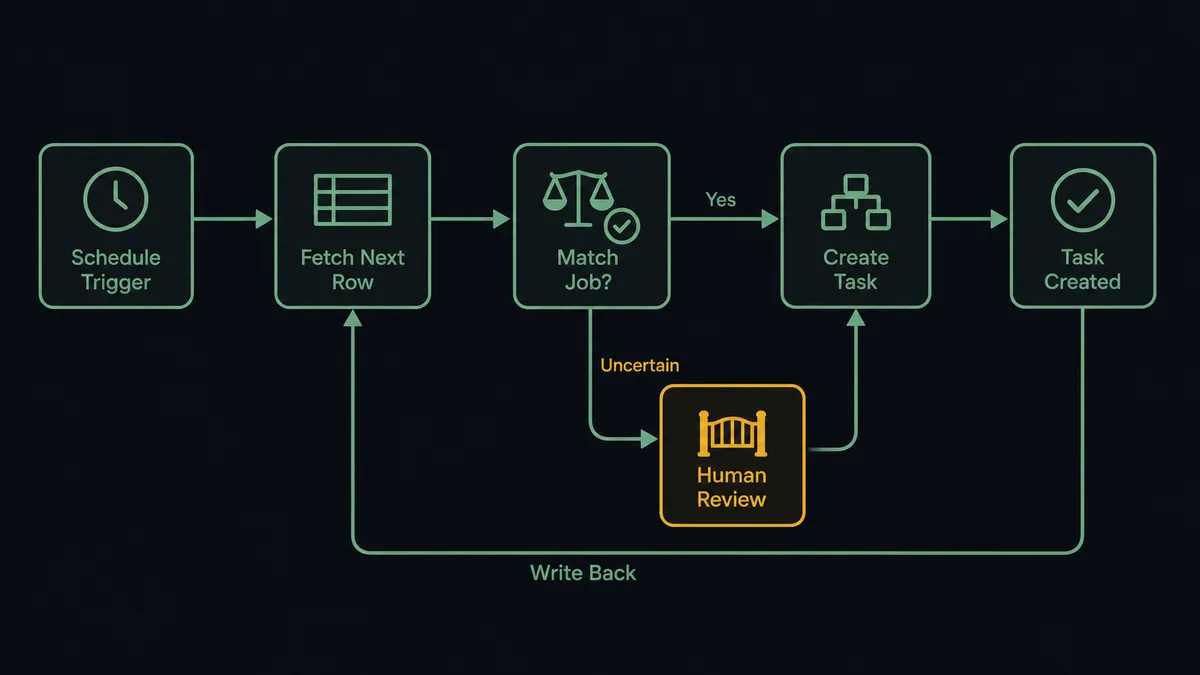
- Trigger: On a schedule, the workflow calls Find Database Item on the tracker database, filtered to rows whose status is ready and not yet synced.
- Read: For each row, it calls Get Page to pull the full properties: title, client, scope notes, owner, due date, estimate.
- Match the engagement: It calls List Jobs in Accelo, searching titles for the client’s engagement, then Get Job to confirm the standing and dates.
- Create the work: It calls Create Task against the matched job, mapping title, description, manager, due date, and time budget.
- Record the context: It calls Log Activity against the job with a note pointing back to the Notion row, so anyone opening Accelo sees where the work came from.
- Close the loop: It calls Update Database Item to stamp the Notion row with the Accelo task reference and a synced status.
That is the “just connect them” answer. Planning stays in Notion, the system of record stays in Accelo, and no one re-keys anything. The reverse view works too: List Tasks and Get Job feed a Notion dashboard of engagement status via Create Database Item, so delivery sees Accelo state without leaving their workspace.
Can an AI agent run it? (and why a human stays in the loop)
Yes, and matching is exactly where the agent earns its place. A dumb sync needs the Notion row to name the Accelo job perfectly, forever. An AI agent holds Find Database Item, Get Page, List Companies, List Jobs, Get Job, Create Task, and Log Activity as tools and reasons the way your delivery lead does: this row says the client’s short name, the scope reads like the retainer rather than the project, the retainer job is active and the project is in review, so the task belongs on the retainer. Clean matches flow straight through.
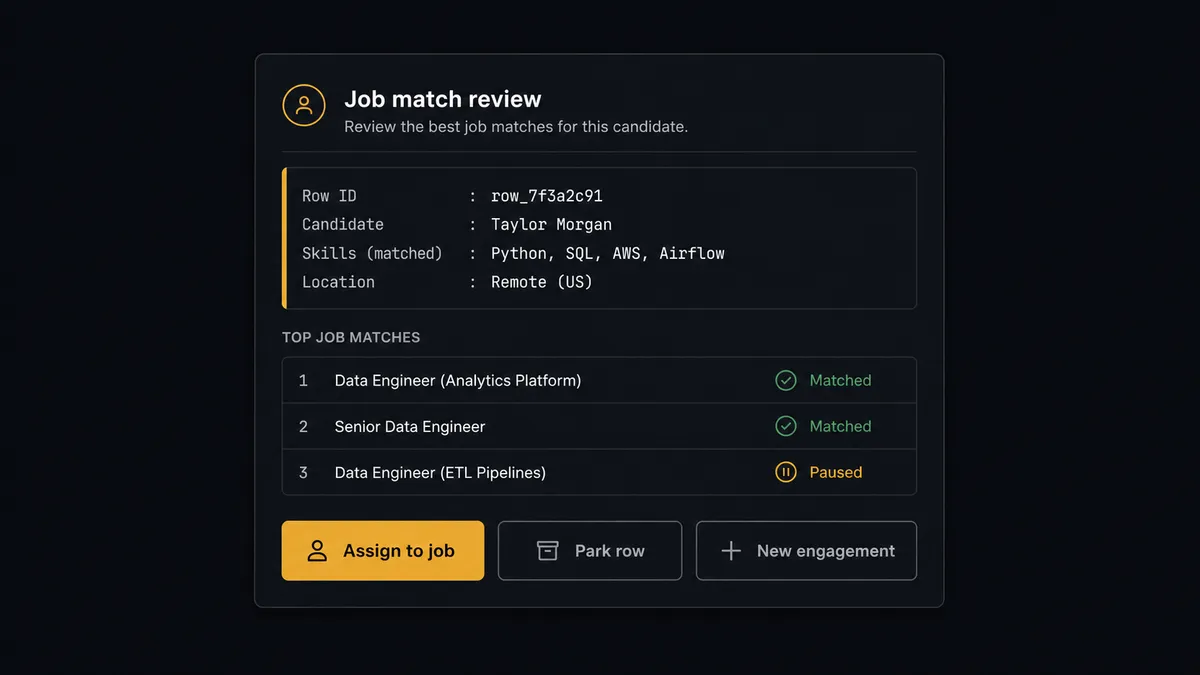
The consequential step is Create Task itself, because in a PSA a task is not a sticky note, it is a container for billable time. Put it on the wrong job and every hour logged against it lands on the wrong invoice. So when the agent finds the matched job paused or closed, when two jobs both plausibly fit, or when the row’s scope reads like work nobody sold, it stops. It invokes a human-in-loop flow it holds as a callable tool and posts to your channel: “Ready row from the delivery tracker. Closest Accelo jobs listed with their standings; the best match is marked paused. Assign to a listed job, park the row, or flag for a new engagement?” A named approver decides, Create Task runs where they pointed, Log Activity records the reasoning, and Update Database Item writes the outcome back to Notion. The decision, the approver, and the timestamp all land in the audit trail.
Prospects call this the digital andon cord: like Toyota’s production line pull cord, the workflow stops the line the moment it hits uncertainty. The routine rows sync in minutes. The row that would have become next month’s billing dispute waits for a person.
FlowRunner vs n8n
A technical evaluator will put n8n on the shortlist for this pairing, with reason. n8n’s Notion node is capable, its HTTP request node can reach Accelo’s API, and its code steps let a developer express arbitrary matching logic. Self-hosted on the fair-code license, it appeals to teams that want the sync running on their own infrastructure with full control of the internals.
The difference is who maintains the judgment. In n8n, the matching rules are code an engineer wrote, and every new edge case is a ticket back to that engineer. FlowRunner puts an AI agent on the matching and a native human gate on the consequential step, so the edge cases route to the person who owns the account, not the person who owns the code.
| What matters for this pair | FlowRunner | n8n |
|---|---|---|
| Human-in-the-loop before Create Task lands on an uncertain job | Native. The agent invokes an approval flow as a callable tool and waits | Buildable with wait nodes and custom branching; you assemble and maintain it |
| Who runs the flow | An AI agent reads both records, reasons, and picks actions as tools | Node sequence with matching logic you write and update in code |
| Users included | Unlimited users on every tier | Cloud plans carry per-tier limits; self-hosting shifts cost to your infrastructure |
| Bring your own AI keys | Yes, BYOK | Yes, BYOK supported |
| Self-hosted option | Yes, cloud-hosted or self-hosted | Yes, fair-code self-hosted |
| Pricing model | Transparent workflow-based tiers | Execution-based cloud pricing that takes effort to predict |
If your team wants to hand-code the matching rules and owns the maintenance happily, n8n is a fair choice. If you want operations to run the sync themselves with judgment built in and exceptions routed to account owners, this pairing is the better fit.
Before and after
| Category | Before | After |
|---|---|---|
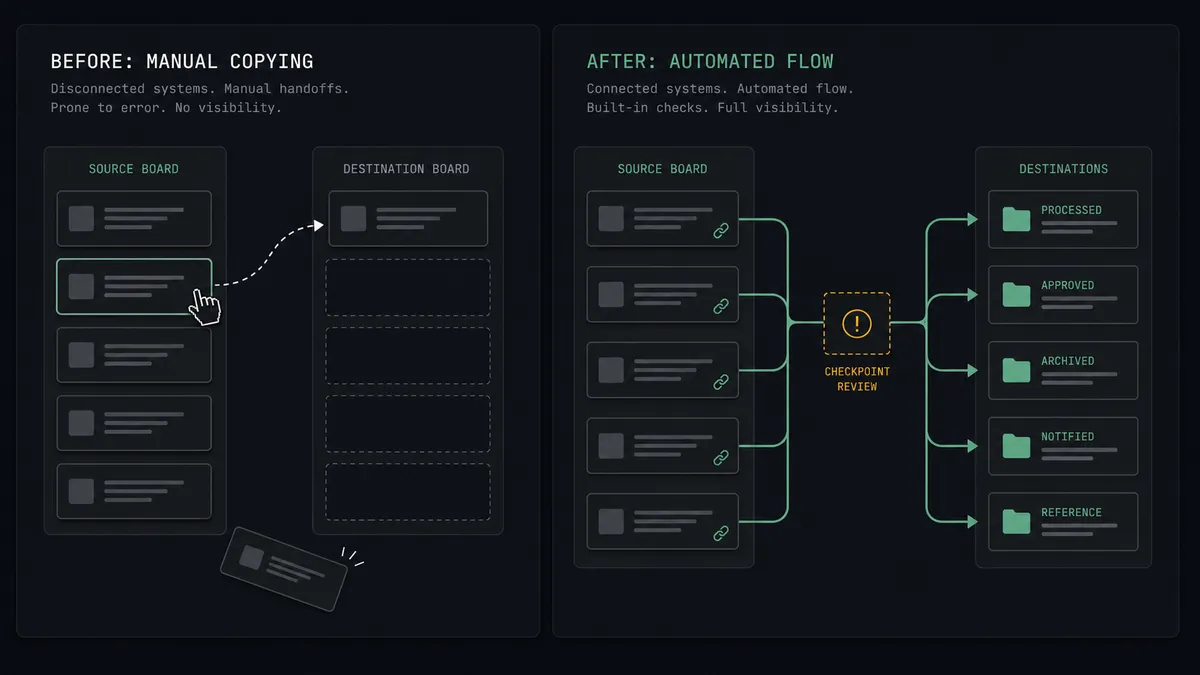
| Data entry | The delivery lead re-keys Notion rows into Accelo between meetings | Ready rows become Accelo tasks on schedule via Create Task |
| Job matching | Whoever copies the row guesses which engagement it belongs to | The agent matches against List Jobs and escalates anything uncertain |
| Paused engagements | Work lands on frozen jobs and quietly reopens commitments | Paused and closed jobs trigger a named approver before any task is created |
| Tracker accuracy | Nobody knows which rows made it into the PSA | Update Database Item stamps every synced row with its Accelo reference |
| Billing integrity | Misfiled tasks surface as invoice disputes at month end | Tasks land on the job an approver confirmed, with the decision on record |
What you can build
Tracker-to-PSA pipeline. Find Database Item selects ready rows, the agent matches engagements with List Jobs, Create Task lands the work with manager and budget, and Update Database Item closes the loop. Planning and billing stop drifting apart.
New client intake. When a row references a client Accelo does not know, the approver flags it, and the agent runs Create Company and Create Contact so the engagement starts with a clean record instead of a duplicate.
Engagement status board. On a schedule, List Jobs and Get Job pull each active engagement’s standing and dates, and Create Database Item or Update Database Item maintain a Notion dashboard the delivery team actually looks at.
Meeting notes to logged activity. When a client call gets written up in Notion, the agent summarizes the page with Get Page and files it against the right company with Log Activity, so the PSA holds the relationship history, not just the invoices.
Scope-creep sentinel. The agent compares each ready row’s estimate against the matched job’s remaining budget from Get Job, and routes rows that would push the engagement over to the account lead before the task exists anywhere.
Getting started
Start on the free plan: 100 executions a month, every integration included, no credit card required, plus 14 days of Professional for new accounts. Both connectors are available on every tier, and every tier includes unlimited users and unlimited workflows.
Explore the integration details:
- Notion integration (23 actions covering pages, databases, blocks, and comments)
- Accelo integration (10 actions covering companies, contacts, jobs, tasks, and activities)
Start building free at flowrunner.ai or book a demo to see a live Notion to Accelo workflow, job-match approval and all.
Frequently asked questions
Is it free to connect Notion and Accelo on FlowRunner?
You can build and run the connection on FlowRunner's free plan, which includes 100 executions a month and every integration with no credit card required, and new accounts also get 14 days of Professional. Both connectors are available on every FlowRunner tier, and every tier includes unlimited users and unlimited workflows.
Can I self-host the Notion to Accelo workflow?
Yes. FlowRunner offers a cloud-hosted option and a self-hosted option, so the connection can run inside your own environment.
Does the AI agent need my own OpenAI or Claude key?
FlowRunner uses a bring-your-own-keys model, so you connect the AI provider key you already have. You are not locked to one model.
What happens when a Notion row does not match any open Accelo job?
The agent creates nothing. It packages the row's contents, the closest candidate jobs from List Jobs with their standings, and the reason the match failed, then invokes a human-in-loop step and waits for a person to pick the job, park the row, or request a new engagement before Create Task runs.
Which Notion and Accelo actions does this workflow use?
On the Notion side, Find Database Item selects ready rows, Get Page pulls details, and Update Database Item writes the sync state back. On the Accelo side, List Jobs and Get Job match the engagement, Create Task adds the work item, and Log Activity records the context.
Does the sync write back to Notion, or is it one direction?
It writes back. After each task is created, Update Database Item stamps the Notion row with the Accelo task reference and a synced status, so the tracker shows exactly which rows made it into the PSA and which are still waiting on a decision.