How to Connect Notion with Adobe Workfront (With or Without an AI Agent)
Turn requests in a Notion database into Adobe Workfront tasks and projects, run by an AI agent that routes work into existing projects and pauses for a human before a request becomes a brand-new resourced project.
How do you connect Notion to Adobe Workfront?
You connect Notion to Adobe Workfront by running a scheduled workflow that selects ready rows with Find Database Item, pulls each request’s brief with Get Page, matches it to active work with Search Projects, files it with Create Task against the right project, and stamps the row with Update Database Item so the tracker knows it synced. FlowRunner is a visual AI-agent orchestration platform where automations run autonomously and pause for human judgment on the steps that carry real consequence. The same connection can run as an AI agent that folds requests into existing projects on its own and pauses for a named human before Create Project turns a request into a brand-new resourced project.
The problem it solves
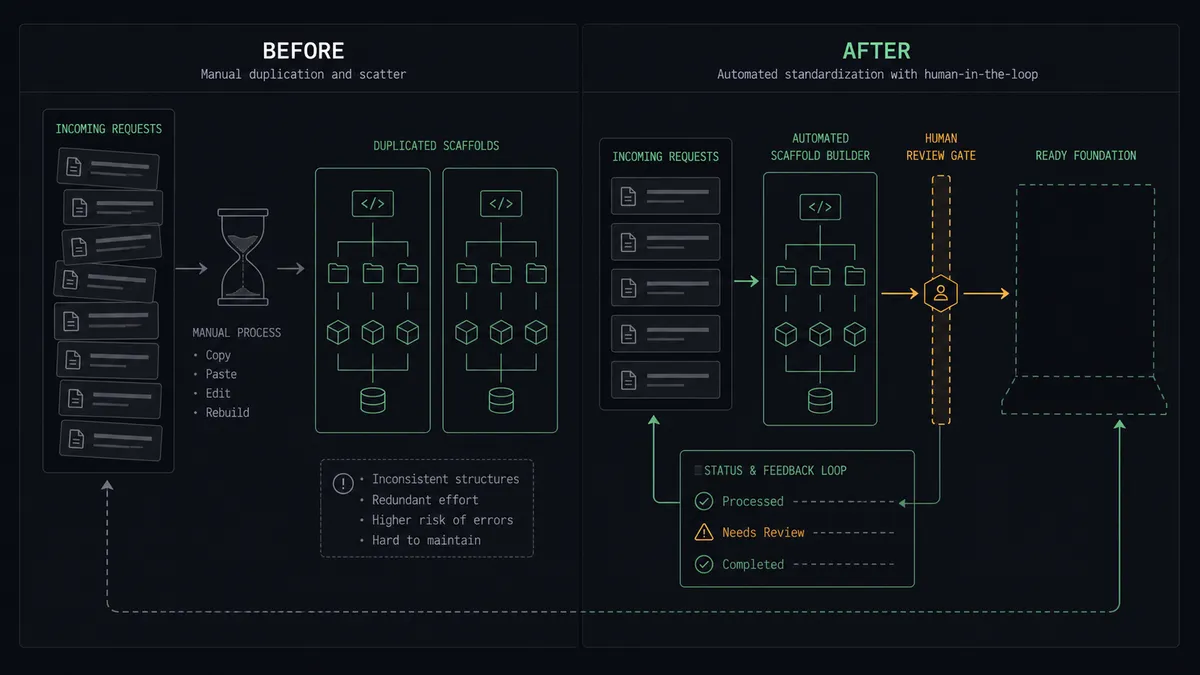
Right now requests are born in Notion and work lives in Workfront, and the distance between them is a coordinator’s job. Marketing, product, and field teams write requests where writing is easy: a Notion database with a brief, a hoped-for date, and a linked doc. Then someone in operations translates each row into Workfront by hand, deciding which project it belongs to, who should own it, and what the real dates are. The translation happens when that person has time, which means requests age in the database while requesters wonder whether anyone saw them.
The edges are what erode trust in the whole system. A request gets typed into the wrong project and the wrong team’s queue, surfacing weeks later at a status meeting as work nobody recognizes. A duplicate project gets created for an initiative that already exists, splitting effort and reporting across two records. Most costly of all, requests quietly become projects without anyone asking whether they should: every project opened is a claim on people’s time, and when project creation has no gate, the portfolio fills with commitments nobody prioritized.
How it works: the connection
The connection reads Notion on a schedule and writes to Adobe Workfront. Here is the plain version, grounded in the real connector actions.
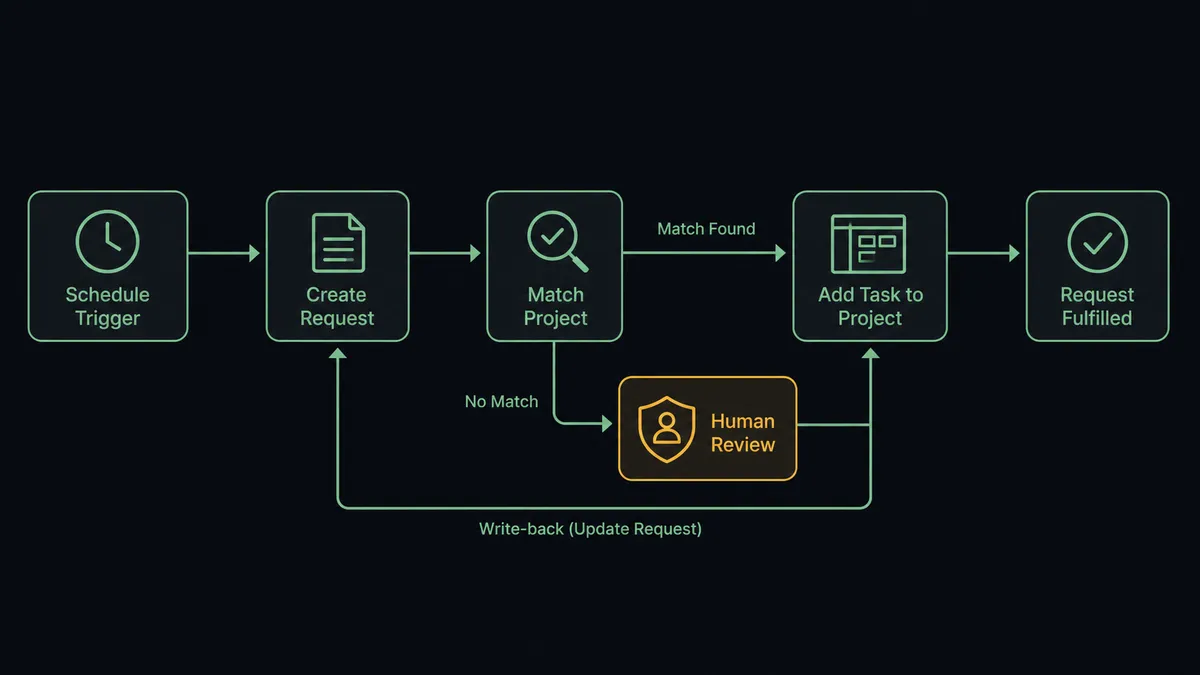
- Trigger: On a schedule, the workflow calls Find Database Item on the request database, filtered to rows marked ready and not yet synced.
- Read: For each row, it calls Get Page to pull the brief, requested owner, dates, and any linked context.
- Match the project: It calls Search Projects in Workfront by name and portfolio, then Get Project to confirm status and dates for the best candidate.
- Resolve the assignee: It calls Search Users to turn the requested owner into a real Workfront user ID.
- File the work: It calls Create Task in the matched project with the name, description, assignee, and planned start and completion dates.
- Close the loop: It calls Update Database Item to stamp the Notion row with the Workfront reference and a synced status.
That is the “just connect them” answer. Requests become assigned, dated tasks in the right project within minutes of being marked ready, and the request database shows exactly what made it into the work system. Running the loop the other way, Get Project feeds status, priority, and percent complete back into Notion, so the database requesters already watch becomes a live status board.
Can an AI agent run it? (and why a human stays in the loop)
Yes, and routing is where the agent shines. It holds the Notion and Workfront actions as tools: Find Database Item, Get Page, Update Database Item on one side; Search Projects, Get Project, Search Tasks, Search Users, Create Task, Create Project, Update Task on the other. It reads each brief the way your traffic manager does. Is this request a piece of the spring campaign project that already exists, or genuinely new work? Is the requested date achievable given the project’s percent complete? Is the named owner actually the right role? Confident matches become tasks without anyone touching them.
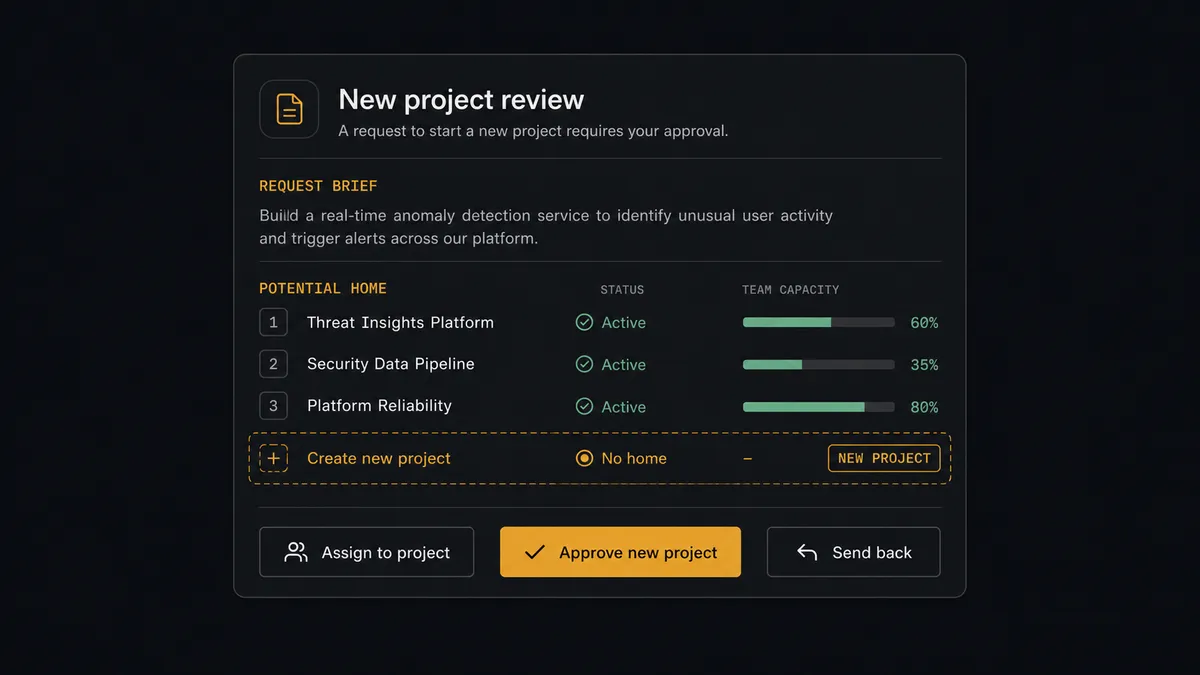
The consequential step is Create Project. A task inside an existing project consumes hours already budgeted; a new project is a new commitment, with an owner, a timeline, and a lane in every status report until someone closes it. So when the agent concludes no existing project covers a request, it does not quietly open one. It invokes a human-in-loop flow it holds as a callable tool and posts to your channel: “Ready request with no matching active project. Brief attached, closest projects listed with status and percent complete. Assign to a listed project, approve a new project, or send back to the requester?” A named approver makes the portfolio call. Only then does Create Project run, followed by Create Task for the first work item, and Update Database Item tells the requester their request is now real. The brief, the candidates considered, the decision, and the approver all land in the audit trail.
Prospects call this the digital andon cord: like Toyota’s production line pull cord, the workflow stops the line the moment it hits uncertainty. Routine requests reach the right queue in minutes. The portfolio only grows when a person says grow.
FlowRunner vs n8n
A technical team comparing options will look at n8n, and it holds up under inspection. Its Notion node is well developed, its HTTP request node reaches Workfront’s API, and its code steps let a developer encode routing rules precisely. The fair-code self-hosted model keeps everything on your own infrastructure, and the community’s library of workflow examples shortens the build.
The difference is who exercises judgment when a request does not match cleanly, and who maintains the logic as the portfolio changes. In n8n the routing is code that drifts out of date as projects open and close; in FlowRunner an AI agent reads the live portfolio each run, and the new-project gate is a native platform feature rather than a pattern you assemble.
| What matters for this pair | FlowRunner | n8n |
|---|---|---|
| Human-in-the-loop before Create Project commits resources | Native. The agent invokes an approval flow as a callable tool and waits | Buildable with wait nodes and custom branching; you assemble and maintain it |
| Who runs the flow | An AI agent reads the brief and portfolio, reasons, and picks actions as tools | Node sequence with routing rules you write and update in code |
| Users included | Unlimited users on every tier | Cloud plans carry per-tier limits; self-hosting shifts cost to your infrastructure |
| Bring your own AI keys | Yes, BYOK | Yes, BYOK supported |
| Self-hosted option | Yes, cloud-hosted or self-hosted | Yes, fair-code self-hosted |
| Pricing model | Transparent workflow-based tiers | Execution-based cloud pricing that takes effort to predict |
If your engineers want to own the intake pipeline as code, n8n gives them everything they need. If you want operations to run request intake themselves, with the live portfolio informing every routing call and a human owning every new project, this pairing is the better fit.
Before and after
| Category | Before | After |
|---|---|---|
| Request latency | Rows age in Notion until the coordinator’s next translation session | Ready rows become Workfront tasks on every scheduled run |
| Project routing | Whoever copies the request guesses which project it belongs to | The agent matches against Search Projects and escalates uncertain fits |
| Portfolio discipline | Requests quietly become projects nobody prioritized | Create Project runs only after a named approver makes the call |
| Status visibility | Requesters ping the coordinator for updates | Get Project feeds status and percent complete back to the Notion row |
| Accountability | No record of why a project exists or who opened it | Every project carries the brief, the decision, and the approver in the audit trail |
What you can build
Request intake pipeline. Find Database Item sweeps ready rows, the agent routes each into the right project with Create Task, and Update Database Item stamps the row. The coordinator stops translating and starts managing exceptions.
Portfolio gatekeeper. Every would-be project crosses the approval tool with the brief and candidate projects attached, so the portfolio grows deliberately and every project’s origin is on record from day one.
Live status board. On a schedule, Get Project pulls status, priority, and percent complete for every linked project, and Update Database Item paints them onto the Notion database requesters already watch. Status meetings start from shared facts.
Blocked-work escalation. Search Issues surfaces open issues on linked projects, and the agent posts the ones tagged critical to the operations channel with the project context, before a stakeholder discovers the blockage in a review.
Assignment sanity check. Before filing a task, the agent verifies the requested owner with Search Users and checks their existing load with Search Tasks, flagging assignments that pile onto someone already saturated so a person can rebalance first.
Getting started
Start on the free plan: 100 executions a month, every integration included, no credit card required, plus 14 days of Professional for new accounts. Both connectors are available on every tier, and every tier includes unlimited users and unlimited workflows.
Explore the integration details:
- Notion integration (23 actions covering pages, databases, blocks, and comments)
- Adobe Workfront integration (10 actions covering projects, tasks, issues, users, and documents)
Start building free at flowrunner.ai or book a demo to see a live Notion to Adobe Workfront workflow, new-project approval and all.
Frequently asked questions
Is it free to connect Notion and Adobe Workfront on FlowRunner?
You can build and run the connection on FlowRunner's free plan, which includes 100 executions a month and every integration with no credit card required, and new accounts also get 14 days of Professional. Both connectors are available on every FlowRunner tier, and every tier includes unlimited users and unlimited workflows.
Can I self-host the Notion to Adobe Workfront workflow?
Yes. FlowRunner offers a cloud-hosted option and a self-hosted option, so the connection can run inside your own environment.
Does the AI agent need my own OpenAI or Claude key?
FlowRunner uses a bring-your-own-keys model, so you connect the AI provider key you already have. You are not locked to one model.
What happens when a request does not fit any existing Workfront project?
The agent creates nothing. It packages the request's brief from the Notion row, the closest active projects from Search Projects with their status and percent complete, and its reasoning, then invokes a human-in-loop step and waits for a person to assign it to a listed project, approve a new one, or send the request back before Create Project or Create Task runs.
Which Notion and Adobe Workfront actions does this workflow use?
On the Notion side, Find Database Item selects ready rows, Get Page pulls the brief, and Update Database Item writes the sync state back. On the Adobe Workfront side, Search Projects and Get Project match existing work, Search Users resolves assignees, Create Task adds work to a project, and Create Project stands up approved new projects.
Can Workfront status flow back into the Notion database?
Yes. On a schedule, the workflow calls Get Project for each linked project and writes status, priority, and percent complete back to the Notion row with Update Database Item, so the request database doubles as a live status board without anyone updating it by hand.