How to Connect Jira Issues with Fathom (With or Without an AI Agent)
Connect Fathom meeting recordings to Jira Issues so action items from recorded calls become tracked tickets, with an AI agent that drafts each issue and pauses for a human before a batch of work lands in the team's backlog.
How do you connect Jira Issues to Fathom?
You connect Jira Issues to Fathom by registering a webhook with Fathom’s Create Webhook action, so the workflow fires the moment a recording’s content is ready, then pulling the notes with Get Summary and Get Transcript and filing the follow-ups with Jira’s Create Issue and Assign Issue. FlowRunner is a visual AI-agent orchestration platform where automations run autonomously and pause for human judgment on the steps that carry real consequence. Run as an agent, the same connection reads the transcript, separates real commitments from conversational noise, checks for duplicates with Search Issues, and pauses for a named human before a batch of new tickets lands in anyone’s sprint.
The problem it solves
Today the follow-ups from a recorded call live in three places: the Fathom summary nobody reopens, the memory of whoever ran the meeting, and a hurried note that says “circle back on the migration.” Turning those into tracked work is a manual chore. Someone rewatches or rereads the call, decides what was actually agreed, writes each ticket by hand, guesses the assignee, and files it into the right project. On a heavy meeting week, that chore loses to everything else, and commitments made out loud simply evaporate.
The edges cut both ways. Skip the chore and decisions vanish: a customer is promised a fix on a call and no ticket ever exists, which surfaces weeks later as an escalation. Automate it naively and the backlog floods: every “maybe we should” becomes a ticket, duplicates pile up when the same topic spans two meetings, and engineers learn that meeting-generated tickets are noise to be ignored. Both failure modes destroy the same thing: trust that the backlog reflects reality.
How it works: the connection
The connection listens to Fathom and writes to Jira Issues. Here is the plain version, grounded in the real connector actions.
- Trigger: Create Webhook registers a webhook in Fathom that fires when new meeting content is ready, with the summary, transcript, and action items flags enabled.
- Read: Get Summary pulls the AI-generated notes and Get Transcript pulls the full time-stamped, speaker-attributed transcript for the recording.
- Extract: The workflow identifies the action items: who committed to what, referenced against the transcript lines where it was said.
- Dedupe: Search Issues runs a JQL query for each item to check whether a ticket for that commitment already exists in the project.
- File: Create Issue writes one ticket per new commitment, with the transcript excerpt and recording reference in the description, and Add Attachment carries the meeting notes.
- Route: Assign Issue puts each ticket on the person who took the commitment, and Add Comment links the ticket back to its source recording.
That is the “just connect them” answer. Recorded calls stop being a graveyard of good intentions, and every commitment has a ticket with a paper trail back to the moment it was made.
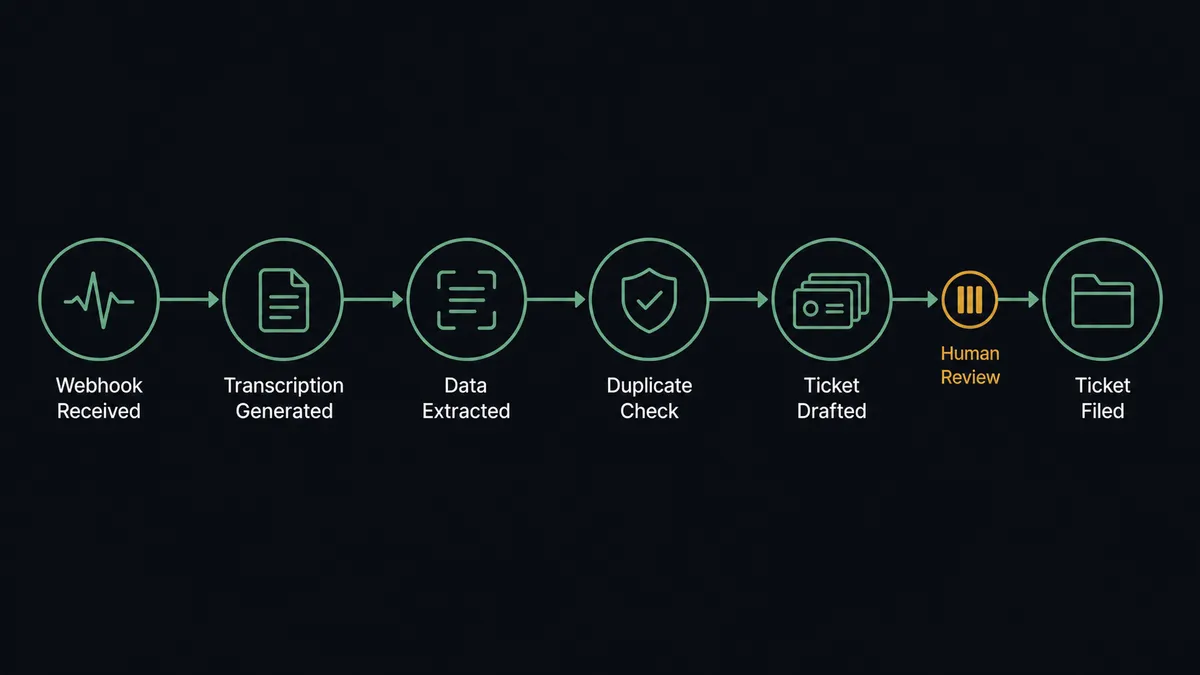
Can an AI agent run it? (and why a human stays in the loop)
Yes, and transcripts are exactly where an agent earns its keep, because “extract the action items” is a judgment call disguised as a parsing task. The agent holds the pair’s actions as tools: List Meetings, Get Summary, Get Transcript, Search Issues, Create Issue, Assign Issue, Add Comment, Add Attachment. It reads the conversation the way a chief of staff would. “I’ll send the revised proposal Friday” is a commitment with an owner and a date. “We should probably rethink onboarding at some point” is a sentiment. A fixed parser files both; the agent files the first and queues the second as a question.
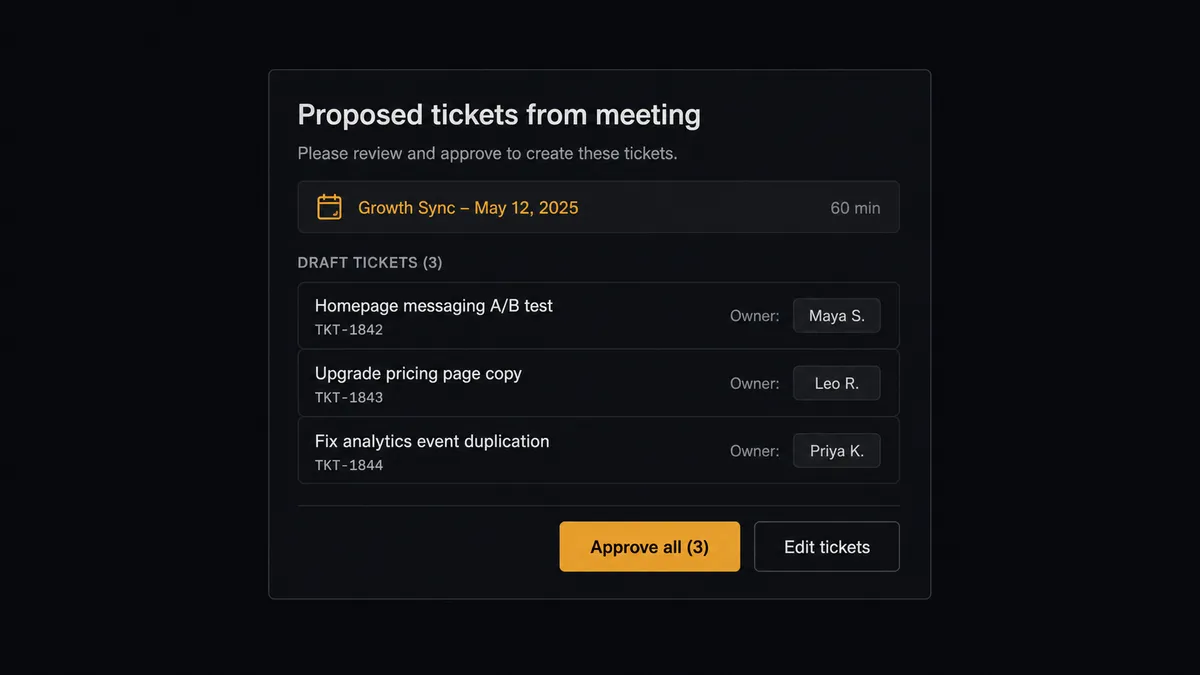
The consequential step is Create Issue followed by Assign Issue, at batch scale. A ticket is not just a record; it is a claim on a person’s time inside a sprint that was already planned. Ten wrong tickets from one misread meeting means an hour of triage for the team lead and one more reason to distrust automation. So before the batch lands, the agent invokes a human-in-loop flow it holds as a callable tool. The workflow pauses and posts to the meeting owner: “From today’s recording: [count from the drafted list] proposed tickets, each with owner and transcript excerpt. Approve all, edit, or drop items before filing?” Only after review does Create Issue run, and each ticket carries the reviewer’s approval in the audit trail.
Ambiguity escalates too. When a commitment has no clear owner, or two speakers contradict each other about scope, the agent does not pick a side. It stops and asks, with the transcript lines quoted. Prospects call this a digital andon cord: the workflow stops the line the moment it hits uncertainty, and your team pulls it back into motion.
FlowRunner vs Zapier
Zapier’s strength here is real: it connects both Fathom and Jira, its template gallery includes notetaker-to-tracker starting points, and a simple Zap that files every Fathom action item as a Jira ticket takes minutes to stand up. For a solo founder who wants everything captured no matter what, that is genuinely useful.
The difference is editorial judgment before the backlog. A team’s sprint is a shared, finite resource, and this pairing treats writing to it as a decision, not a copy.
| What matters for this pair | FlowRunner | Zapier |
|---|---|---|
| Human-in-the-loop before Create Issue and Assign Issue | Native. The agent posts the drafted batch for review before anything is filed | Available via added approval steps, not a native agent decision |
| Who runs the flow | An AI agent reads the transcript, reasons, picks actions as tools | Predefined step sequence you configure per Zap |
| Users included | Unlimited users on every tier | Priced by task volume; seats vary by plan |
| Bring your own AI keys | Yes, BYOK | AI features tied to Zapier’s own AI offering |
| Self-hosted option | Yes, cloud-hosted or self-hosted | Cloud only |
| Pricing model | Transparent workflow-based tiers | Per-task pricing; transcript-heavy flows consume tasks quickly |
If you want raw capture of every action item with zero curation, Zapier does that fine. If you want the backlog to stay trustworthy, with a human reviewing what enters the sprint and every ticket traceable to the words that created it, this pairing is the better fit.
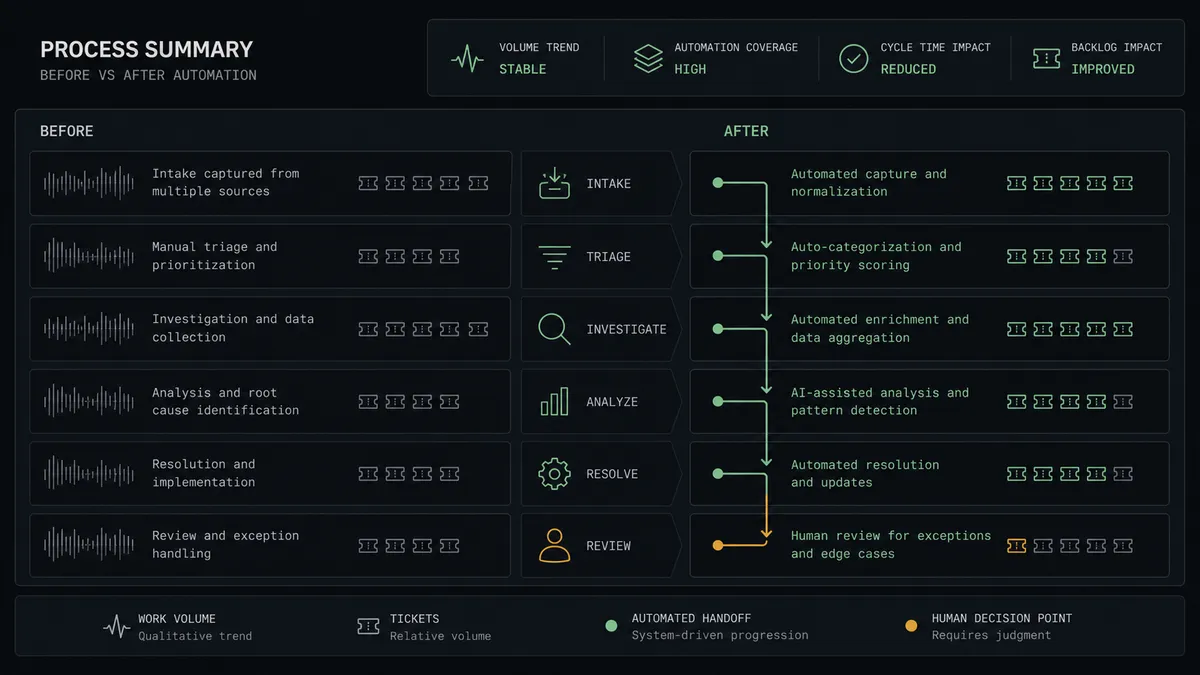
Before and after
| Category | Before | After |
|---|---|---|
| Commitment capture | Follow-ups live in summaries nobody reopens and evaporate within days | Every recorded call is processed the moment its content is ready |
| Ticket quality | Meeting tickets are vague one-liners with no context | Each issue carries the transcript excerpt, speaker, and recording link |
| Duplicates | The same topic from two calls becomes two tickets | Search Issues checks JQL for an existing ticket before anything is drafted |
| Backlog trust | Engineers triage meeting-generated noise by ignoring it | A named reviewer approves the batch before it reaches the sprint |
| Accountability | ”Who agreed to that?” is unanswerable a week later | The ticket quotes who said it, when, and who approved filing it |
What you can build
Meeting-to-backlog pipeline with review. The Fathom webhook fires, Get Transcript and Get Summary supply the material, the agent drafts deduplicated tickets, and Create Issue files them after the meeting owner approves the batch.
Customer-call escalation catcher. For recordings with external guests, the agent scans the transcript for promised fixes and deadlines, and routes those items to the account owner with the exact quote before a ticket is created, so customer promises never silently vanish.
Standup skipper. A scheduled List Meetings run each morning filters yesterday’s recordings by meeting type, pulls each Get Summary, cross-references open tickets via Search Issues, and posts a digest of decisions and new commitments to the team channel.
Reopened-topic detector. When a drafted item matches a ticket that was closed, the agent does not file a duplicate. It calls Add Comment on the closed issue quoting the new discussion, and asks a human whether to reopen, keeping history in one thread.
Meeting-notes archive on tickets. For every approved ticket, Add Attachment stores the meeting notes with the issue itself, so an engineer picking up the work six weeks later reads the original conversation without hunting through Fathom.
Getting started
Start on the free plan: 100 executions a month, every integration included, no credit card required, plus 14 days of Professional for new accounts. Both connectors are available on every tier, and every tier includes unlimited users and unlimited workflows.
Explore the integration details:
- Jira Issues integration (13 actions covering issue creation, JQL search, transitions, comments, and attachments)
- Fathom integration (9 actions covering meetings, transcripts, AI summaries, and webhooks)
Start building free at flowrunner.ai or book a demo to see a live Fathom to Jira Issues workflow, batch review and all.
Frequently asked questions
Is it free to connect Jira Issues and Fathom on FlowRunner?
You can build and run the connection on FlowRunner's free plan, which includes 100 executions a month and every integration with no credit card required, and new accounts also get 14 days of Professional. Both connectors are available on every FlowRunner tier, and every tier includes unlimited users and unlimited workflows.
Can I self-host the Jira Issues to Fathom workflow?
Yes. FlowRunner offers a cloud-hosted option and a self-hosted option, so the connection can run inside your own environment.
Does the AI agent need my own OpenAI or Claude key?
FlowRunner uses a bring-your-own-keys model, so you connect the AI provider key you already have. You are not locked to one model.
What happens when the agent is unsure whether something said in a meeting is a real commitment?
It leaves the ticket in draft and asks. Vague statements like 'we should look into that' are posted to the meeting owner with the transcript excerpt, and the agent calls Create Issue only for the items a person confirms. Nothing enters the backlog on an inference alone.
How does the workflow start if neither connector lists a catalog trigger?
Fathom's Create Webhook action registers a webhook that fires when new meeting content is ready, so the workflow starts the moment a recording's summary and transcript are available. A scheduled List Meetings run works as an alternative if you prefer polling.
Which actions does this connection use on each side?
On the Fathom side: Create Webhook, List Meetings, Get Summary, and Get Transcript. On the Jira side: Create Issue, Search Issues to catch duplicates, Assign Issue, Add Comment, and Add Attachment for the meeting notes.