How to Connect Jira Issues with Everhour (With or Without an AI Agent)
Connect Jira Issues to Everhour so closed tickets become logged time in the right project, with an AI agent that mirrors tasks automatically and pauses for a human before billable hours land on a client project.
How do you connect Jira Issues to Everhour?
You connect Jira Issues to Everhour by running Search Issues on a schedule with a JQL query for tickets that changed state, matching each one to an Everhour project with List Projects and List Tasks, mirroring new work with Create Task, and logging hours with Add Time. FlowRunner is a visual AI-agent orchestration platform where automations run autonomously and pause for human judgment on the steps that carry real consequence. Run as an agent, the same connection reconciles closed tickets against List Team Time, mirrors tasks on its own, and pauses for a named human before Add Time writes billable hours that end up on a client invoice or a payroll run.
The problem it solves
Today the link between what got built and what got billed is memory. Engineers close Jira tickets all week and log time in Everhour when they remember, which is often Friday afternoon, reconstructed from commit messages and guilt. The project manager then plays detective: which closed tickets have no hours against them, which hours reference no ticket, and which client project the ambiguous entries belong to. Every gap is a conversation, and every conversation happens days after anyone remembers the details.
The edges are where the money leaks. A closed ticket with no logged time becomes work you delivered and never invoiced. Hours logged to the wrong project become an invoice a client disputes, and disputes over billing damage trust faster than the underlying error ever would. Payroll built on List Team Time inherits every one of these gaps. The spreadsheet that is supposed to reconcile tracker and timesheet is itself unowned, and by month-end nobody can say with confidence which numbers are real.
How it works: the connection
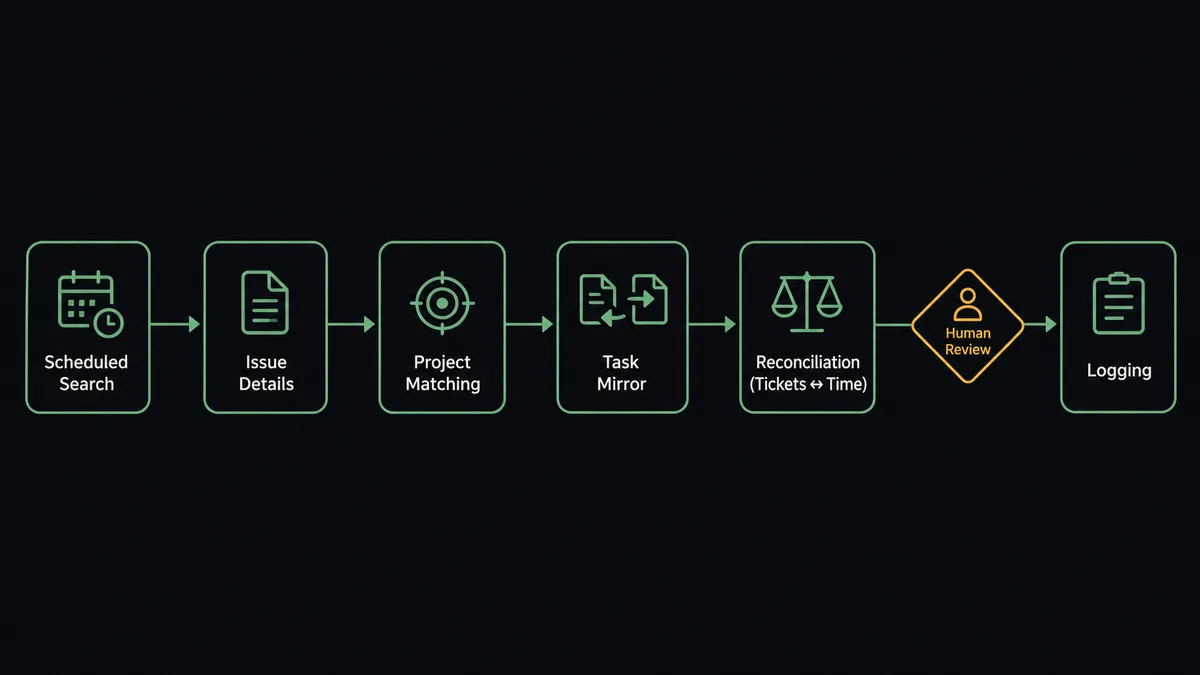
The connection reads from Jira Issues and writes to Everhour. Here is the plain version, grounded in the real connector actions.
- Trigger: On a schedule each morning, the workflow runs Search Issues with a JQL query for issues that moved to Done during the previous day.
- Read: Get Issue pulls each match’s summary, assignee, and history, so the workflow knows who did the work and roughly when.
- Match the project: List Projects finds the Everhour project that corresponds to the Jira project, and List Tasks checks whether a task for this issue already exists.
- Mirror the task: Create Task adds any missing task, named with the issue key and summary, so tracked time always has a precise place to land.
- Reconcile: List Team Time pulls the date range’s logged records, and the workflow pairs each closed issue with its hours, flagging issues with no time and time with no issue.
- Log: Add Time writes the confirmed duration in seconds against the task, attributed to the right person via List Team Users, with the issue key in the entry’s comment.
- Close the loop: Add Comment marks the Jira issue as reconciled, so the ticket itself says its time is accounted for.
That is the “just connect them” answer. Closed tickets and logged hours stop drifting apart, and the reconciliation happens daily instead of at month-end.
Can an AI agent run it? (and why a human stays in the loop)
Yes, and reconciliation is exactly the kind of work that rewards judgment over rules. The agent holds the pair’s actions as tools: Search Issues, Get Issue, List Projects, List Tasks, Create Task, Add Time, List Team Time, List Team Users, Add Comment. A fixed sync copies records; the agent reads them. It notices that a closed ticket’s assignee logged hours against a sibling task and treats that as a match rather than a gap. It notices that an issue bounced between Done and Reopened twice and holds off on logging anything until the state settles.
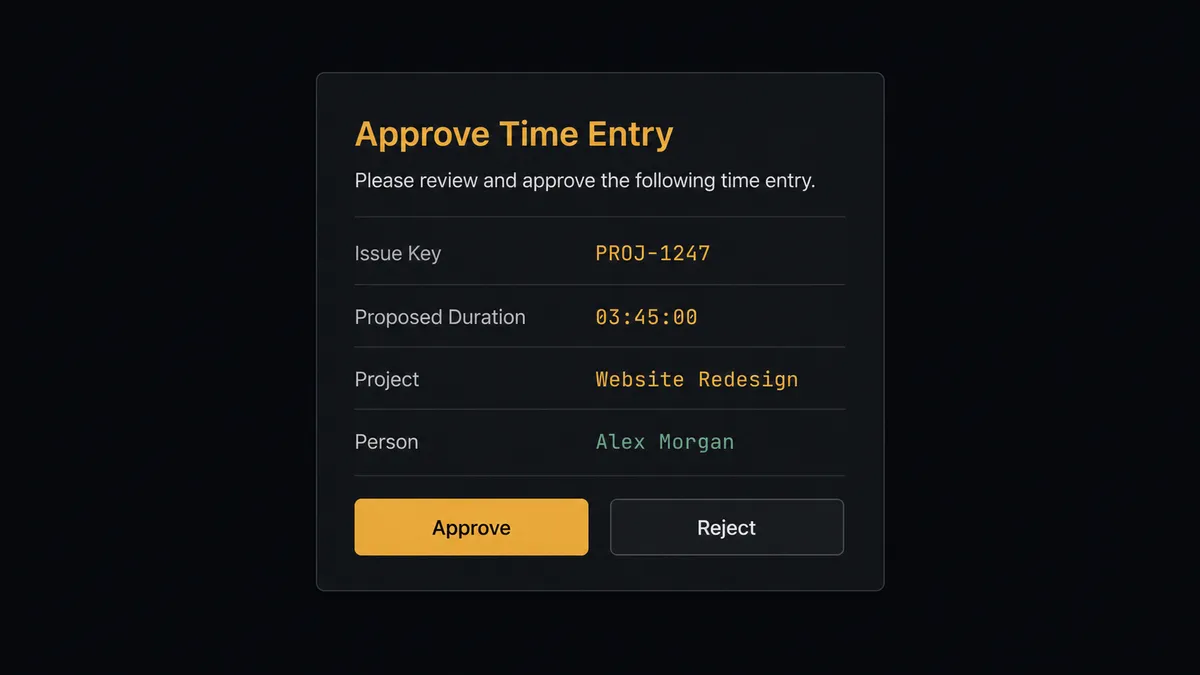
The consequential step is Add Time on a billable project. A time entry is not a note; it flows into client invoices and, through List Team Time, into payroll. Writing a wrong duration or the wrong project is money misassigned with a paper trail that says it was deliberate. So before the agent logs hours to a client project, it invokes a human-in-loop flow it holds as a callable tool. The workflow pauses and posts: “Closed issue [key] has no logged time. Proposed entry: [duration] on [project] for [person], dated [date]. Approve to log?” Only after a named approver confirms does Add Time fire, and the entry’s comment carries the issue key so the invoice line can always be traced back to the ticket.
The escalation is contextual, not threshold-based. A routine entry matching the assignee’s normal pattern on an internal project logs on its own. An entry that lands on a client project, contradicts the assignee’s other hours that day, or reconstructs work from a week ago goes to a person first. Prospects call this a digital andon cord: the workflow stops the line the moment it hits uncertainty, and your team pulls it back into motion.
FlowRunner vs Zapier
Zapier deserves its reputation here: it connects both Jira and Everhour, its editor is genuinely approachable, and for a fixed rule like “when an issue is created, create an Everhour task,” a Zap gets you running in minutes with no learning curve.
The difference is that reconciliation is not a fixed rule. Deciding whether missing hours are a gap, a mismatch, or a sibling-task match takes reading, and writing billable time deserves a pause a Zap does not natively have.
| What matters for this pair | FlowRunner | Zapier |
|---|---|---|
| Human-in-the-loop on Add Time to billable projects | Native. The agent invokes an approval flow as a callable tool and pauses before hours are logged | Available via added approval steps, not a native agent decision |
| Who runs the flow | An AI agent reads, reasons, picks actions as tools | Predefined step sequence you configure per Zap |
| Users included | Unlimited users on every tier | Priced by task volume; seats vary by plan |
| Bring your own AI keys | Yes, BYOK | AI features tied to Zapier’s own AI offering |
| Self-hosted option | Yes, cloud-hosted or self-hosted | Cloud only |
| Pricing model | Transparent workflow-based tiers | Per-task pricing; daily reconciliation runs consume tasks fast |
If you only need new issues to become Everhour tasks, Zapier does that well. If you want closed tickets, logged hours, invoices, and payroll to actually agree, with a person approving the entries that move money, this pairing is the better fit.
Before and after
| Category | Before | After |
|---|---|---|
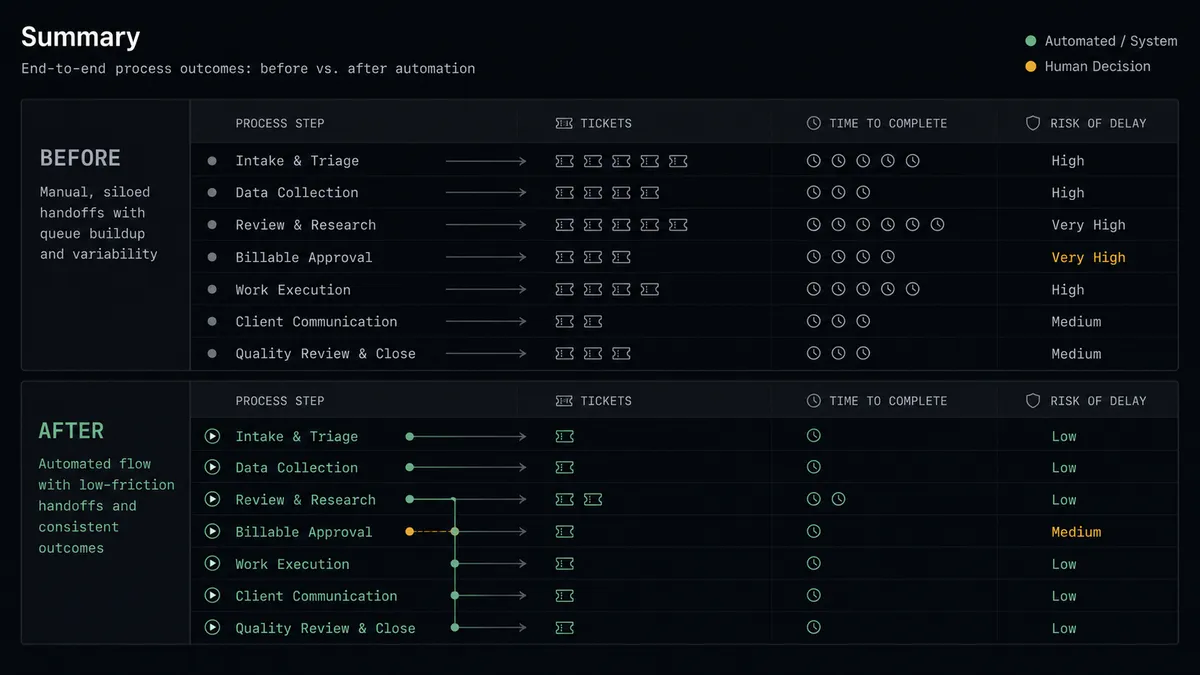
| Task setup | Engineers create Everhour tasks by hand, or log time against whatever exists | Every Jira issue is mirrored by Create Task with the issue key in the name |
| Time gaps | Closed tickets with no hours surface at month-end, if ever | Daily reconciliation flags them within a day, while the work is still fresh |
| Billable accuracy | Hours land on the wrong project and get caught by the client | Entries on billable projects require a named approver before Add Time runs |
| Traceability | Invoice lines cannot be traced to specific tickets | Every entry’s comment carries its Jira issue key |
| Month-end close | The PM spends days reconstructing what happened | The books and the tracker already agree; close is a review, not an investigation |
What you can build
Issue-to-task mirroring, hands off. Search Issues finds newly created tickets, List Projects and List Tasks locate the destination, and Create Task mirrors each one with the issue key in the name. Time tracking always has a precise target.
Daily reconciliation with approval on billables. Each morning the agent pairs yesterday’s Done issues with List Team Time records, flags gaps and mismatches, and calls Add Time on client projects only after a named approver confirms the entry.
Timer nudges from ticket state. When an issue moves to In Progress and Get Current Timer shows the assignee has nothing running, the agent posts a one-tap prompt that calls Start Timer on the mirrored task, and Stop Timer when the issue leaves In Progress.
Weekly effort digest per project. On Fridays the agent calls List Team Time for the week, groups entries by project via List Projects, cross-references the issues closed in the same window, and posts a digest showing where the week actually went.
Payroll pre-check. Before the payroll cutoff, the agent pulls the period’s records with List Team Time and List Team Users, flags people with days that have zero logged time against closed tickets, and routes the exception list to the operations lead instead of letting the gaps ride into payroll.
Getting started
Start on the free plan: 100 executions a month, every integration included, no credit card required, plus 14 days of Professional for new accounts. Both connectors are available on every tier, and every tier includes unlimited users and unlimited workflows.
Explore the integration details:
- Jira Issues integration (13 actions covering issue creation, JQL search, transitions, comments, and attachments)
- Everhour integration (11 actions covering projects, tasks, timers, and team time records)
Start building free at flowrunner.ai or book a demo to see a live Jira Issues to Everhour workflow, billable-time approval and all.
Frequently asked questions
Is it free to connect Jira Issues and Everhour on FlowRunner?
You can build and run the connection on FlowRunner's free plan, which includes 100 executions a month and every integration with no credit card required, and new accounts also get 14 days of Professional. Both connectors are available on every FlowRunner tier, and every tier includes unlimited users and unlimited workflows.
Can I self-host the Jira Issues to Everhour workflow?
Yes. FlowRunner offers a cloud-hosted option and a self-hosted option, so the connection can run inside your own environment.
Does the AI agent need my own OpenAI or Claude key?
FlowRunner uses a bring-your-own-keys model, so you connect the AI provider key you already have. You are not locked to one model.
What happens when the agent finds a closed Jira issue with no matching time in Everhour?
It does not silently invent hours. The agent drafts a proposed entry from the issue's history, posts the issue key, proposed duration, project, and person to your channel, and calls Add Time only after someone confirms. Unattributed work becomes a question, not a guess.
Jira Issues has no trigger in the catalog. How does the workflow start?
On a schedule. The workflow runs Search Issues with a JQL query, for example issues that moved to Done yesterday, then reconciles each result against Everhour with List Team Time for the same date range.
Which Everhour actions does this connection use?
List Projects and List Tasks to find the right project and task, Create Task to mirror a new Jira issue, Add Time to log a fixed duration with a comment, List Team Time for date-range reconciliation, and List Team Users to attribute time to the right person.