How to Connect Jira with Confluence (With or Without an AI Agent)
Turn resolved Jira tickets into Confluence documentation automatically, with an AI agent that drafts postmortems and release notes and pauses for a human before Update Page rewrites a runbook the whole company relies on.

How do you connect Jira to Confluence?
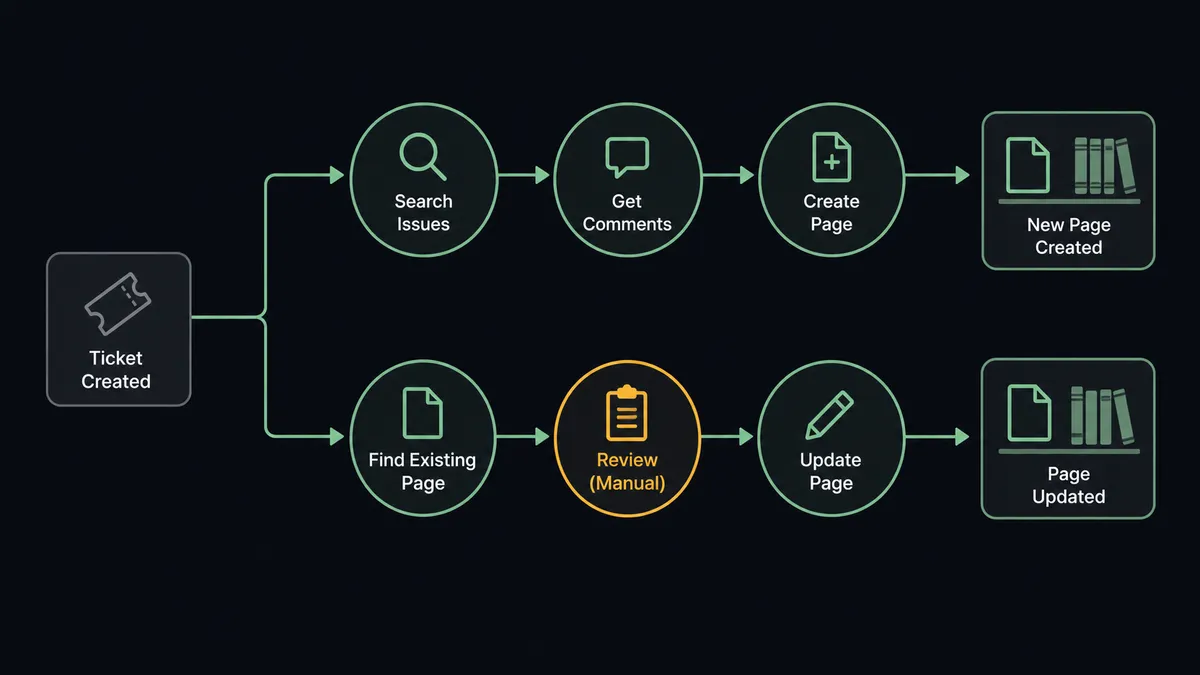
You connect Jira to Confluence by running Search Issues on a schedule to find resolved incidents and shipped epics, pulling the full story with Get Issue and Get Comments, and drafting the documentation with Create Page, so the postmortem exists before the memory fades and the release notes write themselves from the tickets that shipped. FlowRunner is a visual AI-agent orchestration platform where automations run autonomously and pause for human judgment on the steps that carry real consequence. Run as an AI agent, the same connection also proposes revisions to existing pages, and pauses for a named human before Update Page rewrites a runbook the whole company follows at 3am.
The problem it solves
Jira and Confluence sit in the same suite, and the gap between them is still filled by a person who is always behind. An incident closes and the postmortem is due. Someone reopens the ticket, rereads forty comments, reconstructs the timeline, and writes the page days later, when half the detail has evaporated. Release notes are worse: a product manager scrolls the fix version the night before the announcement, summarizing tickets they did not work on, guessing which changes customers will notice. The documentation exists, eventually, thinner than the events deserved.
Then there is the drift nobody assigns. Resolved tickets quietly prove that a runbook step is wrong, that a config default changed, that the escalation contact left the company. The runbook does not know. The next person to follow it at 3am finds out the hard way. The knowledge to fix every one of those pages is sitting in closed tickets; nobody’s job is to carry it across, so it never crosses.
How it works: the connection
The connection reads Jira on a schedule and writes to Confluence. Here is the plain version, grounded in the real connector actions.
- Trigger: On a schedule, the workflow calls Search Issues with a JQL filter for resolved incidents, shipped epics, and closed tickets in your documentation-worthy categories.
- Read: Get Issue and Get Comments pull each ticket’s fields, resolution, and full discussion history.
- Draft: Create Page produces the postmortem or release notes in the mapped space, structured from the ticket data.
- Attach: Upload Attachment adds the supporting files carried on the ticket, and Add Labels to Page files the page for discovery.
- Link back: Add Comment posts the page link on the originating ticket, so the ticket and the page reference each other permanently.
- Digest: A summary of everything drafted posts to your team’s channel for review, with each draft one click away.
That is the “just connect them” answer. Documentation stops being a memory exercise and becomes a byproduct of closing tickets. The reverse lookup rounds it out: Search Content (CQL) finds the existing pages a ticket’s resolution contradicts, so stale runbooks surface instead of hiding.
Can an AI agent run it? (and why a human stays in the loop)
Yes, and writing is exactly what the agent brings that a linker cannot. A deterministic sync can create a page skeleton; an AI agent reads forty comments and produces a timeline, separates root cause from noise, and turns a fix-version ticket list into release notes a customer can actually read. Its toolbox is the real action set: Search Issues, Get Issue, Get Comments, Create Page, Update Page, Add Labels to Page, Upload Attachment, Search Content (CQL), Add Comment.
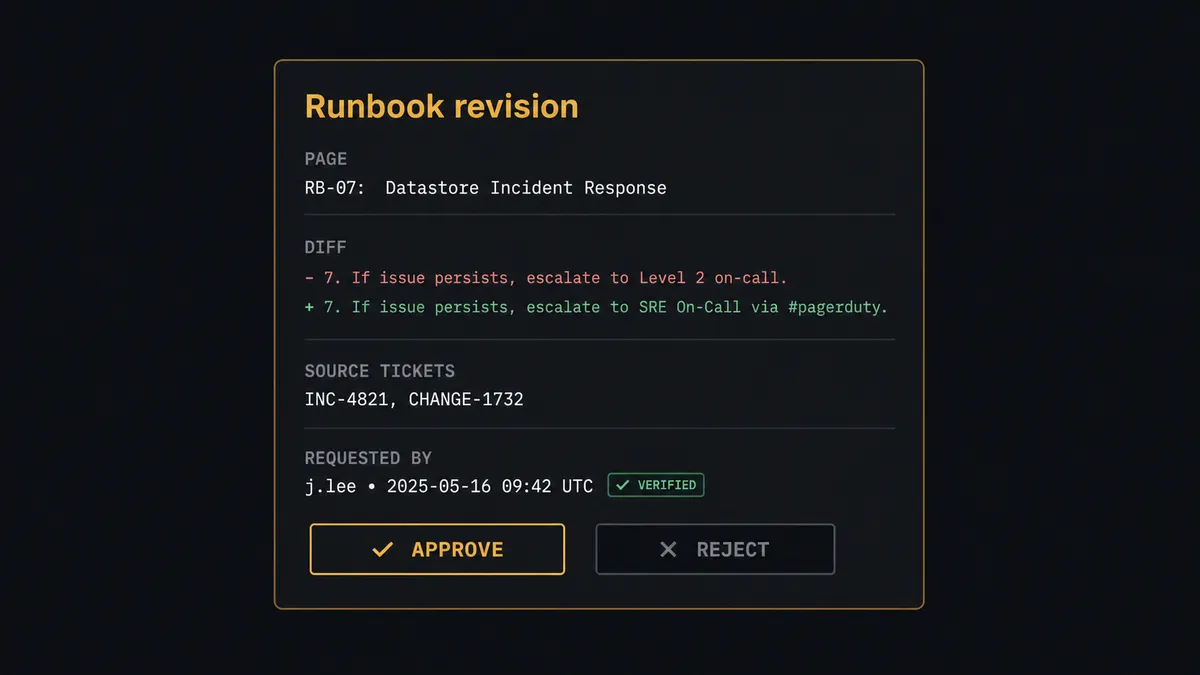
The consequential step is publication into trusted space. A draft in a review area is cheap; an edit to a live runbook is not, because people execute runbooks under pressure without stopping to wonder whether an automation rewrote step four last night. So before Update Page touches any page carrying your protected labels, and before any Delete Page at all, the agent invokes a human-in-loop flow it holds as a callable tool. The workflow pauses and posts: “Runbook revision proposed for the database failover page. Source: three resolved incidents where step four failed as written. Change: replace the restart sequence and update the escalation contact. Approve the edit?” A named reviewer approves, the page updates, and the reviewer and timestamp land in the audit trail with the source tickets linked.
New drafts flow freely; rewrites of trusted pages never move without a person. Prospects call this a digital andon cord: the workflow stops the line the moment it hits uncertainty, and your team pulls it back into motion.
FlowRunner vs Zapier
Zapier connects Jira to Confluence in minutes, and for the simple version of this problem it is genuinely good: a huge connector library, an editor anyone can drive, and templates that create a Confluence page when a Jira ticket hits a status. If all you want is “ticket closed, page stub exists,” Zapier delivers that with less setup than anything else.
The difference is that this pair’s real job is authorship and judgment, not stub creation. FlowRunner runs the connection as an agent that writes the document from the ticket history and holds human review as a native tool before anything trusted changes.
| What matters for this pair | FlowRunner | Zapier |
|---|---|---|
| Human-in-the-loop on Update Page for live runbooks | Native. The agent invokes an approval flow as a callable tool and pauses before publishing | Available via added approval steps, not conditioned on which page is being touched |
| Who runs the flow | An AI agent reads the ticket history, reasons, drafts, picks actions as tools | Predefined step sequence you configure per Zap |
| Users included | Unlimited users on every tier | Priced by task volume; seats vary by plan |
| Bring your own AI keys | Yes, BYOK | AI features tied to Zapier’s own AI offering |
| Self-hosted option | Yes, cloud-hosted or self-hosted | Cloud only |
| Pricing model | Transparent workflow-based tiers | Per-task pricing that scales with ticket volume |
If a page stub per closed ticket is enough, Zapier is the faster start. If you want the postmortem written, the release notes drafted, and a named reviewer between the agent and every runbook it wants to touch, that is FlowRunner’s job.
Before and after
| Category | Before | After |
|---|---|---|
| Postmortems | Written days late from a reread of forty comments | Drafted by Create Page from Get Issue and Get Comments while the incident is fresh |
| Release notes | A product manager summarizes tickets the night before launch | Drafted from the fix version’s resolved tickets, ready for review on schedule |
| Runbook accuracy | Resolved tickets contradict runbooks nobody updates | Stale pages surface via Search Content (CQL) with staged revisions attached |
| Traceability | Pages and tickets reference each other only when someone remembers | Add Comment and Add Labels to Page link every page to its source tickets |
| Publication control | Anyone with edit rights changes trusted pages silently | Update Page on protected pages waits for a named reviewer, logged with a timestamp |
What you can build
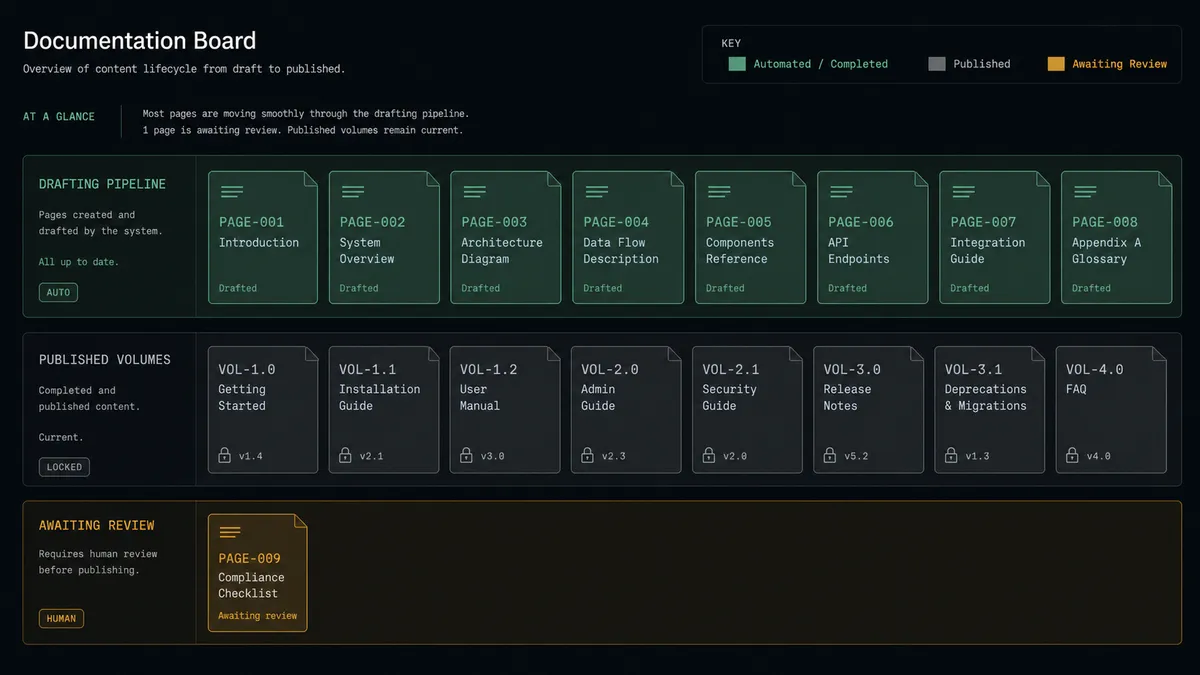
Incident to postmortem. Search Issues finds resolved incidents, Get Comments pulls the discussion, and Create Page drafts the timeline, root cause, and follow-ups in the incident space, with Add Comment linking it from the ticket. The postmortem exists the day the incident closes.
Release notes from the fix version. At the end of each cycle, the agent collects the shipped tickets, drafts customer-readable notes with Create Page, and stages them for review, so launch day starts with editing instead of archaeology.
Runbook drift patrol. Resolved tickets that contradict a documented procedure trigger Search Content (CQL) to find the affected page, and the agent stages a revision behind the Update Page gate, keeping runbooks aligned with how the system actually behaves.
Decision records. Tickets labeled as architecture or process decisions produce a decision-record page capturing context, options from the comments, and the outcome, labeled and filed with Add Labels to Page so decisions stop living only in closed tickets.
Weekly engineering digest. The agent summarizes the week’s resolved work into a single Create Blog Post in your engineering space, giving stakeholders a readable narrative instead of a JQL filter.
Getting started
Start on the free plan: 100 executions a month, every integration included, no credit card required, plus 14 days of Professional for new accounts. Both connectors are available on every tier, and every tier includes unlimited users and unlimited workflows.
Explore the integration details:
- Jira integration (13 actions covering issues, comments, transitions, and attachments)
- Confluence integration (27 actions covering pages, blog posts, comments, attachments, and CQL search)
Start building free at flowrunner.ai or book a demo to see a live Jira to Confluence workflow, runbook review gate and all.
Frequently asked questions
Is it free to connect Jira and Confluence on FlowRunner?
You can build and run the connection on FlowRunner's free plan, which includes 100 executions a month and every integration with no credit card required, and new accounts also get 14 days of Professional. Both connectors are available on every FlowRunner tier, and every tier includes unlimited users and unlimited workflows.
Can I self-host the Jira to Confluence workflow?
Yes. FlowRunner offers a cloud-hosted option and a self-hosted option, so the connection can run inside your own environment.
Does the AI agent need my own OpenAI or Claude key?
FlowRunner uses a bring-your-own-keys model, so you connect the AI provider key you already have. You are not locked to one model.
What happens when the agent wants to change a page people rely on?
It pauses. Before Update Page runs on any page carrying your protected labels, the agent posts the current text, the proposed text, and the tickets driving the change, then waits for a named reviewer. Delete Page is gated the same way, without exception.
Which actions drive the workflow if Jira has no triggers here?
The Jira connector is action-based, so the workflow runs on a schedule. Each run calls Search Issues with your JQL filter for resolved incidents and shipped epics, pulls detail with Get Issue and Get Comments, and writes to Confluence with Create Page.
Can the workflow keep runbooks current from ticket activity?
Yes. When resolved tickets show a procedure has changed, the agent finds the affected runbook with Search Content (CQL), drafts the revision, and stages Update Page behind the review gate, so runbooks track reality without anyone rewriting them from scratch.