How to Connect Jira with Delighted (With or Without an AI Agent)
Route Delighted detractor feedback into Jira issues automatically, with an AI agent that triages verbatims into the right project and pauses for a human before Unsubscribe Person or Delete Person permanently changes a customer's survey record.

How do you connect Jira to Delighted?
You connect Jira to Delighted by polling List Survey Responses on a schedule, reading each new piece of feedback, and filing real problems into the backlog with Create Issue, with the score, verbatim, and respondent context attached, so a detractor’s complaint becomes an assigned ticket instead of a number on a dashboard. FlowRunner is a visual AI-agent orchestration platform where automations run autonomously and pause for human judgment on the steps that carry real consequence. Run as an AI agent, the same connection also deduplicates complaints against existing issues, and pauses for a named human before Unsubscribe Person or Delete Person permanently changes anyone’s survey record.
The problem it solves
Most NPS programs measure faithfully and act rarely. Delighted collects the scores, the dashboard trends, and the verbatims pile up in a feed someone means to read. When a detractor writes two furious sentences about a broken export, that feedback has to be noticed by a human, interpreted, retyped into Jira, and routed to the right team. In practice it happens for the loudest comments and never for the pattern: five different customers describing the same defect in five different wordings, none of them individually alarming. The engineering team ships from the backlog, the backlog never hears from the survey, and the quarterly review rediscovers problems customers reported months earlier.
The edges cut the other way too. A respondent writes “stop sending me these” in a verbatim, and nothing happens, because survey tools do not read. Another gets surveyed again a week after filing a churn-level complaint that nobody acted on. And when someone does clean up the respondent list, records vanish with no note about who removed them or why. The survey program erodes the very goodwill it exists to measure.
How it works: the connection
The connection reads Delighted on a schedule and writes to Jira. Here is the plain version, grounded in the real connector actions.
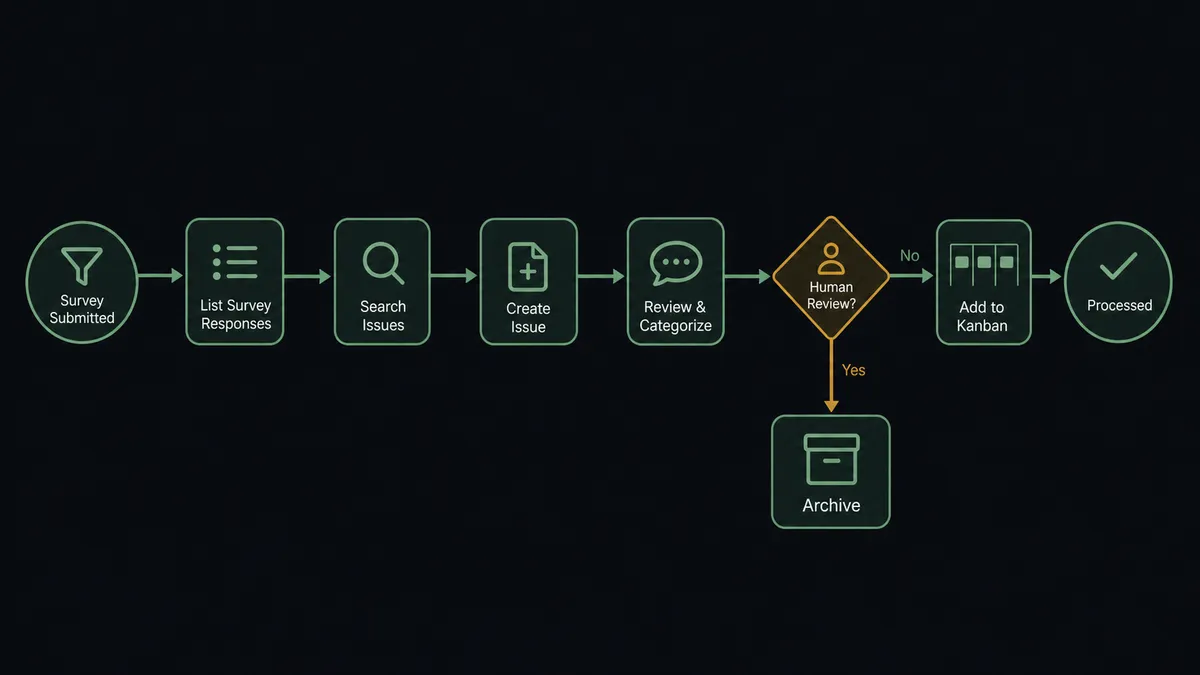
- Trigger: On a schedule, the workflow calls List Survey Responses and collects everything new since the last run.
- Read: Get Survey Response pulls each response’s score and verbatim, and Get Person adds the respondent’s history.
- Classify: Detractor and passive responses with substantive verbatims are routed by product area; empty scores flow to the metrics digest only.
- Deduplicate: Search Issues checks Jira for an open issue covering the same problem.
- File: Create Issue opens a new ticket with the verbatim and context, or Add Comment attaches the new report to the existing issue.
- Route: Assign Issue hands the ticket to the owning team, and Get Metrics feeds the weekly score digest to your channel.
That is the “just connect them” answer. Feedback stops terminating in a dashboard and starts arriving in the backlog, deduplicated and routed, with the customer’s own words attached. Promoter verbatims flow too: the flattering quotes land in a channel where marketing can actually find them, tied to the respondent’s history from Get Person so the strongest quotes come with context about who said them and how long they have been customers.
Can an AI agent run it? (and why a human stays in the loop)
Yes, and reading is the whole job. A rules-based sync can route on score thresholds; it cannot tell a rant about pricing from a defect report, and it files “the export is broken AGAIN” and “exports fail every Friday” as two unrelated events. An AI agent reads the verbatim, identifies the product area, recognizes the repeat, and decides between Create Issue and Add Comment. Its toolbox is the real action set: List Survey Responses, Get Survey Response, Get Person, Get Metrics, Search Issues, Create Issue, Add Comment, Assign Issue, Transition Issue, Unsubscribe Person.
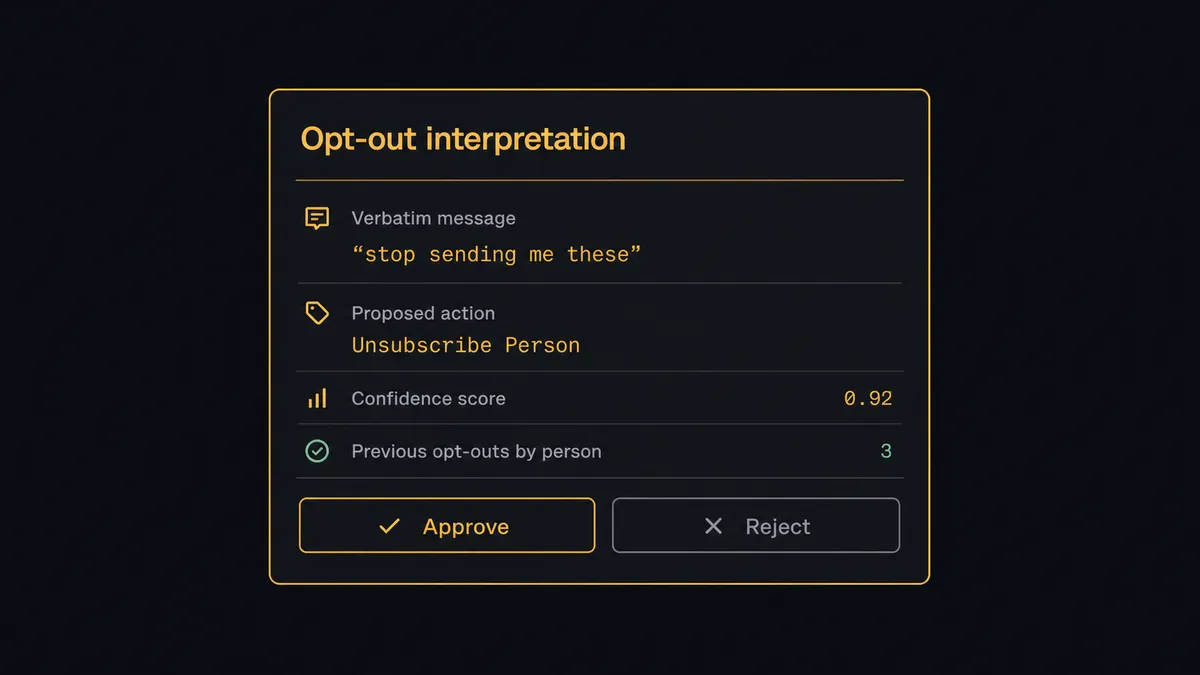
The consequential step is the customer’s permanent record. When a verbatim reads like an opt-out (“please stop emailing me these surveys”), the right response is Unsubscribe Person, and the wrong response is a guess in either direction: keep surveying an annoyed customer, or silently remove someone who was venting about the product, not the survey. So the agent stages the change and invokes a human-in-loop flow it holds as a callable tool. The workflow pauses and posts: “Respondent [email] wrote: ‘stop sending me these.’ Reading this as a survey opt-out. Approve Unsubscribe Person?” The same gate is absolute for Delete Person, which erases the respondent and their history outright. A named person approves, the record changes, and the interpretation, approver, and timestamp are all logged.
Everything else flows without ceremony. Prospects call this pattern a digital andon cord: the workflow stops the line the moment it hits uncertainty, and your team pulls it back into motion.
FlowRunner vs Zapier
Zapier is the default way teams first wire Delighted to Jira, and it deserves the credit: the connector catalog is enormous, setup is fast, and a Zap that creates a Jira issue for every low score works on day one. For a small program where every detractor deserves a ticket, that is genuinely enough.
The difference is comprehension at volume. FlowRunner runs this connection as an agent that reads the verbatims, deduplicates against the backlog, and holds human approval as a native tool before any permanent record changes.
| What matters for this pair | FlowRunner | Zapier |
|---|---|---|
| Human-in-the-loop on Unsubscribe Person and Delete Person | Native. The agent invokes an approval flow as a callable tool and pauses | Available via added approval steps, not driven by reading the verbatim |
| Who runs the flow | An AI agent reads each verbatim, reasons, picks actions as tools | Predefined step sequence keyed on score thresholds |
| Users included | Unlimited users on every tier | Priced by task volume; seats vary by plan |
| Bring your own AI keys | Yes, BYOK | AI features tied to Zapier’s own AI offering |
| Self-hosted option | Yes, cloud-hosted or self-hosted | Cloud only |
| Pricing model | Transparent workflow-based tiers | Per-task pricing that scales with survey volume |
If your survey volume is small and a ticket per detractor is fine, Zapier will serve you well. If you want verbatims read, duplicates merged, and a named human on every change to a customer’s record, that is the FlowRunner version of this pair.
Before and after
| Category | Before | After |
|---|---|---|
| Detractor follow-up | Verbatims sit unread in a feed until someone browses it | Substantive complaints become assigned Jira issues within a polling cycle |
| Duplicate reports | The same defect gets rediscovered in every review meeting | Search Issues merges repeat complaints into one issue that accumulates evidence |
| Routing | Feedback lands with whoever reads the dashboard, whenever they read it | Assign Issue hands each problem to the owning team automatically, the same day it arrives |
| Opt-out requests | Written pleas to stop are invisible to the survey tool | Flagged by the agent and honored after a human confirms the reading |
| Record changes | Respondents removed silently with no trail | Every Unsubscribe Person and Delete Person is approved, attributed, and logged |
What you can build
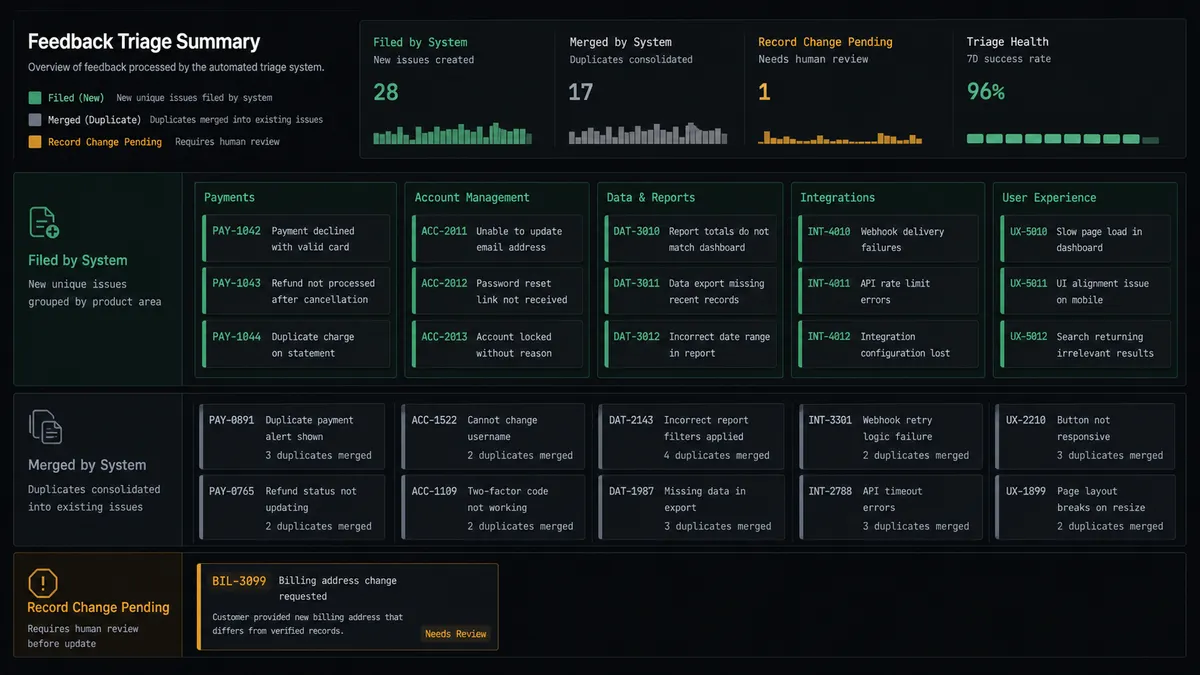
Detractor to backlog. List Survey Responses pulls new feedback, the agent classifies each verbatim, and Create Issue files real defects in the right project with the customer’s words attached, assigned via Assign Issue before anyone reads a dashboard.
Evidence accumulation. Repeat complaints become Add Comment entries on the original issue, so when the team prioritizes, one issue carries every affected customer’s verbatim instead of five near-duplicates splitting the signal.
Close-the-loop tracking. When an issue born from feedback ships, Transition Issue marks it done and the workflow surfaces the respondents who reported it, giving success teams a list of customers worth a personal follow-up.
Respectful list hygiene. Opt-out language in verbatims stages Unsubscribe Person behind an approval card, and record deletions via Delete Person require the same named sign-off, keeping the survey program compliant with its own promises.
Weekly signal digest. Get Metrics and the week’s classified verbatims compile into a digest posted to leadership: score movement, the top recurring themes, and links to the Jira issues each theme produced, so the review meeting starts from evidence instead of anecdotes.
Getting started
Start on the free plan: 100 executions a month, every integration included, no credit card required, plus 14 days of Professional for new accounts. Both connectors are available on every tier, and every tier includes unlimited users and unlimited workflows.
Explore the integration details:
- Jira integration (13 actions covering issues, comments, transitions, and attachments)
- Delighted integration (9 actions covering responses, people, metrics, and unsubscribes)
Start building free at flowrunner.ai or book a demo to see a live Jira to Delighted workflow, opt-out gate and all.
Frequently asked questions
Is it free to connect Jira and Delighted on FlowRunner?
You can build and run the connection on FlowRunner's free plan, which includes 100 executions a month and every integration with no credit card required, and new accounts also get 14 days of Professional. Both connectors are available on every FlowRunner tier, and every tier includes unlimited users and unlimited workflows.
Can I self-host the Jira to Delighted workflow?
Yes. FlowRunner offers a cloud-hosted option and a self-hosted option, so the connection can run inside your own environment.
Does the AI agent need my own OpenAI or Claude key?
FlowRunner uses a bring-your-own-keys model, so you connect the AI provider key you already have. You are not locked to one model.
What happens when a respondent asks to stop being surveyed?
The agent does not act alone. It stages Unsubscribe Person, quotes the exact verbatim that reads as an opt-out request, and invokes a human-in-loop step. A person confirms the interpretation before the record changes, because a wrong guess in either direction has a cost.
Which actions drive the workflow if neither connector has triggers?
Both connectors are action-based, so the workflow runs on a schedule. Each run calls List Survey Responses in Delighted for new feedback, checks Search Issues in Jira for existing reports, and files new problems with Create Issue.
How does the workflow avoid filing the same complaint ten times?
Before Create Issue runs, the agent calls Search Issues for open reports matching the same product area. A repeat complaint becomes an Add Comment on the existing issue with the new verbatim and respondent context, so the issue accumulates evidence instead of the backlog accumulating duplicates.