How to Connect Jira Issues with Fulcrum (With or Without an AI Agent)
Connect Fulcrum field inspection records to Jira Issues so defects found on site become tracked work orders with photos attached, with an AI agent that files routine findings and pauses for a human before closing out a field record as resolved.
How do you connect Jira Issues to Fulcrum?
You connect Jira Issues to Fulcrum by polling List Records for your inspection forms on a schedule, pulling each submission’s detail with Get Record, and filing defect findings as work orders with Create Issue, with the site photos carried onto the ticket through List Photos and Add Attachment. FlowRunner is a visual AI-agent orchestration platform where automations run autonomously and pause for human judgment on the steps that carry real consequence. Run as an agent, the same connection reads each record’s findings, files routine defects on its own, escalates safety-flagged conditions to a person, and pauses for a supervisor before Update Record replaces a field record’s data to mark it resolved.
The problem it solves
Today the distance between the field and the office is measured in retyping. A technician walks a site with Fulcrum, documents a cracked fitting with photos and coordinates, and submits the record. Then the record sits. Back at the office, a coordinator eventually opens the day’s submissions, reads each one, decides which findings need work orders, and manually recreates them in Jira: summary typed from the form values, photos downloaded and re-uploaded, location pasted from the map. Every step loses fidelity, and every busy day delays the queue.
The edges are operational risk wearing paperwork’s face. A safety-flagged finding submitted at four in the afternoon waits in the unread pile overnight. The same leaking valve gets written up on three consecutive inspections and becomes three unlinked work orders, so nobody sees it is a repeat offender. And the close-out is worst of all: when the repair is done, someone edits the field record to say so, and because Fulcrum’s Update Record replaces form values wholesale, a careless write erases the original inspection data that regulators and warranty claims depend on.
How it works: the connection
The connection reads from Fulcrum and writes to Jira Issues. Here is the plain version, grounded in the real connector actions.
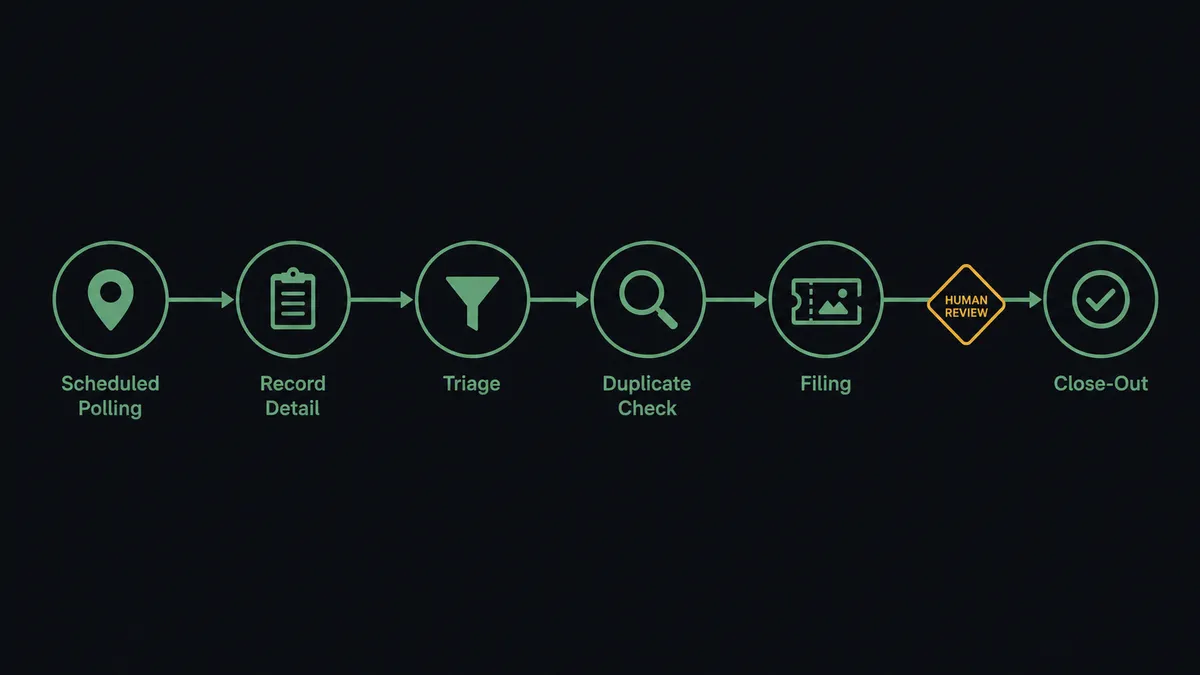
- Trigger: On a schedule, the workflow runs List Records for each form selected via List Forms, filtered to submissions new or changed since the last pass.
- Read: Get Record pulls the full submission: coordinates, status, metadata, and form values keyed by the field schema from Get Form.
- Dedupe: Search Issues runs a JQL query for the site and defect, so a repeat finding threads onto the existing work order instead of spawning a new one.
- File: Create Issue writes the work order with the site identifier, defect description, and coordinates in the description.
- Attach the evidence: List Photos finds the record’s site photos and Add Attachment puts them on the ticket, so the crew sees what the technician saw.
- Route: Assign Issue puts the work order on the responsible crew lead, and Transition Issue moves it into the dispatch column.
- Close the loop: When the work order reaches Done, the workflow prepares the field record’s close-out for supervisor sign-off before Update Record touches it.
That is the “just connect them” answer. Field findings become dispatched work orders with photographic evidence the same day they are captured, and repeat defects accumulate on one ticket instead of scattering.
Can an AI agent run it? (and why a human stays in the loop)
Yes, and the agent’s judgment shows up at both ends of the loop. It holds the pair’s actions as tools: List Forms, Get Form, List Records, Get Record, List Photos, Update Record, Search Issues, Create Issue, Add Attachment, Assign Issue, Transition Issue, Add Comment. On intake, it reads findings rather than matching keywords. A corrosion note on a decorative rail and the same note on a pressure line are different problems; a technician’s “monitor next visit” is a watch item, not a work order. Safety-flagged conditions do not queue behind routine findings: the agent posts them to the operations channel immediately, with photos and coordinates, and a person decides the dispatch before the ticket is even assigned.
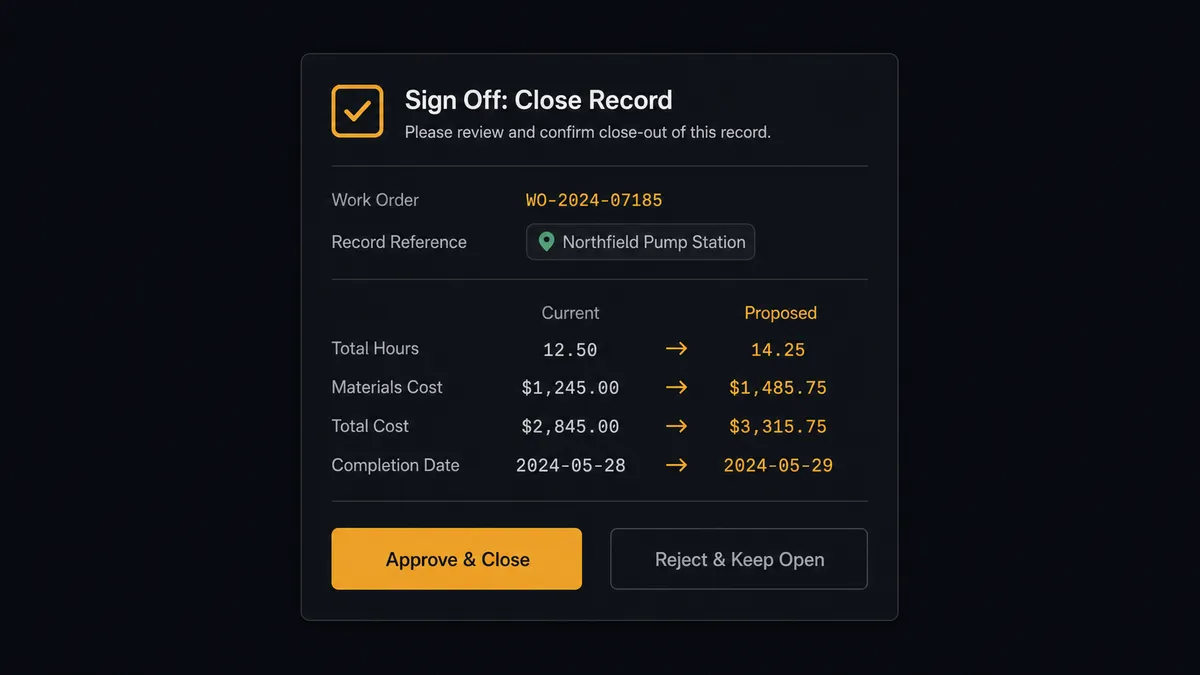
The consequential step on the return path is Update Record. Fulcrum replaces a record’s form values wholesale on update: whatever the write contains becomes the record, and whatever it omits is gone. The inspection data in those records is your compliance evidence, your warranty defense, and your technician’s professional word. So the agent never closes a record silently. It invokes a human-in-loop flow it holds as a callable tool, and the workflow pauses and posts: “Work order [issue key] is Done. Ready to mark record [record ID] resolved. Current values and proposed replacement attached, photos preserved. Approve the write?” Only after the supervisor signs off does Update Record run, with Get Record having supplied the current values first so nothing is dropped. Delete Record never runs at all in this workflow; removal of field data is a decision for humans in Fulcrum itself.
Prospects call this a digital andon cord: the workflow stops the line the moment a write would be hard to take back, and your team pulls it back into motion.
FlowRunner vs Zapier
Zapier has real standing here: it connects form platforms to Jira smoothly, its editor needs no training, and a Zap that creates an issue for every new Fulcrum record is running in minutes. For a small team that wants every submission mirrored into a tracker, that is genuinely enough.
The difference is that field operations are not symmetrical. Getting findings into the office is the easy half; writing resolution back onto legally meaningful field records is the half that deserves a gate.
| What matters for this pair | FlowRunner | Zapier |
|---|---|---|
| Human-in-the-loop on Update Record close-outs | Native. A supervisor reviews the exact replacement values before the write | Available via added approval steps, not a native agent decision |
| Who runs the flow | An AI agent reads findings, reasons, picks actions as tools | Predefined step sequence you configure per Zap |
| Users included | Unlimited users on every tier | Priced by task volume; seats vary by plan |
| Bring your own AI keys | Yes, BYOK | AI features tied to Zapier’s own AI offering |
| Self-hosted option | Yes, cloud-hosted or self-hosted | Cloud only |
| Pricing model | Transparent workflow-based tiers | Per-task pricing; per-record polling and photo steps consume tasks fast |
If you only need submissions mirrored one way into Jira, Zapier covers it. If findings carry safety weight and close-outs rewrite compliance records, with a supervisor’s name on every write, this pairing is the better fit.
Before and after
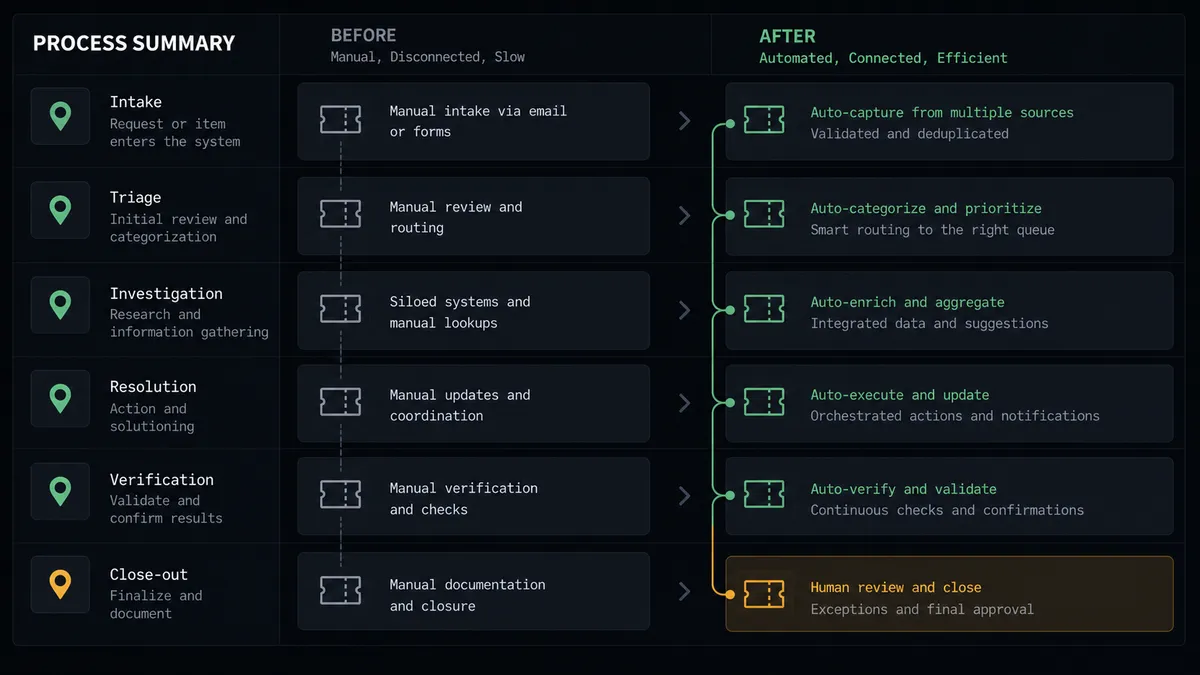
| Category | Before | After |
|---|---|---|
| Finding-to-work-order | A coordinator retypes field submissions into Jira when the queue allows | Records are triaged and filed with photos the same day they are captured |
| Safety findings | Urgent conditions wait in the unread pile with routine ones | Safety-flagged records go straight to a person with photos and coordinates |
| Repeat defects | The same site problem becomes multiple unlinked tickets | Search Issues threads repeat findings onto the existing work order |
| Evidence | Photos live in Fulcrum while the crew works from a text summary | Add Attachment puts the site photos on the ticket itself |
| Close-outs | Field records are edited by hand, sometimes erasing original data | Update Record runs only after a supervisor approves the exact write |
What you can build
Inspection-to-dispatch pipeline. List Records and Get Record feed each submission to the agent, defects become work orders via Create Issue with photos attached through List Photos and Add Attachment, and Assign Issue routes them to the right crew.
Safety fast lane. Records whose findings read as hazardous skip the queue: the agent posts photos, coordinates, and the technician’s notes to the operations channel, and the work order is created and dispatched the moment a person confirms.
Repeat-offender tracker. When a new record matches an open work order via Search Issues, Add Comment appends the fresh finding and photos to the existing ticket, so a three-visit problem reads as one escalating story.
Governed close-out loop. Completed work orders queue their field-record updates for supervisor sign-off, and Update Record writes the resolution only after approval, with the prior values pulled by Get Record so nothing is silently lost.
Site history briefing. Before a crew rolls out, the agent gathers the site’s past records from List Records, its open and closed tickets from Search Issues, and posts a one-page history to the crew channel, so nobody diagnoses a known problem from scratch.
Getting started
Start on the free plan: 100 executions a month, every integration included, no credit card required, plus 14 days of Professional for new accounts. Both connectors are available on every tier, and every tier includes unlimited users and unlimited workflows.
Explore the integration details:
- Jira Issues integration (13 actions covering issue creation, JQL search, transitions, comments, and attachments)
- Fulcrum integration (8 actions covering forms, geolocated records, and field photos)
Start building free at flowrunner.ai or book a demo to see a live Fulcrum to Jira Issues workflow, close-out sign-off and all.
Frequently asked questions
Is it free to connect Jira Issues and Fulcrum on FlowRunner?
You can build and run the connection on FlowRunner's free plan, which includes 100 executions a month and every integration with no credit card required, and new accounts also get 14 days of Professional. Both connectors are available on every FlowRunner tier, and every tier includes unlimited users and unlimited workflows.
Can I self-host the Jira Issues to Fulcrum workflow?
Yes. FlowRunner offers a cloud-hosted option and a self-hosted option, so the connection can run inside your own environment.
Does the AI agent need my own OpenAI or Claude key?
FlowRunner uses a bring-your-own-keys model, so you connect the AI provider key you already have. You are not locked to one model.
What happens when the agent wants to mark a field record resolved?
It asks first, every time. Fulcrum's Update Record replaces the record's form values wholesale, so a wrong write destroys what the technician captured on site. The agent posts the record, the completed Jira issue, and the exact values it intends to write, and calls Update Record only after a supervisor confirms.
Neither connector lists a catalog trigger. How does the workflow start?
On a schedule. The workflow polls List Records for each watched Fulcrum form at your chosen interval, pulls full detail with Get Record, and processes only records that are new or changed since the last pass.
Which actions does this connection use on each side?
On the Fulcrum side: List Forms, Get Form, List Records, Get Record, List Photos, and the gated Update Record. On the Jira side: Create Issue, Add Attachment, Assign Issue, Search Issues, Transition Issue, and Add Comment.