How to Connect Jira Issues with Formbricks (With or Without an AI Agent)
Connect Formbricks survey responses to Jira Issues so real user feedback becomes tracked engineering work, with an AI agent that separates bugs from noise and pauses for a human before severe reports jump the sprint queue.

How do you connect Jira Issues to Formbricks?
You connect Jira Issues to Formbricks by polling List Responses for your watched surveys on a schedule, pulling each new submission’s full answer data with Get Response, and filing real reports into the backlog with Create Issue, deduplicated first through Search Issues. FlowRunner is a visual AI-agent orchestration platform where automations run autonomously and pause for human judgment on the steps that carry real consequence. Run as an agent, the same connection reads every response, files routine reports on its own, threads duplicate reports onto existing tickets with Add Comment, and pauses for a named human before a severity-critical claim reorders anyone’s sprint.
The problem it solves
Today, survey feedback and engineering work are connected by hope. Users type real problems into your Formbricks surveys: a broken export, a checkout that hangs, a settings page that eats changes. Those responses accumulate in a dashboard that product checks weekly on a good week. Turning one into a ticket means someone reading it, deciding it is real, checking whether it is already filed, and rewriting a user’s frustrated paragraph into an engineer’s reproduction steps. Most responses never make that journey.
The edges hurt in both directions. The response that says “I lost three weeks of work” sits unread over a weekend because it arrived Friday at six. Meanwhile the responses that do get filed arrive as unfiltered noise: a duplicate of a known defect, an opinion filed as a bug, a feature wish assigned to a sprint mid-flight. Engineers learn to distrust survey-sourced tickets, product learns filing them is thankless, and the loop that was supposed to connect users to the roadmap quietly dies.
How it works: the connection
The connection reads from Formbricks and writes to Jira Issues. Here is the plain version, grounded in the real connector actions.
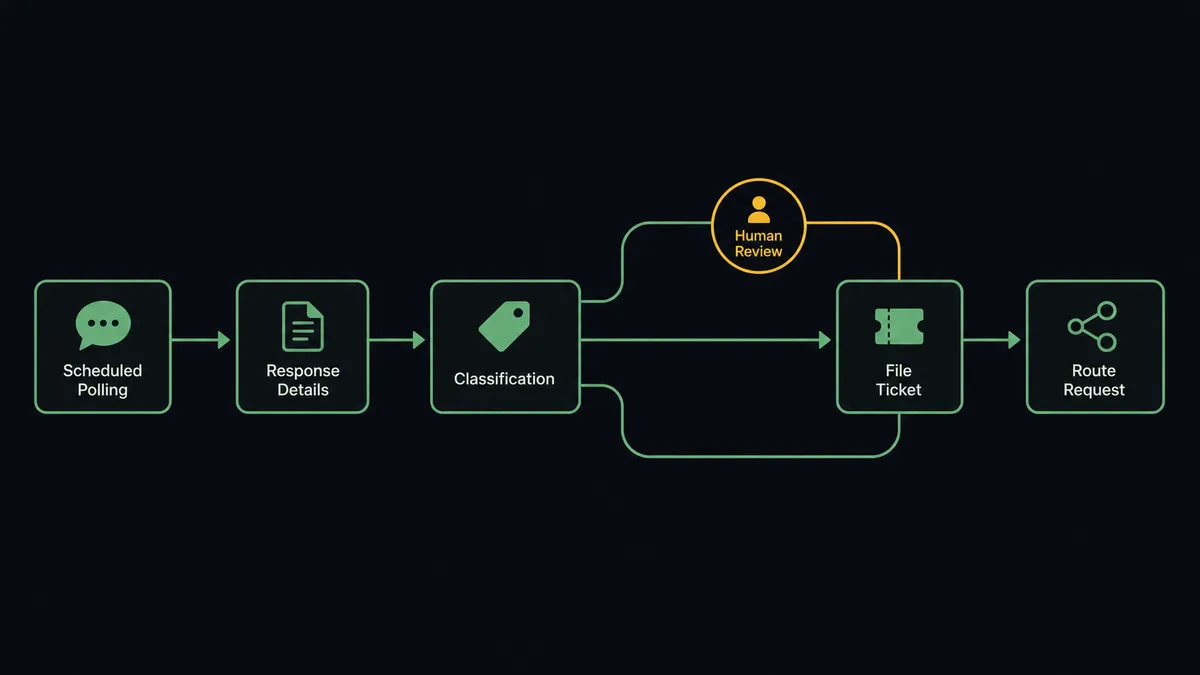
- Trigger: On a schedule, the workflow runs List Responses for each survey selected via List Surveys, comparing against the response IDs it has already processed.
- Read: Get Response pulls each new submission’s full answer data, finished status, contact association, and metadata.
- Enrich: List Contacts adds what the workspace knows about the respondent, so a report from a heavy user reads differently than one from a first-time visitor.
- Dedupe: Search Issues runs a JQL query against the backlog for tickets describing the same defect.
- File or thread: Create Issue writes a new ticket carrying the user’s words verbatim plus the survey and response ID; for a known defect, Add Comment appends the new report to the existing ticket instead.
- Route: Assign Issue puts confirmed reports on the owning team, and the ticket’s labels carry the survey name so reporting can trace feedback to source.
That is the “just connect them” answer. Survey responses stop pooling in a dashboard and start arriving where engineers actually work, deduplicated and traceable back to the person who wrote them.
Can an AI agent run it? (and why a human stays in the loop)
Yes, and triage is the whole game here. The agent holds the pair’s actions as tools: List Surveys, List Responses, Get Response, List Contacts, Search Issues, Create Issue, Add Comment, Assign Issue. A keyword filter files everything containing “broken”; the agent reads. “The export button is broken on Safari” is a bug with a platform detail worth preserving. “The pricing is broken” is sentiment for the product team, not a defect for the sprint. “Same export problem as before” belongs on the existing ticket as a comment, raising its evidence count instead of splitting attention across duplicates.
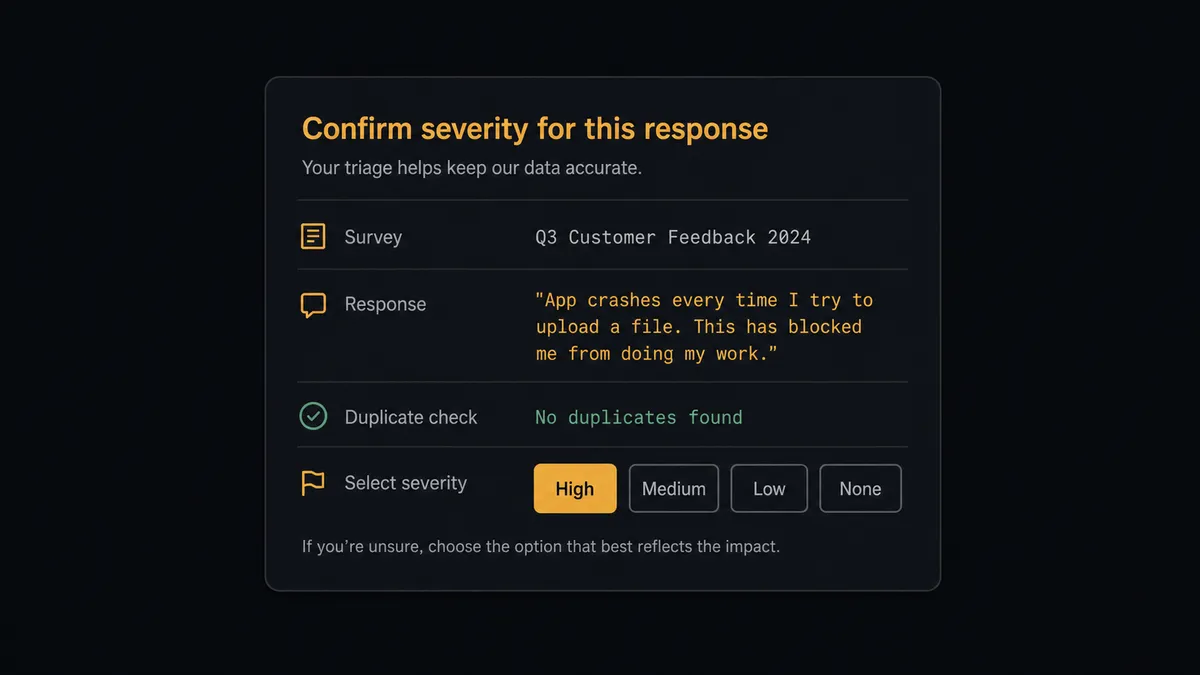
The consequential step is filing and assigning a severity-critical claim. A response alleging data loss, a security hole, or blocked billing is exactly the report you must never lose, and exactly the one an automation should not act on alone. Filing it as critical and assigning it reorders a sprint and pages a team; filing it as routine buries a fire. So the agent does neither. It invokes a human-in-loop flow it holds as a callable tool, and the workflow pauses and posts to the triage owner: “Response on [survey name] claims data loss. Full text attached, respondent context included, no matching open issue found via JQL. Confirm severity to file and assign?” Only after the triager’s call does Create Issue run at the confirmed priority, with the decision in the audit trail.
The same instinct governs ambiguity: a response the agent cannot confidently classify goes to a person with the full text, not into a guessed bucket. Prospects call this a digital andon cord: the workflow stops the line the moment it hits uncertainty, and your team pulls it back into motion.
FlowRunner vs Zapier
Zapier earns its place here: it connects form tools to Jira as well as anything on the market, setup takes minutes, and its template gallery is full of feedback-to-ticket starting points. For a low-volume survey where every response deserves a ticket, a Zap is honestly sufficient.
The difference is judgment under volume. When responses arrive faster than a person can pre-read them, the question is not “can I file tickets automatically” but “who decides what deserves engineering attention.”
| What matters for this pair | FlowRunner | Zapier |
|---|---|---|
| Human-in-the-loop on severity-critical filings | Native. The agent holds the report at a triage gate before Create Issue and Assign Issue | Available via added approval steps, not a native agent decision |
| Who runs the flow | An AI agent reads each response, reasons, picks actions as tools | Predefined step sequence you configure per Zap |
| Users included | Unlimited users on every tier | Priced by task volume; seats vary by plan |
| Bring your own AI keys | Yes, BYOK | AI features tied to Zapier’s own AI offering |
| Self-hosted option | Yes, cloud-hosted or self-hosted | Cloud only |
| Pricing model | Transparent workflow-based tiers | Per-task pricing; polling plus per-response steps consume tasks fast |
If every response should become a ticket regardless of content, Zapier does that simply and well. If you want the backlog to receive signal instead of volume, with a human making the severity calls, this pairing is the better fit.
Before and after
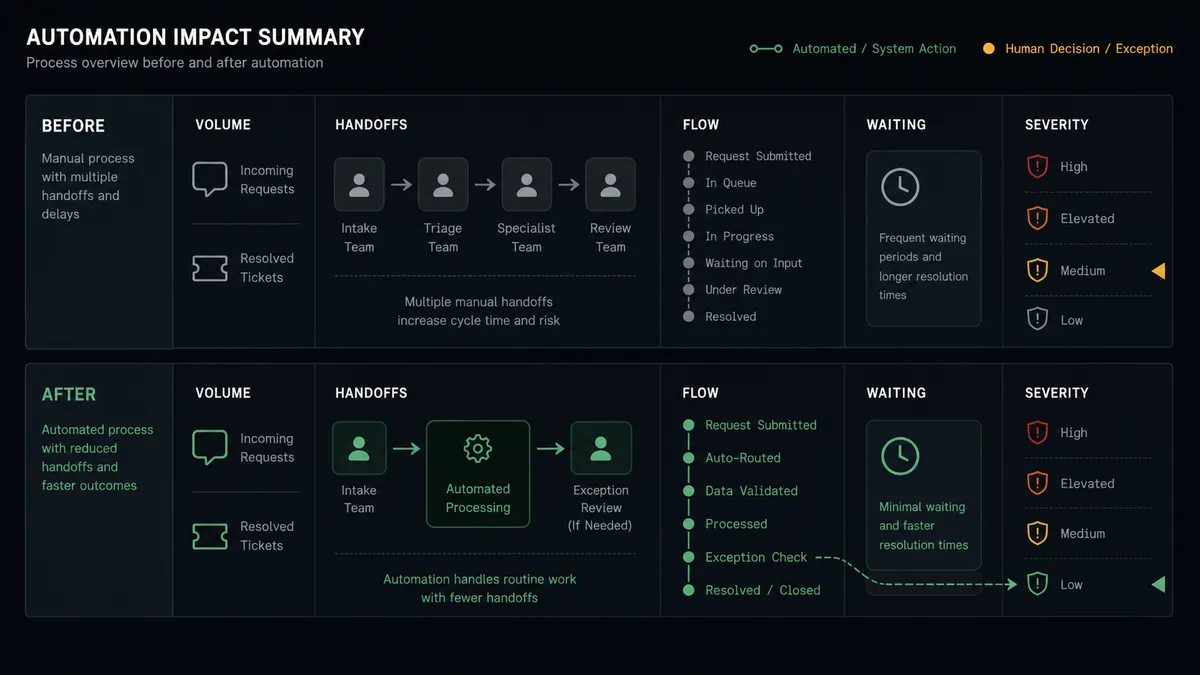
| Category | Before | After |
|---|---|---|
| Feedback visibility | Responses pool in a dashboard product checks weekly | New responses are read and routed within the polling interval |
| Duplicates | Five users reporting one defect become five scattered tickets, or none | Search Issues threads repeat reports onto one ticket via Add Comment |
| Severity handling | A data-loss claim waits in the queue behind routine feedback | Critical claims go straight to the triage owner with full text |
| Ticket quality | Rewritten summaries lose the user’s actual words | Every issue carries the response verbatim with its response ID |
| Engineer trust | Survey-sourced tickets are treated as noise | Filed tickets are deduplicated, classified, and severity-confirmed |
What you can build
Feedback triage pipeline. List Responses and Get Response feed the agent every new submission; bug reports become deduplicated tickets via Search Issues and Create Issue, feature wishes route to product, and sentiment aggregates into a digest instead of the backlog.
Critical-claim fast lane. Responses alleging data loss, security exposure, or billing failures skip the queue and land with the triage owner immediately, with the ticket created and assigned the moment a person confirms severity.
Evidence threading for known defects. When a new response matches an open ticket, Add Comment appends the user’s words and context to it, so the ticket accumulates evidence and the fix gets prioritized on real signal.
Churn-risk survey watch. For NPS-style surveys, the agent pairs low scores from List Responses with respondent history from List Contacts and posts a same-day summary to the account owner, keeping relationship risks out of the engineering backlog but in front of a human.
Resolution loop-back. A scheduled JQL pass finds survey-sourced tickets that reached Done, and the agent compiles which responses were addressed this release, giving product a closed-loop record of feedback that actually shipped.
Getting started
Start on the free plan: 100 executions a month, every integration included, no credit card required, plus 14 days of Professional for new accounts. Both connectors are available on every tier, and every tier includes unlimited users and unlimited workflows.
Explore the integration details:
- Jira Issues integration (13 actions covering issue creation, JQL search, transitions, comments, and attachments)
- Formbricks integration (9 actions covering surveys, responses, and contacts)
Start building free at flowrunner.ai or book a demo to see a live Formbricks to Jira Issues workflow, severity gate and all.
Frequently asked questions
Is it free to connect Jira Issues and Formbricks on FlowRunner?
You can build and run the connection on FlowRunner's free plan, which includes 100 executions a month and every integration with no credit card required, and new accounts also get 14 days of Professional. Both connectors are available on every FlowRunner tier, and every tier includes unlimited users and unlimited workflows.
Can I self-host the Jira Issues to Formbricks workflow?
Yes. FlowRunner offers a cloud-hosted option and a self-hosted option, so the connection can run inside your own environment.
Does the AI agent need my own OpenAI or Claude key?
FlowRunner uses a bring-your-own-keys model, so you connect the AI provider key you already have. You are not locked to one model.
What happens when a survey response claims something severe, like lost data?
The agent does not quietly file it at normal priority, and it does not reorder the sprint on its own either. It posts the full response text, the respondent's context from Get Response, and any matching open issues to the triage owner, and waits. A person decides the severity before the ticket is created and assigned.
Neither connector lists a catalog trigger. How does the workflow start?
On a schedule. The workflow polls List Responses for each watched survey at the interval you choose, uses Get Response for full answer data on new entries, and processes only responses it has not seen before.
Which actions does this connection use on each side?
On the Formbricks side: List Surveys, List Responses, Get Response, and List Contacts for respondent context. On the Jira side: Search Issues for deduplication, Create Issue, Add Comment, and Assign Issue for the confirmed reports.