Connect Monday.com to HubSpot: Board Items Become CRM Deals
Connect Monday.com and HubSpot so a status change on a board item opens or updates a deal automatically, as an AI agent that pauses for a CRM admin when it finds a possible duplicate contact.
How do you connect Monday.com to HubSpot?
You connect Monday.com to HubSpot by using On Item Column Change (or On New Item) as the trigger and calling HubSpot’s Get Contact by Email, Create Contact, Create Company, Associate Objects, and Create Deal as the actions, so a status flip on a board item opens or updates a real CRM record. FlowRunner is a visual AI-agent orchestration platform where automations run autonomously and pause for human judgment on the steps that carry real consequence. The same connection can run as an AI agent that reads the board item, decides what the CRM needs, and pauses for a CRM admin only when it finds a possible duplicate contact.
The problem it solves
A sales or delivery team runs its pipeline on a Monday.com board. Deals live there as items: company name, contact, deal size, a status column that moves from “In Progress” to “Client Signed.” Meanwhile the CRM of record is HubSpot, because that’s where marketing attribution, deal reporting, and the rest of revenue operations lives. Someone has to carry every signed deal from the board into HubSpot by hand. An ops coordinator checks the board each morning, opens HubSpot in another tab, and manually creates the contact, the company, and the deal, hoping they remember the deal amount correctly and don’t create a second record for a company that’s already in the system.
This falls through the cracks in predictable ways. A deal gets marked “Client Signed” on a Friday afternoon and doesn’t make it into HubSpot until Monday, so the revenue report is wrong all weekend. Two people independently create the same company in HubSpot because neither checked first, and now the CRM has duplicate records nobody notices until a rep works the wrong one. None of this is anyone’s fault; it’s what happens when the system that tracks work and the system that tracks revenue don’t talk to each other, and a person is the only bridge between them.
How it works: the connection
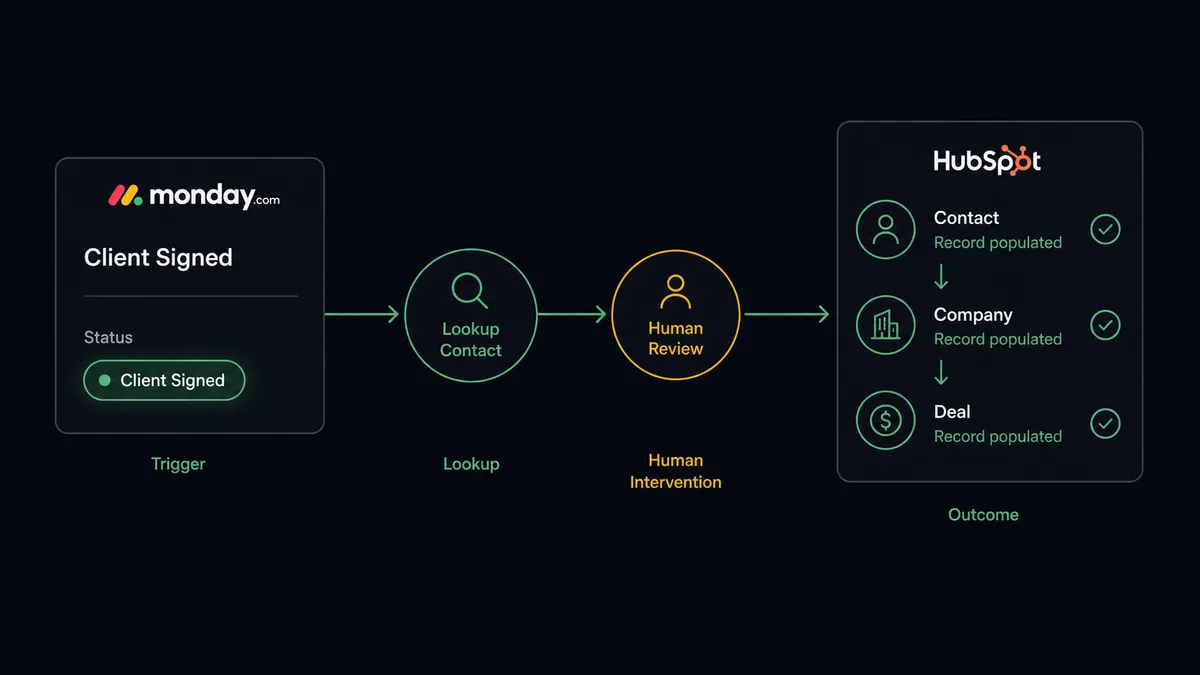
On Item Column Change fires when the status column on a monitored board flips to a value like “Client Signed.” The workflow reads the item’s column values: company name, contact email, deal amount, and whatever else the board tracks. Before writing anything to HubSpot, it calls Get Contact by Email to check whether that person already has a record. This is the same first move HubSpot’s own inbound lead workflow makes, applied here to a board-driven trigger instead of a form.
If no record exists, the workflow calls Create Contact, then Create Company, then Associate Objects to link the two. It calls Create Deal to open the opportunity in the right pipeline stage, carrying the deal amount over from the board’s column value. If the item instead represents a deal that’s already in HubSpot and only the stage changed, Update Deal moves it forward without creating a duplicate opportunity. Finally, Create Update posts a note back on the Monday.com item recording the HubSpot deal ID, so anyone looking at the board can see the CRM already has it.
You can also run this the other direction. Because HubSpot has no native trigger events of its own, a scheduled agent can poll HubSpot for deals in a given stage and use Create Item or Change Column Value to keep a Monday.com delivery board current with what’s happening in the CRM, for teams that want the board to reflect the pipeline rather than drive it.
Can an AI agent run it? (and why a human stays in the loop)
This is not a sync tool that fires the same three API calls every time regardless of what’s on the item. An AI agent reads the Monday.com item, evaluates what’s actually in the data, and decides which HubSpot actions to call and in what order. A clean item, a known contact, a matching company, an unambiguous deal amount, gets processed straight through. The agent’s judgment is what decides that nothing here needs a second opinion.
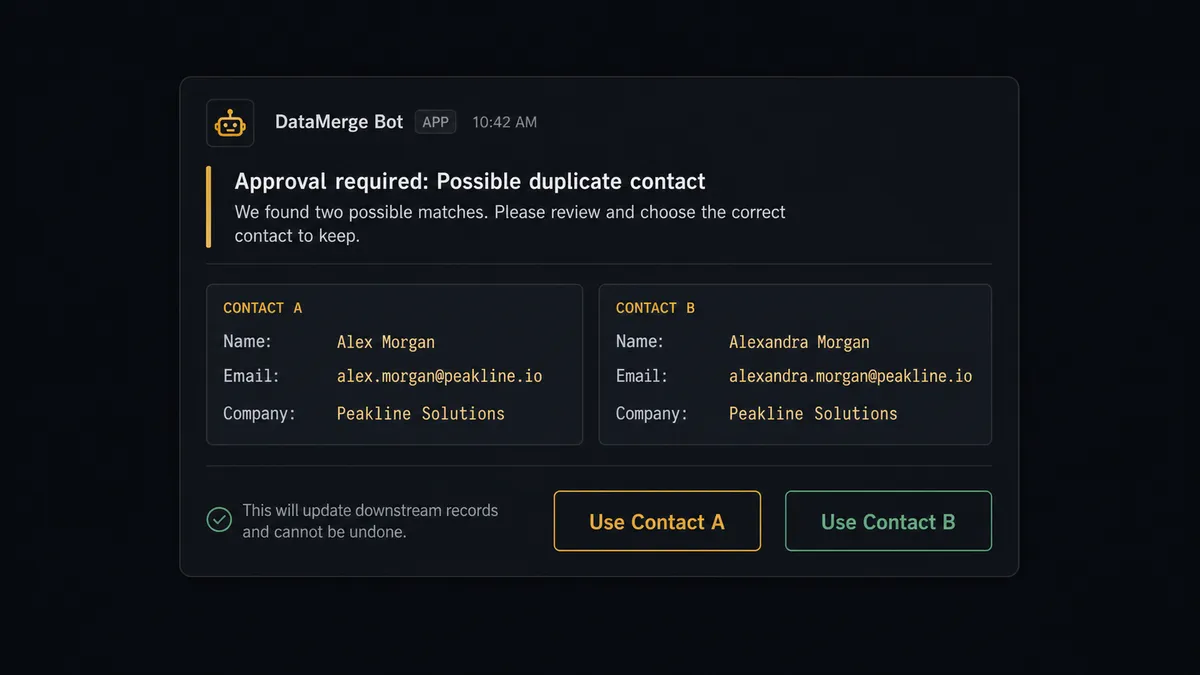
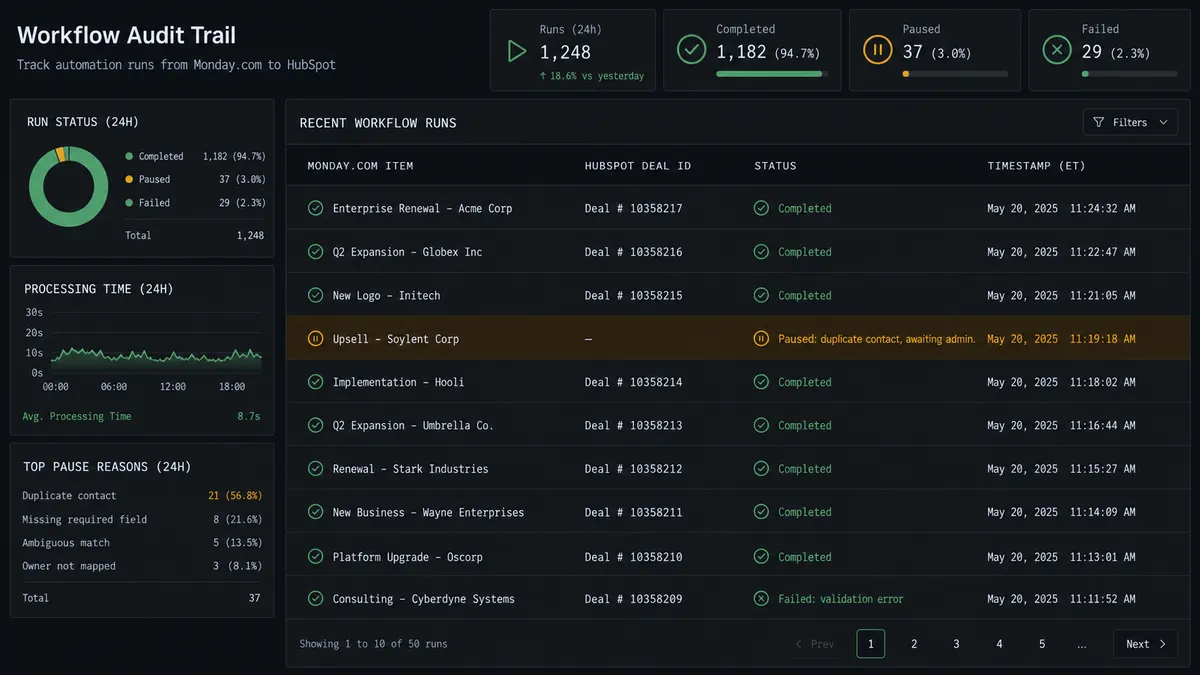
The moment the agent stops is when Get Contact by Email returns more than one plausible match, or when two companies come back with the same domain. That’s the exact scenario HubSpot’s own human-in-loop pattern is built for. The agent doesn’t guess. It packages both matching contact records, the Monday.com item that triggered the lookup, and the deal amount at stake, then routes the whole thing to a CRM admin over Slack: “I found two contacts matching this email. Which should this deal associate with?” The admin picks one with a click. The agent associates the deal, logs which record was chosen and who chose it, and moves on. This is not a sync tool. The agent knows when to stop and ask, and it’s a digital andon cord that pulls itself the moment the data gets ambiguous, not a rule someone had to remember to write.
The same pattern extends to Monday.com’s own human-in-loop moment: if a downstream workflow needs to run Change Multiple Column Values across a batch of items, say, re-tagging every deal in a certain territory after a HubSpot pipeline restructure, the agent pauses and asks the board owner to approve the batch before touching more than one item at a time.
FlowRunner vs Zapier
Zapier is a reasonable choice for a simple, one-directional zap: new HubSpot deal creates a Monday.com item, full stop. It’s fast to set up and familiar to non-technical teams. Where it runs out of road is the duplicate-contact problem. Zapier doesn’t reason about ambiguous data; it either fires the action or it doesn’t, so a duplicate contact either gets created as a second record or the whole zap needs a human checking every run to catch it.
| FlowRunner | Zapier | |
|---|---|---|
| Human-in-loop on ambiguous data | Native. The agent pauses and routes duplicate contacts to a CRM admin with full context | Not built in. Requires a separate approval app or manual review of every run |
| Deduplication logic | Agent calls Get Contact by Email and reasons about the result before writing | Conditional Zap logic only; no judgment about which record is correct |
| Pricing model | Workflow-based tiers with clear execution limits | Per-task pricing that scales with every step in every run |
| Users included | Unlimited on every tier | Paid per user on most plans |
| Self-host option | Yes, free Community Edition available | No self-hosted option |
Before and after
| Category | Before | After |
|---|---|---|
| Deal entry time | Manual CRM entry by a rep or coordinator after checking the board | Contact, company, and deal created within moments of the status change |
| Duplicate records | No systematic check before creating a new contact or company | Get Contact by Email runs before every write, and duplicates get routed to a person |
| Cross-system visibility | Deal status lives on the board; HubSpot only reflects it whenever someone remembers to update it | Create Update posts the HubSpot deal ID back on the Monday.com item automatically |
| Weekend and after-hours lag | Deals signed after hours wait until someone opens both tabs the next business day | The trigger fires on the status change itself, not on someone’s schedule |
| Decision trail | Why a contact was matched to a particular record lives in someone’s memory | The admin’s duplicate-resolution decision is logged with identity and timestamp |
What you can build
Signed deal to CRM record. On Item Column Change fires when a board item’s status flips to “Client Signed.” The agent checks for an existing contact, creates the contact, company, and deal if none exists, and posts the deal ID back to the item.
ERP-to-CRM stage sync through the board. When Acumatica or NetSuite fires a purchase order event that updates a Monday.com delivery item, the agent also calls Update Deal in HubSpot to mark the corresponding opportunity Closed Won and tags it with the product lines purchased.
New form intake, dual system of record. A form submission triggers Create Item on a Monday.com intake board and, in the same run, Create Contact and Create Deal in HubSpot, so the team working from the board and the team working from the CRM see the same lead at the same moment.
Stalled deal escalation. A scheduled agent queries HubSpot for deals inactive 14 days, and instead of just messaging the deal owner, it also creates a Monday.com item on a “needs attention” board so the follow-up is tracked as work, not just a Slack message that scrolls away.
Bulk repricing with a sign-off gate. An agent preparing Change Multiple Column Values across a batch of Monday.com items tied to a pricing change in HubSpot pauses for the board owner’s approval before writing the batch, exactly as it would for any other bulk column update.
Common questions
Is it free to connect Monday.com and HubSpot on FlowRunner? FlowRunner has a free plan with 100 executions a month, every integration included, and no credit card required, and new accounts get 14 days of Professional on top. No credit card is required to start. Beyond the free plan, Growth starts at $45 per month and includes unlimited users and workflows.
Can I self-host this connection? Yes. FlowRunner ships a free self-hosted Community Edition for a single instance. The self-hosted Enterprise tier adds multi-instance clustering and the full compliance suite for teams that need it.
Does the AI agent need my own API keys for Monday.com or HubSpot? You bring your own credentials for both. FlowRunner is a BYOK platform, so your Monday.com and HubSpot access stays under your control and your API usage is not routed through FlowRunner’s own accounts.
What happens when the agent finds a possible duplicate contact in HubSpot? The agent does not silently pick one. It pauses the workflow and routes the ambiguity to a CRM admin over Slack, showing both matching contacts and asking which one the deal should associate with. Work resumes once the admin responds.
Can this run the other direction, from HubSpot into Monday.com? Yes. An agent can watch HubSpot deal data on a schedule and use Create Item or Change Column Value to keep a Monday.com delivery board in sync with deal stage, even though HubSpot itself has no native trigger events.
Does the agent decide when to involve a human, or is it a fixed rule? It is a judgment call the agent makes, not a hardcoded threshold. A clean, unambiguous item update processes on its own. A duplicate contact, a conflicting owner, or a bulk column change is exactly the kind of move the agent flags for a person first.
Getting started
Start on the free plan: 100 executions a month, every integration included, no credit card required, plus 14 days of Professional for new accounts. Connect your Monday.com boards and your HubSpot account, choose your trigger, and let the agent handle the routine items while a person handles the ones that need a second look.
Start building at flowrunner.ai, or book time with the team at calendly.com/flowrunner/intro.
Frequently asked questions
Is it free to connect Monday.com and HubSpot on FlowRunner?
FlowRunner has a free plan with 100 executions a month, every integration included, and no credit card required, and new accounts get 14 days of Professional on top. No credit card is required to start. Beyond the free plan, Growth starts at $45 per month and includes unlimited users and workflows.
Can I self-host this connection?
Yes. FlowRunner ships a free self-hosted Community Edition for a single instance. The self-hosted Enterprise tier adds multi-instance clustering and the full compliance suite for teams that need it.
Does the AI agent need my own API keys for Monday.com or HubSpot?
You bring your own credentials for both. FlowRunner is a BYOK platform, so your Monday.com and HubSpot access stays under your control and your API usage is not routed through FlowRunner's own accounts.
What happens when the agent finds a possible duplicate contact in HubSpot?
The agent does not silently pick one. It pauses the workflow and routes the ambiguity to a CRM admin over Slack, showing both matching contacts and asking which one the deal should associate with. Work resumes once the admin responds.
Can this run the other direction, from HubSpot into Monday.com?
Yes. An agent can watch HubSpot deal data on a schedule and use Create Item or Change Column Value to keep a Monday.com delivery board in sync with deal stage, even though HubSpot itself has no native trigger events.
Does the agent decide when to involve a human, or is it a fixed rule?
It is a judgment call the agent makes, not a hardcoded threshold. A clean, unambiguous item update processes on its own. A duplicate contact, a conflicting owner, or a bulk column change is exactly the kind of move the agent flags for a person first.