How to Connect Slack with Accelo (With or Without an AI Agent)
Turn Slack mentions in client channels into tracked Accelo tasks and logged activities, with an AI agent that pauses for a human before it creates a new company record.
How do you connect Slack to Accelo?
You connect Slack to Accelo by having Slack’s On Mention trigger drive Accelo actions: the workflow reads the request from the channel, matches the client with List Companies and Get Company, finds the engagement with List Jobs, files the work with Create Task, and records the conversation with Log Activity. FlowRunner is a visual AI-agent orchestration platform where automations run autonomously and pause for human judgment on the steps that carry real consequence. The same connection can run as an AI agent that reads each thread, decides which client and job the request belongs to, and pauses for a person before Create Company adds a brand new record to your PSA.
The problem it solves
In a professional services firm, client requests arrive in Slack because that is where the client conversation already lives. An account lead spots a request in the channel, mentally files it, and promises to “get it into Accelo later.” Later means after the next three meetings. Someone eventually opens Accelo, hunts for the right company, scrolls the job list, creates the task, and tries to reconstruct what was actually asked from memory. The task that lands in the PSA is a thin summary of a rich conversation, and the conversation itself never gets logged against the client at all.
The edges are worse than the happy path. Two people file the same request as two different tasks on two different jobs. A request for “Acme” gets attached to “Acme Ltd” when the client is actually “Acme Group,” and the retainer burn report is wrong for a month. A new prospect gets mentioned in a channel, someone creates a company record on the fly, and now there are three near-identical companies polluting every client report. The PSA is only useful when it reflects reality, and the gap between Slack and Accelo is exactly where reality leaks out.
How it works: the connection
The connection listens to Slack and writes to Accelo. Here is the plain version, grounded in the real connector actions.
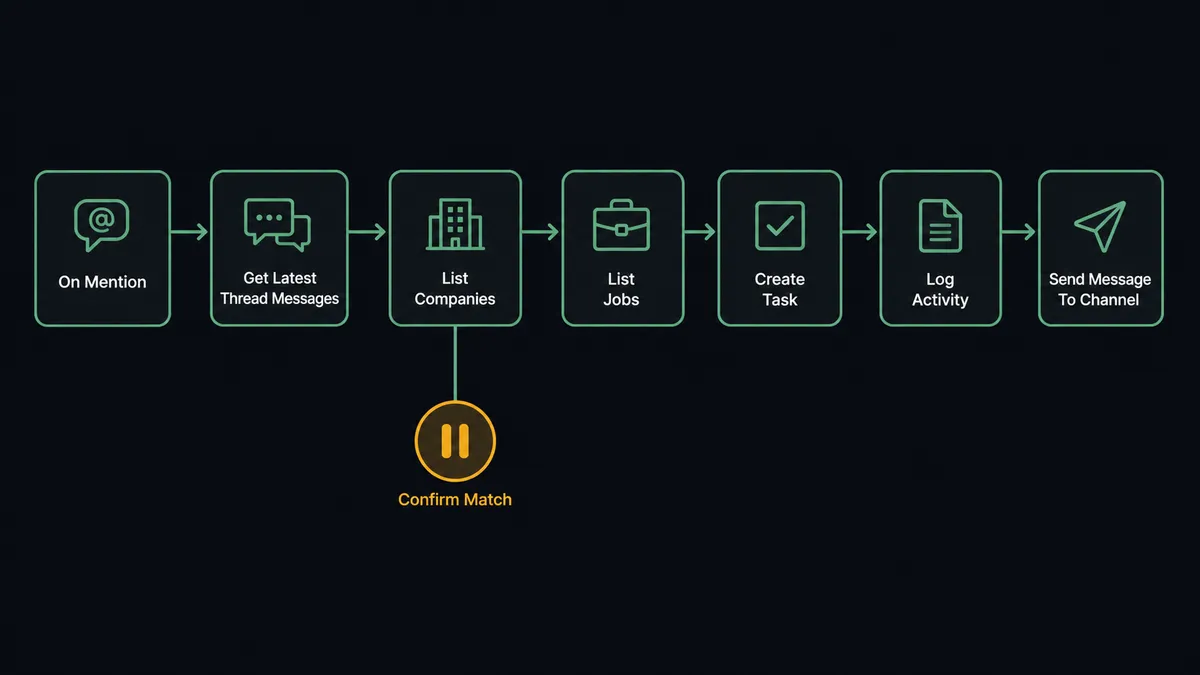
- Trigger: Slack fires On Mention when someone tags the workflow in a client channel with a request.
- Read: The workflow calls Get Latest Thread Messages to pull the whole thread, not just the one message, so the task carries full context.
- Match the client: It calls List Companies in Accelo and narrows by the channel name and the client name in the request, then confirms with Get Company.
- Find the engagement: It calls List Jobs for that company to locate the active job the work belongs to, checking details with Get Job when more than one is open.
- File the work: It calls Create Task on the matched job, carrying the request text, the requester, and a link back to the Slack thread.
- Log the conversation: It calls Log Activity against the company record so the client timeline shows what was discussed, not just what was assigned.
- Confirm: It calls Send Message To Channel in Slack so the requester sees the task exists, with the Accelo reference in the reply.
That is the “just connect them” answer. A mention in the channel becomes a tracked task on the right job, and the client record keeps the conversation. Teams that prefer a lighter gesture wire On Reaction Added instead, so any message flagged with a chosen emoji goes through the same pipeline.
Can an AI agent run it? (and why a human stays in the loop)
Yes, and this is where the connection stops being a notification bridge and starts being a coworker. A fixed integration can only map “mention” to “task.” An AI agent reads the thread, works out that “can you also refresh the Q3 deck” inside a longer message is a second, separate piece of work, and holds the Accelo actions as tools: List Companies, Get Company, List Jobs, Create Task, Log Activity, Create Contact when a new stakeholder appears in the thread. It picks the right ones for the situation instead of running the same script every time.
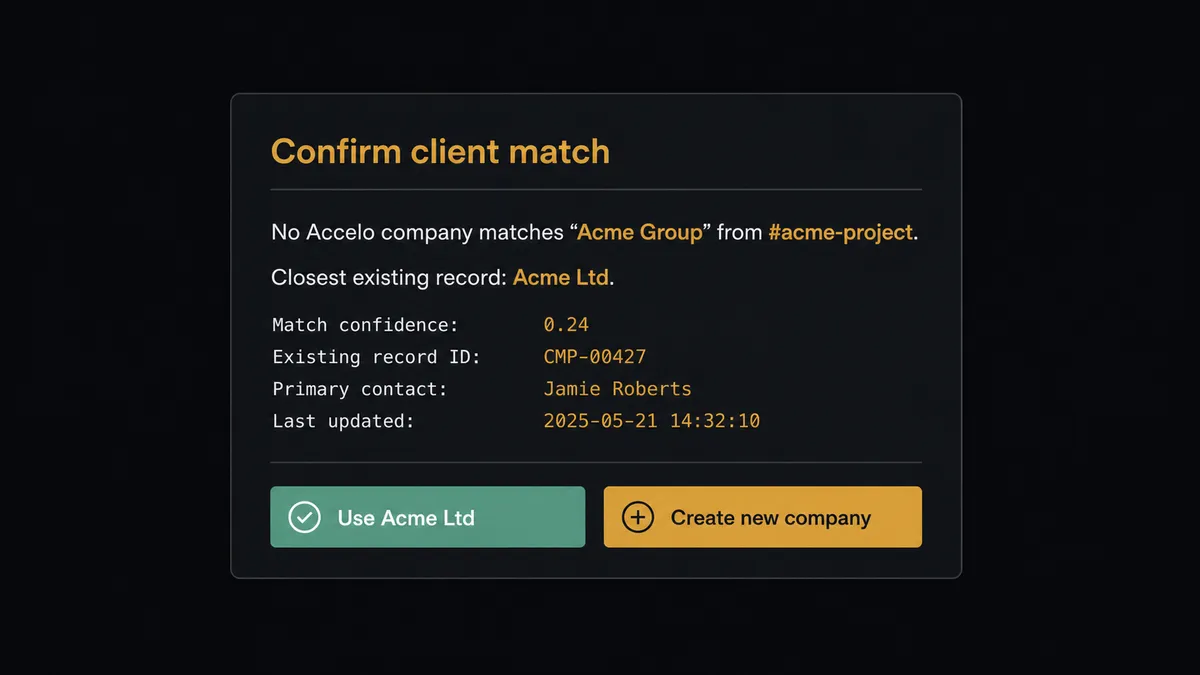
The consequential step is writing a new client record. A wrong task can be moved; a duplicate company quietly corrupts every report, invoice roll-up, and retainer summary built on top of it. So when the agent cannot find a confident match, it does not guess and it does not create. It invokes a human-in-loop flow it holds as a callable tool, and the workflow pauses. The channel gets a message: “No Accelo company matches ‘Acme Group’ from #acme-project. Closest existing record: Acme Ltd. Use Acme Ltd, or approve a new company record for Acme Group?” One click answers it. Only then does the agent call Create Company or attach the task to the existing record, and the decision, the decider, and the timestamp land in the audit trail.
The same judgment covers ambiguity inside the account. Three open jobs for one client, a request that could belong to any of them: the agent asks the account lead to pick rather than burying the task on the wrong engagement. Prospects call this pattern a digital andon cord. Like Toyota’s production line pull cord, the workflow stops the line the moment it hits uncertainty, a person resolves it in seconds, and the line moves again with the answer recorded.
FlowRunner vs n8n
If your team includes developers, n8n is a serious option for this pair. Its node library is large, its community has published thousands of workflow templates, and its fair-code Community Edition can be self-hosted for free. A developer who is comfortable wiring nodes, handling the Accelo API’s pagination, and maintaining the instance can absolutely build a Slack to Accelo bridge on it.
The difference is who can build and run the workflow, and what happens at the step that carries consequence. Here is the honest side-by-side.
| What matters for this pair | FlowRunner | n8n |
|---|---|---|
| Human-in-the-loop on Create Company | Native. The agent invokes an approval flow as a callable tool and pauses until a person decides | Approval waits can be wired as workflow nodes; the pause is a step you construct, not a decision the agent makes |
| Who runs the flow | An AI agent reads the thread, reasons, picks actions as tools | A node graph you design and debug, with AI available as nodes inside it |
| Users included | Unlimited users on every tier | Varies by plan; self-hosting shifts the cost to your own infrastructure and upkeep |
| Bring your own AI keys | Yes, BYOK | Yes, model credentials are yours |
| Self-hosted option | Yes, cloud-hosted or self-hosted | Yes, fair-code Community Edition or paid plans |
| Pricing model | Transparent workflow-based tiers with clear execution limits | Execution-based pricing where what counts as an execution takes reading to predict |
If you have engineers who want full control of every node and are happy to own the maintenance, n8n is a genuinely capable choice. If the people who live in the client channels are account managers and operations leads, and you want the company-record gate approved by a person without anyone reading API docs, this pairing on FlowRunner is the better fit.
Before and after
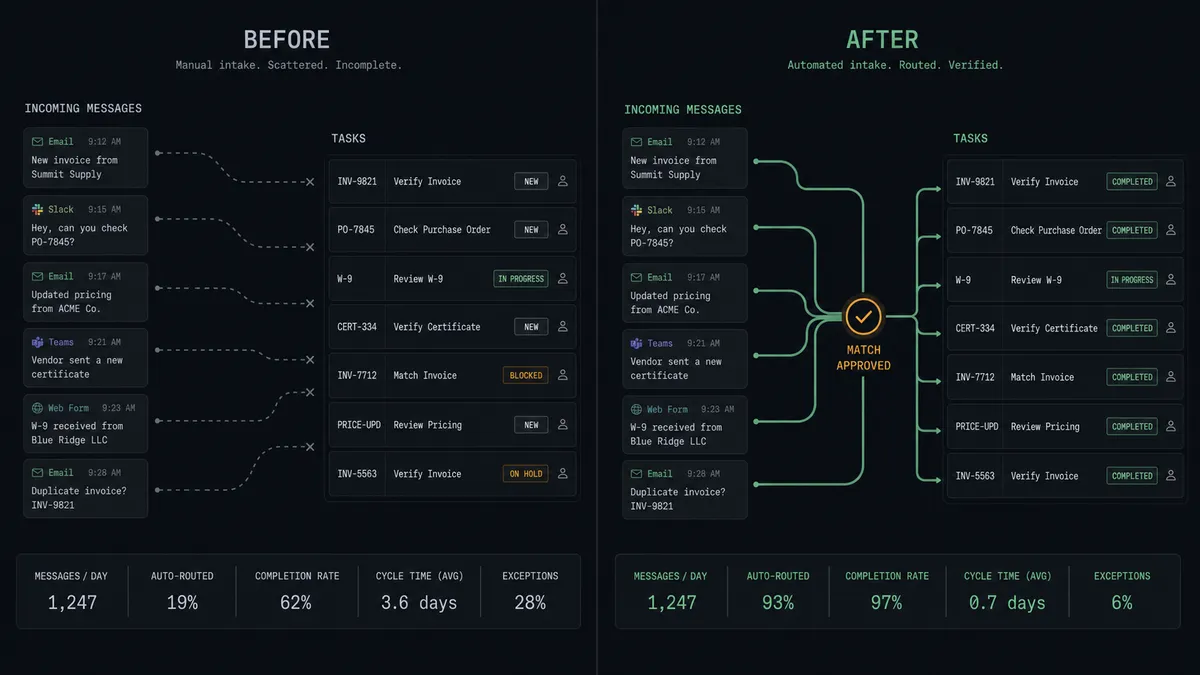
| Category | Before | After |
|---|---|---|
| Request capture | Client asks in Slack, account lead promises to file it later, some requests never reach Accelo | Every mentioned request becomes an Accelo task with Create Task the moment it is flagged |
| Context | Tasks arrive in the PSA as one-line summaries reconstructed from memory | The full thread travels with the task, and Log Activity keeps the conversation on the client timeline |
| Company records | Duplicates created on the fly, reports and retainer summaries quietly wrong | Create Company only runs after a named person approves it against the closest existing match |
| Job assignment | Tasks land on whichever job someone found first | The agent checks List Jobs and asks the account lead when more than one engagement fits |
| Team visibility | The requester never knows whether the ask was filed | Send Message To Channel confirms the task and its Accelo reference in the thread |
What you can build
Mention to tracked task. On Mention fires in a client channel. The agent calls Get Latest Thread Messages, matches the client with List Companies and Get Company, finds the engagement with List Jobs, and files the request with Create Task. The requester gets the confirmation in-thread.
Emoji-flagged work capture. On Reaction Added fires when anyone marks a message with your chosen emoji. The same pipeline runs, so capturing work costs one click instead of a context switch into the PSA.
New stakeholder intake. A thread introduces a new client-side contact. The agent spots the name and email, checks List Contacts, and calls Create Contact so the person exists on the company record before the next meeting.
Client timeline keeper. Decisions made in Slack rarely make it into the PSA. The agent watches the channel, and when a thread resolves a question about scope or timing, it calls Log Activity so the client record tells the whole story at review time.
Daily job digest. Each morning the agent calls List Jobs and List Tasks for your active companies and posts a short status to the delivery channel with Send Message To Channel, so standup starts from the PSA’s reality instead of memory.
Common questions
Is it free to connect Slack and Accelo on FlowRunner? You can build and run the connection on FlowRunner’s free plan, which includes 100 executions a month and every integration with no credit card required, and new accounts also get 14 days of Professional. Both connectors are available on every FlowRunner tier, and every tier includes unlimited users and unlimited workflows.
Can I self-host the Slack to Accelo workflow? Yes. FlowRunner offers a cloud-hosted option and a self-hosted option, so the connection can run inside your own environment.
Does the AI agent need my own OpenAI or Claude key? FlowRunner uses a bring-your-own-keys model, so you connect the AI provider key you already have. You are not locked to one model.
What happens when the agent cannot match a Slack request to an Accelo company? It stops and asks. The agent posts the client name it extracted, the closest matches from List Companies, and a choice: use an existing record or approve Create Company. Nothing is written to Accelo until a person answers, so duplicate client records never slip in.
Which Slack triggers work best for Accelo task capture? Slack offers eight triggers. On Mention is the usual starting point: mention the workflow in a client channel and the request becomes an Accelo task. On Reaction Added is a popular second, letting anyone flag a message with an emoji to file it as tracked work.
Does the connection log time or just create tasks? It creates tasks with Create Task and records the conversation against the client with Log Activity, so the request and its context live on the Accelo record. Activity logging keeps the client timeline complete; your team still controls billable time entries in Accelo itself.
Getting started
Start on the free plan: 100 executions a month, every integration included, no credit card required, plus 14 days of Professional for new accounts. Both connectors are available on every tier, and every tier includes unlimited users and unlimited workflows.
Explore the integration details:
- Slack integration (8 triggers and 16 actions covering messages, channels, members, and files)
- Accelo integration (10 actions covering companies, contacts, jobs, tasks, and activity logging)
Start building free at flowrunner.ai or book a demo to see a live Slack to Accelo workflow, company-match approval and all.
Frequently asked questions
Is it free to connect Slack and Accelo on FlowRunner?
You can build and run the connection on FlowRunner's free plan, which includes 100 executions a month and every integration with no credit card required, and new accounts also get 14 days of Professional. Both connectors are available on every FlowRunner tier, and every tier includes unlimited users and unlimited workflows.
Can I self-host the Slack to Accelo workflow?
Yes. FlowRunner offers a cloud-hosted option and a self-hosted option, so the connection can run inside your own environment.
Does the AI agent need my own OpenAI or Claude key?
FlowRunner uses a bring-your-own-keys model, so you connect the AI provider key you already have. You are not locked to one model.
What happens when the agent cannot match a Slack request to an Accelo company?
It stops and asks. The agent posts the client name it extracted, the closest matches from List Companies, and a choice: use an existing record or approve Create Company. Nothing is written to Accelo until a person answers, so duplicate client records never slip in.
Which Slack triggers work best for Accelo task capture?
Slack offers eight triggers. On Mention is the usual starting point: mention the workflow in a client channel and the request becomes an Accelo task. On Reaction Added is a popular second, letting anyone flag a message with an emoji to file it as tracked work.
Does the connection log time or just create tasks?
It creates tasks with Create Task and records the conversation against the client with Log Activity, so the request and its context live on the Accelo record. Activity logging keeps the client timeline complete; your team still controls billable time entries in Accelo itself.