How to Connect Google Forms with AWeber (With or Without an AI Agent)
Move Google Forms signups onto the right AWeber list automatically, with an agent that screens junk submissions, tags real subscribers by interest, and pauses for a marketer before Create Broadcast reaches the list.
How do you connect Google Forms to AWeber?
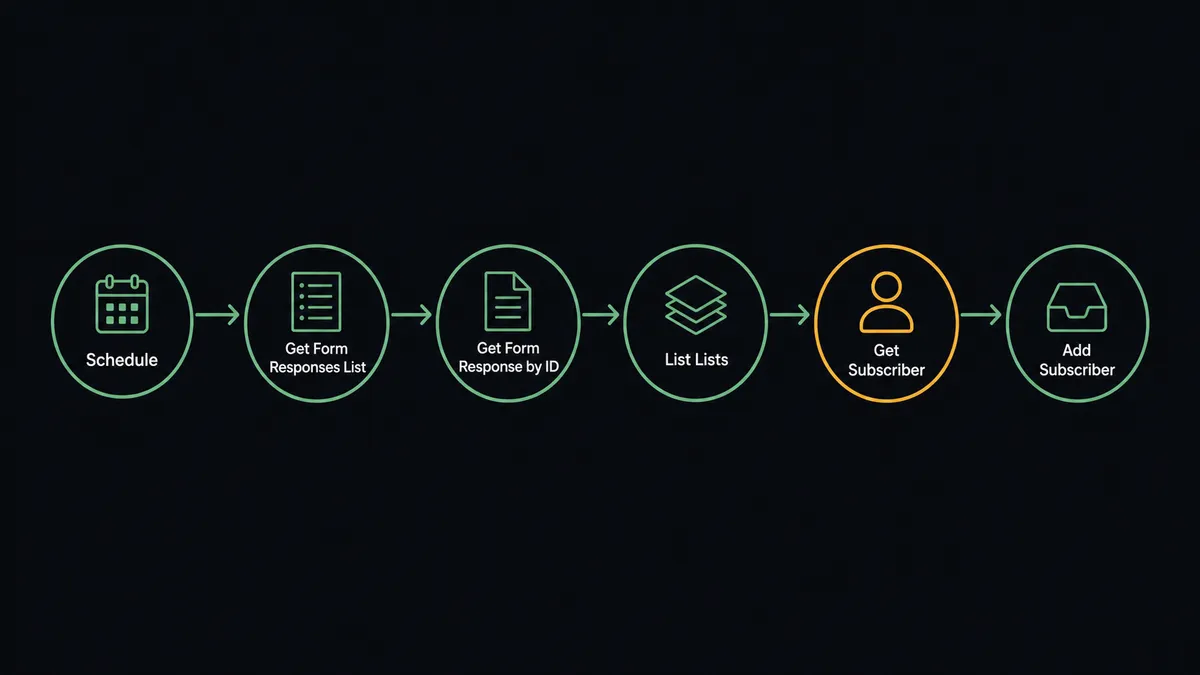
You connect Google Forms to AWeber with a scheduled FlowRunner workflow: Get Form Responses List pulls each new signup, Get Form Response by ID reads the answers, List Lists selects the AWeber list that matches the signup’s interest, and Add Subscriber enrolls the person after Get Subscriber confirms they are not already on it. Neither connector exposes a trigger, so a polling schedule is the honest starting point. FlowRunner is a visual AI-agent orchestration platform where automations run autonomously and pause for human judgment on the steps that carry real consequence. Run as an agent, the connection also screens what actually comes through a public form, and it holds every Create Broadcast behind a marketer’s approval before anything reaches the list.
The problem it solves
Right now someone moves signups by hand, or worse, in batches. A lead magnet form, a webinar registration, a newsletter signup box: responses collect in a Google Forms sheet until a marketer exports them and imports the CSV into AWeber. The person who signed up Tuesday gets their welcome email the following Monday, long after the impulse that made them subscribe has faded. Email marketing lives and dies on timing, and batch imports throw the timing away.
The other half of the problem is what public forms actually collect. Mistyped domains, prank entries, competitors poking around, the same person signing up three times with three addresses. Import all of it and your bounce rate climbs, your deliverability sags, and the junk sits on the list forever because nobody audits it. A raw pipe from form to list automates the mess along with the signal. The job is not moving rows; it is deciding which rows deserve to become subscribers and which list each one belongs on.
How it works: the connection
Here is the deterministic version, grounded in the real connector actions.
- Trigger: On a schedule, the workflow calls Get Form Responses List to pull signups it has not yet processed.
- Read: For each one, it calls Get Form Response by ID to get the full set of answers.
- Select: It calls List Lists in AWeber and picks the list mapped to the form or the signup’s chosen topic.
- Check: It calls Get Subscriber to confirm the address is not already enrolled.
- Enroll: It calls Add Subscriber with the email, name, and interest tags from the form answers.
- Confirm: AWeber’s own confirmation flow takes over, so the subscriber’s consent is recorded in the platform you send from.
That is the plain answer. Signups reach the list within the hour, welcome sequences fire while interest is fresh, and the export ritual ends. Step six is worth underlining: because Add Subscriber hands off to AWeber’s own confirmation flow, the consent record lives in the platform that sends the mail, which is exactly where you want it when a deliverability review or a compliance question comes up later.
Can an AI agent run it? (and why a human stays in the loop)
Yes, and the agent is the difference between automating the pipe and automating the judgment. It holds the actions as tools: Get Form Responses List, Get Form Response by ID, and Get Form Details on the Google Forms side; List Lists, Get List, Get Subscriber, Add Subscriber, List Broadcasts, and Create Broadcast on the AWeber side. Before anyone joins a list, the agent reads the whole response. An address at a mistyped domain gets held rather than enrolled and bounced. A response whose answers are keyboard mash gets dropped and logged. A genuine signup that ticked two interest boxes gets tagged for both topics, so the list segments itself as it grows.
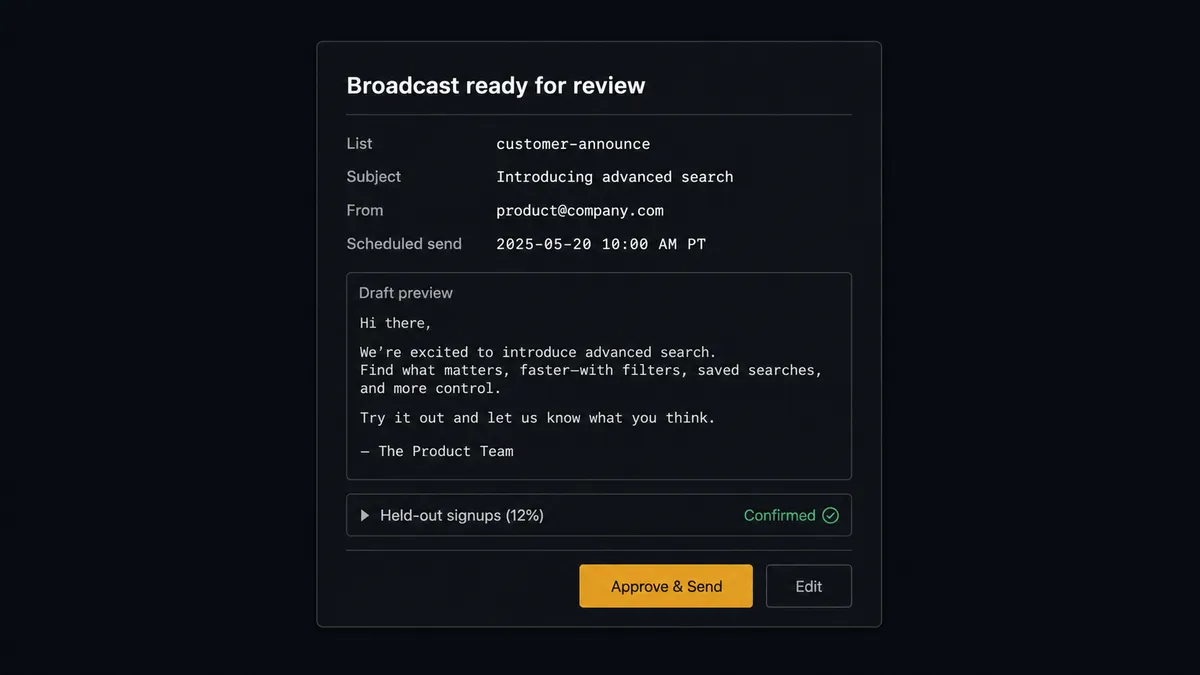
The consequential step is Create Broadcast, because a broadcast reaches every subscriber at once and cannot be unsent. The agent drafts the welcome-week announcement or the event reminder, then invokes a human-review flow it holds as a callable tool. The workflow pauses and the marketer sees: “Broadcast drafted for [list]. Audience: subscribers tagged [topic]. Subject: [subject line]. Draft below. Held out this cycle: [borderline signups] awaiting your call. Approve to queue?” One review covers the send and the edge cases. Only then does Create Broadcast run, with the approver and timestamp recorded in the audit trail.
This is the digital andon cord for list building: the workflow stops the line when an entry looks wrong or a send is about to happen, and the person who owns the list restarts it with one decision instead of an evening of CSV surgery.
FlowRunner vs Zapier
Zapier practically owns the “form to email list” reflex, and deservedly: its Google Forms and AWeber apps are mature, its template gallery covers this exact pairing, and a working Zap takes minutes. For a low-stakes newsletter where every submission belongs on the list, Zapier is a fine answer.
The gap is everything between the form and the list: screening, segmentation, and control over the send.
| What matters for this pair | FlowRunner | Zapier |
|---|---|---|
| Human-in-the-loop on Create Broadcast | Native. The agent invokes an approval flow as a callable tool and pauses before any send | Available by adding approval steps to a Zap, not a native agent decision |
| Who runs the flow | An AI agent screens each response, infers interest, and picks actions as tools | A predefined step sequence that enrolls whatever the form collects |
| Users included | Unlimited users on every tier | Priced by task volume; seats vary by plan |
| Bring your own AI keys | Yes, BYOK | AI features tied to Zapier’s own AI offering |
| Self-hosted option | Yes, cloud-hosted or self-hosted | Cloud only |
| Pricing model | Transparent workflow-based tiers | Per-task pricing that scales with every signup |
If your form is trusted and your list is one bucket, Zapier gets it done. If list quality, interest-based segmentation, and a named approver on every send matter to you, this pairing is the better fit. A list is an asset that compounds or decays with every entry; the screening step is the difference between the two, and it is the step a raw pipe cannot perform.
Before and after
| Category | Before | After |
|---|---|---|
| Signup latency | Welcome emails arrive days after the signup, via batch import | Subscribers are enrolled within the hour and sequences fire on time |
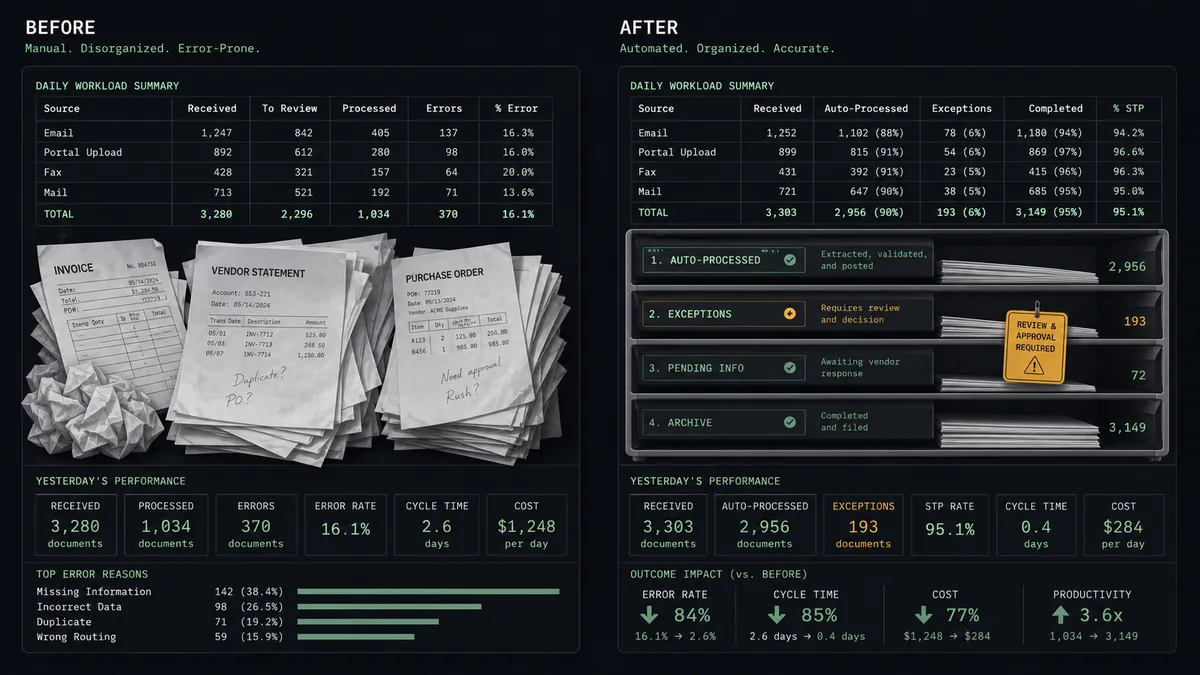
| List hygiene | Typos and junk entries import along with real signups | The agent screens each response and holds borderline entries for review |
| Segmentation | One form dumps everyone into one list | Interest answers become tags, and signups route to the matching list |
| Send control | Broadcasts go out on one person’s judgment, unrecorded | Create Broadcast runs only after a named marketer approves draft and audience |
| Duplicates | The same address joins the list repeatedly across imports | Get Subscriber checks membership before every Add Subscriber |
What you can build
Lead magnet to nurture list. The scheduled flow pulls each download signup, screens it, and Add Subscriber enrolls the reader on the nurture list with topic tags, so the follow-up sequence starts while the guide is still open in their browser.
Webinar registration list. Registrations flow into a dedicated events list, and the agent drafts the reminder broadcast for the registrant segment. A marketer approves, Create Broadcast queues, and the reminder lands before the session.
Interest-split newsletter. One signup form with topic checkboxes feeds two lists. The agent reads the answers, calls Add Subscriber against the right list for each, and tags cross-interest subscribers on both without double-enrolling anyone.
Junk quarantine. Suspicious entries collect in a review message instead of the list. A person corrects the obvious typos, discards the rest, and the list’s bounce profile stays healthy without anyone auditing it manually.
Post-event follow-up. After the form closes, the agent reconciles the final registrant list with Get Subscriber, proposes a thank-you broadcast to attendees, and holds it at the approval gate until the host signs off. The follow-up lands while the event is still fresh, and the host never touches a CSV.
Getting started
Start on the free plan: 100 executions a month, every integration included, no credit card required, plus 14 days of Professional for new accounts. Both connectors are available on every tier, and every tier includes unlimited users and unlimited workflows.
Explore the integration details:
- Google Forms integration (9 actions covering responses, form details, and form management)
- AWeber integration (9 actions covering lists, subscribers, and broadcasts)
Start building free at flowrunner.ai or book a demo to see a live Google Forms to AWeber workflow, send approval and all.
Frequently asked questions
Is it free to connect Google Forms and AWeber on FlowRunner?
You can build and run the connection on FlowRunner's free plan, which includes 100 executions a month and every integration with no credit card required, and new accounts also get 14 days of Professional. Both connectors are available on every FlowRunner tier, and every tier includes unlimited users and unlimited workflows.
Can I self-host the Google Forms to AWeber workflow?
Yes. FlowRunner offers a cloud-hosted option and a self-hosted option, so the connection can run inside your own environment.
Does the AI agent need my own OpenAI or Claude key?
FlowRunner uses a bring-your-own-keys model, so you connect the AI provider key you already have. You are not locked to one model.
What happens when a signup looks suspicious or mistyped?
The agent holds it out of the list. Obvious junk is dropped and logged; borderline entries, like a plausible name with a mistyped domain, get posted to your team's channel so a person decides whether to correct, enroll, or discard. The list stays clean without silently losing real subscribers.
Which triggers and actions does this pair use?
Neither connector exposes a trigger, so the workflow runs on a schedule. It calls Get Form Responses List and Get Form Response by ID in Google Forms, and List Lists, Get Subscriber, Add Subscriber, and Create Broadcast in AWeber.
Can one signup form feed more than one AWeber list?
Yes. The agent reads the interest answers in each response and calls Add Subscriber against the list that matches, with tags carrying the stated topics, so one form can feed a newsletter list and an events list without manual sorting.