How to Connect Google Forms with Campaign Monitor (With or Without an AI Agent)
Sync Google Forms responses into Campaign Monitor subscriber lists automatically, with an AI agent that maps custom fields and consent, and pauses for a human before a previously unsubscribed address is re-added.
How do you connect Google Forms to Campaign Monitor?
You connect Google Forms to Campaign Monitor by running a scheduled workflow that calls Get Form Responses List on your signup form, pulls each new submission with Get Form Response by ID, and writes it to your list with Add Subscriber, mapping the form’s answers to the list’s custom fields and consent to track. FlowRunner is a visual AI-agent orchestration platform where automations run autonomously and pause for human judgment on the steps that carry real consequence. The same connection can run as an AI agent that adds clean signups on its own and pauses for a named human before it re-adds a previously unsubscribed address or writes a signup with no recorded consent.
The problem it solves
Right now the bridge between your forms and your email list is an export file. Someone on the marketing or operations team opens the Google Form, downloads the responses, cleans up the columns, and pastes the batch into Campaign Monitor. It happens weekly if you are disciplined, monthly if you are busy. Every signup collected on Monday waits until the next import to hear from you, which is exactly when their interest is coldest. Welcome emails that should land within the hour land within the fortnight.
The exceptions are where it turns from tedious to risky. A respondent skips the consent checkbox and gets imported anyway. An address that unsubscribed last quarter reappears in a new form and the bulk import quietly re-adds it, which in Campaign Monitor can override a suppression the person explicitly asked for. A typo in the email column bounces and drags down sender reputation. None of this shows up until someone complains or a deliverability report turns ugly, and by then nobody remembers which import introduced the problem.
How it works: the connection
The connection reads Google Forms on a schedule and writes to Campaign Monitor. Here is the plain version, grounded in the real connector actions.
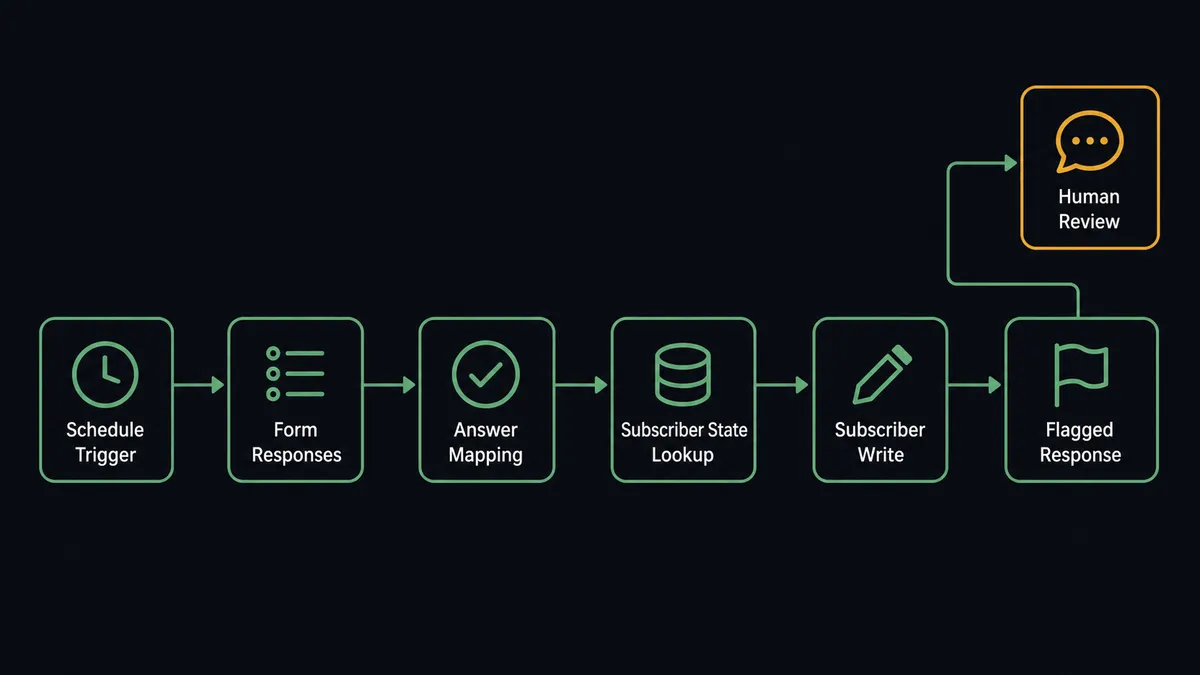
- Trigger: On a schedule you choose, the workflow calls Get Form Responses List on the signup form and identifies responses it has not yet processed.
- Read: For each new response, it calls Get Form Response by ID to pull the full set of answers: email, name, segmentation questions, and the consent question.
- Check the list: It calls Get Subscriber on the Campaign Monitor list to learn the address’s current state: Active, Unconfirmed, Unsubscribed, Bounced, or Deleted, or no record at all.
- Write the signup: For a new address with consent recorded, it calls Add Subscriber with the mapped name, custom fields, and consent to track.
- Correct existing records: When the address already exists and the form supplied newer details, it calls Update Subscriber to change only the supplied fields.
- Keep the structure honest: When a new campaign needs its own audience, Create List provisions it, and List Lists confirms the workflow is writing to the right one.
That is the “just connect them” answer. Form responses become subscribers within minutes of submission, custom fields arrive populated, and nobody touches a CSV. The same pattern extends to review workflows: List Sent Campaigns and List Draft Campaigns give the workflow visibility into what has gone out and what is queued.
Can an AI agent run it? (and why a human stays in the loop)
Yes, and this is where the connection stops being a sync and starts being a decision-maker. Instead of a fixed mapping that treats every response identically, an AI agent reads each submission, reasons about it, and picks the Campaign Monitor actions it needs as tools: Get Subscriber, Add Subscriber, Update Subscriber, Unsubscribe Subscriber. A clean signup with consent checked flows straight through. A messy one gets judgment instead of a template.
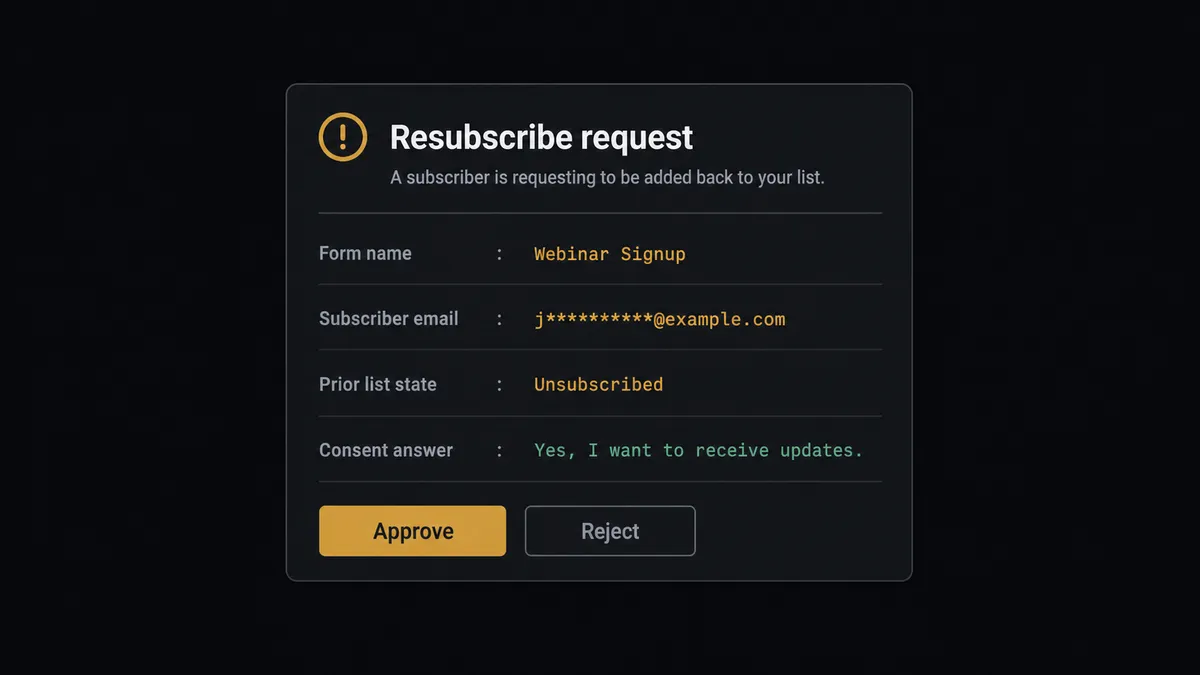
The consequential step is writing to the list itself, because a marketing list is a compliance surface. When the agent finds that an address already exists in an Unsubscribed state, re-adding it with Add Subscriber and Resubscribe enabled is not a data entry task, it is a decision a person should own. The agent does not take it. It gathers what the human needs: the form response, the date the address unsubscribed, the consent answer on the new submission, and the list involved. Then it invokes a human-in-loop flow it holds as a callable tool and posts to your channel: “This address unsubscribed from the newsletter list and has now submitted the signup form again. Consent to track: given. Approve resubscribe?” Only after a named approver clicks approve does Add Subscriber run. The same gate protects submissions where the consent question came back blank.
This is what a threshold rule cannot do. The agent escalates on context, not on a hardcoded field check: a corporate address that matches an existing Active record gets an Update Subscriber, a suspicious burst of near-identical submissions gets held as probable spam, and an honest edge case gets a human. Prospects call it a digital andon cord: like Toyota’s quality control pull cord, the workflow stops the line the moment it hits uncertainty, and your team pulls it back into motion with one click.
FlowRunner vs Zapier
Most teams connecting Google Forms to Campaign Monitor look at Zapier first, and the appeal is real. Zapier offers an instant trigger for new Google Forms responses, a template gallery that includes this exact pairing, and a setup experience a marketer can finish before lunch. For a straight “new response becomes a subscriber” push, it is a fast, proven path.
The difference shows up at the responses that should not flow straight through. FlowRunner is built around native human-in-the-loop and AI-agent orchestration, where the agent decides when a signup needs a person, rather than a fixed field mapping that treats a resubscribe the same as a fresh signup.
| What matters for this pair | FlowRunner | Zapier |
|---|---|---|
| Human-in-the-loop on resubscribes and consent gaps | Native. The agent invokes an approval flow as a callable tool and pauses before Add Subscriber | Available via added approval steps or paths, not a native agent decision |
| Who runs the flow | An AI agent reads each response, reasons, and picks actions as tools | Predefined step sequence you configure per Zap |
| Users included | Unlimited users on every tier | Priced by task volume; seats vary by plan |
| Bring your own AI keys | Yes, BYOK | AI features tied to Zapier’s own AI offering |
| Self-hosted option | Yes, cloud-hosted or self-hosted | Cloud only |
| Pricing model | Transparent workflow-based tiers | Per-task pricing that grows with every form submission |
If all you need is a one-way response-to-subscriber push and volume is modest, Zapier will do it well. If your list is a compliance surface and you want a named human on every resubscribe and consent question, with an audit trail behind each one, this pairing is the better fit.
Before and after
| Category | Before | After |
|---|---|---|
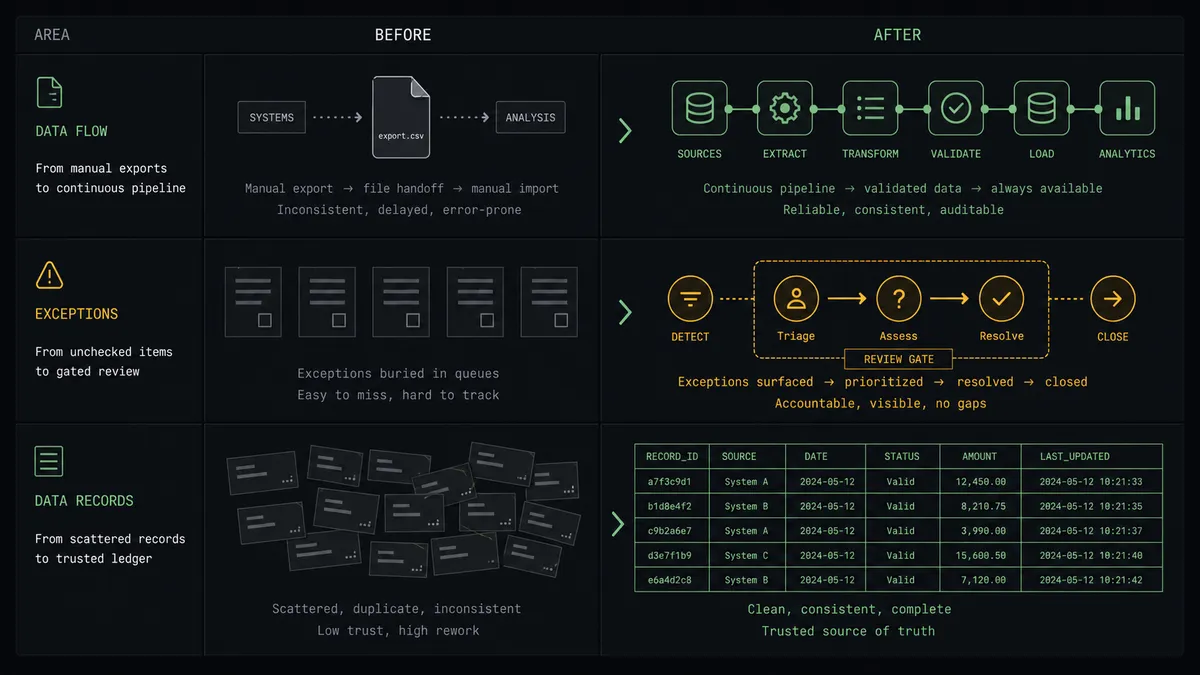
| Signup latency | Responses sit in the form until someone runs the export and import routine | Responses become subscribers within minutes of submission, on every run of the schedule |
| Consent handling | Blank consent answers get imported along with everything else in the batch | Responses without recorded consent are held for a named approver before Add Subscriber runs |
| Resubscribes | Bulk imports silently re-add addresses that had unsubscribed | Every resubscribe is an explicit human decision, captured with approver and timestamp |
| List hygiene | Typos and duplicates ride in with each CSV and surface as bounces later | Get Subscriber checks each address’s state before anything is written |
| Team visibility | Whoever ran the last import holds the knowledge of what went in | The audit trail shows every write, every hold, and every approval in one place |
What you can build
Signup to welcome-ready subscriber. The scheduled run calls Get Form Responses List, pulls each new submission with Get Form Response by ID, and writes it with Add Subscriber, custom fields populated. Your welcome automation in Campaign Monitor fires the same day the person asked to hear from you.
Consent-gated event list. An event registration form feeds a dedicated list created with Create List, with confirmed opt-in enabled. The agent maps registration answers to custom fields and holds any response with an ambiguous consent answer for human review before it lands.
Preference update flow. A “manage my preferences” form lets existing subscribers change their segment answers. The agent matches each response with Get Subscriber and applies changes with Update Subscriber, touching only the supplied fields so nothing else on the record moves.
Clean unsubscribe handling. When a form response explicitly asks to be removed, the agent packages the request and invokes the human-in-loop tool before calling Unsubscribe Subscriber, because in Campaign Monitor that action can suppress the address across all of the client’s lists depending on settings.
Campaign audit digest. On a weekly schedule, the workflow calls List Sent Campaigns and List Draft Campaigns and posts a summary of what went out and what is queued, so operations sees list activity without logging into Campaign Monitor.
Getting started
Start on the free plan: 100 executions a month, every integration included, no credit card required, plus 14 days of Professional for new accounts. Both connectors are available on every tier, and every tier includes unlimited users and unlimited workflows.
Explore the integration details:
- Google Forms integration (9 actions covering form structure, responses, and lifecycle)
- Campaign Monitor integration (10 actions covering lists, subscribers, and campaigns)
Start building free at flowrunner.ai or book a demo to see a live Google Forms to Campaign Monitor workflow, resubscribe approval and all.
Frequently asked questions
Is it free to connect Google Forms and Campaign Monitor on FlowRunner?
You can build and run the connection on FlowRunner's free plan, which includes 100 executions a month and every integration with no credit card required, and new accounts also get 14 days of Professional. Both connectors are available on every FlowRunner tier, and every tier includes unlimited users and unlimited workflows.
Can I self-host the Google Forms to Campaign Monitor workflow?
Yes. FlowRunner offers a cloud-hosted option and a self-hosted option, so the connection can run inside your own environment.
Does the AI agent need my own OpenAI or Claude key?
FlowRunner uses a bring-your-own-keys model, so you connect the AI provider key you already have. You are not locked to one model.
What happens when a form response has no marketing consent answer?
The agent does not write it to the list. It packages the response, the missing consent field, and the subscriber's current state in Campaign Monitor, then invokes a human-in-loop step and waits for an approve or reject decision before Add Subscriber runs.
Which Google Forms and Campaign Monitor actions does this workflow use?
On the Google Forms side, Get Form Responses List and Get Form Response by ID pull new submissions. On the Campaign Monitor side, Get Subscriber checks the current state, Add Subscriber writes the signup with custom fields and consent to track, and Update Subscriber corrects existing records.
Does Google Forms need a native trigger for this to work?
No. The Google Forms connector exposes actions rather than triggers, so the workflow runs on a schedule: it calls Get Form Responses List at the interval you choose, compares against what it has already processed, and handles only the new responses.