How to Connect Google Forms with Braze (With or Without an AI Agent)
Connect Google Forms responses to Braze profiles and campaigns, optionally as an AI agent that updates attributes and fires welcome journeys on its own and pauses for a human before Delete Users erases a profile forever.
How do you connect Google Forms to Braze?
You connect Google Forms to Braze with a scheduled workflow, because Google Forms publishes no webhook triggers: at the interval you choose, FlowRunner calls Get Form Responses List to pull new submissions, reads each with Get Form Response by ID, writes the respondent’s attributes to their profile with Track Users, applies consent answers with Set Subscription Status, and fires the matched journey with Trigger Campaign. FlowRunner is a visual AI-agent orchestration platform where automations run autonomously and pause for human judgment on the steps that carry real consequence. When the connection runs as an AI agent, the agent also reads what kind of response arrived, and it stops for a named human before Delete Users erases a profile and its entire history.
The problem it solves
Forms are the front door to your messaging program: the newsletter signup, the preference center survey, the event registration, the contest entry. Braze is where those people are supposed to receive the right messages. Today the gap is a CSV. Someone exports responses, reshapes columns to match the import format, uploads to Braze, and manually enrolls the batch in the welcome campaign. It happens weekly if the team is disciplined, which means a Monday signup gets the welcome email the following Monday, after the interest that prompted the signup has faded.
The edges carry legal weight, which makes this pair different from a routine sync. A form response saying “stop emailing me” is not a data point; it is a consent withdrawal with a clock on it, and every campaign that sends while the CSV waits for Friday’s upload is a message the person told you not to send. A response invoking a privacy right and asking for deletion is heavier still: it must actually happen, it must be provable, and it must not be executed sloppily against the wrong profile. Batch uploads handle none of that; they just move rows.
How it works: the connection
The connection reads Google Forms on a schedule and writes to Braze. Here is the plain version, grounded in the real connector actions.
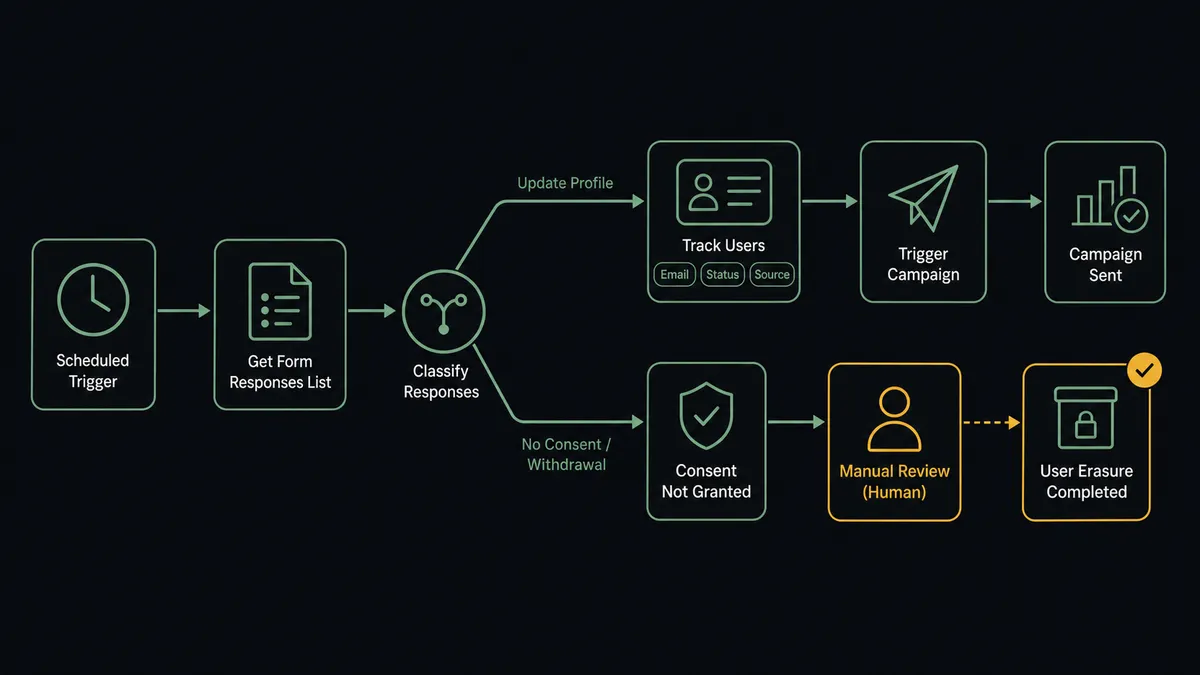
- Trigger: On a schedule, the workflow calls Get Form Responses List and collects every response that arrived since the last run.
- Read: Get Form Response by ID pulls each respondent’s full answer set.
- Update the profile: Track Users writes the respondent’s attributes, their stated preferences, and the submission itself as a custom event on the Braze profile.
- Apply consent: Set Subscription Status turns consent checkboxes into subscription group state, opt-ins and opt-outs alike, on the same run.
- Verify the target: List Campaigns and Get Campaign Details confirm the destination campaign exists and is the one intended for this form.
- Fire the journey: Trigger Campaign enrolls the respondent in the matched API-triggered campaign, welcome series for signups, confirmation for registrations.
- Hold the heavy requests: Responses classified as deletion requests are exported for the record via Export Users and set aside for review instead of processed like preferences.
That is the “just connect them” answer. Signups get their welcome while their interest is warm, consent changes apply the day they arrive, and the messaging platform finally reflects what people actually told you.
Can an AI agent run it? (and why a human stays in the loop)
Yes, and classification is the work. The agent holds the Braze actions as tools: Track Users, Set Subscription Status, Trigger Campaign, List Campaigns, Get Campaign Details, Export Users, Delete Users, Send Message. It reads each response and understands what kind of thing it is. A newsletter signup gets attributes written and the welcome journey fired. A preference update adjusts subscription groups without any campaign at all. Free-text that says “please stop contacting me” is recognized as an opt-out even when the respondent ignored the checkbox designed for it, and the agent executes Set Subscription Status immediately, because pausing messages is the safe direction and needs no permission.
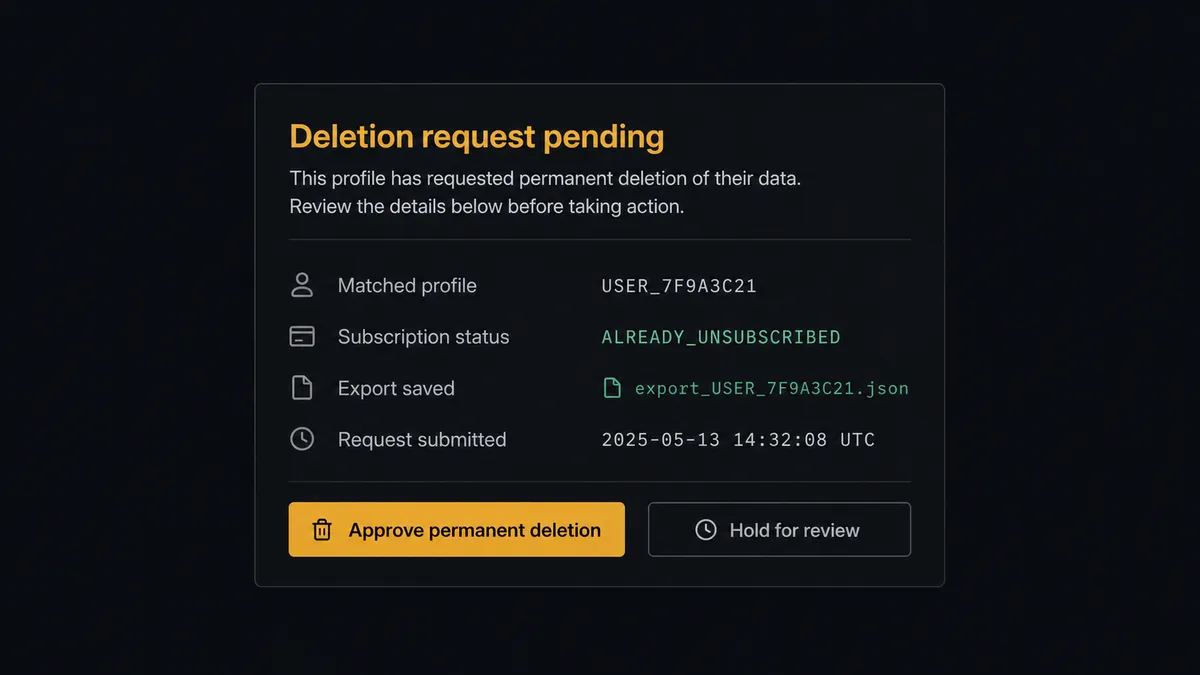
The consequential step is Delete Users, because it is the one action in this pair with no undo: the profile, its history, its events, gone. It is also the action most likely to be demanded by law and audited later. So the agent treats deletion as a proposal, never a reflex. It confirms the profile match, captures the record with Export Users so evidence of compliance survives the deletion, then invokes a human-in-loop flow it holds as a callable tool. The workflow pauses and posts: “Deletion request received via [form name]. Matched profile attached, subscription status already set to unsubscribed. Approve permanent deletion?” A named person approves, Delete Users runs, and the request, the approver, and the timestamp remain in the audit trail, which is precisely the proof a privacy regulator asks for. The same gate guards Trigger Campaign when the agent detects it is about to fire against an audience far larger than the form’s usual flow.
Prospects call this a digital andon cord. Like Toyota’s production line pull cord, the workflow stops the line at the irreversible step, and one person restores motion with a decision that is recorded forever.
FlowRunner vs Zapier
Zapier is the natural first look, and its strengths are real: the biggest connector catalog around, an editor a marketer can use without engineering help, and templates that move form responses into marketing tools in minutes. If the whole job is “response arrives, add subscriber,” Zapier does it quickly.
The difference is that a preference form’s traffic is not homogeneous, and the worst mistake in this pair is irreversible. FlowRunner runs the connection as an AI agent that classifies before it acts, with a native human gate on deletion.
| What matters for this pair | FlowRunner | Zapier |
|---|---|---|
| Human-in-the-loop on Delete Users | Native. The agent exports the profile, posts the request, and waits for a named approval | Available by inserting approval-style steps, not a native agent decision |
| Who runs the flow | An AI agent classifies each response, reasons, picks actions as tools | Predefined step sequence you configure per Zap |
| Users included | Unlimited users on every tier | Priced by task volume; seats vary by plan |
| Bring your own AI keys | Yes, BYOK. Connect the AI provider key you already have | AI features tied to Zapier’s own AI offering |
| Self-hosted option | Yes, cloud-hosted or self-hosted | Cloud only |
| Pricing model | Transparent workflow-based tiers | Per-task pricing that scales with every submission and profile update |
If your form feeds a small list and nothing sensitive ever comes through it, Zapier is a fine choice. If the form is a consent surface, where opt-outs need same-day effect and deletions need proof and a named approver, this pairing is where FlowRunner is the better fit.
Before and after
| Category | Before | After |
|---|---|---|
| Signup to welcome | CSV export and upload, welcome email a week late | Track Users and Trigger Campaign fire on the next scheduled run |
| Consent changes | Opt-outs wait for the weekly batch while campaigns keep sending | Set Subscription Status applies the same run the response arrives |
| Deletion requests | Forwarded by email to whoever handles those, sometimes lost | Classified on arrival, profile exported for evidence, executed after named approval |
| Profile quality | Preferences live in a sheet, Braze targets stale attributes | Every submission lands as attributes and events on the profile via Track Users |
| Proof | No record of when consent changed or who deleted what | Every consent change and deletion timestamped, with approver, in the audit trail |
What you can build
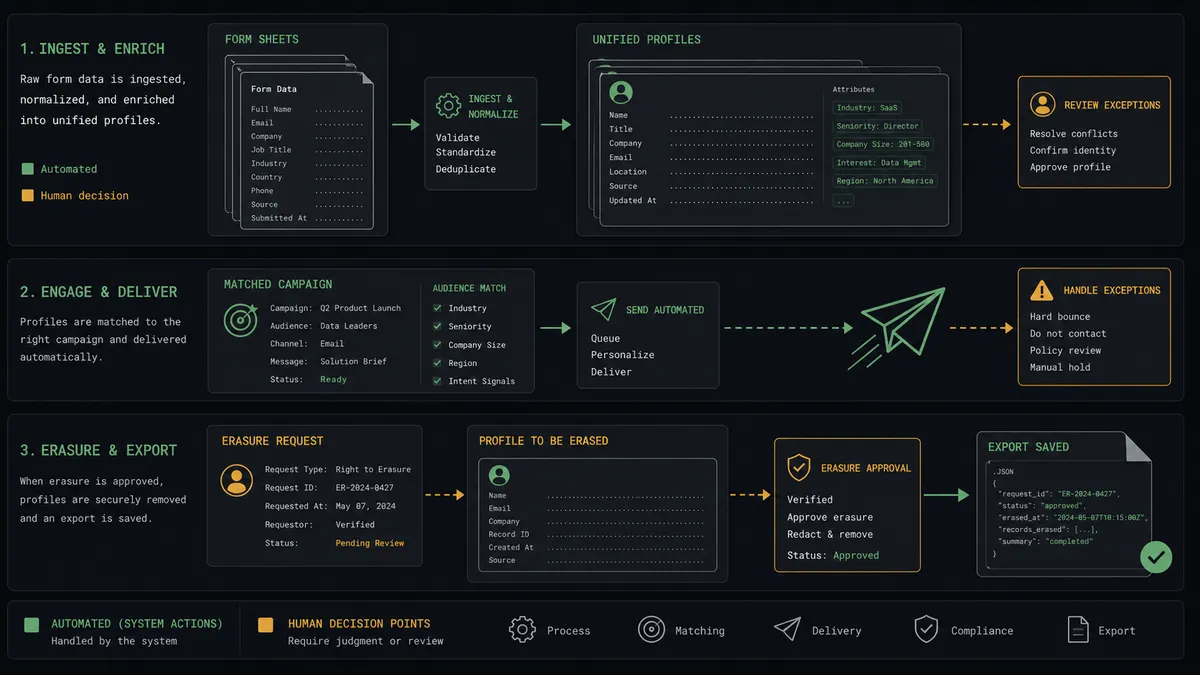
Signup to welcome journey. The scheduled run pulls new responses, writes attributes with Track Users, verifies the destination via Get Campaign Details, and fires the welcome series with Trigger Campaign while the signup is still fresh.
Self-serve preference center. A preference form maps straight onto subscription groups: every submission runs Set Subscription Status for the channels the respondent toggled, so consent state in Braze always matches the last thing the person said.
Compliance-grade deletion pipeline. Deletion requests are recognized even in free text, unsubscribed immediately, exported via Export Users for the record, and erased with Delete Users only after a named approver signs off, leaving a timestamped trail.
Event registration with confirmation. Registration forms write the event as a custom attribute and fire the confirmation campaign via Trigger Campaign, with reminder journeys targeting the same attribute closer to the date.
Survey-driven segmentation. Answers from a feedback survey become profile attributes through Track Users, so tomorrow’s campaigns segment on what customers actually said, not on which list they happened to join years ago.
Getting started
Start on the free plan: 100 executions a month, every integration included, no credit card required, plus 14 days of Professional for new accounts. Both connectors are available on every tier, and every tier includes unlimited users and unlimited workflows.
Explore the integration details:
- Google Forms integration (9 actions covering forms, responses, and field management)
- Braze integration (8 actions covering profiles, campaigns, messaging, and subscriptions)
Start building free at flowrunner.ai or book a demo to see a live Google Forms to Braze workflow, deletion approval and all.
Frequently asked questions
Is it free to connect Google Forms and Braze on FlowRunner?
You can build and run the connection on FlowRunner's free plan, which includes 100 executions a month and every integration with no credit card required, and new accounts also get 14 days of Professional. Both connectors are available on every FlowRunner tier, and every tier includes unlimited users and unlimited workflows.
Can I self-host the Google Forms to Braze workflow?
Yes. FlowRunner offers a cloud-hosted option and a self-hosted option, so the connection can run inside your own environment.
Does the AI agent need my own OpenAI or Claude key?
FlowRunner uses a bring-your-own-keys model, so you connect the AI provider key you already have. You are not locked to one model.
What happens when a form response asks for the person's data to be deleted?
The agent treats opt-out and deletion differently. It executes the unsubscribe immediately with Set Subscription Status, so no further messages go out while the request is reviewed. The deletion itself waits: the agent exports the profile for the record via Export Users, posts the request to your team's channel, and only after a named person approves does Delete Users run.
Google Forms has no webhook trigger, so how does the workflow start?
It runs on a schedule. FlowRunner calls Get Form Responses List at the interval you choose and processes every response that arrived since the last run, with Get Form Response by ID pulling the full answer set. Nothing depends on Google pushing events.
Which Braze actions does a form response drive?
Track Users writes the respondent's attributes and events to their profile, Trigger Campaign fires the API-triggered journey matched to their answers, Set Subscription Status applies opt-ins and opt-outs, and List Campaigns and Get Campaign Details let the workflow verify the target campaign before anything fires.