How to Connect Google Forms with Adobe Workfront (With or Without an AI Agent)
Turn Google Forms work requests into Adobe Workfront tasks and projects, optionally as an AI agent that triages every submission and pauses for a traffic manager before a full project commits team capacity.
How do you connect Google Forms to Adobe Workfront?
You connect Google Forms to Adobe Workfront by having a scheduled workflow poll the intake form with Get Form Responses List, pull each new submission’s answers with Get Form Response by ID, and file the request into Workfront: Create Task drops routine requests into your intake project with an assignee resolved through Search Users, while bigger requests become their own project via Create Project and Create Task. FlowRunner is a visual AI-agent orchestration platform where automations run autonomously and pause for human judgment on the steps that carry real consequence. The same connection can run as an AI agent that reads every response, sizes the request, files the routine ones on its own, and pauses for the traffic manager before anything large enough to commit real team capacity becomes a project.
The problem it solves
Most teams that run intake through a form have the same setup: a Google Form collects requests, the responses pile up in a spreadsheet, and once a day someone on the ops or creative operations team reads through them, decides what each one actually is, and manually recreates it in Workfront. Retyping the title. Copying the description. Guessing the right team. Chasing the requester for the fields they skipped. The form was supposed to organize intake; instead it created a transcription job, and the person doing it is usually the same traffic manager who should be spending that time balancing workloads.
The failure modes cluster at the edges. A request sits in the spreadsheet for two days before anyone reads it, and the requester escalates through a side channel, which defeats the form entirely. Two departments submit overlapping versions of the same request and both get built. And the most expensive one: a request that is really a six-week project gets filed as a task, nobody scopes it, and it detonates the team’s calendar three weeks later when its true size becomes obvious.
How it works: the connection
The connection polls Google Forms and writes to Adobe Workfront. Here is the plain version, grounded in the real connector actions.
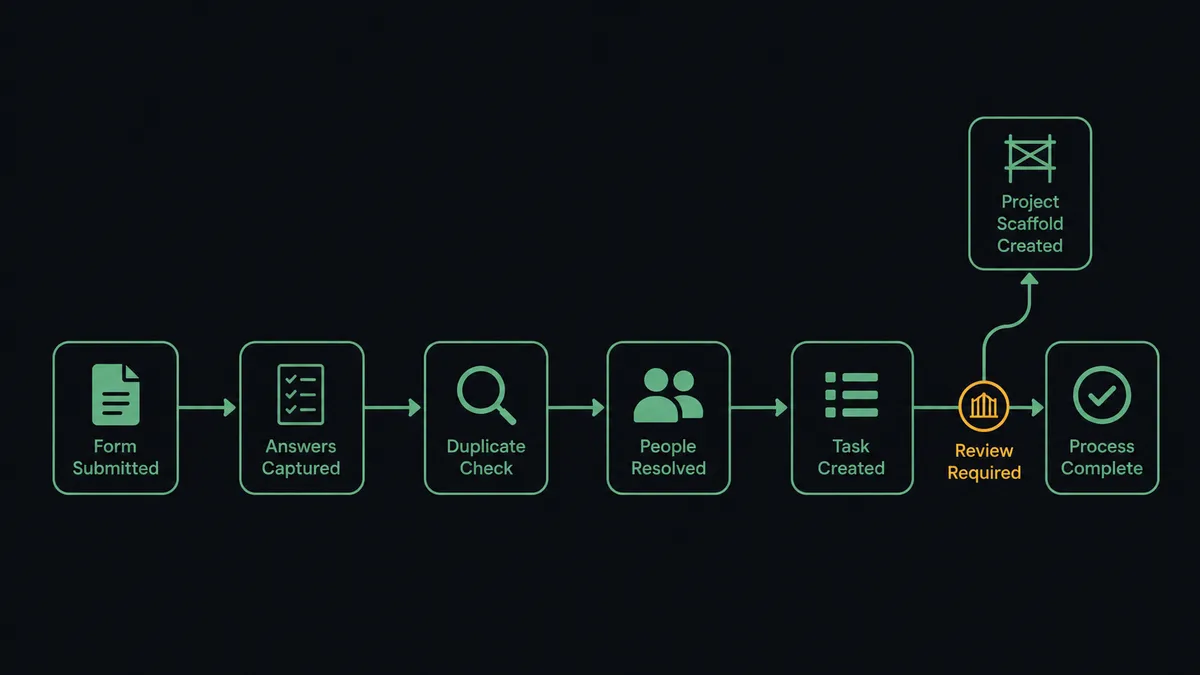
- Trigger: On a schedule, the workflow calls Get Form Responses List and picks up responses submitted since the last run.
- Read: It calls Get Form Response by ID for each new submission’s full answers, and Get Form Details when it needs the question structure to interpret them.
- Check for duplicates: It calls Search Tasks and Search Issues in Workfront, matching on request title and requester, to catch overlapping submissions before they become double work.
- Resolve people: It calls Search Users to match the requester’s email to a Workfront user and to find the receiving team’s assignees.
- File the work: It calls Create Task in the intake project with the mapped title, description, planned dates, and assignee.
- Escalate the big ones: For requests sized beyond a single task, it calls Create Project and then Create Task under it to lay out the phases.
That is the “just connect them” answer. Requests leave the spreadsheet and arrive in Workfront structured, assigned, and deduplicated, minutes after submission.
Can an AI agent run it? (and why a human stays in the loop)
Yes, and triage is exactly the kind of judgment work an agent is built for. A field-mapping sync treats every response identically: one response, one task. The agent reads the response the way your traffic manager would. It holds Get Form Response by ID, Get Form Details, Search Tasks, Search Issues, Search Users, Create Task, Create Project, and Update Task as tools, and it decides per request: is this a ten-minute fix, a standard deliverable, a duplicate of last week’s request, or something that quietly describes six weeks of work?
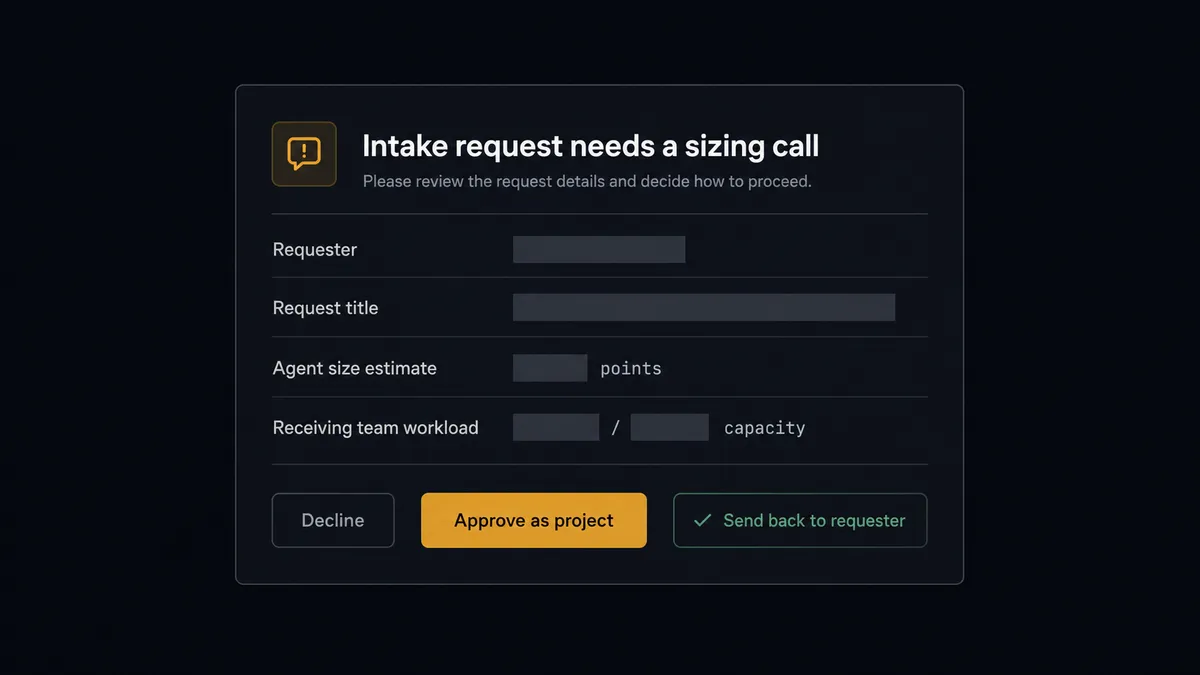
The consequential step is Create Project, because a new project is not a record, it is a claim on the team’s next month. So when the agent sizes a request beyond a single task, it does not build the project. It gathers what the traffic manager needs: the full response text, its own size estimate and reasoning, the duplicates it checked via Search Tasks, and what the receiving team already has in flight. Then it invokes a human-in-loop flow it holds as a callable tool and the workflow pauses. The traffic manager sees: “Request from [requester]: [title]. This reads as a multi-phase project, not a task. The receiving team has [current commitments]. Approve as a project, downgrade to a task, or decline?” One decision. Only after approval does Create Project run, and the decision, the decider, and the timestamp are recorded in the audit trail.
This is the digital andon cord applied to intake: like Toyota’s line, the workflow stops the line the moment a request carries more weight than the automation should judge alone. Routine requests never wait on a human. The capacity-committing ones never skip one.
FlowRunner vs n8n
A technical team could absolutely build this pipeline in n8n. It self-hosts under a fair-code license, its node library and community template gallery are enormous, and a developer can wire form polling to Workfront’s API with complete control over the branching. For teams with engineering capacity to spare, that control is a real draw.
The question is whether the people who own intake, usually operations and traffic managers rather than engineers, can build and evolve the workflow themselves, and whether triage judgment is a first-class part of it.
| What matters for this pair | FlowRunner | n8n |
|---|---|---|
| Human-in-the-loop on Create Project | Native. The agent invokes an approval flow as a callable tool before any request commits team capacity | Approval patterns exist as wait and form nodes a developer wires into the graph |
| Who runs the flow | An AI agent reads each response, sizes it, picks actions as tools | A node graph you design and maintain; AI runs inside nodes you configure |
| Users included | Unlimited users on every tier | Cloud plans meter by executions and plan level; unlimited on self-hosted |
| Bring your own AI keys | Yes, BYOK | Yes, n8n also connects your own model keys |
| Self-hosted option | Yes, cloud-hosted or self-hosted | Yes, self-hosting is a genuine n8n strength |
| Pricing model | Transparent workflow-based tiers with clear execution limits | Execution-based cloud pricing that teams find hard to predict; full cloud compliance sits in custom-priced Enterprise |
If you have developers who enjoy owning automation infrastructure and your intake rules rarely change, n8n will do this job. If the traffic manager should own the triage logic, adjust it without filing an engineering ticket, and keep a named human on every capacity decision, this pairing is the better fit.
Before and after
| Category | Before | After |
|---|---|---|
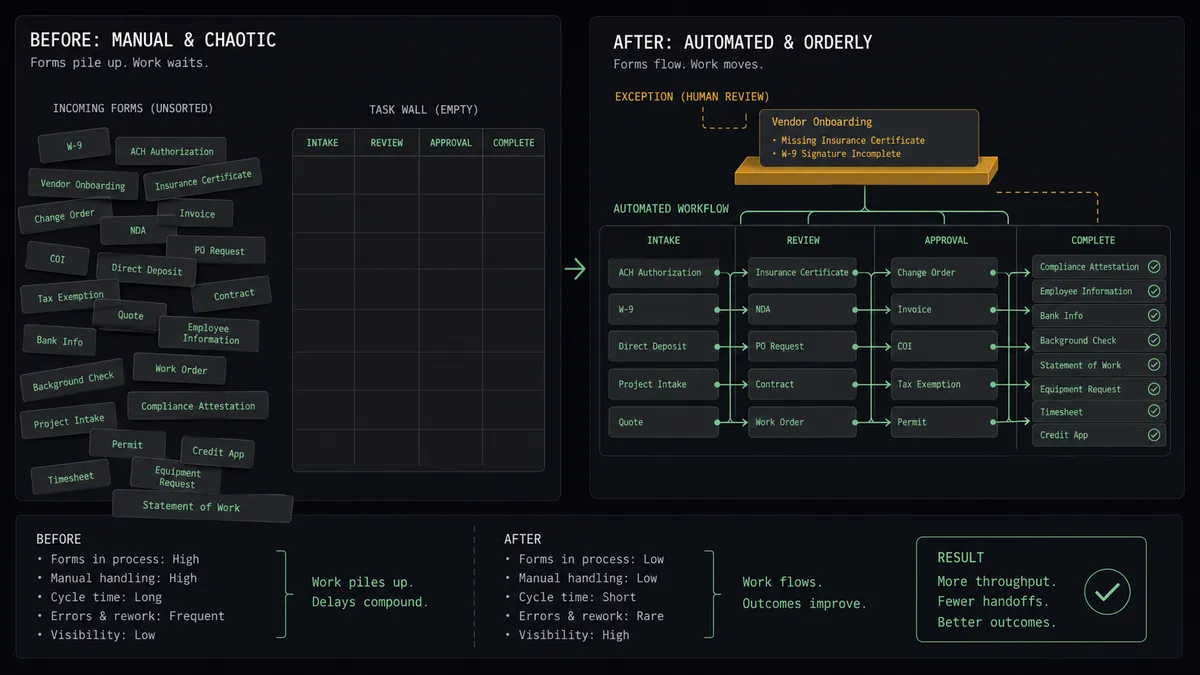
| Intake processing | A person reads the response spreadsheet daily and retypes requests into Workfront | Requests arrive in Workfront structured and assigned minutes after submission |
| Triage | Every request gets whatever sizing the reader has energy for that day | The agent sizes each request consistently and escalates only the ones that deserve a human call |
| Duplicates | Overlapping requests from different teams both get built | Search Tasks and Search Issues catch overlaps before work is created |
| Capacity protection | Project-sized requests slip in as tasks and detonate the calendar later | Nothing becomes a project without the traffic manager’s recorded approval |
| Requester experience | Requests vanish into a spreadsheet until someone follows up | Requests appear as tracked Workfront work the requester’s team can see |
What you can build
Intake to assigned task, hands off. Get Form Responses List picks up the submission, the agent pulls answers with Get Form Response by ID, dedupes via Search Tasks, resolves the assignee with Search Users, and files the request with Create Task, dated and owned.
Sized escalation for big requests. The agent reads the response text, estimates effort, and routes anything project-sized to the traffic manager before Create Project runs, with its reasoning and the team’s workload attached.
Duplicate-request folding. When a new response overlaps an existing item found through Search Tasks or Search Issues, the agent updates the original with Update Task to note the second requester instead of creating parallel work.
Self-maintaining intake form. When request categories or receiving teams change, the agent reads the form with Get Form Details and updates fields through Update Form Advanced, so the intake form always matches how work is actually routed.
Aging-request sweep. On a daily schedule the agent calls Search Tasks for intake items still unassigned or untouched, bundles them by team, and posts a digest so stalled requests surface before requesters start escalating through side channels.
Getting started
Start on the free plan: 100 executions a month, every integration included, no credit card required, plus 14 days of Professional for new accounts. Both connectors are available on every tier, and every tier includes unlimited users and unlimited workflows.
Explore the integration details:
- Google Forms integration (9 actions covering forms, responses, and field management)
- Adobe Workfront integration (10 actions covering projects, tasks, issues, users, and documents)
Start building free at flowrunner.ai or book a demo to see a live Google Forms to Adobe Workfront workflow, traffic-manager sizing gate and all.
Frequently asked questions
Is it free to connect Google Forms and Adobe Workfront on FlowRunner?
You can build and run the connection on FlowRunner's free plan, which includes 100 executions a month and every integration with no credit card required, and new accounts also get 14 days of Professional. Both connectors are available on every FlowRunner tier, and every tier includes unlimited users and unlimited workflows.
Can I self-host the Google Forms to Adobe Workfront workflow?
Yes. FlowRunner offers a cloud-hosted option and a self-hosted option, so the connection can run inside your own environment.
Does the AI agent need my own OpenAI or Claude key?
FlowRunner uses a bring-your-own-keys model, so you connect the AI provider key you already have. You are not locked to one model.
What happens when the agent cannot tell if a request is a task or a whole project?
It stops and asks. The agent posts the full form response, its size estimate, and the team's current workload to the traffic manager's channel, then waits. Create Project only runs after a named person decides the request deserves a project.
Which events start the Google Forms to Adobe Workfront workflow?
Neither connector publishes a catalog trigger, so the workflow runs on a schedule. It polls the form with Get Form Responses List, picks up responses submitted since the last run, and pulls each one's full answers with Get Form Response by ID.
Can the workflow keep the intake form itself up to date?
Yes. The agent reads the form structure with Get Form Details and can adjust fields with Update Form Advanced, so when your request categories change in Workfront, the intake form follows without anyone rebuilding it by hand.