How to Connect DocuSign with Aircall (With or Without an AI Agent)
Connect DocuSign envelope events to Aircall contacts and insight cards so reps see contract status on every call, optionally as an AI agent that pauses for the account owner before a declined contract is voided and reissued.

How do you connect DocuSign to Aircall?
You connect DocuSign to Aircall by having DocuSign’s envelope triggers drive Aircall actions: On Envelope Sent fires, the workflow pulls the signers with Get Envelope Recipients, matches or creates them in Aircall with Get Contact and Create Contact, and pushes the envelope status onto the account with Add Insight Cards, so the rep who answers the phone sees exactly where the contract stands. FlowRunner is a visual AI-agent orchestration platform where automations run autonomously and pause for human judgment on the steps that carry real consequence. The same connection can run as an AI agent that keeps the phone system current on its own and pauses for the account owner before a declined envelope gets voided and reissued.
The problem it solves
The person most likely to talk to your customer today is the least informed about the contract. A customer calls in with a question while their agreement sits half-signed in DocuSign. The rep who picks up sees a name and a number, nothing else. They put the caller on hold, ping the account owner on Slack, get no answer, and improvise. Meanwhile sales ops keeps a spreadsheet of “contracts out for signature” that was accurate on Monday.
The decline path is where real money slips. A customer declines an envelope because legal wants one clause changed. Nobody notices for two days because decline notifications go to a mailbox nobody owns. Then someone spots it, panics, voids the envelope, and reissues, except the redline conversation already happened on a phone call that the reissuer never knew about. Voiding an envelope is irreversible, and reissuing without the call context turns a fixable redline into a restarted negotiation. The two systems each hold half the story: DocuSign knows the paperwork, Aircall knows the conversations. Neither shows the other.
How it works: the connection
The connection listens to DocuSign and writes to Aircall. Here is the plain version, grounded in the real connector actions.
- Trigger: DocuSign fires On Envelope Sent when a contract goes out for signature.
- Read: The workflow calls Get Envelope Recipients to pull each signer’s name and email, and Get Envelope Status for the subject and state.
- Match the contact: It calls List Contacts and Get Contact in Aircall to find each signer, and Create Contact when the signer is new to the phone system.
- Surface the status: It calls Add Insight Cards so the envelope subject and its current state appear on screen whenever that contact calls in or gets called.
- Mark the outcome: When On Envelope Completed fires, it calls Update Contact, then Add Tags to Call and Comment on Call against the account’s recent calls so the signed status is visible in call history.
- Catch the declines: When On Envelope Declined or On Envelope Voided fires, it refreshes the insight card immediately, so no rep congratulates a customer on a deal that just stalled.
That is the “just connect them” answer. The phone system stops being a context desert, and contract state travels to the people actually talking to the customer.
Can an AI agent run it? (and why a human stays in the loop)
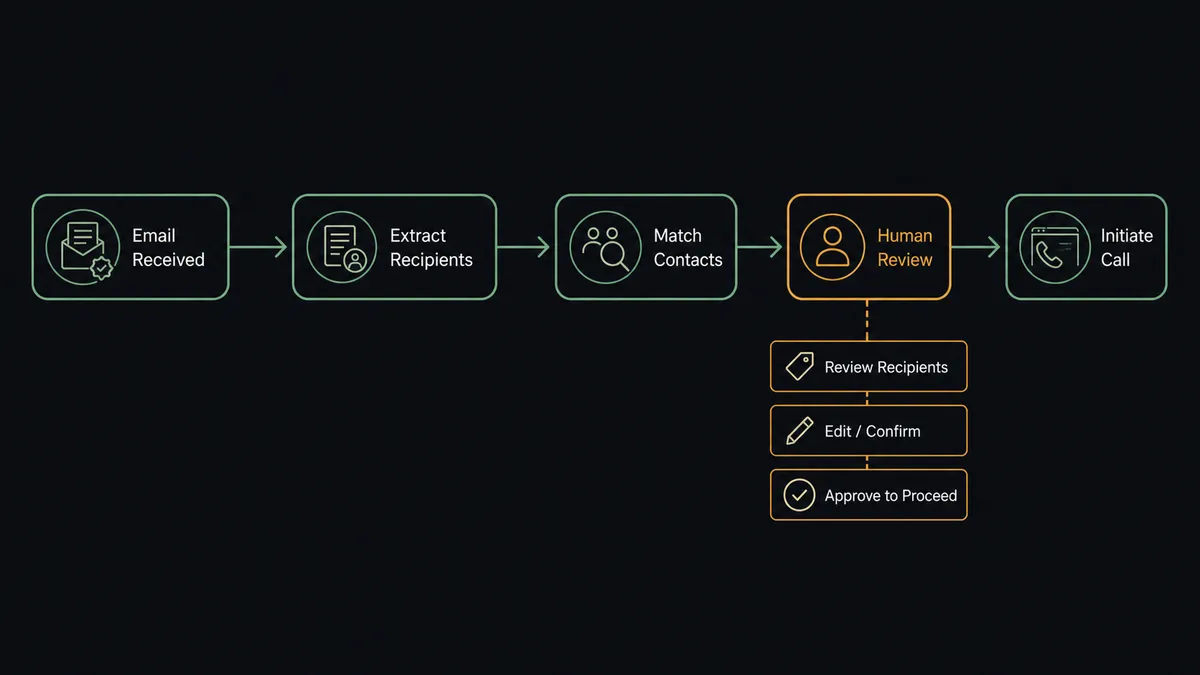
Yes, and the agent earns its keep on the decline path. It holds both connectors’ actions as tools: Get Envelope Status, Get Envelope Recipients, Download Document, Resend Envelope, Void Envelope, and Send Envelope from Template on the DocuSign side; List Calls, Get Call, Comment on Call, Add Insight Cards, Update Contact on the Aircall side. On the routine path it simply keeps contacts and insight cards current. On a decline, it investigates: it pulls the decline reason, then calls List Calls to see whether the account spoke with anyone recently, and reads what the phone system already knows about the objection.
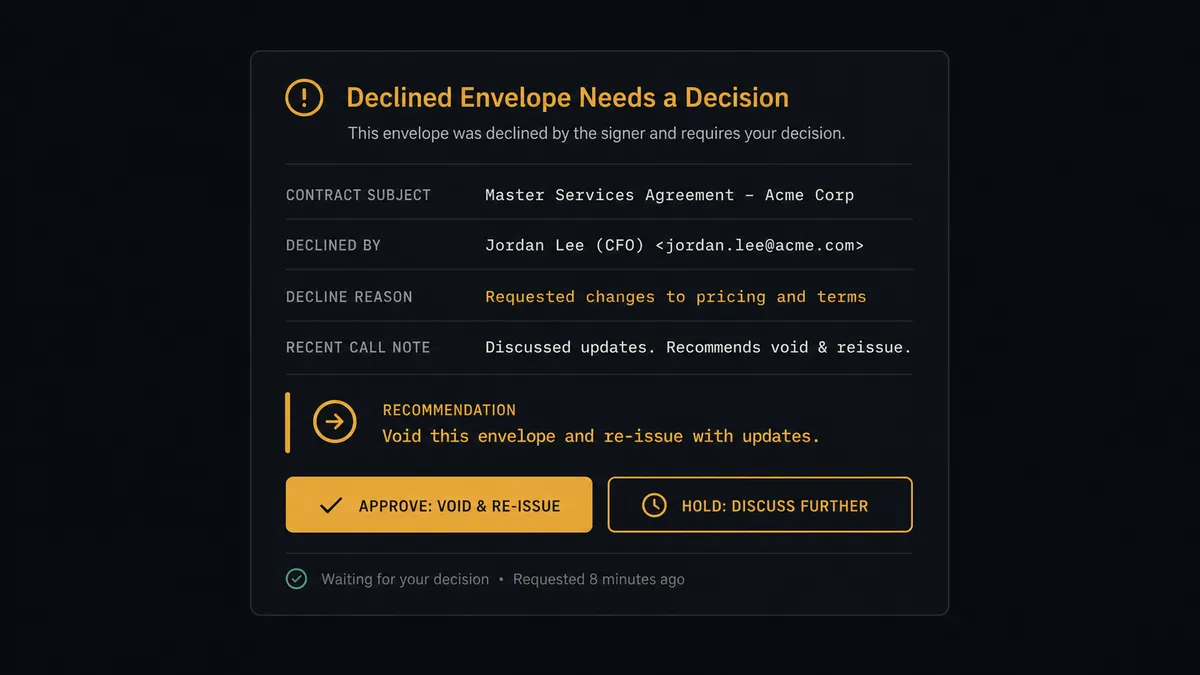
The consequential step is Void Envelope. Voiding is irreversible, and the reissue that follows lands in the customer’s inbox, so this is a move you make once and correctly. The agent drafts the play but does not run it. It invokes a human-in-loop flow it holds as a callable tool, and the workflow pauses and posts to the account owner: “Envelope [subject] declined by [signer]. Reason given: [reason]. The account had a call on [date] tagged [tag]. Recommend void and reissue from the [template] template with the revised clause. Approve?” Only on approval does the agent call Void Envelope and then Send Envelope from Template. The whole sequence, decline, decision, approver, timestamp, lands in the audit trail.
Prospects call this a digital andon cord: like Toyota’s production line pull cord, the workflow stops the line the moment it hits a step it cannot take back. Insight cards and contact updates flow at machine speed. The irreversible paperwork move waits for the person who owns the relationship.
FlowRunner vs Zapier
Zapier is the obvious first stop for this pair, and it deserves the traffic: it connects to both DocuSign and Aircall, the setup wizard is genuinely easy, and its template gallery covers common contract-notification patterns. For “when an envelope completes, do something simple,” a Zap is a fine answer.
The difference is what happens on the paths that need judgment, and who is allowed to be in the tool.
| What matters for this pair | FlowRunner | Zapier |
|---|---|---|
| Human-in-the-loop before Void Envelope and reissue | Native. The agent invokes an approval flow as a callable tool and pauses mid-run | Available via added approval steps, not an agent decision informed by call history |
| Who runs the flow | An AI agent reads the decline, checks call context, and picks actions as tools | A fixed trigger-action sequence per Zap |
| Users included | Unlimited users on every tier | Priced by task volume; seat limits vary by plan |
| Bring your own AI keys | Yes, BYOK | AI features tied to Zapier’s own AI offering |
| Self-hosted option | Yes, cloud-hosted or self-hosted | Cloud only |
| Pricing model | Transparent workflow-based tiers | Per-task pricing that scales with every envelope event |
If you want a completed envelope to post a message somewhere, Zapier does it well. If you want live contract context on every call and an irreversible void gated behind the account owner with an audit trail, this pairing on FlowRunner is the better fit.
Before and after
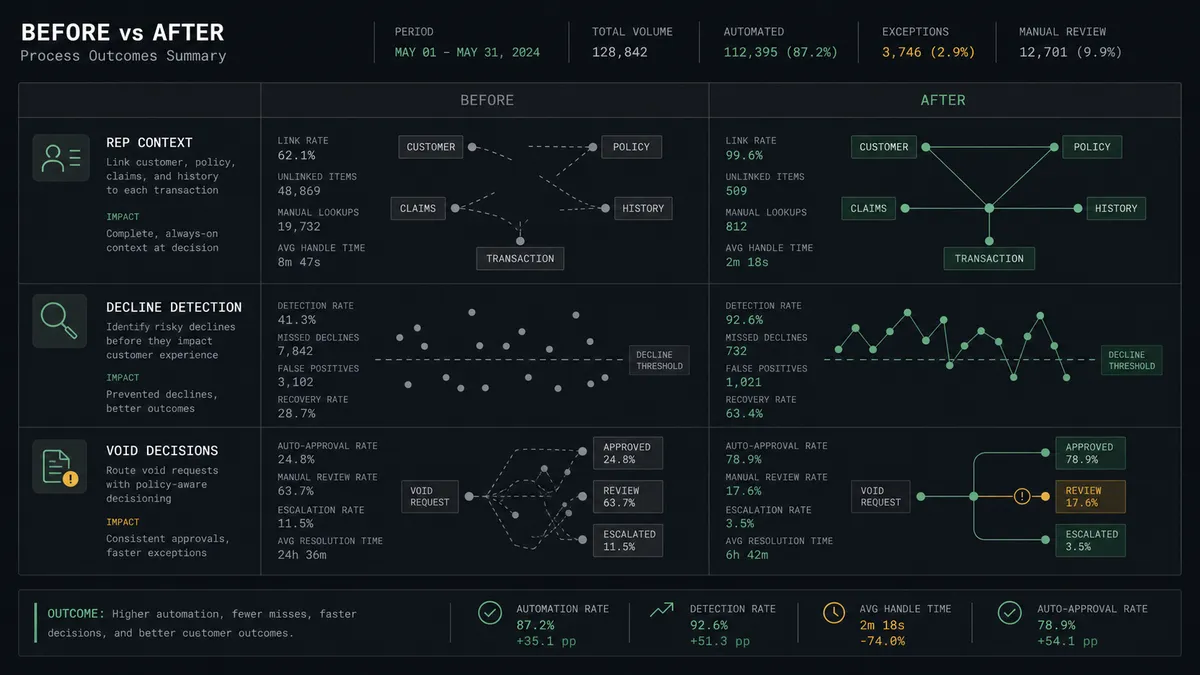
| Category | Before | After |
|---|---|---|
| Rep context | The rep answering sees a name and number, then improvises | The insight card shows the envelope subject and live status on the call screen |
| Decline detection | Declines sit in an unowned mailbox for days | The account owner gets the decline, the reason, and the call history within moments |
| Void decisions | Whoever notices first voids and reissues, context-blind | Void Envelope waits for the account owner’s approval with full context attached |
| Contact hygiene | Signers exist in DocuSign but not the phone system | Every signer is matched or created in Aircall automatically |
| Post-signature handoff | Signed deals surface at the weekly pipeline review | Completed envelopes tag the account and prompt the welcome call the same day |
What you can build
Contract status on every call. On Envelope Sent, the agent matches signers with Get Contact or Create Contact and pushes Add Insight Cards, so any rep who picks up sees where the paperwork stands without asking around.
Decline war room in one card. On Envelope Declined, the agent pulls the reason from Get Envelope Status and the conversation history from List Calls, then posts a single decision card to the account owner instead of a bare notification.
Gated void and reissue. After the owner approves, the agent calls Void Envelope and Send Envelope from Template in sequence, and logs the reissue with Comment on Call so the phone-side record shows why the customer received a second envelope.
Signed-deal welcome motion. On Envelope Completed, the agent updates the contact, applies Add Tags to Call to the closing call, and archives the paperwork with Download Document, so onboarding starts from a complete record.
Stalled-envelope nudge with judgment. The agent watches envelopes that stay in sent status past your window, checks List Calls to make sure the delay is not already being discussed, and only then asks the owner whether to run Resend Envelope, so customers are never nagged mid-negotiation.
Getting started
Start on the free plan: 100 executions a month, every integration included, no credit card required, plus 14 days of Professional for new accounts. Both connectors are available on every tier, and every tier includes unlimited users and unlimited workflows, so every rep and the account owners who approve voids are covered without seat math.
Explore the integration details:
- DocuSign integration (4 triggers and 9 actions covering envelopes, statuses, recipients, and documents)
- Aircall integration (33 actions covering calls, contacts, tags, and insight cards)
Start building free at flowrunner.ai or book a demo to see a live DocuSign to Aircall workflow, void approval and all.
Frequently asked questions
Is it free to connect DocuSign and Aircall on FlowRunner?
You can build and run the connection on FlowRunner's free plan, which includes 100 executions a month and every integration with no credit card required, and new accounts also get 14 days of Professional. Both connectors are available on every FlowRunner tier, and every tier includes unlimited users and unlimited workflows.
Can I self-host the DocuSign to Aircall workflow?
Yes. FlowRunner offers a cloud-hosted option and a self-hosted option, so the connection can run inside your own environment.
Does the AI agent need my own OpenAI or Claude key?
FlowRunner uses a bring-your-own-keys model, so you connect the AI provider key you already have. You are not locked to one model.
What happens when a customer declines an envelope?
On Envelope Declined fires and the agent gathers context: the decline reason from Get Envelope Status and the account's recent calls from List Calls. It then escalates to the account owner with a recommendation. Nothing is voided or reissued until a person decides.
Which DocuSign events can trigger Aircall actions?
DocuSign offers four triggers: On Envelope Sent, On Envelope Completed, On Envelope Declined, and On Envelope Voided. Aircall has no triggers in the catalog, so DocuSign always starts this workflow and Aircall receives the updates.
How do reps see contract status during a call?
The workflow uses Add Insight Cards in Aircall. When an envelope is sent, completed, declined, or voided, the agent updates the card on the matched contact, so whoever answers the customer's call sees the current contract state without asking around.