Send Delighted Detractor Alerts to Slack Automatically
Connect Delighted and Slack so low NPS scores reach the account owner as an interactive Slack alert, optionally run as an AI agent that pauses for a human on the save call.
How do you connect Delighted to Slack?
The connection runs on a schedule: an agent calls Delighted’s List Survey Responses on an hourly sweep, checks each new score, and when it finds a detractor with a written comment, it calls Slack’s Send Message to Channel to alert the account owner with the score and comment attached. FlowRunner is a visual AI-agent orchestration platform where automations run autonomously and pause for human judgment on the steps that carry real consequence. The same connection can run as a plain data sync, or be upgraded to an AI agent that reasons about which responses are worth a human’s attention and pauses on Slack’s interactive buttons for the account owner’s decision.
What breaks without this connection?
Right now, NPS is a quarterly artifact. Scores pile up in Delighted and nobody looks at them until a customer success ops lead needs a number for a board slide, at which point someone exports a CSV and builds a chart. A detractor who leaves an angry comment on a Tuesday doesn’t get read until whenever someone happens to check the survey dashboard, which might be days later. By then the save window has closed. The customer has already started evaluating alternatives, and the comment that explained exactly what went wrong sits unread in an export nobody opened.
The deeper problem is that survey data lives in a silo. The CRM, the warehouse, and the success team each have a different picture of customer sentiment because nothing keeps them in sync. An account owner might be planning a renewal call with no idea the customer scored a 2 last month. Detractors fall through the cracks not because anyone is negligent, but because getting a score out of Delighted and in front of the right person has always required someone to manually check, export, and forward it.
How it works: the connection
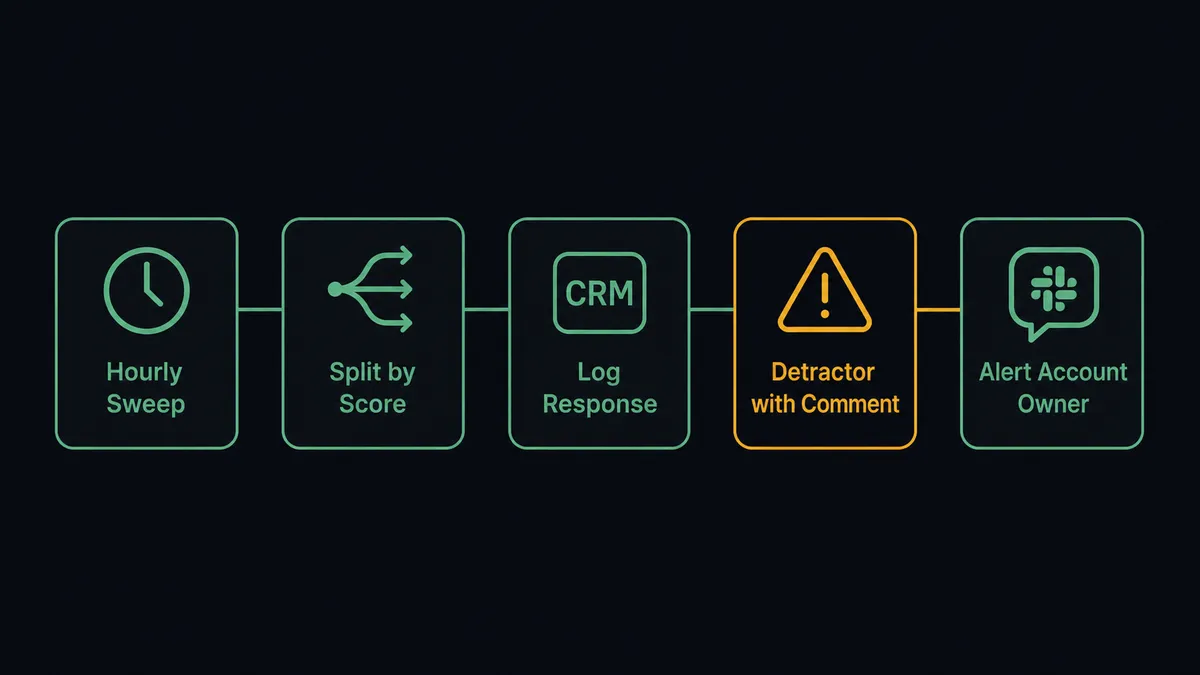
The agent runs List Survey Responses on an hourly sweep, pulling everything since the last checkpoint with Delighted’s built-in pagination and date-range filters. Each response carries a score from 0 to 10, an optional comment, the respondent, and any custom properties already on file. The agent splits these into promoters, passives, and detractors by score, then logs every response to the customer’s CRM record and tracking sheet through Create or Update Person, so the sentiment history stays current whether or not anything is urgent.
When a response scores in the detractor range and includes a written comment, the agent treats it as an at-risk account. It pulls plan and tenure context from the CRM, then calls Send Message to Channel to post the score, the verbatim comment, and that account context into the success team’s Slack channel. If the account owner needs the full record, including tags and notes, the agent can call Get Survey Response for deeper context before responding. When the situation resolves, whatever the account owner decides, Create or Update Person writes the outcome onto the person’s custom properties, so the next survey cycle already knows the history.
Can an AI agent run it, and why does a human stay in the loop?
This is not a sync tool. The agent reads each response, reasons about it, and decides which of Delighted’s and Slack’s actions to call and in what order, rather than executing a fixed sequence. A terse “6, fine I guess” from a customer with two years of clean history gets logged and moved on. A 2 with “your support team never responded to my last three tickets” from a customer up for renewal next quarter gets escalated immediately, because the agent weighed the comment, the score, and the account context together rather than firing on the number alone.
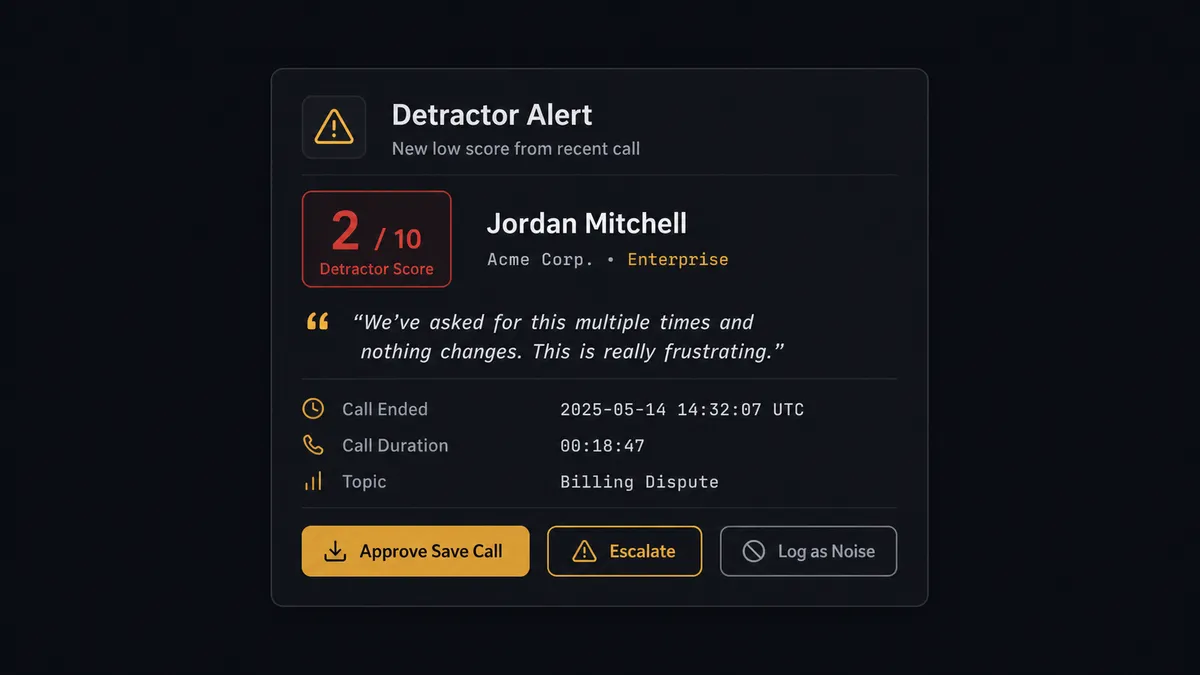
When the agent decides a detractor is worth a human, it invokes a human-in-loop flow as a callable tool, the same way it would call any Delighted or Slack action. That flow posts to the account owner’s Slack channel with the score, the full comment text, the account’s plan and tenure, and three buttons: Approve a save call, Escalate to the CSM lead, or Log as noise. The account owner’s click fires Slack’s On Block Action trigger, which resumes the workflow with that decision. The agent then routes accordingly, booking a save call, filing a product complaint to the issue tracker, or simply tagging the response as reviewed, and every decision, decider, and timestamp lands in the audit trail.
FlowRunner vs Zapier: which fits a detractor alert workflow?
Zapier is genuinely fast to set up for a simple “new Delighted response, post to Slack” zap, and its enormous app catalog means most ops teams already know how it works. For a plain notification, it does the job. Where it runs out of road is the decision itself: Zapier can post every low score to a channel, but it can’t reason about which ones actually need a person, structure a real approve-or-escalate decision, or route the outcome back into the survey data automatically.
| Capability | FlowRunner | Zapier |
|---|---|---|
| Human-in-loop decision | Native: agent reasons about context, then pauses on Slack buttons and resumes with the decision | Not native: can post a message, but the approve/escalate logic has to be built and maintained separately |
| Users included | Unlimited on every tier | Priced per user on paid plans |
| AI provider | BYOK, bring your own key from any provider | Requires Zapier’s own AI credits or a separate integration |
| Self-hosting | Available on Enterprise | Not offered |
| Pricing model | Transparent workflow-based execution tiers | Per-task pricing that scales unpredictably with volume |
Before and after: what changes when detractors reach Slack automatically
| What changes | Before | After |
|---|---|---|
| NPS visibility | Scores pile up in Delighted and someone exports a CSV when a board slide needs a number | Agents sweep responses hourly and Net Promoter Score lands where decisions get made |
| Detractor response time | A 2 with an angry comment sits unread for days, and the save window closes | Low scores route straight to the account owner in Slack with the verbatim comment attached |
| Sentiment record | The CRM, the warehouse, and the success team each have a different picture of customer sentiment | Every response syncs to the CRM automatically, the same record the Slack alert points back to |
| Exception handling | A detractor gets flagged, then waits in a spreadsheet or inbox for someone to notice | The account owner approves a save call, files a complaint, or logs it as noise from Slack, decision captured in the audit trail |
What can you build with Delighted and Slack?
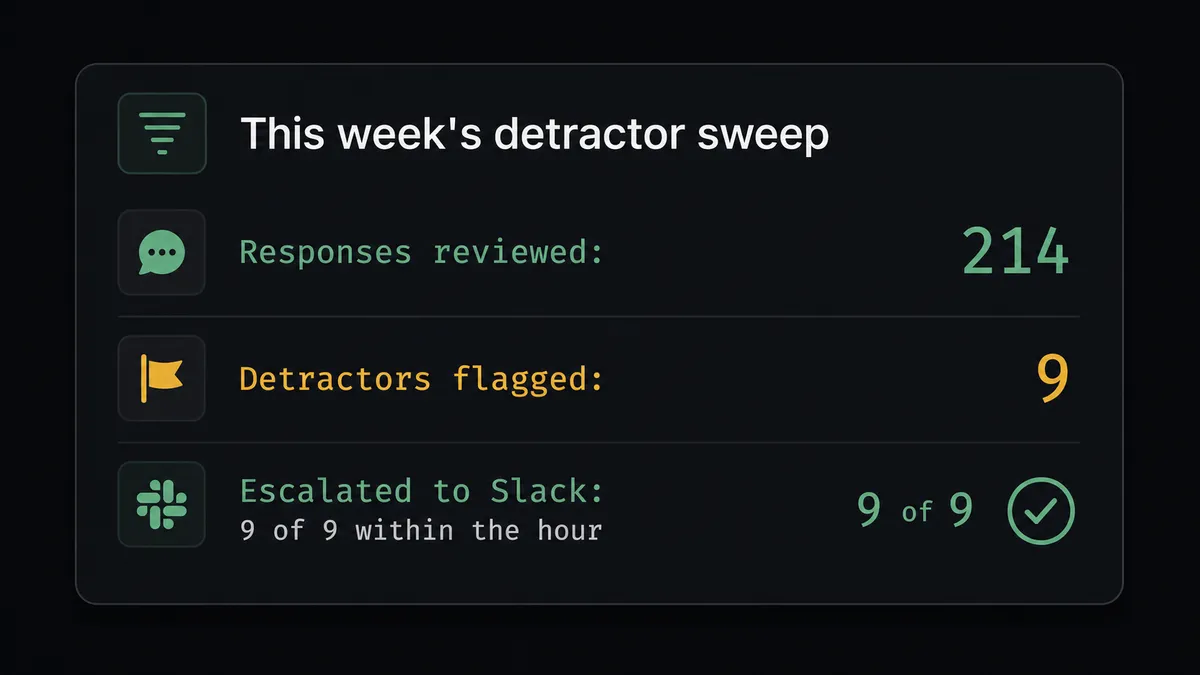
The detractor fire line. List Survey Responses runs hourly; any 0-to-6 score with a comment becomes a Slack alert carrying the score, the verbatim text, and CRM context, so the account owner triages while the customer still remembers writing it.
Weekly NPS digest to leadership. Get Metrics pulls promoter, passive, and detractor counts on a trailing 90-day window every Monday, and the agent posts a formatted Block Kit report to a leadership channel so nobody has to pull the number manually.
Save-call booking loop. When an account owner clicks Approve on a detractor alert, the agent’s next tool call books time through the team’s scheduling flow and tags the outcome on the person’s Delighted record.
Opt-out mirroring. When a customer replies “stop emailing me” in any channel monitored by Slack, the agent calls Unsubscribe Person immediately so Delighted stops surveying them, and posts confirmation back to the thread.
Onboarding-triggered survey enrollment. When a Slack message confirms onboarding is complete, the agent calls Create or Update Person with Send Survey enabled, letting Delighted’s own throttling rules decide the timing.
Common questions about connecting Delighted and Slack
Is it free to connect Delighted and Slack on FlowRunner? FlowRunner has a free plan with 100 executions a month, every integration included, and no credit card required, and new accounts get 14 days of Professional on top. Beyond the free plan, Growth starts at $45 a month for 12,000 executions with unlimited users and workflows included.
Can the agent alert Slack for detractors only, not every survey response? Yes. The agent evaluates each response from List Survey Responses and only escalates scores in the detractor range that carry a written comment, so the account owner’s channel doesn’t fill up with routine 9s and 10s.
Does the agent decide on its own when to loop in a human, or is it a fixed score cutoff? The agent reasons about the response, the comment, and the account context pulled from the CRM rather than firing on a hardcoded number alone, so a terse low score from a long-tenured account can be treated differently than an angry comment from a new one.
What happens if the account owner never responds to the Slack alert? On the Business tier and above, SLA tracking flags exceptions that sit unanswered past a set window so an unresolved detractor doesn’t quietly age out of anyone’s attention.
Does the AI agent need my own OpenAI key? FlowRunner runs on a bring-your-own-key model, so you connect the AI provider you already use, whether that’s OpenAI, Anthropic, or another provider, rather than being locked into one vendor.
Can I self-host this Delighted to Slack workflow? Self-hosting is available on FlowRunner’s Enterprise tier for teams that need the workflow running on their own infrastructure with full compliance controls.
Getting started
FlowRunner has a free plan with 100 executions a month, every integration included, and no credit card required, and new accounts get 14 days of Professional on top. Connect your Delighted account and your Slack workspace, set the hourly sweep, and let the agent handle routine responses while detractors land in front of the account owner with the context they need to act. Start building at flowrunner.ai or book time to walk through the setup at calendly.com/flowrunner/intro.
Frequently asked questions
Is it free to connect Delighted and Slack on FlowRunner?
FlowRunner has a free plan with 100 executions a month, every integration included, and no credit card required, and new accounts get 14 days of Professional on top. Beyond the free plan, Growth starts at $45 a month for 12,000 executions with unlimited users and workflows included.
Can the agent alert Slack for detractors only, not every survey response?
Yes. The agent evaluates each response from List Survey Responses and only escalates scores in the detractor range that carry a written comment, so the account owner's channel doesn't fill up with routine 9s and 10s.
Does the agent decide on its own when to loop in a human, or is it a fixed score cutoff?
The agent reasons about the response, the comment, and the account context pulled from the CRM rather than firing on a hardcoded number alone, so a terse low score from a long-tenured account can be treated differently than an angry comment from a new one.
What happens if the account owner never responds to the Slack alert?
On the Business tier and above, SLA tracking flags exceptions that sit unanswered past a set window so an unresolved detractor doesn't quietly age out of anyone's attention.
Does the AI agent need my own OpenAI key?
FlowRunner runs on a bring-your-own-key model, so you connect the AI provider you already use, whether that's OpenAI, Anthropic, or another provider, rather than being locked into one vendor.
Can I self-host this Delighted to Slack workflow?
Self-hosting is available on FlowRunner's Enterprise tier for teams that need the workflow running on their own infrastructure with full compliance controls.