How to Connect Airtable with Delighted (With or Without an AI Agent)
Connect Airtable records to Delighted so a delivered project or closed order triggers an NPS survey, with an AI agent that checks survey history first and pauses for a human before surveying an account in the middle of an open issue.

How do you connect Airtable to Delighted?
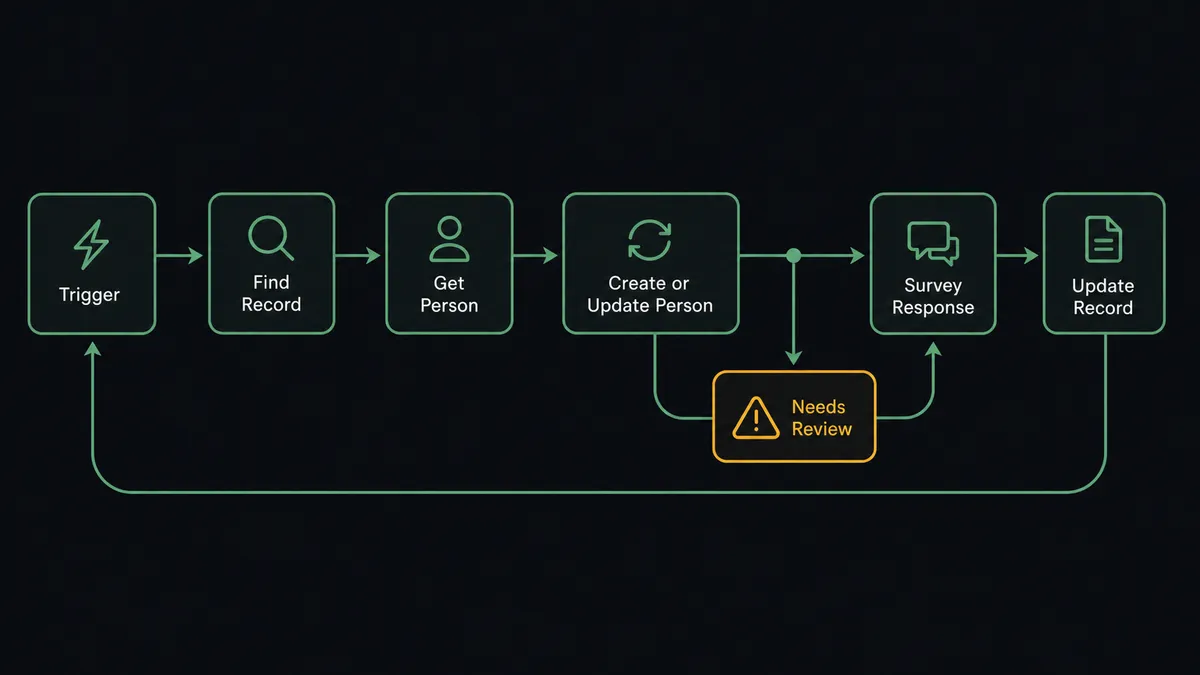
You connect Airtable to Delighted by having Airtable’s On New or Updated Record trigger drive Delighted actions: when a project or order record reaches its done state, the workflow pulls the contact with Find Record, checks their history with Get Person, and adds them to Delighted with Create or Update Person, which queues the NPS or CSAT survey. Responses flow back the other way, with List Survey Responses feeding scores into Update Record on the original row. FlowRunner is a visual AI-agent orchestration platform where automations run autonomously and pause for human judgment on the steps that carry real consequence. Run as an AI agent, the same connection reads each record’s full context before surveying anyone, and stops for a named human before a survey email reaches an account in the middle of an open problem.
The problem it solves
Without this connection, your survey program runs on exports. Someone filters the Airtable base for records closed last month, downloads a CSV, cleans out the duplicates and the churned accounts, and uploads it to Delighted. Surveys go out weeks after the experience they measure, when the customer barely remembers the project. Response data lives in Delighted, project data lives in Airtable, and connecting a score to what happened on the account means matching rows by hand across both tools.
The edges are worse than the lag. The export inevitably includes the account that has an open escalation, and that customer receives a cheerful “how did we do?” email in the middle of a support fire, which reads as either tone-deaf or sarcastic. It includes the contact who was surveyed three weeks ago by another team’s export. It includes the person who unsubscribed last quarter. Each of those sends costs goodwill, and the batch process has no step where anyone catches them.
How it works: the connection
The connection listens to Airtable and writes to Delighted, then closes the loop back into Airtable. Here is the plain version, grounded in the real connector actions.
- Trigger: Airtable fires On New or Updated Record when a record in your projects or orders table changes, and the workflow proceeds when the status field has reached your done state.
- Read: The workflow calls Find Record to pull the full row: contact email, account tier, project type, and any open-issue flags.
- Check history: It calls Get Person in Delighted to see whether this contact was surveyed recently or has unsubscribed.
- Queue the survey: It calls Create or Update Person with the contact’s email, name, and properties like project type and tier, which adds them to Delighted’s survey queue.
- Honor opt-outs: For contacts marked do-not-survey in Airtable, it calls Unsubscribe Person instead, so the suppression is recorded in Delighted rather than tribal knowledge.
- Write back: It calls Update Record on the Airtable row with the survey status and date, so the base shows who was asked and when.
- Return the results: On a schedule, List Survey Responses pulls new scores and comments, Find Record matches each one to its row, and Update Record attaches the score to the project that earned it.
That is the “just connect them” answer. Surveys go out the day the experience ends, suppressions are enforced by the system instead of memory, and every score lands next to the project it describes.
Can an AI agent run it? (and why a human stays in the loop)
Yes, and this is where the connection earns judgment instead of just speed. A rule-based sync sends a survey to every record that hits the done status. An AI agent holds Find Record, Get Person, Create or Update Person, Unsubscribe Person, and Update Record as tools, reads the whole record before acting, and treats “should this person get a survey right now?” as an actual question. A routine project for a mid-tier account with a clean history gets surveyed immediately, no human involved. An account whose record shows three status reversals and an open escalation thread does not.
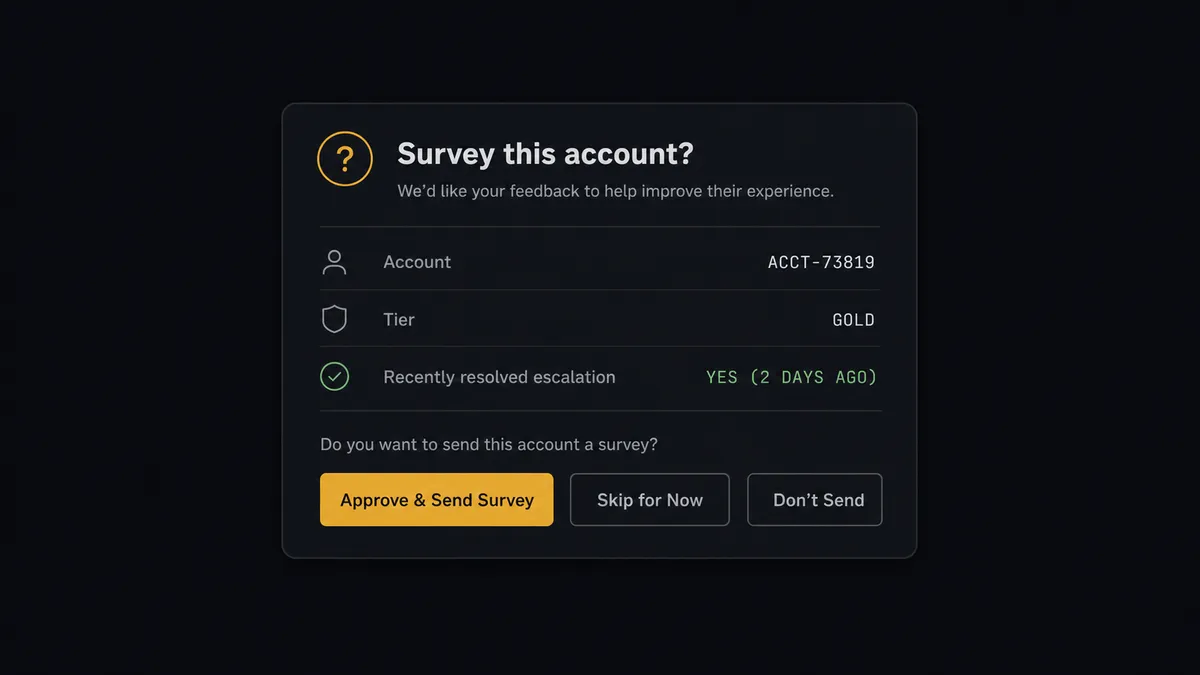
The consequential step is Create or Update Person, because in Delighted that action is not just a database write, it queues a real email to a real customer. You cannot unsend it. So for flagged accounts, the agent invokes a human-in-loop flow it holds as a callable tool, and the workflow pauses. The message lands in your channel: “Project closed for [account], tier [tier]. Record shows an escalation resolved this week, and Get Person shows a survey sent last quarter that scored low. Survey now, delay two weeks, or skip this cycle?” One click decides it. The agent then either queues the survey, schedules the delayed send, or writes the skip decision to the record with Update Record so the next cycle knows why.
Prospects call this pattern the digital andon cord: like Toyota’s production line pull cord, the workflow stops the line the moment it hits uncertainty. Most surveys go out untouched by human hands, on the day they should. The handful that would damage a relationship get caught by a person, before the send instead of in the replies.
FlowRunner vs Zapier
Zapier is the default first reach for this pair, and honestly, for a reason. It connects both tools, its editor is quick to learn, and its template gallery has ready-made Zaps for pushing new spreadsheet rows into survey tools. If all you want is “record created, person added to Delighted,” a Zap does that in an afternoon.
The gap appears the moment the send needs judgment. Zapier runs the steps you configured, in order, every time; deciding whether this particular account should receive this particular survey today is not what a Zap does. FlowRunner runs the connection as an agent that reads context, and it treats the human approval as a native workflow step rather than a workaround.
| What matters for this pair | FlowRunner | Zapier |
|---|---|---|
| Human-in-the-loop before a survey reaches a flagged account | Native. The agent invokes an approval flow as a callable tool and pauses before Create or Update Person | Available via added approval steps, not a native agent decision |
| Who runs the flow | An AI agent reads the record, reasons, picks actions as tools | Predefined step sequence you configure per Zap |
| Users included | Unlimited users on every tier | Priced by task volume; seats vary by plan |
| Bring your own AI keys | Yes, BYOK. Connect the AI provider key you already have | AI features tied to Zapier’s own AI offering |
| Self-hosted option | Yes, cloud-hosted or self-hosted | Cloud only |
| Pricing model | Transparent workflow-based tiers | Per-task pricing that can be hard to predict as volume grows |
If you need a simple one-way push and survey volume is low, Zapier will serve you fine. If your survey program touches accounts with real relationships attached, and you want a person on the sends that carry risk, this pairing is built for that.
Before and after
| Category | Before | After |
|---|---|---|
| Survey timing | Surveys go out in monthly export batches, weeks after the project ended | The survey queues the day the record reaches its done state |
| Suppression | Do-not-survey lives in people’s heads and stale spreadsheet columns | Unsubscribe Person and Get Person enforce suppressions on every single send |
| Risky sends | Accounts mid-escalation get surveyed because the export cannot tell | Flagged accounts pause at a human gate with full record context before anything sends |
| Closing the loop | Scores sit in Delighted, disconnected from the projects that earned them | List Survey Responses writes each score and comment back to its Airtable record |
| Program visibility | NPS reporting means downloading from Delighted and rebuilding charts | Get Metrics feeds promoter and detractor counts into the base on a schedule |
What you can build
Post-delivery NPS on autopilot. On New or Updated Record fires when a project closes. The agent verifies the contact with Find Record and Get Person, then queues the survey with Create or Update Person, with properties for tier and project type so scores segment cleanly.
Detractor fast lane. When List Survey Responses returns a low score, the agent writes it to the record with Update Record, adds a comment with Create Comment tagging the account owner, and posts the response text to your channel the same hour, while the customer’s frustration is still addressable.
Suppression that enforces itself. When a record’s do-not-survey checkbox flips, the agent calls Unsubscribe Person immediately, so a preference expressed once to one team is honored by every survey the company ever sends.
Quarterly metrics into the base. On a schedule, the agent calls Get Metrics for your Net Promoter Score with promoter and detractor counts and writes the summary into a metrics table with Create Record, so the trend lives where the operating data lives.
Historical import with judgment. Pointing the agent at a backlog view, it walks records with Find Many Records, checks each contact against Get Person, and queues only the ones with no recent survey, holding the ambiguous cases for a human instead of blasting the whole list.
Getting started
Start on the free plan: 100 executions a month, every integration included, no credit card required, plus 14 days of Professional for new accounts. Both connectors are available on every tier, and every tier includes unlimited users and unlimited workflows.
Explore the integration details:
- Airtable integration (2 triggers and 17 actions covering full record CRUD)
- Delighted integration (9 actions covering surveys, people, and metrics)
Start building free at flowrunner.ai or book a demo to see a live Airtable to Delighted workflow, flagged-account approval and all.
Frequently asked questions
Is it free to connect Airtable and Delighted on FlowRunner?
You can build and run the connection on FlowRunner's free plan, which includes 100 executions a month and every integration with no credit card required, and new accounts also get 14 days of Professional. Both connectors are available on every FlowRunner tier, and every tier includes unlimited users and unlimited workflows.
Can I self-host the Airtable to Delighted workflow?
Yes. FlowRunner offers a cloud-hosted option and a self-hosted option, so the connection can run inside your own environment.
Does the AI agent need my own OpenAI or Claude key?
FlowRunner uses a bring-your-own-keys model, so you connect the AI provider key you already have. You are not locked to one model.
What happens when the agent is unsure whether an account should be surveyed?
It holds the send. The agent posts the account name, the Airtable record context, the recent survey history from Get Person, and its reason for hesitating to your team's channel, then waits for a person to approve the survey, delay it, or skip this cycle before Create or Update Person runs.
Which Airtable events can trigger a Delighted action?
Airtable offers two triggers: On New Record and On New or Updated Record. This pair uses On New or Updated Record so the workflow fires when a record's status field changes to your done state, not just when a row is created.
How do survey responses get back into Airtable?
On a schedule, the workflow calls List Survey Responses in Delighted, matches each response to its record with Find Record, and writes the score and comment back with Update Record. Aggregate numbers come from Get Metrics and land in a summary table.