How to Connect Google Forms with Slack (With or Without an AI Agent)
Connect Google Forms to Slack so every form submission posts a real-time Slack notification, with optional AI-agent routing that pauses for a human on low scores, vendor exceptions, or any response that carries real consequence.
How do you connect Google Forms to Slack?
A FlowRunner workflow triggers on a schedule or an upstream event, calls Get Form Responses List to retrieve submissions from your Google Form, and posts the results to Slack using Send Message to Channel. FlowRunner is a visual AI-agent orchestration platform where automations run autonomously and pause for human judgment on the steps that carry real consequence. That same connection can run as an AI agent that reads every submission, routes routine responses automatically, and invokes a human decision in Slack when a low satisfaction score, an unrecognized vendor, or a flagged keyword appears.
The problem with managing form responses manually
Right now, someone on your team collects responses from Google Forms and does something with them by hand. They export a spreadsheet. They copy scores into a CRM. They email a vendor to say their qualification was approved or declined. They forward a customer complaint to the account manager and hope it gets picked up before the customer hears nothing for a week.
The gap is not the form. Google Forms works fine for collection. The gap is everything between submission and action. Responses sit in a form waiting for a human to pull them. Exceptions fall through the cracks because there is no structured way to route them. By the time someone sees a low satisfaction score, the window to recover the relationship has already closed. Manual coordination does not scale when your form volume grows, your team is spread across time zones, or the consequences of a missed response are real.
How it works: the connection
The Google Forms to Slack connection in FlowRunner works through a scheduled flow or an event-based trigger. The flow calls Get Form Responses List to pull all submissions for the specified form. From there, each response is mapped into a Slack message using Send Message to Channel or Send Direct Message, depending on whether the alert goes to a team channel or a specific person.
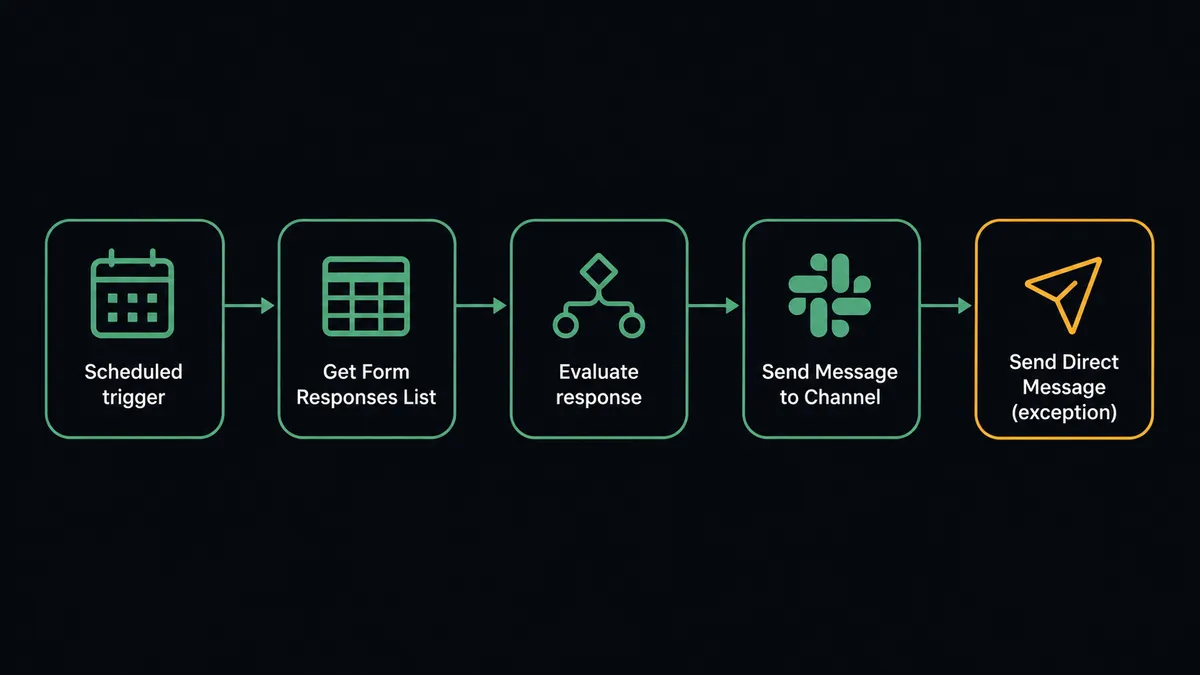
The data mapping is direct. Respondent name, score, free-text answers, and submission timestamp all flow from the Get Form Responses List output into the Slack message body. You decide which fields appear and in what format. A customer satisfaction score can appear as a bold number at the top of the message. A vendor qualification answer can appear as a bulleted list of criteria met and criteria missed. The account manager or procurement lead receives a complete picture without opening Google Forms.
For organizations already on Google Workspace, this closes the loop that spreadsheets and email chains cannot. Form submission happens. Slack message lands. Action follows.
Can an AI agent run it, and why does a human stay in the loop?
A simple connection posts every response to Slack. An AI agent reads every response and decides what to do with it.
The difference matters. Not every form submission deserves the same treatment. A vendor qualification response from a supplier with three years of clean history is different from a first-time vendor with missing documentation. A satisfaction score of 9 from a long-term client is different from a score of 3 from a client in the middle of a renewal conversation. A schedule-based send-everything approach treats them identically. An AI agent does not.
The agent has Get Form Responses List as a tool. It retrieves submissions, reads each one, and evaluates it against its instructions. For routine responses, it posts a batch summary to the relevant Slack channel. For exceptions, it invokes the human-in-loop subflow as a callable tool.
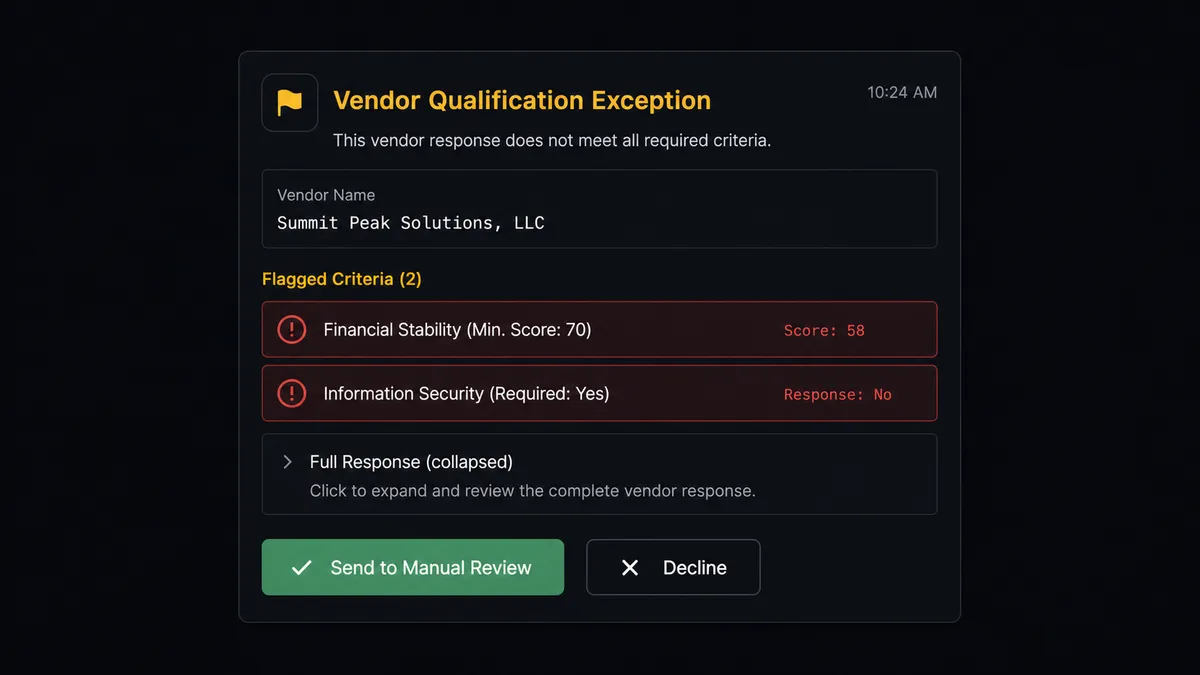
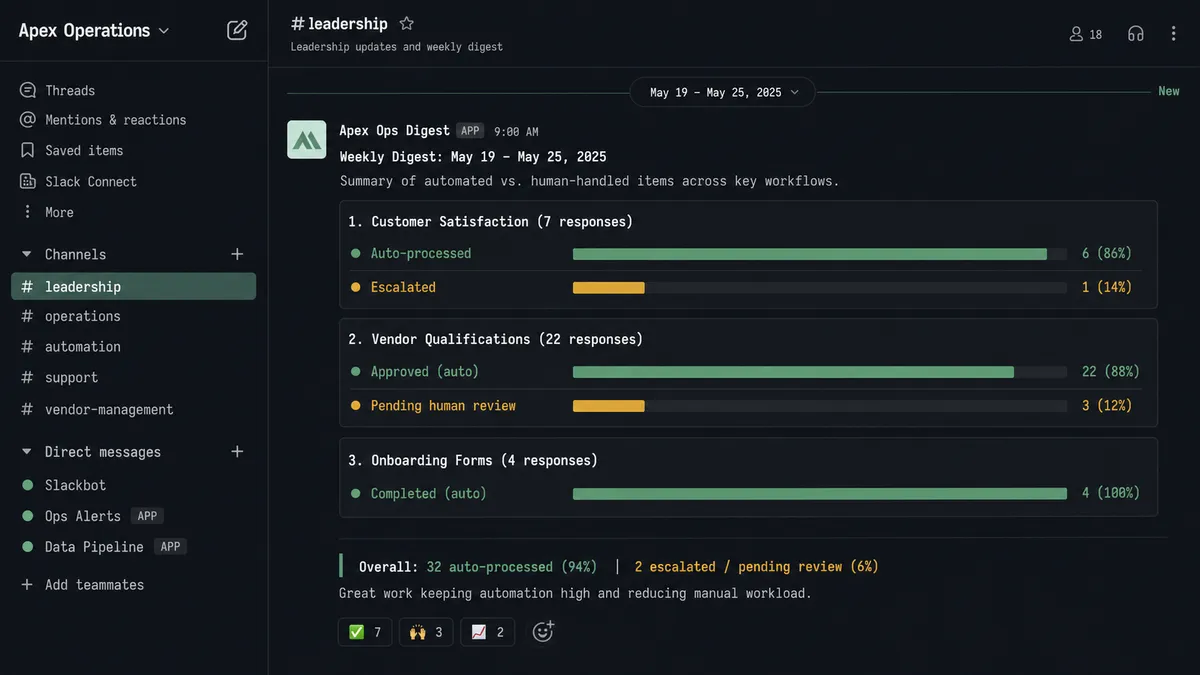
Here is what that looks like in practice. The agent retrieves a vendor qualification batch. It scores each response against the criteria in its instructions. Twenty-two vendors clear the threshold automatically. The agent adds them to the approved list and posts a summary to #procurement: “22 vendors qualified and added. 3 flagged for review.” For those three, the agent sends a direct Slack message to the procurement lead: “Vendor [Name] submitted a qualification response. Two criteria not met: [criteria A] and [criteria B]. Full response below. Approve for manual review or decline?” The procurement lead sees the full context in Slack, clicks a button, and the agent resumes.
This is not a threshold rule (“if score below 7, notify manager”). The agent makes the call based on context. A score of 6 from a new client at their first project milestone gets escalated. A score of 6 from a client who always rates conservatively and just renewed at a higher tier does not. The agent’s instructions define what context matters. The decision to involve a human is itself an AI decision, not a hardcoded branch.
Prospects call this a digital andon cord. The agent stops the line when it hits something it should not decide alone.
When the human responds via On Block Action in Slack, the agent resumes with the decision as input. The approver’s identity, the timestamp, and the decision are all captured in the audit trail automatically.
FlowRunner vs Zapier for connecting Google Forms and Slack
Zapier is the right comparison for non-technical teams connecting Google Forms to Slack. Zapier is straightforward, well-documented, and gets a basic trigger-to-notification working in minutes. Its form-to-Slack zaps are battle-tested and require no technical skill. That is a genuine strength.
Where the tools differ is in what happens when the submission requires judgment.
| Feature | Zapier | FlowRunner |
|---|---|---|
| Basic form submission to Slack notification | Yes | Yes |
| AI agent that reads and evaluates responses | No | Yes |
| Human-in-loop decision with interactive Slack buttons | No (conditional branches only) | Yes, native to the platform |
| Agent decides when to escalate, not a hardcoded rule | No | Yes |
| BYOK for AI model (OpenAI, Anthropic, etc.) | No | Yes |
| Unlimited users on every paid tier | No (per-user pricing on higher tiers) | Yes |
| Self-hosted deployment option | No | Yes (Community and Enterprise) |
| Audit trail of human decisions with approver identity | No | Yes |
Zapier’s per-task pricing also adds up when you are processing form batches. FlowRunner’s workflow-based tiers give you a fixed execution budget with no per-action anxiety.
Before and after
| Category | Before | After |
|---|---|---|
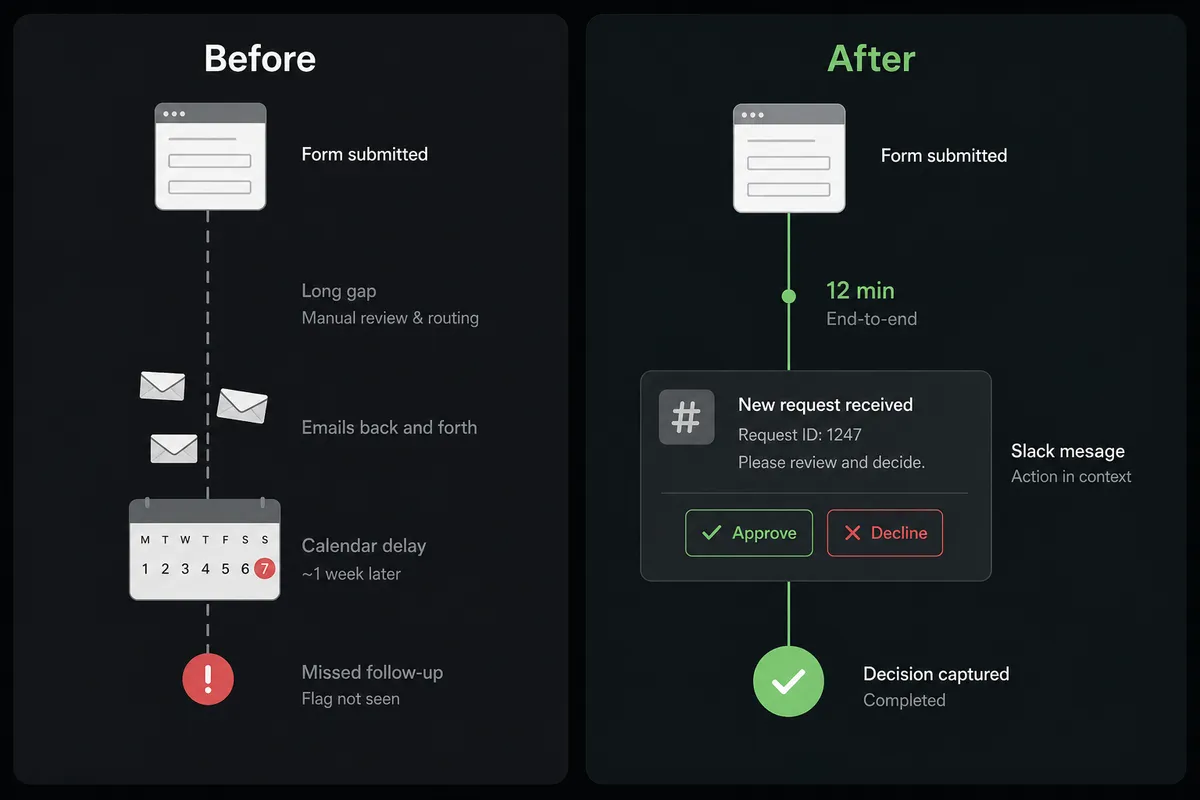
| Response review time | Someone exports the form, sorts by score, and routes exceptions manually, usually days after submission | Agent retrieves and evaluates all responses within minutes of the scheduled run |
| Exception routing | Manager gets a forwarded email with no context or action path | Procurement lead or account manager gets a direct Slack message with full response, flagged criteria, and decision buttons |
| Missed follow-ups | Low scores and vendor flags fall through the cracks when the person responsible is out or busy | Every flagged response is routed to Slack and stays open until the human responds |
| Audit trail | Decision emails scattered across inboxes; no structured record of who approved what | Every decision captured with approver identity and timestamp in FlowRunner’s audit trail |
| Team time on routine responses | Team manually processes all responses, including the 80% that are straightforward | Routine responses auto-posted in batch; team touches only the exceptions that need judgment |
What you can build
New employee onboarding from form to Slack confirmation. When a new hire submits their onboarding form, the agent calls Get Form Response by ID to pull the specific submission, creates the employee record in your ERP, provisions software access, and posts a confirmation to the manager via Send Message to Channel. No manual data entry.
Vendor qualification with exception routing. The agent calls Get Form Responses List weekly to process vendor qualification submissions. Qualified vendors are added to the approved list automatically. Rejected vendors receive an automated response. Vendors requiring human review get a direct Slack message to the procurement lead with the specific unmet criteria highlighted.
Customer satisfaction triage. After a project milestone, the agent retrieves satisfaction survey submissions and scores them. High scores trigger a case study request. Scores below the threshold invoke the human-in-loop tool, which sends the account manager a direct Slack message: “Low satisfaction from [Client]. Here is their response. Review and reach out before I log this in the CRM.”
Event registration with channel provisioning. When an attendee registers through a Google Form, the agent retrieves the submission, creates a private Slack channel for their event cohort using Create Private Channel, and invites them using Invite User to Channel. Conference logistics handled without a coordinator touching each registration.
Weekly form response digest. Every Monday morning, the agent calls Get Form Responses List across multiple active forms and compiles a structured summary. It posts the digest to a leadership channel using Block Kit for clean visual formatting. Operations visibility without pulling reports manually.
Common questions
Is it free to connect Google Forms and Slack on FlowRunner? FlowRunner has a free plan with 100 executions a month, every integration included, and no credit card required, and new accounts get 14 days of Professional on top. Both the Google Forms and Slack integrations are included on every tier, including Growth at $45 per month.
Can I self-host FlowRunner to keep form response data on my own infrastructure? Yes. FlowRunner offers a Community Edition for self-hosting at no cost, and an Enterprise self-hosted tier for teams that need multi-instance clustering and a full compliance suite. The cloud-hosted option is available if you prefer managed infrastructure.
Does the AI agent need my own API key for the AI model? Yes. FlowRunner uses a BYOK (Bring Your Own Keys) model. You connect your own OpenAI, Anthropic, or other provider key. FlowRunner orchestrates the agent; your key controls which model it uses and what it costs.
What happens when the agent is not sure how to handle a form response? The agent invokes a human-in-loop flow as a callable tool. It pauses, packages the full form response, the reason for escalation, and the available options, then sends a Slack message to the right person. The workflow resumes after the human responds. Nothing falls through the cracks.
Can the agent handle multiple form responses in batch, not just one at a time? Yes. The agent calls Get Form Responses List to retrieve all submissions for a form at once, then processes them in sequence. Routine responses flow through automatically. Exceptions get routed to Slack for a human decision before the agent continues.
How long does it take to set this up? A basic Google Forms to Slack connection takes about 15 minutes. Adding an AI agent with human-in-loop routing typically takes under an hour using FlowRunner’s visual builder, with no coding required.
Getting started
FlowRunner includes the Google Forms and Slack integrations on every tier. FlowRunner has a free plan with 100 executions a month, every integration included, and no credit card required, and new accounts get 14 days of Professional on top.
Connect your integrations at /integrations/google-forms and /integrations/slack, then build your first flow using the visual editor at flowrunner.ai.
If you want to walk through the human-in-loop configuration or see the vendor qualification workflow in a live demo, book 30 minutes at calendly.com/flowrunner/intro. Bring your current form setup and we will show you what the agent would look like in production.
Frequently asked questions
Is it free to connect Google Forms and Slack on FlowRunner?
FlowRunner has a free plan with 100 executions a month, every integration included, and no credit card required, and new accounts get 14 days of Professional on top. Both the Google Forms and Slack integrations are included on every tier, including Growth at $45 per month.
Can I self-host FlowRunner to keep form response data on my own infrastructure?
Yes. FlowRunner offers a Community Edition for self-hosting at no cost, and an Enterprise self-hosted tier for teams that need multi-instance clustering and a full compliance suite. The cloud-hosted option is available if you prefer managed infrastructure.
Does the AI agent need my own API key for the AI model?
Yes. FlowRunner uses a BYOK (Bring Your Own Keys) model. You connect your own OpenAI, Anthropic, or other provider key. FlowRunner orchestrates the agent; your key controls which model it uses and what it costs.
What happens when the agent is not sure how to handle a form response?
The agent invokes a human-in-loop flow as a callable tool. It pauses, packages the full form response, the reason for escalation, and the available options, then sends a Slack message to the right person. The workflow resumes after the human responds. Nothing falls through the cracks.
Can the agent handle multiple form responses in batch, not just one at a time?
Yes. The agent calls Get Form Responses List to retrieve all submissions for a form at once, then processes them in sequence. Routine responses flow through automatically. Exceptions get routed to Slack for a human decision before the agent continues.
How long does it take to set this up?
A basic Google Forms to Slack connection takes about 15 minutes. Adding an AI agent with human-in-loop routing typically takes under an hour using FlowRunner's visual builder, with no coding required.