How to Connect Calendly with Accelo (With or Without an AI Agent)
Connect Calendly bookings to Accelo so every client meeting lands on the right company record with a prep task assigned, with an AI agent that pauses for a human before a client-facing meeting is canceled.
How do you connect Calendly to Accelo?
You connect Calendly to Accelo by having Calendly’s On Invitee Created trigger drive Accelo’s client-record actions: the moment a booking lands, the workflow matches the invitee’s company with List Companies and Get Company, provisions new people with Create Contact, stamps the meeting on the record with Log Activity, and opens an assigned prep task with Create Task, so a booked call shows up in your service operations system as work, not just as a calendar entry. FlowRunner is a visual AI-agent orchestration platform where automations run autonomously and pause for human judgment on the steps that carry real consequence. Run as an AI agent, the same connection reads each booking in the context of the account, files the routine ones on its own, and stops for a named person before anything client-facing happens, above all Cancel Scheduled Event.
The problem it solves
Service firms live in two systems that refuse to talk. Meetings get booked in Calendly; client work lives in Accelo. So the account manager plays courier: a client books a check-in, and someone copies the booking into Accelo by hand, logs it against the engagement, and remembers, or does not remember, to create a prep task. When the courier is busy, the meeting happens off the record. The client history in Accelo shows a tidy engagement with mysterious gaps where half the actual conversations happened.
The edges are where revenue leaks. A client whose account is on hold for unpaid invoices books a strategy session through an old link, and the consultant shows up and delivers an hour of free work because nobody connected the booking to the account status. A no-show never gets a follow-up because Calendly knew and Accelo did not. A prospect books through the routing form, and by the time anyone files them, the context they typed into the form is three tools away from the person taking the call. Every one of these is a small operational failure that the client experiences as your firm not knowing who they are.
How it works: the connection
The connection listens to Calendly and writes to Accelo. Here is the plain version, grounded in the real connector actions.
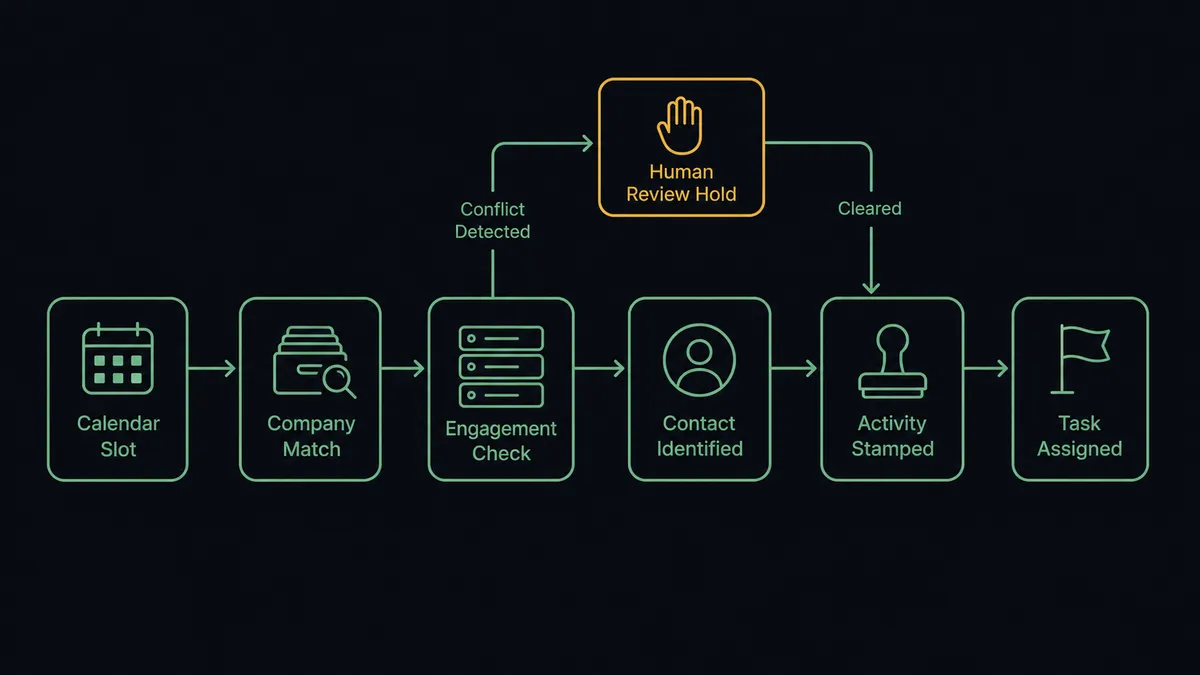
- Trigger: Calendly fires On Invitee Created the moment a client books a meeting.
- Match: The workflow calls List Companies in Accelo to match the invitee’s email domain, and Get Company for the account detail.
- Check the engagement: It calls List Jobs to see the account’s active work, so the meeting lands on the right engagement.
- Provision: New invitees get Create Contact against the matched company, so the person exists in the client record.
- File it: It calls Log Activity to stamp the booking, its time, and the invitee’s form answers onto the record.
- Open the prep: It calls Create Task assigned to the meeting owner, with the meeting context in the task body.
That is the “just connect them” answer. Bookings become filed activities and assigned prep, the client history stays complete, and the courier job disappears. On Invitee Canceled and On Mark Invitee as No-Show close the loop on the meeting lifecycle, so the record reflects what actually happened, not what was scheduled to happen.
Can an AI agent run it? (and why a human stays in the loop)
Yes, and the agent earns its place by reading the account, not just the booking. It holds the real actions as tools: List Companies, Get Company, List Jobs, Create Contact, Log Activity, Create Task, and on the Calendly side, Cancel Scheduled Event, Create One-Off Meeting, and Create Single-Use Scheduling Link. A routine check-in from an active client gets filed and tasked without ceremony. A booking from an unknown domain makes the agent look closer: is this a new contact at an existing client, or a genuinely new company? It holds Create Company for a person to confirm rather than minting a duplicate client record on a guess.
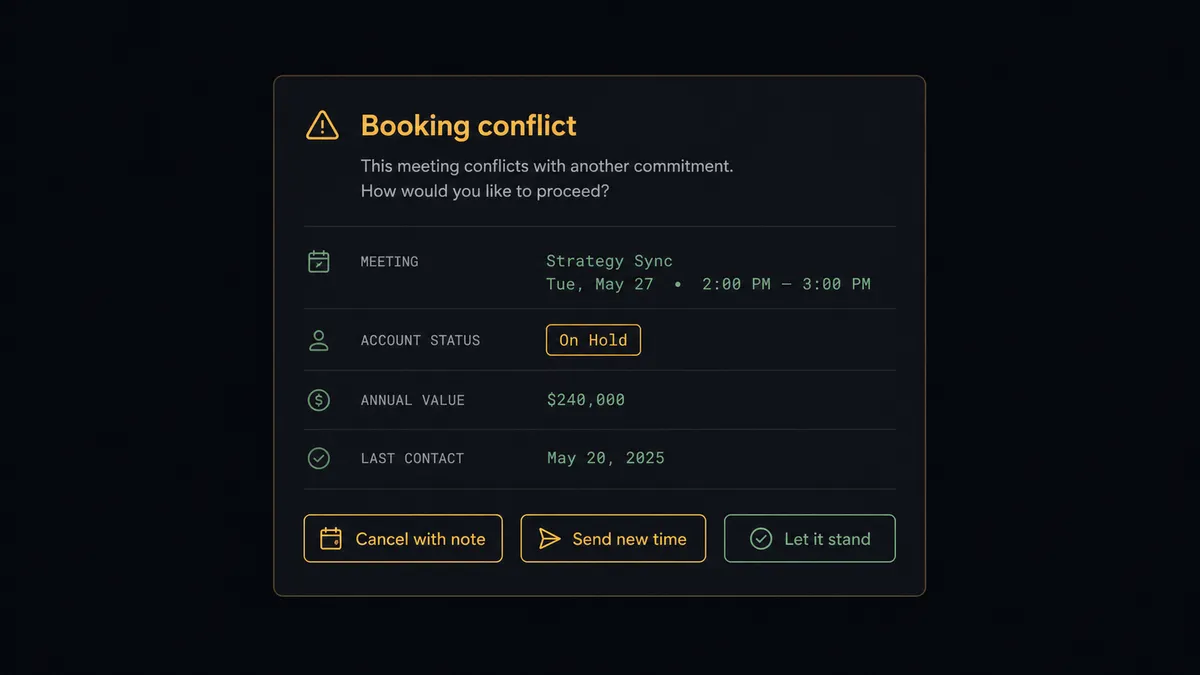
The consequential step is Cancel Scheduled Event, because a cancellation notice lands in a client’s inbox and speaks for your firm. When the agent finds a real conflict, a booking from an account on hold, a double-booked consultant, a meeting type that no longer exists, it does not act. It invokes a human-in-loop flow it holds as a callable tool. The workflow pauses and posts to your channel: “[Client] booked [meeting type] for [day and time]. Their account shows engagements on hold in Accelo. Cancel with a note, send a fresh time via Create Single-Use Scheduling Link, or let it stand?” A named person chooses. Only then does anything client-facing happen, and the decision, the approver, and the timestamp land in the audit trail.
Prospects call this a digital andon cord. Like Toyota’s line, where the cord stops production the moment something looks wrong, the workflow stops the line before your automation says anything to a client that a person did not sign off on.
FlowRunner vs n8n
n8n deserves respect here: its node library is enormous, the fair-code model means technical teams self-host it at very low cost, and for a developer, the flexibility is real. If your firm has an engineer who enjoys owning automation infrastructure, n8n can absolutely wire Calendly events to an API-driven system like Accelo.
The question is who maintains the workflow that touches your client relationships. FlowRunner is built so the operations lead who owns the client experience can build, read, and change this flow, with the human pause as a native agent step rather than an assembled pattern.
| What matters for this pair | FlowRunner | n8n |
|---|---|---|
| Human-in-the-loop on client-facing cancellations | Native. The agent invokes an approval flow as a callable tool before Cancel Scheduled Event | Wait and approval patterns exist; assembling them per flow is developer work |
| Who runs the flow | An AI agent reads the account context and picks actions as tools | Node graphs you design and maintain, with agent nodes available to wire in |
| Users included | Unlimited users on every tier | Self-host is free for those who run it; cloud tiers meter executions |
| Bring your own AI keys | Yes, BYOK | Yes, BYOK as well |
| Self-hosted option | Yes, cloud-hosted or self-hosted | Yes, a genuine strength of the fair-code model |
| Built-in compliance | Audit trails and RBAC from the $299/mo Professional tier | Full cloud compliance suite sits at the custom-priced Enterprise tier |
If you have engineering capacity and want maximum control of your automation stack, n8n is a credible choice. If the people who own client operations should own this workflow themselves, with approvals and audit trails built in from the mid tier, that is the case for this pairing.
Before and after
| Category | Before | After |
|---|---|---|
| Meeting filing | Bookings copied into Accelo by hand, when someone remembers | Log Activity stamps every booking on the right record automatically |
| Prep work | Consultants walk in cold or prep from memory | Create Task opens assigned prep with the invitee’s answers attached |
| On-hold accounts | Free hours delivered to accounts that stopped paying | The agent flags the conflict and a person decides before the meeting stands |
| No-shows | Known to Calendly, invisible to the client record | On Mark Invitee as No-Show writes the outcome back to Accelo |
| Client history | Gaps where unfiled meetings happened | A complete, timestamped activity trail per account |
What you can build
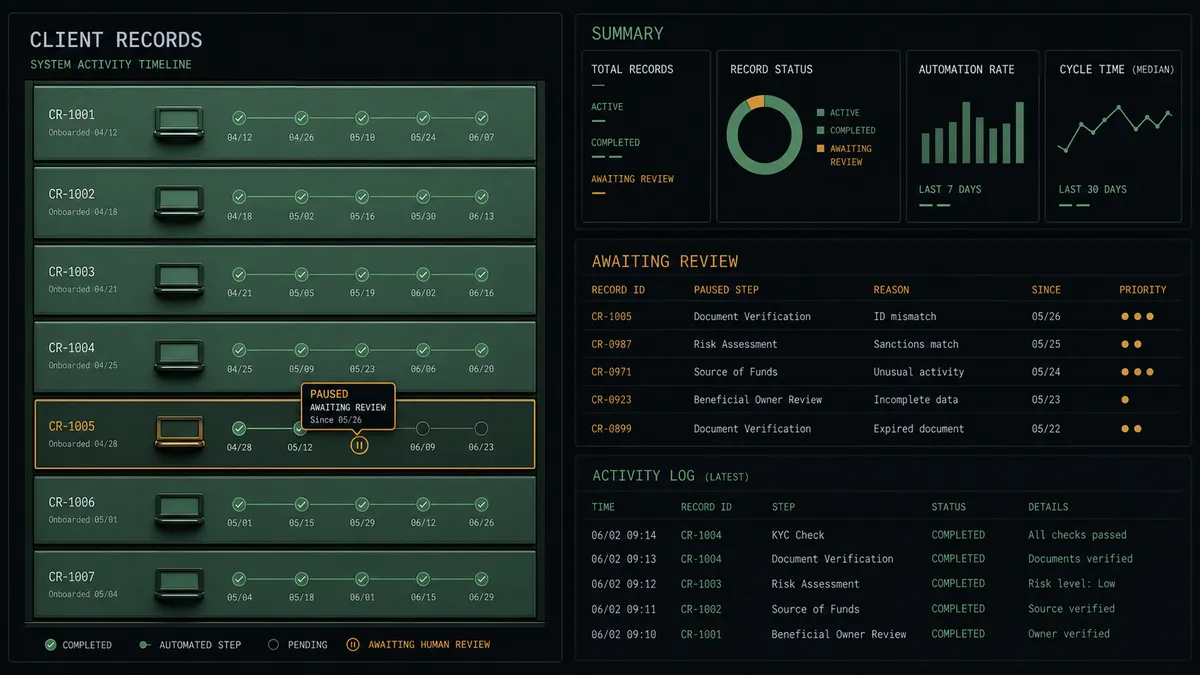
Booking to filed prep task. On Invitee Created fires, the agent matches the company, provisions the contact, logs the activity, and opens an assigned Create Task with the form answers, so every consultant walks in prepared.
On-hold account gate. Bookings from accounts with paused engagements pause the workflow. A named person chooses between a polite cancellation, a fresh time via Create Single-Use Scheduling Link, or honoring the meeting.
No-show follow-through. On Mark Invitee as No-Show fires, the agent logs the outcome with Log Activity and opens a follow-up task, so missed meetings become rebooking conversations instead of silence.
Routing form triage. On New Routing Form Submitted fires, the agent reads the answers, matches or holds the company record, and files the context where the person taking the call will actually see it.
Cancellation hygiene. On Invitee Canceled fires, the agent updates the record, closes the prep task, and, for active engagements, drafts a rebooking note for approval, keeping the client history honest end to end.
Getting started
Start on the free plan: 100 executions a month, every integration included, no credit card required, plus 14 days of Professional for new accounts. Both connectors are available on every tier, and every tier includes unlimited users and unlimited workflows.
Explore the integration details:
- Calendly integration (5 triggers and 3 actions covering bookings, cancellations, and scheduling links)
- Accelo integration (10 actions covering companies, contacts, jobs, tasks, and activities)
Start building free at flowrunner.ai or book a demo to see a live Calendly to Accelo workflow, cancellation approval and all.
Frequently asked questions
Is it free to connect Calendly and Accelo on FlowRunner?
You can build and run the connection on FlowRunner's free plan, which includes 100 executions a month and every integration with no credit card required, and new accounts also get 14 days of Professional. Both connectors are available on every FlowRunner tier, and every tier includes unlimited users and unlimited workflows.
Can I self-host the Calendly to Accelo workflow?
Yes. FlowRunner offers a cloud-hosted option and a self-hosted option, so the connection can run inside your own environment.
Does the AI agent need my own OpenAI or Claude key?
FlowRunner uses a bring-your-own-keys model, so you connect the AI provider key you already have. You are not locked to one model.
Can the agent cancel a meeting on its own?
No. Cancel Scheduled Event is client-facing, so it sits behind a human-in-loop step. When the agent finds a reason to cancel or rebook, such as a booking from an account on hold, it packages the situation and waits for a named person to approve, offer a new time with Create Single-Use Scheduling Link, or let the meeting stand.
Which Calendly events can start the Accelo workflow?
Five triggers are available: On Invitee Created, On Invitee Canceled, On Mark Invitee as No-Show, On Unmark Invitee as No-Show, and On New Routing Form Submitted. Most teams start with On Invitee Created for the booking flow and On Mark Invitee as No-Show for follow-up.
What lands in Accelo when a client books a call?
Three things: the booking is stamped on the client's record with Log Activity, a prep task is opened with Create Task and assigned to the meeting owner, and new contacts are provisioned with Create Contact against the matched company.