How to Connect Calendly with Adobe Workfront (With or Without an AI Agent)
Connect Calendly bookings to Adobe Workfront projects and tasks, optionally as an AI agent that stands up standard projects on its own and pauses for a delivery lead before it reshuffles team deadlines.
How do you connect Calendly to Adobe Workfront?
You connect Calendly to Adobe Workfront by having Calendly’s On Invitee Created trigger drive Workfront actions: the workflow calls Search Projects to check for an existing client project, then Create Project and Create Task to stand up the work, so a booked kickoff call becomes a real project with owners and due dates before anyone opens Workfront. FlowRunner is a visual AI-agent orchestration platform where automations run autonomously and pause for human judgment on the steps that carry real consequence. The same connection can run as an AI agent that reads each booking, builds standard projects on its own, and pauses for the delivery lead before a non-standard request or a canceled kickoff moves deadlines across the team.
The problem it solves
Today the gap between a booked call and a live project is filled by a coordinator. A client books a kickoff through Calendly. Someone sees the confirmation email, opens Adobe Workfront, checks whether a project already exists, creates one from a template if it does not, renames it, sets the planned dates to line up with the call, creates the prep tasks, and assigns them. If that person is out or the booking lands late on a Friday, the project gets created Monday and the prep window just shrank by a weekend.
The edges are worse than the happy path. A client books through the wrong event type and the project gets built against the wrong template. A routing form answer signals a scope the standard package does not cover, but nobody reads it until the kickoff call itself. A cancellation comes in and the project keeps marching: tasks come due for a kickoff that no longer exists, people prep for a meeting that was pulled two days ago, and the delivery lead finds out from a confused designer. The connection is not hard. The judgment calls hiding inside it are.
How it works: the connection
The connection listens to Calendly and writes to Adobe Workfront. Here is the plain version, grounded in the real connector actions.
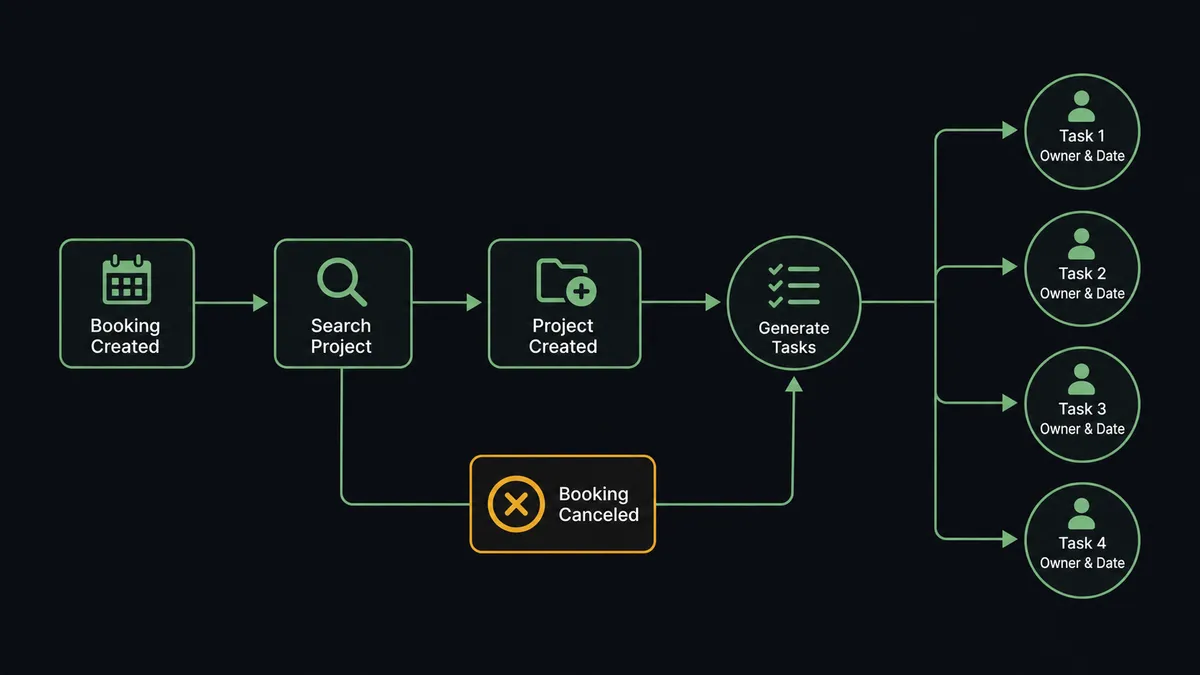
- Trigger: Calendly fires On Invitee Created when a client books the kickoff call.
- Read: The workflow reads the invitee name, email, event time, and the routing form answers that came with the booking.
- Check for the project: It calls Search Projects in Adobe Workfront to see whether a project already exists for this client, and Search Users to resolve the right owner.
- Create the project: If none exists, it calls Create Project with the client name, the scope from the routing form, and planned dates anchored to the booked call.
- Build the tasks: It calls Create Task for each kickoff prep item, then Update Task to set owners and due dates working backward from the call.
- Handle changes: When On Invitee Canceled fires, the workflow calls Search Tasks to find everything tied to the pulled date so the plan can move with the calendar.
That is the “just connect them” answer. Bookings become projects, prep tasks appear with real owners and real dates, and the calendar and the project plan stop drifting apart.
Can an AI agent run it? (and why a human stays in the loop)
Yes, and this is where the connection stops being a template-filler. An AI agent reads the booking in front of it and picks Workfront actions as tools: Search Projects, Create Project, Create Task, Update Task, Search Users, Search Issues. For a standard booking it matches the routing form answers to a delivery package, stands up the project, and assigns the prep tasks without anyone touching Workfront. For a booking that does not fit, it behaves differently, because it read the form instead of pattern-matching the event type.
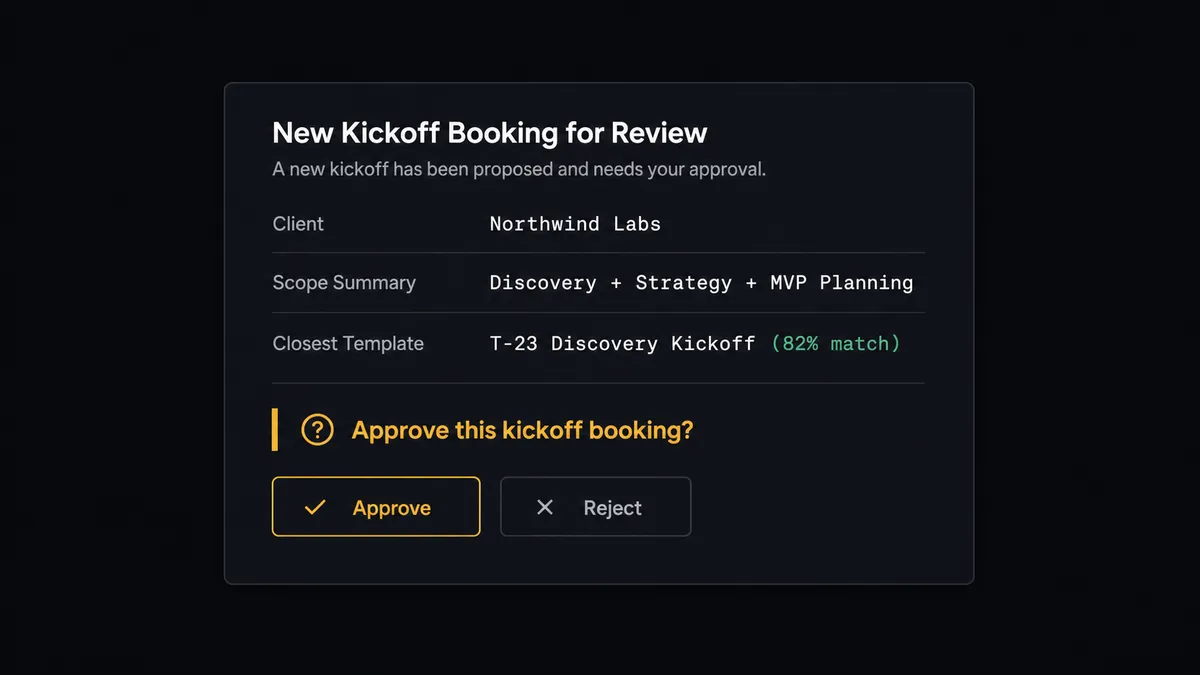
The consequential step is committing your team’s capacity. When the routing form signals scope outside the standard packages, the agent does not guess at a template. It gathers what a delivery lead would want: the form answers, the closest matching package, the open projects for that client from Search Projects, and any related items from Search Issues. Then it invokes a human-in-loop flow it holds as a callable tool. The workflow pauses and posts: “New kickoff booked for [client] on [date]. Routing form indicates scope beyond the standard package: [summary]. Closest template: [name]. Approve to create the project, or reply with a different template?” Only after the delivery lead answers does Create Project run. The same gate protects the cancellation path: when On Invitee Canceled fires, the agent drafts the reshuffled dates but pauses before Update Project and Update Task push new deadlines onto the team.
Prospects call this pattern a digital andon cord: like Toyota’s production line pull cord, the workflow stops the line the moment it hits uncertainty, and the person with context pulls it back into motion. The routine bookings build themselves. The ones that commit capacity or move other people’s deadlines wait for a named human, and that decision lands in the audit trail with an approver and a timestamp.
FlowRunner vs n8n
Technical teams comparing options for this pair will look hard at n8n, and there is real substance there. n8n has a very large node library, an active community with thousands of shared templates, and a fair-code model that lets developers self-host without a license fee. If you have an engineer who lives in workflow tooling, n8n gives them a lot of room to build.
The difference is who can run this connection and what happens at the judgment calls. FlowRunner is built for the operations team that owns the kickoff process, not just the engineer who wires it.
| What matters for this pair | FlowRunner | n8n |
|---|---|---|
| Human-in-the-loop before Create Project and deadline reshuffles | Native. The agent invokes an approval flow as a callable tool and pauses mid-run | Wait and approval nodes exist, but the pause is a step you wire, not a decision the agent makes |
| Who runs the flow | An AI agent reads the routing form, reasons, and picks Workfront actions as tools | A node graph a developer builds and maintains |
| Users included | Unlimited users on every tier | Cloud plans priced with execution limits; compliance features sit at the Enterprise tier |
| Bring your own AI keys | Yes, BYOK | Yes, n8n also supports your own provider keys |
| Self-hosted option | Yes, cloud-hosted or self-hosted | Yes, fair-code self-hosting |
| Pricing model | Transparent workflow-based tiers | Execution-based cloud pricing; full compliance suite requires custom Enterprise pricing |
If your team is developers who want maximum control over every node, n8n is a genuine fit. If the people who own client onboarding are operations people, and you want the project-creation and reshuffle decisions gated by a human with an audit trail on a $299/mo tier rather than a custom Enterprise contract, this pairing on FlowRunner is the better fit.
Before and after
| Category | Before | After |
|---|---|---|
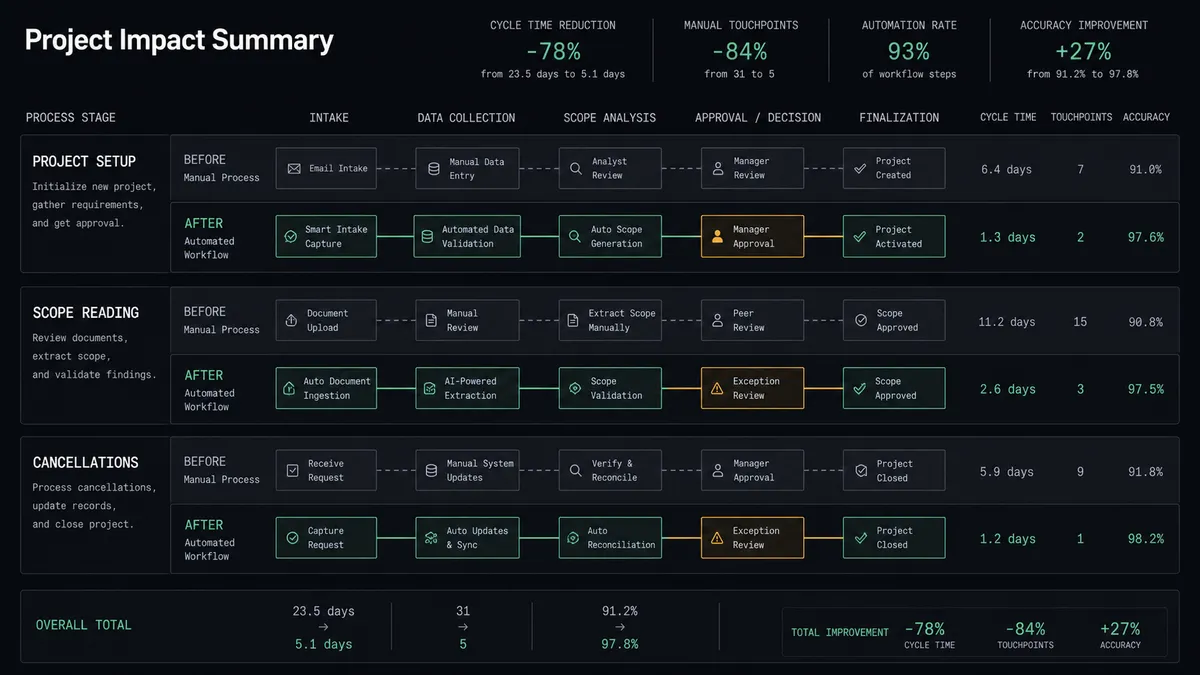
| Project setup | A coordinator watches for confirmation emails and builds each Workfront project by hand | The project, tasks, owners, and dates exist within moments of the booking |
| Scope reading | Routing form answers get read for the first time on the kickoff call itself | The agent reads the form at booking time and routes non-standard scope to the delivery lead |
| Cancellations | Tasks keep coming due for meetings that were pulled days earlier | The plan pauses, the reshuffle is drafted, and deadlines move only after approval |
| Weekend bookings | Friday evening bookings become Monday projects and the prep window shrinks | Bookings become projects at any hour, with the same human gate on the exceptions |
| Accountability | Nobody can say who decided to build a project against which template | Every project creation and date change carries an approver and a timestamp |
What you can build
Kickoff booking to full project. On Invitee Created fires, the agent checks Search Projects, then Create Project and Create Task build the delivery plan with owners and due dates anchored to the call. The coordinator’s checklist becomes an automated path.
Non-standard scope escalation. The agent reads every routing form submission from On New Routing Form Submitted, matches it against your delivery packages, and routes the ones that do not fit to the delivery lead with full context before any project exists in Workfront.
Cancellation-safe replanning. On Invitee Canceled fires, the agent finds every affected task with Search Tasks, drafts the new dates, and holds Update Project and Update Task until the delivery lead approves the reshuffle.
No-show follow-up work item. On Mark Invitee as No-Show fires and the agent creates a follow-up task with Create Task, assigned to the account owner resolved through Search Users, so a missed kickoff never silently disappears.
Rebooking with a fresh link. After a cancellation or no-show is resolved, the agent generates a Create Single-Use Scheduling Link in Calendly and attaches it to the follow-up task, so the client rebooks against the right event type and the loop closes in Workfront.
Getting started
Start on the free plan: 100 executions a month, every integration included, no credit card required, plus 14 days of Professional for new accounts. Both connectors are available on every tier, and every tier includes unlimited users and unlimited workflows, so the delivery lead who approves reshuffles does not cost you a seat.
Explore the integration details:
- Calendly integration (5 triggers and 3 actions covering bookings, cancellations, no-shows, and routing forms)
- Adobe Workfront integration (10 actions covering projects, tasks, issues, users, and documents)
Start building free at flowrunner.ai or book a demo to see a live Calendly to Adobe Workfront workflow, delivery-lead reshuffle approval and all.
Frequently asked questions
Is it free to connect Calendly and Adobe Workfront on FlowRunner?
You can build and run the connection on FlowRunner's free plan, which includes 100 executions a month and every integration with no credit card required, and new accounts also get 14 days of Professional. Both connectors are available on every FlowRunner tier, and every tier includes unlimited users and unlimited workflows.
Can I self-host the Calendly to Adobe Workfront workflow?
Yes. FlowRunner offers a cloud-hosted option and a self-hosted option, so the connection can run inside your own environment.
Does the AI agent need my own OpenAI or Claude key?
FlowRunner uses a bring-your-own-keys model, so you connect the AI provider key you already have. You are not locked to one model.
What happens when a booking does not fit a standard project template?
The agent stops and invokes a human-in-loop step. It posts the routing form answers, the closest matching template, and the current team capacity picture to your delivery lead, then waits for a decision before Create Project runs in Adobe Workfront.
Which Calendly events can drive Adobe Workfront actions?
Calendly offers five triggers: On Invitee Created, On Invitee Canceled, On New Routing Form Submitted, On Mark Invitee as No-Show, and On Unmark Invitee as No-Show. On Invitee Created and On Invitee Canceled carry most of the project work.
What does the workflow do when a client cancels the kickoff call?
On Invitee Canceled fires and the agent finds the affected project with Search Projects and Search Tasks. It drafts the date changes but pauses before Update Project and Update Task move deadlines for the team, so the delivery lead approves the reshuffle instead of discovering it.