How to Connect Calendly with Aha! (With or Without an AI Agent)
Connect Calendly customer calls to Aha! ideas and features, optionally as an AI agent that logs every request as an idea automatically and pauses for the product lead before anything is promoted onto the roadmap.
How do you connect Calendly to Aha!?
You connect Calendly to Aha! by having Calendly’s On New Routing Form Submitted trigger drive Aha! actions: the workflow resolves the product line with List Products, checks for existing requests with List Ideas, and logs the conversation with Create Idea, so every customer call that gets booked leaves a trace in your product management system before the call even happens. FlowRunner is a visual AI-agent orchestration platform where automations run autonomously and pause for human judgment on the steps that carry real consequence. The same connection can run as an AI agent that reads each booking, files ideas on its own, and pauses for the product lead before Create Feature turns a conversation into a roadmap commitment.
The problem it solves
Right now the path from a customer conversation to your Aha! workspace runs through memory. A customer books a call through Calendly and writes, in their own words, what they want to talk about, straight into the routing form. Then the call happens, notes land in a doc or nowhere, and three weeks later a product manager tries to reconstruct which customers asked for the export feature. The routing form answer, the cleanest signal in the whole chain, never reaches Aha! at all.
The failure at the edges is quieter but more expensive. Duplicate ideas pile up because nobody searched before filing, so demand for one capability splinters across four records and never looks big enough to prioritize. Or the opposite: an enthusiastic teammate promotes a single loud request straight onto the roadmap, engineers pick it up, and two sprints later everyone learns exactly one customer wanted it. The gap is not data entry. It is that filing an idea and committing a feature are decisions with completely different weight, and most integrations treat them the same.
How it works: the connection
The connection listens to Calendly and writes to Aha!. Here is the plain version, grounded in the real connector actions.
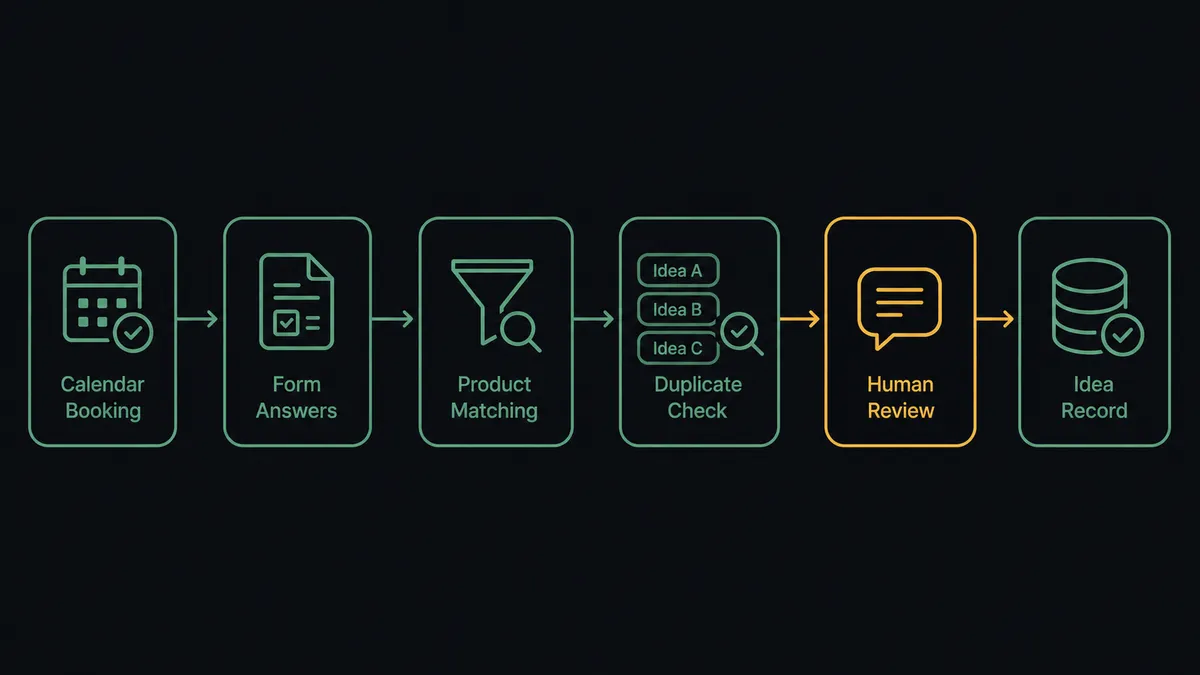
- Trigger: Calendly fires On New Routing Form Submitted when a customer books a call and describes what they want to discuss.
- Resolve the product: The workflow calls List Products in Aha! and matches the request to the right product line.
- Check for twins: It calls List Ideas and List Features for that product to see whether this request already exists in some form.
- File the idea: It calls Create Idea with the customer’s name, company, and their routing form answer as the description, so the idea reads in the customer’s own words.
- Add roadmap context: It calls List Releases and List Initiatives to note where any related work already sits, and attaches that context to the record.
- Close the loop: When the related feature ships, a follow-up flow calls Get Feature for status and generates a Create Single-Use Scheduling Link in Calendly so the requester books a walkthrough.
That is the “just connect them” answer. Every booked conversation becomes a searchable, attributed idea in Aha!, and the demand signal stops evaporating between the calendar and the roadmap.
Can an AI agent run it? (and why a human stays in the loop)
Yes, and this is where the pair gets interesting, because the agent can do the part that makes idea inboxes useless: reconciliation. The agent holds the Aha! actions as tools, List Products, List Ideas, List Features, Create Idea, Get Feature, List Releases, and reasons about each booking. A request phrased as “better reporting” and one phrased as “export dashboards to PDF” land on the same idea instead of two. A request that is really a support issue never pollutes the idea pool. Each new booking that matches an existing idea strengthens that idea’s demand story instead of fragmenting it.
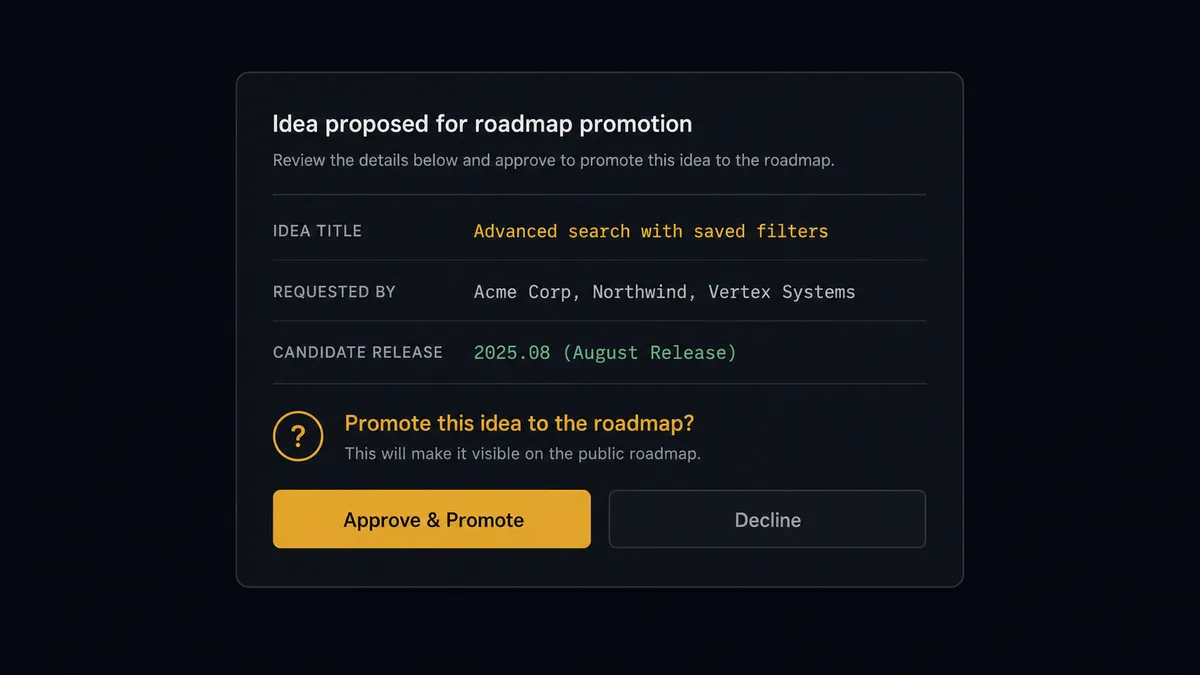
The consequential step is Create Feature. An idea costs nothing; a feature is a claim on engineering time and a public signal on the roadmap. So the agent never promotes on its own. When accumulated demand crosses the line the product lead set, it invokes a human-in-loop flow it holds as a callable tool. The workflow pauses and posts: “Idea [title] now has requests from [companies], most recently from the call booked on [date]. Related work in [release] per List Releases. Promote to a feature?” Only after approval does Create Feature run, followed by Update Feature to set the details. The feature record carries the source conversations, the approver, and the timestamp.
Prospects call this pattern a digital andon cord: like Toyota’s production line pull cord, the workflow stops the line the moment the next step carries weight. Filing ideas runs at machine speed. Committing the roadmap waits for the person accountable for it.
FlowRunner vs n8n
A technical team evaluating this pair will rightly consider n8n. Its node library is very large, its community has shared thousands of workflow templates, and its fair-code license means a developer can self-host it without paying for the platform. If your product ops tooling is owned by someone who is happy writing expressions and managing an instance, n8n can wire Calendly to Aha!.
The question is who owns this workflow in practice, and what happens at the promotion decision.
| What matters for this pair | FlowRunner | n8n |
|---|---|---|
| Human-in-the-loop before Create Feature | Native. The agent invokes an approval flow as a callable tool and pauses mid-run | Wait and approval nodes exist, but escalation logic is something a developer scripts |
| Who runs the flow | An AI agent reads bookings, reconciles duplicates, and picks Aha! actions as tools | A node graph a developer builds and maintains |
| Users included | Unlimited users on every tier | Cloud plans carry execution limits; compliance features sit at the Enterprise tier |
| Bring your own AI keys | Yes, BYOK | Yes, n8n also supports your own provider keys |
| Self-hosted option | Yes, cloud-hosted or self-hosted | Yes, fair-code self-hosting |
| Pricing model | Transparent workflow-based tiers | Execution-based cloud pricing; full compliance suite requires custom Enterprise pricing |
If you have engineers who want full control of every node and are comfortable operating the instance, n8n is a credible choice. If the people running voice-of-customer are product and ops folks, and you want audit-trailed roadmap gates on a $299/mo tier instead of a custom Enterprise contract, this pairing on FlowRunner is the better fit.
Before and after
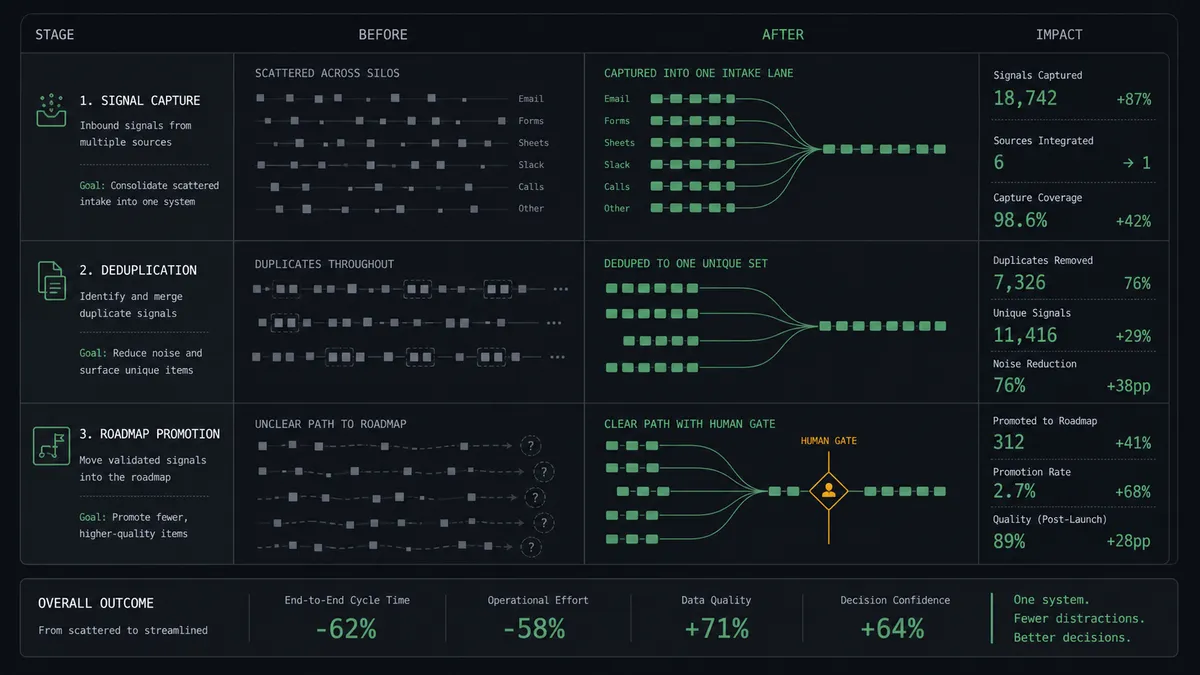
| Category | Before | After |
|---|---|---|
| Signal capture | Routing form answers die in the confirmation email | Every booked conversation lands in Aha! as an attributed idea |
| Duplicates | The same request splinters across multiple idea records | The agent reconciles new requests onto existing ideas |
| Roadmap promotion | Loud single requests jump the queue on enthusiasm | Promotion waits for evidence and a product lead’s approval |
| Traceability | Nobody remembers which customers asked for a shipped feature | Each feature lists its source conversations back to the calendar |
| Follow-up | Requesters learn about shipped features from the changelog, if at all | The workflow offers each requester a walkthrough booking when their feature ships |
What you can build
Booking to attributed idea. On New Routing Form Submitted fires, the agent matches the product with List Products, checks List Ideas for twins, and files Create Idea in the customer’s own words. Voice-of-customer capture stops depending on note-taking discipline.
Demand-gated roadmap promotion. The agent watches ideas accumulate requests and, when the evidence threshold is met, packages the case and waits for approval before Create Feature adds it to the roadmap.
Pre-call briefing. On Invitee Created, the agent pulls the customer’s open ideas with List Ideas and the status of related work with Get Feature and List Releases, and posts a one-card brief to the account owner before the call starts.
No-show signal hygiene. On Mark Invitee as No-Show, the agent annotates the linked idea so demand counts reflect conversations that actually happened, and clears the flag when On Unmark Invitee as No-Show fires.
Shipped-feature walkthrough loop. When a promoted feature ships, the agent finds its source requesters, creates a Create Single-Use Scheduling Link in Calendly, and invites each one to a walkthrough, turning a roadmap delivery into booked customer touchpoints.
Getting started
Start on the free plan: 100 executions a month, every integration included, no credit card required, plus 14 days of Professional for new accounts. Both connectors are available on every tier, and every tier includes unlimited users and unlimited workflows, so product, ops, and the approvers all work in the same place without seat math.
Explore the integration details:
- Calendly integration (5 triggers and 3 actions covering bookings, cancellations, no-shows, and routing forms)
- Aha! integration (10 actions covering products, ideas, features, releases, and initiatives)
Start building free at flowrunner.ai or book a demo to see a live Calendly to Aha! workflow, roadmap promotion gate and all.
Frequently asked questions
Is it free to connect Calendly and Aha! on FlowRunner?
You can build and run the connection on FlowRunner's free plan, which includes 100 executions a month and every integration with no credit card required, and new accounts also get 14 days of Professional. Both connectors are available on every FlowRunner tier, and every tier includes unlimited users and unlimited workflows.
Can I self-host the Calendly to Aha! workflow?
Yes. FlowRunner offers a cloud-hosted option and a self-hosted option, so the connection can run inside your own environment.
Does the AI agent need my own OpenAI or Claude key?
FlowRunner uses a bring-your-own-keys model, so you connect the AI provider key you already have. You are not locked to one model.
Can the agent add features to the Aha! roadmap on its own?
No, and that is deliberate. The agent creates ideas freely, but Create Feature is gated behind a human-in-loop step. It packages the idea, the matching requests it found with List Ideas, and the candidate release from List Releases, then waits for the product lead's approval.
Which Calendly events can drive Aha! actions?
Calendly offers five triggers: On Invitee Created, On Invitee Canceled, On New Routing Form Submitted, On Mark Invitee as No-Show, and On Unmark Invitee as No-Show. On New Routing Form Submitted is the richest one here because the form answers describe what the customer wants to discuss.
How does the workflow avoid filling Aha! with duplicate ideas?
Before creating anything, the agent calls List Ideas and List Features for the matched product. When an existing idea covers the request, it treats the booking as a new signal on that idea instead of creating a twin record.