How to Connect Calendly with Basecamp (With or Without an AI Agent)
Connect Calendly bookings to Basecamp projects so client kickoffs build their own workspace automatically, with an AI agent that pauses for a human before a canceled booking trashes project work.
How do you connect Calendly to Basecamp?
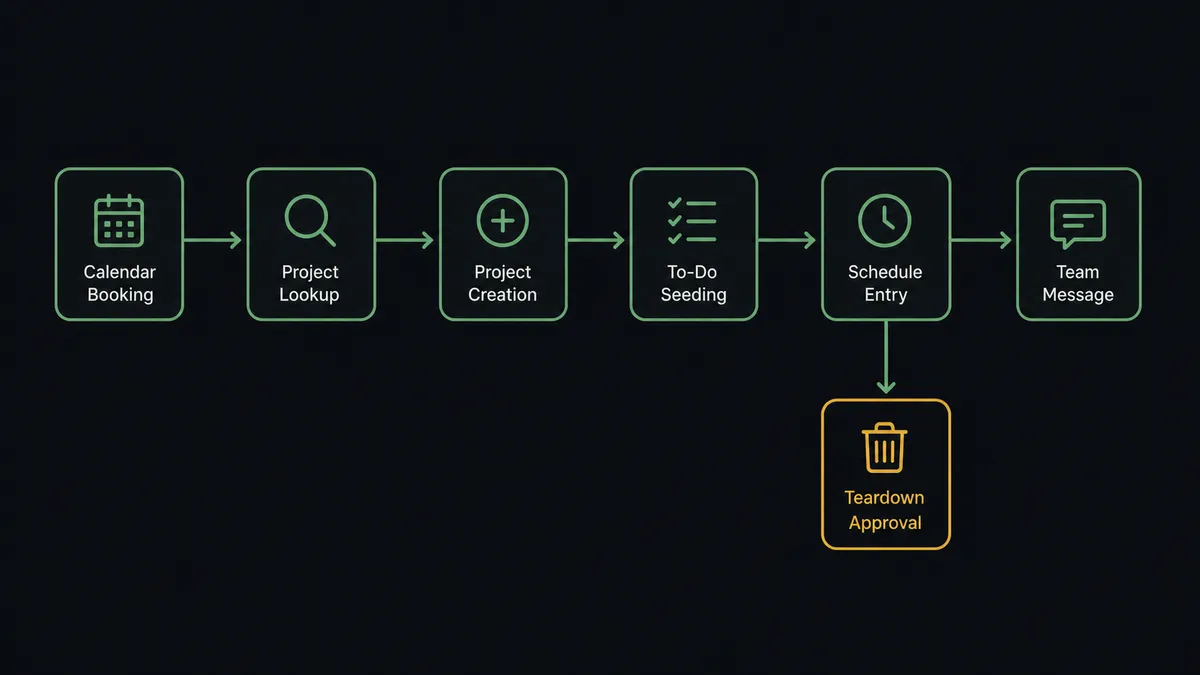
You connect Calendly to Basecamp by having Calendly’s On Invitee Created trigger drive Basecamp actions: the workflow calls List Projects to check for existing client work, Create Project to stand up a new workspace, Create To-do List and Create To-do to seed the prep tasks, Create Schedule Entry to put the call on the project calendar, and Create Message to brief the team. FlowRunner is a visual AI-agent orchestration platform where automations run autonomously and pause for human judgment on the steps that carry real consequence. When the connection runs as an AI agent, the agent also handles what bookings become later, and it stops for a named human before a cancellation turns into Trash Project on work your team already did.
The problem it solves
For services teams, a booked kickoff is the starting gun for a checklist nobody owns. Someone has to create the Basecamp project, name it the way the team names things, add the standard to-do lists, put the call on the schedule, and tell the team who is coming and what they asked for. When the coordinator is out or the week is heavy, projects get created hours before the call, or after it, and the routing form answers the client carefully filled in never make it into the project at all.
Cancellations are messier. A client cancels a kickoff, and the half-built project lingers as clutter, or worse, someone tidies up and trashes a project where a designer already uploaded exploration work. Reschedules fork into duplicate projects with slightly different names. The gap between the scheduling tool and the work tool is small enough that nobody automates it, and wide enough that it burns hours every week.
How it works: the connection
The connection listens to Calendly and writes to Basecamp. Here is the plain version, grounded in the real connector actions.
- Trigger: Calendly fires On Invitee Created when a kickoff call is booked.
- Check: The workflow calls List Projects to see whether this client already has an engagement in flight.
- Create: For a new engagement, it calls Create Project with your naming convention baked in.
- Seed: It calls Create To-do List and Create To-do to lay in the standard prep checklist, assigned and dated relative to the call.
- Schedule: It calls Create Schedule Entry so the call sits on the project calendar the team actually looks at.
- Brief: It calls Create Message announcing the engagement, and Create Document to file the routing form answers as the intake brief.
That is the “just connect them” answer. A booking becomes a named project, a seeded checklist, a calendar entry, and a team announcement, identically every time. On Invitee Canceled and On Mark Invitee as No-Show feed the recovery paths the same way.
Can an AI agent run it? (and why a human stays in the loop)
Yes, and the judgment calls are exactly the ones a template cannot make. The agent holds List Projects, Get Project, Create Project, Update Project, Create To-do, Complete To-do, Create Message, Create Campfire Line, Create Schedule Entry, and Trash Project as tools. When a booking arrives, it decides whether this is a new engagement or a returning client whose call belongs inside existing work, reading the routing form answers and the project list rather than string-matching a name. A reschedule updates the Create Schedule Entry instead of forking a duplicate project.
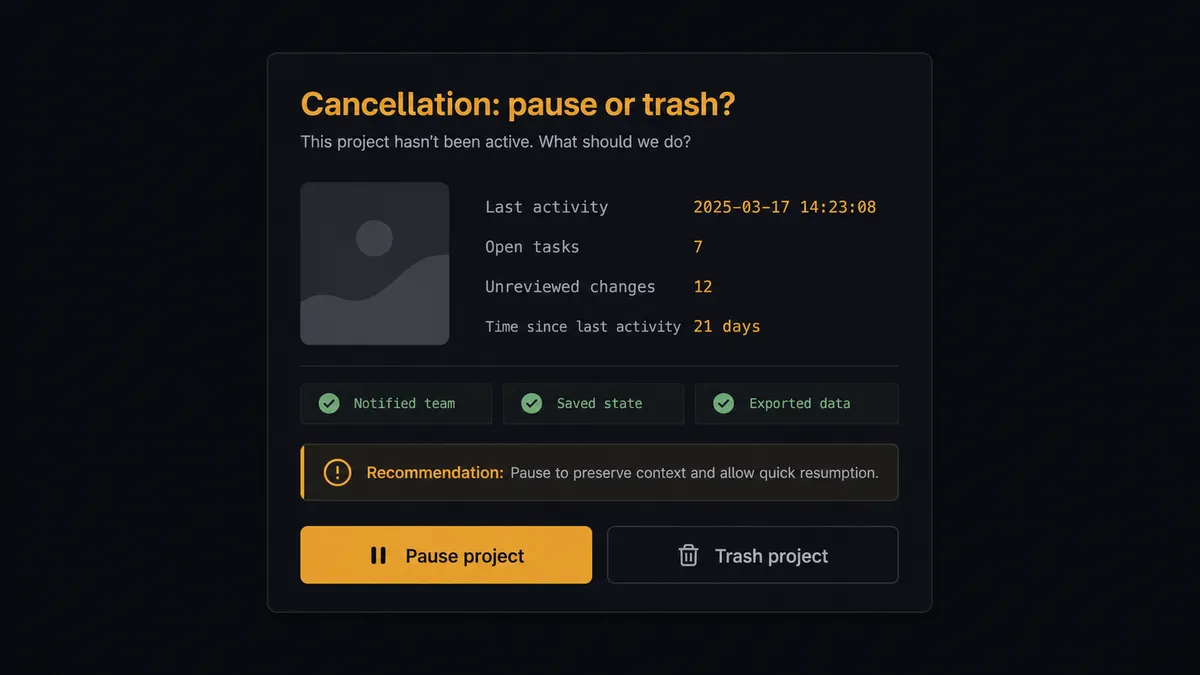
The consequential step is Trash Project, because it removes a workspace and everything the team put in it. When On Invitee Canceled fires, the agent does not tidy on reflex. It calls Get Project and List To-dos to measure how much work exists, then invokes a human-in-loop flow it holds as a callable tool. The workflow pauses and posts to the team channel: “Kickoff for [client] canceled. The project holds completed to-dos and an uploaded brief. Recommend pausing, not trashing, and sending a reschedule link. Approve the pause, or approve Trash Project?” A named approver decides, the chosen action runs, and the decision, the project state, and the timestamp land in the audit trail.
Everything routine stays autonomous: projects created, checklists seeded, briefs filed, the team pinged in Campfire. The agent asks only when work is about to disappear. Prospects call this the digital andon cord: like Toyota’s cord on the line, the workflow stops itself the moment a step is destructive, and a person restarts it knowing exactly what would be lost.
FlowRunner vs n8n
n8n can absolutely wire this pair, and its strengths are real: a free self-hosted community edition, a deep node library, and the flexibility to script any branch logic you can imagine. A technical team that wants to own its automation stack end to end will find n8n capable here, and its community has published plenty of scheduling-to-project patterns.
The difference is who does the wiring and where the judgment lives. FlowRunner is built around native human-in-the-loop and AI-agent orchestration, where “check how much work exists before trashing” is the agent reasoning with tools, not an expression tree you author and maintain.
| What matters for this pair | FlowRunner | n8n |
|---|---|---|
| Human-in-the-loop before Trash Project | Native. The agent invokes an approval flow as a callable tool with the project state attached | Wait and approval patterns you assemble and maintain yourself |
| Who runs the flow | An AI agent reads bookings and project state, reasons, picks actions as tools | Node graphs and expressions you build; agent nodes exist but flows are developer-built |
| Users included | Unlimited users on every tier | Varies by plan; full RBAC and SSO sit in the Enterprise tier |
| Bring your own AI keys | Yes, BYOK | Yes, n8n also supports your own keys; parity here |
| Self-hosted option | Yes, cloud-hosted or self-hosted | Yes, self-hosting is a core n8n strength |
| Pricing model | Transparent workflow-based tiers | Execution-based cloud pricing; self-hosting shifts cost to infrastructure and upkeep |
If your ops team includes someone who enjoys maintaining node graphs, n8n is a legitimate choice. If the people running client delivery are project managers, and the requirement is that no cancellation ever silently deletes work, this pairing gets there without anyone learning an expression language.
Before and after
Here is what changes operationally when the connection is live.
| Category | Before | After |
|---|---|---|
| Project setup | The coordinator builds each project by hand, sometimes after the call | Create Project, Create To-do List, and Create Schedule Entry run the moment the booking lands |
| Intake context | Routing form answers die in the scheduling tool | Create Document files the answers as the project brief before the team meets the client |
| Team awareness | Who booked what circulates by word of mouth | Create Message announces every new engagement in the project itself |
| Reschedules | Duplicate projects with near-identical names accumulate | The agent updates the existing schedule entry instead of forking a new project |
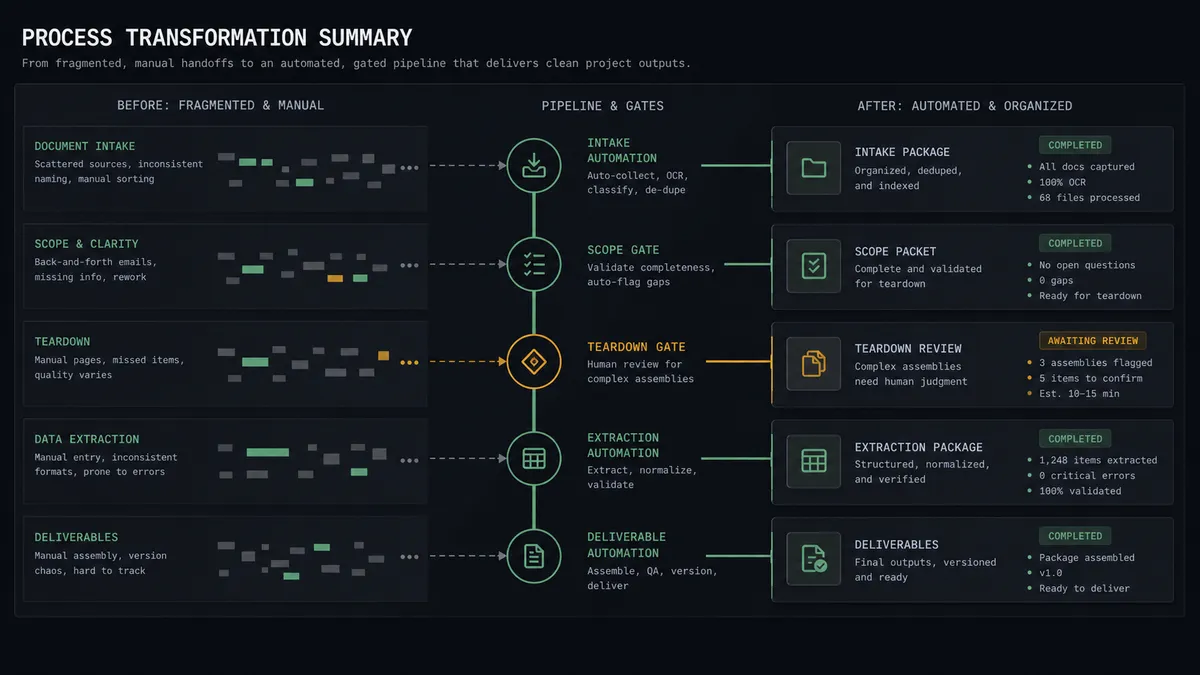
| Cancellations | Half-built projects linger, or someone trashes real work while tidying | Teardown waits for a named approver who sees the project state first |
What you can build
Kickoff to workspace. On Invitee Created fires. The agent checks List Projects, stands up Create Project with the standard structure, seeds prep with Create To-do List and Create To-do, and briefs the team with Create Message.
Returning-client routing. A known client books a check-in. The agent matches them to their existing engagement and adds a Create Schedule Entry and a Create To-do inside it, so one client never becomes three projects.
Routing form to project brief. On New Routing Form Submitted fires. The agent turns the answers into a Create Document brief and pings the assigned lead with Create Campfire Line, so discovery starts before the call does.
No-show follow-through. On Mark Invitee as No-Show fires. The agent posts the miss to the project with Create Comment, creates a follow-up to-do for the account lead, and holds the project open rather than letting it silently stall.
Guarded teardown. On Invitee Canceled fires on a dead engagement. The agent measures the project with Get Project and List To-dos, recommends pause or trash, and executes Trash Project only after a named approver signs off.
Getting started
Start on the free plan: 100 executions a month, every integration included, no credit card required, plus 14 days of Professional for new accounts. Both connectors are available on every tier, and every tier includes unlimited users and unlimited workflows, so the coordinator, the leads, and the whole delivery team work the same flows from day one.
Explore the integration details:
- Calendly integration (5 triggers and 3 actions across the scheduling lifecycle)
- Basecamp integration (37 actions across projects, to-dos, messages, and schedules)
Start building free at flowrunner.ai or book a demo to see a live Calendly to Basecamp workflow, teardown gate and all.
Frequently asked questions
Is it free to connect Calendly and Basecamp on FlowRunner?
You can build and run the connection on FlowRunner's free plan, which includes 100 executions a month and every integration with no credit card required, and new accounts also get 14 days of Professional. Both connectors are available on every FlowRunner tier, and every tier includes unlimited users and unlimited workflows.
Can I self-host the Calendly to Basecamp workflow?
Yes. FlowRunner offers a cloud-hosted option and a self-hosted option, so the connection can run inside your own environment.
Does the AI agent need my own OpenAI or Claude key?
FlowRunner uses a bring-your-own-keys model, so you connect the AI provider key you already have. You are not locked to one model.
What happens when a client cancels after the project is already set up?
The agent does not tear anything down on its own. It checks how much work exists in the project, posts a summary to your team channel with a recommendation to pause or trash, and waits for a named approver. Only after approval does Trash Project or Trash Recording run.
Which Calendly events can trigger a Basecamp action?
Calendly offers five triggers: On Invitee Created, On Invitee Canceled, On Mark Invitee as No-Show, On Unmark Invitee as No-Show, and On New Routing Form Submitted. On Invitee Created drives project setup, and On Invitee Canceled drives the guarded teardown path.
Does every booking create a brand-new Basecamp project?
No. The agent calls List Projects first and matches the invitee against existing work. A returning client's booking lands in their existing project as a Create To-do and Create Schedule Entry; only a genuinely new engagement gets Create Project.