How to Connect QuickBooks Online with CloudTalk (With or Without an AI Agent)
Turn overdue QuickBooks Online invoices into CloudTalk reminders and collection calls, run by an AI agent that segments accounts and pauses for a human before any message or call reaches a customer about money.
How do you connect QuickBooks Online to CloudTalk?
You connect QuickBooks Online to CloudTalk by running a scheduled workflow that finds overdue balances with List Invoices, pulls contact details with Get Customer, matches or creates the CloudTalk record with List Contacts and Add Contact, and sends a payment reminder with Send SMS or queues a call with Make Call (Click to Call). FlowRunner is a visual AI-agent orchestration platform where automations run autonomously and pause for human judgment on the steps that carry real consequence. The same connection can run as an AI agent that handles routine reminders on its own and pauses for a named human before any message or call reaches a customer whose account is large, disputed, or strategically important.
The problem it solves
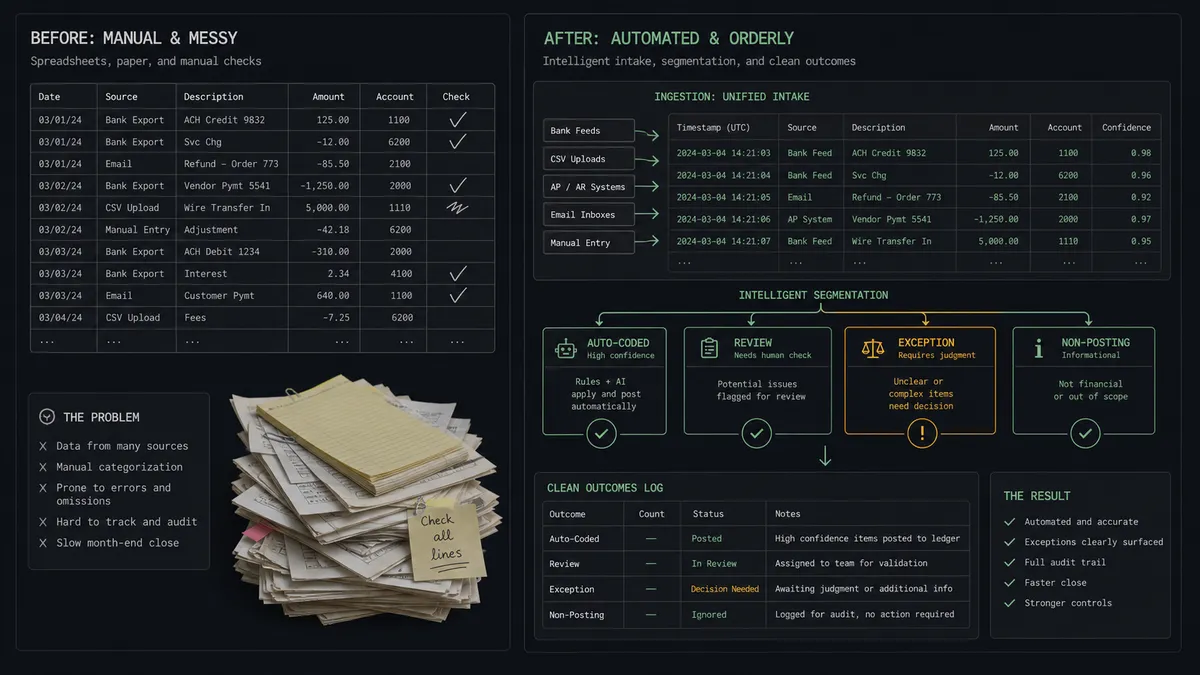
Right now collections is a spreadsheet and a guilty conscience. Once a week someone exports the aging report from QuickBooks Online, sorts by days overdue, and starts working the list: looking up phone numbers, sending texts from a shared phone, leaving voicemails, noting who promised what in a column that nobody else reads. The accounts that get chased are the ones that fit into that hour, not the ones that matter most. Balances age quietly because follow-up depends on someone finding the time.
The edges are worse than the routine. A reminder goes to a customer who already paid this morning, and the apology costs more goodwill than the balance was worth. An automated text lands on your largest account three days into a billing dispute your own team escalated. A long-standing customer going through a rough quarter gets the same terse template as a chronic non-payer. Collections is not just a sequence of messages, it is a series of relationship decisions, and a blind automation makes them badly.
How it works: the connection
The connection reads QuickBooks Online on a schedule and acts through CloudTalk. Here is the plain version, grounded in the real connector actions.
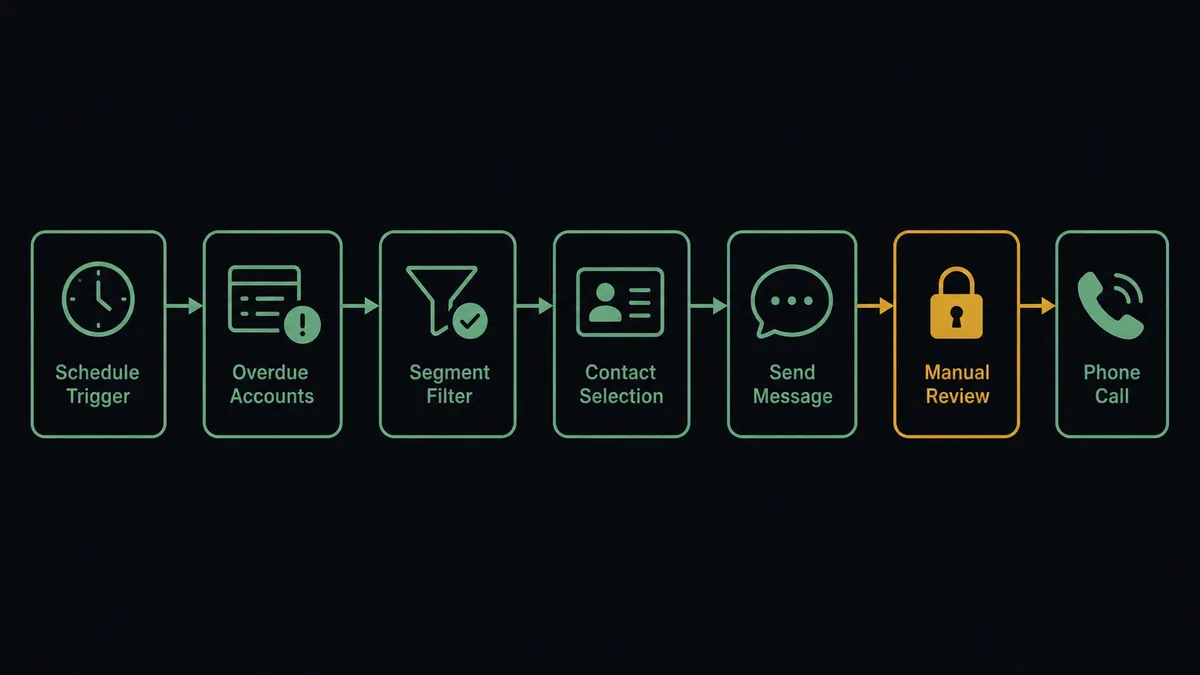
- Trigger: On a morning schedule, the workflow calls List Invoices filtered to unpaid invoices past their due date.
- Read: For each overdue invoice, it calls Get Customer to pull the account’s contact details, and Get Invoice for the balance and due date.
- Match the contact: It calls List Contacts in CloudTalk to find the customer by name or phone. If no record exists, Add Contact creates one with the phone number in E.164 format.
- Send the reminder: For routine accounts, it calls Send SMS with a short message carrying the invoice number, balance, and a payment link reference.
- Queue the call: For accounts that need a voice, Make Call (Click to Call) rings your collections agent first, then dials the customer once the agent answers.
- Log the outcome: Get Call and List Notes pull the call result and any notes, so the account’s story stays complete.
That is the “just connect them” answer. Overdue balances get chased on schedule, every reminder quotes the exact invoice and amount, and the aging report stops being a to-do list. Get Statistics adds a weekly view of call volume and outcomes for the operations review.
Can an AI agent run it? (and why a human stays in the loop)
Yes, and this is where the connection stops being a blast list. An AI agent holds the QuickBooks Online and CloudTalk actions as tools: List Invoices, Get Customer, List Contacts, Add Contact, Send SMS, Make Call (Click to Call). Before it sends anything, it reads the account. Days overdue, balance size, payment history, whether a payment just arrived via List Payments, whether this is a first slip or a pattern. A small balance, a few days late, from a customer who always pays gets a friendly reminder. The agent writes it, sends it, done.
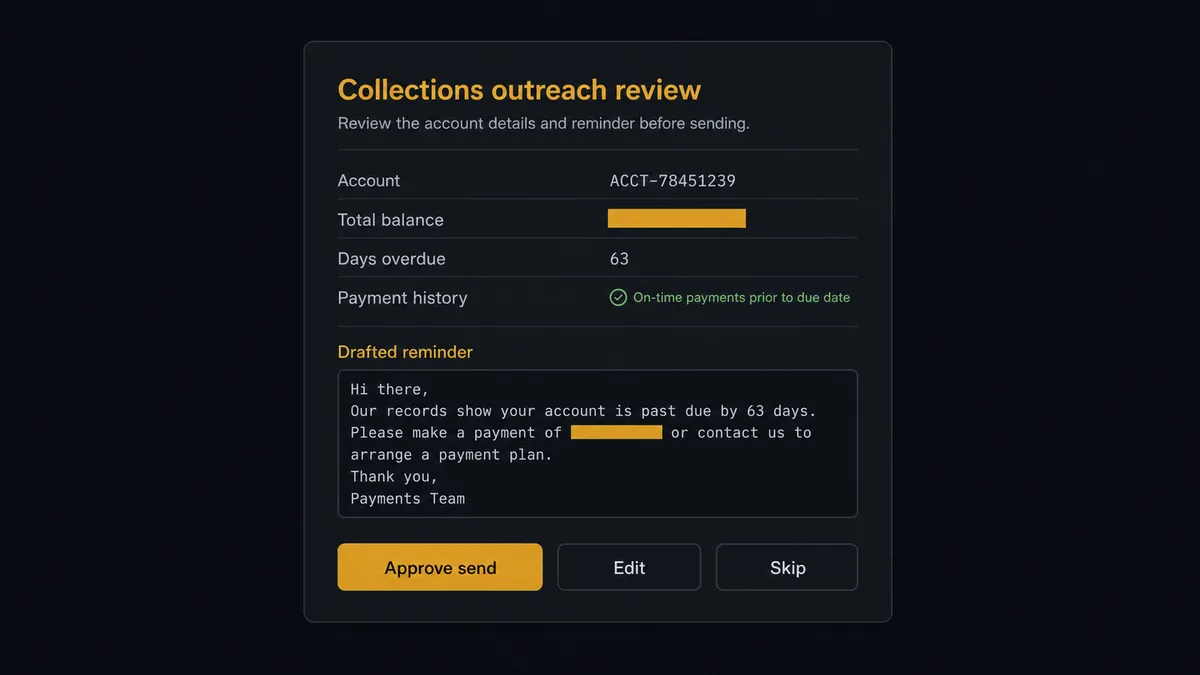
The consequential step is outreach itself, because every collections touch spends relationship capital. When the account is large, when the history shows a dispute, or when the customer is one your team would recognize by name, the agent does not send. It invokes a human-in-loop flow it holds as a callable tool and posts to your channel: “Overdue balance on a flagged account. Invoice numbers, total balance, and days overdue attached, plus payment history. Drafted reminder text below. Approve, edit, or skip?” A named approver decides. Only then does Send SMS go out, or Make Call (Click to Call) queue the conversation for a human collections agent with full context in front of them. The decision, the approver, and the timestamp land in the audit trail.
Prospects call this the digital andon cord: like Toyota’s production line pull cord, the workflow stops the line the moment it hits uncertainty. Routine reminders flow. The account where a wrong message costs real money waits for a person, every time.
FlowRunner vs Zapier
Zapier is the first tool most teams try for this pairing, and it earns the look. Its connector library covers both QuickBooks Online and CloudTalk, its template gallery makes a basic overdue-invoice alert quick to stand up, and a non-technical user can wire it without help. For an internal notification, “tell the team when an invoice goes overdue,” Zapier is genuinely fast.
The difference appears the moment the automation talks to your customers instead of your team. FlowRunner is built around native human-in-the-loop and AI-agent orchestration, where the agent decides which accounts need a person before any outreach fires.
| What matters for this pair | FlowRunner | Zapier |
|---|---|---|
| Human-in-the-loop before Send SMS or Make Call (Click to Call) reaches a customer | Native. The agent invokes an approval flow as a callable tool and waits | Available via added approval steps or paths, not a native agent decision |
| Who runs the flow | An AI agent reads the account, reasons, and picks actions as tools | Predefined step sequence you configure per Zap |
| Users included | Unlimited users on every tier | Priced by task volume; seats vary by plan |
| Bring your own AI keys | Yes, BYOK | AI features tied to Zapier’s own AI offering |
| Self-hosted option | Yes, cloud-hosted or self-hosted | Cloud only |
| Pricing model | Transparent workflow-based tiers | Per-task pricing that grows with every reminder sent |
If you need an internal alert when invoices go overdue, Zapier will handle it with less ceremony. If the workflow is going to text and call your customers about money, and you want a named human on every sensitive account with an audit trail behind each decision, this pairing is the better fit.
Before and after
| Category | Before | After |
|---|---|---|
| Follow-up cadence | Overdue accounts get chased when someone finds an hour for the aging report | Every overdue invoice is evaluated on schedule, every morning |
| Message accuracy | Reminders quote stale balances and occasionally hit accounts that already paid | Each message carries the live invoice number and balance pulled at send time |
| Sensitive accounts | The biggest and touchiest accounts get the same template as everyone else | Flagged accounts wait for a named approver before any outreach fires |
| Call preparation | Collections calls start with the agent scrambling through tabs for context | Make Call (Click to Call) connects the call with balance and history already packaged |
| Record keeping | Promises and outcomes live in one person’s spreadsheet column | Call outcomes and approvals land in the audit trail via Get Call and List Notes |
| Team visibility | Nobody knows what outreach went out until a customer replies | Get Statistics feeds a weekly view of reminders, calls, and outcomes |
What you can build
Morning dunning run. List Invoices finds the overdue set, the agent segments it, Send SMS handles the routine tail with exact balances, and flagged accounts queue for approval. The aging report becomes an exception list instead of a to-do list.
Pre-due-date courtesy nudge. A few days before an invoice falls due, the agent sends a short heads-up SMS with the amount and date. Fewer accounts ever reach overdue status, and the tone stays friendly because nothing is late yet.
Approved call queue with context. For accounts a human cleared for a call, Make Call (Click to Call) rings your collections agent first with the invoice list, balance, and history packaged in the workflow, then dials the customer. No cold starts.
Payment confirmation loop. When List Payments shows a payment arriving after a reminder, the agent sends a brief thank-you SMS and closes the follow-up thread, so nobody gets chased for a balance they settled this morning.
Weekly collections review. Get Statistics and List Calls feed a summary of reminders sent, calls connected, and outcomes logged, posted to the operations channel so the team sees the state of receivables outreach without opening either system.
Getting started
Start on the free plan: 100 executions a month, every integration included, no credit card required, plus 14 days of Professional for new accounts. Both connectors are available on every tier, and every tier includes unlimited users and unlimited workflows.
Explore the integration details:
- QuickBooks Online integration (56 actions covering customers, invoices, bills, payments, and P&L reports)
- CloudTalk integration (15 actions covering calls, SMS, contacts, and call statistics)
Start building free at flowrunner.ai or book a demo to see a live QuickBooks Online to CloudTalk workflow, outreach approval and all.
Frequently asked questions
Is it free to connect QuickBooks Online and CloudTalk on FlowRunner?
You can build and run the connection on FlowRunner's free plan, which includes 100 executions a month and every integration with no credit card required, and new accounts also get 14 days of Professional. Both connectors are available on every FlowRunner tier, and every tier includes unlimited users and unlimited workflows.
Can I self-host the QuickBooks Online to CloudTalk workflow?
Yes. FlowRunner offers a cloud-hosted option and a self-hosted option, so the connection can run inside your own environment.
Does the AI agent need my own OpenAI or Claude key?
FlowRunner uses a bring-your-own-keys model, so you connect the AI provider key you already have. You are not locked to one model.
What happens when an overdue account looks disputed or sensitive?
The agent holds all outreach. It packages the balance, the invoice list, the customer's payment history, and the reason it flagged the account, then invokes a human-in-loop step and waits for an approve, edit, or skip decision before Send SMS or Make Call (Click to Call) runs.
Which QuickBooks Online and CloudTalk actions does this workflow use?
On the QuickBooks Online side, List Invoices finds overdue balances and Get Customer pulls contact details. On the CloudTalk side, List Contacts matches the account, Add Contact creates missing records, Send SMS delivers reminders, Make Call (Click to Call) connects a collections call, and Get Call logs the outcome.
Does the workflow place phone calls without a person on the line?
No. Make Call (Click to Call) rings your chosen CloudTalk agent first and only dials the customer once that person answers, so every call is a human conversation. The workflow's job is to queue the right calls with the right context, not to talk to your customers.