How to Connect Airtable with Aircall (With or Without an AI Agent)
Connect Airtable records to Aircall contacts and insight cards so your base drives the phone system, optionally as an AI agent that syncs updates automatically and pauses for a human before Delete Contact removes anyone.
How do you connect Airtable to Aircall?
You connect Airtable to Aircall by having Airtable’s On New or Updated Record trigger drive Aircall actions: the workflow pulls the changed row with Find Record, matches it against the phone system with List Contacts, then calls Create Contact for new people or Update Contact for edits, so the base your team already maintains becomes the source of truth for who is calling. FlowRunner is a visual AI-agent orchestration platform where automations run autonomously and pause for human judgment on the steps that carry real consequence. The same connection can run as an AI agent that syncs every row change on its own and pauses for a human before Delete Contact removes anyone from the phone system.
The problem it solves
Plenty of teams run their CRM out of Airtable, and it works, right up until the phone rings. The base knows the account owner, the plan, the renewal date, and the open issue. Aircall knows a phone number. So an inbound call shows up as a bare number or a stale name, the rep asks the caller to spell their company again, and somewhere a founder winces. Keeping the two in sync manually means someone exports rows and retypes contacts, which happens exactly once per quarter, which means the phone system is always weeks stale.
The edges are worse. A rep edits a phone number in Airtable and the old number lives on in Aircall forever, so callback lists dial dead lines. Two teammates add the same account with slightly different names and the phone system grows twins. And the cleanup instinct is dangerous in the other direction: bulk-deleting Aircall contacts to match a filtered view will happily erase people who are mid-conversation with your team, because a spreadsheet filter does not know who called yesterday. Sync is easy. Safe sync is the actual problem.
How it works: the connection
The connection listens to Airtable and writes to Aircall. Here is the plain version, grounded in the real connector actions.
- Trigger: Airtable fires On New or Updated Record when a row is added or edited in the accounts table.
- Read: The workflow calls Find Record to pull the full row: name, company, phone numbers, email, status, owner.
- Match: It calls List Contacts in Aircall to search for an existing contact by phone number and email.
- Write the contact: No match means Create Contact; a match means Update Contact, so edits in the base land on the phone system within moments.
- Enrich the call screen: It calls Add Insight Cards with the account status, owner, and renewal date, so whoever answers sees the relationship, not just a number.
- Close the loop: It calls Update Record in Airtable to stamp the row with the sync outcome and the Aircall contact reference, so the base always shows what the phone system knows.
That is the “just connect them” answer. The base you already maintain drives the phone system, and the phone system stops being a stale copy nobody trusts.
Can an AI agent run it? (and why a human stays in the loop)
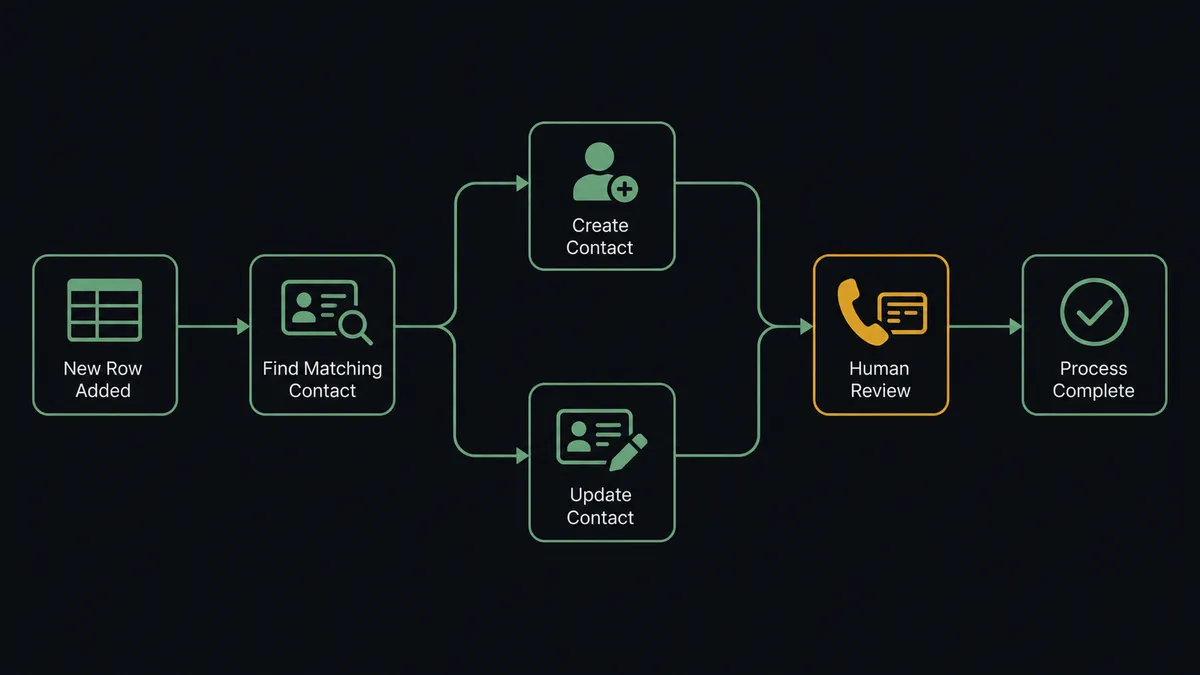
Yes, and the agent is what turns a fragile field mapping into something you can leave running. It holds the actions as tools: Find Record, Find Many Records, Update Record on the Airtable side; List Contacts, Get Contact, Create Contact, Update Contact, Delete Contact, Add Insight Cards on the Aircall side. A pass-through sync copies whatever the row says. The agent reasons first: a row whose phone number changed gets an update, a row that collides with an existing contact gets flagged as a duplicate instead of creating a twin, a row missing a phone number entirely gets sent back to the base with a note rather than becoming an uncallable contact.
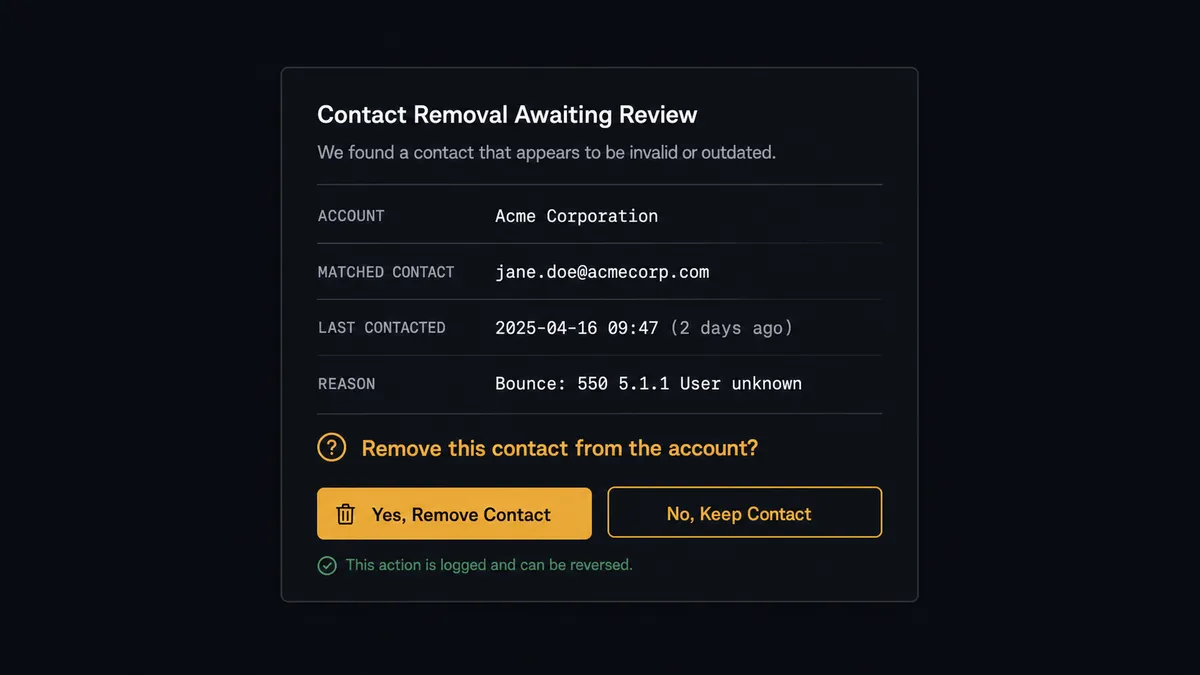
The consequential step is Delete Contact. It is the one action in this set that destroys something, and the thing it destroys is a working link between a person and your call history. So when a row gets marked churned or duplicate, the agent does not react. It pulls the matched contact with Get Contact, checks recent activity with List Calls, and invokes a human-in-loop flow it holds as a callable tool. The workflow pauses and posts: “Row [account] is marked churned. Matched Aircall contact [name] had a call [when] tagged [tag]. Delete the contact, or keep it and tag the account instead?” Only after a named approval does Delete Contact run, and the decision, approver, and timestamp land in the audit trail.
Prospects call this a digital andon cord: like Toyota’s production line pull cord, the workflow stops the line the moment the next step cannot be undone. Creates and updates flow at machine speed. Removals wait for a person.
FlowRunner vs Zapier
Zapier is the default answer for Airtable automations, and honestly so: it connects to both sides of this pair, its Airtable support is mature, and its template gallery has record-to-contact patterns ready to clone. If you need new rows to become Aircall contacts and nothing else, a Zap gets you there quickly.
The differences surface at the judgment calls and on the invoice.
| What matters for this pair | FlowRunner | Zapier |
|---|---|---|
| Human-in-the-loop before Delete Contact | Native. The agent invokes an approval flow as a callable tool and pauses mid-run | Available via added approval steps, not a decision informed by call history |
| Who runs the flow | An AI agent matches, dedupes, and picks actions as tools per record | A fixed field mapping applied to every row the same way |
| Users included | Unlimited users on every tier | Priced by task volume; seat limits vary by plan |
| Bring your own AI keys | Yes, BYOK | AI features tied to Zapier’s own AI offering |
| Self-hosted option | Yes, cloud-hosted or self-hosted | Cloud only |
| Pricing model | Transparent workflow-based tiers | Per-task pricing; a busy base burns tasks on every row edit |
If your base changes a few times a week, Zapier will keep up. If the base is your CRM, rows change all day, and a bad delete means losing a customer’s call thread, the agent-with-a-gate version on FlowRunner is the better fit.
Before and after
| Category | Before | After |
|---|---|---|
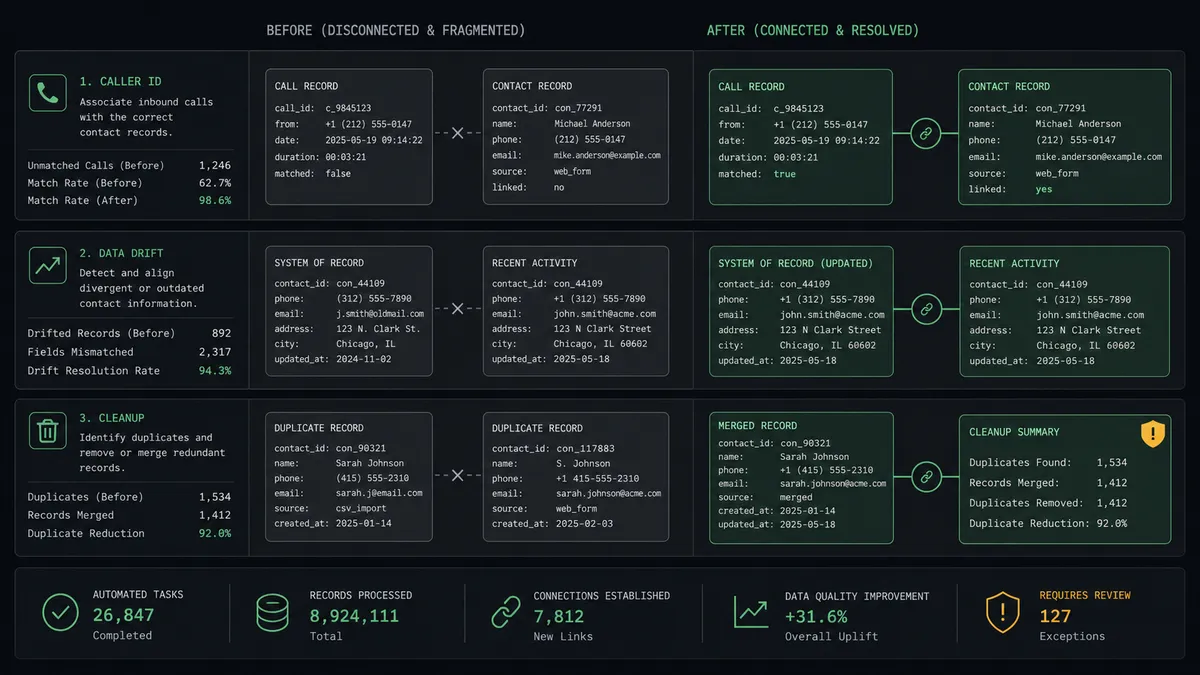
| Caller ID | Inbound calls show a bare number or a stale name | Every caller resolves to a current contact with account context |
| Data drift | Phone numbers edited in Airtable never reach Aircall | Row edits land on the phone system within moments |
| Duplicates | Twin contacts accumulate with each teammate’s additions | Collisions are caught at match time and routed to a human |
| Cleanup | Bulk deletes erase contacts mid-conversation | Every removal is reviewed against recent call activity first |
| Trust | Reps stop believing either system and keep private lists | The base and the phone system agree, with a stamped sync trail |
What you can build
Base-driven caller ID. On New or Updated Record fires, the agent matches with List Contacts and writes with Create Contact or Update Contact, so every inbound call resolves to a real account with a current name.
Call-screen account briefing. The agent maps status, owner, and renewal fields into Add Insight Cards, so a rep answering sees “renewal next month, owner Dana, open ticket” instead of a phone number.
Guarded offboarding. Rows marked churned queue a reviewed Delete Contact with recent-call evidence attached, and approved removals are stamped back to the base with Update Record.
Duplicate quarantine. When two rows resolve to one contact, the agent flags both rows with Update Record and asks a human which is canonical, instead of silently creating twins in the phone system.
Call outcomes back to the base. After calls, the agent applies Add Tags to Call and Comment on Call in Aircall, then writes the disposition into Airtable with Update Record, so the base shows which accounts were actually reached this week.
Getting started
Start on the free plan: 100 executions a month, every integration included, no credit card required, plus 14 days of Professional for new accounts. Both connectors are available on every tier, and every tier includes unlimited users and unlimited workflows, so everyone who edits the base and everyone who answers the phone is covered without seat math.
Explore the integration details:
- Airtable integration (2 triggers and 17 actions covering bases, tables, records, and comments)
- Aircall integration (33 actions covering calls, contacts, tags, and insight cards)
Start building free at flowrunner.ai or book a demo to see a live Airtable to Aircall workflow, delete approval and all.
Frequently asked questions
Is it free to connect Airtable and Aircall on FlowRunner?
You can build and run the connection on FlowRunner's free plan, which includes 100 executions a month and every integration with no credit card required, and new accounts also get 14 days of Professional. Both connectors are available on every FlowRunner tier, and every tier includes unlimited users and unlimited workflows.
Can I self-host the Airtable to Aircall workflow?
Yes. FlowRunner offers a cloud-hosted option and a self-hosted option, so the connection can run inside your own environment.
Does the AI agent need my own OpenAI or Claude key?
FlowRunner uses a bring-your-own-keys model, so you connect the AI provider key you already have. You are not locked to one model.
What stops the workflow from deleting the wrong Aircall contact?
Delete Contact is gated behind a human-in-loop step. When a record is marked churned or duplicate, the agent packages the Airtable row, the matched contact, and that contact's recent call activity, then waits for an approval before anything is removed.
Which Airtable events can trigger an Aircall action?
Airtable offers two triggers: On New Record and On New or Updated Record. On New or Updated Record is the one this pair leans on, because it catches both new accounts and edits to existing ones in a single stream.
How does the workflow handle two Airtable rows pointing at the same person?
The agent matches each row against Aircall with List Contacts before writing. When two rows resolve to one contact, it does not create a twin; it flags the collision back into Airtable with Update Record and asks a human which row is canonical.