How to Connect Airtable with Bland AI (With or Without an AI Agent)
Connect an Airtable call list to Bland AI phone outreach, optionally as an AI agent that validates every row, writes outcomes back to the base, and pauses for a human before any call is placed.
How do you connect Airtable to Bland AI?
You connect Airtable to Bland AI by having Airtable’s On New Record trigger feed a call queue: the workflow pulls each row with Find Record, validates the number and context, selects a conversation plan with List Pathways and Get Pathway, places the call with Send Call, and writes the outcome back with Update Record and Create Comment, so a row in your base becomes a completed, documented phone conversation. Bland AI has no triggers of its own, so the workflow always starts from the Airtable side, which is exactly where a call list lives anyway. FlowRunner is a visual AI-agent orchestration platform where automations run autonomously and pause for human judgment on the steps that carry real consequence. The same connection runs as an AI agent that manages the whole queue itself, with one firm rule: no call is placed until a named human releases it.
The problem it solves
Right now the call list in your Airtable base is a to-do list for a person. Appointment reminders, delivery confirmations, renewal check-ins, event follow-ups: the rows pile up faster than anyone can dial. Whoever owns the list works through it between other jobs, so calls happen late, in bursts, or not at all. The outcome column stays half empty, which means nobody trusts the base, which means the next campaign starts with a data cleanup instead of a dial tone.
Handing an unreviewed list to any automated dialer is the opposite failure. Bases collect junk: a row with a malformed number, a contact who asked not to be called, a duplicate entry that gets two calls in one afternoon, a note column that says “do not contact until dispute resolved” that no dialer reads. Volume without judgment turns a helpful reminder call into a complaint. The list needs to be worked fast, and it also needs to be worked carefully, and until now those were the same person’s job.
How it works: the connection
The connection listens to Airtable and calls through Bland AI, then closes the loop. Here is the plain version, grounded in the real connector actions.
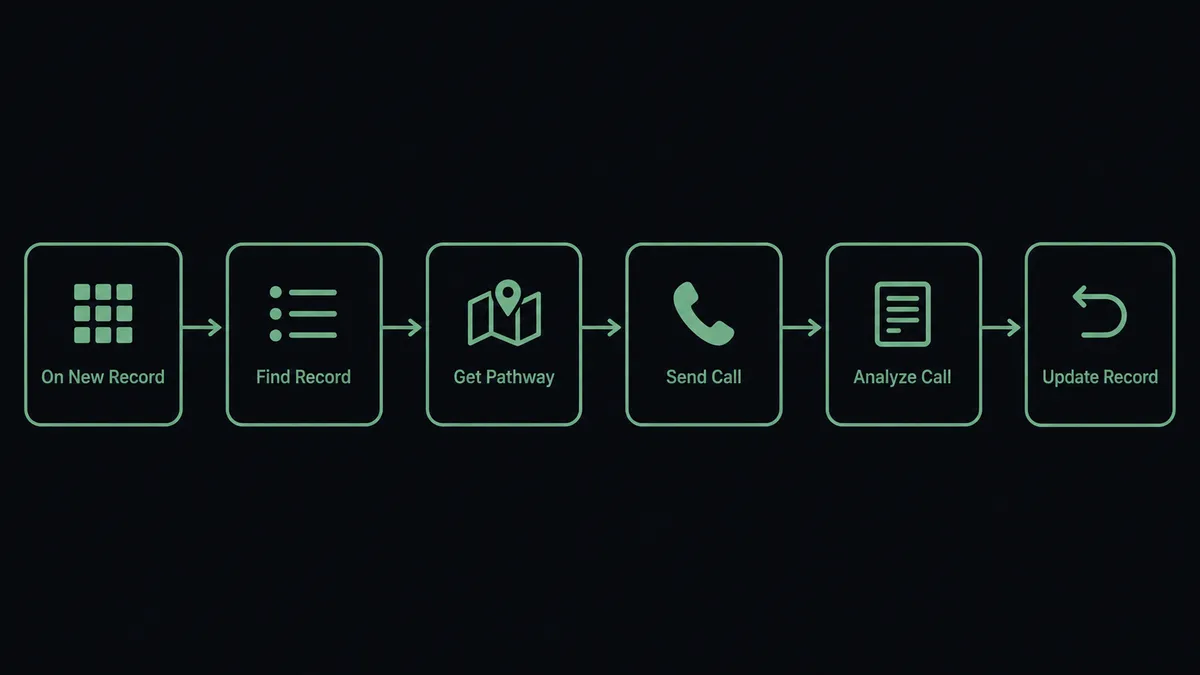
- Trigger: Airtable fires On New Record when a row lands in the call table.
- Read: The workflow calls Find Record to pull the contact, phone number, call purpose, and any notes on the row.
- Validate: It checks the number is usable and the row carries no do-not-call flag, marking failures with Update Record instead of dialing them.
- Prepare: It selects the conversation plan with List Pathways and Get Pathway to match the call purpose, whether that is a reminder, a confirmation, or a follow-up.
- Call: It calls Send Call, and the AI voice has a short, purposeful conversation with the contact.
- Write back: It calls Get Call Details and Analyze Call, then writes the outcome to the row with Update Record and attaches a transcript summary with Create Comment, so the base shows exactly what happened.
That is the “just connect them” answer. Rows become calls, calls become outcomes in the same base, and the half-empty status column fills itself.
Can an AI agent run it? (and why a human stays in the loop)
Yes, and the judgment lives in two places: what to dial and what to skip. An AI agent reads each row in full, including the free-text notes a rigid dialer ignores, and picks the Airtable and Bland AI actions it needs as tools. Find Record, Find Many Records, Update Record, Create Comment, List Pathways, Send Call, Analyze Call, Stop Call, Stop All Calls: that is the toolbox, and the agent chooses based on what the row actually says. A row whose note reads “customer disputing invoice” gets routed to a person, not a pathway. Two rows with the same number get collapsed into one call.
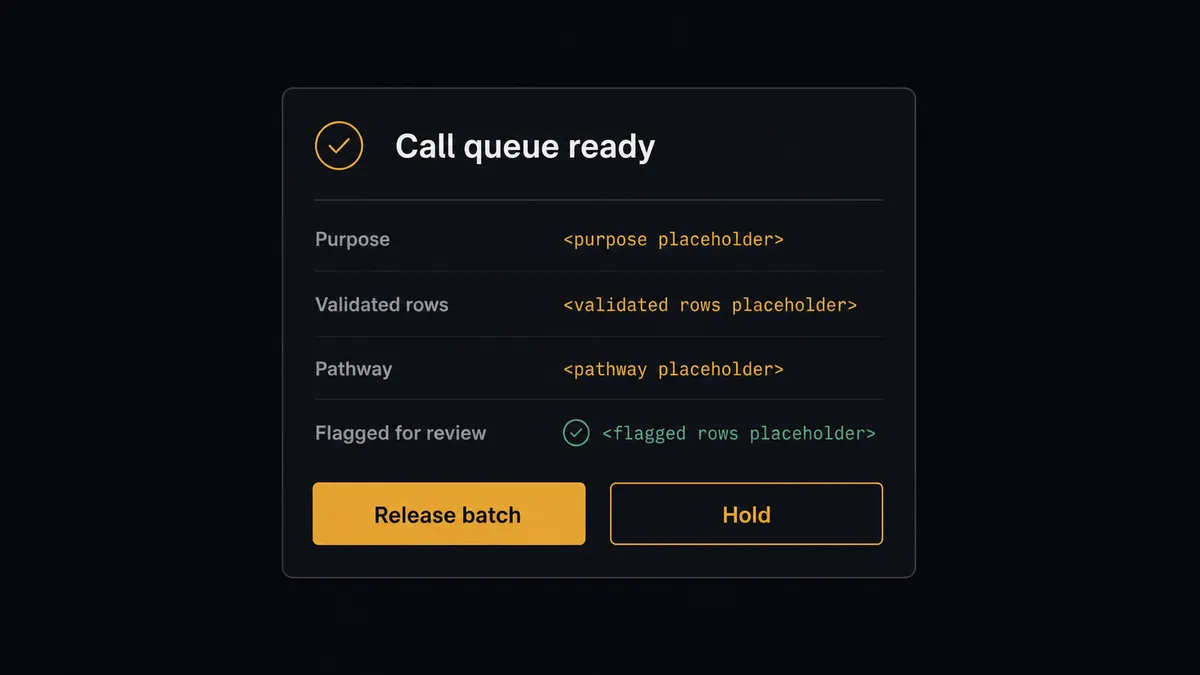
The consequential step is the dial itself. Send Call puts an AI voice on the phone with a real person on your behalf, and the agent never takes that step alone. It assembles the queue, validates every row, and then invokes a human-in-loop flow it holds as a callable tool. The workflow pauses and posts to your channel: “Call queue ready: [count] validated rows for [purpose], pathway [name]. Flagged for individual review: [rows and reasons]. Release the batch?” A person releases the batch, pulls individual rows, or holds everything in one click. Only then does Send Call begin dialing, with Stop Call and Stop All Calls available the whole time, and every outcome flows back to the base through Update Record.
The release gate is what makes the speed safe. The agent does the hours of validation and preparation; a person spends thirty seconds deciding whether this batch, today, should go out. Prospects call it the digital andon cord: like Toyota’s quality control pull cord, the workflow stops the line the moment it hits uncertainty, and your team pulls it back into motion.
FlowRunner vs Zapier
Most teams automating from an Airtable base reach for Zapier first, and for good reason. Zapier connects to both Airtable and Bland AI, its editor is quick to learn, and its template gallery makes a row-triggered action a same-day build. For a simple “new row does a thing” push, it is a fast, proven path.
The difference shows up when the thing is a phone call. FlowRunner is built around native human-in-the-loop and AI-agent orchestration, where the agent works the queue and a person owns the release.
| What matters for this pair | FlowRunner | Zapier |
|---|---|---|
| Human-in-the-loop on placing calls | Native. The agent invokes an approval flow as a callable tool and pauses before Send Call | Available by adding approval steps, not a native agent decision |
| Who runs the flow | An AI agent reads each row including free-text notes, reasons, and picks actions as tools | Predefined step sequence you configure per Zap |
| Users included | Unlimited users on every tier | Priced by task volume; seats vary by plan |
| Bring your own AI keys | Yes, BYOK | AI features tied to Zapier’s own AI offering |
| Self-hosted option | Yes, cloud-hosted or self-hosted | Cloud only |
| Pricing model | Transparent workflow-based tiers | Per-task pricing that gets harder to predict as call volume grows |
If a new row only needs to send an email or update another app, Zapier will do it well. If a new row can put a voice on the phone with your customer, and you want validation, a release gate, and outcomes written back to the base, this pairing is the better fit.
Before and after
| Category | Before | After |
|---|---|---|
| List throughput | Rows pile up faster than the owner can dial between other jobs | Validated rows are queued the moment On New Record fires |
| Call safety | Malformed numbers, duplicates, and do-not-call rows get dialed by accident | The agent validates every row and routes flagged ones to a person |
| Release control | Whoever runs the list decides alone what goes out, undocumented | A named approver releases each batch, captured in the audit trail |
| Outcome capture | The status column stays half empty and the base loses trust | Update Record and Create Comment file every outcome and transcript summary |
| Course correction | A bad campaign is discovered after the complaints arrive | Stop Call and Stop All Calls halt in-flight work the moment something looks wrong |
What you can build
Call list to outcomes, one gate. On New Record fires. The agent validates with Find Record, prepares with Get Pathway, and a person releases the batch. Send Call dials, and Analyze Call plus Update Record fill the outcome column the base owner used to chase by hand.
Appointment reminder queue. Rows for tomorrow’s appointments enter the table. The agent queues reminder calls in the right window, a person releases them, and confirmations or reschedule requests land back on each row for the scheduler to act on.
Missed-call follow-up. Rows added from a missed-call log get a return call proposed with the caller’s context on the row. Flagged entries, like a note about an open dispute, route to a person instead of the pathway.
Renewal check-in campaign. A filtered batch of accounts nearing renewal is loaded into the table with Create Records. The agent works it in released batches, and Analyze Call’s structured answers, interested, needs a rep, declined, are written back so the team calls only the rows that need a human.
Post-call escalation routing. When Analyze Call reports an unhappy customer or an unanswered question, the agent updates the row, adds the transcript summary with Create Comment, and creates a follow-up row assigned to a person, so no call ends as a dead end in the base.
Getting started
Start on the free plan: 100 executions a month, every integration included, no credit card required, plus 14 days of Professional for new accounts. Both connectors are available on every tier, and every tier includes unlimited users and unlimited workflows.
Explore the integration details:
- Airtable integration (2 triggers and 17 actions covering bases, tables, records, and comments)
- Bland AI integration (11 actions covering calls, pathways, transcripts, and recordings)
Start building free at flowrunner.ai or book a demo to see a live Airtable to Bland AI workflow, batch release and all.
Frequently asked questions
Is it free to connect Airtable and Bland AI on FlowRunner?
You can build and run the connection on FlowRunner's free plan, which includes 100 executions a month and every integration with no credit card required, and new accounts also get 14 days of Professional. Both connectors are available on every FlowRunner tier, and every tier includes unlimited users and unlimited workflows.
Can I self-host the Airtable to Bland AI workflow?
Yes. FlowRunner offers a cloud-hosted option and a self-hosted option, so the connection can run inside your own environment.
Does the AI agent need my own OpenAI or Claude key?
FlowRunner uses a bring-your-own-keys model, so you connect the AI provider key you already have. You are not locked to one model.
Can a row in the base trigger a phone call without anyone approving it?
No. Send Call is held behind the human-in-loop step by design. The agent validates the row, prepares the pathway, and posts the queued calls to your channel, then waits. Calls are only placed after a named approver releases them, and each release is captured in the audit trail.
Which Airtable events can start the workflow?
Airtable offers two triggers: On New Record and On New or Updated Record. On New Record fires when a row lands in the call table, and On New or Updated Record also fires when someone edits a row, which suits bases where a status column marks rows as ready to call. Bland AI has no triggers, so the workflow always starts from the Airtable side.
What gets written back to the base after a call?
The workflow calls Get Call Details and Analyze Call, then writes the outcome to the row with Update Record and attaches a transcript summary with Create Comment, so the base becomes the system of record for the whole campaign.