How to Connect Airtable with Crisp (With or Without an AI Agent)
Connect Airtable records to Crisp profiles and conversations, optionally as an AI agent that enriches chat profiles from your base automatically and pauses for a human before Send Message starts a proactive conversation with a customer.
How do you connect Airtable to Crisp?
You connect Airtable to Crisp by having Airtable’s On New or Updated Record trigger drive Crisp actions: the workflow pulls the row with Find Record, matches the contact with List People and Get Person, and stamps the account context onto the chat profile with Update Person, so the person answering chat sees the plan, renewal date, and owner the moment the customer types. FlowRunner is a visual AI-agent orchestration platform where automations run autonomously and pause for human judgment on the steps that carry real consequence. The same connection can run as an AI agent that enriches profiles silently on its own, and pauses for a named human before Send Message turns a record change into an unprompted message in a customer’s widget.
The problem it solves
Right now everything your company knows about an account lives in Airtable, and none of it is visible to the person answering chat. A customer opens the widget and asks about their renewal, and the teammate replies while alt-tabbing to the base, searching for the row, and hoping it is current. The conversation your customer experiences is slower and dumber than your data actually is. Meanwhile the base fills with signals worth acting on, a renewal ninety days out, an order stuck in a status, an account owner change, and none of them ever reach the customer, because reaching out means someone noticing the field change and writing a message by hand.
The failure modes sit at both extremes. Teams that never message proactively let renewals lapse in silence and let stuck orders become angry tickets. Teams that wire up naive automation do worse: a record edit fires a template into a customer’s chat at the wrong moment, out of context, sometimes twice, and the widget your customers trusted for help starts feeling like a marketing channel. The problem is not connecting the two systems. It is knowing which record changes are context and which are conversations.
How it works: the connection
The connection listens to Airtable and writes to Crisp. Here is the plain version, grounded in the real connector actions.
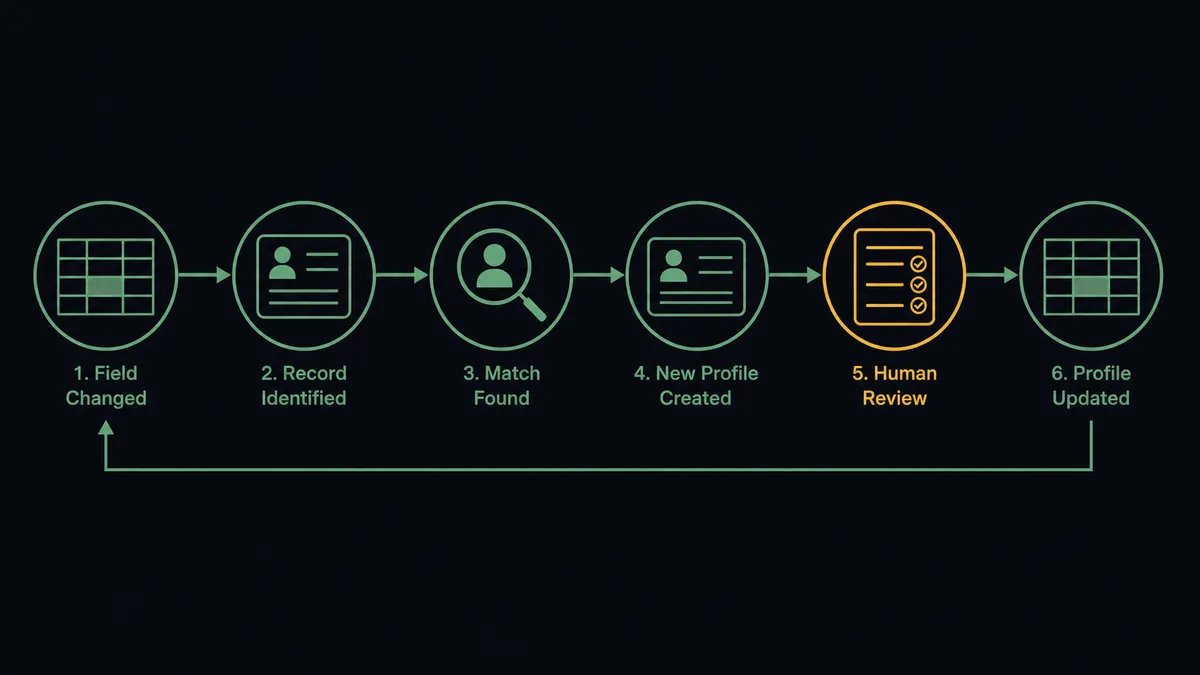
- Trigger: Airtable fires On New or Updated Record when an account field changes on your accounts table.
- Read: The workflow calls Find Record to pull the full row: plan, renewal date, status, and account owner.
- Match: It calls List People and Get Person in Crisp to find the profile with the record’s email.
- Provision: If the contact is new to chat, it calls Create Person so the profile exists before the first conversation.
- Enrich: It calls Update Person to stamp the account fields onto the profile, silently, with nothing sent to the customer.
- Close the loop: It calls Update Record or Create Comment in Airtable to note the sync, so the base shows when chat context was last refreshed.
That is the “just connect them” answer. The base becomes the memory behind the chat, and support stops alt-tabbing mid-conversation.
Can an AI agent run it? (and why a human stays in the loop)
Yes, and the agent’s real job here is judgment about attention. Every record change raises the same question: is this context, or is this a conversation? A plan-field correction is context; Update Person, done, silent. A renewal entering its final window on an account whose recent chats, read via Get Conversation and List Messages, show unresolved frustration is a conversation, and a template is the worst possible way to start it. The agent holds Find Record, Find Many Records, List People, Get Person, Update Person, Create Conversation, and Send Message as tools, and reasons about which the moment calls for.
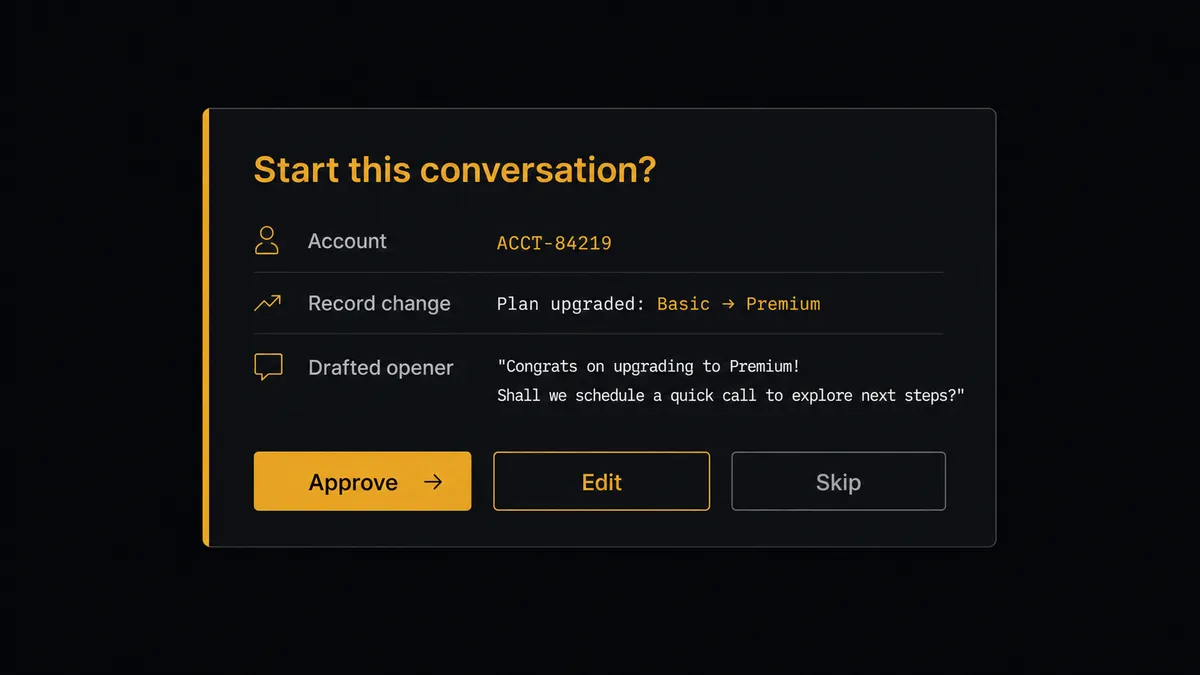
The consequential step is the unprompted message. Send Message into a customer’s widget is your company starting a conversation the customer did not ask for, in the channel they reserved for getting help. Before that step, the agent invokes a human-in-loop flow it holds as a callable tool. The workflow pauses and posts to the account owner: “Renewal window opened for [account]. Their record shows [status], their recent chats mention [topic]. Drafted opener: [draft]. Approve to send, edit, or skip.” One click decides it. Silent enrichment never waits for anyone; customer-visible words always do. And when the agent is unsure which side of the line a change falls on, it treats it as customer-visible and asks.
Prospects call this pattern a digital andon cord: like Toyota’s quality control pull cord, the workflow stops the line the moment it hits uncertainty, and your team pulls it back into motion. Your data reaches the conversation. Your customers never hear from a database.
FlowRunner vs Zapier
Zapier is the natural first stop for connecting Airtable to a chat tool, and it has earned that position. Its Airtable integration is among its most polished, setup is fast, and the template gallery covers record-to-message patterns out of the box. For a contained, low-stakes notification flow, it is genuinely quick to stand up.
The difference shows up because one of this pair’s two actions is a message inside a customer’s chat widget. FlowRunner is built around native human-in-the-loop and AI-agent orchestration, where the agent distinguishes silent enrichment from customer-visible outreach and routes only the second through a person.
| What matters for this pair | FlowRunner | Zapier |
|---|---|---|
| Human-in-the-loop before Send Message reaches a customer | Native. The agent invokes an approval flow as a callable tool and pauses until the account owner decides | Available via added approval steps you insert manually, not a native agent decision |
| Who runs the flow | An AI agent weighs each record change and picks actions as tools | Predefined step sequence that fires the same way on every record change |
| Users included | Unlimited users on every tier | Priced by task volume; seats vary by plan |
| Bring your own AI keys | Yes, BYOK. Connect the AI provider key you already have | AI features tied to Zapier’s own AI offering |
| Self-hosted option | Yes, cloud-hosted or self-hosted | Cloud only |
| Pricing model | Transparent workflow-based tiers with clear execution limits | Per-task pricing that is hard to predict as record volume grows |
If all you need is profile fields kept in sync, Zapier will do it. If your base is going to start conversations with customers, and you want a person approving every unprompted message with an audit trail behind it, that is where FlowRunner is the better fit.
Before and after
| Category | Before | After |
|---|---|---|
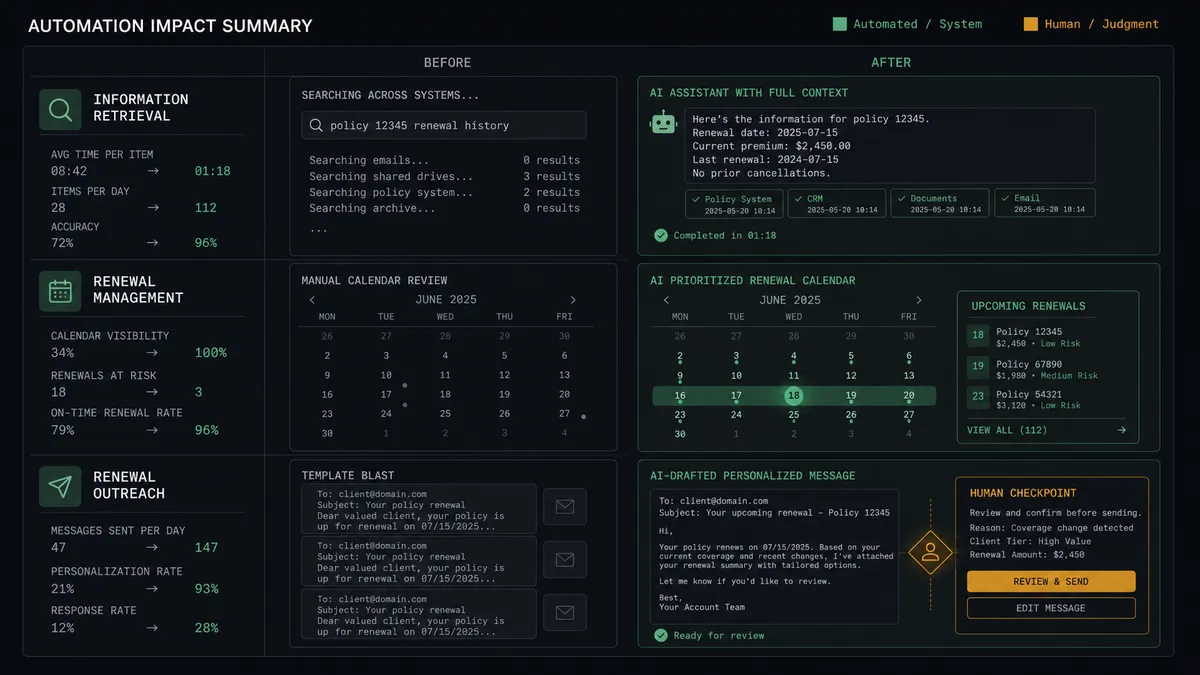
| Chat context | Support alt-tabs to the base mid-conversation, hoping the row is current | Update Person stamps plan, renewal, and owner on the profile before the customer types |
| Renewal signals | Dates pass unnoticed in the base until the lapse | The agent surfaces the window, drafts the outreach, and a person decides |
| Proactive messaging | Either silence or templates firing into the widget at the wrong moment | Every unprompted message is drafted with context and approved by name |
| New contacts | Chat visitors and base records live as separate populations | Create Person and scheduled write-backs keep both rosters matched |
| Accountability | Nobody can say why a customer was messaged | Every send links the record change, the approver, and the timestamp |
What you can build
Context-loaded support. On New or Updated Record fires when account fields change. The agent matches via List People and calls Update Person, so every chat opens with plan, renewal date, and owner already on the profile.
Renewal outreach with a gate. When a record’s renewal date enters its window, the agent reads recent threads via Get Conversation, drafts an opener that fits the account’s actual state, and holds Send Message at the approval gate for the owner.
Stuck-order check-in. When an order record sits in one status too long, the agent packages the order context and a drafted check-in, and a person decides whether the customer hears about it before they come asking.
Chat-to-base write-back. On a schedule, the agent calls List Conversations and List People in Crisp, compares against Find Many Records, and writes new contacts and conversation outcomes to the base with Create Record and Update Record.
Owner handoff without the cold open. When the account-owner field changes, the agent updates the profile and drafts an introduction message from the new owner, which goes out only after that owner personally approves it.
Getting started
Start on the free plan: 100 executions a month, every integration included, no credit card required, plus 14 days of Professional for new accounts. Both connectors are available on every tier, and every tier includes unlimited users and unlimited workflows.
Explore the integration details:
- Airtable integration (2 triggers and 17 actions covering full record CRUD, comments, and base schemas)
- Crisp integration (9 actions covering conversations, operator messages, and people profiles)
Start building free at flowrunner.ai or book a demo to see a live Airtable to Crisp workflow, outreach approval and all.
Frequently asked questions
Is it free to connect Airtable and Crisp on FlowRunner?
You can build and run the connection on FlowRunner's free plan, which includes 100 executions a month and every integration with no credit card required, and new accounts also get 14 days of Professional. Both connectors are available on every FlowRunner tier, and every tier includes unlimited users and unlimited workflows.
Can I self-host the Airtable to Crisp workflow?
Yes. FlowRunner offers a cloud-hosted option and a self-hosted option, so the connection can run inside your own environment.
Does the AI agent need my own OpenAI or Claude key?
FlowRunner uses a bring-your-own-keys model, so you connect the AI provider key you already have. You are not locked to one model.
What happens when the agent is unsure whether a record change deserves a message?
It defaults to silence. The agent updates the profile silently with Update Person, and if it believes the change warrants reaching out, it drafts the message and invokes a human-in-loop step. A person approves, edits, or declines before Send Message runs. Uncertainty never messages a customer.
Which Airtable events can trigger a Crisp action?
Airtable offers two triggers: On New Record and On New or Updated Record. On New or Updated Record is the workhorse here, firing when a renewal date, order status, or account field changes on an existing row.
Can the connection work in the other direction, from Crisp back to Airtable?
Yes, on a schedule. Crisp has no triggers, so the agent periodically calls List Conversations and List People, then writes new contacts and conversation outcomes back to the base with Create Record or Update Record, keeping Airtable the single source of truth.